编程开发中 GPT-6 Astra 缓存命中率太低?试试我们的 VS Code 扩展 Claude Code Config Helper
编程开发中 GPT-6 Astra 缓存命中率太低?试试我们的 VS Code 扩展 Claude Code Config Helper
同一个项目反复改、同一段上下文反复用,缓存却总是命不中?先别急着换模型,检查一下「显式缓存」。
LLS CCAI(Claude Code Config Helper)—— 在 VS Code 里管理提供商、配置模型、运行 Claude Code,并直接查看 Token 用量与缓存命中率。
代码一直在写,缓存却没怎么用上?
让 AI 读项目、拆需求、改代码、补测试,一轮接一轮。
项目规范还是那份规范,系统提示还是那段提示,但看一眼用量:缓存命中率怎么还是这么低?
问题不一定出在模型,也可能是你使用的上游需要显式缓存参数,才能更稳定地复用相同前缀。
LLS CCAI 把这个配置放进了模型编辑界面:找到模型,勾选「显式缓存」,保存即可。 不用自己改请求 JSON,也不用手动维护缓存键。
- 模型级开关:按提供商下的模型分别配置,不必所有模型一起开。
- 会话键自动处理:使用当前会话的
session_id作为缓存键,无需手填。 - 按协议适配:分别处理 OpenAI Chat 兼容协议与 Responses 协议的缓存请求格式。
- 效果直接看:对话用量摘要展示输入、输出、缓存读写和缓存命中率。
适用前提:上游支持本扩展发送的显式缓存参数。这是网关兼容能力,不是所有 GPT-6 Astra 服务或所有 OpenAI 兼容接口的通用保证;Anthropic 类型不支持此选项。
四步配置:先接入,再开启,最后看效果
安装或更新 Claude Code Config Helper,打开扩展配置中的提供商列表,然后按下面的顺序操作。
第一步:创建提供商
新增一个提供商,填写你实际使用的服务信息:
| 配置项 | 如何填写 |
|---|---|
| 名称 | 自定义一个便于识别的名称 |
| BaseURL | 按服务商文档填写,不要直接照抄截图 |
| 密钥 | 填写自己的 API 密钥;编辑已有提供商时,留空可继续使用已保存的密钥 |
| API 类型 | 截图示例为 v1-response,仅在上游支持 Responses 接口时选择 |
| 鉴权模式 | 截图示例为 auth_token,以服务商要求为准 |
| 启用 | 勾选 |
| 自动拉取模型 | 建议勾选,保存后检查模型列表 |
填写完成,点击「保存」。
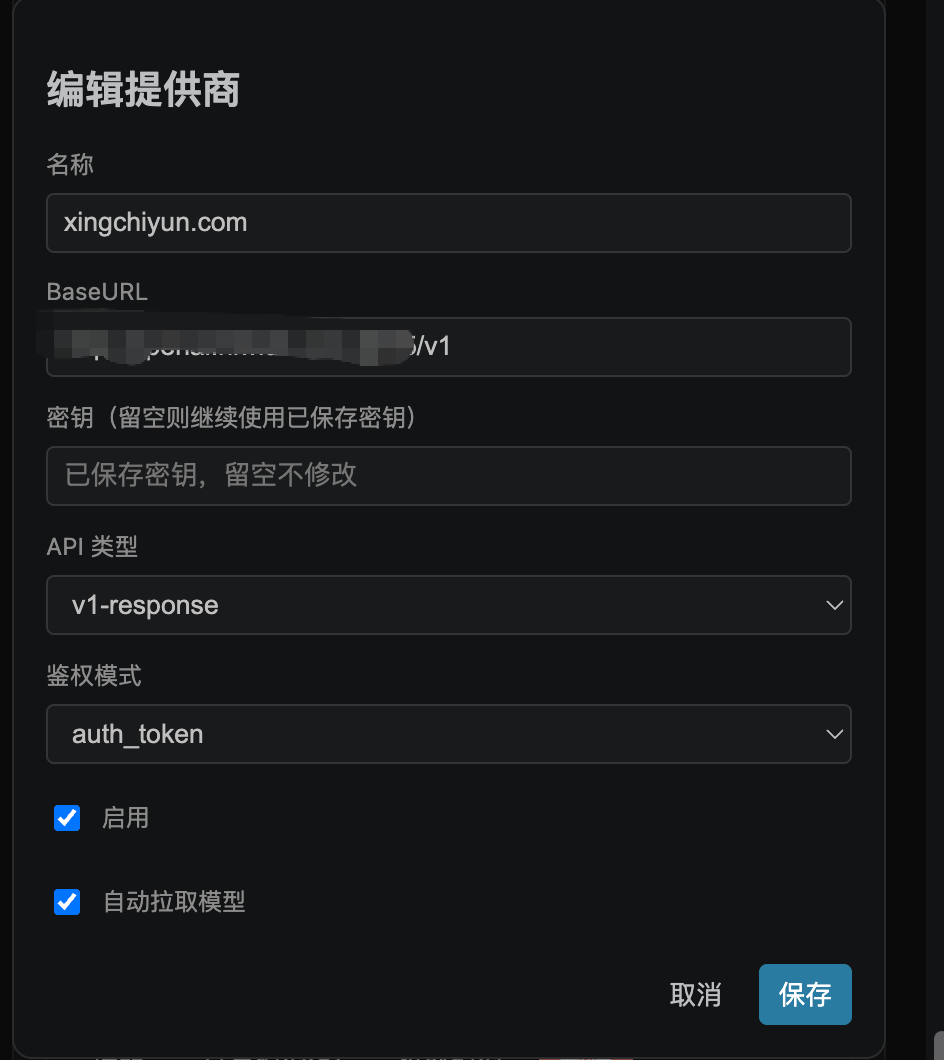
图 1:提供商配置示例。截图为已有提供商的「编辑」界面,新建时参照这些字段填写;首次创建需要输入密钥。图中服务名称仅作演示,不代表推荐或合作关系。
第二步:拉取模型
保存提供商后,在该提供商的操作区点击 「拉取模型」,然后点击 「查看模型」。
如果自动拉取已经完成,直接进入模型列表,查找 gpt-6-astra 即可。
- 列表里没有目标模型?先确认服务商是否提供该模型,以及当前密钥是否有访问权限。
- 拉取失败?优先核对 BaseURL、密钥、鉴权模式和网络连接。
- 模型名称以服务商实际返回的 ID 为准,不要只根据宣传名称填写。
第三步:编辑模型,开启「显式缓存」
找到 gpt-6-astra,点击「编辑」:
- 确认模型 ID 与服务商返回值一致。
- 勾选「启用模型」与「显示在顶部模型下拉」。
- 找到「提示缓存模式」下面的 「显式缓存」,勾选。
- 点击「保存」,回到聊天面板选择对应提供商下的模型。
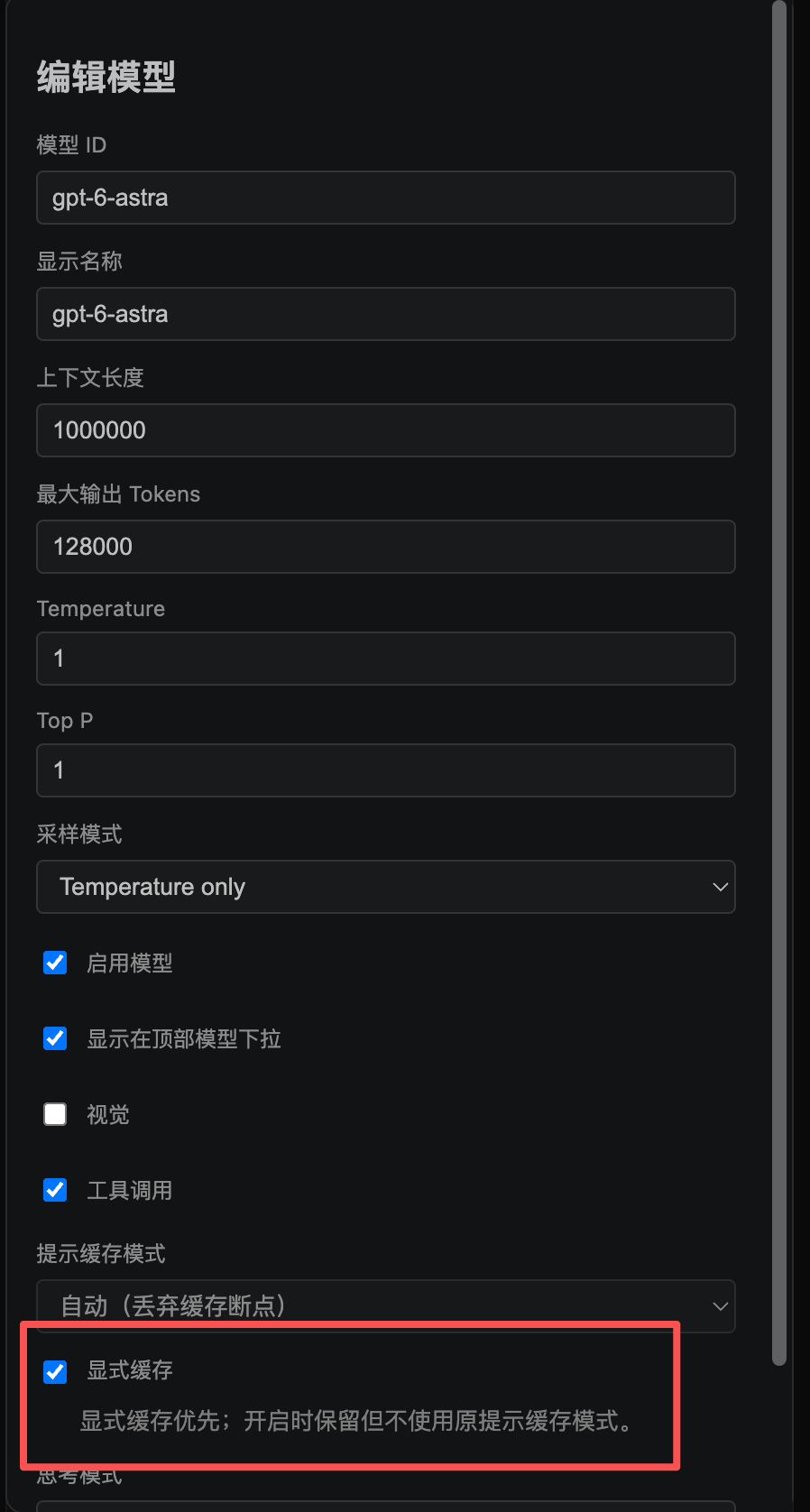
图 2:红框内的「显式缓存」是本次配置的关键。开启后显式缓存策略优先,原「提示缓存模式」的设置仍会保留,但暂不使用;关闭显式缓存后恢复原模式。
不用为了提高命中率照抄整张图。 上下文长度、最大输出 Tokens、采样参数、视觉和工具调用能力,应按服务商实际支持情况配置。截图中的 1000000 与 128000 是示例配置,不构成模型能力承诺。
第四步:继续开发,查看缓存命中率
在同一会话里继续读代码、修改功能、补全测试,观察回复底部的 Token 用量摘要。首次请求可能需要预热,不要只看第一轮就判断是否生效。
下面是本次提供的使用截图:
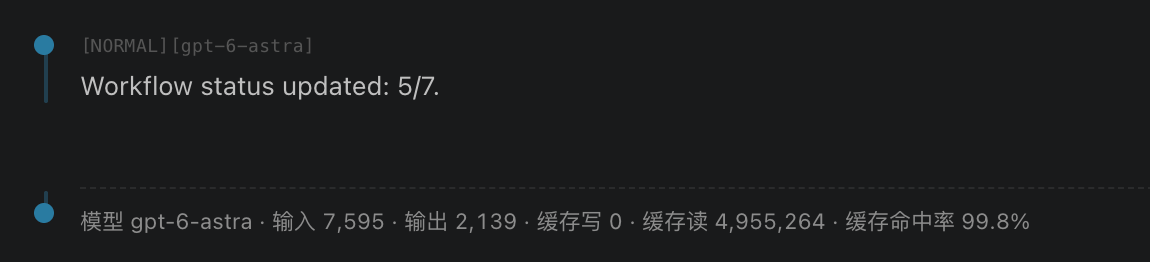
图 3:截图中的用量摘要显示,输入 7,595、输出 2,139、缓存写 0、缓存读 4,955,264,缓存命中率为 99.8%。这是我们实测的结果,不代表单次请求上下文长度。
99.8% 是我们实测的缓存命中率。受上游提供商、模型配置、会话上下文及缓存策略等因素影响,我们不保证在不同环境下也能达到同样的效果。 扩展展示口径为:缓存读 ÷(输入 + 缓存写 + 缓存读),输出 Tokens 不计入该比例。实际结果取决于上游返回的用量数据。
缓存命中率不等于费用节省比例,也不等于响应提速比例;缓存写为 0 同样不能用来证明上游没有写入缓存或不收取相关费用。费用请以服务商账单为准。
开了还是低?先检查这几件事
- 上游支持吗? 支持 Chat 或 Responses 接口,不等于支持本扩展的显式缓存字段。若报参数不支持,请关闭该选项并向服务商确认。
- 是不是第一轮? 首次请求可能需要建立缓存,后续相同前缀的请求才有机会命中。
- 是否仍在同一会话? 新建会话会改变缓存键;对比效果时尽量保持同一会话和模型。
- 前缀是否变化? 修改系统提示、工具配置或模型,可能触发重新预热;静态前缀太短也可能导致低命中。
- 缓存是否过期? 扩展发送的显式缓存选项请求
30mTTL,实际支持及保留时间由上游决定。
开启此选项不保证达到 80% 或 99.8%,也不保证缓存全部历史消息。命中率偏低时,还可以点击用量摘要里的「解决方案」查看配置提示。
立即试试:把重复上下文交给缓存,把精力留给代码
打开 VS Code 扩展面板,搜索 Claude Code Config Helper,安装或更新至包含「显式缓存」选项的版本。
创建提供商 → 拉取模型 → 编辑模型并开启显式缓存 → 在对话里查看命中率。
不用先研究一堆请求参数,先把开关配对,再用自己的开发任务验证效果。
- 扩展商店:https://marketplace.visualstudio.com/items?itemName=liliangshan.claude-code-config-helper
- 项目地址:https://github.com/liliangshan/claude-code-config-helper
使用协议与免责声明
以下为本文配套使用说明,不替代项目许可证,也不替代 VS Code、Claude Code 或第三方 API 服务商的条款。
- 开源许可:本扩展采用 MIT License。可在许可证允许范围内使用、复制、修改、分发及商用;复制或分发软件及其实质部分时,须保留版权声明和许可声明。完整授权、条件及免责内容以项目 LICENSE 为准,本文不额外限制 MIT 已授予的权利。
- 账号与费用:用户需自行取得有权使用的服务账号、API 密钥及模型访问权限,并遵守相关服务条款。扩展不附赠模型额度;调用、缓存及其他服务费用按实际服务商规则结算。
- 数据与隐私:使用模型时,提示词、相关代码、对话上下文及工具结果可能发送至所配置的上游。显式缓存可能涉及上游对输入前缀的暂存,缓存键使用当前会话标识。提交前请确认具有相应授权,并核对服务商的数据保留、缓存隔离、训练使用及删除政策;不要上传无权披露的代码、个人信息或密钥。
- 兼容性与效果:显式缓存依赖上游实现。本文截图仅展示特定配置下的样本,不构成模型官方背书,不承诺固定命中率、费用节省、响应速度或服务可用性。
- 开发安全:AI 生成的代码与自动执行结果需要人工审查。建议在版本控制和必要备份下使用,生产部署、数据删除及其他关键操作须由用户确认,并完成适当测试。
- 合法使用与第三方权利:请遵守适用法律及所用服务的协议,不得用于未授权访问、侵犯隐私或知识产权等违法活动。文中第三方名称、模型名称及商标归各自权利人所有,提及不表示隶属、合作或认证关系。
- 责任边界:软件按 MIT License 以「现状」提供,不作明示或默示担保。适用法律允许范围内的责任限制以许可证为准;适用法律赋予且不得排除的权利不受本文影响。
Low GPT-6 Astra Cache Hit Rates While Coding? Try Our VS Code Extension, Claude Code Config Helper
Working on the same project, reusing the same context, but barely getting any cache hits? Before switching models, check out Explicit Prompt Cache.
LLS CCAI (Claude Code Config Helper) — manage providers, configure models, run Claude Code, and monitor token usage and cache hit rates directly in VS Code.
You keep writing code. Why isn’t the cache keeping up?
You ask AI to explore a project, break down requirements, implement changes, and write tests — round after round.
The project guidelines haven’t changed. The system prompt is still the same. Yet the usage summary leaves you wondering: why is the cache hit rate so low?
The model may not be the problem. Your upstream provider may need explicit caching parameters to reuse matching prefixes more reliably.
LLS CCAI puts that configuration right in the model editor: find your model, enable “Explicit Prompt Cache,” and save. No request JSON to edit and no cache keys to maintain manually.
- Per-model control: configure caching separately for each model under each provider.
- Automatic session keys: the current session’s
session_idis used as the cache key, with no manual entry required. - Protocol-specific handling: separate cache request formats for OpenAI Chat-compatible and Responses APIs.
- Visible results: the conversation usage summary shows input, output, cache writes, cache reads, and cache hit rate.
Requirement: your upstream provider must support the explicit caching parameters sent by the extension. This is a gateway-specific compatibility feature, not a universal guarantee for every GPT-6 Astra service or OpenAI-compatible endpoint. This option is not supported for Anthropic-type providers.
Four steps: connect, configure, and check the results
Install or update Claude Code Config Helper, open the provider list in the extension settings, and follow these steps.
Step 1: Create a provider
Add a provider and enter the details for the service you actually use:
| Setting | What to enter |
|---|---|
| Name | A recognizable name of your choice |
| BaseURL | The URL specified by your provider’s documentation; do not copy it from the screenshot |
| API key | Your own API key; when editing an existing provider, leave it blank to keep the saved key |
| API type | The example uses v1-response; choose it only if your upstream supports the Responses API |
| Authentication mode | The example uses auth_token; follow your provider’s requirements |
| Enabled | Turn on |
| Auto-fetch models | Recommended; check the model list after saving |
Click “Save” when finished.
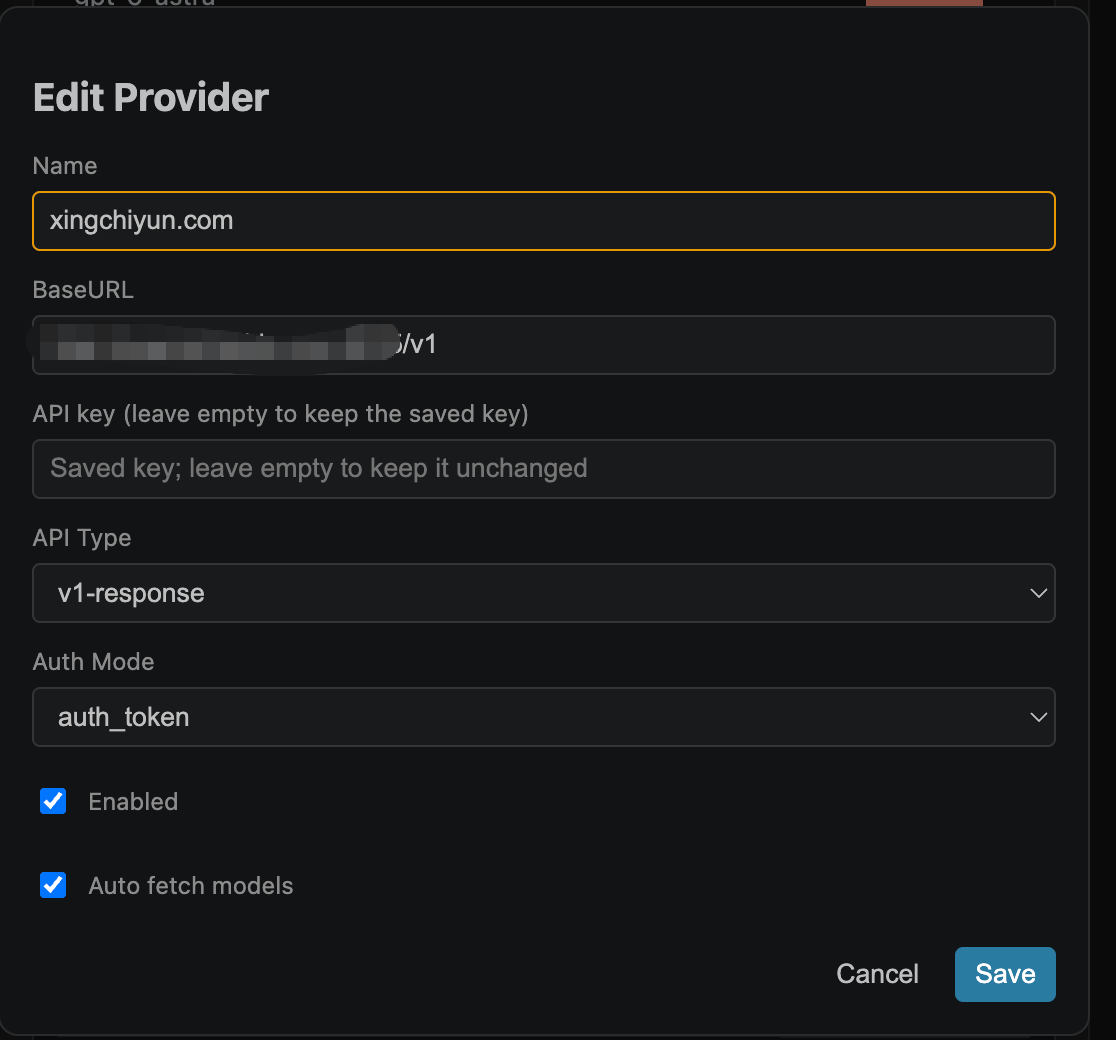
Figure 1: Example provider configuration. The screenshot shows the editor for an existing provider; use the same fields when creating one, and enter an API key on first setup. The service name is shown for illustration only and does not imply a recommendation or partnership. Screenshots use the Chinese interface.
Step 2: Fetch models
After saving the provider, click “Fetch Models” in its actions, then “View Models.”
If automatic fetching has already completed, open the model list and look for gpt-6-astra.
- Model missing? Confirm that your provider offers it and that your API key has access.
- Fetch failed? Check the BaseURL, API key, authentication mode, and network connection first.
- Use the actual model ID returned by your provider, not just its marketing name.
Step 3: Edit the model and enable Explicit Prompt Cache
Find gpt-6-astra and click “Edit”:
- Confirm that the model ID matches the one returned by your provider.
- Enable the model and its visibility in the top model dropdown.
- Below “Prompt Cache Mode,” turn on “Explicit Prompt Cache” (「显式缓存」 in the screenshot).
- Click “Save,” return to the chat panel, and select the model under the corresponding provider.
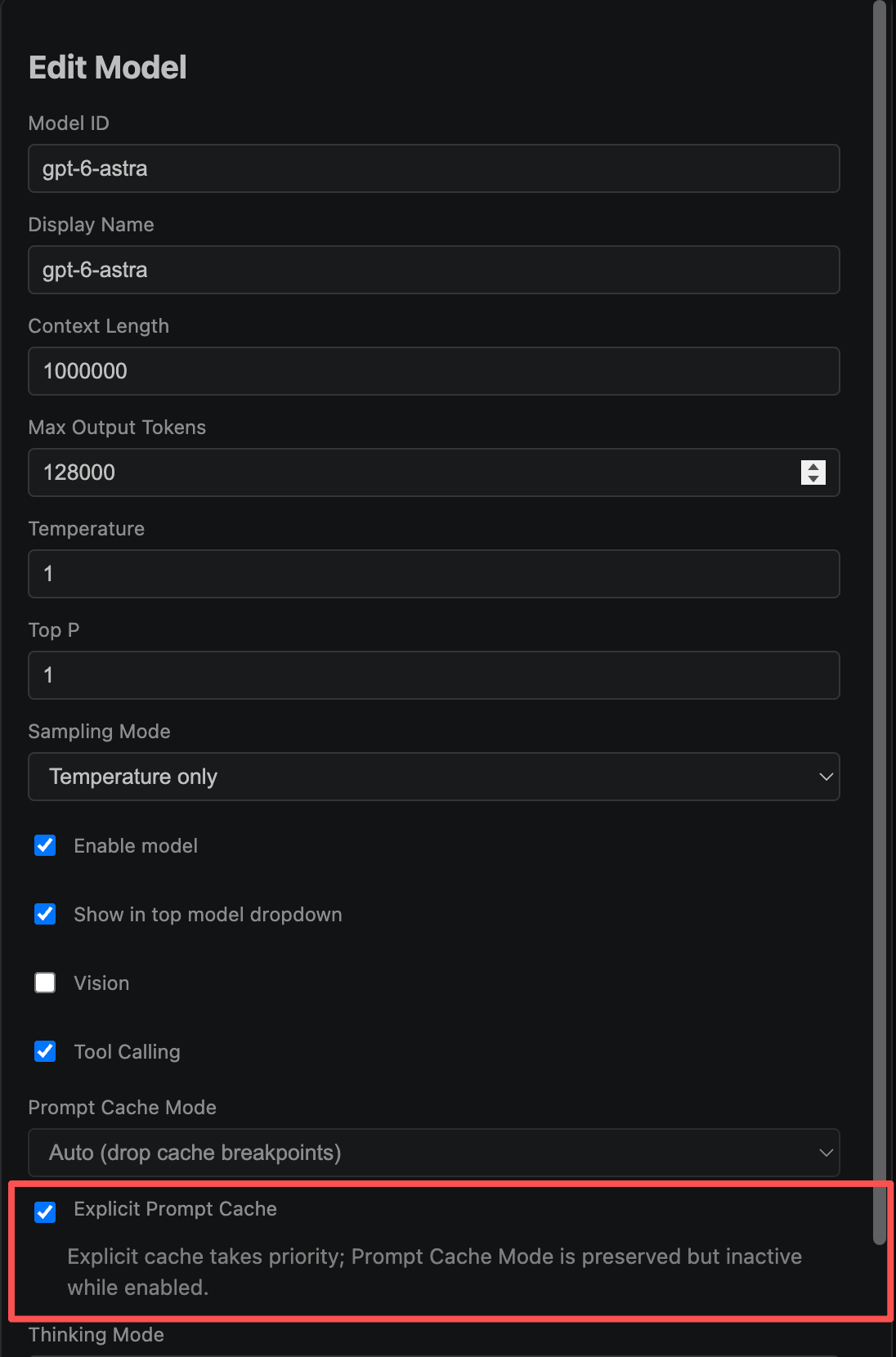
Figure 2: The highlighted Explicit Prompt Cache checkbox is the key setting. When enabled, explicit caching takes priority. Your previous Prompt Cache Mode setting is preserved but inactive, and resumes when explicit caching is disabled.
You do not need to copy every value in the screenshot to improve cache hits. Configure context length, maximum output tokens, sampling parameters, vision, and tool calling according to your provider’s actual capabilities. The values 1000000 and 128000 are example settings, not guarantees of model capabilities.
Step 4: Keep coding and check your cache hit rate
Continue exploring code, implementing features, and writing tests in the same session. Watch the token usage summary below the responses. The first request may need to warm up the cache, so do not judge the results on the first round alone.
Here is a screenshot from our testing:
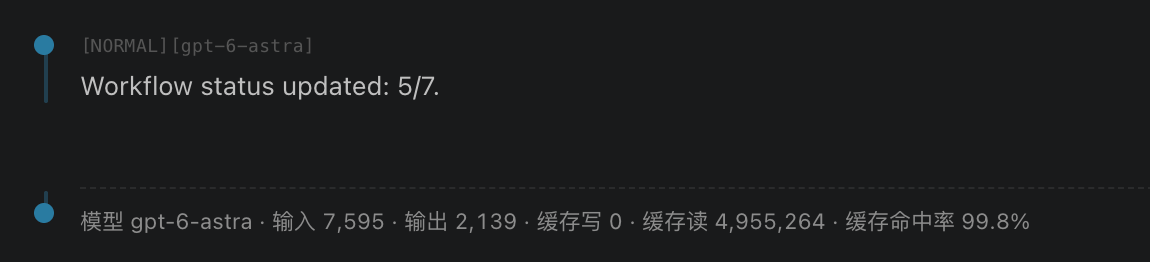
Figure 3: The usage summary shows 7,595 input tokens, 2,139 output tokens, 0 cache-write tokens, 4,955,264 cache-read tokens, and a 99.8% cache hit rate. This is a result from our testing; it does not represent the context length of a single request.
We measured a 99.8% cache hit rate in our testing. Results depend on factors such as the upstream provider, model configuration, session context, and caching policy, so we cannot guarantee the same results in other environments. The extension calculates the displayed rate as cache reads ÷ (input + cache writes + cache reads). Output tokens are excluded. The result depends on usage data returned by the upstream provider.
Cache hit rate is not the same as the percentage of money saved or the speed improvement. A cache-write count of 0 also does not prove that the upstream performed no cache writes or charged no caching fees. Refer to your provider’s bill for actual charges.
Still seeing a low hit rate? Check these first
- Does your upstream support it? Supporting Chat or Responses does not automatically mean supporting this extension’s explicit caching fields. If you receive an unsupported-parameter error, disable the option and check with your provider.
- Is this the first request? The cache may need to be populated before later requests with matching prefixes can hit it.
- Are you in the same session? A new session changes the cache key. Keep the session and model consistent when comparing results.
- Has the prefix changed? Changes to system prompts, tool configuration, or the model may require another warm-up. A short static prefix can also produce a low hit rate.
- Has the cache expired? The extension requests a
30mTTL in its explicit caching options. Actual support and retention are determined by the upstream provider.
Enabling the option does not guarantee an 80% or 99.8% hit rate, nor does it guarantee that all conversation history will be cached. If the hit rate is low, you can also click the solution link (「解决方案」) in the usage summary for configuration guidance.
Try it: let caching handle repeated context while you focus on code
Open the VS Code Extensions panel, search for Claude Code Config Helper, and install or update to a version that includes Explicit Prompt Cache.
Create a provider → Fetch models → Edit your model and enable Explicit Prompt Cache → Check the hit rate in your conversation.
You do not have to study a long list of request parameters first. Configure the option, then evaluate it with your own development tasks.
- Marketplace: https://marketplace.visualstudio.com/items?itemName=liliangshan.claude-code-config-helper
- Project: https://github.com/liliangshan/claude-code-config-helper
Terms of Use and Disclaimer
The following usage notes accompany this article. They do not replace the project’s license or the terms of VS Code, Claude Code, or any third-party API provider.
- Open-source license: This extension is licensed under the MIT License. Use, copying, modification, distribution, and commercial use are permitted under that license. Copies or substantial portions of the software must retain the copyright and permission notices. See the project’s LICENSE for the full grant, conditions, and disclaimer. This article imposes no additional restrictions on rights granted by MIT.
- Accounts and fees: You are responsible for obtaining authorized service accounts, API keys, and model access, and for complying with the relevant service terms. The extension does not include model credits. API calls, caching, and other services are billed according to your provider’s rules.
- Data and privacy: Prompts, relevant code, conversation context, and tool results may be sent to your configured upstream provider. Explicit caching may involve temporary upstream storage of input prefixes, and the cache key uses the current session identifier. Before submitting data, confirm that you are authorized to do so and review the provider’s policies on retention, cache isolation, training use, and deletion. Do not upload code, personal information, or secrets that you are not authorized to disclose.
- Compatibility and results: Explicit caching depends on the upstream implementation. The screenshots show a sample under a specific configuration, not an official model endorsement. No fixed cache hit rate, cost savings, response speed, or service availability is guaranteed.
- Development safety: AI-generated code and automated execution results require human review. Use version control and appropriate backups. Production deployments, data deletion, and other critical operations should be confirmed by the user and appropriately tested.
- Lawful use and third-party rights: Comply with applicable laws and the terms of the services you use. Do not use the software for unlawful activities such as unauthorized access or infringement of privacy or intellectual property rights. Third-party names, model names, and trademarks belong to their respective owners. Their inclusion does not imply affiliation, partnership, or certification.
- Liability: The software is provided “AS IS” under the MIT License, without express or implied warranties. Limitations of liability are governed by that license to the extent permitted by applicable law. This article does not affect rights that cannot legally be excluded.

欢迎加入DeepSeek 技术社区。在这里,你可以找到志同道合的朋友,共同探索AI技术的奥秘。
更多推荐

 6
6 0
0- 0


 已为社区贡献5条内容

所有评论(0)