【整理1】LangGraph 基础入门
·
目录
1 引言
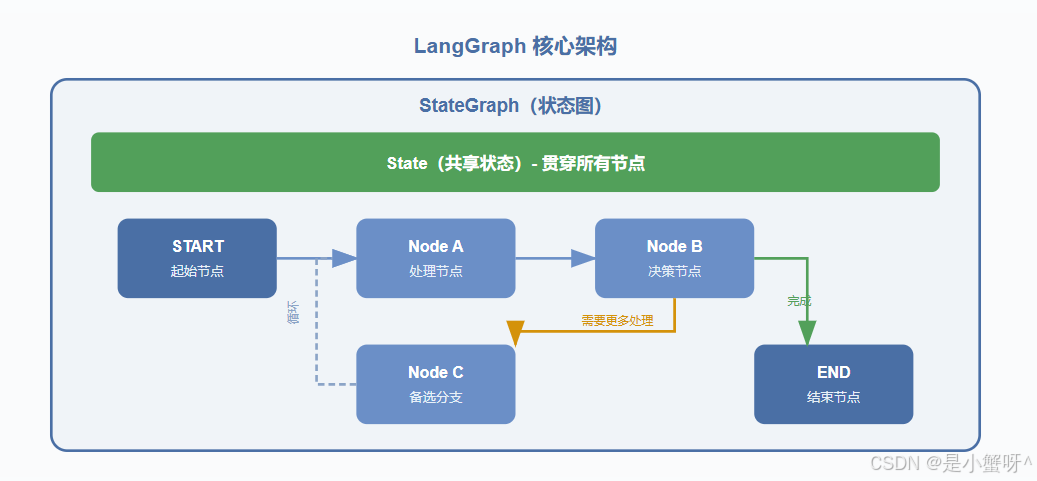
LangGraph 是由 LangChain 团队开发的一个低层级 Agent 编排框架,专为构建有状态(Stateful)、长时运行的 AI 工作流而设计。
与传统的线性 LLM 调用链不同,LangGraph 将工作流建模为有向图(Directed Graph):
- 节点(Node):执行具体操作的函数(如调用 LLM、执行工具、处理数据)
- 边(Edge):定义节点之间的流转路径,支持条件分支
- 状态(State):在整个工作流中共享并传递的数据
2 第一个 LangGraph 程序
"""
    第一个LangGraph的demo
"""
from langchain_core.messages import AnyMessage
from typing_extensions import TypedDict
# 1.定义state
class State(TypedDict):
    messages: list[AnyMessage]
    extra_field: int

# 2.定义节点
from langchain_core.messages import AIMessage
def Node(state:State):
    messages = state["messages"]

    new_message = AIMessage(content="Hello, world!")

    return {
        "messages": messages + [new_message],
        "extra_field": 1
    }

# 3.创建图
from langgraph.graph import StateGraph
graph = StateGraph(State)
graph.add_node(Node)
graph.set_entry_point("Node")
graph_builder = graph.compile()


# 4.图展示
from IPython.display import display, Image
display(Image(graph_builder.get_graph().draw_mermaid_png()))


# 5.执行图
from langchain_core.messages import HumanMessage
result = graph_builder.invoke({
    "messages": [HumanMessage(content="你好,我是tom")]
})

for message in result["messages"]:
    message.pretty_print()
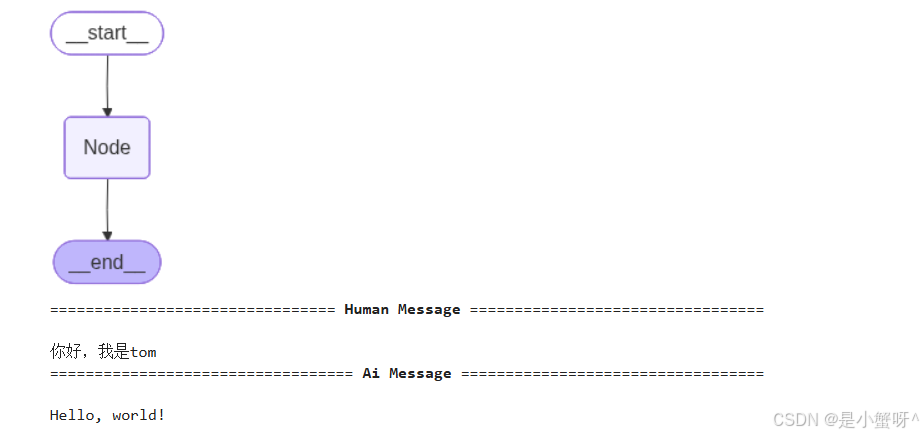
【结果】
3 节点串行
"""
    串行
"""
from langgraph.graph import START,StateGraph, END
from typing_extensions import TypedDict
from IPython.display import display, Image

# 1.状态
class State(TypedDict):
    value_1: str
    value_2: str

# 2.定义三个节点
def node_1(state: State):
    return {"value_1": "hello"}  # 返回新字典,不要修改原字典

def node_2(state: State):
    return {"value_2": "yesyesyes"}

def node_3(state: State):
    return {"value_1": state["value_1"], "value_2": state["value_2"]}

# 3.定义边
graph_builder = StateGraph(State)
graph_builder.add_node(node_1)
graph_builder.add_node(node_2)
graph_builder.add_node(node_3)
graph_builder.add_edge(START, "node_1")
graph_builder.add_edge("node_1", "node_2")
graph_builder.add_edge("node_2", "node_3")
graph_builder.add_edge("node_3", END)

graph = graph_builder.compile()

result = graph.invoke({
    "value_1": "c"
})

print(result)
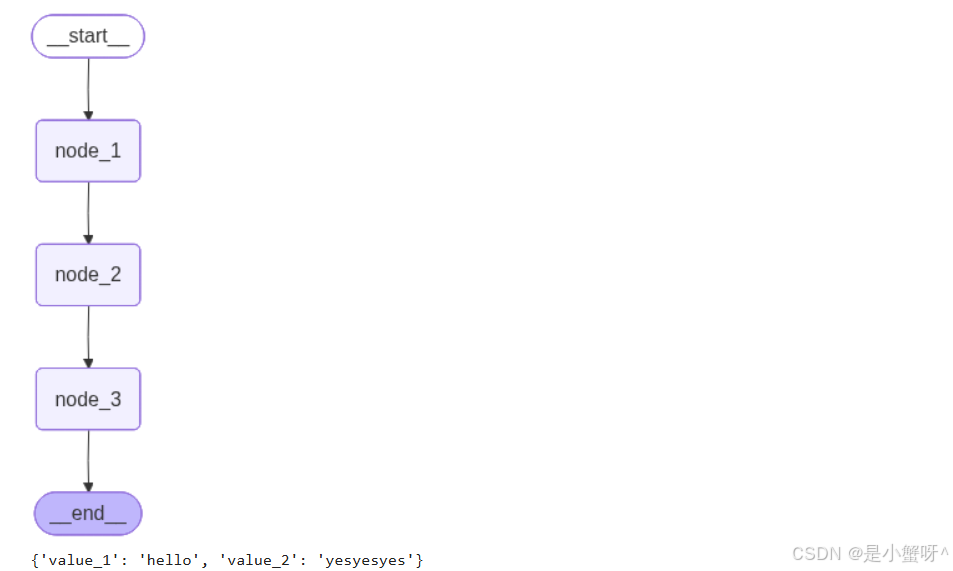
【结果】
4 节点分支
"""
    分支
"""
import operator
from typing_extensions import TypedDict
from langgraph.graph import StateGraph, START, END
from typing import Annotated
from IPython.display import display,Image

# 1.定义状态
class State(TypedDict):
    aggregate: Annotated[list, operator.add]  #Annotated 允许为类型提供额外的元数据,而不影响类型检查器对类型本身的理解

# 2.定义节点
def node_1(state: State):
    print('添加A到state["aggregate"]')
    return {
        "aggregate": ["A"]
    }

def node_2(state: State):
    print('添加B到state["aggregate"]')
    return {
        "aggregate": ["B"]
    }

def node_3(state: State):
    print('添加C到state["aggregate"]')
    return {
        "aggregate": ["C"]
    }

def node_4(state: State):
    print('state["aggregate"]')
    return {
        "aggregate": ["D"]
    }

graph_builder = StateGraph(State)
graph_builder.add_node(node_1)
graph_builder.add_node(node_2)
graph_builder.add_node(node_3)
graph_builder.add_node(node_4)

graph_builder.add_edge(START, "node_1")
graph_builder.add_edge("node_1", "node_2")
graph_builder.add_edge("node_1", "node_3")
graph_builder.add_edge("node_2", "node_4")
graph_builder.add_edge("node_3", "node_4")
graph_builder.add_edge("node_4", END)

graph = graph_builder.compile()


display(Image(graph.get_graph().draw_mermaid_png()))

configurable = {
    "thread_id": "thread_1"
}
result = graph.invoke({
    "aggregate": []
},configurable=configurable)

print(result)
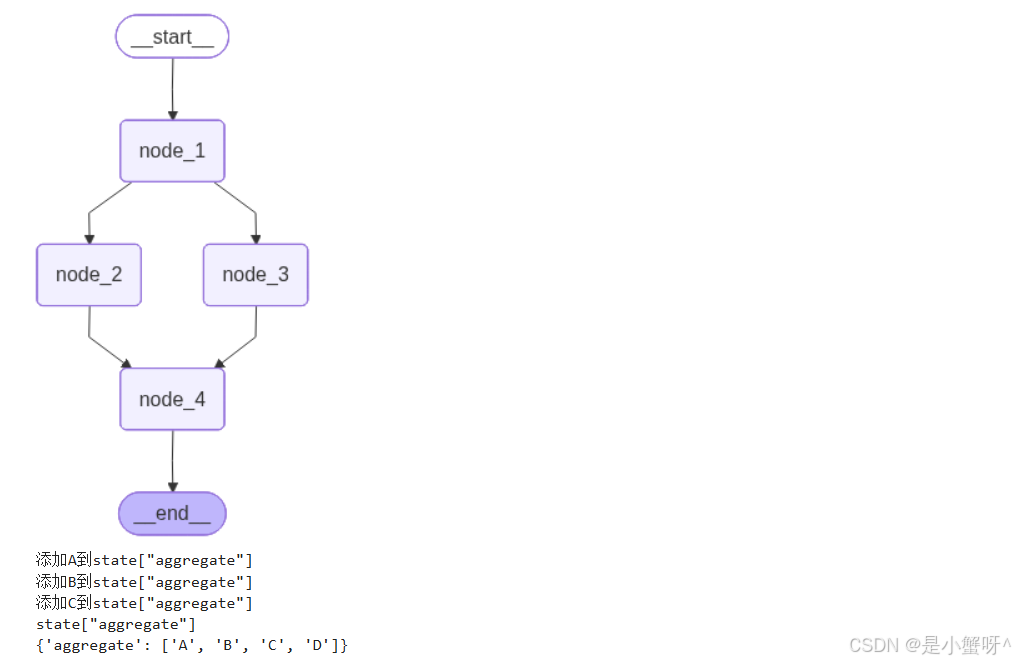
【结果】
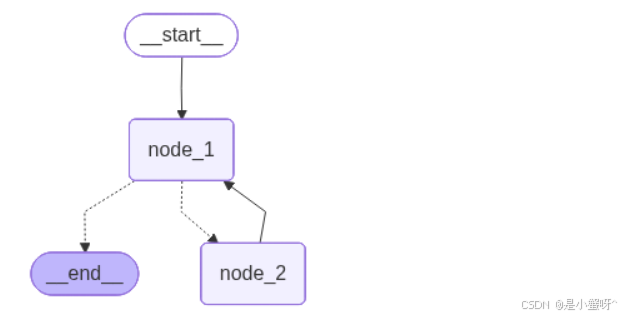
5 节点条件分支
"""
    条件分支
"""
import operator
from typing_extensions import TypedDict
from langgraph.graph import StateGraph, START, END
from typing import Annotated, Literal
from IPython.display import display,Image

# 1.定义状态
class State(TypedDict):
    aggregate: Annotated[list, operator.add]  #Annotated 允许为类型提供额外的元数据,而不影响类型检查器对类型本身的理解

# 2.定义节点
def node_1(state: State):
    print('添加A到state["aggregate"]')
    return {
        "aggregate": ["A"]
    }

def node_2(state: State):
    print('添加B到state["aggregate"]')
    return {
        "aggregate": ["B"]
    }


graph_builder = StateGraph(State)
graph_builder.add_node(node_1)
graph_builder.add_node(node_2)


# 3.定义边
def route(state: State) -> Literal["node_2", END]:
    if len(state["aggregate"]) < 7:
        return "node_2"
    else:
        return END

graph_builder.add_edge(START, "node_1")
graph_builder.add_conditional_edges("node_1", route)
graph_builder.add_edge("node_2", "node_1")
graph = graph_builder.compile()


display(Image(graph.get_graph().draw_mermaid_png()))
【结果】
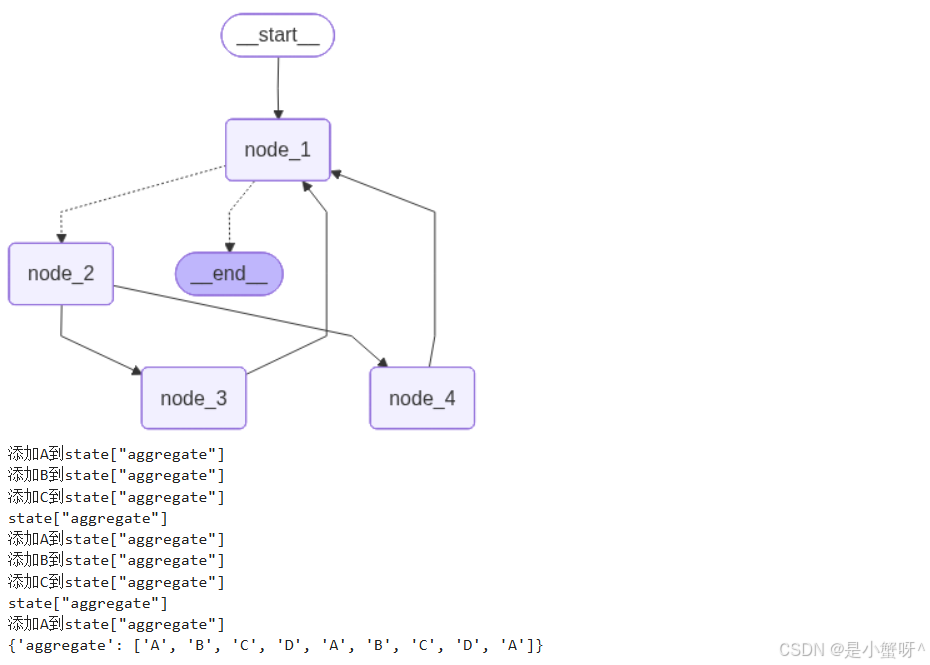
6 循环分支
"""
    循环
"""

import operator
from typing_extensions import TypedDict
from langgraph.graph import StateGraph, START, END
from typing import Annotated, Literal
from IPython.display import display,Image

# 1.定义状态
class State(TypedDict):
    aggregate: Annotated[list, operator.add]  #Annotated 允许为类型提供额外的元数据,而不影响类型检查器对类型本身的理解

# 2.定义节点
def node_1(state: State):
    print('添加A到state["aggregate"]')
    return {
        "aggregate": ["A"]
    }

def node_2(state: State):
    print('添加B到state["aggregate"]')
    return {
        "aggregate": ["B"]
    }

def node_3(state: State):
    print('添加C到state["aggregate"]')
    return {
        "aggregate": ["C"]
    }

def node_4(state: State):
    print('state["aggregate"]')
    return {
        "aggregate": ["D"]
    }

graph_builder = StateGraph(State)
graph_builder.add_node(node_1)
graph_builder.add_node(node_2)
graph_builder.add_node(node_3)
graph_builder.add_node(node_4)

# 条件边
def route(state: State) -> Literal["node_2", END]:
    if len(state["aggregate"]) < 7:
        return "node_2"
    else:
        return END

graph_builder.add_edge(START, "node_1")
graph_builder.add_conditional_edges("node_1", route)
graph_builder.add_edge("node_2", "node_3")
graph_builder.add_edge("node_2", "node_4")
graph_builder.add_edge(["node_3","node_4"], "node_1")

graph = graph_builder.compile()


display(Image(graph.get_graph().draw_mermaid_png()))

configurable = {
    "thread_id": "thread_1"
}
result = graph.invoke({
    "aggregate": []
},config=configurable)

print(result)
【结果】
7 LLM调用节点
"""
    LLM 调用节点
"""
from dotenv import load_dotenv
from langchain.chat_models import init_chat_model
from langchain_core.messages import SystemMessage, HumanMessage
from langgraph.graph import MessagesState, StateGraph, START, END
load_dotenv()

model = init_chat_model("deepseek-chat")

# print(model)


# 路由函数
def classify_intent(state: MessagesState) -> str:
    """根据用户意图路由到不同的 Agent"""
    last_message = state["messages"][-1]
    content = last_message.content.lower()

    if "天气" in content or "温度" in content:
        return "weather_agent"
    elif "代码" in content or "编程" in content:
        return "code_agent"
    elif "再见" in content or "退出" in content:
        return "farewell"
    else:
        return "general_agent"


# 定义各个 Agent 节点
def router_node(state: MessagesState) -> dict:
    """路由节点:不做处理,只用于触发路由判断"""
    return {}

def weather_node(state: MessagesState) -> dict:
    """天气 Agent"""
    response = model.invoke([
        SystemMessage(content="你是一个天气助手,友好地回答天气相关问题。如果没有实时数据,可以给出一般性建议。"),
        *state["messages"]   # 历史消息展开传入
    ])
    return {"messages": [response]}

def code_node(state: MessagesState) -> dict:
    """代码 Agent"""
    response = model.invoke([
        SystemMessage(content="你是一个编程助手,擅长解答代码问题并给出清晰的代码示例。"),
        *state["messages"]
    ])
    return {"messages": [response]}

def general_node(state: MessagesState) -> dict:
    """通用 Agent"""
    response = model.invoke([
        SystemMessage(content="你是一个友善的 AI 助手,可以回答各种问题。"),
        *state["messages"]
    ])
    return {"messages": [response]}

def farewell_node(state: MessagesState) -> dict:
    """告别节点"""
    return {"messages": [{"role": "assistant", "content": "再见!期待下次与你交流。"}]}


# 构建图
builder = StateGraph(MessagesState)

# 添加节点
builder.add_node("router", router_node)
builder.add_node("weather_agent", weather_node)
builder.add_node("code_agent", code_node)
builder.add_node("general_agent", general_node)
builder.add_node("farewell", farewell_node)

# 添加边
builder.add_edge(START, "router")
builder.add_conditional_edges(
    "router",
    classify_intent,
    {
        "weather_agent": "weather_agent",
        "code_agent": "code_agent",
        "general_agent": "general_agent",
        "farewell": "farewell",
    }
)


for node in ["weather_agent", "code_agent", "general_agent", "farewell"]:
    builder.add_edge(node, END)

graph = builder.compile()

test_inputs = [
    "北京今天天气怎么样?",
    "帮我写一个 Python 快速排序",
    "你好,介绍一下你自己",
    "再见啦!"
]


for user_input in test_inputs:
    print(f"\n用户: {user_input}")
    result = graph.invoke({
        "messages": [HumanMessage(content=user_input)]
    })
    print(f"助手: {result['messages'][-1].content[:100]}...")
    print("-" * 50)
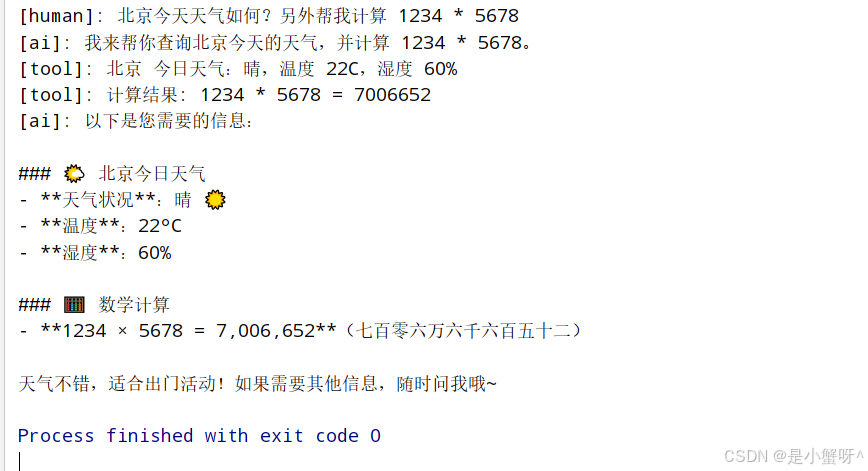
8 LLM 节点调用工具
"""
    LLM 节点调用工具
"""
from dotenv import load_dotenv
from langgraph.graph import StateGraph, MessagesState, START, END
from langgraph.prebuilt import ToolNode, tools_condition
from langchain.chat_models import init_chat_model
from langchain_core.tools import tool
from langchain_core.messages import HumanMessage
import ast
import operator

load_dotenv()


# 定义工具
@tool
def search_web(query: str) -> str:
    """搜索网络获取最新信息。"""
    return f"关于 '{query}' 的搜索结果:这是模拟的搜索结果..."


@tool
def calculate(expression: str) -> str:
    """计算数学表达式。"""
    ops = {
        ast.Add: operator.add,
        ast.Sub: operator.sub,
        ast.Mult: operator.mul,
        ast.Div: operator.truediv,
        ast.Pow: operator.pow,
        ast.USub: operator.neg,
    }

    def safe_eval(node):
        if isinstance(node, ast.Expression):
            return safe_eval(node.body)
        elif isinstance(node, ast.Constant):
            return node.value
        elif isinstance(node, ast.BinOp):
            left = safe_eval(node.left)
            right = safe_eval(node.right)
            return ops[type(node.op)](left, right)
        elif isinstance(node, ast.UnaryOp):
            operand = safe_eval(node.operand)
            return ops[type(node.op)](operand)
        else:
            raise ValueError(f"不支持的表达式类型: {type(node)}")

    try:
        tree = ast.parse(expression, mode='eval')
        result = safe_eval(tree)
        return f"计算结果: {expression} = {result}"
    except Exception as e:
        return f"计算错误: {str(e)}"


@tool
def get_weather(city: str) -> str:
    """获取指定城市的天气信息。"""
    return f"{city} 今日天气:晴,温度 22C,湿度 60%"


tools = [search_web, calculate, get_weather]

# 初始化 LLM 并绑定工具
llm = init_chat_model(
    "deepseek-chat"
)
llm_with_tools = llm.bind_tools(tools)


def agent_node(state: MessagesState) -> dict:
    """Agent 推理节点:调用 LLM 决定下一步行动"""
    response = llm_with_tools.invoke(state["messages"])
    return {"messages": [response]}


# 构建 ReAct 图
builder = StateGraph(MessagesState)

# 添加节点
builder.add_node("agent", agent_node)
builder.add_node("tools", ToolNode(tools))  # 内置 ToolNode 自动处理工具调用

# 添加边
builder.add_edge(START, "agent")

# 条件路由:如果 LLM 请求工具则执行工具,否则结束
builder.add_conditional_edges(
    "agent",
    tools_condition,  # 内置路由函数
    {
        "tools": "tools",
        END: END
    }
)

# 工具执行完后返回 agent 继续推理
builder.add_edge("tools", "agent")

graph = builder.compile()

# 测试
result = graph.invoke({
    "messages": [HumanMessage(content="北京今天天气如何?另外帮我计算 1234 * 5678")]
})

for message in result["messages"]:
    if message.content:
        print(f"[{message.type}]: {message.content}")
    else:
        pass
【结果】

欢迎加入DeepSeek 技术社区。在这里,你可以找到志同道合的朋友,共同探索AI技术的奥秘。
更多推荐

 7
7 0
0- 0


 已为社区贡献1条内容

所有评论(0)