cursor连接Ubuntu远程
·
1 生成ssh密钥对
在笔记本电脑上执行,
# 生成RSA密钥对
ssh-keygen -t rsa -b 4096 -C "your-email@example.com"

# 查看公钥内容
cat ~/.ssh/id_rsa.pub
在ubuntu远程上执行,
echo "公钥内容" >> ~/.ssh/authorized_keys #>>表示把内容追加到文件末尾
chmod 600 ~/.ssh/authorized_keys
在笔记本上执行,测试连接,
ssh -i ~/.ssh/id_rsa username@hostname
2 cursor设置
按下ctrl + shift + P,输入Remote-SSH: Connect to Host,配置config文件,
Host ubuntu4090
    HostName hostname
    User username
    IdentityFile ~/.ssh/id_rsa

Host ubuntu4090-2
    HostName hostname-2
    User username-2
    IdentityFile ~/.ssh/id_rsa
即可连接!锁屏也不需要重新输入密码!
3 cursor使用技巧
Ctrl E 切换 Agent 布局
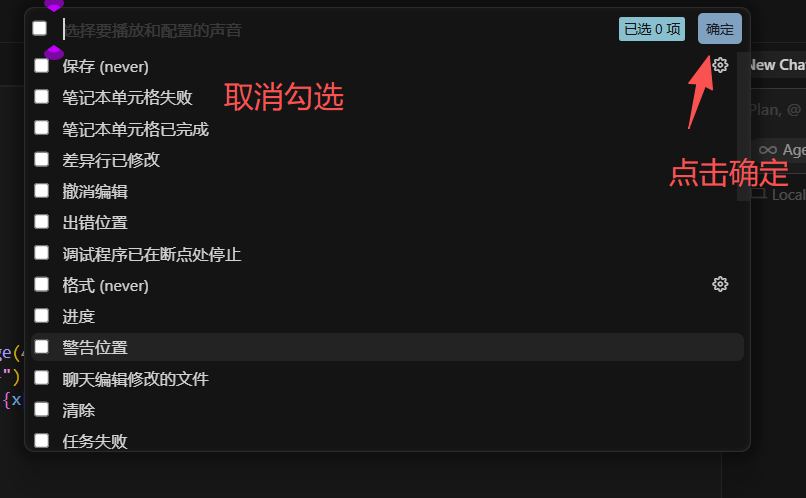
关闭cursor的提示音:
ctrl + shift + P,输入signal sound- 关闭这30个声音,并点击确定

欢迎加入DeepSeek 技术社区。在这里,你可以找到志同道合的朋友,共同探索AI技术的奥秘。
更多推荐

 16
16 0
0- 0


 已为社区贡献2条内容

所有评论(0)