harness deepseek AST插件制作
AST(Abstract Syntax Tree,抽象语法树),简单说就是:把源代码变成一棵“结构树”。
它不关心空格、换行、注释这些表面格式,只保留语法结构:哪里是函数、哪里是变量、谁调用了谁、参数是什么、返回什么。
AST 有什么特点?
- 不是普通文本:是结构化的树。
- 由解析器生成:比如 Babel、TypeScript、ESLint、Vite、Rollup 都会生成 AST。
- 可以反向变回代码:改完 AST 后,通常还能打印回源码。
- 适合程序处理:比直接处理字符串更准确、更安全。
AI 能拿 AST 做什么?
AI 可以直接或间接利用 AST 来做很多事:
-
理解代码结构
- 找出所有函数、类、接口、导出、依赖。
- 前文里的“AST 分析 apps/web”就是在做这件事:列出文件、入口、导出、测试、构建配置等。
-
代码搜索和导航
- 按结构搜索:“找所有调用
connectWorkerHost的地方”。 - 比字符串搜索更准,不会误匹配注释或变量名。
- 按结构搜索:“找所有调用
-
代码生成和修改
- AI 不直接乱改文本,而是生成或修改 AST,再打印成代码。
- 这样语法更不容易出错,比如自动加 import、改变量名、插入函数。
-
自动重构
- 提取函数、重命名、迁移 API、拆分模块。
- 比如把所有
React.createElement改成 JSX。
-
静态分析和查错
- 发现未使用变量、循环依赖、类型不匹配、潜在漏洞。
- 做数据流分析、污点分析,比如“用户输入有没有直接进 SQL”。
-
代码摘要和文档
- 遍历 AST 提取函数签名、参数、返回值,自动生成文档。
-
测试生成
- 根据条件分支、函数入口,AI 可以生成更针对性的测试用例。
-
跨语言转换
- 把一种语言的 AST 映射到另一种语言的结构,辅助翻译代码。
-
减少 AI 幻觉
- 让 AI 基于 AST 操作,而不是凭空改文本。
- 比如 AI 输出“把某个节点替换掉”,由工具执行,结果更可靠。
一句话总结
AST 是代码的“骨架图”。
人看代码是看文字,AI 和工具看代码时,更希望看 AST。
AI 用 AST 可以更准确地理解、搜索、修改、生成、分析和重构代码。
插件效果:(解析harnes web客户端为例)
D:\harness\3\deepseek-harness\apps\web。请用ast解析这个文件夹下的代码。
我现在已经彻底理解了代码库。以下是 apps/web 的完整 AST 分析:
D:\harness\3\deepseek-harness\apps\web 的 AST 分析
此文件夹是 DeepSeek Harness 的 Web 客户端构建产物。它包含 176 个文件,分为 4 个类别:
| 类别 | 数量 | 描述 |
|---|---|---|
src/ | 4 | 浏览器入口点 + 存根 |
vite.config.ts | 1 | Vite 构建配置 |
tests/ | ~90 | 端到端 + 快照测试 |
lib/types/ | ~20 | 生成的类型声明 |
dist/ | ~55 | 构建输出产物 |
stress-tests/ | 1 | 性能压力测试 |
1. 源码(src/)— 4 个文件
src/main.ts(6 行)
- 导入:从
@deepseek-ai/dsh-client-web导入AppWebEntry - 入口点:获取
#root元素,创建new AppWebEntry(el).run()
src/preview.ts(14 行)
- Worker 预览引导:从
@deepseek-ai/dsh-experimental-webworker-runtime导入DshWorker(Web Worker 运行时)、chooseWorkerHostSource、connectWorkerHost、IMAGE_FILE_NAME - 顶层 await:调用
chooseWorkerHostSource({ image }),然后调用connectWorkerHost(new DshWorker(...), { image, overlays })
src/node-module-stub.ts(12 行)
- 导出:
名称 类型 签名 createRequire函数 (): never— 抛出错误LoadHookContext类型 never node:module的浏览器替代存根
src/vite-env.d.ts — 单行 /// <reference types="vite/client" />
2. 构建配置(vite.config.ts)— 235 行
导入:fs/promises、url、vite(defineConfig、Plugin)、@vitejs/plugin-react、自定义 clientBuildEnvironmentDefines
工具函数:
| 函数 | 参数 | 用途 |
|---|---|---|
src(rel) | string | 从配置目录解析相对路径 |
escapeHtmlText(value) | string | 为 HTML 标题转义 &<> |
npmPackageOf(id) | string | 从解析的模块 id 中提取 npm 包名 |
Vite 插件(3 个自定义插件):
| 插件 | 钩子 | 用途 |
|---|---|---|
clientDocumentTitle() | transformIndexHtml | 将 DSH_CLIENT_TITLE 环境变量注入 <title> |
rejectStandaloneServe() | config | 对裸 vite dev/vite preview 抛出错误 |
emitPreviewPage() | generateBundle、closeBundle | 拼接带 Worker 引导脚本标签的 preview.html |
Vite 配置:base: './'、target: 'es2022'、react 插件、sourcemap
Rollup 输入:
index→index.html(主页面)bootstrap→src/preview.ts(Worker 预览)
分块策略:
manualChunks:VENDOR_PACKAGES(15 个包的 Set:katex、shiki、mdast/micromark 系列)→vendor分块@shikijs/langs:启动语法(typescript、shellscript、json)→vendor;懒加载语法 → 单独的assets/langs/分块- 字体 →
assets/fonts/ entryFileNames:bootstrap 为preview/,index 为assets/
解析(Resolve):
dedupe: ['react', 'react-dom']alias:node:module→node-module-stub.ts
定义(Define):clientBuildEnvironmentDefines、process.versions.node、process.execArgv、process.env.CORDIS_SHARED
3. 测试基础设施 — 关键共享文件
tests/support.ts(199 行)
所有 Web 端到端测试的共享管道。
导出:
| 导出 | 类型 | 用途 |
|---|---|---|
DIST_INDEX | 常量 | 构建后 dist/index.html 的路径 |
REPO_ROOT | 常量 | 仓库根目录(向上 4 层) |
ZH_BROWSER_LOCALE | 常量 | 'zh-CN' |
newEnglishPage(browser, height) | 异步函数 | 创建 Playwright 页面(1680×1000、en-US、Asia/Shanghai) |
expandTurnProcesses(page) | 异步函数 | 展开所有 [data-turn-process] 分组 |
expandOwningTurnProcess(page, target) | 异步函数 | 展开包含特定定位器的轮次 |
requireDist() | void 函数 | 断言构建后的 dist 存在 |
probeFreePort() | 异步函数 | 通过 net.createServer 获取操作系统分配的空闲端口 |
connectFreshWorkspace(page, root, name) | 异步函数 | 驱动工作区选择器 → mkdir → 编辑路径 → 打开 |
connectFreshWorkspaceZh(page, root, name) | 异步函数 | 中文区域变体 |
writeComposerDraft(page, input, text) | 异步函数 | Lexical 安全的编辑器文本输入(按键,而非填充) |
saveFailureShot(page, name) | 异步函数 | 截图 → .artifacts/ |
conversationContextKey(kind, id) | 函数 | 格式化对话上下文键 |
tests/assembled-boot.ts(305 行)
用于快照测试的基于 Jsdom 的引导 — 无需浏览器即可挂载真实 Web 组合。
接口:
AssembledPlugin— 扩展WebBootEntry,带bundlePathAssembledBootOptions—exclude?: readonly string[]ClientPackageManifest、ComposedEntry、BootComposition、FixtureWindow
关键模块级状态:
REPO_ROOT、BUNDLE_LAYERS(基础 + Web 应用 bundle 补丁)workspacePackageManifests— 所有packages/*/*/package.json的Map<string, string>appBoot— 动态导入的@deepseek-ai/dsh-app-boot模块PLUGINS— 已加载的有序插件win— 类型转换后的window as FixtureWindow
函数:
| 函数 | 参数 | 用途 |
|---|---|---|
resolvePackageManifest(specifier) | string | 查找工作区包路径 |
resolveClientExport(packagePath, pkg) | string, ClientPackageManifest | 解析 ./client 导出 |
comboUrl(ids, rev) | string[], string | 构建 /plugins/??...&rev= URL |
loadAssembledPlugins() | 无 | 组合 bundle 补丁 → 有序插件列表 |
bootGraph(plugins) | AssembledPlugin[] | 构建带 bootstrap/application 批次的 WebBootGraph |
bundleTable(graph, plugins) | WebBootGraph, AssembledPlugin[] | 构建所有 bundle/组合的 url→code 映射 |
installAssembledBootEnv() | 无 | 注册带 vi 存根的 beforeEach/afterEach(ResizeObserver、EventSource、rAF、locale) |
mountAssembledApp(search, options) | string, AssembledBootOptions | 通过 __DSH_BOOT__ + eval + AppWebEntry 在 fixture 传输上挂载应用 |
hasClass(el, name) | Element, string | 按逻辑名称匹配 CSS-module 类 |
REFRESHING_GOLDEN | 常量 | DSH_SNAPSHOT === 'record' || 'refresh' |
存根类:ResizeObserverStub、EventSourceStub
tests/chat-scroll-fixture.ts(250 行)
为滚动/性能测试生成合成的长对话会话 JSONL。
接口:ChatScrollFixtureOptions、ChatScrollMarkers、ChatScrollFixture
常量:DEFAULT_TURNS = 88、TOOL_INTERVAL = 8、CODE_INTERVAL = 11
辅助函数:
| 函数 | 用途 |
|---|---|
text(value) | 将字符串包装为 {type:'text', text} 数组 |
suffix(turn) | 零填充的 3 位轮次编号 |
markerHelpers(prefix) | 返回 {user, assistant, tool} 标记工厂 |
appendSystemPrompt(session, turn, step) | 追加 system/message |
appendRequestHeader(session, turn, step) | 追加 request/header |
appendAssistant(session, turn, step, body) | 追加带用量的 assistant/message |
codeBlock(turn) | 在 CODE_INTERVAL 时生成 30 行 TypeScript 代码块 |
appendToolStep(session, markers, turn) | 追加工具调用 + 2 个 bash 结果 |
fixtureLog(session) | 将会话序列化为 JSONL |
核心导出:createChatScrollFixture(options) — 生成 88 轮对话,包含散文、代码块(%11)、bash 工具调用(%8),所有轮次均已关闭。
tests/scaffold.ts(1597 行 — 最大的文件)
用于浏览器端到端测试的真实 Web 组合引导,使用 Playwright。
导出:
| 导出 | 类型 | 用途 |
|---|---|---|
WELCOME_NOTICE_* | 常量 | 从 ui-settings-models 镜像而来 |
WebSnapshotMode | 类型 | 'replay' | 'record' | 'refresh' |
WebScaffold | 接口 | 返回类型:mode、baseUrl、authenticatedUrl、ctx、workspaceCwd、persistenceRoot、harnessHome、hostFetch、whenTurnSettled、close |
LaunchOptions | 接口 | 30+ 个 scaffold 配置选项 |
webSnapshotMode() | 函数 | 读取 $DSH_SNAPSHOT |
assertFinalWorkspaceSnapshot(...) | 异步函数 | 将工作区与预期值比较 |
selectedSessionFixture(path) | 异步函数 | 解析最高提交的 fixture 代次 |
recordedSessionFixturePath(path, version) | 函数 | 计算规范的兄弟路径 |
launchWebScaffold(options) | 异步函数 | 主入口 — 引导真实组合 |
normalizeWebSessionVolatiles(log, ...) | 函数 | 对 JSONL 中运行本地字符串进行分词 |
recordFixture(scaffold, sessionId, path) | 异步函数 | 采集实时会话 → fixture |
fixtureUserPrompts(fixtureText) | 函数 | 从 fixture 中提取用户提示 |
fixtureIdentity(kind, ordinal) | 函数 | 从 sha256 生成确定性 UUID |
realizeSeedFixture(...) | 函数 | 替换 {{sessionId}}/{{cwd}} 占位符 |
parseSeedFixture(fixtureText) | 函数 | 通过重放读取器解析种子 fixture |
renderSeedFixture(headerLine, events) | 函数 | 将事件渲染为 JSONL |
seedSession(scaffold, ..., options) | 异步函数 | 将 fixture 播种到持久化存储 |
readPersistedEvents(scaffold, id) | 异步函数 | 读取存储的会话事件 |
captureStableAria(page, selector, cwd, ...) | 异步函数 | 轮询稳定的 aria 快照 |
captureExpandedTurnProcessAria(...) | 异步函数 | 展开轮次 + 滚动 + 稳定化 aria |
compareOrRefreshGolden(path, actual, mode) | 异步函数 | 比较或自动刷新 golden |
assertFixtureInventory(dir, expected) | 异步函数 | 验证 fixture 目录内容 |
watchConsole(page) | 函数 | 触发式控制台/pageerror 收集器 |
acknowledgeReloadConnectionLoss(...) | 函数 | 剥离重载警告 |
launchWebScaffold() — 主编排器:
- 加载 bundle 补丁(基础 + Web 应用 + 可选额外)
- 创建临时工作区/持久化目录
- 注册 20+ 个 include 补丁(技能隔离、遥测、目录选择器、工具模式、重放 fixture)
- 使用
Loader、Include、Group引导 Cordis 上下文 - 可选安装
dsh-llm-replay用于 fixture 重放 - 返回带
hostFetch、whenTurnSettled、close的WebScaffold
assertReplaySession() — 将实时会话转录与提交的 fixture 比较,支持刷新模式。
4. 代表性端到端测试文件(样本)
所有端到端测试遵循相同模式:
- 从
./scaffold.ts导入launchWebScaffold+ 辅助函数 - 从
./support.ts导入newEnglishPage、connectFreshWorkspace beforeAll/afterAllscaffold 生命周期- 带 Playwright 浏览器交互的
describe/it块 - 用于快照断言的
captureStableAria+compareOrRefreshGolden
| 测试文件 | 行数 | 重点 |
|---|---|---|
lifecycle-chrome.e2e.ts | 566 | 工作区首次发送、重载恢复、深色模式主题 |
smoke-real.e2e.ts | 869 | 使用真实密钥完整 dsh web 启动,所有屏幕 |
settings-chrome.e2e.ts | 713 | 设置模态框、外观/语言/权限行 |
composer-placeholder.e2e.ts | 72 | 输入/粘贴空格时的占位符可见性 |
chat-continuous-conversation.e2e.ts | — | 多轮对话流程 |
navigation-panes.e2e.ts | — | 侧边栏/面板导航 |
scaffold-hermetic.e2e.ts | 74 | 验证技能发现与宿主根目录的隔离 |
scaffold-generation.spec.ts | 76 | fixture 命名/清单逻辑的单元测试 |
5. 整体架构图(概念性)
vite.config.ts
  ├── src/main.ts ───────────── AppWebEntry ──► @deepseek-ai/dsh-client-web
  ├── src/preview.ts ────────── Web Worker Runtime(预览引导)
  └── src/node-module-stub.ts ── node:module 的浏览器存根

tests/
  ├── support.ts ─────────── Playwright 辅助函数(页面、端口、工作区)
  ├── scaffold.ts ────────── 引导编排器(launchWebScaffold)
  ├── assembled-boot.ts ──── 用于快照测试的 Jsdom 引导
  ├── chat-scroll-fixture.ts ── 长对话合成 fixture 生成器
  ├── scaffold-hermetic.e2e.ts ── 技能隔离测试
  ├── scaffold-generation.spec.ts ── fixture 命名单元测试
  └── *.e2e.ts ──────────── ~90 个基于浏览器的场景测试
插件实现:
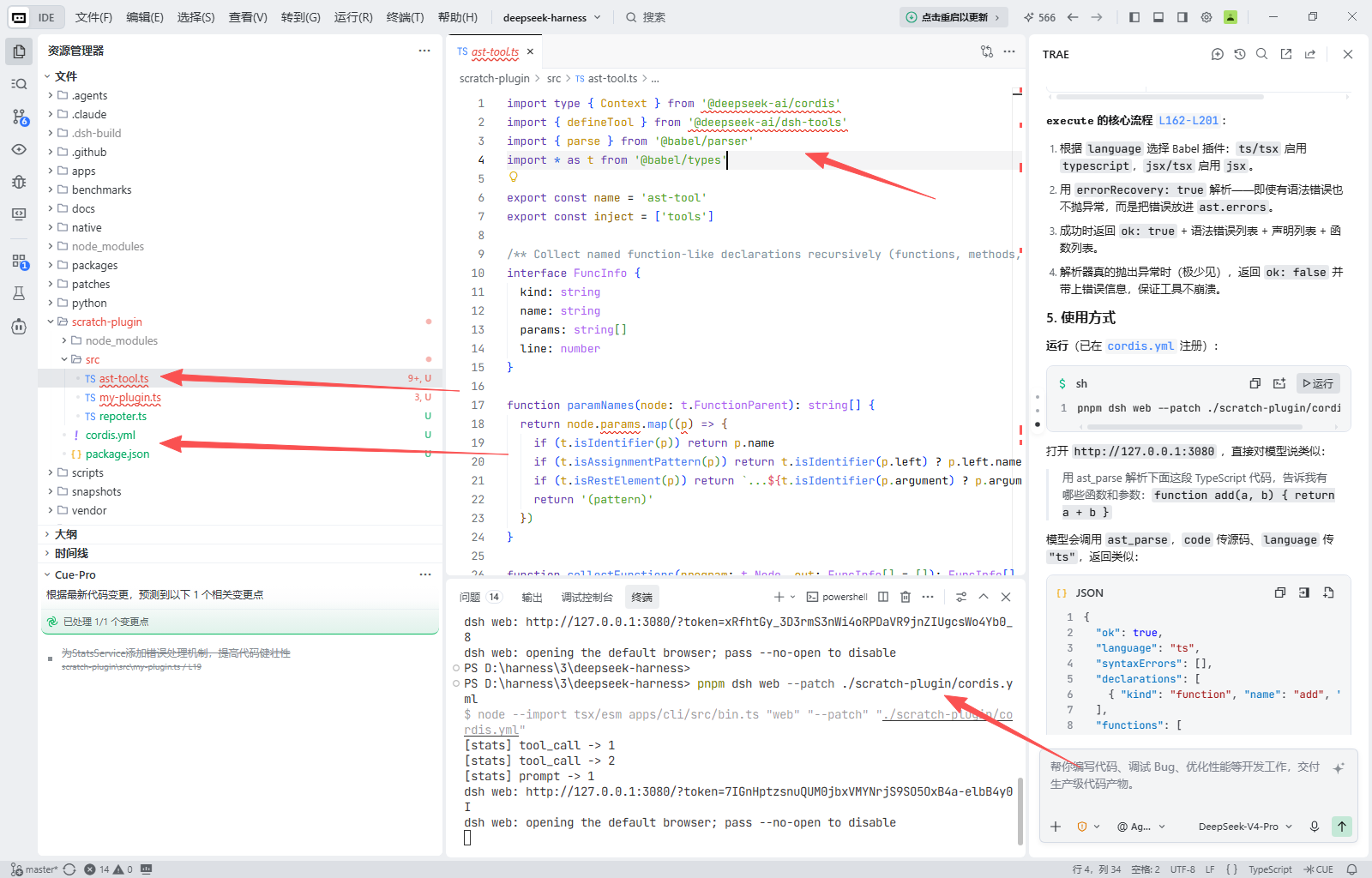
1. 头部:导入与插件声明
import type { Context } from '@deepseek-ai/cordis'
import { defineTool } from '@deepseek-ai/dsh-tools'
import { parse } from '@babel/parser'
import * as t from '@babel/types'

export const name = 'ast-tool'
export const inject = ['tools']
@deepseek-ai/cordis:harness 的插件框架,Context是所有插件apply拿到的上下文。@deepseek-ai/dsh-tools:defineTool是定义工具的统一 DSL。@babel/parser/@babel/types:真正的 AST 解析器(Babel),负责词法/语法分析和节点类型判断。inject = ['tools']:声明本插件依赖tools服务,框架会在tools注册表就绪后才调用apply(对应 [index.zh.md](file:///d:/harness/3/deepseek-harness/docs/user/develop/basic/index.zh.md) 里的“声明依赖”)。
2. 结果类型定义
FuncInfo:一个“函数式”声明(函数/箭头变量/类方法),含kind、name、params、line。DeclInfo:一个顶层声明(import/function/variable/class/export),含kind、name、line。
3. 三个辅助函数(纯函数,无副作用)
paramNames [L17-L24](file:///d:/harness/3/deepseek-harness/scratch-plugin/src/ast-tool.ts#L17-L24):从函数节点提取参数名,处理三种情况——普通标识符、带默认值(b = 1)、剩余参数(...rest),其它模式统一记为 (pattern)。
collectFunctions [L26-L49](file:///d:/harness/3/deepseek-harness/scratch-plugin/src/ast-tool.ts#L26-L49):递归遍历顶层语句,收集函数式声明:
- 函数声明
function foo(){} - 变量声明中初始化为箭头/函数表达式的(
const bar = (x) => ...) export包裹的声明(递归解包)- 类声明里的方法
collectDecls [L58-L88](file:///d:/harness/3/deepseek-harness/scratch-plugin/src/ast-tool.ts#L58-L88):收集所有顶层命名声明,包括 import 的本地名、变量、类、命名导出、默认导出等。
4. apply 与工具定义
[apply](file:///d:/harness/3/deepseek-harness/scratch-plugin/src/ast-tool.ts#L90-L203) 里通过 ctx.tools.register(defineTool({...})) 注册工具。defineTool 的几个关键字段:
| 字段 | 作用 |
|---|---|
name: 'ast_parse' | 模型看到的工具名 |
description | 发给模型的说明,告诉它工具的用途、参数含义、只读不执行 |
parameters | 输入参数 schema(code 必填、language 可选枚举 js/jsx/ts/tsx) |
output.schema | 返回值规范结构(ok/language/syntaxErrors/declarations/functions) |
output.render | 把规范值转成面向模型的文本(这里直接 JSON.stringify) |
execute | 真正的解析逻辑 |
execute 的核心流程 [L162-L201](file:///d:/harness/3/deepseek-harness/scratch-plugin/src/ast-tool.ts#L162-L201):
- 根据
language选择 Babel 插件:ts/tsx启用typescript,jsx/tsx启用jsx。 - 用
errorRecovery: true解析——即使有语法错误也不抛异常,而是把错误放进ast.errors。 - 成功时返回
ok: true+ 语法错误列表 + 声明列表 + 函数列表。 - 解析器真的抛出异常时(极少见),返回
ok: false并带上错误信息,保证工具不崩溃。
5. 使用方式
运行(已在 [cordis.yml](file:///d:/harness/3/deepseek-harness/scratch-plugin/cordis.yml#L7-L9) 注册):
pnpm dsh web --patch ./scratch-plugin/cordis.yml
打开 http://127.0.0.1:3080,直接对模型说类似:
用 ast_parse 解析下面这段 TypeScript 代码,告诉我有哪些函数和参数:
function add(a, b) { return a + b }
模型会调用 ast_parse,code 传源码、language 传 "ts",返回类似:
{
  "ok": true,
  "language": "ts",
  "syntaxErrors": [],
  "declarations": [
    { "kind": "function", "name": "add", "line": 1 }
  ],
  "functions": [
    { "kind": "function", "name": "add", "params": ["a", "b"], "line": 1 }
  ]
}
6. 两个设计要点
- 只读、不执行:description 里明确写了
read-only analysis tool,解析出的 AST 不会运行源码,符合“AST 解析”而非“代码执行”的语义。 - 优雅降级:语法错误不会被当作工具异常抛出,而是通过
ok: false+syntaxErrors返回,模型能据此继续诊断,而不是直接中断。
如果你希望它进一步返回完整 AST 节点树(而非仅摘要)、或增加跨函数调用关系分析,可以告诉我,我在现有基础上扩展 output.schema 和 collect* 函数。
代码:
ast-tool.ts
import type { Context } from '@deepseek-ai/cordis'
import { defineTool } from '@deepseek-ai/dsh-tools'
import { parse } from '@babel/parser'
import * as t from '@babel/types'

export const name = 'ast-tool'
export const inject = ['tools']

/** Collect named function-like declarations recursively (functions, methods, arrow vars). */
interface FuncInfo {
  kind: string
  name: string
  params: string[]
  line: number
}

function paramNames(node: t.FunctionParent): string[] {
  return node.params.map((p) => {
    if (t.isIdentifier(p)) return p.name
    if (t.isAssignmentPattern(p)) return t.isIdentifier(p.left) ? p.left.name : '(pattern)'
    if (t.isRestElement(p)) return `...${t.isIdentifier(p.argument) ? p.argument.name : '(pattern)'}`
    return '(pattern)'
  })
}

function collectFunctions(program: t.Node, out: FuncInfo[] = []): FuncInfo[] {
  for (const node of program as unknown as t.Node[]) {
    if (t.isFunctionDeclaration(node) && node.id) {
      out.push({ kind: 'function', name: node.id.name, params: paramNames(node), line: node.loc?.start.line ?? 0 })
    } else if (t.isVariableDeclaration(node)) {
      for (const decl of node.declarations) {
        if (t.isIdentifier(decl.id) && (t.isArrowFunctionExpression(decl.init) || t.isFunctionExpression(decl.init))) {
          out.push({ kind: 'function', name: decl.id.name, params: paramNames(decl.init), line: decl.loc?.start.line ?? 0 })
        }
      }
    } else if (t.isExportNamedDeclaration(node) && node.declaration) {
      collectFunctions([node.declaration] as unknown as t.Node[], out)
    } else if (t.isExportDefaultDeclaration(node) && node.declaration) {
      collectFunctions([node.declaration] as unknown as t.Node[], out)
    } else if (t.isClassDeclaration(node)) {
      for (const member of node.body.body) {
        if (t.isClassMethod(member) && member.key.type === 'Identifier') {
          out.push({ kind: 'class method', name: member.key.name, params: paramNames(member), line: member.loc?.start.line ?? 0 })
        }
      }
    }
  }
  return out
}

/** Collect top-level declarations with names. */
interface DeclInfo {
  kind: string
  name: string
  line: number
}

function collectDecls(program: t.Node, out: DeclInfo[] = []): DeclInfo[] {
  for (const node of program as unknown as t.Node[]) {
    if (t.isFunctionDeclaration(node) && node.id) {
      out.push({ kind: 'function', name: node.id.name, line: node.loc?.start.line ?? 0 })
    } else if (t.isVariableDeclaration(node)) {
      for (const decl of node.declarations) {
        if (t.isIdentifier(decl.id)) {
          out.push({ kind: 'variable', name: decl.id.name, line: decl.loc?.start.line ?? 0 })
        }
      }
    } else if (t.isClassDeclaration(node) && node.id) {
      out.push({ kind: 'class', name: node.id.name, line: node.loc?.start.line ?? 0 })
    } else if (t.isImportDeclaration(node)) {
      for (const spec of node.specifiers) {
        const local = t.isImportSpecifier(spec) || t.isImportDefaultSpecifier(spec) ? spec.local.name : spec.local.name
        out.push({ kind: 'import', name: local, line: node.loc?.start.line ?? 0 })
      }
    } else if (t.isExportNamedDeclaration(node)) {
      if (node.declaration) {
        collectDecls([node.declaration] as unknown as t.Node[], out)
      } else {
        for (const spec of node.specifiers) {
          out.push({ kind: 'export', name: t.isExportSpecifier(spec) ? spec.local.name : '(namespace)', line: node.loc?.start.line ?? 0 })
        }
      }
    } else if (t.isExportDefaultDeclaration(node)) {
      out.push({ kind: 'export default', name: '(default)', line: node.loc?.start.line ?? 0 })
    }
  }
  return out
}

export function apply(ctx: Context): void {
  ctx.tools.register(defineTool({
    name: 'ast_parse',
    description:
      'Parse JavaScript/TypeScript source code into a structured syntax summary using an AST parser. '
      + 'Returns syntax errors (if any), top-level declarations (functions, variables, classes, imports, exports) '
      + 'and every named function/method with its parameters and line numbers. This is a read-only analysis tool: '
      + 'it never executes the code. Pass `code` as a plain string and `language` to select the dialect: '
      + '"js" (JavaScript), "jsx" (JavaScript + JSX), "ts" (TypeScript), or "tsx" (TypeScript + JSX); default is "js".',
    parameters: {
      code: { type: 'string', required: true, description: 'The JavaScript/TypeScript source code to parse.' },
      language: {
        type: 'string',
        enum: ['js', 'jsx', 'ts', 'tsx'],
        description: 'Source dialect. Defaults to "js".',
      },
    },
    output: {
      schema: {
        type: 'object',
        additionalProperties: false,
        properties: {
          ok: { type: 'boolean', required: true },
          language: { type: 'string', required: true },
          syntaxErrors: {
            type: 'array',
            required: true,
            items: {
              type: 'object',
              additionalProperties: false,
              properties: {
                message: { type: 'string', required: true },
                line: { type: 'number', required: true },
                column: { type: 'number', required: true },
              },
            },
          },
          declarations: {
            type: 'array',
            required: true,
            items: {
              type: 'object',
              additionalProperties: false,
              properties: {
                kind: { type: 'string', required: true },
                name: { type: 'string', required: true },
                line: { type: 'number', required: true },
              },
            },
          },
          functions: {
            type: 'array',
            required: true,
            items: {
              type: 'object',
              additionalProperties: false,
              properties: {
                kind: { type: 'string', required: true },
                name: { type: 'string', required: true },
                params: {
                  type: 'array',
                  required: true,
                  items: { type: 'string' },
                },
                line: { type: 'number', required: true },
              },
            },
          },
        },
      },
      render: (_args, value) => [{ type: 'text', text: JSON.stringify(value, null, 2) }],
    },
    async execute(args) {
      const language = args.language ?? 'js'
      try {
        const ast = parse(args.code, {
          sourceType: 'module',
          plugins: [
            language === 'ts' || language === 'tsx' ? 'typescript' : null,
            language === 'jsx' || language === 'tsx' ? 'jsx' : null,
          ].filter((p): p is NonNullable<typeof p> => p !== null),
          errorRecovery: true,
          ranges: false,
          attachComment: false,
        })
        const body = ast.program.body
        return {
          ok: true,
          language,
          syntaxErrors: (ast.errors ?? []).map((err) => ({
            message: err.message,
            line: err.loc?.line ?? 0,
            column: err.loc?.column ?? 0,
          })),
          declarations: collectDecls(body as unknown as t.Node),
          functions: collectFunctions(body as unknown as t.Node),
        }
      } catch (error) {
        const err = error as { message?: string; loc?: { line?: number; column?: number } }
        return {
          ok: false,
          language,
          syntaxErrors: [{
            message: err.message ?? String(error),
            line: err.loc?.line ?? 0,
            column: err.loc?.column ?? 0,
          }],
          declarations: [],
          functions: [],
        }
      }
    },
  }))
}
cordis.yml
- insert:
    - id: ast
      name: 'D:deepseek-harness/scratch-plugin/src/ast-tool.ts'
package.json
{
  "name": "scratch-plugin-ast",
  "private": true,
  "type": "module",
  "dependencies": {
    "@babel/parser": "^7.29.7",
    "@babel/types": "^7.29.0"
  }
}

欢迎加入DeepSeek 技术社区。在这里,你可以找到志同道合的朋友,共同探索AI技术的奥秘。
更多推荐

 2
2 0
0- 0


 已为社区贡献1条内容

所有评论(0)