Agent 开发(三)—— 实战篇:完整代码实现与 CLI 封装
·
一、环境准备
1.1 项目初始化
# 创建项目目录
mkdir git-commit-agent && cd git-commit-agent

# 创建虚拟环境
python -m venv .venv

# Windows:
.venv\Scripts\activate
# Mac/Linux:
# source .venv/bin/activate

# 安装依赖(只有这一个)
pip install openai
1.2 目录结构
git-commit-agent/
├── pyproject.toml
└── commit_agent/
    ├── __init__.py
    ├── cli.py
    ├── agent.py
    ├── git_utils.py
    ├── llm_client.py
    └── prompts.py
创建目录:
mkdir commit_agent
# 创建一个空的 __init__.py
type nul > commit_agent\__init__.py   # Windows
# touch commit_agent/__init__.py      # Mac/Linux
1.3 配置 API Key
# Windows (PowerShell):
$env:DEEPSEEK_API_KEY="sk-xxxxxxxx"

# Windows (CMD):
set DEEPSEEK_API_KEY=sk-xxxxxxxx

# Mac/Linux:
# export DEEPSEEK_API_KEY=sk-xxxxxxxx
二、逐模块实现
2.1 pyproject.toml — 项目配置
[project]
name = "git-commit-agent"
version = "0.1.0"
description = "AI-powered Git commit message generator (powered by DeepSeek)"
requires-python = ">=3.10"
dependencies = [
    "openai>=1.0.0",
]

[project.scripts]
commit-agent = "commit_agent.cli:main"
[project.scripts] 的作用:安装后 commit-agent 命令直接可用,效果等同于 python -m commit_agent.cli。
2.2 prompts.py — System Prompt 模板
"""Agent 的 system prompt 和消息模板"""

SYSTEM_PROMPT = """你是一个专业的 Git commit 消息生成器。

你的任务是根据 git diff 生成简洁、准确的 commit 消息。

## 格式要求
- 第一行是标题,格式为 <type>: <简短描述>,不超过 72 字符
- 空一行后写正文(可选),每行不超过 72 字符
- 正文说明"为什么做这个变更",而不是"做了什么"

## 类型前缀(Conventional Commits)
- feat: 新功能
- fix: 修复 bug
- refactor: 重构(不改变外部行为)
- docs: 文档变更
- style: 代码格式(空格、分号等,不影响逻辑)
- test: 增加测试
- chore: 构建/工具/依赖变更

## 语言
使用中文撰写。

## 工作流程
1. 分析 diff 的内容类型和变更范围
2. 调用 generate_commit_message 工具生成 commit message"""


def build_diff_prompt(diff: str) -> str:
    """将 git diff 包装成用户消息"""
    if not diff.strip():
        return "当前没有检测到任何代码变更。请提示用户先修改代码。"
    return f"请为以下代码变更生成 commit message:\n\n```diff\n{diff}\n```"
2.3 git_utils.py — Git 操作封装
"""Git 操作封装"""

import subprocess


def get_full_diff() -> str:
    """获取工作区所有变更(staged + unstaged + untracked)"""
    # 检查是否有 HEAD(至少有一次提交)
    has_head = bool(_run_git("rev-parse", "--verify", "HEAD").strip())
    if has_head:
        diff = _run_git("diff", "HEAD")
    else:
        diff = _run_git("diff", "--cached") + _run_git("diff")

    # 包含未追踪新文件的内容
    untracked = _run_git("ls-files", "--others", "--exclude-standard")
    if untracked.strip():
        for fname in untracked.strip().splitlines():
            try:
                with open(fname, "r", encoding="utf-8") as f:
                    content = f.read()
                diff += f"\n--- /dev/null\n+++ b/{fname}\n"
                for line in content.splitlines():
                    diff += f"+{line}\n"
            except Exception:
                diff += f"\n# (新文件 {fname},无法读取内容)\n"
    return diff


def get_staged_diff() -> str:
    """仅获取已暂存的变更"""
    return _run_git("diff", "--cached")


def stage_all() -> None:
    """暂存所有变更"""
    _run_git("add", "-A")
    print("staged all changes")


def commit(message: str) -> None:
    """执行 git commit"""
    result = subprocess.run(
        ["git", "commit", "-m", message],
        capture_output=True, text=True, encoding="utf-8",
    )
    if result.returncode != 0:
        raise RuntimeError(f"提交失败:\n{result.stderr}")
    print(result.stdout.strip())


def _run_git(*args: str) -> str:
    """执行 git 命令的底层封装"""
    result = subprocess.run(
        ["git", *args],
        capture_output=True, text=True, encoding="utf-8",
    )
    if result.returncode != 0:
        return ""
    return result.stdout or ""
2.4 llm_client.py — DeepSeek API 封装(核心改动)
这是替换 Anthropic 为 DeepSeek 最关键的文件。
"""DeepSeek API 客户端封装(OpenAI 兼容格式)"""

import json
from openai import OpenAI


class LLMClient:
    """封装 DeepSeek API,管理 API 调用和工具定义"""

    def __init__(self, api_key: str, model: str = "deepseek-chat"):
        self.client = OpenAI(
            api_key=api_key,
            base_url="https://api.deepseek.com"
        )
        self.model = model

    @staticmethod
    def define_tools() -> list:
        """工具定义(OpenAI Function Calling 格式)

        DeepSeek 完全兼容 OpenAI 的 tool 定义格式。
        """
        return [
            {
                "type": "function",
                "function": {
                    "name": "generate_commit_message",
                    "description": "根据 git diff 生成符合 Conventional Commits 规范的 commit message。"
                                    "分析变更的内容、类型和影响范围,返回规范的提交信息。",
                    "parameters": {
                        "type": "object",
                        "properties": {
                            "title": {
                                "type": "string",
                                "description": "commit 标题,格式为 <type>: <描述>,不超过 72 字符"
                            },
                            "type": {
                                "type": "string",
                                "enum": [
                                    "feat", "fix", "refactor",
                                    "docs", "style", "test", "chore"
                                ],
                                "description": "变更类型"
                            },
                            "body": {
                                "type": "string",
                                "description": "commit 正文(可选),说明变更原因,每行不超过 72 字符"
                            }
                        },
                        "required": ["title", "type"]
                    }
                }
            }
        ]

    def send_with_tools(self, system_prompt: str, user_message: str):
        """发送消息(带工具定义),返回 DeepSeek 原始响应

        返回 OpenAI 风格的 ChatCompletion 对象。
        tool_calls 在 response.choices[0].message.tool_calls 中。
        """
        response = self.client.chat.completions.create(
            model=self.model,
            messages=[
                {"role": "system", "content": system_prompt},
                {"role": "user", "content": user_message},
            ],
            tools=self.define_tools(),
            max_tokens=1024,
        )
        return response
与 Anthropic 版本的关键区别:
| 项目 | Anthropic 版 | DeepSeek 版 |
|---|---|---|
| SDK | anthropic |
openai |
| base_url | 无需设置 | https://api.deepseek.com |
| 工具格式 | 直接写 name/description/input_schema | 包一层 {"type": "function", "function": {...}} |
| 参数 key | input_schema |
parameters |
| 响应解析 | response.content 中的 block |
response.choices[0].message.tool_calls |
| arguments 类型 | 直接是 dict | JSON 字符串,需 json.loads() |
2.5 agent.py — Agent 核心流程
"""Agent 核心流程:编排 LLM 调用和结果处理"""

import json
from .git_utils import get_full_diff
from .llm_client import LLMClient
from .prompts import SYSTEM_PROMPT, build_diff_prompt


def generate_commit_message(
    api_key: str,
    model: str = "deepseek-chat"
) -> dict:
    """
    Agent 主流程:
    1. 读取 git diff
    2. 调 DeepSeek API(带工具定义)
    3. 解析响应,提取结构化的 commit message
    4. 返回 dict 或 error dict

    返回格式(成功):
    {"type": "feat", "title": "feat: xxx", "body": "..."}
    返回格式(失败):
    {"error": "原因"}
    """
    # Step 1: 获取 diff
    diff = get_full_diff()
    if not diff.strip():
        return {"error": "没有检测到代码变更,请先修改代码后再运行"}

    # Step 2: 初始化客户端,发送请求
    client = LLMClient(api_key=api_key, model=model)
    user_message = build_diff_prompt(diff)

    try:
        response = client.send_with_tools(SYSTEM_PROMPT, user_message)
    except Exception as e:
        return {"error": f"API 调用失败: {e}"}

    # Step 3: 解析响应,提取工具调用结果
    message = response.choices[0].message

    if message.tool_calls:
        # 取第一个工具调用
        tool_call = message.tool_calls[0]
        if tool_call.function.name == "generate_commit_message":
            args = json.loads(tool_call.function.arguments)
            return {
                "type": args.get("type", "unknown"),
                "title": args["title"],
                "body": args.get("body", ""),
            }

    # 如果 LLM 直接返回文本(没有调工具)
    if message.content:
        return {"error": message.content}

    return {"error": "未能生成 commit message"}
注意:DeepSeek 返回的 arguments 是 JSON 字符串,所以多了一步 json.loads() 解析。
2.6 cli.py — 命令行入口
"""CLI 入口:参数解析、用户交互"""

import os
import sys
import argparse
from .agent import generate_commit_message
from .git_utils import stage_all, commit


def display_preview(commit_info: dict):
    """展示生成的 commit message"""
    if "error" in commit_info:
        print(f"\n[ERROR] {commit_info['error']}")
        return False

    print("\n" + "=" * 56)
    print(" [Commit Message]")
    print("=" * 56)
    print(f"  类型:{commit_info['type']}")
    print(f"  标题:{commit_info['title']}")
    if commit_info.get("body"):
        print(f"  正文:\n{commit_info['body']}")
    print("=" * 56)
    return True


def confirm_commit() -> bool:
    """交互式确认,返回 True 表示确认提交"""
    while True:
        choice = input("\n确认提交?[Y]es / [n]o / [q]uit: ").strip().lower()
        if choice in ("y", "yes", ""):
            return True
        elif choice in ("n", "no"):
            print("已取消提交")
            return False
        elif choice in ("q", "quit"):
            print("退出")
            sys.exit(0)


def main():
    parser = argparse.ArgumentParser(
        description="AI-powered Git commit message generator (DeepSeek)"
    )
    parser.add_argument(
        "--model", default="deepseek-chat",
        help="模型名称(默认 deepseek-chat)"
    )
    parser.add_argument(
        "--stage", action="store_true",
        help="自动暂存所有变更后再生成 commit"
    )
    args = parser.parse_args()

    # 读取 API Key
    api_key = os.environ.get("DEEPSEEK_API_KEY")
    if not api_key:
        print("[ERROR] 请设置环境变量 DEEPSEEK_API_KEY")
        print("   Windows: $env:DEEPSEEK_API_KEY='sk-xxx'")
        print("   Mac/Linux: export DEEPSEEK_API_KEY=sk-xxx")
        sys.exit(1)

    # 可选:自动暂存
    if args.stage:
        print("staging all changes...")
        stage_all()

    # 生成 commit message
    print("analyzing code changes...")
    commit_info = generate_commit_message(api_key, args.model)

    # 展示和确认
    if display_preview(commit_info) and confirm_commit():
        full_message = commit_info["title"]
        if commit_info.get("body"):
            full_message += f"\n\n{commit_info['body']}"
        commit(full_message)


if __name__ == "__main__":
    main()
三、运行
3.1 安装并运行
# 在 git-commit-agent/ 目录下
pip install -e .

# 进入一个有 git 仓库的目录,修改一些代码后运行
commit-agent

# 带 --stage 参数(自动 git add -A)
commit-agent --stage

# 指定模型
commit-agent --model deepseek-chat
3.2 运行示例
增加代码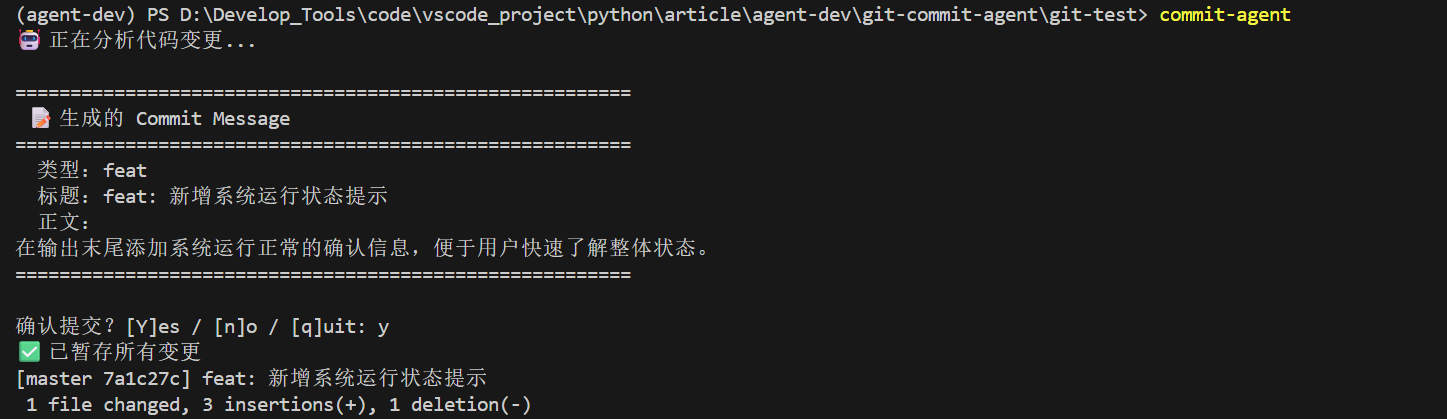
删除代码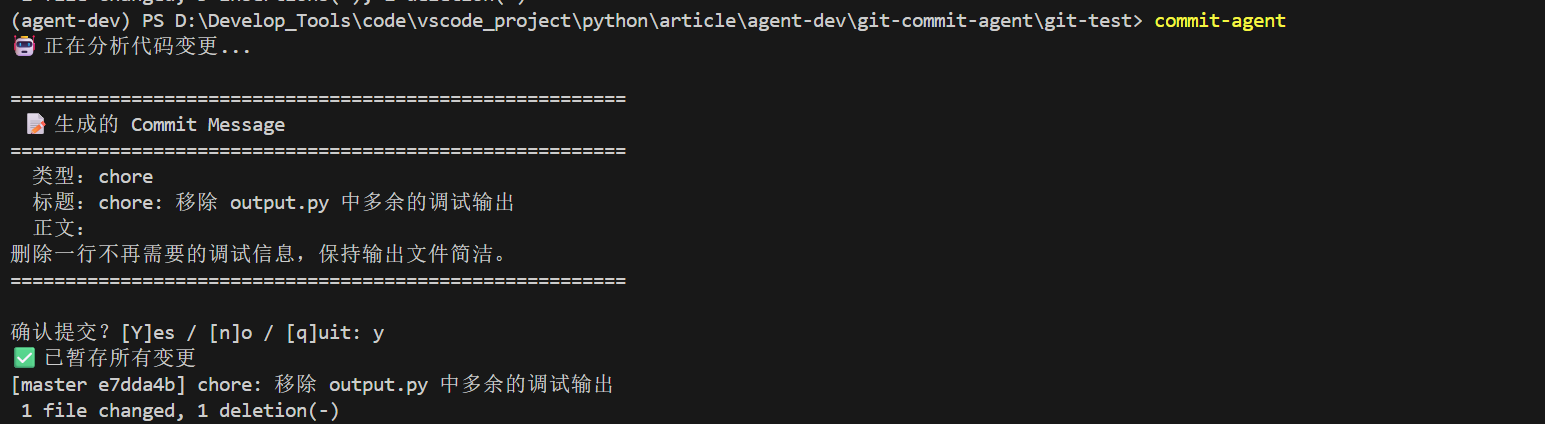
四、v2 扩展:交互式修改
v1 是"生成 → 确认 → 提交"的单向流程。v2 让用户可以在确认前要求修改。
修改思路
只需改动 cli.py——当用户输入 “n” 时,进入修改循环。但多轮交互涉及 tool result 的回传,格式如下:
# Agent 的多轮交互模式(消息列表结构)
messages = [
    {"role": "system", "content": SYSTEM_PROMPT},
    {"role": "user", "content": build_diff_prompt(diff)},
    # ← 第一轮 LLM 响应(含 tool_calls)
    message,  # assistant 的完整 message 对象
    # ← 工具结果回传
    {
        "role": "tool",
        "tool_call_id": tool_call.id,
        "content": "工具执行结果"
    },
    # ← 用户修改意见
    {"role": "user", "content": "请改短一些"},
]
在 chat.completions.create 的 messages 列表里插入 tool role 的消息,LLM 就能理解"之前工具调用的结果,以及用户的新要求"。
会在后续文章中实现该版本
五、常见问题排查
| 问题 | 原因 | 解决 |
|---|---|---|
git diff 为空 |
没有修改文件,或文件是新文件(未追踪) | git diff 不包含未追踪文件,代码改用 git ls-files --others --exclude-standard 读取新文件内容 |
| API Key 错误 | 环境变量未设置或写错 | 检查 $env:DEEPSEEK_API_KEY |
| LLM 没调 tool | System prompt 不清晰 | 检查 prompts.py 中是否明确指示了调用工具 |
json.loads 解析失败 |
DeepSeek 返回了不合法的 JSON | 添加 try/except,给 LLM 重试机会 |
中文乱码 或 AttributeError: 'NoneType' object has no attribute 'strip' |
Windows 终端 GBK 编码与 UTF-8 不兼容 | 所有 subprocess.run 加上 encoding="utf-8";运行前设置 $env:PYTHONIOENCODING='utf-8' |
终端报错 UnicodeEncodeError |
代码中的 emoji 字符在 GBK 编码的终端中无法显示 | 用 ASCII 替代 emoji(如 [OK] 替代 ✅),或运行 chcp 65001 切换到 UTF-8 |

欢迎加入DeepSeek 技术社区。在这里,你可以找到志同道合的朋友,共同探索AI技术的奥秘。
更多推荐

 0
0 0
0- 0


 已为社区贡献2条内容

所有评论(0)