GLM-4-9B-Chat-1M多轮对话优化:上下文记忆管理
GLM-4-9B-Chat-1M多轮对话优化:上下文记忆管理
让AI记住你说过的每一句话,打造真正连贯的智能对话体验
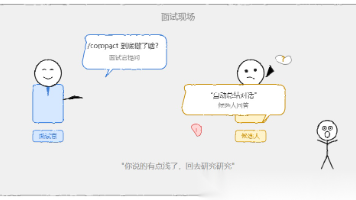
你是否遇到过这样的场景:和AI聊了十几轮后,它突然忘记了你之前提到的关键信息,或者开始重复之前已经讨论过的内容?这种"记忆断层"问题在多轮对话中非常常见。
今天我们就来深入探讨GLM-4-9B-Chat-1M模型的多轮对话优化技术,特别是如何通过上下文记忆管理来提升对话的连贯性和智能程度。这个支持百万级上下文长度的模型,为我们提供了前所未有的长对话可能性。
1. 理解多轮对话的核心挑战
多轮对话不仅仅是简单的问答接龙,而是一个需要持续维护对话状态和上下文信息的复杂过程。想象一下和朋友聊天:如果对方每隔几分钟就忘记你们刚才在聊什么,这样的对话还能进行下去吗?
GLM-4-9B-Chat-1M面临的几个关键挑战:
上下文遗忘问题:随着对话轮数增加,模型可能会"忘记"早期的关键信息,导致回答不一致或重复。
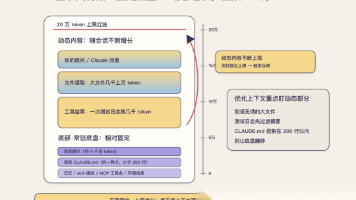
信息冗余积累:长对话中会积累大量冗余信息,这些无用信息会挤占有限的计算资源。
注意力分散:当上下文过长时,模型可能难以聚焦在当前对话的最相关部分。
计算资源限制:即使支持1M上下文,实际部署时仍需要考虑计算效率和内存使用。
2. 环境准备与快速部署
在深入技术细节之前,我们先快速搭建一个可以测试多轮对话的环境。
2.1 基础环境配置
# 创建虚拟环境
python -m venv glm-chat-env
source glm-chat-env/bin/activate  # Linux/Mac
# 或
glm-chat-env\Scripts\activate  # Windows

# 安装必要依赖
pip install torch transformers accelerate
2.2 模型加载与初始化
import torch
from transformers import AutoModelForCausalLM, AutoTokenizer

# 设置设备
device = "cuda" if torch.cuda.is_available() else "cpu"

# 加载tokenizer和模型
tokenizer = AutoTokenizer.from_pretrained(
    "THUDM/glm-4-9b-chat-1m",
    trust_remote_code=True
)

model = AutoModelForCausalLM.from_pretrained(
    "THUDM/glm-4-9b-chat-1m",
    torch_dtype=torch.bfloat16,
    low_cpu_mem_usage=True,
    trust_remote_code=True
).to(device).eval()
3. 对话状态跟踪技术
对话状态跟踪是多轮对话的核心,它帮助模型理解当前的对话上下文和历史信息。
3.1 基础对话状态管理
最简单的实现方式是维护一个对话历史列表:
class SimpleDialogueManager:
    def __init__(self, max_history=10):
        self.dialogue_history = []
        self.max_history = max_history

    def add_message(self, role, content):
        """添加对话消息"""
        self.dialogue_history.append({"role": role, "content": content})

        # 保持历史记录不超过最大限制
        if len(self.dialogue_history) > self.max_history * 2:  # 每轮包含user和assistant
            # 保留最近的对话,但确保不会切断正在进行的对话
            self.dialogue_history = self.dialogue_history[-self.max_history * 2:]

    def get_context(self):
        """获取当前对话上下文"""
        return self.dialogue_history.copy()
3.2 使用模型进行对话
def chat_with_model(dialogue_manager, user_input):
    # 添加用户输入到对话历史
    dialogue_manager.add_message("user", user_input)

    # 准备模型输入
    context = dialogue_manager.get_context()
    inputs = tokenizer.apply_chat_template(
        context,
        add_generation_prompt=True,
        tokenize=True,
        return_tensors="pt",
        return_dict=True
    )
    inputs = inputs.to(device)

    # 生成回复
    with torch.no_grad():
        outputs = model.generate(
            **inputs,
            max_new_tokens=512,
            do_sample=True,
            temperature=0.7,
            top_p=0.9
        )

    # 解码回复
    response = tokenizer.decode(
        outputs[0][inputs['input_ids'].shape[1]:],
        skip_special_tokens=True
    )

    # 添加助手回复到对话历史
    dialogue_manager.add_message("assistant", response)

    return response

# 初始化对话管理器
dialogue_manager = SimpleDialogueManager(max_history=20)

# 示例对话
user_messages = [
    "你好,我想了解多轮对话优化技术",
    "能具体讲讲上下文压缩吗?",
    "那对话状态跟踪又是如何实现的?"
]

for msg in user_messages:
    response = chat_with_model(dialogue_manager, msg)
    print(f"用户: {msg}")
    print(f"助手: {response}")
    print("-" * 50)
4. 上下文压缩与记忆增强
当对话变得很长时,我们需要更智能的方法来管理上下文,而不是简单地截断历史记录。
4.1 基于重要性的上下文压缩
class SmartContextManager:
    def __init__(self, compression_ratio=0.3):
        self.full_history = []
        self.compressed_history = []
        self.compression_ratio = compression_ratio

    def add_message(self, role, content):
        self.full_history.append({"role": role, "content": content})
        self._compress_context()

    def _compress_context(self):
        """智能压缩上下文,保留重要信息"""
        if len(self.full_history) <= 10:  # 对话较短时不需要压缩
            self.compressed_history = self.full_history.copy()
            return

        # 这里可以使用更复杂的算法来判断哪些信息重要
        # 简单实现:保留开头的重要上下文和最近的对话
        important_messages = self.full_history[:2]  # 保留开头的对话
        recent_messages = self.full_history[-8:]    # 保留最近的8轮对话

        self.compressed_history = important_messages + recent_messages

    def get_compressed_context(self):
        return self.compressed_history.copy()
4.2 记忆增强策略
对于特别重要的信息,我们可以使用记忆增强技术来确保模型不会忘记:
class MemoryEnhancedManager:
    def __init__(self):
        self.dialogue_history = []
        self.important_facts = set()  # 存储重要事实

    def extract_important_facts(self, message):
        """从消息中提取重要事实(简化版)"""
        # 实际应用中可以使用更复杂的NLP技术
        important_keywords = ["名字", "年龄", "喜欢", "不喜欢", "重要", "记住"]
        facts = []

        for keyword in important_keywords:
            if keyword in message:
                facts.append(message)

        return facts

    def add_message(self, role, content):
        if role == "user":
            # 从用户消息中提取重要事实
            facts = self.extract_important_facts(content)
            self.important_facts.update(facts)

        self.dialogue_history.append({"role": role, "content": content})

    def get_context_with_memory(self):
        """获取包含重要记忆的上下文"""
        context = self.dialogue_history.copy()

        # 如果有很多重要事实,可以定期总结
        if self.important_facts and len(context) > 6:
            memory_summary = "重要信息回顾:" + ";".join(list(self.important_facts)[-3:])
            # 将记忆摘要插入到上下文中
            context.insert(-2, {"role": "system", "content": memory_summary})

        return context
5. 实用技巧与最佳实践
在实际使用GLM-4-9B-Chat-1M进行多轮对话时,有几个实用技巧可以显著提升体验。
5.1 控制上下文长度
虽然模型支持1M上下文,但实际使用时需要平衡效果和性能:
def optimize_context_length(history, max_tokens=4000):
    """优化上下文长度,确保不超过token限制"""
    total_tokens = 0
    optimized_history = []

    # 从最新消息开始添加,直到达到token限制
    for message in reversed(history):
        message_tokens = len(tokenizer.encode(message["content"]))
        if total_tokens + message_tokens > max_tokens:
            break

        optimized_history.insert(0, message)  # 保持顺序
        total_tokens += message_tokens

    return optimized_history
5.2 处理长文档对话
当对话涉及长文档时,可以使用文档摘要技术:
class DocumentAwareManager:
    def __init__(self):
        self.dialogue_history = []
        self.document_summaries = {}

    def add_document(self, doc_id, content):
        """添加文档并生成摘要"""
        # 简化的摘要生成(实际应使用更复杂的摘要算法)
        summary = content[:500] + "..." if len(content) > 500 else content
        self.document_summaries[doc_id] = summary

    def get_context(self):
        context = self.dialogue_history.copy()

        # 如果对话中提到了文档,添加相关摘要
        for doc_id, summary in self.document_summaries.items():
            if any(doc_id in msg["content"] for msg in self.dialogue_history):
                context.insert(0, {
                    "role": "system",
                    "content": f"文档摘要({doc_id}):{summary}"
                })

        return context
5.3 对话主题跟踪
def track_conversation_topics(history):
    """简单的话题跟踪实现"""
    topics = []
    topic_keywords = {
        "技术": ["模型", "算法", "代码", "部署", "优化"],
        "业务": ["需求", "场景", "应用", "客户", "产品"],
        "通用": ["你好", "谢谢", "帮助", "介绍", "解释"]
    }

    for message in history:
        content = message["content"].lower()
        for topic, keywords in topic_keywords.items():
            if any(keyword in content for keyword in keywords):
                if topic not in topics:
                    topics.append(topic)

    return topics
6. 常见问题与解决方案
在实际使用过程中,你可能会遇到一些典型问题,这里提供一些解决方案。
问题1:模型开始重复回答
# 解决方案:检测重复并调整生成参数
def detect_repetition(response, history, threshold=0.8):
    """检测回答是否与历史重复"""
    from sklearn.feature_extraction.text import TfidfVectorizer
    from sklearn.metrics.pairwise import cosine_similarity

    if not history:
        return False

    # 计算与历史回答的相似度
    previous_responses = [msg["content"] for msg in history if msg["role"] == "assistant"]
    if not previous_responses:
        return False

    texts = previous_responses + [response]
    vectorizer = TfidfVectorizer().fit_transform(texts)
    vectors = vectorizer.toarray()

    # 计算与最近几个回答的相似度
    similarity_scores = cosine_similarity([vectors[-1]], vectors[:-1])
    return any(score > threshold for score in similarity_scores[0])
问题2:上下文过长导致性能下降
# 解决方案:实现分层上下文管理
class HierarchicalContextManager:
    def __init__(self):
        self.recent_context = []  # 最近对话
        self.summarized_context = []  # 摘要化的历史
        self.important_memories = []  # 重要记忆

    def add_message(self, role, content):
        self.recent_context.append({"role": role, "content": content})

        # 当近期上下文过长时进行摘要
        if len(self.recent_context) > 20:
            self._summarize_context()

    def _summarize_context(self):
        """生成上下文摘要"""
        # 简化的摘要实现
        summary = "之前的对话涉及:" + "; ".join(
            [msg["content"][:50] + "..." for msg in self.recent_context[:-10]]
        )
        self.summarized_context.append(summary)
        self.recent_context = self.recent_context[-10:]  # 保留最近10轮
问题3:模型忘记重要信息
# 解决方案:实现主动记忆提醒
def proactive_memory_reminder(history, important_info):
    """主动提醒重要信息"""
    last_few_messages = history[-4:] if len(history) >= 4 else history

    # 检查最近对话是否涉及重要信息
    recent_text = " ".join([msg["content"] for msg in last_few_messages])

    for info in important_info:
        if info not in recent_text:
            # 在上下文中插入提醒
            return [{"role": "system", "content": f"提醒:{info}"}] + history

    return history
7. 总结
多轮对话优化是一个复杂但极其有价值的技术领域。GLM-4-9B-Chat-1M的百万级上下文能力为我们提供了强大的基础,但要真正实现流畅、智能的长时间对话,还需要精心设计上下文管理策略。
从实践来看,单纯的增加上下文长度并不是万能解决方案。更重要的是如何智能地管理这些上下文——知道该记住什么、该忘记什么、该如何组织信息。好的对话系统应该像优秀的交谈者一样,既能记住重要的细节,又不会被无关信息干扰。
在实际项目中,建议根据具体应用场景选择合适的策略。如果是客服对话,可能需要更强调重要信息的记忆;如果是创意写作辅助,可能更需要保持上下文的完整性;如果是技术问答,则需要更好的话题跟踪能力。
最重要的是持续测试和迭代。不同的应用场景、不同的用户群体,甚至不同的对话主题,都可能需要调整优化策略。多收集真实的使用反馈,不断改进你的上下文管理系统,这样才能打造出真正令人满意的多轮对话体验。
获取更多AI镜像
想探索更多AI镜像和应用场景?访问 CSDN星图镜像广场,提供丰富的预置镜像,覆盖大模型推理、图像生成、视频生成、模型微调等多个领域,支持一键部署。

欢迎加入DeepSeek 技术社区。在这里,你可以找到志同道合的朋友,共同探索AI技术的奥秘。
更多推荐
 5
5 0
0- 0


 已为社区贡献41条内容

所有评论(0)