Ollama + LangChain + Agent Function调用
·
Ollama + LangChain + Agent Function调用
环境: WSL2 >> Ubuntu 20.04 >> Docker: Docker(Ollama) + Docker(Python 3.12.13)
一、 ollama环境搭建
1. docker 拉取ollama
docker pull docker.xuanyuan.run/ollama/ollama:latest
2. 启动ollama
docker run -d -v ollama:/root/.ollama -p 11434:11434 --gpus all --name ollama --restart always docker.xuanyuan.run/ollama/ollama:latest
注意:以GPU方式运行, 命令加–gpus all
-v 创建数据卷 映射到ollama的/root/.ollama目录下, 用来保存模型数据,要不然重启后会丢失模型数据
-p 映射ollama的11434端口到宿主机的11434端口, 默认11434端口,可以自定义端口号
3. 拉取千文模型
进入ollama容器 pull qwen:7b模型
docker exec -it ollama ollama pull qwen:7b
支持断点续传:拉取模型的时候,传到一定程度速度会降低(我测到在1.5G左右速度会下降,然后慢慢降为0), Ctrl+C停止下载,在执行拉取命令,它会继续下载,不会从头重新拉取
4. 进入模型
docker execc -it ollama /bin/bash
ollama run qwen:7b
这时候就可以和模型进行对话了

二、上代码
from langchain.tools import tool                # 工具装饰器
from langchain.agents import create_agent, create_react_agent  # 智能体创建函数
from langchain_ollama import ChatOllama      # ollama大模型
from langchain.messages import HumanMessage, AIMessage, ToolMessage  # 消息类型
from langchain_core.prompts import ChatPromptTemplate, MessagesPlaceholder  # 提示词模板
import requests      # 发送HTTP请求库

# create_react_agent为langchain1.0版本之前的  1.0(2025)后用create_agent
is_react_agent = False
try:
    from langgraph.prebuilt import create_react_agent   # langchain的React智能体创建函数 推荐
    is_react_agent = True
except ImportError:
    pass

# 天气码映射
code_map = {
    0: "晴天", 1: "多云", 2: "多云", 3: "阴天",
    45: "雾", 48: "雾凇",
    61: "小雨", 63: "中雨", 65: "大雨",
    80: "阵雨", 95: "雷阵雨"
}


@tool
def get_weather(location:str)->str:
    """
        获取天气
        参数: location 城市名称
        返回: 天气描述
    """
    # 获取城市的经纬度信息
    geo_url = "https://geocoding-api.open-meteo.com/v1/search"
    geo_params = {"name": location, "count": 1, "language": "zh", "format": "json"}
    jwd = requests.get(geo_url, params=geo_params, timeout=20)
    # 数据结构:{'results': [{'id': 9614220, 'name': '成都', 'latitude': 26.983, 'longitude': 114.207, 'elevation': 138.0, 'feature_code': 'PPL', 'country_code': 'CN', 'admin1_id': 1806222, 'admin2_id': 1806430, 'timezone': 'Asia/Shanghai', 'country_id': 1814991, 'country': '中国', 'admin1': '江西', 'admin2': '吉安'}], 'generationtime_ms': 0.16498566}
    jwd_result = jwd.json().get('results', [])
    if jwd_result == []:
        return f'没有找到{location}的经纬度'
    latitude = jwd_result[0]['latitude']
    longitude = jwd_result[0]['longitude']
    # 定义查询参数
    params = {
        "latitude": latitude,   # 纬度
        "longitude": longitude, # 经度
        "current": ["temperature_2m", "wind_speed_10m"], # 当前天气
        "hourly": ["temperature_2m", "precipitation", "weather_code"], # 1小时天气
        "forecast_days": 3, # 预测天数
        "timezone": "Asia/Shanghai" # 时区
    }
    # 调用天气API
    response = requests.get("https://api.open-meteo.com/v1/forecast", params=params, timeout=10)
    result = response.json()
    return f'{location}的天气是{code_map.get(result["hourly"]["weather_code"][0], "未知")},{result["current"]["temperature_2m"]}摄氏度, 风速是{result["current"]["wind_speed_10m"]}km/h'

def build_agent():
    """
        创建React智能体
    """
    llm = ChatOllama(
    model="qwen2.5:7b",                                # 模型名称
    temperature=0.4,
    # 样本温度, 控制模型的随机性, 0为最稳定不发散, 1为最发散
    # 0 完全固定,只输出最确定的内容 0.1-0.3 RAG检索标准推荐(严谨,但不简略)
    # 0.5- 1   创意写作    大于1:非常发散

    top_p=0.6,
    # 核采样 控制模型只从概率最高的前p%词汇里选词
    # 0.1-0.3 极度保守(机器人), 0.6-0.8 RAG检索标准推荐(严谨+完整), 0.9-1 开发,丰富

    top_k=50,
    # 核采样 控制模型只从概率最高的前k个词汇里选词
    # 区间1:100, RAG推荐30:50   越小越死板, 越大越发散

    repeat_penalty=1.05,
    # repeat_penalty 重复惩罚, 区间:0-2
    # 防止模型重复句子,啰嗦 >1 惩罚重复,越大越不允许重复
    # =1 不惩罚重复, 允许重复输出   < 1 鼓励重复, 越小越鼓励重复

    frequency_penalty=0.1,
    # frequency_penalty 重复词语惩罚,
    # 防止模型重复词语, 区间:0-1, 0为不惩罚重复, 1为惩罚重复, 越大惩罚重复

    num_ctx = 2048,
    # 上下文窗口长度,能读多少个字(模型能看懂多长的知识库内容) ollama为512-8192
    # RAG推荐2048-4096

    base_url="http://host.docker.internal:11434",   # Ollama 地址
    stream=True,                                    # 是否开启流式输出, 默认False
    max_tokens=1024,                                # 最大输出token数, 默认128  -1无限 推荐1024-2048

    # 显存配置
    num_gpu = 20000,                                # 全部用gpu加速
    )
    tools = [get_weather]
    system_prompt = """
    你是一个专业的智能助手,可根据用户问题调用工具获取信息。
    请严格按照以下步骤工作:
    1. 分析用户问题,判断是否需要调用工具
    2. 选择对应的工具,传入正确参数
    3. 基于工具返回的结果,用自然语言回答用户问题
    """
    if is_react_agent:
        prompt = ChatPromptTemplate.from_messages([
            ("system", system_prompt),
            MessagesPlaceholder(variable_name="messages"),
        ])
        agent = create_react_agent(llm, tools,prompt=prompt)
    else:
        agent = create_agent(llm, tools, system_prompt=system_prompt)   # 函数传递方式唯一, 不能llm=llm
    return agent

def demonstrate_complex_task():
    """
        演示复杂任务
    """
    print("开始演示复杂任务")
    agent = build_agent()
    complex_tasks = [
        "查询深圳天气",
        "查询成都天气",
        "刚才我查询了哪几个城市的天气?"
    ]
    history_messages = []
    for task in complex_tasks:
        history_messages.append(HumanMessage(content=task))
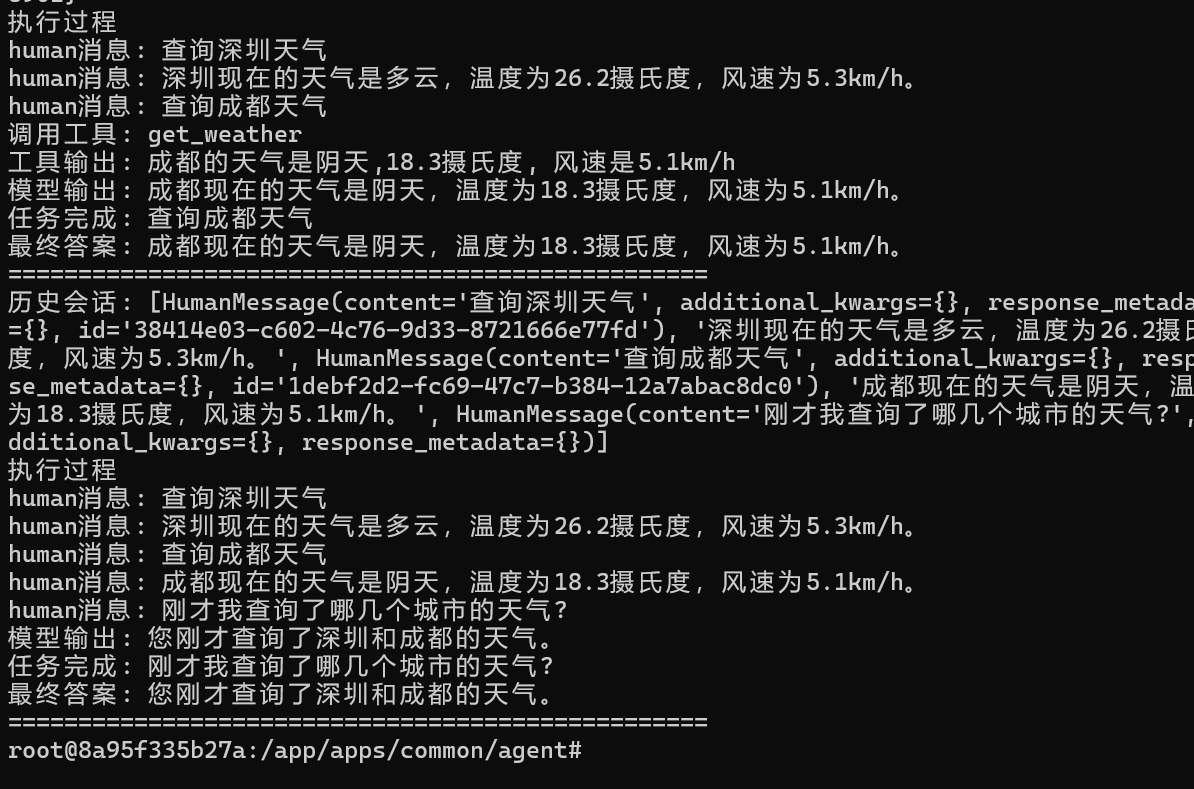
        print(f'历史会话: {history_messages}')
        result = agent.invoke({
            "messages": history_messages,
        })
        print("执行过程")
        for message in result["messages"]:
            if isinstance(message, AIMessage):
                # 检查是否调用了工具
                if hasattr(message, 'tool_calls') and message.tool_calls:
                    for tool_call in message.tool_calls:
                        print(f'调用工具: {tool_call["name"]}')
                else:
                    history_messages.append(message.content)
                    print(f'模型输出: {message.content}')
            elif isinstance(message, ToolMessage):
                print(f'工具输出: {message.content}')
            else:
                print(f'human消息: {message.content}')
        print(f'任务完成: {task}')
        print(f'最终答案: {result["messages"][-1].content}')
        print("="*50)

if __name__ == '__main__':
    demonstrate_complex_task()
三、服务端Django API流式输出
agent = build_agent()                   # 构建Agent 避免重新构建
class AgentView(APIView):
    permission_classes = [IsloginUser]
    def post(self, request):
        r_data = json.loads(request.body)
        ask_text = r_data.get('ask_text')
        print(f'用户问题:{ask_text}')
        new_messages = [HumanMessage(content=ask_text)]
        # 获取历史会话
        # 构建缓存key
        key = f'conversation:{request.user.id}'
        # 历史会话
        history_conversation = get_conversation(key) or []
        # 添加新的用户消息
        history_conversation.append({"role": "user", "content": ask_text})
        # 历史会话转换为LangChain会话
        to_ai_messages = []
        for message in history_conversation:
            print(message)
            if message["role"] == "user":
                to_ai_messages.append(HumanMessage(content=message["content"]))
            else:
                to_ai_messages.append(AIMessage(content=message["content"]))
        # 常规调用
        # result = self.agent.invoke({
        #     "messages": to_ai_messages,   # 历史会话
        # })

        # 流式调用
        def event_stream_iter():
            from langchain_core.messages import AIMessageChunk
            run_nums = 0
            full_message = ""       # 最终响应内容, 为缓存做准备
            # 遍历chunk碎片内容
            for chunk in agent.stream({"messages": to_ai_messages}, stream_mode="messages", version="v2"):
                run_nums += 1
                print(chunk)
                # chunk 结构 {'type': 'messages', 'ns': (), 'data': (AIMessageChunk(content='首先', additional_kwargs={}, response_metadata={}, id='lc_run--019d9160-7d48-7012-a263-7b1a5807ffb0', tool_calls=[], invalid_tool_calls=[], tool_call_chunks=[]), {'ls_integration': 'langchain_chat_model', 'langgraph_step': 1, 'langgraph_node': 'agent', 'langgraph_triggers': ('branch:to:agent',), 'langgraph_path': ('__pregel_pull', 'agent'), 'langgraph_checkpoint_ns': 'agent:c93bf3c1-5c5c-4688-ae4d-8db61d9cf4f9', 'checkpoint_ns': 'agent:c93bf3c1-5c5c-4688-ae4d-8db61d9cf4f9', 'ls_provider': 'ollama', 'ls_model_name': 'qwen2.5:7b', 'ls_model_type': 'chat', 'ls_temperature': 0.4})}
                if chunk['type'] == "messages":
                    token, metadata = chunk['data']
                    if token.content:
                        full_message += token.content
                        yield token.content
                        run_nums += 1

            history_conversation.append({"role": "assistant", "content": full_message})
            set_conversation(key, history_conversation)
            print(f"run_nums:{run_nums},{'*'*50}")
        # 构建流式response
        response = StreamingHttpResponse(
            event_stream_iter(),   # 迭代器
            content_type='text/event-stream'
        )
        response['Cache-Control'] = "no-cache"  # 禁用缓存
        response['X-Accel-Buffering'] = "no"    # 禁用Nginx缓存
        return response
四、前端Javascript
// Fetch + POST
async function streamAsk(ask_url, ask_text){
    const response = await fetch(ask_url, {
        method: "POST",
        headers: {
            "Content-Type": "application/json",
            // "X-CSRFToken": csrftoken, // Django 原生CSRFToken
            'Authorization': 'Token '+$.cookie(token_key)   // DRF 接口需要Authorization头, 这里为什么额外设置,因为不是AJAX请求,所以需要手动设置Authorization头
        },
        body: JSON.stringify({'ask_text':ask_text}) // 要将SSE转换成json
    })
    const reader = response.body.getReader();
    const decoder = new TextDecoder();
    text = ""
    while(true){
        const {done, value} = await reader.read();
        if(done) break;
        text += decoder.decode(value)
        $("#output_text").text(text);
        // 关键:用requestAnimationFrame确保滚动在DOM布局完成后执行
        requestAnimationFrame(() => {
            const $box = $("#output_text_box");
            $box.scrollTop($box[0].scrollHeight); // 直接取原生scrollHeight,更稳定
        });
    }
}
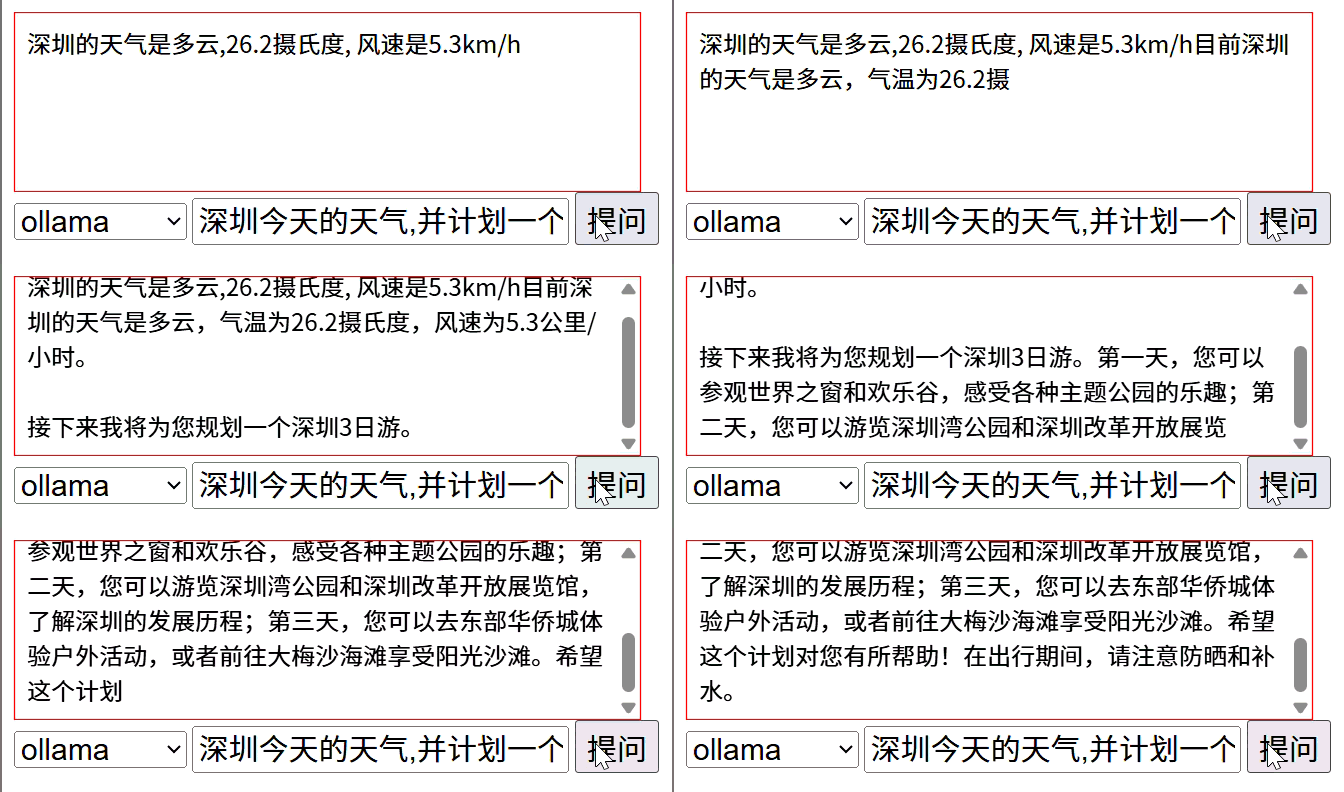
五、前端运行

欢迎加入DeepSeek 技术社区。在这里,你可以找到志同道合的朋友,共同探索AI技术的奥秘。
更多推荐



 9
9 0
0- 0


 已为社区贡献1条内容

所有评论(0)