g4f给出JavaScript调用的例子代码,让用户只要能点开网页,就能用ai
·
代码
<!DOCTYPE html>
<html lang="zh-CN">
<head>
<meta charset="UTF-8" />
<meta name="viewport" content="width=device-width, initial-scale=1.0" />
<title>G4F AI 聊天</title>
<style>
*, *::before, *::after { box-sizing: border-box; margin: 0; padding: 0; }
:root {
--bg: #0f0f13;
--surface: #1a1a24;
--surface2: #22222e;
--border: #2e2e3e;
--accent: #7c6df8;
--accent2: #a78bfa;
--user-bubble: #2d2257;
--ai-bubble: #1e2030;
--text: #e2e2f0;
--text-muted: #7878a0;
--danger: #f87171;
--success: #34d399;
--radius: 16px;
}
body {
font-family: 'Segoe UI', system-ui, -apple-system, sans-serif;
background: var(--bg);
color: var(--text);
height: 100dvh;
display: flex;
flex-direction: column;
overflow: hidden;
}
/* ── Header ── */
header {
display: flex;
align-items: center;
gap: 12px;
padding: 14px 20px;
background: var(--surface);
border-bottom: 1px solid var(--border);
flex-shrink: 0;
}
.logo {
width: 36px; height: 36px;
background: linear-gradient(135deg, var(--accent), #c084fc);
border-radius: 10px;
display: flex; align-items: center; justify-content: center;
font-size: 18px; flex-shrink: 0;
}
.header-info { flex: 1; min-width: 0; }
.header-title { font-size: 15px; font-weight: 600; }
.header-sub { font-size: 11px; color: var(--text-muted); margin-top: 1px; }
#statusDot {
width: 8px; height: 8px; border-radius: 50%;
background: #34d399; flex-shrink: 0; transition: background .3s;
}
/* ── Settings bar ── */
.settings-bar {
display: flex; gap: 8px;
padding: 10px 16px;
background: var(--surface2);
border-bottom: 1px solid var(--border);
flex-wrap: wrap; align-items: center;
flex-shrink: 0;
}
.settings-bar label { font-size: 12px; color: var(--text-muted); white-space: nowrap; }
select {
background: var(--surface); border: 1px solid var(--border);
color: var(--text); font-size: 12px; padding: 5px 10px;
border-radius: 8px; outline: none; cursor: pointer;
}
select:focus { border-color: var(--accent); }
select option { background: var(--surface2); }
.sys-prompt-toggle {
margin-left: auto;
background: none; border: 1px solid var(--border);
color: var(--text-muted); font-size: 11px; padding: 4px 10px;
border-radius: 6px; cursor: pointer; white-space: nowrap;
}
.sys-prompt-toggle:hover { border-color: var(--accent); color: var(--accent2); }
.sys-prompt-area {
display: none; padding: 8px 16px;
background: var(--surface2); border-bottom: 1px solid var(--border);
}
.sys-prompt-area textarea {
width: 100%; background: var(--surface); border: 1px solid var(--border);
color: var(--text); font-size: 12px; padding: 8px 12px;
border-radius: 8px; resize: vertical; min-height: 60px;
font-family: inherit; outline: none;
}
.sys-prompt-area textarea:focus { border-color: var(--accent); }
/* ── Messages ── */
.messages {
flex: 1; overflow-y: auto;
padding: 20px 16px;
display: flex; flex-direction: column; gap: 14px;
}
.messages::-webkit-scrollbar { width: 5px; }
.messages::-webkit-scrollbar-track { background: transparent; }
.messages::-webkit-scrollbar-thumb { background: var(--border); border-radius: 4px; }
/* Welcome */
.welcome {
text-align: center; padding: 40px 20px; color: var(--text-muted);
}
.welcome .big-icon { font-size: 52px; margin-bottom: 12px; }
.welcome h2 { font-size: 20px; color: var(--text); margin-bottom: 8px; }
.welcome p { font-size: 13px; line-height: 1.6; }
.quick-btns {
display: flex; flex-wrap: wrap; justify-content: center;
gap: 8px; margin-top: 20px;
}
.quick-btn {
background: var(--surface2); border: 1px solid var(--border);
color: var(--text-muted); font-size: 12px; padding: 7px 14px;
border-radius: 20px; cursor: pointer; transition: all .2s;
}
.quick-btn:hover { border-color: var(--accent); color: var(--accent2); background: var(--user-bubble); }
/* Message row */
.msg-row {
display: flex; gap: 10px;
max-width: 820px; width: 100%; align-self: flex-start;
}
.msg-row.user { align-self: flex-end; flex-direction: row-reverse; }
.avatar {
width: 32px; height: 32px; border-radius: 50%;
display: flex; align-items: center; justify-content: center;
font-size: 15px; flex-shrink: 0; margin-top: 2px;
}
.msg-row.user .avatar { background: linear-gradient(135deg, #4f46e5, #7c3aed); }
.msg-row.ai .avatar { background: linear-gradient(135deg, #0f766e, #0284c7); }
.bubble {
max-width: 75%; padding: 11px 15px;
border-radius: var(--radius);
font-size: 14px; line-height: 1.65; word-break: break-word;
}
.msg-row.user .bubble {
background: var(--user-bubble); border-bottom-right-radius: 4px;
border: 1px solid #3d2f7a;
}
.msg-row.ai .bubble {
background: var(--ai-bubble); border-bottom-left-radius: 4px;
border: 1px solid var(--border);
}
.bubble.error {
background: #2a0e0e; border-color: #7f1d1d; color: var(--danger);
}
/* Code inside bubbles */
.bubble pre {
background: #10101a; border: 1px solid var(--border);
border-radius: 8px; padding: 10px 12px; margin: 8px 0;
overflow-x: auto; font-size: 12.5px;
}
.bubble code { font-family: 'Fira Code','Cascadia Code','Consolas',monospace; }
.bubble strong { color: #c4b5fd; }
/* Cursor blink while streaming */
.cursor {
display: inline-block; width: 2px; height: 1em;
background: var(--accent2); margin-left: 2px;
vertical-align: text-bottom;
animation: blink .7s step-end infinite;
}
@keyframes blink { 0%,100%{opacity:1} 50%{opacity:0} }
/* Thinking dots */
.thinking { display: flex; align-items: center; gap: 4px; padding: 4px 0; }
.thinking span {
width: 7px; height: 7px; background: var(--accent);
border-radius: 50%; animation: bounce 1.2s ease-in-out infinite;
}
.thinking span:nth-child(2) { animation-delay: .15s; }
.thinking span:nth-child(3) { animation-delay: .3s; }
@keyframes bounce {
0%,80%,100% { transform: translateY(0); opacity:.5; }
40% { transform: translateY(-6px); opacity:1; }
}
.msg-meta {
font-size: 10px; color: var(--text-muted);
margin-top: 5px; padding: 0 2px;
}
.msg-row.user .msg-meta { text-align: right; }
/* ── Input area ── */
.input-area {
padding: 12px 16px 16px;
background: var(--surface);
border-top: 1px solid var(--border);
flex-shrink: 0;
}
.input-row {
display: flex; gap: 8px; align-items: flex-end;
background: var(--surface2); border: 1px solid var(--border);
border-radius: 14px; padding: 8px 8px 8px 14px;
transition: border-color .2s;
}
.input-row:focus-within { border-color: var(--accent); }
#userInput {
flex: 1; background: none; border: none;
color: var(--text); font-size: 14px; font-family: inherit;
resize: none; outline: none; max-height: 160px; min-height: 22px; line-height: 1.5;
}
#userInput::placeholder { color: var(--text-muted); }
.send-btn {
width: 36px; height: 36px;
background: linear-gradient(135deg, var(--accent), #a78bfa);
border: none; border-radius: 10px; cursor: pointer;
display: flex; align-items: center; justify-content: center;
flex-shrink: 0; transition: opacity .2s, transform .1s;
}
.send-btn:hover { opacity:.9; transform: scale(1.05); }
.send-btn:active { transform: scale(.95); }
.send-btn:disabled { opacity:.35; cursor:not-allowed; transform:none; }
.send-btn svg { width: 17px; height: 17px; fill: #fff; }
/* Stop button */
.stop-btn {
width: 36px; height: 36px; display: none;
background: #3b1414; border: 1px solid #7f1d1d;
border-radius: 10px; cursor: pointer;
align-items: center; justify-content: center;
flex-shrink: 0; transition: opacity .2s;
font-size: 15px;
}
.stop-btn:hover { opacity:.8; }
.input-footer {
display: flex; justify-content: space-between; align-items: center;
margin-top: 6px; padding: 0 2px;
}
.input-hint { font-size: 11px; color: var(--text-muted); }
.clear-btn {
background: none; border: none; color: var(--text-muted);
font-size: 11px; cursor: pointer; padding: 2px 6px; border-radius: 4px;
}
.clear-btn:hover { color: var(--danger); }
@media (max-width: 600px) {
.bubble { max-width: 90%; }
.settings-bar { gap: 6px; }
}
</style>
</head>
<body>
<header>
<div class="logo">🤖</div>
<div class="header-info">
<div class="header-title">G4F AI 聊天</div>
<div class="header-sub">由 g4f.dev 免费提供 · 无需 API Key · 流式输出</div>
</div>
<div id="statusDot" title="服务状态"></div>
</header>
<div class="settings-bar">
<label>Provider</label>
<select id="providerSelect">
<option value="default">default(自动)</option>
<option value="pollinations">pollinations</option>
<option value="deepinfra">deepinfra</option>
<option value="huggingface">huggingface</option>
<option value="puter">puter</option>
<option value="worker">worker</option>
</select>
<label style="margin-left:4px;">Model</label>
<select id="modelSelect">
<option value="auto">auto(自动选择)</option>
<option value="gpt-4o">gpt-4o</option>
<option value="gpt-4o-mini">gpt-4o-mini</option>
<option value="gpt-4">gpt-4</option>
<option value="gpt-3.5-turbo">gpt-3.5-turbo</option>
<option value="claude-3-5-sonnet">claude-3-5-sonnet</option>
<option value="claude-3-opus">claude-3-opus</option>
<option value="gemini-pro">gemini-pro</option>
<option value="gemini-1.5-flash">gemini-1.5-flash</option>
<option value="llama-3.3-70b">llama-3.3-70b</option>
<option value="mixtral-8x7b">mixtral-8x7b</option>
<option value="deepseek-v3">deepseek-v3</option>
<option value="deepseek-r1">deepseek-r1</option>
<option value="qwen-2.5-72b">qwen-2.5-72b</option>
</select>
<button class="sys-prompt-toggle" onclick="toggleSysPrompt()">⚙ 系统提示词</button>
</div>
<div class="sys-prompt-area" id="sysPromptArea">
<textarea id="sysPrompt" placeholder="输入系统提示词(可选)。例如:你是一个专业的 Python 程序员,请用中文回答所有问题。"></textarea>
</div>
<div class="messages" id="messages">
<div class="welcome" id="welcomeScreen">
<div class="big-icon">✨</div>
<h2>欢迎使用 G4F AI 聊天</h2>
<p>完全免费 · 无需注册 · 无需 API Key<br>支持流式输出,由 g4f.dev 聚合多家 AI 提供商</p>
<div class="quick-btns">
<button class="quick-btn" onclick="quickSend('你好!请介绍一下你自己')">👋 自我介绍</button>
<button class="quick-btn" onclick="quickSend('用 Python 写一个快速排序算法,并加上注释')">🐍 Python 代码</button>
<button class="quick-btn" onclick="quickSend('帮我写一篇 200 字的关于人工智能的短文')">📝 写作助手</button>
<button class="quick-btn" onclick="quickSend('翻译成英文:今天天气真好,我们出去走走吧')">🌐 中英翻译</button>
<button class="quick-btn" onclick="quickSend('解释一下什么是量子计算,用通俗易懂的语言')">🔬 科普问答</button>
<button class="quick-btn" onclick="quickSend('给我推荐 5 部科幻电影,并简要介绍每部的故事')">🎬 电影推荐</button>
</div>
</div>
</div>
<div class="input-area">
<div class="input-row">
<textarea id="userInput" rows="1" placeholder="输入消息... (Enter 发送,Shift+Enter 换行)"></textarea>
<button class="send-btn" id="sendBtn" onclick="sendMessage()" title="发送">
<svg viewBox="0 0 24 24"><path d="M2.01 21L23 12 2.01 3 2 10l15 2-15 2z"/></svg>
</button>
<button class="stop-btn" id="stopBtn" title="停止生成" onclick="stopGeneration()">⏹</button>
</div>
<div class="input-footer">
<span class="input-hint">Enter 发送 · Shift+Enter 换行 · 自动携带上下文</span>
<button class="clear-btn" onclick="clearChat()">🗑 清空对话</button>
</div>
</div>
<script type="module">
// ══════════════════════════════════════════════
// createClient 是 async 函数,必须 await!
// ══════════════════════════════════════════════
import { createClient } from 'https://g4f.dev/dist/js/providers.js';
// ── 状态 ──
let conversationHistory = [];
let isLoading = false;
let abortCtrl = null; // 用于中止流式请求
let client = null; // 延迟初始化
// ── DOM ──
const messagesEl = document.getElementById('messages');
const userInputEl = document.getElementById('userInput');
const sendBtnEl = document.getElementById('sendBtn');
const stopBtnEl = document.getElementById('stopBtn');
const providerSel = document.getElementById('providerSelect');
const modelSel = document.getElementById('modelSelect');
const sysPromptEl = document.getElementById('sysPrompt');
const statusDot = document.getElementById('statusDot');
// ── 初始化 client(async) ──
async function getClient(provider) {
setStatus('loading');
try {
// ⚠️ createClient 是 async,必须 await
const c = await createClient(provider);
setStatus('ok');
return c;
} catch (e) {
setStatus('error');
throw e;
}
}
// 预加载默认 client
getClient('default').then(c => { client = c; }).catch(() => {});
// ── Provider 切换 ──
providerSel.addEventListener('change', async () => {
client = null;
client = await getClient(providerSel.value);
showToast(`已切换 Provider: ${providerSel.value}`);
});
// ── 状态指示灯 ──
function setStatus(s) {
statusDot.style.background = s === 'ok' ? '#34d399' : s === 'error' ? '#f87171' : '#f59e0b';
statusDot.title = s === 'ok' ? '服务正常' : s === 'error' ? '连接失败' : '连接中...';
}
// ── 自适应文本框 ──
userInputEl.addEventListener('input', () => {
userInputEl.style.height = 'auto';
userInputEl.style.height = Math.min(userInputEl.scrollHeight, 160) + 'px';
});
// ── Enter 发送 ──
userInputEl.addEventListener('keydown', e => {
if (e.key === 'Enter' && !e.shiftKey) { e.preventDefault(); if (!isLoading) sendMessage(); }
});
// ── 快捷问题 ──
window.quickSend = text => { userInputEl.value = text; sendMessage(); };
// ── 停止生成 ──
window.stopGeneration = () => {
if (abortCtrl) { abortCtrl.abort(); abortCtrl = null; }
};
// ── 发送消息(流式) ──
window.sendMessage = async () => {
const text = userInputEl.value.trim();
if (!text || isLoading) return;
document.getElementById('welcomeScreen')?.remove();
userInputEl.value = '';
userInputEl.style.height = 'auto';
setLoading(true);
appendMessage('user', text);
// 确保 client 已初始化
if (!client) {
try { client = await getClient(providerSel.value); }
catch (e) {
appendError(`初始化 Provider 失败:${e?.message ?? e}\n请尝试刷新页面或切换 Provider。`);
setLoading(false); return;
}
}
// 构建消息列表
const sysContent = sysPromptEl.value.trim();
const messages = [];
if (sysContent) messages.push({ role: 'system', content: sysContent });
messages.push(...conversationHistory);
messages.push({ role: 'user', content: text });
// 创建 AI 气泡(流式写入)
const { bubbleEl, metaEl, rowEl } = createAiBubble();
let fullReply = '';
abortCtrl = new AbortController();
try {
const model = modelSel.value;
// ── 流式请求 ──
const stream = await client.chat.completions.create({
model,
messages,
stream: true,
signal: abortCtrl.signal,
});
for await (const chunk of stream) {
const delta = chunk?.choices?.[0]?.delta?.content ?? '';
if (delta) {
fullReply += delta;
renderBubble(bubbleEl, fullReply, true); // true = 显示光标
scrollToBottom();
}
}
// 流结束,移除光标
renderBubble(bubbleEl, fullReply, false);
const provider = stream?.provider ?? providerSel.value;
metaEl.textContent = `${timeStr()} · ${provider} / ${model}`;
setStatus('ok');
} catch (err) {
if (err?.name === 'AbortError') {
renderBubble(bubbleEl, fullReply || '(已停止)', false);
metaEl.textContent = `${timeStr()} · 已手动停止`;
} else {
console.error(err);
rowEl.remove();
appendError(
`请求失败:${err?.message ?? err}\n\n` +
`💡 排查建议:\n` +
` 1. 尝试切换其他 Provider(如 pollinations)\n` +
` 2. 尝试切换 Model 为 auto\n` +
` 3. 检查网络是否能访问 g4f.dev\n` +
` 4. 等待 10 秒后重试(免费服务有限速)`
);
setStatus('error');
}
}
// 保存历史
if (fullReply) {
conversationHistory.push(
{ role: 'user', content: text },
{ role: 'assistant', content: fullReply }
);
if (conversationHistory.length > 40) conversationHistory = conversationHistory.slice(-40);
}
abortCtrl = null;
setLoading(false);
scrollToBottom();
};
// ── 清空对话 ──
window.clearChat = () => {
conversationHistory = [];
messagesEl.innerHTML = '';
const wc = document.createElement('div');
wc.id = 'welcomeScreen'; wc.className = 'welcome';
wc.innerHTML = `<div class="big-icon">✨</div><h2>对话已清空</h2><p>上下文已重置,开始新对话吧!</p>`;
messagesEl.appendChild(wc);
};
// ── 系统提示词切换 ──
window.toggleSysPrompt = () => {
const a = document.getElementById('sysPromptArea');
a.style.display = a.style.display === 'block' ? 'none' : 'block';
};
// ─────────────── 工具函数 ───────────────
function setLoading(val) {
isLoading = val;
sendBtnEl.style.display = val ? 'none' : 'flex';
stopBtnEl.style.display = val ? 'flex' : 'none';
userInputEl.disabled = val;
}
function appendMessage(role, content) {
const row = document.createElement('div');
row.className = `msg-row ${role}`;
const avatar = document.createElement('div');
avatar.className = 'avatar';
avatar.textContent = role === 'user' ? '🧑' : '🤖';
const wrapper = document.createElement('div');
const bubble = document.createElement('div');
bubble.className = 'bubble';
bubble.innerHTML = formatContent(content);
const meta = document.createElement('div');
meta.className = 'msg-meta';
meta.textContent = timeStr() + (role === 'ai' ? ` · ${providerSel.value} / ${modelSel.value}` : '');
wrapper.appendChild(bubble);
wrapper.appendChild(meta);
row.appendChild(avatar);
row.appendChild(wrapper);
messagesEl.appendChild(row);
scrollToBottom();
}
function createAiBubble() {
const row = document.createElement('div');
row.className = 'msg-row ai';
const avatar = document.createElement('div');
avatar.className = 'avatar'; avatar.textContent = '🤖';
const wrapper = document.createElement('div');
const bubble = document.createElement('div');
bubble.className = 'bubble';
bubble.innerHTML = '<div class="thinking"><span></span><span></span><span></span></div>';
const meta = document.createElement('div');
meta.className = 'msg-meta'; meta.textContent = '生成中...';
wrapper.appendChild(bubble); wrapper.appendChild(meta);
row.appendChild(avatar); row.appendChild(wrapper);
messagesEl.appendChild(row);
scrollToBottom();
return { bubbleEl: bubble, metaEl: meta, rowEl: row };
}
function renderBubble(el, text, showCursor) {
el.innerHTML = formatContent(text) + (showCursor ? '<span class="cursor"></span>' : '');
}
function appendError(msg) {
const row = document.createElement('div');
row.className = 'msg-row ai';
row.innerHTML = `<div class="avatar">⚠️</div>
<div>
<div class="bubble error"><pre style="white-space:pre-wrap;font-family:inherit;font-size:13px">${escHtml(msg)}</pre></div>
<div class="msg-meta">${timeStr()}</div>
</div>`;
messagesEl.appendChild(row);
scrollToBottom();
}
function scrollToBottom() {
requestAnimationFrame(() => { messagesEl.scrollTop = messagesEl.scrollHeight; });
}
function timeStr() {
const d = new Date();
return `${d.getHours().toString().padStart(2,'0')}:${d.getMinutes().toString().padStart(2,'0')}`;
}
function escHtml(s) {
return s.replace(/&/g,'&').replace(/</g,'<').replace(/>/g,'>');
}
// 简易 Markdown → HTML
function formatContent(text) {
text = text.replace(/```(\w*)\n?([\s\S]*?)```/g,
(_, lang, code) => `<pre><code>${escHtml(code.trim())}</code></pre>`);
text = text.replace(/`([^`\n]+)`/g, '<code>$1</code>');
text = text.replace(/\*\*(.+?)\*\*/g, '<strong>$1</strong>');
text = text.replace(/\*(.+?)\*/g, '<em>$1</em>');
text = text.replace(/\n/g, '<br>');
return text;
}
function showToast(msg) {
const t = document.createElement('div');
Object.assign(t.style, {
position:'fixed', bottom:'80px', left:'50%', transform:'translateX(-50%)',
background:'#2e2e3e', color:'#e2e2f0', padding:'8px 18px',
borderRadius:'20px', fontSize:'13px', zIndex:'999',
boxShadow:'0 4px 16px rgba(0,0,0,.4)', pointerEvents:'none',
});
t.textContent = msg;
document.body.appendChild(t);
setTimeout(() => t.remove(), 2200);
}
userInputEl.focus();
</script>
</body>
</html>
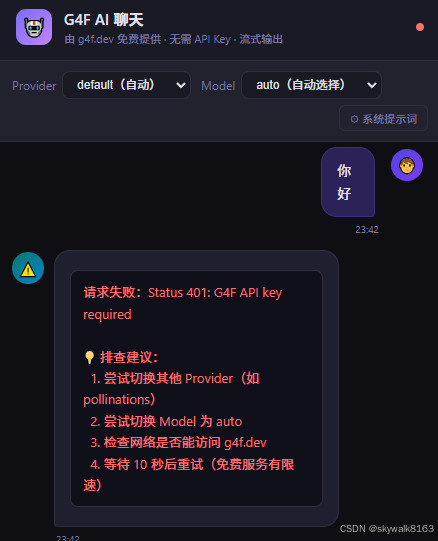
还是报错
请求失败:Status 401: G4F API key required

💡 排查建议:
  1. 尝试切换其他 Provider(如 pollinations)
  2. 尝试切换 Model 为 auto
  3. 检查网络是否能访问 g4f.dev
  4. 等待 10 秒后重试(免费服务有限速)
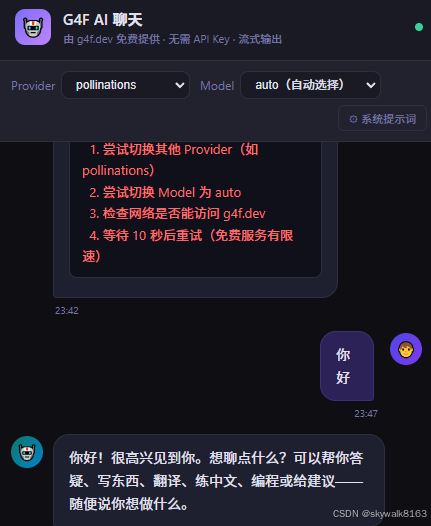
哇塞,将模型提供商换成pollinations
竟然成功了!

欢迎加入DeepSeek 技术社区。在这里,你可以找到志同道合的朋友,共同探索AI技术的奥秘。
更多推荐

 2
2 0
0- 0


 已为社区贡献12条内容

所有评论(0)