Spring-Ai-Alibaba [01] helloworld-Demo
·
Spring-Ai-Alibaba [01] helloworld-Demo
概述
本文是 Spring AI Alibaba 框架学习系列第一篇,从零搭建一个最基础、可直接运行的 HelloWorld 入门级 Demo。
代码上传至 Gitee:https://gitee.com/xbjct/spring-ai-alibaba-demo
运行环境
- 基础框架: Spring Boot 3.5.14
- AI 框架: Spring AI 1.1.2 + Spring AI Alibaba 1.1.2.2
- 大模型: 阿里云通义千问 (qwen-plus)
- 构建工具: Maven
- JDK 版本: JDK 17+
项目结构
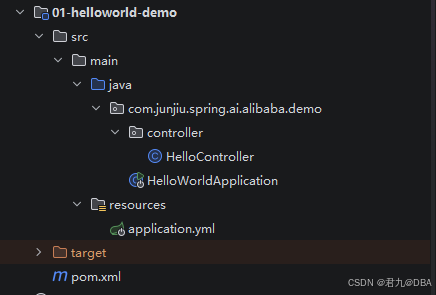
POM.XML
<project xmlns="http://maven.apache.org/POM/4.0.0" xmlns:xsi="http://www.w3.org/2001/XMLSchema-instance"
         xsi:schemaLocation="http://maven.apache.org/POM/4.0.0 http://maven.apache.org/xsd/maven-4.0.0.xsd">
    <modelVersion>4.0.0</modelVersion>
    <parent>
        <groupId>com.junjiu.spring.ai.alibaba.demo</groupId>
        <artifactId>Spring-AI-Alibaba-Demo</artifactId>
        <version>1.0-SNAPSHOT</version>
    </parent>

    <artifactId>01-helloworld-demo</artifactId>
    <packaging>jar</packaging>

    <name>01-helloworld-demo</name>
    <url>http://maven.apache.org</url>

    <properties>
        <project.build.sourceEncoding>UTF-8</project.build.sourceEncoding>
    </properties>

</project>
application.yml 配置文件
server:
  port: 5826
  servlet:
    # 解决流式中文对话乱码问题.
    encoding:
      charset: utf-8
      enabled: true
      force: true

spring:
  application:
    name: 01-helloworld-demo
  ai:
    dashscope:
      base-url: https://dashscope.aliyuncs.com
      api-key: ${AIALI_API_KEY}
      chat:
        options:
          model: qwen-plus
controller 层
package com.junjiu.spring.ai.alibaba.demo.controller;

import org.springframework.ai.chat.model.ChatModel;
import org.springframework.beans.factory.annotation.Autowired;
import org.springframework.web.bind.annotation.GetMapping;
import org.springframework.web.bind.annotation.RequestMapping;
import org.springframework.web.bind.annotation.RequestParam;
import org.springframework.web.bind.annotation.RestController;
import reactor.core.publisher.Flux;

/**
 * program: Spring-AI-Alibaba-Demo
 * ClassName: HelloController
 * description:
 *
 * @author: 君九
 * @create: 2026-05-18 01:05
 * @version: 1.0
 **/
@RestController
@RequestMapping("/hello")
public class HelloController {

    @Autowired
    private ChatModel chatModel;

    /**
     * 聊天对话.
     * @param message
     * @return
     */
    @GetMapping("/chat")
    public String chat(@RequestParam(name = "message", defaultValue = "你好") String message) {
        return chatModel.call(message);
    }

    /**
     * 聊天对话.
     * @param message
     * @return
     */
    @GetMapping("/streamChat")
    public Flux<String> streamChat(@RequestParam(name = "message", defaultValue = "你好") String message) {
        return chatModel.stream(message);
    }

}
package com.junjiu.spring.ai.alibaba.demo;

import org.springframework.boot.SpringApplication;
import org.springframework.boot.autoconfigure.SpringBootApplication;
import org.springframework.boot.context.event.ApplicationReadyEvent;
import org.springframework.context.ApplicationListener;
import org.springframework.context.annotation.Bean;
import org.springframework.core.env.Environment;

/**
 * program: Spring-AI-Alibaba-Demo
 * ClassName: HelloWorldApplication
 * description:
 *
 * @author: 君九
 * @create: 2026-05-18 00:59
 * @version: 1.0
 **/
@SpringBootApplication
public class HelloWorldApplication {

    public static void main(String[] args) {
        SpringApplication.run(HelloWorldApplication.class, args);
    }

    @Bean
    public ApplicationListener<ApplicationReadyEvent> readyEventApplicationListener(Environment env) {
        return event -> {
            System.out.println("\n🎉========================================🎉");
            System.out.println("✅ Application is ready!");
            System.out.println("AIALI_API_KEY=" + System.getenv("AIALI_API_KEY"));
            System.out.println("🎉========================================🎉\n");
        };
    }

}
验证
打开浏览器访问:
-
基本对话:http://localhost:5826/hello/chat


-
流式对话



欢迎加入DeepSeek 技术社区。在这里,你可以找到志同道合的朋友,共同探索AI技术的奥秘。
更多推荐


 5
5 0
0- 0


 已为社区贡献1条内容

所有评论(0)