豆包生成C#微博API HTTP调用实例代码
很早的时候就想实现调用微博API,定时发微博的功能。一直没有理解OAuth2的授权流程,所以一直搁置着。最近AI帮助生成代码,不仅实现功能,还帮助理解了OAuth2的授权流程。我觉得难点在于几个不同类型的Token(或者Code)。下面介绍一下我从开发到部署的全流程。
前期准备:
1. 你要创建一个新应用,我这里选的是网页应用。创建好之后,会得到两个重要的信息。1. App Key; 2. App Secret. 注意这里Secret一定要妥善保存,不能泄露,一旦泄露,及时在Weibo开放平台重置。
2. 在高级信息里,有一个OAuth2.0授权设置,这里你要填入授权回调页和取消授权回调页。这里你需要填入一个网址。这里可能会劝退大部分同学,因为不是所有人都有自己的网站,所以这里就不清楚要填什么网址。其实这里可以任意填一个符合格式的网址,比如https://abc.com。这个网址是用于后续OAuth2.0授权第一步里设置授权回调地址。这里我就以https://abc.com为例。注意,这里你填的是https://abc.com,那么下面你设置redirect_uri的时候就必须是https://abc.com。否则,会报回调地址和开发平台上信息不一致的错误。
3. 这些信息很重要,都是用于微博OAuth2.0认证授权的。有人问为什么需要认证授权?如果没有这些授权,每个人都能任意调用微博API,那么微博上发布的内容将无法管理。有了认证授权,你虽然是调用的API,但是用的你微博的身份调用的API。
开发步骤:
1. 使用豆包,生成C#代码。首先是WeiboApiConfig工具类。这里要注意的是:
- RedirectUri必须填你在Weibo开发平台上的授权回调页。这里的例子就是https://abc.com。
- 注意三个Url,一个是AuthorizeUrl,这个是请求用户授权码(Code);一个是AccessTokenUrl,这个是获得了用户授权码(Code)后,调用得到访问令牌(AccessToken),有了这个AccessToken,你才能调用微博API;还有一个是CommentCreateUrl,这个就是发微博的EndPoint,这里,我只有评论微博API权限。据说发微博的权限非常高,难申请。
- 发微博的时候,有个参数要填IP,改成自己的IP就可以。
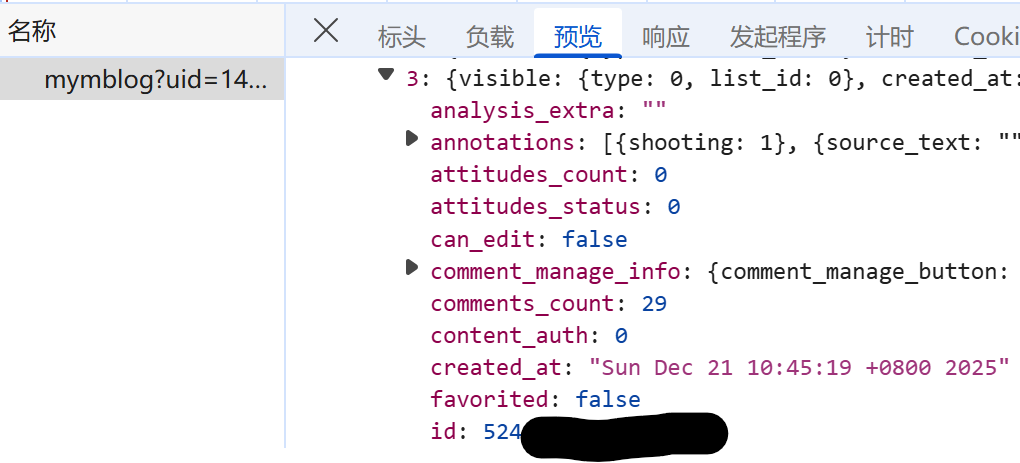
- 发微博的时候,有个参数是WeiboId,这里是你要评论的WeiboId。我下面有个图告诉你怎么找WeiboId。
class WeiboApiConfig
{
    public const string AppKey = "";
    public const string AppSecret = "";
    public const string RedirectUri = "https://abc.com"; // 注意这里一定要和微博开发平台上填的一致。

    // 微博API地址
    public const string AuthorizeUrl = "https://api.weibo.com/oauth2/authorize";
    public const string AccessTokenUrl = "https://api.weibo.com/oauth2/access_token";
    public const string CommentCreateUrl = "https://api.weibo.com/2/comments/create.json";

    public string GetAuthorizeUrl()
    {
        var url = $"{WeiboApiConfig.AuthorizeUrl}?client_id={WeiboApiConfig.AppKey}&redirect_uri={Uri.EscapeDataString(WeiboApiConfig.RedirectUri)}&response_type=code";
        return url;
    }

    /// <summary>
    /// 获取Access Token
    /// </summary>
    /// <param name="code">授权码</param>
    /// <returns>AccessToken信息</returns>
    public async Task<WeiboAccessToken> GetAccessTokenAsync(string code)
    {
        using var httpClient = new HttpClient();
        var parameters = new FormUrlEncodedContent(new[]
        {
    new KeyValuePair<string, string>("client_id", WeiboApiConfig.AppKey),
    new KeyValuePair<string, string>("client_secret", WeiboApiConfig.AppSecret),
    new KeyValuePair<string, string>("grant_type", "authorization_code"),
    new KeyValuePair<string, string>("code", code),
    new KeyValuePair<string, string>("redirect_uri", WeiboApiConfig.RedirectUri)
});

        var response = await httpClient.PostAsync(WeiboApiConfig.AccessTokenUrl, parameters);
        response.EnsureSuccessStatusCode();
        var json = await response.Content.ReadAsStringAsync();
        return JsonConvert.DeserializeObject<WeiboAccessToken>(json);
    }

    // AccessToken实体类
    public class WeiboAccessToken
    {
        [JsonProperty("access_token")]
        public string AccessToken { get; set; } // 访问令牌
        [JsonProperty("expires_in")]
        public int ExpiresIn { get; set; } // 过期时间(秒)
        [JsonProperty("uid")]
        public string Uid { get; set; } // 用户ID
    }

    // 微博发布结果实体类
    public class WeiboPostResult
    {
        [JsonProperty("created_at")]
        public string CreatedAt { get; set; } // 发布时间
        [JsonProperty("id")]
        public long Id { get; set; } // 微博ID
        [JsonProperty("text")]
        public string Text { get; set; } // 微博内容
        [JsonProperty("error_code")]
        public int ErrorCode { get; set; } // 错误码(成功时无此字段)
        [JsonProperty("error")]
        public string Error { get; set; } // 错误信息(成功时无此字段)
    }

    /// <summary>
    /// 评论创建
    /// </summary>
    /// <param name="accessToken">访问令牌</param>
    /// <param name="content">微博内容(需符合微博规范,不超过140字)</param>
    /// <returns>发布结果</returns>
    public async Task<WeiboPostResult> PostWeiboCommentAsync(string accessToken, string content, string weiboId, string rip)
    {
        if (string.IsNullOrEmpty(content) || content.Length > 140)
        {
            throw new ArgumentException("微博内容不能为空且不超过140字");
        }

        using var httpClient = new HttpClient();
        var parameters = new FormUrlEncodedContent(new[]
        {
    new KeyValuePair<string, string>("access_token", accessToken),
    new KeyValuePair<string, string>("comment", content),
    new KeyValuePair<string, string>("id", weiboId),
    new KeyValuePair<string, string>("rip", rip)
        });

        var response = await httpClient.PostAsync(WeiboApiConfig.CommentCreateUrl, parameters);
        var json = await response.Content.ReadAsStringAsync();

        if (!response.IsSuccessStatusCode)
        {
            throw new Exception($"Post failed: {json}");
        }

        return JsonConvert.DeserializeObject<WeiboPostResult>(json);
    }

}
2. 调用Main。这里注意把WeiboId,IP换成自己的Id, IP。
try
{
    var weiboApi = new WeiboApiConfig();

    // 1. 生成授权URL,用户访问后获取code
    var authorizeUrl = weiboApi.GetAuthorizeUrl();
    Console.WriteLine($"请访问以下URL授权:{authorizeUrl}");
    Console.Write("请输入授权后的code:");
    var code = Console.ReadLine();

    // 2. 获取Access Token
    var accessTokenInfo = await weiboApi.GetAccessTokenAsync(code);
    Console.WriteLine($"获取AccessToken成功:{accessTokenInfo.AccessToken}");

    accessToken = accessTokenInfo.AccessToken;

    // 3. 发布微博
    var result = await weiboApi.PostWeiboCommentAsync(accessToken, "测试自动发评论", "WeiboId", "8.8.8.8"); // 注意这里把WeiboId换成你想要回复的Id, IP换成自己的IP.
    Console.WriteLine($"Success. WeiboID:{result.Id},Post time:{result.CreatedAt}");
}
catch (Exception ex)
{
    Console.WriteLine($"Error: {ex.Message}");
}
3. 运行程序

在浏览器里访问控制台打印出来的URL,这个时候,你可能需要输入微博用户名/密码登录,或者用微博扫网页上出现的二维码登陆。这个时候,他会告诉你,你授权你创建的应用访问微博API。登录完成,浏览器会重定向到你填写的redirect_uri,这里比如是https://abc.com。你浏览器中的地址是:https://abc.com?Code=12345678。
4. 把12345678输入到控制台,回车继续。这时候,带着Code,开始调用AccessToken Url。调用AccessToken Url成功会返回AccessToken,还有AccessToken过期的时间。这里有个奇怪的地方,我看到的返回AccessToken的过期时间很长(5年)。可能我错了,我的程序才跑了一天,目前没有问题。
5. 有了AccessToken,调用微博发送评论API,成功发送。
自动化发送:
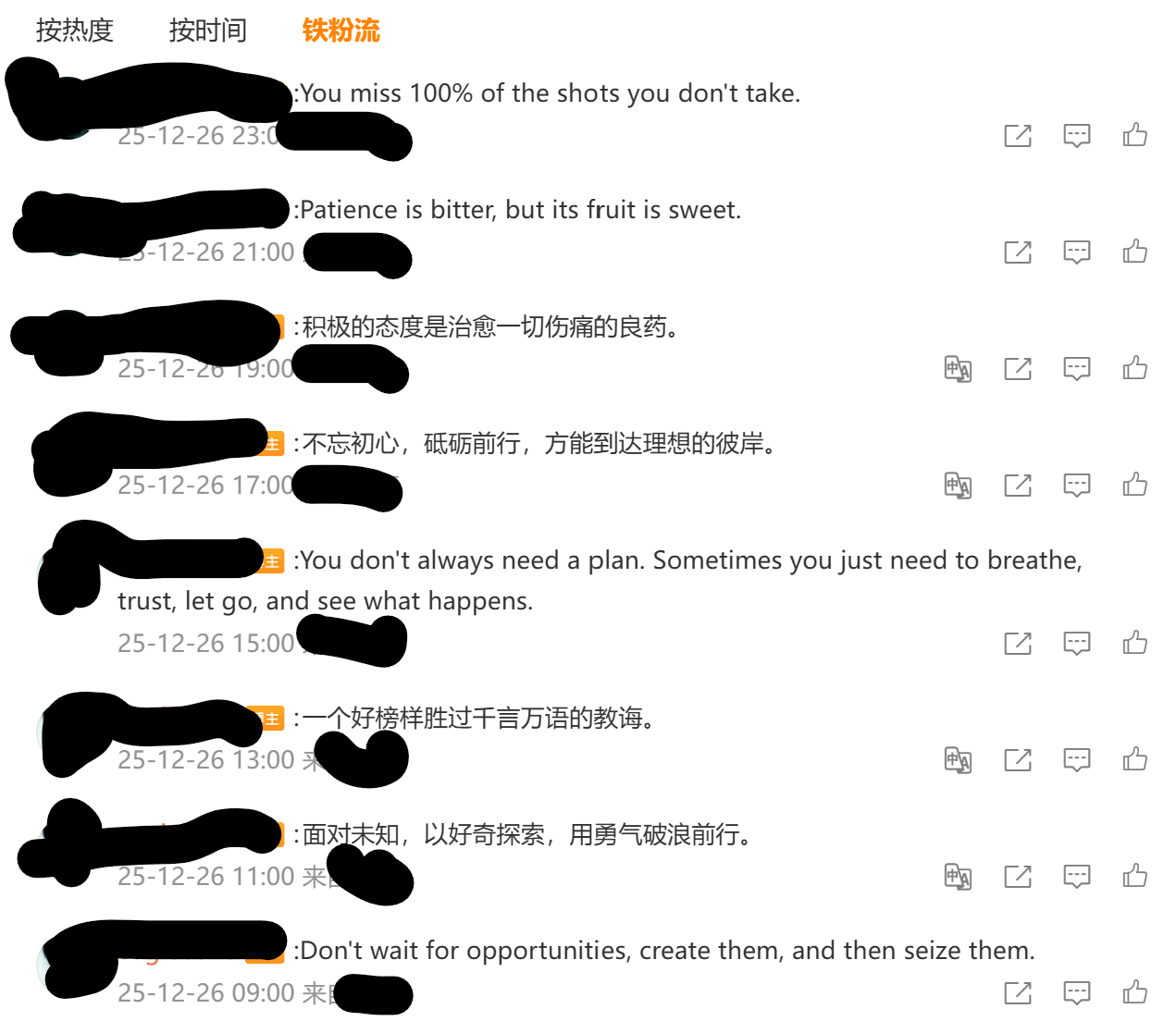
如果AccessToken过期时间短暂,那么自动化可能没有那么容易。需要定期登录,在回调页里实现获取并保存AccessToken供自动化程序使用。但是现在,我的Token是5年过期,所以我就暂时用这个Token。用Scheduled Task把这个C#程序配了上去,每个2小时评论一次。效果如下:
附录,如何获得微博Id:
网页打开自己的微博,然后点击查看自己的微博,同时F12打开浏览器开发者工具->网络,查找mymblob?uid=...的request,看预览里找某条微博,这里的id就是WeiboId。

欢迎加入DeepSeek 技术社区。在这里,你可以找到志同道合的朋友,共同探索AI技术的奥秘。
更多推荐
 25
25 0
0- 0


 已为社区贡献1条内容

所有评论(0)