C++ libcurl 连接豆包 分析文件
·
一、文件处理器基础类
这个类负责读取文件夹中的文件列表:
// FileProcessor.h
#ifndef FILEPROCESSOR_H
#define FILEPROCESSOR_H

#include <string>
#include <vector>
#include <fstream>
#include <iostream>
#include <algorithm>
#include <sstream>
#include <iomanip>
#include <chrono>
#include <ctime>
#include <cctype>

#ifdef _WIN32
#include <windows.h>
#include <direct.h>   // for _mkdir, _rmdir
#include <io.h>       // for _access
#define PATH_SEPARATOR '\\'
#define MKDIR(path) _mkdir(path)
#define ACCESS(path, mode) _access(path, mode)
#define STAT(path, buffer) _stat(path, buffer)
#define STAT_STRUCT struct _stat
#else
#include <sys/stat.h>
#include <unistd.h>
#include <dirent.h>
#include <cstring>
#define PATH_SEPARATOR '/'
#define MKDIR(path) mkdir(path, 0755)
#define ACCESS(path, mode) access(path, mode)
#define STAT(path, buffer) stat(path, buffer)
#define STAT_STRUCT struct stat
#endif

class FileProcessor {
private:
std::string folderPath;

// 辅助函数:检查路径是否存在
bool pathExists(const std::string& path) const;

// 辅助函数:判断是否为目录
bool isDirectory(const std::string& path) const;

// 辅助函数:获取文件大小
long getFileSize(const std::string& filePath) const;

public:
// 构造函数
FileProcessor(const std::string& path = ".");

// 获取文件夹路径
std::string getFolderPath() const;

// 设置文件夹路径
bool setFolderPath(const std::string& path);

// 获取文件夹中所有文件的路径
std::vector<std::string> getAllFiles() const;

// 获取特定扩展名的文件
std::vector<std::string> getFilesByExtension(const std::string& extension) const;

// 检查文件是否存在
bool fileExists(const std::string& filePath) const;

// 读取文件内容(文本文件)
std::string readTextFile(const std::string& filePath, size_t maxSize = 10 * 1024 * 1024) const;

// 读取二进制文件内容
std::vector<char> readBinaryFile(const std::string& filePath) const;

// 获取文件扩展名(小写)
std::string getFileExtension(const std::string& filePath) const;

// 判断是否为文本文件
bool isTextFile(const std::string& filePath) const;

// 获取文件大小(以KB/MB为单位)
std::string getFileSizeFormatted(const std::string& filePath) const;

// 获取文件名(不含路径)
std::string getFileName(const std::string& filePath) const;

// 打印文件列表
void printFileList() const;

// 打印文件详细信息
void printFileDetails() const;

// 创建目录
static bool createDirectory(const std::string& path);

// 删除文件
bool deleteFile(const std::string& filePath) const;

// 统计文件信息
void getFileStats(size_t& totalFiles, size_t& textFiles,
size_t& totalSize, size_t& textSize) const;

// 获取文件最后修改时间
std::string getFileModificationTime(const std::string& filePath) const;

private:
// Windows平台特定的文件列表获取函数
std::vector<std::string> getAllFilesWindows() const;

// 非Windows平台特定的文件列表获取函数
std::vector<std::string> getAllFilesUnix() const;
};

#endif // FILEPROCESSOR_H
// FileProcessor.cpp
#include "FileProcessor.h"
#include <chrono>
#include <iomanip>
#include <sstream>
#include <cstring>
#pragma warning(disable:4996)
#pragma execution_character_set("utf-8")
// 构造函数
FileProcessor::FileProcessor(const std::string& path) {
setFolderPath(path);
}
// 获取文件夹路径
std::string FileProcessor::getFolderPath() const {
return folderPath;
}
// 设置文件夹路径
bool FileProcessor::setFolderPath(const std::string& path) {
if (pathExists(path) && isDirectory(path)) {
folderPath = path;
// 确保路径以分隔符结尾
if (!folderPath.empty() && folderPath.back() != PATH_SEPARATOR) {
folderPath += PATH_SEPARATOR;
}
return true;
}
std::cerr << "错误:路径 '" << path << "' 不存在或不是目录" << std::endl;
return false;
}
// 检查路径是否存在
bool FileProcessor::pathExists(const std::string& path) const {
return ACCESS(path.c_str(), 0) == 0;
}
// 判断是否为目录
bool FileProcessor::isDirectory(const std::string& path) const {
STAT_STRUCT pathStat;
if (STAT(path.c_str(), &pathStat) != 0) {
return false;
}
#ifdef _WIN32
return (pathStat.st_mode & _S_IFDIR) != 0;
#else
return S_ISDIR(pathStat.st_mode);
#endif
}
// 获取文件大小
long FileProcessor::getFileSize(const std::string& filePath) const {
STAT_STRUCT stat_buf;
int rc = STAT(filePath.c_str(), &stat_buf);
return rc == 0 ? stat_buf.st_size : -1;
}
// Windows平台获取文件列表
std::vector<std::string> FileProcessor::getAllFilesWindows() const {
std::vector<std::string> files;
if (folderPath.empty()) {
std::cerr << "错误:文件夹路径未设置" << std::endl;
return files;
}
// 使用ANSI版本的Windows API,避免宽字符问题
std::string searchPath = folderPath + "*.*";
WIN32_FIND_DATAA findFileData;
HANDLE hFind = FindFirstFileA(searchPath.c_str(), &findFileData);
if (hFind == INVALID_HANDLE_VALUE) {
std::cerr << "错误:无法打开文件夹 '" << folderPath << "'" << std::endl;
return files;
}
do {
// 跳过 "." 和 ".."
if (strcmp(findFileData.cFileName, ".") == 0 || strcmp(findFileData.cFileName, "..") == 0) {
continue;
}
std::string filePath = folderPath + findFileData.cFileName;
// 只添加普通文件,跳过目录
if (!(findFileData.dwFileAttributes & FILE_ATTRIBUTE_DIRECTORY)) {
files.push_back(filePath);
}
} while (FindNextFileA(hFind, &findFileData) != 0);
FindClose(hFind);
return files;
}
// 非Windows平台获取文件列表
std::vector<std::string> FileProcessor::getAllFilesUnix() const {
std::vector<std::string> files;
if (folderPath.empty()) {
std::cerr << "错误:文件夹路径未设置" << std::endl;
return files;
}
#ifdef _WIN32
// 如果编译到Windows但调用了Unix版本,使用Windows版本
return getAllFilesWindows();
#else
// Linux/Mac平台实现
DIR* dir = opendir(folderPath.c_str());
if (dir == nullptr) {
std::cerr << "错误:无法打开文件夹 '" << folderPath << "'" << std::endl;
return files;
}
struct dirent* entry;
while ((entry = readdir(dir)) != nullptr) {
// 跳过 "." 和 ".."
if (strcmp(entry->d_name, ".") == 0 || strcmp(entry->d_name, "..") == 0) {
continue;
}
std::string filePath = folderPath + entry->d_name;
// 只添加普通文件,跳过目录
STAT_STRUCT fileStat;
if (STAT(filePath.c_str(), &fileStat) == 0) {
bool isRegularFile = S_ISREG(fileStat.st_mode);
if (isRegularFile) {
files.push_back(filePath);
}
}
}
closedir(dir);
return files;
#endif
}
// 获取文件夹中所有文件的路径
std::vector<std::string> FileProcessor::getAllFiles() const {
#ifdef _WIN32
return getAllFilesWindows();
#else
return getAllFilesUnix();
#endif
}
// 获取特定扩展名的文件
std::vector<std::string> FileProcessor::getFilesByExtension(const std::string& extension) const {
std::vector<std::string> allFiles = getAllFiles();
std::vector<std::string> filteredFiles;
std::string extLower = extension;
std::transform(extLower.begin(), extLower.end(), extLower.begin(), ::tolower);
for (const auto& file : allFiles) {
std::string fileExt = getFileExtension(file);
if (fileExt == extLower) {
filteredFiles.push_back(file);
}
}
return filteredFiles;
}
// 检查文件是否存在
bool FileProcessor::fileExists(const std::string& filePath) const {
STAT_STRUCT pathStat;
if (STAT(filePath.c_str(), &pathStat) != 0) {
return false;
}
#ifdef _WIN32
return (pathStat.st_mode & _S_IFREG) != 0; // 是普通文件
#else
return S_ISREG(pathStat.st_mode); // 是普通文件
#endif
}
// 读取文件内容(文本文件)
std::string FileProcessor::readTextFile(const std::string& filePath, size_t maxSize) const {
// 检查文件大小
long fileSize = getFileSize(filePath);
if (fileSize == -1) {
std::cerr << "错误:无法获取文件大小 '" << filePath << "'" << std::endl;
return "";
}
if (fileSize > maxSize) {
std::cerr << "警告:文件 '" << filePath << "' 大小(" << fileSize
<< "字节)超过限制(" << maxSize << "字节),将被截断读取" << std::endl;
}
std::ifstream file(filePath, std::ios::binary);
if (!file.is_open()) {
std::cerr << "错误:无法打开文件 '" << filePath << "'" << std::endl;
return "";
}
std::string content;
char buffer[4096];
size_t bytesRead = 0;
while (file.read(buffer, sizeof(buffer)) || file.gcount() > 0) {
size_t count = file.gcount();
if (bytesRead + count > maxSize) {
count = maxSize - bytesRead;
if (count <= 0) break;
}
content.append(buffer, count);
bytesRead += count;
if (bytesRead >= maxSize) break;
}
file.close();
return content;
}
// 读取二进制文件内容
std::vector<char> FileProcessor::readBinaryFile(const std::string& filePath) const {
std::vector<char> data;
std::ifstream file(filePath, std::ios::binary | std::ios::ate);
if (!file.is_open()) {
std::cerr << "错误:无法打开文件 '" << filePath << "'" << std::endl;
return data;
}
std::streamsize size = file.tellg();
file.seekg(0, std::ios::beg);
data.resize(size);
if (!file.read(data.data(), size)) {
std::cerr << "错误:读取文件 '" << filePath << "' 失败" << std::endl;
data.clear();
}
file.close();
return data;
}
// 获取文件扩展名(小写)
std::string FileProcessor::getFileExtension(const std::string& filePath) const {
size_t dotPos = filePath.find_last_of('.');
if (dotPos == std::string::npos) {
return "";
}
std::string ext = filePath.substr(dotPos);
std::transform(ext.begin(), ext.end(), ext.begin(), ::tolower);
return ext;
}
// 判断是否为文本文件
bool FileProcessor::isTextFile(const std::string& filePath) const {
std::string ext = getFileExtension(filePath);
// 常见的文本文件扩展名
const std::vector<std::string> textExtensions = {
".txt", ".cpp", ".h", ".hpp", ".c", ".cc", ".py",
".java", ".js", ".html", ".css", ".xml", ".json",
".md", ".csv", ".log", ".ini", ".cfg", ".conf",
".yaml", ".yml", ".toml", ".sql", ".sh", ".bat",
".php", ".rb", ".go", ".rs", ".swift", ".kt",
".asm", ".s", ".pas", ".vb", ".cs", ".fs"
};
return std::find(textExtensions.begin(), textExtensions.end(), ext) != textExtensions.end();
}
// 获取文件大小(格式化显示)
std::string FileProcessor::getFileSizeFormatted(const std::string& filePath) const {
long size = getFileSize(filePath);
if (size == -1) {
return "未知大小";
}
std::stringstream ss;
if (size < 1024) {
ss << size << " B";
}
else if (size < 1024 * 1024) {
ss << std::fixed << std::setprecision(2) << (size / 1024.0) << " KB";
}
else {
ss << std::fixed << std::setprecision(2) << (size / (1024.0 * 1024.0)) << " MB";
}
return ss.str();
}
// 获取文件名(不含路径)
std::string FileProcessor::getFileName(const std::string& filePath) const {
size_t separatorPos = filePath.find_last_of("/\\");
if (separatorPos == std::string::npos) {
return filePath;
}
return filePath.substr(separatorPos + 1);
}
// 打印文件列表
void FileProcessor::printFileList() const {
std::vector<std::string> files = getAllFiles();
if (files.empty()) {
std::cout << "文件夹 '" << folderPath << "' 中没有文件。" << std::endl;
return;
}
std::cout << "文件夹 '" << folderPath << "' 中的文件列表:" << std::endl;
std::cout << "==================================================" << std::endl;
for (size_t i = 0; i < files.size(); ++i) {
std::string fileName = getFileName(files[i]);
std::string fileSize = getFileSizeFormatted(files[i]);
std::string fileType = isTextFile(files[i]) ? "文本" : "二进制";
std::cout << std::setw(3) << std::right << i + 1 << ". "
<< std::setw(30) << std::left << fileName
<< " 大小: " << std::setw(10) << fileSize
<< " 类型: " << fileType
<< " 扩展名: " << getFileExtension(files[i])
<< std::endl;
}
std::cout << "==================================================" << std::endl;
std::cout << "总计: " << files.size() << " 个文件" << std::endl;
}
// 打印文件详细信息
void FileProcessor::printFileDetails() const {
std::vector<std::string> files = getAllFiles();
if (files.empty()) {
std::cout << "文件夹 '" << folderPath << "' 中没有文件。" << std::endl;
return;
}
size_t totalFiles = 0, textFiles = 0, totalSize = 0, textSize = 0;
getFileStats(totalFiles, textFiles, totalSize, textSize);
std::cout << "文件夹: " << folderPath << std::endl;
std::cout << "文件统计:" << std::endl;
std::cout << " 总文件数: " << totalFiles << std::endl;
std::cout << " 文本文件数: " << textFiles << std::endl;
std::cout << " 总大小: " << (totalSize / 1024.0) << " KB" << std::endl;
std::cout << " 文本文件总大小: " << (textSize / 1024.0) << " KB" << std::endl;
std::cout << std::endl;
std::cout << "详细文件信息:" << std::endl;
std::cout << "======================================================================" << std::endl;
for (size_t i = 0; i < files.size(); ++i) {
std::string fileName = getFileName(files[i]);
std::string fileSize = getFileSizeFormatted(files[i]);
std::string modTime = getFileModificationTime(files[i]);
std::cout << "文件 " << i + 1 << ":" << std::endl;
std::cout << " 名称: " << fileName << std::endl;
std::cout << " 路径: " << files[i] << std::endl;
std::cout << " 大小: " << fileSize << std::endl;
std::cout << " 修改时间: " << modTime << std::endl;
std::cout << " 扩展名: " << getFileExtension(files[i]) << std::endl;
std::cout << " 类型: " << (isTextFile(files[i]) ? "文本" : "二进制") << std::endl;
// 如果是文本文件,显示前几行内容
if (isTextFile(files[i])) {
std::string content = readTextFile(files[i], 500); // 只读取前500字符
if (!content.empty()) {
std::cout << " 内容预览:" << std::endl;
std::cout << " ------------------------------------" << std::endl;
// 只显示前5行或前200字符
std::stringstream ss(content);
std::string line;
int lineCount = 0;
while (std::getline(ss, line) && lineCount < 5) {
if (line.length() > 80) {
line = line.substr(0, 77) + "...";
}
std::cout << " " << line << std::endl;
lineCount++;
}
std::cout << " ------------------------------------" << std::endl;
}
}
if (i < files.size() - 1) {
std::cout << std::endl;
}
}
std::cout << "======================================================================" << std::endl;
}
// 创建目录
bool FileProcessor::createDirectory(const std::string& path) {
return MKDIR(path.c_str()) == 0;
}
// 删除文件
bool FileProcessor::deleteFile(const std::string& filePath) const {
return std::remove(filePath.c_str()) == 0;
}
// 统计文件信息
void FileProcessor::getFileStats(size_t& totalFiles, size_t& textFiles,
size_t& totalSize, size_t& textSize) const {
totalFiles = 0;
textFiles = 0;
totalSize = 0;
textSize = 0;
std::vector<std::string> files = getAllFiles();
totalFiles = files.size();
for (const auto& file : files) {
long size = getFileSize(file);
if (size != -1) {
totalSize += size;
if (isTextFile(file)) {
textFiles++;
textSize += size;
}
}
}
}
// 获取文件最后修改时间
std::string FileProcessor::getFileModificationTime(const std::string& filePath) const {
STAT_STRUCT fileStat;
if (STAT(filePath.c_str(), &fileStat) != 0) {
return "未知时间";
}
time_t modTime = fileStat.st_mtime;
struct tm* timeinfo = localtime(&modTime);
std::stringstream ss;
ss << std::put_time(timeinfo, "%Y-%m-%d %H:%M:%S");
return ss.str();
}测试
// main.cpp - 简单的测试FileProcessor类
#include "FileProcessor.h"
#include <iostream>

int main() {
    std::cout << "=== 文件处理器测试程序 ===" << std::endl;
    std::cout << std::endl;

    // 创建文件处理器对象
    FileProcessor processor(".");  // 当前目录

    std::cout << "当前工作目录: " << processor.getFolderPath() << std::endl;
    std::cout << std::endl;

    // 测试1: 打印文件列表
    std::cout << "测试1: 打印文件列表" << std::endl;
    std::cout << "=====================" << std::endl;
    processor.printFileList();
    std::cout << std::endl;

    // 测试2: 获取所有文件
    std::cout << "测试2: 获取所有文件" << std::endl;
    std::cout << "====================" << std::endl;
    std::vector<std::string> allFiles = processor.getAllFiles();
    std::cout << "找到 " << allFiles.size() << " 个文件" << std::endl;
    std::cout << std::endl;

    // 测试3: 读取文本文件内容
    std::cout << "测试3: 读取文本文件内容" << std::endl;
    std::cout << "=======================" << std::endl;

    int textFileCount = 0;
    for (const auto& file : allFiles) {
        if (processor.isTextFile(file)) {
            textFileCount++;
            std::string fileName = processor.getFileName(file);
            std::cout << "文本文件 #" << textFileCount << ": " << fileName << std::endl;

            // 只读取前300字符
            std::string content = processor.readTextFile(file, 300);
            if (!content.empty()) {
                std::cout << "大小: " << processor.getFileSizeFormatted(file) << std::endl;
                std::cout << "预览:" << std::endl;
                std::cout << "----------------------------------------" << std::endl;
                std::cout << content;
                if (content.length() >= 300) {
                    std::cout << "...";
                }
                std::cout << std::endl << "----------------------------------------" << std::endl << std::endl;
            }

            // 只显示前2个文本文件
            if (textFileCount >= 2) break;
        }
    }

    if (textFileCount == 0) {
        std::cout << "没有找到文本文件。" << std::endl;
    }

    std::cout << std::endl << "测试完成!" << std::endl;

    return 0;
}
二、安装libcurl
以下github连接在国内可能连接不上,多尝试几次就好了。
1.安装git
https://blog.csdn.net/weixin_44485316/article/details/143610150?spm=1001.2014.3001.5506
2.安装cmake
https://blog.csdn.net/weixin_52677672/article/details/135815928?spm=1001.2014.3001.5506
3.安装vcpkg
F:\lib>git clone https://github.com/microsoft/vcpkg
F:\lib>cd vcpkg
F:\lib>bootstrap-vcpkg.bat
验证安装
vcpkg version
4.安装libcurl
# 先查看是否已经安装了vcpkg
vcpkg list | findstr curl
# 如果未安装执行
vcpkg install curl[ssl]:x64-windows
# 然后使用vcpkg集成到vs中
vcpkg integrate install
# 重启vs后应该就可以在vs中使用libcurl了
测试
// main.cpp - 测试libcurl是否可用
#include <iostream>
#include <curl/curl.h>

int main() {
    // 初始化libcurl
    curl_global_init(CURL_GLOBAL_DEFAULT);

    // 创建curl句柄
    CURL* curl = curl_easy_init();

    if (curl) {
        std::cout << "libcurl配置成功!" << std::endl;
        std::cout << "版本信息:" << curl_version() << std::endl;

        // 清理
        curl_easy_cleanup(curl);
    } else {
        std::cout << "libcurl初始化失败" << std::endl;
    }

    curl_global_cleanup();
    return 0;
}
三、豆包ai内容接口API Key申请及接入点ID获取
https://www.eyoucms.com/help/system/31645.html
四、DoubaoClient 类
这个类负责:
连接到豆包API
发送文件内容进行分析
处理API响应
解析返回的结果
// DoubaoClient.h
#ifndef DOUBAO_CLIENT_H
#define DOUBAO_CLIENT_H

#include <string>
#include <map>
#include <vector>
#include <curl/curl.h>
#include "FileProcessor.h"

class DoubaoClient {
public:
/**
     * 构造函数
     * @param apiKey API 密钥
     * @param modelId 模型 ID
     * @param apiEndpoint API 服务的基础请求地址    默认为"https://ark.cn-beijing.volces.com/api/v3/responses"
     */
DoubaoClient(const std::string& apiKey, const std::string& modelId, const std::string& apiEndpoint = "https://ark.cn-beijing.volces.com/api/v3/responses");

/**
     * 析构函数,清理 CURL 资源
     */
~DoubaoClient();

// 禁止拷贝和赋值
DoubaoClient(const DoubaoClient&) = delete;
DoubaoClient& operator=(const DoubaoClient&) = delete;

/**
     * 设置 API 端点地址
     * @param endpoint API 地址
     */
void setApiEndpoint(const std::string& endpoint);

/**
     * 设置请求超时时间(秒)
     * @param timeout 超时时间,默认为 60 秒
     */
void setRequestTimeout(long timeout);

/**
     * 分析文本
     * @param text 用户输入的文本
     * @param systemPrompt 系统提示词(可选)
     * @return AI 返回的响应内容
     */
std::string analyzeText(const std::string& text, const std::string& systemPrompt = "");

/**
     * 分析单个文件
     * @param filePath 文件的完整路径
     * @param fileProcessor FileProcessor 对象引用,用于读取文件
     * @return 模型对该文件的分析结果
     */
std::string analyzeSingleFile(const std::string& filePath, const FileProcessor& fileProcessor);

/**
     * 分析文件夹中的所有文件
     * @param folderPath 文件夹路径
     * @param fileProcessor 文件处理器
     * @param extensionFilter 文件扩展名过滤(如 ".txt")。为空字符串时分析所有文件。
     * @return 文件名->分析结果的映射
     */
std::map<std::string, std::string> analyzeFolderFiles(
const std::string& folderPath,
FileProcessor& fileProcessor,
const std::string& extensionFilter = "");

/**
     * 获取最后一次 HTTP 状态码
     * @return HTTP 状态码
     */
long getHttpStatus() const { return lastHttpStatus_; }

/**
     * 获取最后一次错误信息
     * @return 错误信息字符串
     */
std::string getLastError() const { return lastError_; }

/**
     * 启用/禁用详细日志输出
     * @param enable true 启用,false 禁用 默认不启用
     */
void setVerbose(bool enable);

private:
std::string apiKey_;         // API 密钥
std::string modelId_;        // 模型 ID
std::string apiEndpoint_;    // API 端点 URL
CURL* curlHandle_;           // libcurl 句柄
int lastHttpStatus_;         // 最后一次 HTTP 状态码
std::string lastError_;      // 最后一次错误信息
long requestTimeout_;        // 请求超时时间(秒)
bool verbose_;               // 是否启用详细日志输出模式

// 辅助函数
// 对字符串进行 JSON 转义
static std::string escapeJsonString(const std::string& str);
// 构建符合火山方舟 API 要求的 JSON 请求体
std::string buildRequestJson(const std::string& userMessage)const;
// 执行 HTTP POST 请求
std::string sendHttpRequest(const std::string& jsonData);
// 从 API 的 JSON 响应中解析出 content 字段
std::string parseResponse(const std::string& responseJson);

// libcurl 的回调函数,用于写入响应数据
static size_t writeCallback(void* contents, size_t size, size_t nmemb, std::string* output);
};

#endif // DOUBAO_CLIENT_H
// DoubaoClient.cpp
#include "DoubaoClient.h"
#include <sstream>
#include <iostream>
#include <iomanip>
#include <algorithm>
#include <thread>
#include <chrono>
#include <stdexcept>
#include <vector>
// 静态辅助函数:对字符串进行 JSON 转义
std::string DoubaoClient::escapeJsonString(const std::string& str) {
std::ostringstream oss;
for (size_t i = 0; i < str.length(); ++i) {
unsigned char c = static_cast<unsigned char>(str[i]);
switch (c) {
case '"': oss << "\\\""; break;
case '\\': oss << "\\\\"; break;
case '\b': oss << "\\b"; break;
case '\f': oss << "\\f"; break;
case '\n': oss << "\\n"; break;
case '\r': oss << "\\r"; break;
case '\t': oss << "\\t"; break;
default:
// 控制字符转义为 \uXXXX
if (c < 0x20 || c == 0x7F) {
oss << "\\u" << std::hex << std::setw(4) << std::setfill('0')
<< static_cast<int>(c);
}
else {
// 否则直接输出原始字节,保持 UTF-8 多字节序列完整
oss << c;
}
break;
}
}
return oss.str();
}
// libcurl 写回调函数 output:用户提供的输出缓冲区
size_t DoubaoClient::writeCallback(void* contents, size_t size, size_t nmemb, std::string* output) {
size_t totalSize = size * nmemb;
output->append(static_cast<char*>(contents), totalSize);
return totalSize;
}
DoubaoClient::DoubaoClient(const std::string& apiKey, const std::string& modelId, const std::string& apiEndpoint)
: apiKey_(apiKey)
, modelId_(modelId)
, apiEndpoint_(apiEndpoint)
, curlHandle_(nullptr)
, lastHttpStatus_(0)
, requestTimeout_(60L)
, verbose_(false) {
// 全局初始化 libcurl(线程安全)
curl_global_init(CURL_GLOBAL_DEFAULT);
// 初始化 easy handle
curlHandle_ = curl_easy_init();
if (!curlHandle_) {
throw std::runtime_error("Failed to initialize CURL handle.");
}
}
DoubaoClient::~DoubaoClient() {
if (curlHandle_) {
curl_easy_cleanup(curlHandle_);
curlHandle_ = nullptr;
}
curl_global_cleanup();
}
void DoubaoClient::setApiEndpoint(const std::string& endpoint) {
apiEndpoint_ = endpoint;
}
void DoubaoClient::setRequestTimeout(long timeout) {
requestTimeout_ = timeout;
}
void DoubaoClient::setVerbose(bool enable) {
verbose_ = enable;
}
// ============================================================================
// 构建请求 JSON
// ============================================================================
std::string DoubaoClient::buildRequestJson(const std::string& userMessage) const {
std::ostringstream oss;
oss << "{";
oss << "\"model\":\"" << escapeJsonString(modelId_) << "\",";
oss << "\"input\":[";
oss << "{";
oss << "\"role\":\"user\",";
oss << "\"content\":[";
oss << "{";
oss << "\"type\":\"input_text\",";
oss << "\"text\":\"" << escapeJsonString(userMessage) << "\"";
oss << "}";
oss << "]";
oss << "}";
oss << "]";
oss << "}";
return oss.str();
}
// ============================================================================
// 发送 HTTP 请求
// 即使 respose 状态码 错误也返回完整响应内容
// ============================================================================
std::string DoubaoClient::sendHttpRequest(const std::string& jsonData) {
if (!curlHandle_) {
lastError_ = "CURL handle is not initialized.";
return "";
}
// 重置 lastError_ 和 lastHttpStatus_
lastError_.clear();
lastHttpStatus_ = 0;
std::string responseString;
// 设置 HTTP 头部
struct curl_slist* headers = nullptr;
headers = curl_slist_append(headers, ("Authorization: Bearer " + apiKey_).c_str());
headers = curl_slist_append(headers, "Content-Type: application/json");
headers = curl_slist_append(headers, "User-Agent: DoubaoCppClient/1.0");
headers = curl_slist_append(headers, "Accept: application/json");
// 重置 curl handle
curl_easy_reset(curlHandle_);
// 配置 CURL 选项
curl_easy_setopt(curlHandle_, CURLOPT_URL, apiEndpoint_.c_str());
curl_easy_setopt(curlHandle_, CURLOPT_HTTPHEADER, headers);
curl_easy_setopt(curlHandle_, CURLOPT_POST, 1L);
curl_easy_setopt(curlHandle_, CURLOPT_POSTFIELDS, jsonData.c_str());
curl_easy_setopt(curlHandle_, CURLOPT_POSTFIELDSIZE, static_cast<long>(jsonData.length()));
curl_easy_setopt(curlHandle_, CURLOPT_WRITEFUNCTION, writeCallback);
curl_easy_setopt(curlHandle_, CURLOPT_WRITEDATA, &responseString);
curl_easy_setopt(curlHandle_, CURLOPT_TIMEOUT, requestTimeout_);
curl_easy_setopt(curlHandle_, CURLOPT_SSLVERSION, CURL_SSLVERSION_TLSv1_2);
// 调试时开启详细日志
if (verbose_) {
curl_easy_setopt(curlHandle_, CURLOPT_VERBOSE, 1L);
}
// 执行请求
CURLcode res = curl_easy_perform(curlHandle_);
// 获取 HTTP 状态码
if (res == CURLE_OK) {
curl_easy_getinfo(curlHandle_, CURLINFO_RESPONSE_CODE, &lastHttpStatus_);
}
else {
lastError_ = "CURL Error: " + std::string(curl_easy_strerror(res));
}
// 清理头部列表
curl_slist_free_all(headers);
if (res != CURLE_OK) {//执行curl_easy_perform失败
return "";
}
// 记录错误但保留响应内容
if (lastHttpStatus_ < 200 || lastHttpStatus_ >= 300) {
lastError_ = "HTTP Error " + std::to_string(lastHttpStatus_);
return responseString;
}
return responseString;
}
// ============================================================================
// 解析响应 JSON
// ============================================================================
std::string DoubaoClient::parseResponse(const std::string& responseJson) {
// 这是一个简化的 JSON 解析器,仅用于提取 text 字段。
const std::string textKey = "\"text\":";
size_t textPos = responseJson.find(textKey);
if (textPos != std::string::npos) {
// 找到字段起始位置后,定位到其值的开始(冒号后的第一个引号)
size_t valueStart = responseJson.find('\"', textPos + textKey.length());
if (valueStart != std::string::npos) {
size_t valueEnd = valueStart + 1;
while (valueEnd < responseJson.length()) {
if (responseJson[valueEnd] == '\"' &&
(valueEnd == 0 || responseJson[valueEnd - 1] != '\\')) {
break;
}
valueEnd++;
}
if (valueEnd > valueStart) {
std::string extracted = responseJson.substr(valueStart + 1, valueEnd - valueStart - 1);
// 反转义
std::string result;
for (size_t i = 0; i < extracted.length(); ++i) {
if (extracted[i] == '\\' && i + 1 < extracted.length()) {
switch (extracted[i + 1]) {
case 'n': result += '\n'; i++; break;
case 'r': result += '\r'; i++; break;
case 't': result += '\t'; i++; break;
case '\\': result += '\\'; i++; break;
case '"': result += '"'; i++; break;
default: result += extracted[i]; break;
}
}
else {
result += extracted[i];
}
}
return result;
}
}
}
// 如果解析失败,返回原始响应以便调试
return "[解析响应失败] 原始响应:\n" + responseJson;
}
// ============================================================================
// 分析文本
// ============================================================================
std::string DoubaoClient::analyzeText(const std::string& text, const std::string& systemPrompt) {
// 组合系统提示和用户文本
std::string userMessage = systemPrompt.empty() ? text : systemPrompt + "\n\n" + text;
std::string requestJson = buildRequestJson(userMessage);
if (verbose_) {
std::cout << "[DEBUG] 发送请求 JSON: " << requestJson << std::endl;
std::cout << "[DEBUG] JSON 长度:" << requestJson.length() << " 字节" << std::endl;
// 打印前 200 字节的十六进制,检查编码
std::cout << "[DEBUG] 前 100 字节 HEX: ";
int min = requestJson.length() > size_t(100) ? 100 : requestJson.length();
for (size_t i = 0; i < min; ++i) {
printf("%02X ", static_cast<unsigned char>(requestJson[i]));
}
std::cout << std::endl;
}
std::string responseJson = sendHttpRequest(requestJson);
if (responseJson.empty() && !lastError_.empty()) {
return "[网络请求失败] " + lastError_;
}
if (lastHttpStatus_ != 200) {
return "[API 错误 " + std::to_string(lastHttpStatus_) + "] " + responseJson;
}
return parseResponse(responseJson);
}
// ============================================================================
// 分析单个文件
// ============================================================================
std::string DoubaoClient::analyzeSingleFile(const std::string& filePath, const FileProcessor& fileProcessor) {
// 使用 FileProcessor 检查并读取文件
if (!fileProcessor.fileExists(filePath)) {
lastError_ = "File does not exist: " + filePath;
return "[错误] " + lastError_;
}
// 读取文件并发送
std::string fileContent = fileProcessor.readTextFile(filePath);
if (fileContent.empty()) {
return "[提示] 文件内容为空或读取失败:" + fileProcessor.getFileName(filePath);
}
std::string fileName = fileProcessor.getFileName(filePath);
std::string userMessage = "请分析以下文件,文件名为 `" + fileName + "`:\n```\n" + fileContent + "\n```";
return analyzeText(userMessage);
}
// ============================================================================
// 分析文件夹中的所有文件
// ============================================================================
std::map<std::string, std::string> DoubaoClient::analyzeFolderFiles(
const std::string& folderPath,
FileProcessor& fileProcessor,
const std::string& extensionFilter) {
std::map<std::string, std::string> results;
// 1. 设置文件夹路径
if (!fileProcessor.setFolderPath(folderPath)) {
lastError_ = "无效的文件夹路径:" + folderPath;
std::cerr << "错误:" << lastError_ << std::endl;
return results;
}
// 2. 获取文件列表
std::vector<std::string> filePaths;
if (extensionFilter.empty()) {
filePaths = fileProcessor.getAllFiles();
}
else {
filePaths = fileProcessor.getFilesByExtension(extensionFilter);
}
if (filePaths.empty()) {
std::cout << "在文件夹 \"" << folderPath << "\" 中未找到任何文件。" << std::endl;
return results;
}
std::cout << "开始在文件夹 \"" << folderPath << "\" 中分析 " << filePaths.size() << " 个文件..." << std::endl;
std::cout << "==================================================" << std::endl;
// 3. 遍历并分析每个文件
for (size_t i = 0; i < filePaths.size(); ++i) {
const std::string& filePath = filePaths[i];
std::string fileName = fileProcessor.getFileName(filePath);
std::cout << "[" << (i + 1) << "/" << filePaths.size() << "] 正在分析:" << fileName << std::endl;
std::string analysisResult = analyzeSingleFile(filePath, fileProcessor);
results[fileName] = analysisResult;
// 在控制台输出简要预览
std::string preview = analysisResult.substr(0, 120);
if (analysisResult.length() > 120) {
preview += "...";
}
// 移除预览中的换行符,使单行显示更整洁
std::replace(preview.begin(), preview.end(), '\n', ' ');
std::cout << " 结果预览:" << preview << std::endl;
// 添加延迟,避免触发 API 速率限制(RPM)
if (i < filePaths.size() - 1) {
std::cout << " 等待 1 秒..." << std::endl;
std::this_thread::sleep_for(std::chrono::seconds(1));
}
std::cout << "--------------------------------------------------" << std::endl;
}
std::cout << "文件夹分析完成!" << std::endl;
return results;
}测试API Key/Model ID是否有效
#include "DoubaoClient.h"
#include "FileProcessor.h"
#include <iostream>
#pragma execution_character_set("utf-8")

int main() {
    // Windows 下设置控制台输出 UTF-8
    #ifdef _WIN32
    system("chcp 65001 > nul");
    #endif
    // 替换为你的有效参数
    const std::string API_KEY = "你的真实API Key";
    const std::string MODEL_ID = "你的真实Model ID";

    try {
        DoubaoClient client(API_KEY, MODEL_ID);
        // 发送简单文本请求
        std::string result = client.analyzeText("Hello World", "请回复测试");
        std::cout << "测试结果:" << result << std::endl;
    } catch (const std::exception& e) {
        std::cerr << "错误:" << e.what() << std::endl;
    }
    return 0;
}
需要注意的是,所有文件必须保存为utf-8格式,否则响应500错误
"error":{"code":"InternalServiceError","message":"The service encountered an unexpected internal error. "}
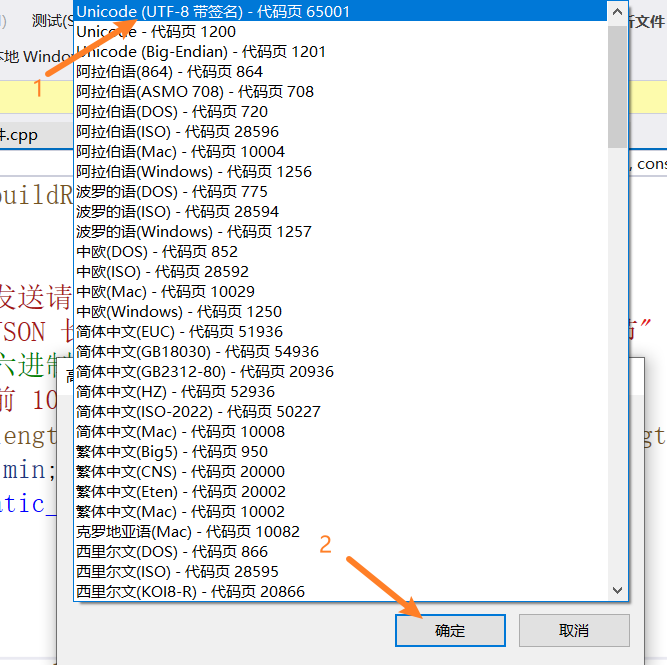
在vs中保存文件为utf8格式步骤如下:
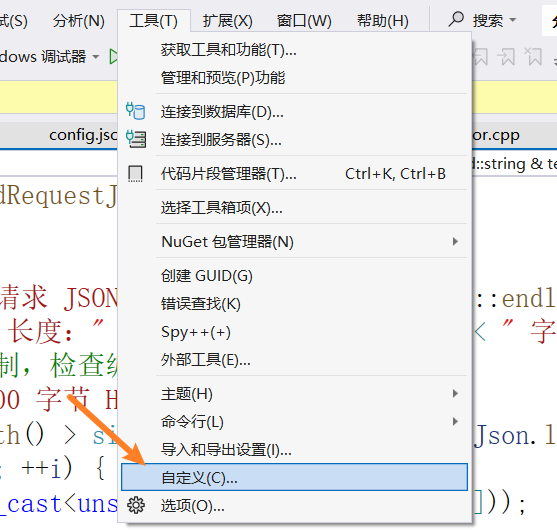
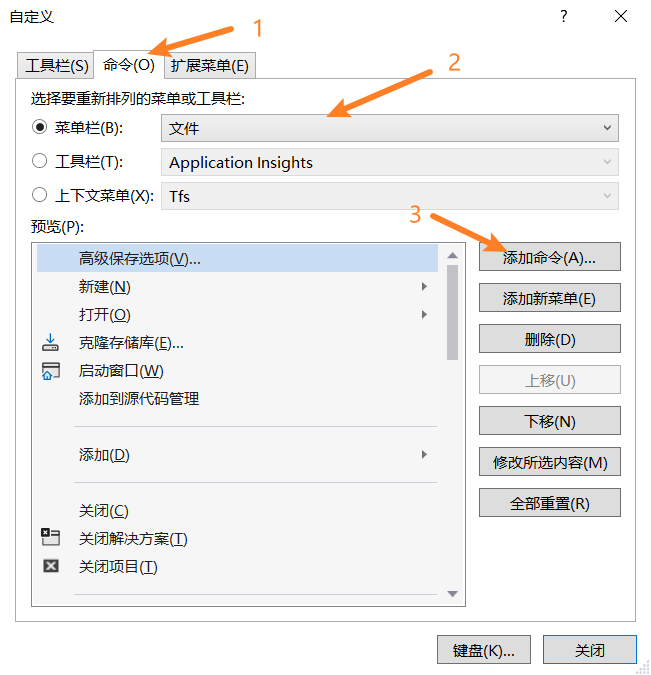
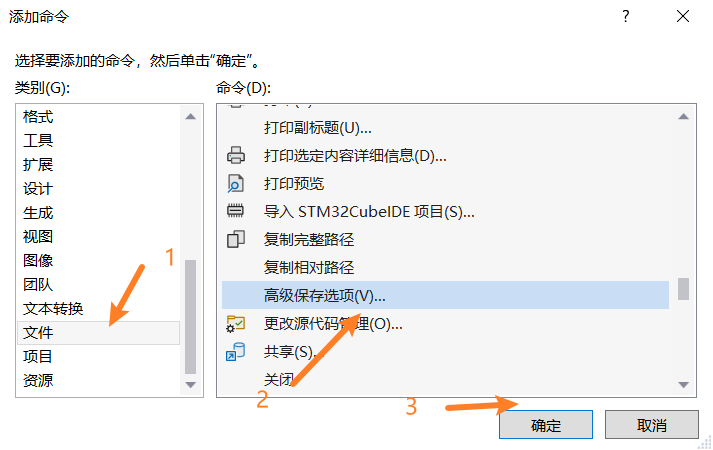
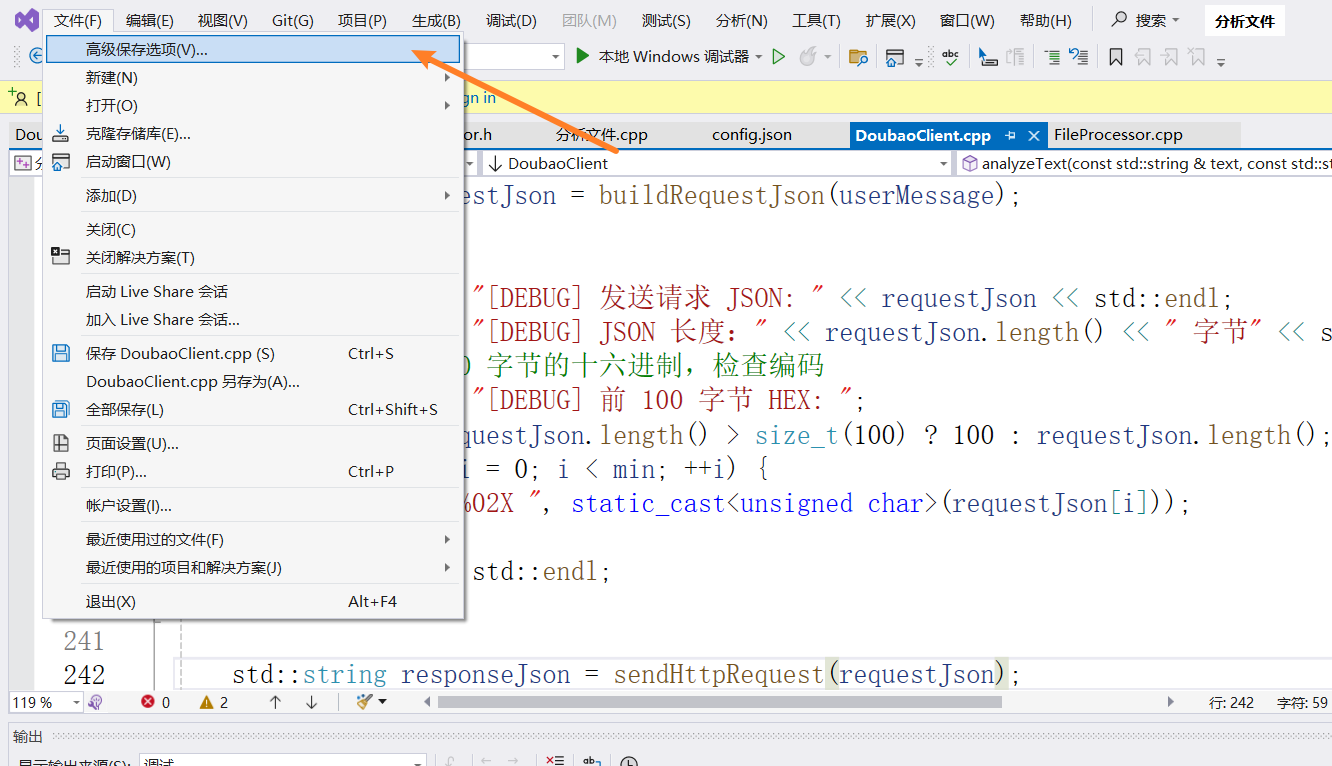
选择UTF-8带签名,然后确定
代码调整,因为文件上传字节数比较大,增大了请求超时时间
// DoubaoClient.h
#ifndef DOUBAO_CLIENT_H
#define DOUBAO_CLIENT_H

#include <string>
#include <map>
#include <vector>
#include <curl/curl.h>
#include "FileProcessor.h"

class DoubaoClient {
public:
/**
    * 预览输出模式枚举
    */
enum class PreviewMode {
BRIEF,      // 简要输出 (默认,截断至120字符)
FULL,       // 完整输出
NONE        // 不输出
};

/**
     * 构造函数
     * @param apiKey API 密钥
     * @param modelId 模型 ID
     * @param apiEndpoint API 服务的基础请求地址    默认为"https://ark.cn-beijing.volces.com/api/v3/responses"
     */
DoubaoClient(const std::string& apiKey, const std::string& modelId, const std::string& apiEndpoint = "https://ark.cn-beijing.volces.com/api/v3/responses");

/**
     * 析构函数,清理 CURL 资源
     */
~DoubaoClient();

// 禁止拷贝和赋值
DoubaoClient(const DoubaoClient&) = delete;
DoubaoClient& operator=(const DoubaoClient&) = delete;

/**
     * 设置 API 端点地址
     * @param endpoint API 地址
     */
void setApiEndpoint(const std::string& endpoint);

/**
     * 设置请求超时时间(秒)
     * @param timeout 超时时间,默认为 120 秒
     */
void setRequestTimeout(long timeout);

/**
     * 设置分析文件夹时,在控制台输出结果的模式
     * @param mode 预览模式 (BRIEF, FULL, NONE) 默认模式为完整输出
     */
void setPreviewMode(PreviewMode mode);

/**
     * 设置API请求间隔(毫秒),用于避免触发API速率限制
     * @param delayMs 请求间隔延迟,单位毫秒   默认1000毫秒
     */
void setRateLimitDelayMs(unsigned int delayMs);

/**
     * 分析文本
     * @param text 用户输入的文本
     * @param systemPrompt 系统提示词(可选)
     * @return AI 返回的响应内容
     */
std::string analyzeText(const std::string& text, const std::string& systemPrompt = "");

/**
     * 分析单个文件
     * @param filePath 文件的完整路径
     * @param fileProcessor FileProcessor 对象引用,用于读取文件
     * @return 模型对该文件的分析结果
     */
std::string analyzeSingleFile(const std::string& filePath, const FileProcessor& fileProcessor);

/**
     * 分析文件夹中的所有文件
     * @param folderPath 文件夹路径
     * @param fileProcessor 文件处理器
     * @param extensionFilter 文件扩展名过滤(如 ".txt")。为空字符串时分析所有文件。
     * @return 文件名->分析结果的映射
     */
std::map<std::string, std::string> analyzeFolderFiles(
const std::string& folderPath,
FileProcessor& fileProcessor,
const std::string& extensionFilter = "");

/**
     * 获取最后一次 HTTP 状态码
     * @return HTTP 状态码
     */
long getHttpStatus() const { return lastHttpStatus_; }

/**
     * 获取最后一次错误信息
     * @return 错误信息字符串
     */
std::string getLastError() const { return lastError_; }

/**
     * 启用/禁用详细日志输出
     * @param enable true 启用,false 禁用 默认不启用
     */
void setVerbose(bool enable);

/**
    * 设置是否在分析文件夹时输出每个文件的简要预览到控制台
    * @param enable true 输出,false 不输出 默认为 true
    */
void setEnablePreviewOutput(bool enable) { enablePreviewOutput_ = enable; }

private:
std::string apiKey_;         // API 密钥
std::string modelId_;        // 模型 ID
std::string apiEndpoint_;    // API 端点 URL
CURL* curlHandle_;           // libcurl 句柄
int lastHttpStatus_;         // 最后一次 HTTP 状态码
    std::string lastError_;      // 最后一次错误信息
    long requestTimeout_;        // 请求超时时间(秒)
    bool verbose_;               // 是否启用详细日志输出模式
    bool enablePreviewOutput_;   // 是否在分析文件夹时输出结果预览到控制台
    PreviewMode previewMode_;    // 控制台结果预览模式
    unsigned int rateLimitDelayMs_; // API请求间隔延迟(毫秒)

    // 辅助函数
    // 对字符串进行 JSON 转义
    static std::string escapeJsonString(const std::string& str);
    // 构建符合火山方舟 API 要求的 JSON 请求体
    std::string buildRequestJson(const std::string& userMessage)const;
    // 执行 HTTP POST 请求
    std::string sendHttpRequest(const std::string& jsonData);
    // 从 API 的 JSON 响应中解析出 content 字段
    std::string parseResponse(const std::string& responseJson);

    // libcurl 的回调函数,用于写入响应数据
    static size_t writeCallback(void* contents, size_t size, size_t nmemb, std::string* output);
};

#endif // DOUBAO_CLIENT_H
// DoubaoClient.cpp
#include "DoubaoClient.h"
#include <sstream>
#include <iostream>
#include <iomanip>
#include <algorithm>
#include <thread>
#include <chrono>
#include <stdexcept>
#include <vector>
#pragma execution_character_set("utf-8")
// 静态辅助函数:对字符串进行 JSON 转义
std::string DoubaoClient::escapeJsonString(const std::string& str) {
std::ostringstream oss;
for (char c : str) {
switch (c) {
case '"': oss << "\\\""; break;
case '\\': oss << "\\\\"; break;
case '\n': oss << "\\n"; break;
case '\r': oss << "\\r"; break;
case '\t': oss << "\\t"; break;
default: oss << c; break; // 保留其他字符原生格式
}
}
return oss.str();
}
// libcurl 写回调函数 output:用户提供的输出缓冲区
size_t DoubaoClient::writeCallback(void* contents, size_t size, size_t nmemb, std::string* output) {
size_t totalSize = size * nmemb;
output->append(static_cast<char*>(contents), totalSize);
return totalSize;
}
DoubaoClient::DoubaoClient(const std::string& apiKey, const std::string& modelId, const std::string& apiEndpoint)
: apiKey_(apiKey)
, modelId_(modelId)
, apiEndpoint_(apiEndpoint)
, curlHandle_(nullptr)
, lastHttpStatus_(0)
, requestTimeout_(120L)
, verbose_(false)
, previewMode_(PreviewMode::FULL) {
// 全局初始化 libcurl(线程安全)
curl_global_init(CURL_GLOBAL_DEFAULT);
// 初始化 easy handle
curlHandle_ = curl_easy_init();
if (!curlHandle_) {
throw std::runtime_error("Failed to initialize CURL handle.");
}
}
DoubaoClient::~DoubaoClient() {
if (curlHandle_) {
curl_easy_cleanup(curlHandle_);
curlHandle_ = nullptr;
}
curl_global_cleanup();
}
void DoubaoClient::setApiEndpoint(const std::string& endpoint) {
apiEndpoint_ = endpoint;
}
void DoubaoClient::setRequestTimeout(long timeout) {
requestTimeout_ = timeout;
}
void DoubaoClient::setVerbose(bool enable) {
verbose_ = enable;
}
void DoubaoClient::setPreviewMode(PreviewMode mode) {
previewMode_ = mode;
}
void DoubaoClient::setRateLimitDelayMs(unsigned int delayMs) {
rateLimitDelayMs_ = delayMs;
}
// ============================================================================
// 构建请求 JSON
// ============================================================================
std::string DoubaoClient::buildRequestJson(const std::string& userMessage) const {
std::ostringstream oss;
oss << "{";
oss << "\"model\":\"" << escapeJsonString(modelId_) << "\",";
oss << "\"input\":[";
oss << "{";
oss << "\"role\":\"user\",";
oss << "\"content\":[";
oss << "{";
oss << "\"type\":\"input_text\",";
oss << "\"text\":\"" << escapeJsonString(userMessage) << "\"";
oss << "}";
oss << "]";
oss << "}";
oss << "]";
oss << "}";
return oss.str();
}
// ============================================================================
// 发送 HTTP 请求
// 即使 respose 状态码 错误也返回完整响应内容
// ============================================================================
std::string DoubaoClient::sendHttpRequest(const std::string& jsonData) {
if (!curlHandle_) {
lastError_ = "CURL handle is not initialized.";
return "";
}
// 重置 lastError_ 和 lastHttpStatus_
lastError_.clear();
lastHttpStatus_ = 0;
std::string responseString;
// 设置 HTTP 头部
struct curl_slist* headers = nullptr;
headers = curl_slist_append(headers, ("Authorization: Bearer " + apiKey_).c_str());
headers = curl_slist_append(headers, "Content-Type: application/json");
headers = curl_slist_append(headers, "User-Agent: DoubaoCppClient/1.0");
headers = curl_slist_append(headers, "Accept: application/json");
// 重置 curl handle
curl_easy_reset(curlHandle_);
// 配置 CURL 选项
curl_easy_setopt(curlHandle_, CURLOPT_URL, apiEndpoint_.c_str());
curl_easy_setopt(curlHandle_, CURLOPT_HTTPHEADER, headers);
curl_easy_setopt(curlHandle_, CURLOPT_POST, 1L);
curl_easy_setopt(curlHandle_, CURLOPT_POSTFIELDS, jsonData.c_str());
curl_easy_setopt(curlHandle_, CURLOPT_POSTFIELDSIZE, static_cast<long>(jsonData.length()));
curl_easy_setopt(curlHandle_, CURLOPT_WRITEFUNCTION, writeCallback);
curl_easy_setopt(curlHandle_, CURLOPT_WRITEDATA, &responseString);
curl_easy_setopt(curlHandle_, CURLOPT_TIMEOUT, requestTimeout_);
curl_easy_setopt(curlHandle_, CURLOPT_SSLVERSION, CURL_SSLVERSION_TLSv1_2);
// 调试时开启详细日志
if (verbose_) {
curl_easy_setopt(curlHandle_, CURLOPT_VERBOSE, 1L);
}
// 执行请求
CURLcode res = curl_easy_perform(curlHandle_);
// 获取 HTTP 状态码
if (res == CURLE_OK) {
curl_easy_getinfo(curlHandle_, CURLINFO_RESPONSE_CODE, &lastHttpStatus_);
}
else {
lastError_ = "CURL Error: " + std::string(curl_easy_strerror(res));
}
// 清理头部列表
curl_slist_free_all(headers);
if (res != CURLE_OK) {//执行curl_easy_perform失败
return "";
}
// 记录错误但保留响应内容
if (lastHttpStatus_ < 200 || lastHttpStatus_ >= 300) {
lastError_ = "HTTP Error " + std::to_string(lastHttpStatus_);
return responseString;
}
return responseString;
}
// ============================================================================
// 解析响应 JSON
// ============================================================================
std::string DoubaoClient::parseResponse(const std::string& responseJson) {
// 这是一个简化的 JSON 解析器,仅用于提取 text 字段。
const std::string textKey = "\"text\":";
size_t textPos = responseJson.find(textKey);
if (textPos != std::string::npos) {
// 找到字段起始位置后,定位到其值的开始(冒号后的第一个引号)
size_t valueStart = responseJson.find('\"', textPos + textKey.length());
if (valueStart != std::string::npos) {
size_t valueEnd = valueStart + 1;
while (valueEnd < responseJson.length()) {
if (responseJson[valueEnd] == '\"' &&
(valueEnd == 0 || responseJson[valueEnd - 1] != '\\')) {
break;
}
valueEnd++;
}
if (valueEnd > valueStart) {
std::string extracted = responseJson.substr(valueStart + 1, valueEnd - valueStart - 1);
// 反转义
std::string result;
for (size_t i = 0; i < extracted.length(); ++i) {
if (extracted[i] == '\\' && i + 1 < extracted.length()) {
switch (extracted[i + 1]) {
case 'n': result += '\n'; i++; break;
case 'r': result += '\r'; i++; break;
case 't': result += '\t'; i++; break;
case '\\': result += '\\'; i++; break;
case '"': result += '"'; i++; break;
default: result += extracted[i]; break;
}
}
else {
result += extracted[i];
}
}
return result;
}
}
}
// 如果解析失败,返回原始响应以便调试
return "[解析响应失败] 原始响应:\n" + responseJson;
}
// ============================================================================
// 分析文本
// ============================================================================
std::string DoubaoClient::analyzeText(const std::string& text, const std::string& systemPrompt) {
// 组合系统提示和用户文本
std::string userMessage = systemPrompt.empty() ? text : systemPrompt + "\n\n" + text;
std::string requestJson = buildRequestJson(userMessage);
if (verbose_) {
std::cout << "[DEBUG] 发送请求 JSON: " << requestJson << std::endl;
std::cout << "[DEBUG] JSON 长度:" << requestJson.length() << " 字节" << std::endl;
// 打印前 200 字节的十六进制,检查编码
std::cout << "[DEBUG] 前 100 字节 HEX: ";
int min = requestJson.length() > size_t(100) ? 100 : requestJson.length();
for (size_t i = 0; i < min; ++i) {
printf("%02X ", static_cast<unsigned char>(requestJson[i]));
}
std::cout << std::endl;
}
std::string responseJson = sendHttpRequest(requestJson);
if (responseJson.empty() && !lastError_.empty()) {
return "[网络请求失败] " + lastError_;
}
if (lastHttpStatus_ != 200) {
return "[API 错误 " + std::to_string(lastHttpStatus_) + "] " + responseJson;
}
return parseResponse(responseJson);
}
// ============================================================================
// 分析单个文件
// ============================================================================
std::string DoubaoClient::analyzeSingleFile(const std::string& filePath, const FileProcessor& fileProcessor) {
// 使用 FileProcessor 检查并读取文件
if (!fileProcessor.fileExists(filePath)) {
lastError_ = "File does not exist: " + filePath;
return "[错误] " + lastError_;
}
// 读取文件并发送
std::string fileContent = fileProcessor.readTextFile(filePath, 8 * 1024);
if (fileContent.empty()) {
return "[提示] 文件内容为空或读取失败:" + fileProcessor.getFileName(filePath);
}
std::string fileName = fileProcessor.getFileName(filePath);
std::string userMessage = "请分析以下文件,文件名为 `" + fileName + "`:\n```\n" + fileContent + "\n```";
return analyzeText(userMessage);
}
// ============================================================================
// 分析文件夹中的所有文件
// ============================================================================
std::map<std::string, std::string> DoubaoClient::analyzeFolderFiles(
const std::string& folderPath,
FileProcessor& fileProcessor,
const std::string& extensionFilter) {
std::map<std::string, std::string> results;
// 1. 设置文件夹路径
if (!fileProcessor.setFolderPath(folderPath)) {
lastError_ = "无效的文件夹路径:" + folderPath;
std::cerr << "错误:" << lastError_ << std::endl;
return results;
}
// 2. 获取文件列表
std::vector<std::string> filePaths;
if (extensionFilter.empty()) {
filePaths = fileProcessor.getAllFiles();
}
else {
filePaths = fileProcessor.getFilesByExtension(extensionFilter);
}
if (filePaths.empty()) {
std::cout << "在文件夹 \"" << folderPath << "\" 中未找到任何文件。" << std::endl;
return results;
}
std::cout << "开始在文件夹 \"" << folderPath << "\" 中分析 " << filePaths.size() << " 个文件..." << std::endl;
std::cout << "==================================================" << std::endl;
// 3. 遍历并分析每个文件
for (size_t i = 0; i < filePaths.size(); ++i) {
const std::string& filePath = filePaths[i];
std::string fileName = fileProcessor.getFileName(filePath);
std::cout << "[" << (i + 1) << "/" << filePaths.size() << "] 正在分析:" << fileName << std::endl;
std::string analysisResult = analyzeSingleFile(filePath, fileProcessor);
results[fileName] = analysisResult;
// 根据预览模式输出结果
if (previewMode_ != PreviewMode::NONE) {
if (previewMode_ == PreviewMode::BRIEF) {
// 简要输出
std::string preview = analysisResult.substr(0, 120);
if (analysisResult.length() > 120) {
preview += "...";
}
// 移除预览中的换行符,使单行显示更整洁
std::replace(preview.begin(), preview.end(), '\n', ' ');
std::cout << " 结果预览:" << preview << std::endl;
}
else if (previewMode_ == PreviewMode::FULL) {
// 完整输出 (默认逻辑)
std::cout << " 分析结果:" << analysisResult << std::endl;
}
}
// 添加延迟,避免触发 API 速率限制(RPM)
if (i < filePaths.size() - 1 && rateLimitDelayMs_ > 0) {
std::cout << " 等待 " << rateLimitDelayMs_ << " 毫秒..." << std::endl;
std::this_thread::sleep_for(std::chrono::milliseconds(rateLimitDelayMs_));
}
std::cout << "--------------------------------------------------" << std::endl;
}
std::cout << "文件夹分析完成!" << std::endl;
return results;
}测试文件
// main.cpp
#include "FileProcessor.h"
#include "DoubaoClient.h"
#include <iostream>
#include <fstream>
#include <vector>
#pragma execution_character_set("utf-8")

int main(int argc, char* argv[]) {
    // Windows 下设置控制台输出 UTF-8
    #ifdef _WIN32
    system("chcp 65001 > nul");
    #endif
    // ==================== 第一部分:硬编码的参数配置 ====================
    const std::string API_KEY = "在此处填写您真实的ARK_API_KEY";
    const std::string MODEL_ID = "在此处填写您的推理接入点ID,如 ep-xxxxx";

    const std::string API_ENDPOINT = "https://ark.cn-beijing.volces.com/api/v3/responses";
    const long REQUEST_TIMEOUT_SECONDS = 120;
    const int RATE_LIMIT_DELAY_MS = 1200; // 请求间隔,避免触发API限流

    const std::string DEFAULT_FOLDER = "."; // 默认分析当前文件夹
    const bool ANALYZE_ONLY_TEXT_FILES = true;
    const std::string DEFAULT_EXTENSION_FILTER = ".cpp"; // 默认只分析.cpp文件

    const std::string SYSTEM_PROMPT =
    "你是一个专业的代码分析助手。请分析用户提供的文件内容,并按照以下要求给出分析结果:\n"
    "1. 简要总结文件的主要功能或内容。\n"
    "2. 如果是代码文件,指出其主要函数/类的用途。\n"
    "3. 识别任何明显的潜在问题或可改进之处。\n"
    "4. 用中文回复,保持回答简洁明了。";

    const std::string RESULT_OUTPUT_FILE = "analysis_results.txt"; // 结果输出文件

    // ==================== 第二部分:核心业务逻辑 ====================
    // 1. 初始化豆包客户端(使用硬编码参数)
    std::cout << "正在初始化豆包客户端..." << std::endl;
    std::cout << "模型ID: " << MODEL_ID << std::endl;

    DoubaoClient client(API_KEY, MODEL_ID);
    client.setApiEndpoint(API_ENDPOINT);
    client.setRequestTimeout(REQUEST_TIMEOUT_SECONDS);
    client.setRateLimitDelayMs(RATE_LIMIT_DELAY_MS);
    client.setVerbose(true);

    // 2. 初始化文件处理器
    FileProcessor fp;

    // 3. 确定要分析的文件夹路径(支持命令行参数)
    std::string targetFolder = DEFAULT_FOLDER;
    if (argc > 1) {
        targetFolder = argv[1];
        std::cout << "使用命令行指定的文件夹: " << targetFolder << std::endl;
    }
    else {
        std::cout << "使用默认文件夹: " << targetFolder << std::endl;
    }

    // 4. 确定文件扩展名过滤器
    std::string extensionFilter = "";
    if (ANALYZE_ONLY_TEXT_FILES) {
        extensionFilter = DEFAULT_EXTENSION_FILTER;
        std::cout << "扩展名过滤: " << extensionFilter << std::endl;
    }

    // 5. 执行文件夹文件分析
    std::cout << "\n开始分析文件..." << std::endl;
    std::cout << "注意:请求间隔设置为 " << RATE_LIMIT_DELAY_MS << " 毫秒,以避免触发API限流。" << std::endl;
    std::cout << "----------------------------------------" << std::endl;

    auto results = client.analyzeFolderFiles(targetFolder, fp, extensionFilter);

    // 6. 输出分析结果摘要
    std::cout << "\n\n=== 分析完成 ===" << std::endl;
    std::cout << "成功分析 " << results.size() << " 个文件。" << std::endl;

    // 7. 将详细结果保存到文件
    if (!results.empty()) {
        std::ofstream outFile(RESULT_OUTPUT_FILE);
        if (outFile.is_open()) {
            outFile << "=== 文件分析报告 ===\n";
            outFile << "生成时间: " << __DATE__ << " " << __TIME__ << "\n";
            outFile << "目标文件夹: " << targetFolder << "\n";
            outFile << "分析文件类型: " << (extensionFilter.empty() ? "所有文件" : extensionFilter) << "\n";
            outFile << "==========================================\n\n";

            // 遍历结果映射(C++11兼容写法)
            for (const auto& item : results) {
                const std::string& fileName = item.first;
                const std::string& analysis = item.second;

                outFile << "文件: " << fileName << "\n";
                outFile << "----------------------------------------\n";
                outFile << analysis << "\n\n";
                outFile << "==========================================\n\n";
            }

            outFile.close();
            std::cout << "详细分析结果已保存至: " << RESULT_OUTPUT_FILE << std::endl;
        }
        else {
            std::cerr << "警告:无法打开结果文件 " << RESULT_OUTPUT_FILE << " 进行写入。" << std::endl;
        }

        // 同时在控制台显示前3个文件的简要结果
        std::cout << "\n=== 简要结果预览(前3个文件)===" << std::endl;
        int previewCount = 0;
        for (const auto& item : results) {
            if (previewCount >= 3) break;

            const std::string& fileName = item.first;
            const std::string& analysis = item.second;

            // 截取分析结果的前100个字符作为预览
            std::string preview = analysis.substr(0, 100);
            if (analysis.length() > 100) preview += "...";

            std::cout << previewCount + 1 << ". " << fileName << ":\n   ";
            std::cout << preview << "\n" << std::endl;
            previewCount++;
        }
    }
    else {
        std::cout << "没有生成任何分析结果。" << std::endl;
    }

    return 0;
}
五、ConfigManager类
这个类负责应用程序配置的加载、验证和访问。
// ConfigManager.h
#ifndef CONFIG_MANAGER_H
#define CONFIG_MANAGER_H

#include <string>
#include <map>
#include <vector>
#include <iostream>
#include <fstream>
#include <sstream>
#include <cctype>

class ConfigManager {
public:
ConfigManager() = default;

/**
     * 从文件加载配置
     * @param filePath 配置文件路径,例如 "config.json"
     * @return 成功加载返回 true,失败返回 false
     */
bool loadFromFile(const std::string& filePath);

/**
     * 从 JSON 字符串加载配置
     * @param jsonString 包含配置的 JSON 字符串
     * @return 成功解析返回 true,失败返回 false
     */
bool loadFromJsonString(const std::string& jsonString);

// --- 获取配置值的方法 ---
// 获取字符串类型配置
std::string getString(const std::string& key, const std::string& defaultValue = "") const;

// 获取整数类型配置
int getInt(const std::string& key, int defaultValue = 0) const;

// 获取长整数类型配置
long getLong(const std::string& key, long defaultValue = 0L) const;

// 获取双精度浮点数配置
double getDouble(const std::string& key, double defaultValue = 0.0) const;

// 获取布尔类型配置
bool getBool(const std::string& key, bool defaultValue = false) const;

// 获取字符串列表配置
std::vector<std::string> getStringArray(const std::string& key) const;

// --- 配置管理方法 ---
// 检查配置项是否存在
bool hasKey(const std::string& key) const;

// 设置配置值(可用于编程覆盖或测试)
void setString(const std::string& key, const std::string& value);

// 打印所有配置项(用于调试)
void printAll() const;

// 验证必需的配置项是否都已设置
bool validateRequired(const std::vector<std::string>& requiredKeys) const;

private:
// 存储配置项的映射表,key 支持点号表示法,如 "doubao_api.api_key"
std::map<std::string, std::string> configMap_;

// --- 私有辅助方法 ---
// 清理和规范化 JSON 字符串(移除空格、换行、注释)
std::string cleanJsonString(const std::string& jsonStr);

// 解析 JSON 对象(递归)
bool parseJsonObject(const std::string& jsonStr, size_t& pos, const std::string& parentKey = "");

// 解析 JSON 数组
bool parseJsonArray(const std::string& jsonStr, size_t& pos, const std::string& parentKey);

// 解析 JSON 字符串值
std::string parseJsonString(const std::string& jsonStr, size_t& pos);

// 解析 JSON 值(数字、布尔、null)
std::string parseJsonValue(const std::string& jsonStr, size_t& pos);

// 读取文件内容到字符串
std::string readFileToString(const std::string& filePath);

// 转义字符串中的特殊字符
std::string escapeString(const std::string& str) const;

// 反转义字符串(用于从配置读取时)
std::string unescapeString(const std::string& str) const;
};
#endif // CONFIG_MANAGER_H
// ConfigManager.cpp
#include "ConfigManager.h"
#include <algorithm>
#include <cstdlib> // 用于 getenv
#pragma warning(disable:4996)
#pragma execution_character_set("utf-8")
// 工具函数:修剪字符串两端的空白字符
static inline std::string trim(const std::string& str) {
size_t first = str.find_first_not_of(" \t\n\r");
if (first == std::string::npos) return "";
size_t last = str.find_last_not_of(" \t\n\r");
return str.substr(first, last - first + 1);
}
bool ConfigManager::loadFromFile(const std::string& filePath) {
std::string content = readFileToString(filePath);
if (content.empty()) {
std::cerr << "[ConfigManager] 错误: 无法读取配置文件 '" << filePath << "' 或文件为空。" << std::endl;
return false;
}
return loadFromJsonString(content);
}
bool ConfigManager::loadFromJsonString(const std::string& jsonString) {
if (jsonString.empty()) {
std::cerr << "[ConfigManager] 错误: 提供的 JSON 字符串为空。" << std::endl;
return false;
}
// 清理 JSON 字符串(移除注释和多余空白)
std::string cleanJson = cleanJsonString(jsonString);
size_t pos = 0;
// 检查是否以 { 开头,表示是一个 JSON 对象
while (pos < cleanJson.length() && cleanJson[pos] > 0 && std::isspace(cleanJson[pos])) pos++;
if (pos >= cleanJson.length() || cleanJson[pos] != '{') {
std::cerr << "[ConfigManager] 错误: 无效的 JSON 格式,应以 '{' 开头。" << std::endl;
return false;
}
// 解析根对象
return parseJsonObject(cleanJson, pos);
}
std::string ConfigManager::getString(const std::string& key, const std::string& defaultValue) const {
auto it = configMap_.find(key);
if (it != configMap_.end()) {
return unescapeString(it->second);
}
// 如果配置文件中没有,尝试从环境变量获取(优先级更高)
const char* envVal = std::getenv(key.c_str());
if (envVal != nullptr) {
return std::string(envVal);
}
return defaultValue;
}
int ConfigManager::getInt(const std::string& key, int defaultValue) const {
std::string val = getString(key, "");
if (val.empty()) return defaultValue;
try {
return std::stoi(val);
}
catch (const std::exception& e) {
std::cerr << "[ConfigManager] 警告: 无法将配置项 '" << key << "' 的值 '" << val << "' 转换为整数。使用默认值 " << defaultValue << "。" << std::endl;
return defaultValue;
}
}
long ConfigManager::getLong(const std::string& key, long defaultValue) const {
std::string val = getString(key, "");
if (val.empty()) return defaultValue;
try {
return std::stol(val);
}
catch (const std::exception& e) {
std::cerr << "[ConfigManager] 警告: 无法将配置项 '" << key << "' 的值 '" << val << "' 转换为长整数。使用默认值 " << defaultValue << "。" << std::endl;
return defaultValue;
}
}
double ConfigManager::getDouble(const std::string& key, double defaultValue) const {
std::string val = getString(key, "");
if (val.empty()) return defaultValue;
try {
return std::stod(val);
}
catch (const std::exception& e) {
std::cerr << "[ConfigManager] 警告: 无法将配置项 '" << key << "' 的值 '" << val << "' 转换为浮点数。使用默认值 " << defaultValue << "。" << std::endl;
return defaultValue;
}
}
bool ConfigManager::getBool(const std::string& key, bool defaultValue) const {
std::string val = getString(key, "");
if (val.empty()) return defaultValue;
// 转换为小写进行比较
std::string lowerVal = val;
std::transform(lowerVal.begin(), lowerVal.end(), lowerVal.begin(), ::tolower);
if (lowerVal == "true" || lowerVal == "1" || lowerVal == "yes" || lowerVal == "on") {
return true;
}
else if (lowerVal == "false" || lowerVal == "0" || lowerVal == "no" || lowerVal == "off") {
return false;
}
else {
std::cerr << "[ConfigManager] 警告: 配置项 '" << key << "' 的值 '" << val << "' 无法识别为布尔值。使用默认值 " << (defaultValue ? "true" : "false") << "。" << std::endl;
return defaultValue;
}
}
std::vector<std::string> ConfigManager::getStringArray(const std::string& key) const {
std::vector<std::string> result;
// 数组在内部存储为 key.0, key.1, key.2, ...
int index = 0;
while (true) {
std::string arrayKey = key + "." + std::to_string(index);
auto it = configMap_.find(arrayKey);
if (it == configMap_.end()) {
// 也检查环境变量
const char* envVal = std::getenv(arrayKey.c_str());
if (envVal == nullptr) {
break;
}
result.push_back(unescapeString(std::string(envVal)));
}
else {
result.push_back(unescapeString(it->second));
}
index++;
}
return result;
}
bool ConfigManager::hasKey(const std::string& key) const {
if (configMap_.find(key) != configMap_.end()) return true;
// 也检查环境变量
return std::getenv(key.c_str()) != nullptr;
}
void ConfigManager::setString(const std::string& key, const std::string& value) {
configMap_[key] = escapeString(value);
}
void ConfigManager::printAll() const {
std::cout << "========== 当前配置项 ==========" << std::endl;
for (const auto& item : configMap_) {
const std::string& key = item.first;
const std::string& value = item.second;
std::cout << key << " = " << unescapeString(value) << std::endl;
}
std::cout << "=================================" << std::endl;
}
bool ConfigManager::validateRequired(const std::vector<std::string>& requiredKeys) const {
bool allValid = true;
for (const auto& key : requiredKeys) {
if (!hasKey(key)) {
std::cerr << "[ConfigManager] 错误: 缺少必需的配置项 '" << key << "'。" << std::endl;
allValid = false;
}
}
return allValid;
}
// --- 私有方法实现 ---
std::string ConfigManager::readFileToString(const std::string& filePath) {
std::ifstream file(filePath, std::ios::binary); // 以二进制模式打开文件
if (!file.is_open()) {
return "";
}
// 获取文件大小
file.seekg(0, std::ios::end);
size_t fileSize = file.tellg();
file.seekg(0, std::ios::beg);
if (fileSize == 0) {
return "";
}
// 读取整个文件
std::string content(fileSize, '\0');
file.read(&content[0], fileSize);
// 检查并移除UTF-8 BOM标记
if (fileSize >= 3 &&
static_cast<unsigned char>(content[0]) == 0xEF &&
static_cast<unsigned char>(content[1]) == 0xBB &&
static_cast<unsigned char>(content[2]) == 0xBF) {
// 移除开头的3个字节(BOM标记)
content = content.substr(3);
}
return content;
}
std::string ConfigManager::cleanJsonString(const std::string& jsonStr) {
std::string result;
bool inString = false;
bool inComment = false;
char stringDelimiter = '\0';
for (size_t i = 0; i < jsonStr.length(); i++) {
char c = jsonStr[i];
// 处理字符串字面量
if (!inComment && (c == '"' || c == '\'')) {
if (!inString) {
inString = true;
stringDelimiter = c;
}
else if (c == stringDelimiter) {
// 检查转义字符
if (i > 0 && jsonStr[i - 1] == '\\') {
// 是转义的引号,继续在字符串中
}
else {
inString = false;
}
}
result += c;
continue;
}
// 不在字符串中时,处理注释
if (!inString) {
// 处理单行注释
if (c == '/' && i + 1 < jsonStr.length() && jsonStr[i + 1] == '/') {
inComment = true;
i++; // 跳过下一个字符
continue;
}
// 处理多行注释
if (c == '/' && i + 1 < jsonStr.length() && jsonStr[i + 1] == '*') {
inComment = true;
i++; // 跳过下一个字符
continue;
}
// 结束多行注释
if (inComment && c == '*' && i + 1 < jsonStr.length() && jsonStr[i + 1] == '/') {
inComment = false;
i++; // 跳过下一个字符
continue;
}
// 结束单行注释(换行)
if (inComment && c == '\n') {
inComment = false;
}
if (inComment) {
continue;
}
// 跳过不必要的空白字符(不在字符串中且不在注释中)
if (c > 0 && std::isspace(c) && c != ' ' && c != '\t') {
continue;
}
}
// 添加字符到结果
if (!inComment) {
result += c;
}
}
return result;
}
bool ConfigManager::parseJsonObject(const std::string& jsonStr, size_t& pos, const std::string& parentKey) {
// 跳过 '{'
pos++;
while (pos < jsonStr.length()) {
// 跳过空白字符
while (pos < jsonStr.length() && std::isspace(jsonStr[pos])) pos++;
if (pos >= jsonStr.length()) return false;
// 检查是否结束
if (jsonStr[pos] == '}') {
pos++;
return true;
}
// 解析键名(字符串)
if (jsonStr[pos] != '"' && jsonStr[pos] != '\'') {
std::cerr << "[ConfigManager] 解析错误: 期望键名(字符串)在位置 " << pos << std::endl;
return false;
}
std::string key = parseJsonString(jsonStr, pos);
// 跳过空白字符和 ':'
while (pos < jsonStr.length() && std::isspace(jsonStr[pos])) pos++;
if (pos >= jsonStr.length() || jsonStr[pos] != ':') {
std::cerr << "[ConfigManager] 解析错误: 期望 ':' 在键名后" << std::endl;
return false;
}
pos++; // 跳过 ':'
// 跳过空白字符
while (pos < jsonStr.length() && std::isspace(jsonStr[pos])) pos++;
if (pos >= jsonStr.length()) return false;
// 构建完整键名(带父级前缀)
std::string fullKey = parentKey.empty() ? key : parentKey + "." + key;
// 根据值的类型解析
char currentChar = jsonStr[pos];
if (currentChar == '{') {
// 嵌套对象
if (!parseJsonObject(jsonStr, pos, fullKey)) {
return false;
}
}
else if (currentChar == '[') {
// 数组
if (!parseJsonArray(jsonStr, pos, fullKey)) {
return false;
}
}
else if (currentChar == '"' || currentChar == '\'') {
// 字符串值
std::string value = parseJsonString(jsonStr, pos);
configMap_[fullKey] = escapeString(value);
}
else {
// 其他值(数字、布尔、null)
std::string value = parseJsonValue(jsonStr, pos);
configMap_[fullKey] = escapeString(value);
}
// 跳过空白字符
while (pos < jsonStr.length() && std::isspace(jsonStr[pos])) pos++;
if (pos >= jsonStr.length()) break;
// 检查是否有下一个键值对
if (jsonStr[pos] == ',') {
pos++;
continue;
}
else if (jsonStr[pos] == '}') {
// 对象结束
pos++;
return true;
}
else {
std::cerr << "[ConfigManager] 解析错误: 期望 ',' 或 '}' 在位置 " << pos << std::endl;
return false;
}
}
return true;
}
bool ConfigManager::parseJsonArray(const std::string& jsonStr, size_t& pos, const std::string& parentKey) {
// 跳过 '['
pos++;
int index = 0;
while (pos < jsonStr.length()) {
// 跳过空白字符
while (pos < jsonStr.length() && std::isspace(jsonStr[pos])) pos++;
if (pos >= jsonStr.length()) return false;
// 检查是否结束
if (jsonStr[pos] == ']') {
pos++;
return true;
}
// 构建数组元素的键名
std::string elementKey = parentKey + "." + std::to_string(index);
// 根据值的类型解析
char currentChar = jsonStr[pos];
if (currentChar == '{') {
// 嵌套对象
if (!parseJsonObject(jsonStr, pos, elementKey)) {
return false;
}
}
else if (currentChar == '[') {
// 嵌套数组
if (!parseJsonArray(jsonStr, pos, elementKey)) {
return false;
}
}
else if (currentChar == '"' || currentChar == '\'') {
// 字符串值
std::string value = parseJsonString(jsonStr, pos);
configMap_[elementKey] = escapeString(value);
}
else {
// 其他值
std::string value = parseJsonValue(jsonStr, pos);
configMap_[elementKey] = escapeString(value);
}
index++;
// 跳过空白字符
while (pos < jsonStr.length() && std::isspace(jsonStr[pos])) pos++;
if (pos >= jsonStr.length()) break;
// 检查是否有下一个元素
if (jsonStr[pos] == ',') {
pos++;
continue;
}
else if (jsonStr[pos] == ']') {
// 数组结束
pos++;
return true;
}
else {
std::cerr << "[ConfigManager] 解析错误: 期望 ',' 或 ']' 在位置 " << pos << std::endl;
return false;
}
}
return true;
}
std::string ConfigManager::parseJsonString(const std::string& jsonStr, size_t& pos) {
char delimiter = jsonStr[pos]; // 可能是 " 或 '
pos++; // 跳过开始的分隔符
std::string result;
while (pos < jsonStr.length() && jsonStr[pos] != delimiter) {
// 处理转义字符
if (jsonStr[pos] == '\\' && pos + 1 < jsonStr.length()) {
pos++; // 跳过反斜杠
switch (jsonStr[pos]) {
case '"': result += '"'; break;
case '\'': result += '\''; break;
case '\\': result += '\\'; break;
case '/': result += '/'; break;
case 'b': result += '\b'; break;
case 'f': result += '\f'; break;
case 'n': result += '\n'; break;
case 'r': result += '\r'; break;
case 't': result += '\t'; break;
case 'u':
// 简单处理Unicode转义(这里简化为跳过)
if (pos + 4 < jsonStr.length()) {
pos += 4;
}
break;
default: result += jsonStr[pos]; break;
}
}
else {
result += jsonStr[pos];
}
pos++;
}
if (pos < jsonStr.length() && jsonStr[pos] == delimiter) {
pos++; // 跳过结束的分隔符
}
return result;
}
std::string ConfigManager::parseJsonValue(const std::string& jsonStr, size_t& pos) {
size_t start = pos;
while (pos < jsonStr.length()) {
char c = jsonStr[pos];
if (c == ',' || c == '}' || c == ']' || std::isspace(c)) {
break;
}
pos++;
}
std::string value = jsonStr.substr(start, pos - start);
return trim(value);
}
std::string ConfigManager::escapeString(const std::string& str) const {
// 简单转义,将换行符等转换为可存储的形式
std::string result;
for (char c : str) {
switch (c) {
case '\n': result += "\\n"; break;
case '\r': result += "\\r"; break;
case '\t': result += "\\t"; break;
case '\\': result += "\\\\"; break;
default: result += c; break;
}
}
return result;
}
std::string ConfigManager::unescapeString(const std::string& str) const {
std::string result;
for (size_t i = 0; i < str.length(); i++) {
if (str[i] == '\\' && i + 1 < str.length()) {
switch (str[i + 1]) {
case 'n': result += '\n'; i++; break;
case 'r': result += '\r'; i++; break;
case 't': result += '\t'; i++; break;
case '\\': result += '\\'; i++; break;
default: result += str[i]; break;
}
}
else {
result += str[i];
}
}
return result;
}// config.json
{
// ==================== 豆包API配置 ====================
"doubao_api": {
// 【重要】您的API密钥。也可以设置环境变量 ARK_API_KEY 来覆盖此值
"api_key": "your_actual_ark_api_key_here",
// 您的推理接入点ID(从火山方舟控制台获取)
"model_id": "your_actual_ark_model_id_here",
// API端点URL(通常不需要修改)
"api_endpoint": "https://ark.cn-beijing.volces.com/api/v3/responses",
// 请求超时时间(秒)
"request_timeout_seconds": 180,
// 启用详细日志输出(调试用)
"enable_debug_log": false
},
// ==================== 应用程序配置 ====================
"application": {
// 默认分析的文件夹路径
"default_folder": ".",
// 单次请求的最大文件大小(MB),避免发送过大的文件
"max_file_size_mb": 2,
// 仅分析文本文件(true/false)
"analyze_only_text_files": true,
// 允许分析的文件扩展名列表(空数组表示允许所有文件)
"allowed_extensions": [
".cpp",
".h",
".hpp",
".c",
".cc",
".py",
".java",
".js",
".txt",
".md",
".json",
".xml",
".yml",
".yaml"
],
// 文件分析之间的延迟(毫秒),用于避免触发API速率限制
"rate_limit_delay_ms": 1200,
// 输出格式:simple(仅结果)或 detailed(带文件信息)
"output_format": "detailed"
},
// ==================== 分析提示词配置 ====================
"analysis": {
// 系统提示词,用于设定AI的角色和任务
"system_prompt": "你是一个专业的代码和文档分析助手。请分析用户提供的文件内容,并按照以下要求给出分析结果:\n1. 简要总结文件的主要功能或内容。\n2. 如果是代码文件,指出其主要函数/类的用途。\n3. 识别任何明显的潜在问题或可改进之处。\n4. 用中文回复,保持回答简洁明了。",
// 用户提示词模板,{filename} 和 {content} 会被实际值替换
"user_prompt_template": "请分析以下文件:\n文件名:{filename}\n文件内容:\n```\n{content}\n```",
// 是否在提示词中包含文件路径
"include_filepath_in_prompt": false,
// 最大内容截断长度(字符数),0表示不截断
"max_content_length": 8000
},
// ==================== 输出配置 ====================
"output": {
// 结果保存的文件名(空字符串表示不保存到文件)
"result_file": "analysis_results.txt",
// 控制台输出颜色(true/false)
"enable_colors": true,
// 是否在控制台显示进度条
"show_progress": true,
// 日志级别:debug, info, warning, error
"log_level": "info"
},
// ==================== 高级配置 ====================
"advanced": {
// 最大重试次数(当API请求失败时)
"max_retries": 3,
// 重试之间的等待时间(秒)
"retry_delay_seconds": 2,
// 是否使用HTTP代理(空字符串表示不使用)
"http_proxy": "",
// 是否验证SSL证书
"verify_ssl": true,
// 并发分析的文件数(1表示顺序处理)
"concurrent_files": 1
}
}测试
// main.cpp
#include "ConfigManager.h"
#include "FileProcessor.h"
#include "DoubaoClient.h"
#include <iostream>
#include <vector>
#pragma execution_character_set("utf-8")

int main(int argc, char* argv[]) {
    // 1. 加载配置管理器
    ConfigManager config;

    // 1.1 尝试从文件加载配置
    std::string configFile = "config.json";
    if (argc > 2 && std::string(argv[1]) == "--config") {
        configFile = argv[2];
    }

    if (!config.loadFromFile(configFile)) {
        std::cerr << "警告: 无法从 '" << configFile << "' 加载配置文件,使用默认值或环境变量。" << std::endl;
    }

    // 1.2 验证必需配置
    std::vector<std::string> requiredKeys = { "doubao_api.api_key", "doubao_api.model_id" };
    if (!config.validateRequired(requiredKeys)) {
        std::cerr << "错误: 缺少必需的API配置。请设置环境变量或编辑配置文件。" << std::endl;
        std::cerr << "必需的环境变量: ARK_API_KEY (对应 doubao_api.api_key)" << std::endl;
        return 1;
    }

    // 调试:打印所有配置
    if (config.getBool("doubao_api.enable_debug_log", false)) {
        config.printAll();
    }

    // 2. 初始化豆包客户端
    DoubaoClient client(
    config.getString("doubao_api.api_key"),
    config.getString("doubao_api.model_id")
    );

    // 2.1 设置可选参数
    std::string endpoint = config.getString("doubao_api.api_endpoint", "");
    if (!endpoint.empty()) {
        client.setApiEndpoint(endpoint);
    }
    client.setRequestTimeout(config.getLong("doubao_api.request_timeout_seconds", 30));

    // 3. 初始化文件处理器
    FileProcessor fp;

    // 4. 确定要分析的文件夹
    std::string targetFolder = config.getString("application.default_folder", ".");
    if (argc > 1 && std::string(argv[1]) != "--config") {
        targetFolder = argv[1]; // 命令行参数优先
    }

    // 5. 确定文件扩展名过滤器
    std::string extensionFilter = "";
    auto allowedExtensions = config.getStringArray("application.allowed_extensions");
    if (!allowedExtensions.empty() && config.getBool("application.analyze_only_text_files", true)) {
        // 这里简化处理:如果配置了允许的扩展名,只处理第一个
        // 实际可以根据需要扩展为支持多个扩展名
        if (!allowedExtensions.empty()) {
            // 可以根据需要扩展为支持多个扩展名
            extensionFilter = allowedExtensions[0];
        }
    }

    // 6. 执行分析
    std::cout << "=== 文件分析器启动 ===" << std::endl;
    std::cout << "目标文件夹: " << targetFolder << std::endl;
    std::cout << "模型ID: " << config.getString("doubao_api.model_id") << std::endl;
    std::cout << "扩展名过滤: " << (extensionFilter.empty() ? "无" : extensionFilter) << std::endl;
    std::cout << "==========================" << std::endl;

    auto results = client.analyzeFolderFiles(targetFolder, fp, extensionFilter);

    // 7. 输出结果
    std::cout << "\n\n=== 分析完成 ===" << std::endl;
    std::cout << "共分析 " << results.size() << " 个文件。" << std::endl;

    // 8. 保存结果到文件(如果配置了)
    std::string resultFile = config.getString("output.result_file", "");
    if (!resultFile.empty()) {
        std::ofstream outFile(resultFile);
        if (outFile.is_open()) {
            outFile << "=== 文件分析报告 ===\n";
            outFile << "生成时间: " << __DATE__ << " " << __TIME__ << "\n";
            outFile << "目标文件夹: " << targetFolder << "\n";
            outFile << "=================================\n\n";

            for (const auto& item : results) {
                const std::string& fileName = item.first;
                const std::string& analysis = item.second;

                outFile << "文件: " << fileName << "\n";
                outFile << "---------------------------------\n";
                outFile << analysis << "\n\n";
                outFile << "=================================\n\n";
            }
            outFile.close();
            std::cout << "结果已保存到: " << resultFile << std::endl;
        }
        else {
            std::cerr << "警告:无法打开结果文件 " << resultFile << " 进行写入。" << std::endl;
        }

        // 同时在控制台显示前3个文件的简要结果
        std::cout << "\n=== 简要结果预览(前3个文件)===" << std::endl;
        int previewCount = 0;
        for (const auto& item : results) {
            if (previewCount >= 3) break;

            const std::string& fileName = item.first;
            const std::string& analysis = item.second;

            // 截取分析结果的前100个字符作为预览
            std::string preview = analysis.substr(0, 100);
            if (analysis.length() > 100) preview += "...";

            std::cout << previewCount + 1 << ". " << fileName << ":\n   ";
            std::cout << preview << "\n" << std::endl;
            previewCount++;
        }
    }
    else {
        std::cout << "没有生成任何分析结果。" << std::endl;
    }

    return 0;
}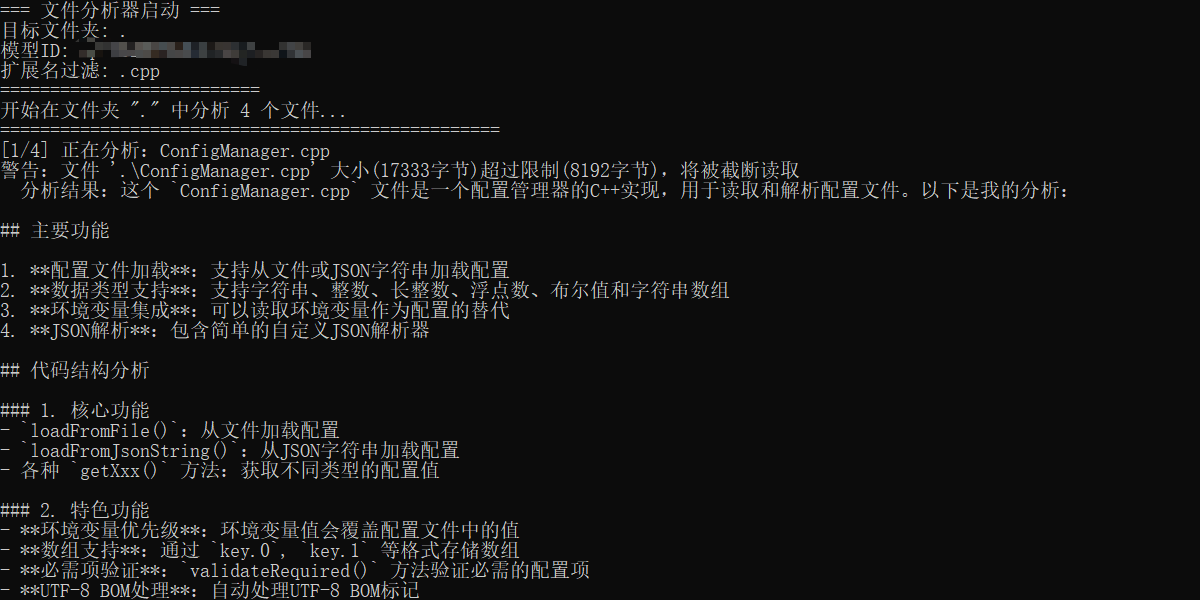
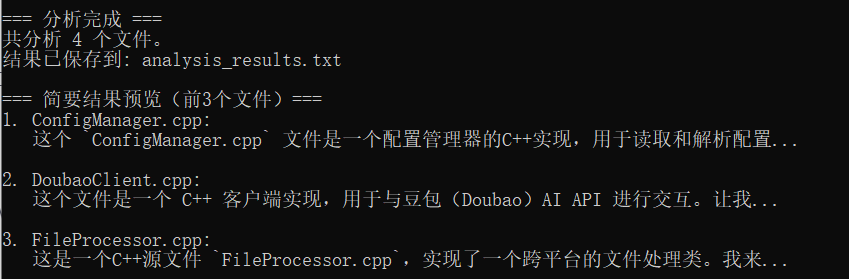

欢迎加入DeepSeek 技术社区。在这里,你可以找到志同道合的朋友,共同探索AI技术的奥秘。
更多推荐


 14
14 0
0- 0


 已为社区贡献1条内容

所有评论(0)