SCNet 和 DeepSeek 的 API 调用 并处理Token 使用gradio复现DeepSeek网页交互的实例
SCNet 和 DeepSeek 的 API 调用 并处理Token 使用gradio复现DeepSeek网页交互的实例
本文为Agentic AI所需的大模型API调用的一些API示范,注重于使用SCNet以及DeepSeek的基于OpenAI 以及 OpenAI SDK 的 API调用。本文为公益类代码,由DeepSeek辅助生成,经过实例测试。
首先,用户需要注册SCNet账户和DeepSeek账户,并获取API。SCNet和DeepSeek都支持支付宝,其中,SCNet近期免费赠送1000万个Token,而且在折扣期间的价格相对于DeepSeek的要便宜一些,但是其服务器近期较为繁忙,实测近期每次调用overhead和Io延迟平均在30秒以上,但较为方便,而且关键的是支持多种国内主流大模型,这在现行技术框架下对于Agentic AI的构建非常重要。DeepSeek官方API调用迅速,成本也较为低廉,支持reasoning和非reasoning两种模式的选择。本文API调用示范消耗在一毛钱以内。
DeepSeek API
1. 注册DeepSeek账户。
1. 进入官网页面,点击API开放平台。https://www.deepseek.com/ https://www.deepseek.com/
2. 点击左侧“API keys”->“Create new API key”
复制保存到本地。
3. 点击“Top up”充值,点击“CNY”而后使用支付宝或微信支付。
SCNet
1. 注册注册超算互联 SCNet账户。
https://www.scnet.cn/https://www.scnet.cn/2. 点击右上角红色按钮“控制台” 。
3. 点击右上角“费用”->“总览”。
4. 点击“充值” ->“支付宝” 。具体充值金额按服务所需选择。
近期SCNet开展了免费Token赠送活动,开发者可免费获取1000万Token作为测试额度,若参与此活动则本案例无需付费。
5. 返回主页(https://www.scnet.cn),再次点击右上角红色按钮“控制台” 。
6. 点击“服务导航”->“人工智能”(蓝色按钮)。
https://www.scnet.cn/ui/console/index.html#/notebookhttps://www.scnet.cn/ui/console/index.html#/notebook7. 点击左下角“模型API”
https://www.scnet.cn/ui/llm/https://www.scnet.cn/ui/llm/8. 点击左侧“模型API”->“API Key”
https://www.scnet.cn/ui/llm/apikeyshttps://www.scnet.cn/ui/llm/apikeys9. 点击“创建API Key”(红色按钮),将API保存至本地。
至此,DeepSeek 和 SCNet 的 模型调用 API 就 获取完成了。接下来,设置.env 文件并在Jupyter notebook中调用API。
1. Jupyter notebook的文件夹内创建一个全面为“.env”的文件。
2. 打开“.env” 文件,将DeepSeek API和SCNet API 以代码形式输入。
DEEPSEEK_API_KEY=sk-......


SCNET_API_KEY=sk-.......
由此,就可以开始Jupyter Notebook的编辑了。
3. 首先,安装OpenAI, OpenAI agents和python-dotenv library
pip install openai python-dotenv openai-agents如果使用Anaconda,这一过程或有些复杂。实测pip更为稳定,或创建新的环境。
4. 使用以下命令载入API key
import os
from dotenv import load_dotenv

load_dotenv(override=True)
5. 创建OpenAI client,这相当于指定到具体的云端接口参数。
DeepSeek使用代码
# Initialize DeepSeek client
client = OpenAI(
    api_key=os.getenv("DEEPSEEK_API_KEY"),
    base_url="https://api.deepseek.com/v1"
)
SCNet使用代码
# Initialize SCNet client
client = OpenAI(
    api_key=os.getenv("SCNET_API_KEY"),
    base_url="https://api.scnet.cn/api/llm/v1"
)
6. 演示一个对话
# Conversation with system, user, and assistant roles
messages = [
    {"role": "system", "content": "You are insightful academian."},
    # Sets the behavior, persona, rules, or constraints for the assistant.
    {"role": "assistant", "content": "Hello! How are you?"},
    # Represents the model’s own replies in the conversation history.
    {"role": "user", "content": "What can you do for me?"}
]
接下来通过API调用让LLM模型对于输入messages进行回答
DeepSeek使用代码
try:
    response = client.chat.completions.create(
        model="deepseek-chat",   # or "deepseek-reasoner"
        messages=messages,
        temperature=0.7,
        max_tokens=512
    )
    print("DeepSeek reply:", response.choices[0].message.content)
except Exception as e:
    print("DeepSeek error:", e)
SCNet使用代码
try:
    response = client.chat.completions.create(
        model="DeepSeek-R1-0528",   # or "Qwen3-30B-A3B" etc.
        messages=messages,
        temperature=0.7,
        max_tokens=512
    )
    print("SCNet reply:", response.choices[0].message.content)
except Exception as e:
    print("SCNet error:", e)
至此,使用SCNet和DeepSeek的API调用LLM模型的实例便完成了,这也是基于云端API调用的Agentic AI的基础。其中,用户可选择直接以此和pydantic构建Agentic AI系统,或采用OpenAI SDK更为迅速地部署。
7. 为了方便测试,可以安装Gradio library 并借助其复现DeepSeek网页交互环境,以此对Chatbot和Agentic AI的调试做准备。
# pip install gradio 8. 使用Gradio与LLM进行有history的交互。
import os
from openai import OpenAI
from dotenv import load_dotenv
import gradio as gr

load_dotenv(override=True)

client = OpenAI(
    api_key=os.getenv("DEEPSEEK_API_KEY"),
    base_url="https://api.deepseek.com/v1"
)

SYSTEM_PROMPT = "You are insightful academian."

def chat_with_deepseek(message: str, history: list) -> str:
    messages = [{"role": "system", "content": SYSTEM_PROMPT}]

    # Handle different history formats
    if history and isinstance(history[0], dict):
        # Dict format: either OpenAI style or Gradio native
        if "role" in history[0] and "content" in history[0]:
            messages.extend(history)          # already perfect
        elif "user" in history[0] and "bot" in history[0]:
            for turn in history:
                messages.append({"role": "user", "content": turn["user"]})
                messages.append({"role": "assistant", "content": turn["bot"]})
        else:
            # Unknown dict format – fallback: take first two values
            for turn in history:
                vals = list(turn.values())
                if len(vals) >= 2:
                    messages.append({"role": "user", "content": vals[0]})
                    messages.append({"role": "assistant", "content": vals[1]})
    elif history:
        # Assume list of tuples/lists (user, assistant)
        for turn in history:
            messages.append({"role": "user", "content": turn[0]})
            messages.append({"role": "assistant", "content": turn[1]})

    messages.append({"role": "user", "content": message})

    try:
        response = client.chat.completions.create(
            model="deepseek-chat",
            messages=messages,
            temperature=0.7,
            max_tokens=512
        )
        return response.choices[0].message.content
    except Exception as e:
        return f"Error: {e}"

demo = gr.ChatInterface(
    fn=chat_with_deepseek,
    title="DeepSeek Chat with Full History",
    description="Your entire conversation history is sent to the DeepSeek model with every message.",
    examples=[["What can you do for me?"], ["Tell me something interesting about AI."]]
)

if __name__ == "__main__":
    demo.launch()
所呈现的界面可在本地浏览器中访问。
http://127.0.0.1:7860/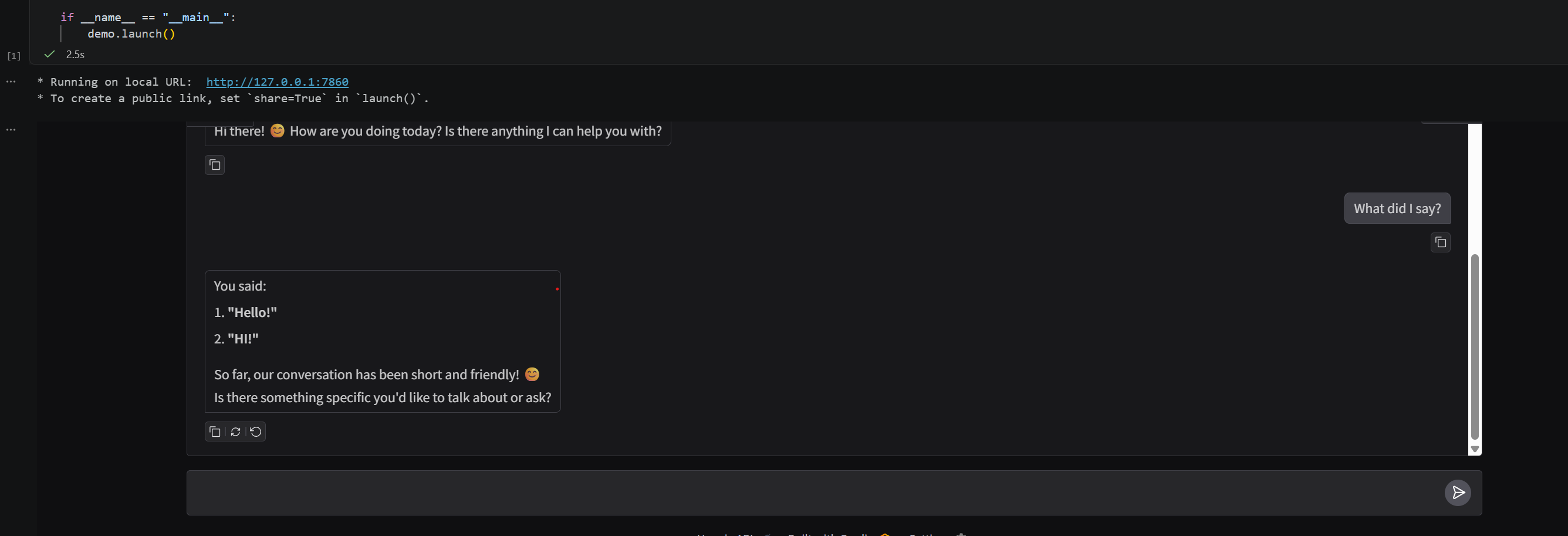
如上文所述,DeepSeek和SCNet提供了多种不同的LLM模型。
9. 检测DeepSeek所提供的LLM模型。
# list_scnet_models.py
import os
from openai import OpenAI
from dotenv import load_dotenv

# Load environment variables
load_dotenv(override=True)

# Initialize SCNet client (using the same OpenAI-compatible client)
client = OpenAI(
    api_key=os.getenv("DEEPSEEK_API_KEY"),
    base_url="https://api.deepseek.com/v1"  # This URL points to DeepSeek, not SCNet
)

try:
    # List available models
    models = client.models.list()
    print("Available models on SCNet:")
    for model in models.data:
        print(f"  - {model.id}")
except Exception as e:
    print(f"Error listing models: {e}")
10. 检测SCNet所提供的LLM模型。
# list_scnet_models.py
import os
from openai import OpenAI
from dotenv import load_dotenv

# Load environment variables
load_dotenv(override=True)

# Initialize SCNet client
client = OpenAI(
    api_key=os.getenv("SCNET_API_KEY"),
    base_url="https://api.scnet.cn/api/llm/v1"
)

try:
    # List available models
    models = client.models.list()
    print("Available models on SCNet:")
    for model in models.data:
        print(f"  - {model.id}")
except Exception as e:
    print(f"Error listing models: {e}")
这允许小微企业和个人迅速调用各类LLM大模型进行二次开发。
我在找工作,HR或项目合作请联系:yucongcai_business@outlook.com
与科研相关的请联系:yucongcai_research@outlook.com

欢迎加入DeepSeek 技术社区。在这里,你可以找到志同道合的朋友,共同探索AI技术的奥秘。
更多推荐


 24
24 0
0- 0


 已为社区贡献2条内容

所有评论(0)