DeepSeek-OCR · 万象识界参数详解:grounding阈值、置信度过滤与后处理规则
本文介绍了如何在星图GPU平台上自动化部署🏮 DeepSeek-OCR · 万象识界镜像,实现高效OCR文档解析。该镜像通过调整grounding阈值、置信度过滤和后处理规则,可精准识别和转换各类文档为结构化Markdown格式,广泛应用于学术论文、商业报表和历史档案的数字化处理。
DeepSeek-OCR · 万象识界参数详解:grounding阈值、置信度过滤与后处理规则
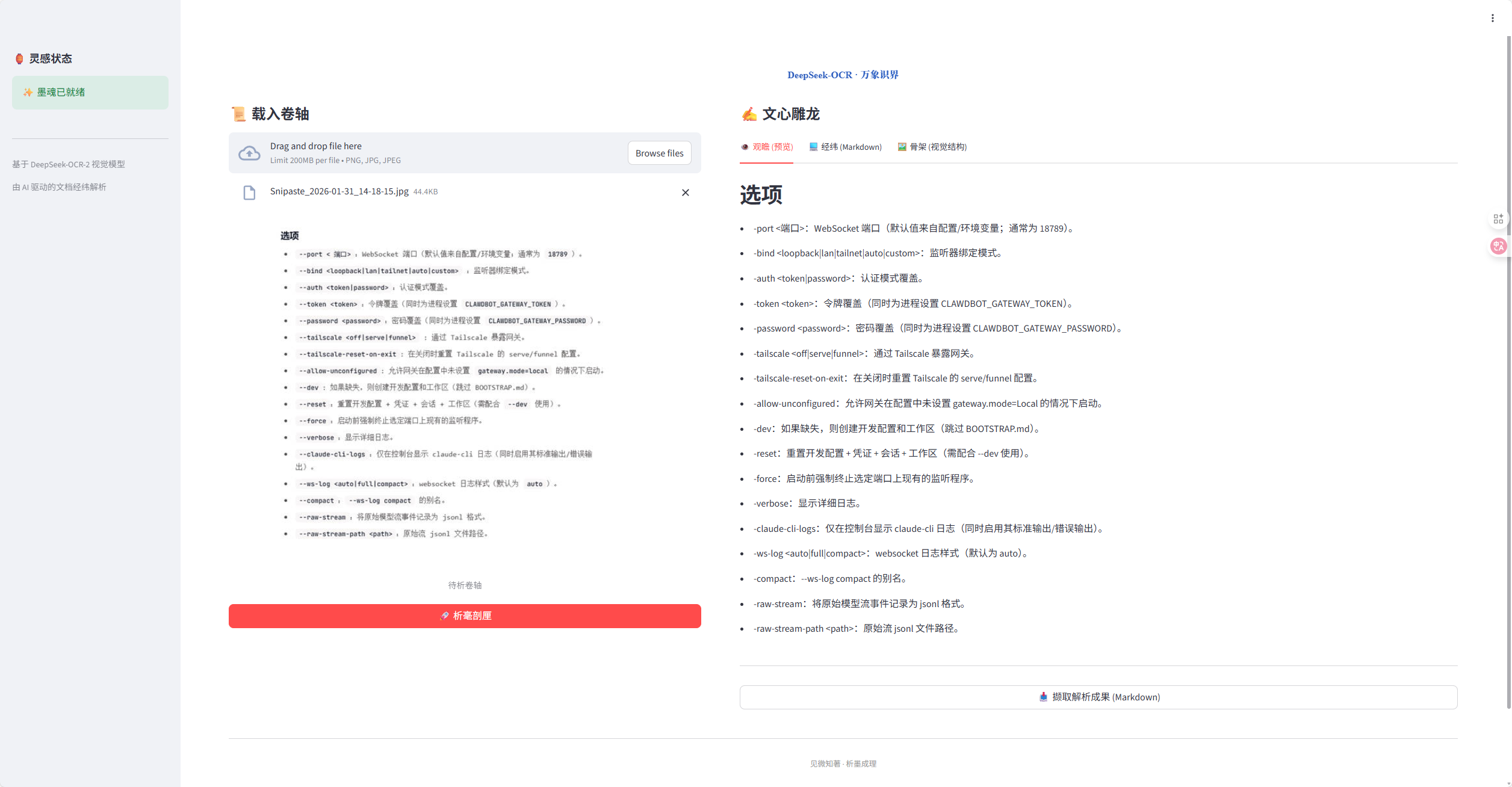
"见微知著,析墨成理。"
DeepSeek-OCR · 万象识界是基于 DeepSeek-OCR-2 构建的现代化智能文档解析终端。通过视觉与语言的深度融合,将静止的图卷(图像)重构为流动的经纬(Markdown),并洞察其底层的骨架布局。
在实际使用过程中,很多用户发现同样的图片在不同参数设置下,识别结果会有显著差异。本文将深入解析三个关键参数:grounding阈值、置信度过滤和后处理规则,帮助你更好地驾驭这个强大的文档解析工具。
1. 核心参数解析:从理论到实践
1.1 grounding阈值:空间定位的精度控制
grounding阈值是DeepSeek-OCR中最重要的参数之一,它控制着模型对文本位置信息的敏感度。
什么是grounding功能? grounding是模型通过特殊提示词<|grounding|>触发的空间感知能力,能够让模型不仅识别文字内容,还能精确感知每个字符在文档中的物理位置。
阈值设置建议:
- 低阈值(0.3-0.5):宽松模式,适合简单文档或需要完整提取所有文本的场景
- 中阈值(0.5-0.7):平衡模式,适合大多数商业文档和标准表格
- 高阈值(0.7-0.9):严格模式,适合复杂排版或需要精确对齐的学术文献
# grounding阈值设置示例
def set_grounding_threshold(threshold=0.6):
    """
    设置grounding检测阈值
    :param threshold: 阈值范围0.1-0.9,默认0.6
    :return: 配置字典
    """
    config = {
        "grounding_threshold": threshold,
        "enable_spatial_awareness": True,
        "min_confidence": 0.3  # 关联的最小置信度
    }
    return config

# 使用示例
config = set_grounding_threshold(0.65)
1.2 置信度过滤:质量控制的守门员
置信度过滤决定了哪些识别结果会被保留,哪些会被丢弃。
置信度的意义: 置信度分数表示模型对识别结果的确定程度,范围从0.0(完全不确定)到1.0(完全确定)。
实际应用策略:
| 场景类型 | 推荐置信度 | 适用情况 |
|---|---|---|
| 高精度需求 | 0.8-0.9 | 法律文档、财务报告、学术论文 |
| 一般业务 | 0.6-0.8 | 商业合同、技术文档、标准表格 |
| 探索性分析 | 0.4-0.6 | 初步扫描、内容概览、大量文档处理 |
| 全量提取 | 0.2-0.4 | 归档扫描、历史文档数字化 |
def configure_confidence_filtering(min_confidence=0.6, max_confidence=1.0):
    """
    配置置信度过滤规则
    :param min_confidence: 最低置信度阈值
    :param max_confidence: 最高置信度阈值
    :return: 过滤配置
    """
    filtering_rules = {
        "min_confidence": min_confidence,
        "max_confidence": max_confidence,
        "apply_per_character": False,  # 是否按字符应用过滤
        "reject_low_confidence": True  # 是否拒绝低置信度结果
    }

    # 动态调整策略
    if min_confidence < 0.4:
        filtering_rules["apply_per_character"] = True
        filtering_rules["reject_low_confidence"] = False

    return filtering_rules

# 为不同场景创建配置
legal_config = configure_confidence_filtering(0.8, 1.0)
general_config = configure_confidence_filtering(0.6, 1.0)
exploratory_config = configure_confidence_filtering(0.4, 1.0)
1.3 后处理规则:智能优化的艺术
后处理规则是对原始识别结果的再加工,包括格式校正、逻辑重组和布局优化。
核心后处理功能:
-
文本规范化
- 去除多余空格和换行符
- 校正标点符号
- 统一数字和日期格式
-
布局重构
- 表格结构优化
- 列表项识别和格式化
- 标题层级推断
-
语义增强
- 段落合并与分割
- 逻辑结构恢复
- 上下文一致性检查
def apply_post_processing(text, layout_info, ruleset="standard"):
    """
    应用后处理规则
    :param text: 原始识别文本
    :param layout_info: 布局信息
    :param ruleset: 规则集类型
    :return: 处理后的文本
    """
    # 选择规则集
    rulesets = {
        "minimal": {"normalize_spaces": True, "correct_punctuation": True},
        "standard": {"normalize_spaces": True, "correct_punctuation": True,
                    "format_tables": True, "detect_lists": True},
        "aggressive": {"normalize_spaces": True, "correct_punctuation": True,
                     "format_tables": True, "detect_lists": True,
                     "infer_headers": True, "reflow_paragraphs": True}
    }

    selected_rules = rulesets.get(ruleset, rulesets["standard"])

    # 应用选定的规则
    processed_text = text
    if selected_rules["normalize_spaces"]:
        processed_text = normalize_whitespace(processed_text)

    if selected_rules["correct_punctuation"]:
        processed_text = correct_punctuation(processed_text)

    # 更多处理步骤...
    return processed_text

def normalize_whitespace(text):
    """规范化空格"""
    import re
    text = re.sub(r'\s+', ' ', text)  # 合并多个空格
    text = re.sub(r'(\w) \.(\s|$)', r'\1.\2', text)  # 修复句号前空格
    return text.strip()
2. 参数组合实战:针对不同场景的优化配置
2.1 学术论文处理配置
学术论文通常具有复杂的数学公式、参考文献和分层标题结构。
def academic_paper_config():
    """学术论文处理专用配置"""
    return {
        "grounding_threshold": 0.7,      # 较高精度要求
        "min_confidence": 0.75,          # 高置信度过滤
        "max_confidence": 1.0,
        "post_processing": {
            "ruleset": "aggressive",
            "preserve_equations": True,   # 保留数学公式
            "detect_citations": True,     # 识别参考文献引用
            "hierarchy_levels": 3         # 支持三级标题
        },
        "special_handling": {
            "footnotes": True,            # 处理脚注
            "captions": True              # 处理图标题
        }
    }
2.2 商业报表处理配置
商业报表需要精确的表格识别和数字准确性。
def business_report_config():
    """商业报表处理专用配置"""
    return {
        "grounding_threshold": 0.65,
        "min_confidence": 0.7,
        "max_confidence": 1.0,
        "post_processing": {
            "ruleset": "standard",
            "enhance_tables": True,       # 增强表格处理
            "validate_numbers": True,     # 数字验证
            "currency_detection": True    # 货币符号识别
        },
        "table_processing": {
            "detect_merged_cells": True,
            "preserve_alignment": True,
            "header_detection": True
        }
    }
2.3 历史文档处理配置
历史文档可能需要更宽松的设置来捕捉所有内容。
def historical_document_config():
    """历史文档处理专用配置"""
    return {
        "grounding_threshold": 0.5,       # 中等精度
        "min_confidence": 0.4,            # 较低置信度阈值
        "max_confidence": 1.0,
        "post_processing": {
            "ruleset": "minimal",         # 最小化干预
            "preserve_layout": True,      # 保持原始布局
            "handle_damage": True         # 处理破损文本
        },
        "recovery_mode": {
            "attempt_reconstruction": True,
            "tolerate_errors": True
        }
    }
3. 高级技巧与最佳实践
3.1 参数调优工作流
建立系统化的参数调优流程可以显著提高识别质量。
def parameter_tuning_workflow(image_path, document_type):
    """
    参数调优工作流
    :param image_path: 图像路径
    :param document_type: 文档类型
    :return: 优化后的配置
    """
    # 第一步:初步分析文档特征
    doc_characteristics = analyze_document(image_path)

    # 第二步:基于文档类型选择基础配置
    base_config = get_base_config(document_type)

    # 第三步:适应性调整
    tuned_config = adapt_config_to_document(base_config, doc_characteristics)

    # 第四步:验证和微调
    final_config = validate_and_refine(tuned_config, image_path)

    return final_config

def analyze_document(image_path):
    """分析文档特征"""
    # 这里可以集成图像分析功能
    return {
        "text_density": estimate_text_density(image_path),
        "layout_complexity": estimate_layout_complexity(image_path),
        "image_quality": estimate_image_quality(image_path)
    }
3.2 动态参数调整
根据识别结果的实时反馈动态调整参数。
class DynamicParameterAdjuster:
    """动态参数调整器"""

    def __init__(self):
        self.learning_rate = 0.1  # 调整速率
        self.history = []         # 历史记录

    def adjust_based_on_feedback(self, current_config, feedback):
        """
        基于反馈调整参数
        :param current_config: 当前配置
        :param feedback: 质量反馈
        :return: 调整后的配置
        """
        new_config = current_config.copy()

        # 根据置信度反馈调整
        if feedback['avg_confidence'] < 0.6:
            new_config['min_confidence'] *= 0.9
        elif feedback['avg_confidence'] > 0.8:
            new_config['min_confidence'] *= 1.1

        # 根据grounding质量调整
        if feedback['grounding_accuracy'] < 0.7:
            new_config['grounding_threshold'] *= 0.95

        # 记录调整历史
        self.history.append({
            'old_config': current_config,
            'new_config': new_config,
            'feedback': feedback
        })

        return new_config
3.3 批量处理优化
针对大批量文档处理的参数优化策略。
def batch_processing_optimizer(documents):
    """
    批量处理优化器
    :param documents: 文档列表
    :return: 优化后的批量配置
    """
    # 分析文档集合特征
    collective_features = analyze_document_collection(documents)

    config = {
        "grounding_threshold": 0.6,  # 保守的默认值
        "min_confidence": 0.5,
        "batch_optimizations": {
            "memory_management": True,
            "parallel_processing": True,
            "incremental_learning": True
        }
    }

    # 根据集合特征调整
    if collective_features['has_tables']:
        config['post_processing'] = {"format_tables": True}

    if collective_features['is_mixed_quality']:
        config['dynamic_adjustment'] = True

    return config
4. 常见问题与解决方案
4.1 过度过滤问题
问题描述: 设置过高的置信度阈值导致重要内容被过滤掉。
解决方案:
def solve_over_filtering(current_config, missed_content):
    """
    解决过度过滤问题
    :param current_config: 当前配置
    :param missed_content: 被误过滤的内容
    :return: 调整后的配置
    """
    adjusted_config = current_config.copy()

    # 逐步降低阈值直到找到平衡点
    if missed_content['important']:
        adjusted_config['min_confidence'] *= 0.8

    # 启用逐字符置信度处理
    adjusted_config['apply_per_character'] = True

    # 添加例外规则
    adjusted_config['exceptions'] = {
        'numbers': True,      # 总是保留数字
        'dates': True,        # 总是保留日期
        'proper_nouns': True  # 尽量保留专有名词
    }

    return adjusted_config
4.2 布局识别错误
问题描述: grounding阈值设置不当导致布局识别错误。
解决方案:
def correct_layout_issues(image_analysis, current_config):
    """
    纠正布局识别问题
    :param image_analysis: 图像分析结果
    :param current_config: 当前配置
    :return: 修正后的配置
    """
    new_config = current_config.copy()

    # 根据图像复杂度调整grounding阈值
    complexity = image_analysis['layout_complexity']
    if complexity > 0.7:  # 高复杂度
        new_config['grounding_threshold'] = max(0.5, current_config['grounding_threshold'])
    else:  # 低复杂度
        new_config['grounding_threshold'] = min(0.7, current_config['grounding_threshold'])

    # 启用高级布局分析
    new_config['advanced_layout_analysis'] = True

    return new_config
4.3 后处理过度修正
问题描述: 后处理规则过于激进导致原始内容被错误修改。
解决方案:
def mitigate_over_processing(original_text, processed_text, current_config):
    """
    减轻过度处理问题
    :param original_text: 原始文本
    :param processed_text: 处理后的文本
    :param current_config: 当前配置
    :return: 调整后的配置
    """
    change_ratio = calculate_change_ratio(original_text, processed_text)

    new_config = current_config.copy()

    if change_ratio > 0.3:  # 变化率超过30%
        # 切换到更保守的规则集
        new_config['post_processing']['ruleset'] = 'minimal'

        # 禁用可能造成过度处理的规则
        new_config['post_processing']['reflow_paragraphs'] = False
        new_config['post_processing']['infer_headers'] = False

        # 启用变化审核
        new_config['post_processing']['review_changes'] = True

    return new_config
5. 总结
通过深入了解DeepSeek-OCR的三个核心参数——grounding阈值、置信度过滤和后处理规则,你可以显著提升文档识别的准确性和实用性。
关键要点回顾:
- grounding阈值控制空间定位精度,需要根据文档复杂度调整
- 置信度过滤影响内容完整性,应在准确性和完整性间找到平衡
- 后处理规则决定最终输出质量,需要根据文档类型选择合适规则集
实践建议:
- 开始时使用中等保守设置(grounding=0.6, confidence=0.6)
- 根据具体文档类型和需求进行微调
- 建立参数调优工作流,系统化地优化识别效果
- 利用动态调整机制适应不同质量的输入文档
记住,最好的参数配置取决于你的具体使用场景和文档特性。通过实践和调整,你将能够充分发挥DeepSeek-OCR · 万象识界的强大能力。
获取更多AI镜像
想探索更多AI镜像和应用场景?访问 CSDN星图镜像广场,提供丰富的预置镜像,覆盖大模型推理、图像生成、视频生成、模型微调等多个领域,支持一键部署。

欢迎加入DeepSeek 技术社区。在这里,你可以找到志同道合的朋友,共同探索AI技术的奥秘。
更多推荐


 2
2 0
0- 0


 已为社区贡献14条内容

所有评论(0)