这可能是目前最全的《Claude code使用指南》
最近有不少听闻cc的大名跑来上手新工具的朋友,但是cil的页面让不少对命令行不熟悉的朋友感到疑惑。不知道如何下手。今天笔者在这里分享一下我根据官方文,内容很长,建议作为工具书使用:主要内容: - 六种不同平台的详细安装方法,包括 Docker 和源码编译 - MCP 集成完整指南,连接外部服务和数据库的配置教程 - 完整的命令参考表,覆盖 CLI 命令和交互模式斜杠命令 - 安全权限管理和最佳实践
最近有不少听闻cc的大名跑来上手新工具的朋友,但是cil的页面让不少对命令行不熟悉的朋友感到疑惑。不知道如何下手。
今天笔者在这里分享一下我根据官方文档整理出的所有使用技巧,内容很长,建议作为工具书使用:
目录:
- [Claude Code 简介]
- [安装方法]
- [基础使用]
- [MCP 集成]
- [配置系统]
- [安全和权限管理系统]
- [思考模式]
- [congfig 命令]
- [团队协作git自动化审查和部署指南]
- [高级特性]
主要内容: - 六种不同平台的详细安装方法,包括 Docker 和源码编译 - MCP 集成完整指南,连接外部服务和数据库的配置教程 - 完整的命令参考表,覆盖 CLI 命令和交互模式斜杠命令 - 安全权限管理和最佳实践,避免数据泄露风险 - 自动化脚本示例,适用于 CI/CD 和团队协作场景 - 详细的故障排除指南,快速解决常见配置问题
按照指南步骤即可快速上手,想要深度使用 Claude Code 的开发者不妨看下。
一、Claude Code 简介
Claude Code 不是又一个 AI IDE,而是革命性的 CLI 智能编程助手!
| 核心痛点 | Cursor 等 AI IDE | Claude Code (CLI) |
| AI 能力 被阉割 | 处于成本考虑,提示词工程降智,回答质量差 | 原生 Claude 4 Sonnet/opus,无任何阉割 |
| 工具调用限制 | 仅 25 次工具调用,复杂任务被强制中断 | 无限工具调用,复杂任务一气呵成 |
| 上下文太短 | 上下文窗口 小,大项目理解不全 | 200K+ 上下文,整个项目一览无余 |
| Agent 能力弱 | 长任务会被夹断,无法自主完成 | 完全自主 Agent,从头到尾自动执行 |
| 调试能力差 | 只能看代码,看不到系统状态 | 直接读取系统日志,实时 debug | |
二、安装教程
⚠️注意:Claude官方不支持中国大陆用户使用他们的服务,因此这里更推荐使用国内镜像站,两者使用上并无任何差别。这里两种方式均会介绍。
2.1 镜像站安装:
地址:Claude Code Dashboard - 官方API镜像服务
注册好账号后,根据教程一键安装即可:
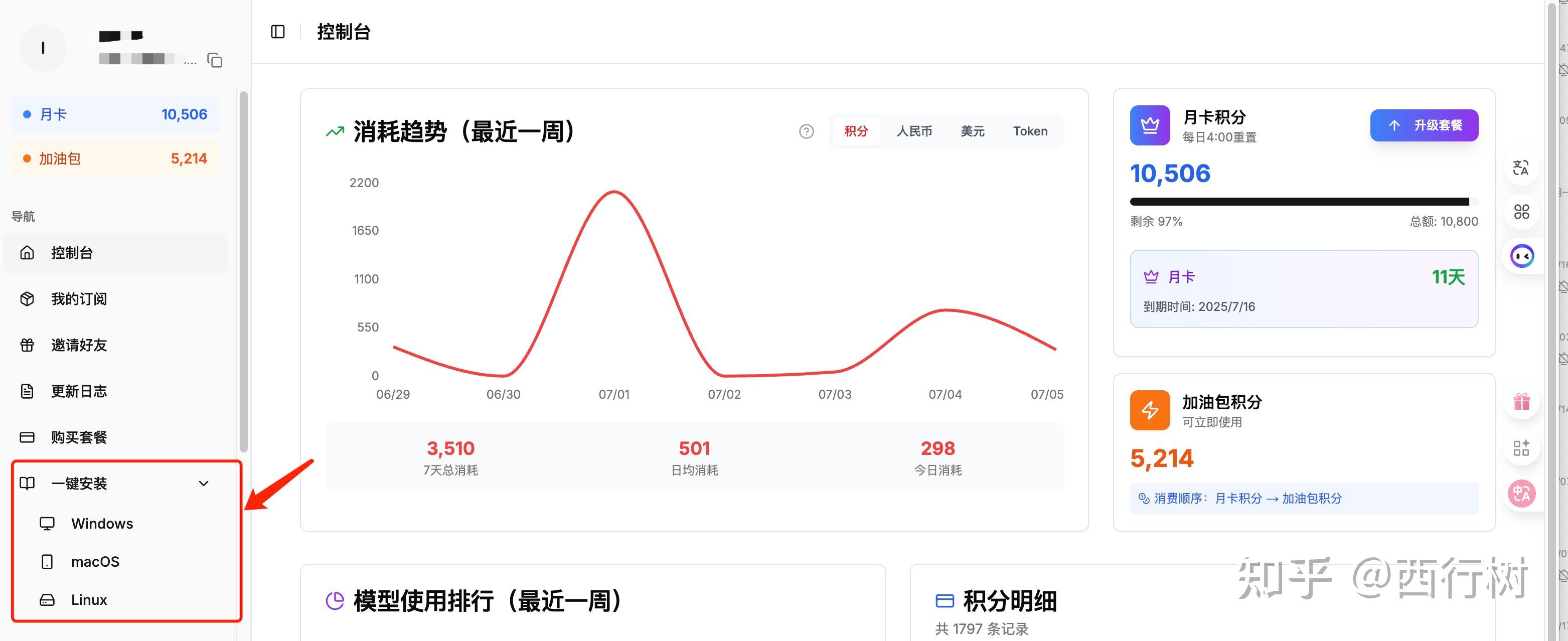
这里将命令也写出来
- MACOS:
curl -fsSL https://aicodewith.com/claudecode/resources/install-script-macos | bash - Linux:
curl -fsSL https://aicodewith.com/claudecode/resources/install-script-linux | bash - Windows: Claude Code 不支持 Windows 文件系统,必须在 WSL 环境中运行,系统要求Windows 11 Pro/Workstation/Enterprise 已启用 BIOS/UEFI 虚拟化。
#安装 WSL2
wsl --install
#然后在微软商店搜索并安装 Ubuntu
curl -fsSL https://aicodewith.com/claudecode/resources/install-script-wsl | bash #运行一键安装脚本
2.2 官方安装:
NPM 安装(windows用户仍须在wsl中安装使用)
#全局安装
npm install -g @anthropic-ai/claude-code

#验证版本
claude --version
三、基础使用
3.1 首次配置
1、api配置(镜像站跳过)
# 从官网 https://console.anthropic.com 获取api keyexport ANTHROPIC_API_KEY="sk-your-key-here"# 根据你的shell选择# Bashecho 'export ANTHROPIC_API_KEY="sk-your-key-here"' >> ~/.bashrcsource ~/.bashrc# Zshecho 'export ANTHROPIC_API_KEY="sk-your-key-here"' >> ~/.zshrcsource ~/.zshrc# Fishecho 'set -gx ANTHROPIC_API_KEY "sk-your-key-here"' >> ~/.config/fish/config.fish
2.基本配置
修改默认设置
claude config set -g model claude-sonnet-4
claude config set -g verbose true
claude config set -g outputFormat text

测试安装是否成功
claude "Hello, Claude!"
claude /doctor
3.安全设置(有风险,自行选择)
export DISABLE_TELEMETRY=1                 #Claude Code 不会发送使用统计、性能数据等信息给 Anthropic
export DISABLE_ERROR_REPORTING=1           #当 Claude Code 崩溃或出错时,不会自动发送错误日志给 Anthropic
export DISABLE_NON_ESSENTIAL_MODEL_CALLS=1 #禁用非必要的模型调用,节约token

Security defaults
claude config set allowedTools "Edit,View" #限制 Claude 只可以使用edit和view工具
claude config set hasTrustDialogAccepted   #跳过信任对话框
claude config set hasCompletedProjectOnboarding       #跳过项目引导流程
claude config set ignorePatterns           #设置忽略的文件/目录,防止读取敏感文件
claude config set --global                 #全局设置需要指定具体配置的参数
3.2 基本命令:
1、基础交互:
claude                           # 启动软件claude "帮我修复这个 bug"          # 一次性命令执行claude -p "<prompt>"             #单次打印模式

cat file | claude -p "<prompt>"  #大文件读取

claude update                    #更新客户端,镜像站更新重新运行下载的命令即可

claude mcp                       #启动mcp向导
2、对话命令:
claude -c              #继续上次对话
claude -r <id>         #按会话 ID 恢复对话
claude --resume <id>   #长对话恢复对话
claude --resume <name> #按照自定义的名字恢复对话
3、快捷命令:
/help # 列出所有斜线命令/add-dir #添加更多工作目录/bug #向 Anthropic 报告错误/clear #清除聊天记录/compact #压缩上下文/config #配置菜单/cost #toekn花费统计/doctor #客户端完整性检查/exit # 退出 Claude Code/init #初始化项目,生成 CLAUDE.md全局记忆/mcp #查看mcp列表和状态/memory #编辑记忆/model #更换模型/permissions #修改工具权限/pr_comments #查看PR评论/review #请求代码审查/sessions #列出sessions列表/status #系统/账户状态/terminal-setup #安装 Shift+Enter 绑定/vim #切换 vim 模式
四、MCP 集成
MCP 通过连接外部服务、数据库、API 和工具扩展了 Claude 的功能。
注意:所有的mcp安装均需要在终端命令行页面进行,不可以在软件内部设置
4.1 基本的mcp命令
claude mcp list              # 列出现有的mcp服务
claude mcp add <name> <cmd>  # 添加新的mcp
claude mcp remove <name>     # 移除mcp
MCP 配置文件位置 : ~/.claude.json
4.2 常用的一些mcp服务(选装)
⚠️注意:以下软件包名称和安装命令可能不准确。请参阅 MCP 官方文档了解当前服务器软件包信息。
1、git mcp
npm install -g git-mcp-server
claude mcp add git "git-mcp-server"
claude mcp add github "github-mcp-server --token $GITHUB_TOKEN"
2、数据库mcp
npm install -g postgres-mcp-server
npm install -g mysql-mcp-server
npm install -g sqlite-mcp-server

#Setup examples
export POSTGRES_URL="postgresql://user:password@localhost:5432/mydb"
claude mcp add postgres "postgres-mcp-server --url $POSTGRES_URL"
3、mcp工具权限
#赋予特定mcp权限
claude --allowedTools "mcp__git__commit,mcp__git__push"

#赋予特定关键词mcp权限
claude --allowedTools "mcp__postgres__*"

#将mcp与内置工具结合
claude --allowedTools "Edit,View,mcp__git__*"
五、配置系统
5.1配置文件
全局配置文件:~/.claude.json 修改后全局生效
{
  "model": "claude-sonnet-4",
  "verbose": true,
  "outputFormat": "text",
  "allowedTools": ["Edit", "View"],
  "disallowedTools": [],
}
项目配置文件:settings.json或者类似名称,修改后只在项目目录生效
{
  "model": "claude-sonnet-4",
  "systemPrompt": "You are a senior developer working on this project",
  "allowedTools": [
    "Edit",
    "View",
    "Bash(git:)",
    "Bash(npm:*)"
  ],
}
5.2 环境变量
| 变量名 | 默认值 | 效果 |
| DISABLE_NON_ESSENTIAL_MODEL_CALLS | 0 | 是否跳过自动摘要、背景解释和 git diff 扫描->节约token,打开速度更快 |
| MAX_THINKING_TOKENS | ≈30‑40 k | 设定最大思考token的花费 |
| DISABLE_TELEMETRY | 0 | 是否向Anthropic官方发送统计信息和错误日志 |
| CLAUDE_CODE_USE_BEDROCK | 0 | 通过 AWS Bedrock 验证账号(需要 IAM 凭证;如果不存在则回退) |
| CLAUDE_CODE_USE_VERTEX | 0 | 通过 Google Vertex AI 验证账号(需要服务帐户凭证;如果不存在则回退)。 |
| HTTP_PROXY | unset | 通过给定的代理HTTP 请求。 |
| HTTPS_PROXY | unset | 通过给定的代理HTTPS 请求。 |
| NO_PROXY | localhost,127.0.0.1 | 绕过代理的逗号分隔的主机/IP。 |
六、安全和权限管理系统
6.1 权限系统
工作场景:
- 在使用工具前请求许可
- 每个会话都会记住权限
- 危险操作需要确认
1、权限级别
| 级别 | 描述 | 风险 |
| Interactive | 每次操作提示 | 低 |
| Allowlist | 仅限预先批准的工具 | 中 |
| Dangerous | 跳过所有权限 | 高 |
2、应用案例
工具权限管理:
给予具体工具权限
claude --allowedTools "Edit,View"

给予一组工具权限
claude --allowedTools "Edit,View,Bash"

范围权限赋予 (仅git操作)
claude --allowedTools "Bash(git:*)"

多范围权限赋予
claude --allowedTools "Bash(git:*),Bash(npm:*)"
完全权限模式:
claude --dangerously-skip-permissions
⚠️注意:使用这个模式cc将不再向你索要任何权限,会直接修改它觉得需要修改的所有文件!
6.2 推荐的安全策略
1️⃣ 限制具体的工具权限
#Good: Specific permissions
claude --allowedTools "Edit,View,Bash(git:status)"

#Bad: Broad permissions
claude --allowedTools "Bash"
2️⃣ 保护敏感数据
#Good: Environment variables
export DATABASE_URL="postgresql://user:pass@host/db"

#Bad: Hardcoded credentials in commands
claude "connect to postgresql://user:password123@host/db"
3️⃣ 定期审查权限组
#Check current permissions
claude config get allowedTools
claude config get disallowedTools

#Review configuration
claude config list
七、思考模式
可以通过设置prompt,来加深思考的深度
| 思考深度 | Prompt 关键词 |
| 1 | think |
| 2 | think about it, think a lot, think deeply, think hard, think more, megathink |
| 3 | think harder, think intensely, think longer, think really hard, think super hard, think very hard, ultrathink |
example:
claude -p "We have a tricky concurrency bug. ultrathink and propose a fix."
- 关键字可以出现在提示中的任何位置
- 如果存在多个关键字, 则最高层级优先
八、config 命令
| command | 功能 | 用例 |
| claude config list | 显示所有当前设置 | claude config list |
| claude config get <key> | 显示具体的<key>的设置 | claude config get theme |
| claude config set -g <key> <value> | 设置全局值 | claude config set -g theme dark |
| claude config add -g <key> <value> | 附加到数组类型设置 | claude config add -g env CLAUDE_CODE_ENABLE_TELEMETRY=1 |
| claude config remove -g <key> <value> | 从数组类型设置中删除 | claude config remove -g env CLAUDE_CODE_ENABLE_TELEMETRY |
注:-g 参数的含义是全局设置,若不加-g则仅为当前项目设置
可编辑的
| Key | 常用值 | 用例 | 功能 |
| apiKeyHelper | 可执行脚本的路径 | claude config set -g apiKeyHelper ~/.claude/key_helper.sh | 脚本必须回应新的 API 密钥;并且可执行。 |
| installMethod | npm, brew, binary, deb, … | claude config set -g installMethod npm | |
| autoUpdates | true / false | claude config set -g autoUpdates false | 打开/关闭自我更新程序 |
| theme | dark, light, light-daltonized, dark-daltonized | claude config set -g theme dark | CLI 主题方案 |
| verbose | true / false | claude config set -g verbose true | 显示完整的 Bash + 工具输出 |
| preferredNotifChannel | iterm2, iterm2_with_bell, terminal_bell, notifications_disabled | claude config set -g preferredNotifChannel terminal_bell | 报警出现的位置 |
| shiftEnterKeyBindingInstalled | true / false | claude config set -g shiftEnterKeyBindingInstalled true | 启用 Shift+Enter 换行 |
| editorMode | true / false | claude config set -g supervisorMode true | 长提示编辑器 |
| autoCompactEnabled | true / false | claude config set -g autoCompactEnabled true | 自动压缩聊天记录 |
| diffTool | Diff command/path | claude config set -g diffTool meld | 由 /diff 使用 |
| env | KEY=value 或 JSON | claude config set -g env CLAUDE_CODE_ENABLE_TELEMETRY=0 | 将环境变量注入每个会话。 |
| tipsHistory | [] 或 JSON 数组 | claude config set -g tipsHistory [] | 清除提示弹出历史记录 |
| parallelTasksCount | 大于等于1的整数 | claude config set -g parallelTasksCount 4 | 限制并发任务 |
| todoFeatureEnabled | true / false | claude config set -g todoFeatureEnabled true | 启用实验性的待办事项 |
| messageIdleNotifThresholdMs | 整数(毫秒) | claude config set -g messageIdleNotifThresholdMs 60000 | 警报前的空闲阈值 |
| autoConnectIde | true / false | claude config set -g autoConnectIde true | 启动时自动连接到 IDE |
九、团队协作git自动化审查和部署指南
9.1 CI/CD 集成
所谓的CI/CD即自动化检查和自动化部署,通过集成到Git中,即可在每次提交代码时让cc做自动化审查,和服务器自动化部署。
GitHub 操作
name: Claude Code Review
on:
  pull_request:
    branches: [main, develop]

jobs:
  claude-review:
    runs-on: ubuntu-latest
    steps:
      - uses: actions/checkout@v4

      - name: Setup Node.js 18
        uses: actions/setup-node@v4
        with:
          node-version: '18'

      - name: Install Claude Code
        run: npm install -g @anthropic-ai/claude-code

      - name: Review PR
        env:
          ANTHROPIC_API_KEY: ${{ secrets.ANTHROPIC_API_KEY }}
        run: |
          claude -p "Review changes for security issues and bugs" \
            --allowedTools "View" \
            --output-format json > review-results.json

      - name: Upload results artifact
        uses: actions/upload-artifact@v4
        with:
          name: claude-review
          path: review-results.json
关键点:
| Setting | Purpose |
| actions/checkout@v4 | 检索拉取请求差异 |
| @anthropic-ai/claude-code | 官方 CLI(为了提高速度,在 CI 中禁用自动更新) |
| ANTHROPIC_API_KEY | 必须存储为加密的 repo 机密。 |
| --allowedTools "View" | 只读工具集:防止在运行器中写入文件。 |
| --output-format json | 发出结构化发现以供下游解析。 |
9.2 本地git自动化
Pre‑commit Hook:
#!/usr/bin/env bash
.git/hooks/pre-commit (chmod +x)

Abort if nothing staged
staged=$(git diff --cached --name-only --diff-filter=ACM)
[ -z "$staged" ] && exit 0

Aggregate staged file contents
payload=$(echo "$staged" | xargs cat)

analysis=$(echo "$payload" | \
  claude -p "Review these changes for issues before commit" \
    --allowedTools "View" \
    --output-format json)

Block commit on critical issues
if echo "$analysis" | jq -e '.critical_issues[]' >/dev/null 2>&1; then
  echo "❌ Critical issues found – commit blocked"
  exit 1
fi

echo "✅ Claude analysis passed"
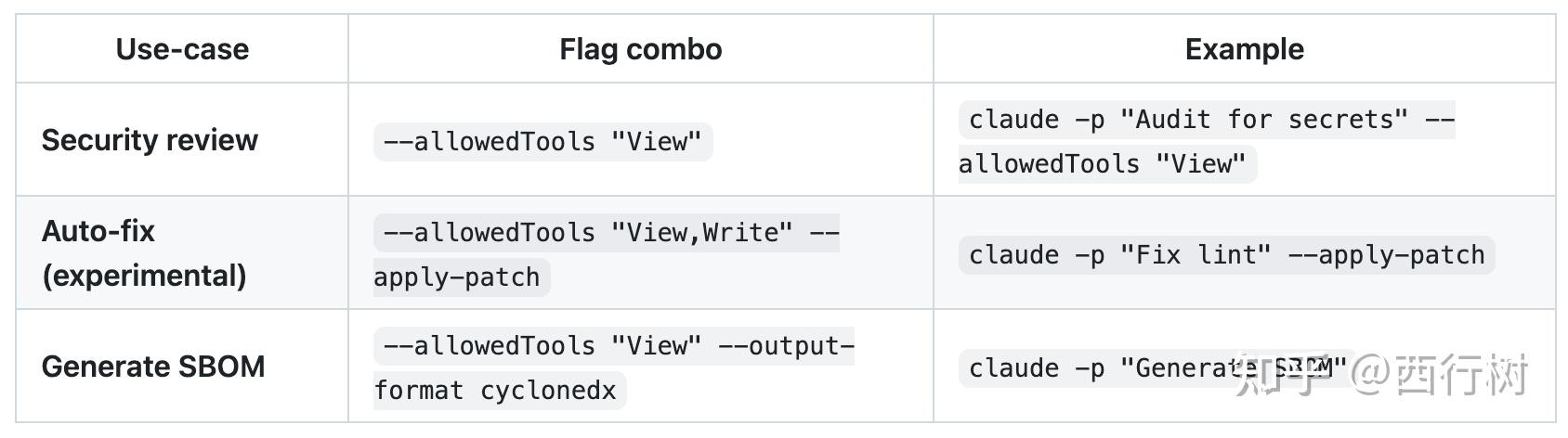
9.3 常见模式
十、高级特性
10.1 持久化记忆
CLAUDE.md - 由/init产生和更新,位于项目根目录。可以让 Claude 记住的持久项目信息
Project: My Application
Overview
This is a React/Node.js application with PostgreSQL database.

Architecture
Frontend: React 18 with TypeScript
Backend: Node.js with Express
Database: PostgreSQL 14

Current Goals
Implement authentication
Add API documentation
Set up CI/CD pipeline

Development Guidelines
Use TypeScript for all new code
Follow ESLint configuration
Write tests for new features
10.2 Memory 命令
Memory 命令就是给 Claude Code 提供"长期记忆"的功能,让它能够记住你的项目特点、编程习惯和重要信息
claude /memory           # Edit project memory
claude /memory view      # View current memory
10.3多目录工作区
#Add multiple directories
claude --add-dir ../frontend ../backend ../shared

#Project-wide analysis
claude "analyze the entire application architecture"

欢迎加入DeepSeek 技术社区。在这里,你可以找到志同道合的朋友,共同探索AI技术的奥秘。
更多推荐

 5
5 0
0- 0


 已为社区贡献11条内容

所有评论(0)