cursor接入antd AI实践
cursor接入antd AI操作步骤
写在前面:已经具备cursor环境
介绍: ant design AI可以帮助AI工具更好地理解组件库、API 及使用模式,一共有三种接入方式:CLI,LLM.txt,MCP Server(官网:https://ant.design/docs/react/llms-cn)
类型
CLI: 通过命令行的形式直接查询文档, 可以离线操作和查询
使用:npm install -g @ant-design/cli 详细命令可参考官网
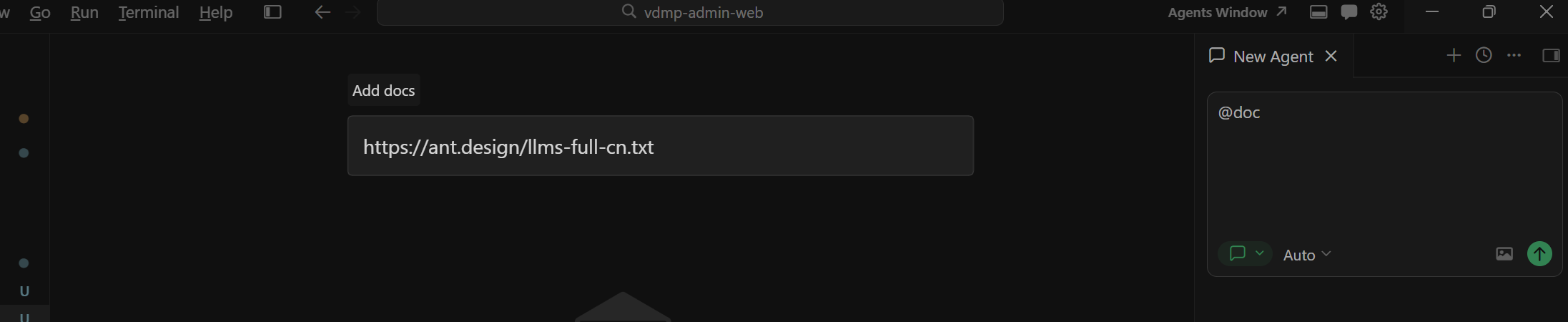
LLMs.txt:静态文件注入,将文档(URL或文本)作为“知识库”附加给AI,一次性或按需读取文件内容来理解组件
使用:在对话框输入@doc 选择 add new doc, 输入官网给的LLMs.txt 聚合文件
-
注意区分平台:如果你是做 React Native 开发,需要使用 Ant Design Mobile RN 的专属文档 URL;如果你是做 Angular 开发,则需要使用 NG-ZORRO 的专属文档 URL。
-
React Native:
https://rn.mobile.ant.design/llms-full.txt -
Angular (NG-ZORRO):
https://ng.ant.design/llms-full-cn.txt
-
MCP Server (官方/社区): 动态协议交互,AI通过标准协议调用一个本地服务,实时查询所需信息,可以实时获取更新后的文档
-
全局安装 npm install -g @ant-design/cli
-
打开cursor配置,点击New MCP Server(如下图) { "mcpServers": { "antd": { "command": "antd", "args": ["mcp"] // 这里还可以拓展指定版本,可参考官网 } } }
-
{
"mcpServers": {
"antd": {
"command": "antd", "args": ["mcp"] // 这里还可以拓展指定版本,可参考官网
}
}
}
重启cursor,看到连接成功的绿色指示灯
遇到的问题
连接失败Error, 指示灯显示红色,点击error output显示报错:Connection failed: MCP error -32000: Connection closed 原因:NPM 配置了内网私有仓库,但内网地址无法访问导致超时
方案:临时使用官方源安装(不影响全局配置)
npm install -g @ant-design/cli --registry=https://registry.npmmirror.com 再次重启cursor,连接成功

欢迎加入DeepSeek 技术社区。在这里,你可以找到志同道合的朋友,共同探索AI技术的奥秘。
更多推荐


 7
7 0
0- 0


 已为社区贡献1条内容

所有评论(0)