【Claude Desktop】第三方 HTTP 网关接入排查复盘
🌌你好!这里是👋 欢迎添加文末好友,不定期掉落福利资讯。
@TOC

写在最前面
版权声明:本文为原创,遵循 CC 4.0 BY-SA 协议。转载请注明出处。
目标是让 Claude Desktop 使用一个只有 HTTP、没有 HTTPS 的第三方推理网关,而不是直接走官方登录和官方推理链路。
已知第三方网关在 Claude Code / VS Code 环境中可用,典型配置形态如下:
ANTHROPIC_BASE_URL = http://<gateway-host>:<port>/ANTHROPIC_AUTH_TOKEN = <your-api-key>
最终验证出的可行思路不是让 Claude Desktop 直接访问公网 HTTP 网关,而是:
- 先确认 Claude Desktop 是否支持 third-party inference
- 排除“模型名错误”和“接口不兼容”两类干扰项
- 定位到真正问题是:Claude Desktop 对公网 third-party endpoint 实际要求 HTTPS
- 利用 Desktop 对 loopback HTTP 的例外支持,通过本地回环代理把
127.0.0.1转发到公网 HTTP 网关
零、最小化复现路径
如果你想完整复现这个问题和解决过程,最短路径如下。
前提条件
- Windows 上已安装 Claude Desktop
- Desktop 有
Developer -> Configure third-party inference入口 - 远端网关支持:
POST /v1/messages- Claude Messages API 风格返回
- 远端网关只有 HTTP,无 HTTPS
Step 1:验证远端网关支持 Claude Messages API
curl -X POST "http://<gateway-host>:<port>/v1/messages" \
  -H "Content-Type: application/json" \
  -H "x-api-key: <your-api-key>" \
  -H "anthropic-version: 2023-06-01" \
  --data '{
    "model": "claude-opus-4",
    "max_tokens": 16,
    "messages": [{"role": "user", "content": "hi"}]
  }'
预期:返回 Claude message 对象,而不是 404、501 或完全不同的响应格式。
Step 2:直接把公网 HTTP 填进 Desktop,观察失败
在 Claude Desktop 里填:
- Base URL =
http://<gateway-host>:<port>/
预期:对于公网域名,Desktop 最终会因为 HTTPS 相关问题失败。常见表征是:
- 最终探测到的 endpoint 变成
https://... - 报
ERR_SSL_PROTOCOL_ERROR
Step 3:起 loopback HTTP 代理
把第五章中的 Python 代码保存成 loopback_proxy.py,然后运行:
python loopback_proxy.py
预期输出:
Listening on http://127.0.0.1:18080 -> http://<gateway-host>:<port>
Step 4:验证 loopback 代理可用
curl -X POST "http://127.0.0.1:18080/v1/messages" \
  -H "Content-Type: application/json" \
  -H "x-api-key: <your-api-key>" \
  -H "anthropic-version: 2023-06-01" \
  --data '{
    "model": "claude-opus-4",
    "max_tokens": 16,
    "messages": [{"role": "user", "content": "hi"}]
  }'
预期:成功返回 Claude Messages 响应。
Step 5:在 Claude Desktop 中改填 loopback 地址
在 Desktop 中填:
- Connection =
Gateway - Gateway base URL =
http://127.0.0.1:18080/ - Gateway API key =
<your-api-key> - Auth scheme =
Bearer - Model =
claude-opus-4
Step 6:如果 Desktop 额外要求 Virtual Machine Platform
执行:
dism.exe /online /enable-feature /featurename:VirtualMachinePlatform /all /norestart
bcdedit /set hypervisorlaunchtype auto
然后重启系统。
复盘全过程
一、先确认 Claude Desktop 是否真的支持 third-party inference
在 Windows 上,可以先看 Claude Desktop 的本地配置和日志目录,一般位于:
%APPDATA%\Claude\config.json%APPDATA%\Claude\developer_settings.json%APPDATA%\Claude\claude_desktop_config.json%APPDATA%\Claude\logs\main.log
如果你已经启用了开发者相关能力,通常能看到类似特征:
allowDevTools: true- 日志里出现过
setup-desktop-3p - third-party inference / gateway 相关字段
这一步的目的不是依赖某个具体文件结构,而是确认:
- 你当前安装的 Claude Desktop 版本里,third-party inference 这个功能是真实存在的
- 不是教程、截图或传闻里的虚构入口
二、先排除两个最常见的误判
一开始最容易怀疑两件事:
- Desktop 失败是不是因为模型名填错了
- 第三方站是不是只支持 OpenAI API,不支持 Claude Messages API
1)先测 /v1/models
先对第三方网关测试模型列表:
curl "http://<gateway-host>:<port>/v1/models" \
  -H "Authorization: Bearer <your-api-key>"
如果这里能返回模型列表,说明这个网关至少对外暴露了一个模型查询能力。
在我的验证里,它返回的是类似:
gpt-5.5gpt-5.4gpt-5.4-minigpt-5.3-codexgpt-5.3-codex-sparkgpt-5.2
这说明它至少兼容 OpenAI 风格的模型查询。
2)再直接测 Claude Messages API
真正关键的是:它是否支持 Claude 的 /v1/messages。
curl -X POST "http://<gateway-host>:<port>/v1/messages" \
  -H "Content-Type: application/json" \
  -H "x-api-key: <your-api-key>" \
  -H "anthropic-version: 2023-06-01" \
  --data '{
    "model": "claude-opus-4",
    "max_tokens": 16,
    "messages": [{"role": "user", "content": "hi"}]
  }'
如果返回的是 Claude Messages 风格对象,例如:
type = messagerole = assistantcontent = [...]stop_reason = end_turn
那就说明:
- 这个第三方站不只是 OpenAI 兼容
- 它也支持 Claude
/v1/messages
我在实际测试里还额外验证过:
model = claude-opus-4可用model = gpt-5.5也可用
所以至少在这个案例里:
- 不是模型名错误导致失败
- 也不是接口不兼容导致失败
三、真正的主因:Claude Desktop 对公网 third-party endpoint 实际要求 HTTPS
当把下面这个公网 HTTP 地址直接填进 Claude Desktop 时:
http://<gateway-host>:<port>/
Desktop 最终报出的错误特征是:
requestUrl: https://<gateway-host>:<port>/v1/messagesendpoint: https://<gateway-host>:<port>/message: Gateway was unreachable: net::ERR_SSL_PROTOCOL_ERROR
这已经足够说明:
- 即便原始配置是
http://... - Claude Desktop 最终仍然尝试以 HTTPS 访问该公网域名
为什么可以确定这是产品限制,不是偶发 UI 问题
进一步检查 Claude Desktop 的打包前端代码,可以看到它对 third-party inference URL 有一层校验逻辑,核心规则是:
- 允许
https: - 或者允许
http:,但仅限 loopback - 代码里能看到
allowLoopbackHttp: true - 非 loopback 的校验语义是:
must use https
因此可以得出稳定结论:
- 公网 host 的 third-party gateway 必须走 HTTPS
- 只有
localhost/127.0.0.1/[::1]允许 HTTP
也就是说,这不是“刚好你那次填错了”,而是 Claude Desktop 本身的约束。
四、为什么 loopback 方案能成立
既然:
- 公网 HTTP 不被 Claude Desktop 接受
- loopback HTTP 被 Claude Desktop 明确允许
那最小变更方案就是:
- 在本机启动一个只监听
127.0.0.1的 HTTP 代理 - 让这个本地代理转发到远端公网 HTTP 网关
- 在 Claude Desktop 里填
http://127.0.0.1:<port>/
这样一来:
- 对 Claude Desktop 来说,它看到的是本机 loopback HTTP,满足自身限制
- 对你的第三方网关来说,流量仍然能通过本地代理转发到外部 HTTP 服务
五、一个最小可用的 loopback 代理
下面是一份可以直接运行的最小 Python 代理示例。它只做一件事:
- 监听
127.0.0.1:18080 - 把收到的请求转发到
http://<gateway-host>:<port>
1)保存为 loopback_proxy.py
import http.server
import socketserver
import urllib.request
import urllib.error
import sys

TARGET_BASE = "http://<gateway-host>:<port>"
LISTEN_HOST = "127.0.0.1"
LISTEN_PORT = 18080
HOP_BY_HOP = {
    "connection", "keep-alive", "proxy-authenticate", "proxy-authorization",
    "te", "trailers", "transfer-encoding", "upgrade", "host", "content-length"
}

class ProxyHandler(http.server.BaseHTTPRequestHandler):
    protocol_version = "HTTP/1.1"

    def do_GET(self):
        self._proxy()

    def do_POST(self):
        self._proxy()

    def do_PUT(self):
        self._proxy()

    def do_DELETE(self):
        self._proxy()

    def do_PATCH(self):
        self._proxy()

    def do_OPTIONS(self):
        self._proxy()

    def log_message(self, format, *args):
        sys.stdout.write("%s - - [%s] %s\n" % (self.client_address[0], self.log_date_time_string(), format % args))
        sys.stdout.flush()

    def _proxy(self):
        length = int(self.headers.get("Content-Length", "0") or "0")
        body = self.rfile.read(length) if length else None
        url = TARGET_BASE + self.path

        req = urllib.request.Request(url=url, data=body, method=self.command)
        for key, value in self.headers.items():
            if key.lower() not in HOP_BY_HOP:
                req.add_header(key, value)

        try:
            with urllib.request.urlopen(req, timeout=60) as resp:
                data = resp.read()
                self.send_response(resp.status)
                for key, value in resp.getheaders():
                    if key.lower() not in HOP_BY_HOP:
                        self.send_header(key, value)
                self.send_header("Content-Length", str(len(data)))
                self.end_headers()
                if data:
                    self.wfile.write(data)
        except urllib.error.HTTPError as e:
            data = e.read()
            self.send_response(e.code)
            for key, value in e.headers.items():
                if key.lower() not in HOP_BY_HOP:
                    self.send_header(key, value)
            self.send_header("Content-Length", str(len(data)))
            self.end_headers()
            if data:
                self.wfile.write(data)
        except Exception as e:
            message = str(e).encode("utf-8", errors="replace")
            self.send_response(502)
            self.send_header("Content-Type", "text/plain; charset=utf-8")
            self.send_header("Content-Length", str(len(message)))
            self.end_headers()
            self.wfile.write(message)

with socketserver.ThreadingTCPServer((LISTEN_HOST, LISTEN_PORT), ProxyHandler) as httpd:
    print(f"Listening on http://{LISTEN_HOST}:{LISTEN_PORT} -> {TARGET_BASE}", flush=True)
    httpd.serve_forever()
2)运行代理
python loopback_proxy.py
预期看到:
Listening on http://127.0.0.1:18080 -> http://<gateway-host>:<port>
六、先验证 loopback 代理本身可用
不要急着先开 Claude Desktop,先验证本地代理真的能转发 Claude Messages API。
curl -X POST "http://127.0.0.1:18080/v1/messages" \
  -H "Content-Type: application/json" \
  -H "x-api-key: <your-api-key>" \
  -H "anthropic-version: 2023-06-01" \
  --data '{
    "model": "claude-opus-4",
    "max_tokens": 16,
    "messages": [{"role": "user", "content": "hi"}]
  }'
如果这一步成功,说明:
- loopback 代理本身可用
- 本地到远端的转发链路可用
- 第三方站经 loopback 转发后仍能正常提供 Claude Messages API
这是整个方案最关键的验证点。
七、在 Claude Desktop 里怎么填
当 loopback 代理验证成功后,再去 Claude Desktop:
Developer -> Configure third-party inference
填下面这组值:
- Connection:
Gateway - Gateway base URL:
http://127.0.0.1:18080/ - Gateway API key:
<your-api-key> - Auth scheme:
Bearer - Model: 先填
claude-opus-4
如果 claude-opus-4 因为网关映射策略不可用,再测试:
claude-sonnet-4gpt-5.5
但在我这个案例里,claude-opus-4 通过 /v1/messages 已经验证可用,所以优先用它最合理。
八、为什么没有把“注册表配置”作为主路径
理论上,Claude Desktop 支持从 Windows 策略项中读取 third-party inference 配置,典型位置是:
HKCU\SOFTWARE\Policies\Claude- 或
HKLM\SOFTWARE\Policies\Claude
但在实际机器上,这条路可能经常失败,常见原因包括:
- 当前用户无权写
Policies分支 - 企业管控或安全软件拦截
reg import直接失败- PowerShell 创建项时报
UnauthorizedAccessException
因此,如果你的目标是快速验证,我不建议优先走注册表。
对大多数人来说,更稳的顺序应该是:
- 先用 Desktop UI 配
- 如果必须批量分发,再研究注册表或 MDM
九、一个额外前置条件:Virtual Machine Platform
在继续配置 loopback gateway 之前,Claude Desktop 还可能提示:
Virtual Machine Platform not available
如果出现这个问题,需要先在 Windows 上启用:
- Virtual Machine Platform
可以执行:
dism.exe /online /enable-feature /featurename:VirtualMachinePlatform /all /norestart
bcdedit /set hypervisorlaunchtype auto
然后重启电脑。
这和 HTTP/HTTPS 问题不是一回事,但如果不先满足这个前置条件,Claude Desktop workspace 本身可能就起不来。
十一、核心结论
这次问题不是模型名错,也不是第三方站不支持 Claude API;真正的关键在于:
- Claude Desktop 不接受公网 HTTP gateway
- 但允许 loopback HTTP
- 所以最小可行方案是:
- 本地起一个
127.0.0.1代理 - 再让 Claude Desktop 连接这个本地代理
- 本地起一个
如果只是临时验证,这个方案已经足够。
如果要长期稳定使用 Claude Desktop,最终还是建议:
- 给远端网关补一个正式 HTTPS 入口
- 这样就不再依赖本地代理,也更接近 Claude Desktop 的设计预期
报错:Virtual Machine Platform not available
Claude’s workspace requires the Virtual Machine Platform on Windows. Enable this feature, then restart.
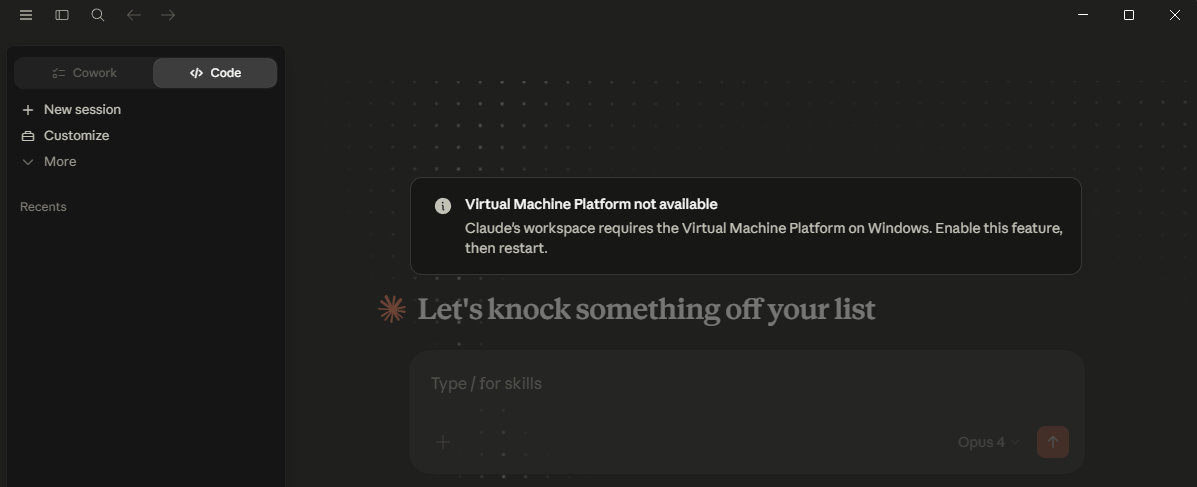
这不是网关问题了,是 Windows 没开 Virtual Machine Platform。Claude Desktop 的 workspace 在你这台机器上需要它,开完后必须重启。
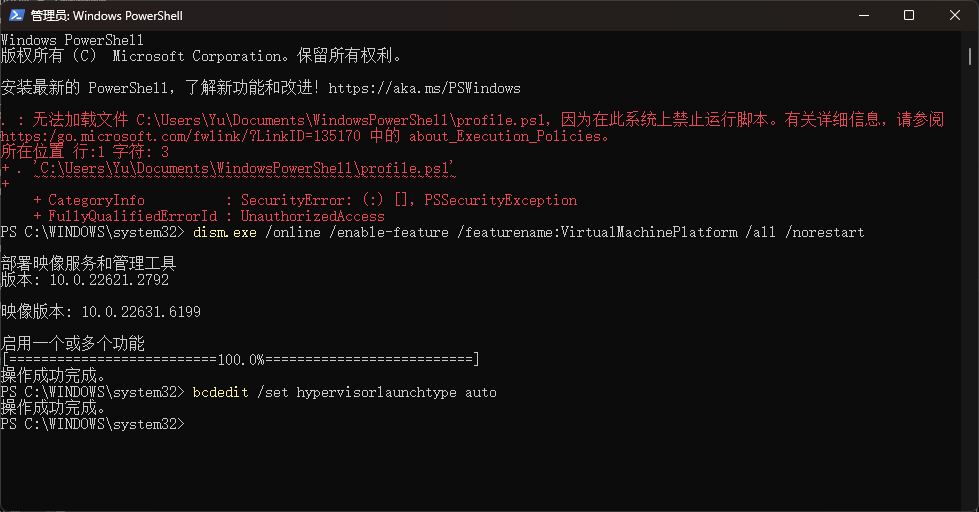
最直接的做法:
用管理员身份打开 PowerShell
执行:
dism.exe /online /enable-feature /featurename:VirtualMachinePlatform /all /norestart
再执行:
bcdedit /set hypervisorlaunchtype auto
重启电脑
重新打开 Claude Desktop 再试
如果上面开不了,再检查两点:
控制面板 -> 启用或关闭 Windows 功能 里,确认 Virtual Machine Platform 已勾选
BIOS/UEFI 里确认 Intel VT-x / AMD-V 虚拟化已开启
如果你愿意,我下一条可以直接给你一个逐步排查清单,按“管理员权限 / Windows 功能 / BIOS 虚拟化”三步把它确认完。
hello,这里是 晓雨的笔记本 。如果你喜欢我的文章,欢迎三连给我鼓励和支持:👍点赞 📁 关注 💬评论,我会给大家带来更多有用有趣的文章。
原文链接 👉 ,⚡️更新更及时。
欢迎大家点开下面名片,添加好友交流。

欢迎加入DeepSeek 技术社区。在这里,你可以找到志同道合的朋友,共同探索AI技术的奥秘。
更多推荐



 11
11 0
0- 0


 已为社区贡献7条内容

所有评论(0)