从创建到进化:用 skill-creator 和 Darwin 打造高质量 Agent Skill
文章摘要: Agent Skill生态快速发展,工具如Claude Code、Codex等开始支持SKILL.md扩展机制。随着Skill数量增长,手工管理变得困难,需要系统化的工作流。文章介绍了skill-creator和darwin-skill工具链:前者用于从零创建Skill,后者用于持续优化Skill质量。Skill本质是给AI的操作说明书,包含核心说明、脚本和资源。文章以创建CSDN作者
Agent Skill 生态正在变得越来越热。Claude Code、Codex、OpenClaw、Trae、CodeBuddy 等工具,都开始支持类似 SKILL.md 的能力扩展机制。
一开始只有几个 Skill 时,手写还能应付:写一个 SKILL.md,放几段说明,再补几个脚本。但当 Skill 数量变成 10 个、30 个,甚至 60 个以后,问题就来了:
- 哪些 Skill 真的有效?
- 哪些只是格式正确,但实际跑出来效果不好?
- 新建 Skill 时怎么避免漏掉结构、测试和打包步骤?
- 修改 Skill 后,怎么确认它变好了,而不是只是“看起来更完整”?
这时候就需要把 Skill 当成一个工程资产来管理,而不是一段随手写的 Prompt。
本文介绍一条比较实用的工作流:用 skill-creator 创建 Skill,用 darwin-skill 持续评分和进化 Skill。
简单说:
skill-creator解决“怎么从 0 到 1 创建一个 Skill”,darwin-skill解决“怎么让已有 Skill 越用越好”。
一、Skill 是什么:给 AI 的操作说明书
在 Claude Code 生态里,Skill 是一种可复用的能力扩展包。它可以给 Agent 添加:
- 专业领域知识
- 固定工作流程
- API 或工具使用方式
- 模板、脚本和参考资料
可以先用一句话理解:
Skill = 给 AI 写的一份操作说明书。
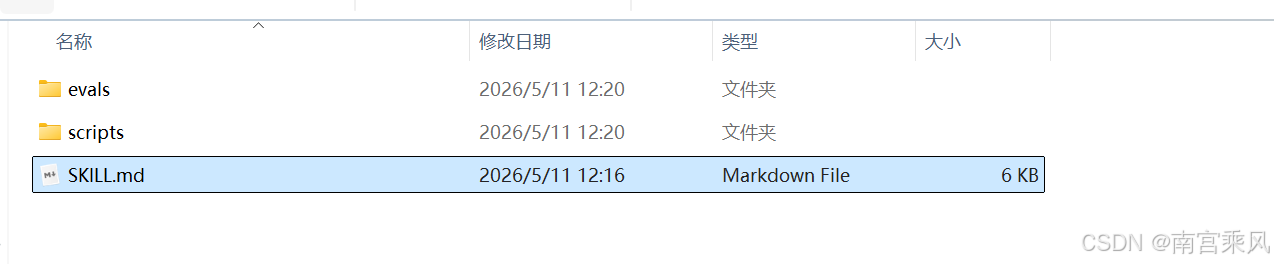
一个典型 Skill 通常长这样:
skill-name/
├── SKILL.md        # 核心说明,必须存在
├── scripts/        # 可执行脚本
├── references/     # 文档、规范或领域知识
└── assets/         # 模板、图片、样例等附加资源
其中最重要的是 SKILL.md。
一个极简示例:
---
name: video-tool
description: Video processing CLI for editing and transcribing videos
---

# Video Tool Skill

Use the video-tool CLI to process videos.

## Quick Start

video-tool video download -u URL
video-tool generate transcript -i video.mp4
这份文件的作用不是“介绍 video-tool 有多厉害”,而是教 Agent 在需要处理视频时,应该怎么调用这个工具。
这也是 Skill 和普通文档最大的区别:普通文档写给人看,Skill 写给 AI 执行。
二、为什么需要 skill-creator?
手写一个简单 Skill 不难,难的是稳定地写出高质量 Skill。
一个合格的 Skill 至少要回答几个问题:
- 什么时候应该触发?
- 输入是什么?
- 执行步骤是什么?
- 需要哪些脚本、参考资料和模板?
- 怎么测试它是否真的有效?
- 最后怎么打包和分发?
如果每次都靠人凭记忆处理,很容易漏步骤。
skill-creator 就是 Anthropic 官方提供的 Skill 开发助手。它本身也是一个 Skill,用来帮助开发者创建、优化和打包新的 Skill。
GitHub 地址:
https://github.com/anthropics/skills/tree/main/skills/skill-creator
安装方式有两种。
使用 npx skills:
npx skills add https://github.com/anthropics/skills --skill skill-creator
或者使用 Claude 的安装命令:
claude install anthropics/skills/skill-creator
安装完成后,就可以在 Claude 中调用:
/skill-creator
安装后的本地目录通常会包含这些内容:
skills/skill-creator/
├── SKILL.md          # 核心说明文件
├── agents/           # 内置评审助手
├── eval-viewer/      # 测试结果可视化工具
├── references/       # 数据格式、规范等参考资料
└── scripts/          # 打包、测评等自动化脚本
这说明 skill-creator 不是简单帮你生成一段 Markdown,而是提供了一套完整的开发工具链。
三、skill-creator 的核心流程
skill-creator 的工作方式可以概括成一个循环:
这个流程里,最重要的不是“生成 SKILL.md”,而是“用测试验证 Skill 是否真的起作用”。
很多人会把 Skill 当成一段增强 Prompt,只要写得详细就觉得完成了。但 Agent 的表现并不只取决于写得多详细,还取决于:
- 触发条件是否清楚
- 操作步骤是否可执行
- 参考资料是否放在正确位置
- 错误路径是否有处理
- 输出是否符合预期
所以更合理的流程是:
需求 → 草稿 → 测试 → 评估 → 修改 → 再测试 → 打包
这其实和我们平时写代码很像。不是写完就上线,而是要经过测试、评审和迭代。
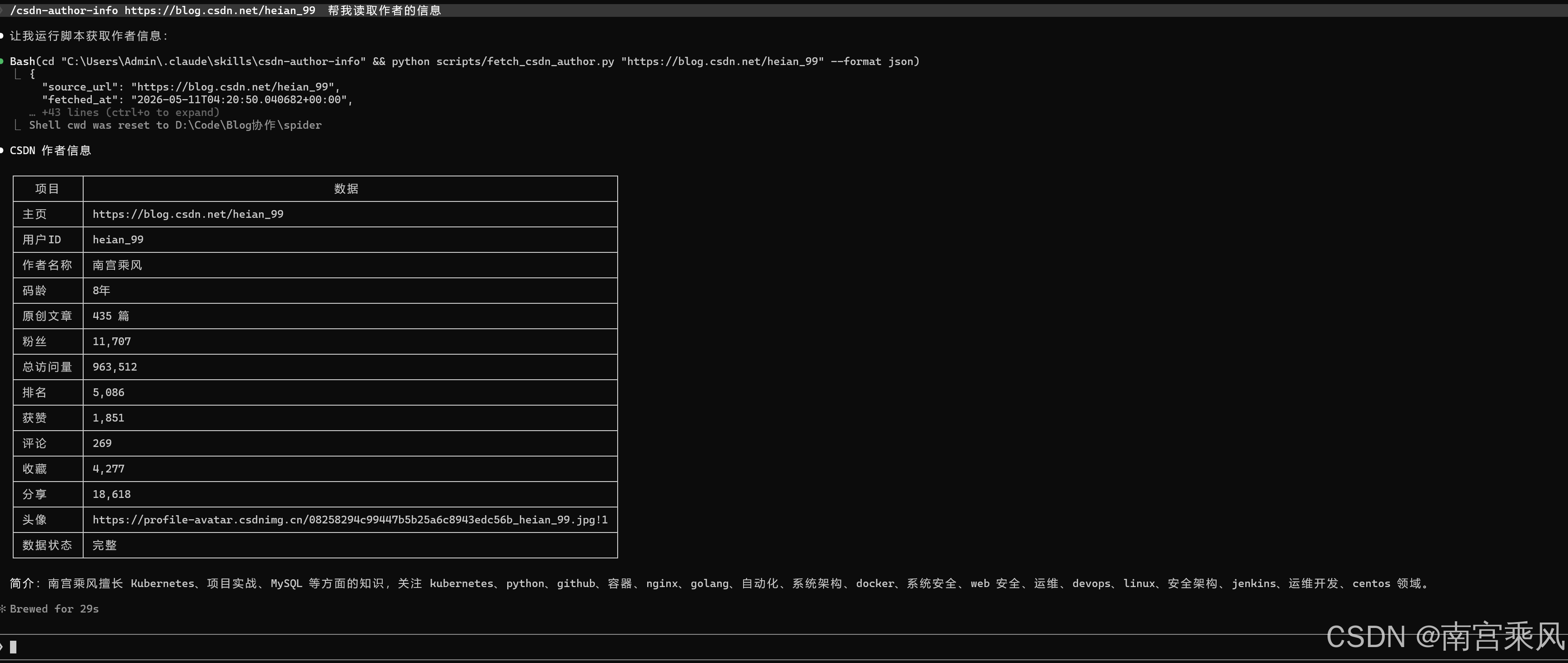
四、一个实战例子:创建 CSDN 作者信息读取 Skill
素材里给了一个很典型的实战场景:
/skill-creator spider 读取这个文件,现在我想创建一个 Skills,
我输一个 csdn 的博客地址 https://blog.csdn.net/heian_99。
这个 skills 可以读取作者的详细信息。
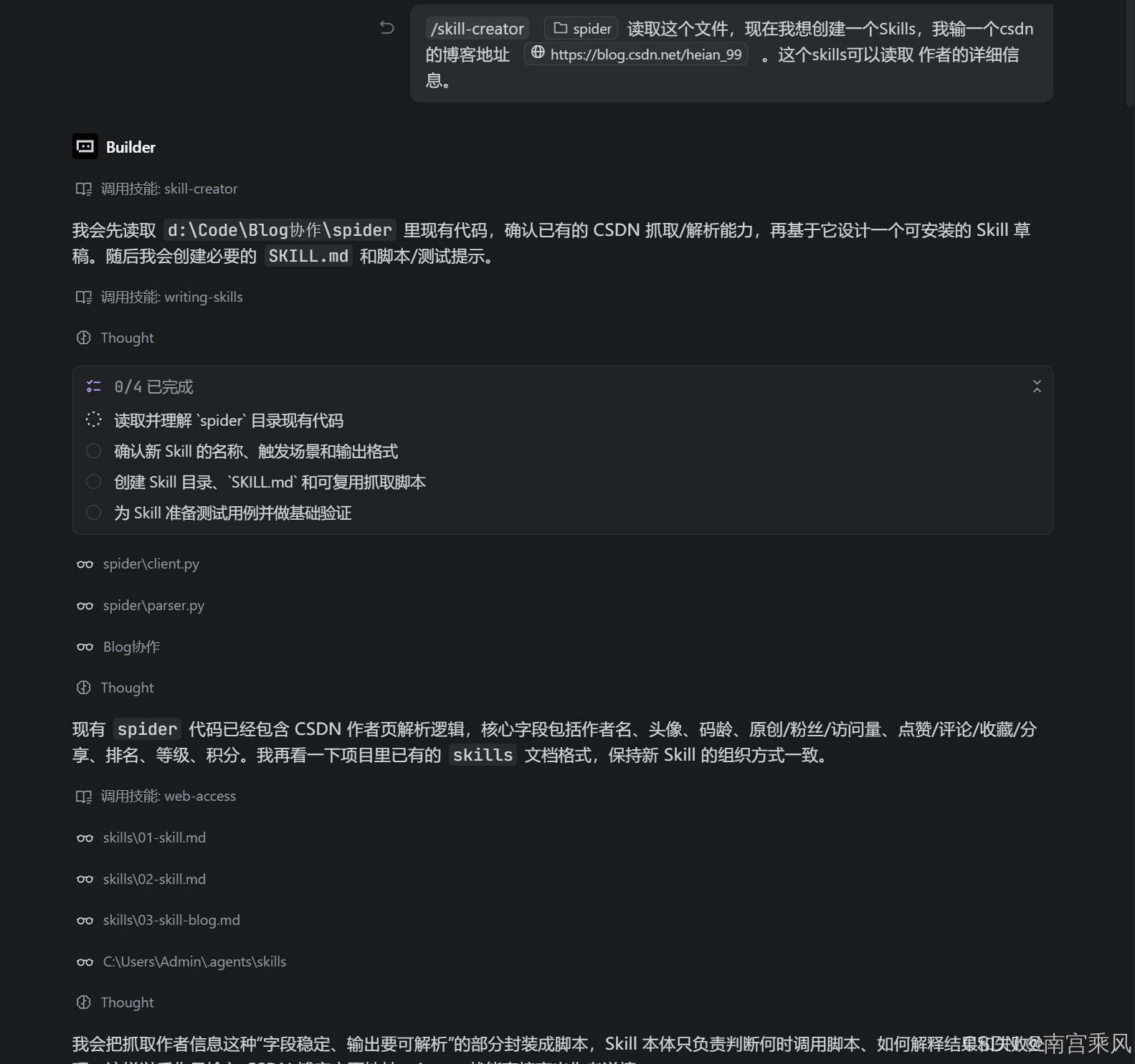
这个需求适合拆成一个专门的 Skill,比如 csdn-author-info。
它的目标不是“万能爬虫”,而是聚焦一个明确动作:读取 CSDN 博客作者公开资料。
一个比较合理的 Skill 边界可以这样定义:
---
name: csdn-author-info
description: >-
  Read and summarize public CSDN author profile information from a CSDN blog
  homepage URL. Use when the user provides a CSDN author page and wants author
  name, avatar, article count, fans, visits, ranking, level, score, likes,
  comments, collections, or shares.
---
这里有几个设计点:
name用小写字母和连字符,方便识别。description同时说明“能做什么”和“什么时候用”。- 范围限定在 CSDN 作者公开资料,不扩展成通用网页爬虫。
- 输出字段提前列清楚,降低 Agent 自由发挥的空间。
对应的工作流可以设计成:
1. 校验用户输入是否为 CSDN 博客主页 URL。
2. 读取页面公开信息。
3. 提取作者名称、头像、文章数、粉丝数、访问量、排名、等级等字段。
4. 如果字段缺失,标记为“未公开”或“未获取到”,不要编造。
5. 用结构化格式返回结果,并附上来源 URL。
如果这个 Skill 要长期使用,最好再补一个脚本,例如:
scripts/fetch_csdn_author.py
把“请求网页、解析字段、输出 JSON”这类确定性逻辑交给脚本。Agent 只负责判断何时调用、如何解释结果。
这样比每次让 Agent 临时写爬虫更可靠。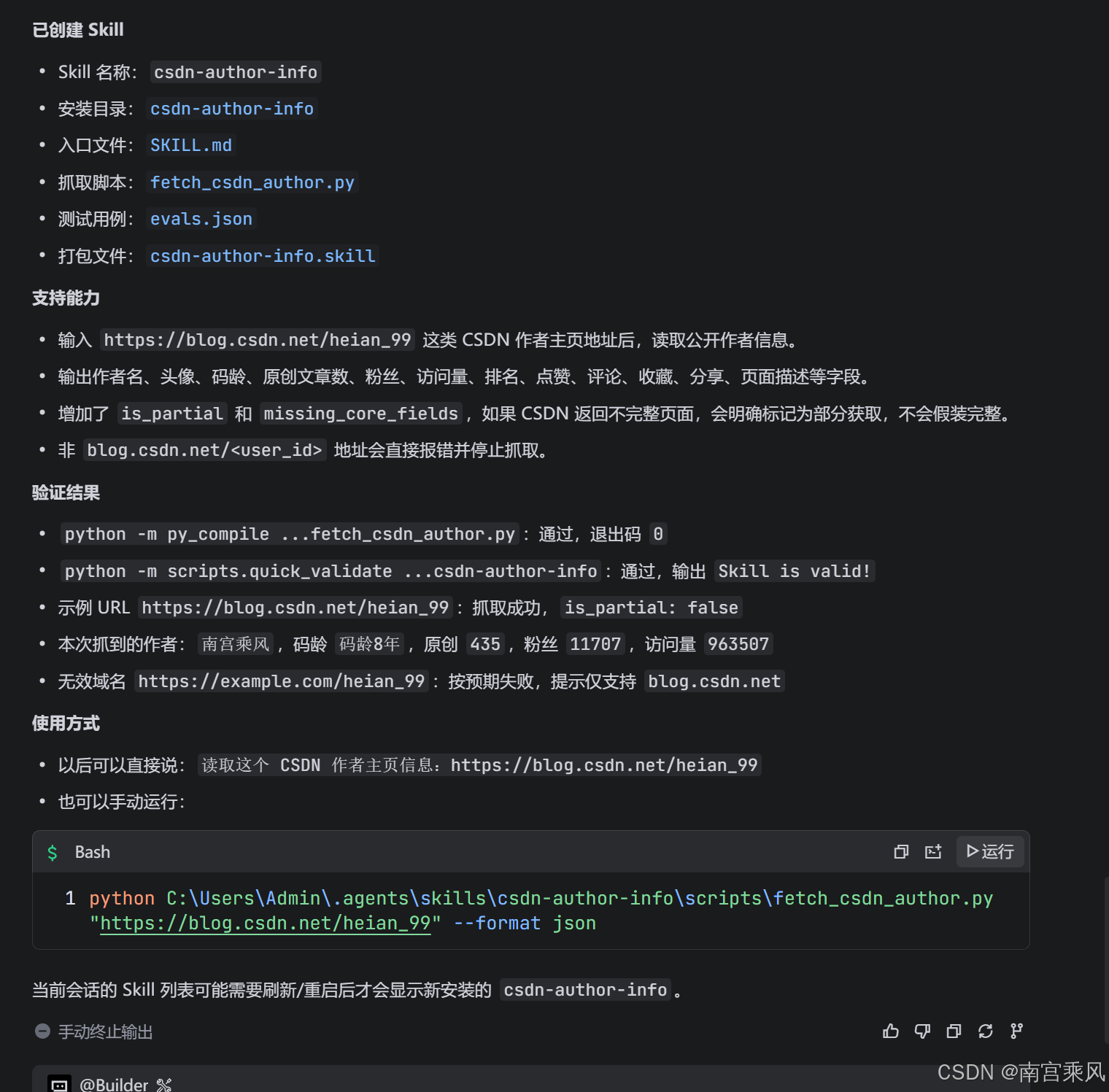
PS D:\Code\Blog协作> python C:\Users\Admin\.agents\skills\csdn-author-info\scripts\fetch_csdn_author.py "https://blog.csdn.net/heian_99" --format json
{
  "source_url": "https://blog.csdn.net/heian_99",
  "fetched_at": "2026-05-11T03:39:34.040207+00:00",
  "user_id": "heian_99",
  "author_name": "南宫乘风",
  "avatar_url": "https://profile-avatar.csdnimg.cn/08258294c99447b5b25a6c8943edc56b_heian_99.jpg!1",
  "code_age": "码龄8年",
  "level": null,
  "score": null,
  "rank": 5086,
  "original_article_count": 435,
  "fans_count": 11707,
  "total_visit_count": 963508,
  "likes_count": 1851,
  "comments_count": 269,
  "collections_count": 4276,
  "shares_count": 18618,
  "raw_values": {
    "original_article_count": "435",
    "fans_count": "11,707",
    "total_visit_count": "963,508",
    "rank": "5,086",
    "likes_count": "1,851",
    "comments_count": "269",
    "collections_count": "4,276",
    "shares_count": "18,618"
  },
  "statistics_raw": {
    "总访问量": "963,508",
    "原创": "435",
    "排名": "5,086",
    "粉丝": "11,707",
    "关注": "61"
  },
  "achievements_raw": {
    "likes": "1,851",
    "comments": "269",
    "collections": "4,276",
    "collections": "4,276",
    "collections": "4,276",
    "collections": "4,276",
    "shares": "18,618"
  },
  "page_title": "南宫乘风-CSDN博客",
  "description": "南宫乘风擅长Kubernetes,项目实战,MySQL,等方面的知识,南宫乘风关注kubernetes,python,github,容器,nginx,golang,自动化,系统架构,docker,系统安全,web安全,运维,devops,linux,安全架构,jenkins,运维开发,centos领域.",
  "is_partial": false,
  "missing_core_fields": []
}
Claude code 的调用
询问测试
实战调用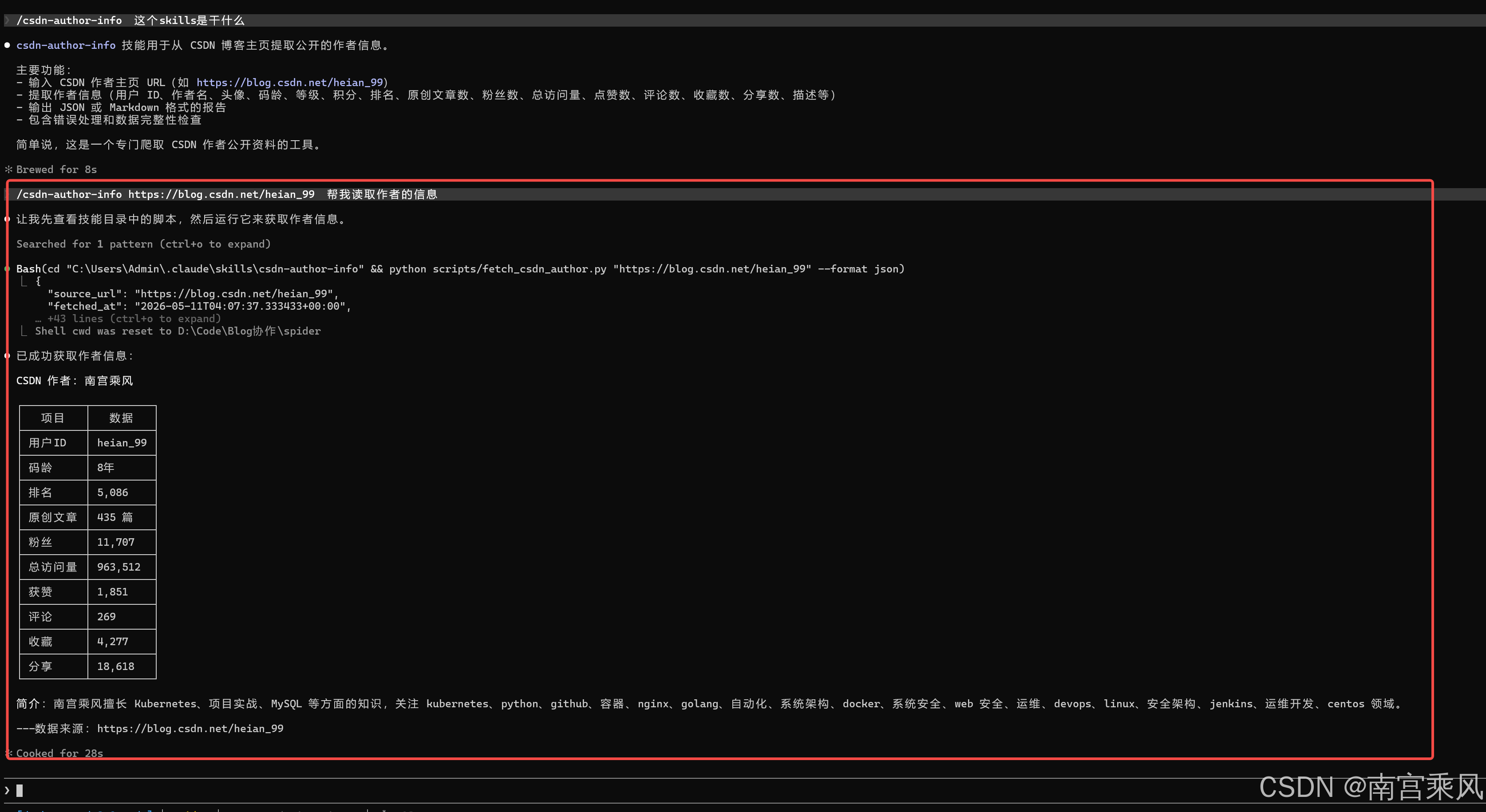
五、为什么还需要 darwin-skill?
skill-creator 能帮我们创建 Skill,但创建只是第一步。
真正的问题是:一个 Skill 写完以后,它到底好不好?
传统的 Skill 审查大多停留在结构层面:
- frontmatter 格式对不对?
name是否符合规范?- 步骤有没有编号?
- 文件路径能不能访问?
- 引用资料是否存在?
这些检查很有必要,但还不够。
因为一个格式完美的 Skill,实际跑出来效果可能很差。
比如:
- 触发太宽,导致误触发。
- 描述太窄,导致该触发时没触发。
- 步骤很完整,但 Agent 执行时抓不到重点。
- 输出模板看着漂亮,但真实问题回答不到点上。
- 新增规则后,旧的黄金路径反而坏了。
darwin-skill 解决的就是这个问题:它不只看结构,还看实际效果。
项目地址:
https://github.com/alchaincyf/darwin-skill
安装方式:
npx skills add alchaincyf/darwin-skill
它的核心理念很像训练模型:
不断提出改进方案,实际测试,评分,只保留真正变好的修改。
六、Darwin 的核心思想:只让分数向前走
darwin-skill 受 Andrej Karpathy 的 autoresearch 启发,把自主实验循环从模型训练迁移到了 Skill 优化。
可以这样类比:
| autoresearch | darwin-skill | 含义 |
|---|---|---|
program.md |
SKILL.md |
定义目标和约束 |
train.py |
待优化的 SKILL.md |
被优化的资产 |
val_bpb |
8 维加权总分 | 可量化目标 |
| git ratchet | keep / revert 机制 | 只保留改进 |
| test set | test-prompts.json |
验证实际效果 |
| 全自主运行 | 人在回路 | 保留人工判断 |
这里最有意思的是“棘轮机制”。
棘轮只能向一个方向转。放到 Skill 优化里,就是:
如果新版本分数更高,就保留。
如果新版本分数更低,就回滚。
举个例子:
当前最优版本:78 分
第 1 轮优化后:81 分 → 保留
第 2 轮优化后:75 分 → 回滚
第 3 轮从 81 分继续优化
这能避免一个常见问题:Skill 改着改着,看似加了很多内容,实际质量却下降了。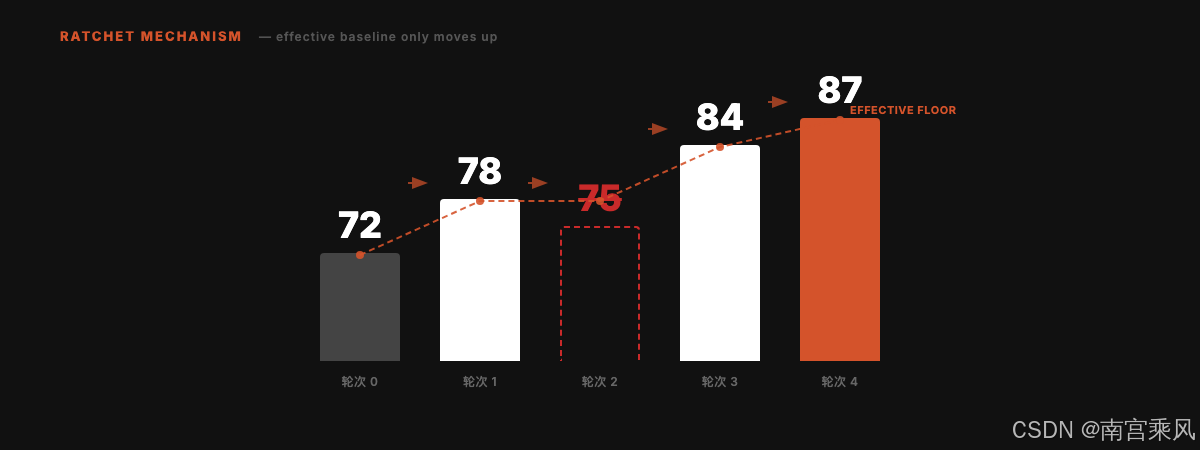
七、Darwin 的五条原则
素材里提到 Darwin 的五条核心原则,我觉得可以把它们理解成一套 Skill 优化纪律。
| 原则 | 说明 |
|---|---|
| 单一可编辑资产 | 每次只改一个 SKILL.md,方便归因 |
| 双重评估 | 结构评分 + 实际效果验证 |
| 棘轮机制 | 只保留改进,退步就回滚 |
| 独立评分 | 用子 Agent 评分,避免自己改自己评 |
| 人在回路 | 每个 Skill 优化后暂停,让用户确认 |
这五条原则背后有一个共同目标:减少“主观感觉变好”的风险。
很多时候我们改 Skill,会产生一种错觉:内容更多了、结构更完整了、标题更清楚了,所以它应该变好了。
但 Agent Skill 的质量不能只靠读起来是否顺眼判断。它最终要看真实任务里的表现。
这也是 Darwin 强调“效果验证”的原因。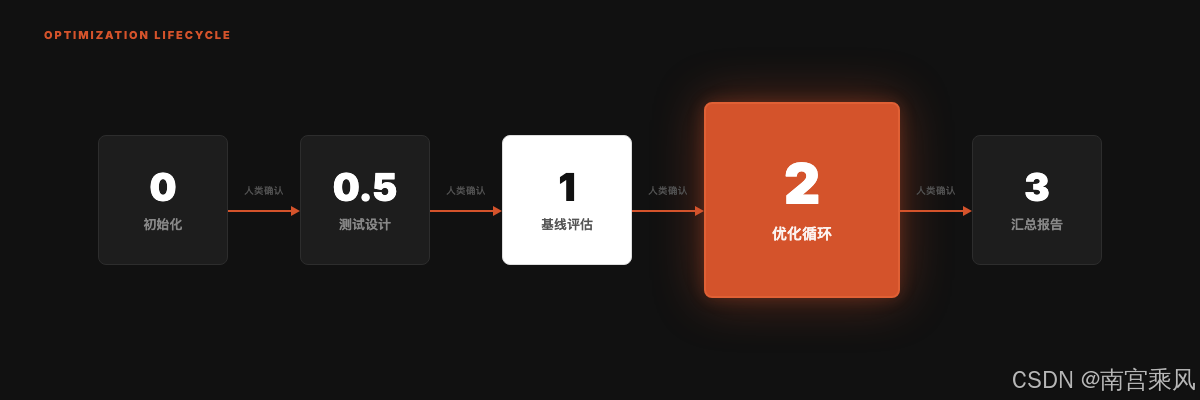
八、8 维度评分:结构质量和实测效果都要看
Darwin 使用 8 维度评分体系,总分 100。
素材中提到一个关键比例:
结构维度:60 分
效果维度:40 分
其中实测表现权重最高,单项达到 25 分。
这很合理。因为 Skill 不是简历,不是看上去规范就够了。它是要被 Agent 调用并完成任务的。
一个 Skill 如果:
- 格式完美
- 目录清晰
- 步骤完整
- 但真实测试中经常误触发或输出跑偏
那它依然不是好 Skill。
反过来,如果一个 Skill 文档不算华丽,但在目标任务中触发准确、执行稳定、输出可靠,它就有实际价值。
可以把评分拆成两类来看:
结构质量:这个 Skill 写得是否规范?
实际效果:这个 Skill 跑起来是否有用?
前者保证“不会坏得太离谱”,后者决定“是否真的值得保留”。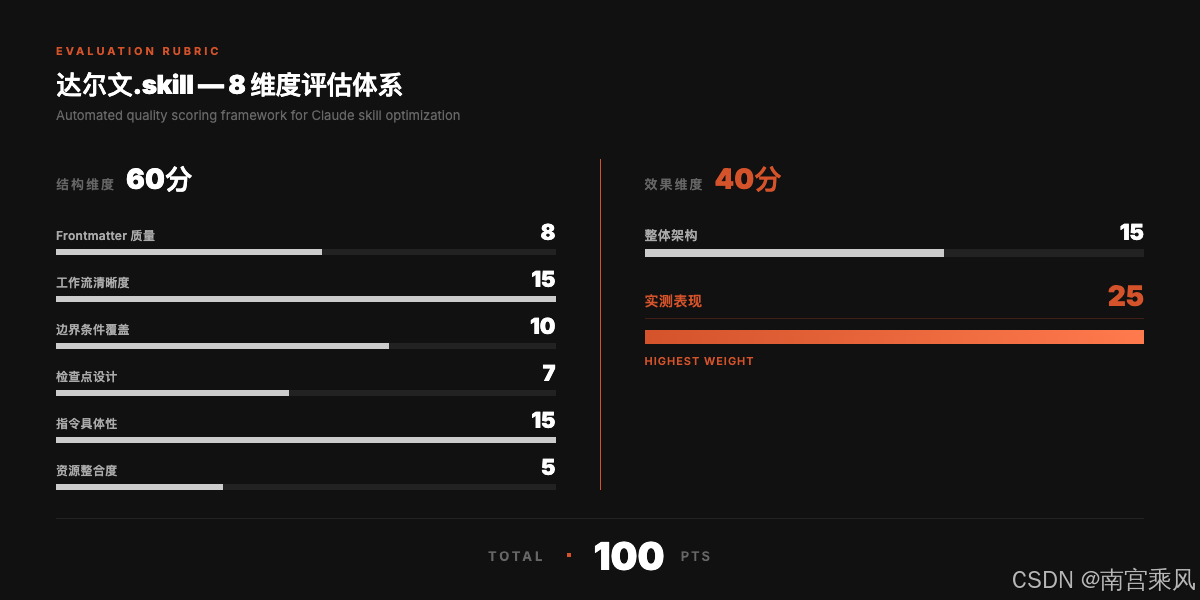
九、推荐工作流:创建和进化分开做
把 skill-creator 和 darwin-skill 放在一起,比较推荐的工作流是这样的:
这里有一个分工:
| 阶段 | 工具 | 目标 |
|---|---|---|
| 从 0 到 1 | skill-creator |
创建结构正确、可测试、可打包的 Skill |
| 从 1 到 N | darwin-skill |
基于评分和实测持续优化 Skill |
我不建议一开始就追求“完美 Skill”。更实用的方法是:
先用 skill-creator 做出可运行版本;
再用 darwin-skill 根据真实反馈迭代。
这和软件开发一样。先跑通最小可用版本,再通过测试和用户反馈不断改进。
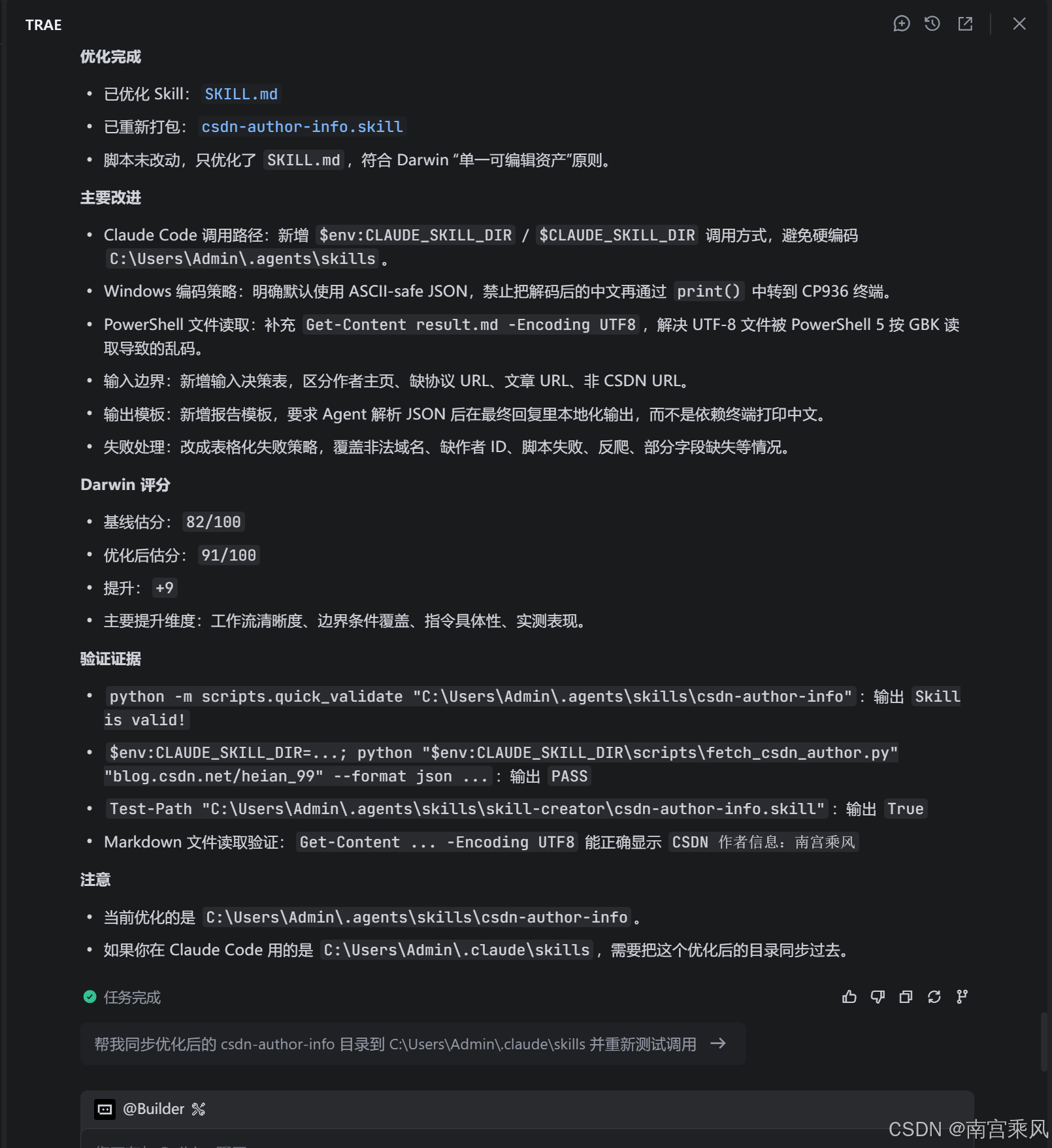
实战 测试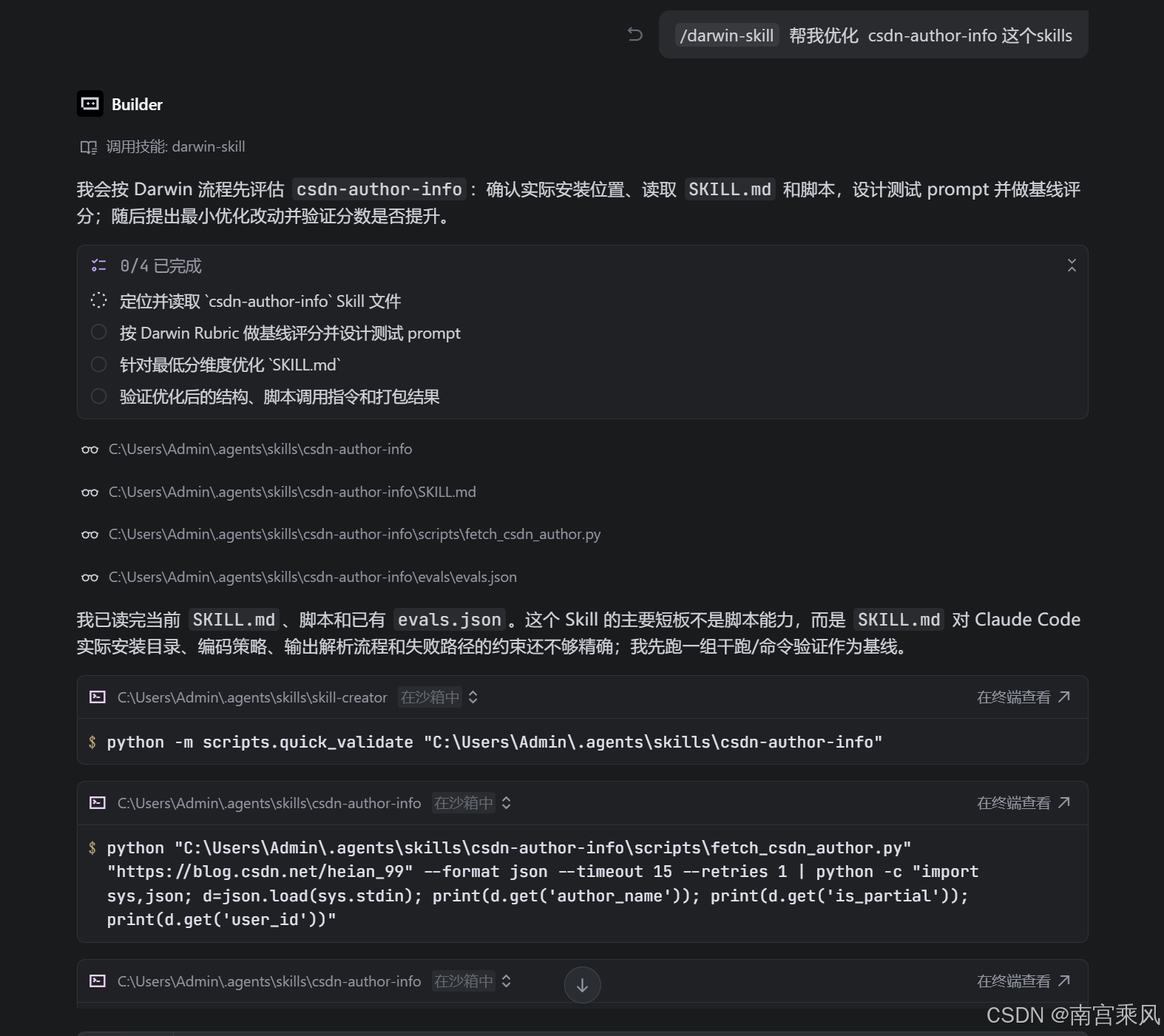
#!/usr/bin/env python3
"""Fetch public author details from a CSDN blog homepage."""

from __future__ import annotations

import argparse
import ctypes
import datetime as dt
import json
import os
import re
import sys
import time
from typing import Any
from urllib.parse import urlparse

import requests
from bs4 import BeautifulSoup


DEFAULT_TIMEOUT = 15
DEFAULT_RETRIES = 2
JSON_INDENT = 2
CORE_FIELDS = [
    "author_name",
    "original_article_count",
    "fans_count",
    "total_visit_count",
]


def normalize_url(raw_url: str) -> str:
    url = raw_url.strip()
    if not url:
        raise ValueError("URL is empty.")
    if not re.match(r"^https?://", url, flags=re.I):
        url = "https://" + url

    parsed = urlparse(url)
    host = parsed.netloc.lower()
    if host not in {"blog.csdn.net", "www.blog.csdn.net"}:
        raise ValueError("Only CSDN blog home URLs under blog.csdn.net are supported.")

    parts = [part for part in parsed.path.split("/") if part]
    if not parts:
        raise ValueError("CSDN author id is missing from the URL path.")

    return f"https://blog.csdn.net/{parts[0]}"


def parse_count(value: str | None) -> int | None:
    if value is None:
        return None
    text = value.strip().replace(",", "")
    if not text:
        return None

    multiplier = 1
    if text.endswith("万"):
        multiplier = 10_000
        text = text[:-1]
    elif text.endswith("亿"):
        multiplier = 100_000_000
        text = text[:-1]

    match = re.search(r"-?\d+(?:\.\d+)?", text)
    if not match:
        return None
    return int(float(match.group(0)) * multiplier)


def first_text(soup: BeautifulSoup, selectors: list[str]) -> str | None:
    for selector in selectors:
        node = soup.select_one(selector)
        if node:
            text = node.get_text(" ", strip=True)
            if text:
                return text
    return None


def first_attr(soup: BeautifulSoup, selectors: list[str], attr: str) -> str | None:
    for selector in selectors:
        node = soup.select_one(selector)
        if node and node.get(attr):
            return str(node.get(attr)).strip()
    return None


def extract_statistics(soup: BeautifulSoup) -> dict[str, str]:
    statistics: dict[str, str] = {}
    container = soup.find("div", class_="user-profile-head-info-r-c")
    if not container:
        return statistics

    for item in container.find_all("li"):
        name_div = item.find("div", class_="user-profile-statistics-name")
        num_div = item.find("div", class_="user-profile-statistics-num")
        if name_div and num_div:
            label = name_div.get_text(strip=True)
            value = num_div.get_text(strip=True)
            if label:
                statistics[label] = value
    return statistics


def extract_achievements(soup: BeautifulSoup) -> dict[str, str]:
    target_keywords = {
        "点赞": "likes",
        "评论": "comments",
        "收藏": "collections",
        "分享": "shares",
    }
    achievements: dict[str, str] = {}

    for ul_element in soup.find_all("ul", class_="aside-common-box-achievement"):
        for li_item in ul_element.find_all("li"):
            div = li_item.find("div")
            if not div:
                continue
            num_span = div.find("span")
            if not num_span:
                continue
            value = num_span.get_text(strip=True)
            full_text = div.get_text(" ", strip=True)
            for keyword, key in target_keywords.items():
                if keyword in full_text:
                    achievements[key] = value
                    break
    return achievements


def parse_author_page(html: str, source_url: str) -> dict[str, Any]:
    soup = BeautifulSoup(html, "lxml")
    parsed = urlparse(source_url)
    user_id = parsed.path.strip("/").split("/")[0]

    statistics = extract_statistics(soup)
    achievements = extract_achievements(soup)
    description = first_attr(
        soup,
        [
            'meta[name="description"]',
            'meta[property="og:description"]',
        ],
        "content",
    )

    author_name = first_text(
        soup,
        [
            "div.user-profile-head-name div",
            ".user-profile-head-name",
            ".profile-intro-name-box",
        ],
    )

    if not author_name:
        title = soup.title.get_text(strip=True) if soup.title else ""
        author_name = re.sub(r"[-_]?CSDN博客.*$", "", title).strip() or None

    code_age = first_text(soup, ["div.person-code-age span", ".person-code-age span"])
    avatar_url = first_attr(soup, ["div.user-profile-avatar img", ".user-profile-avatar img"], "src")
    page_title = soup.title.get_text(strip=True) if soup.title else None

    raw_mapping = {
        "original_article_count": statistics.get("原创"),
        "fans_count": statistics.get("粉丝"),
        "total_visit_count": statistics.get("总访问量"),
        "rank": statistics.get("排名"),
        "score": statistics.get("积分"),
    }

    return {
        "source_url": source_url,
        "fetched_at": dt.datetime.now(dt.timezone.utc).isoformat(),
        "user_id": user_id,
        "author_name": author_name,
        "avatar_url": avatar_url,
        "code_age": code_age,
        "level": statistics.get("等级"),
        "score": parse_count(statistics.get("积分")),
        "rank": parse_count(statistics.get("排名")),
        "original_article_count": parse_count(statistics.get("原创")),
        "fans_count": parse_count(statistics.get("粉丝")),
        "total_visit_count": parse_count(statistics.get("总访问量")),
        "likes_count": parse_count(achievements.get("likes")),
        "comments_count": parse_count(achievements.get("comments")),
        "collections_count": parse_count(achievements.get("collections")),
        "shares_count": parse_count(achievements.get("shares")),
        "raw_values": {
            **{key: value for key, value in raw_mapping.items() if value is not None},
            **{f"{key}_count": value for key, value in achievements.items()},
        },
        "statistics_raw": statistics,
        "achievements_raw": achievements,
        "page_title": page_title,
        "description": description,
    }


def fetch_html(url: str, timeout: int, retries: int) -> str:
    headers = {
        "User-Agent": (
            "Mozilla/5.0 (Windows NT 10.0; Win64; x64) "
            "AppleWebKit/537.36 (KHTML, like Gecko) "
            "Chrome/124.0 Safari/537.36"
        ),
        "Accept": "text/html,application/xhtml+xml,application/xml;q=0.9,*/*;q=0.8",
        "Accept-Language": "zh-CN,zh;q=0.9,en;q=0.8",
        "Referer": "https://blog.csdn.net/",
    }
    last_error: Exception | None = None
    for attempt in range(retries + 1):
        try:
            response = requests.get(url, headers=headers, timeout=timeout)
            response.raise_for_status()
            response.encoding = response.apparent_encoding or response.encoding
            return response.text
        except requests.RequestException as exc:
            last_error = exc
            if attempt < retries:
                time.sleep(1 + attempt)
    raise RuntimeError(f"Failed to fetch CSDN author page: {last_error}")


def missing_core_fields(data: dict[str, Any]) -> list[str]:
    return [field for field in CORE_FIELDS if data.get(field) in (None, "")]


def fetch_author_data(url: str, timeout: int, retries: int) -> dict[str, Any]:
    last_data: dict[str, Any] | None = None
    for attempt in range(retries + 1):
        html = fetch_html(url, timeout=timeout, retries=0)
        data = parse_author_page(html, source_url=url)
        missing = missing_core_fields(data)
        data["is_partial"] = bool(missing)
        data["missing_core_fields"] = missing
        last_data = data
        if not missing:
            return data
        if attempt < retries:
            time.sleep(1 + attempt)
    return last_data or {}


def format_markdown(data: dict[str, Any]) -> str:
    lines = [
        f"# CSDN 作者信息:{data.get('author_name') or data.get('user_id')}",
        "",
        f"- 数据状态:{'部分获取' if data.get('is_partial') else '完整'}",
        f"- 主页:{data.get('source_url')}",
        f"- 用户 ID:{data.get('user_id')}",
        f"- 作者名:{data.get('author_name') or '未获取'}",
        f"- 码龄:{data.get('code_age') or '未获取'}",
        f"- 等级:{data.get('level') or '未获取'}",
        f"- 积分:{data.get('score') if data.get('score') is not None else '未获取'}",
        f"- 排名:{data.get('rank') if data.get('rank') is not None else '未获取'}",
        f"- 原创文章:{data.get('original_article_count') if data.get('original_article_count') is not None else '未获取'}",
        f"- 粉丝:{data.get('fans_count') if data.get('fans_count') is not None else '未获取'}",
        f"- 总访问量:{data.get('total_visit_count') if data.get('total_visit_count') is not None else '未获取'}",
        f"- 点赞:{data.get('likes_count') if data.get('likes_count') is not None else '未获取'}",
        f"- 评论:{data.get('comments_count') if data.get('comments_count') is not None else '未获取'}",
        f"- 收藏:{data.get('collections_count') if data.get('collections_count') is not None else '未获取'}",
        f"- 分享:{data.get('shares_count') if data.get('shares_count') is not None else '未获取'}",
    ]
    if data.get("avatar_url"):
        lines.append(f"- 头像:{data['avatar_url']}")
    if data.get("missing_core_fields"):
        lines.append(f"- 缺失核心字段:{', '.join(data['missing_core_fields'])}")
    if data.get("description"):
        lines.extend(["", "## 页面描述", data["description"]])
    return "\n".join(lines) + "\n"


def windows_console_encoding() -> str | None:
    if os.name != "nt":
        return None
    try:
        code_page = ctypes.windll.kernel32.GetConsoleOutputCP()
    except Exception:
        return None
    if not code_page:
        return None
    return "utf-8" if code_page == 65001 else f"cp{code_page}"


def resolve_stdout_encoding(requested: str) -> str | None:
    if requested == "auto":
        return windows_console_encoding()
    if requested == "ascii":
        return "ascii"
    return requested


def write_stdout(text: str, requested_encoding: str) -> None:
    encoding = resolve_stdout_encoding(requested_encoding)
    if not encoding:
        print(text)
        return

    data = text.encode(encoding, errors="replace")
    if not data.endswith(b"\n"):
        data += b"\n"
    sys.stdout.buffer.write(data)
    sys.stdout.buffer.flush()


def main() -> int:
    parser = argparse.ArgumentParser(description="Fetch public author details from a CSDN blog URL.")
    parser.add_argument("url", help="CSDN blog home URL, for example: https://blog.csdn.net/heian_99")
    parser.add_argument("--format", choices=["json", "markdown"], default="json")
    parser.add_argument("--output", help="Write output to a file instead of stdout.")
    parser.add_argument(
        "--unicode-json",
        action="store_true",
        help="Emit raw Unicode in JSON. By default JSON uses ASCII escapes to avoid Windows console mojibake.",
    )
    parser.add_argument(
        "--stdout-encoding",
        choices=["auto", "utf-8", "gbk", "ascii"],
        default="auto",
        help="Encoding used for stdout. Auto uses the Windows console code page when available.",
    )
    parser.add_argument("--timeout", type=int, default=DEFAULT_TIMEOUT)
    parser.add_argument("--retries", type=int, default=DEFAULT_RETRIES)
    args = parser.parse_args()

    try:
        url = normalize_url(args.url)
        data = fetch_author_data(url, timeout=args.timeout, retries=args.retries)
        output = (
            json.dumps(data, ensure_ascii=not args.unicode_json, indent=JSON_INDENT)
            if args.format == "json"
            else format_markdown(data)
        )
        if args.output:
            with open(args.output, "w", encoding="utf-8") as file:
                file.write(output)
                if not output.endswith("\n"):
                    file.write("\n")
        else:
            write_stdout(output, args.stdout_encoding)
        return 0
    except Exception as exc:
        print(f"ERROR: {exc}", file=sys.stderr)
        return 1


if __name__ == "__main__":
    raise SystemExit(main())
Skill.md
---
name: csdn-author-info
description: Use when the user provides a CSDN blog homepage URL or asks to read, fetch, crawl, extract, summarize, or verify public CSDN author/profile details, including author name, avatar, code age, article count, fans, visits, rank, level, score, likes, comments, collections, or shares.
---

# CSDN Author Info

## Overview

Extract public author details from a CSDN blog homepage. Use the bundled script for fetching and parsing because CSDN profile fields are selector-sensitive; use the model only to summarize the returned JSON.

## Input

Accept a CSDN blog home URL such as:

```text
https://blog.csdn.net/heian_99
```

If the user provides an article URL, derive or ask for the author's blog homepage before running the script. Do not guess private or login-only data.

Supported input forms:

| Input | Action |
|---|---|
| `https://blog.csdn.net/heian_99` | Run directly |
| `blog.csdn.net/heian_99` | Run directly; the script adds `https://` |
| CSDN article URL | Derive the author homepage only if the author id is obvious; otherwise ask |
| Non-CSDN URL | Stop and ask for a `blog.csdn.net/<user_id>` URL |

## Workflow

1. Validate that the target is a public CSDN author/blog homepage under `blog.csdn.net`.
2. Run the script with default JSON output. In Claude Code, prefer the skill directory environment variable instead of hardcoded user paths.

PowerShell:

```powershell
python "$env:CLAUDE_SKILL_DIR\scripts\fetch_csdn_author.py" "https://blog.csdn.net/heian_99" --format json
```

Bash/Zsh:

```bash
python "$CLAUDE_SKILL_DIR/scripts/fetch_csdn_author.py" "https://blog.csdn.net/heian_99" --format json
```

Fallback when `CLAUDE_SKILL_DIR` is unavailable:

```bash
python scripts/fetch_csdn_author.py "https://blog.csdn.net/heian_99" --format json
```

3. Parse the JSON internally. Do not pipe decoded Chinese values through `print()` just to inspect them; that can reintroduce Windows terminal mojibake.
4. Check `is_partial` and `missing_core_fields` before summarizing.
5. If `is_partial` is `true`, say that CSDN returned an incomplete page and list the missing fields.
6. If the user asks for JSON, return the raw JSON exactly as script output. Do not decode `\u` escapes unless the user wants a human-readable report.
7. If the user asks for a report, summarize the parsed JSON in the user's language.
8. If fetching fails, report the script error and do not fabricate values. Suggest retrying later or using a browser/CDP path if CSDN blocks static requests.

## Windows Encoding

Prefer the default JSON command above on Windows. It avoids mojibake by emitting ASCII-safe JSON such as `\u5357\u5bab`.

Rules:

- For Claude Code automation, prefer `--format json` and parse it internally.
- For direct human terminal viewing, use Markdown with explicit stdout encoding.
- For files, use `--output`; the script writes UTF-8 files. In Windows PowerShell 5, read them with `Get-Content -Encoding UTF8`.
- Do not run `python -c "... print(decoded_chinese) ..."` in CP936 terminals as a validation step.

If raw readable Markdown must be printed in Windows cmd or PowerShell:

```powershell
python scripts/fetch_csdn_author.py "https://blog.csdn.net/heian_99" --format markdown --stdout-encoding auto
```

If the terminal still displays mojibake, force GBK for legacy Chinese Windows consoles:

```powershell
python scripts/fetch_csdn_author.py "https://blog.csdn.net/heian_99" --format markdown --stdout-encoding gbk
```

When writing to a file:

```powershell
python scripts/fetch_csdn_author.py "https://blog.csdn.net/heian_99" --format markdown --output result.md
Get-Content result.md -Encoding UTF8
```

## Output

Default to a concise report in the user's language with these fields when available:

- `source_url`
- `user_id`
- `author_name`
- `avatar_url`
- `code_age`
- `level`
- `score`
- `rank`
- `original_article_count`
- `fans_count`
- `total_visit_count`
- `likes_count`
- `comments_count`
- `collections_count`
- `shares_count`
- `description`
- `is_partial`
- `missing_core_fields`

When the user asks for machine-readable data, return the raw JSON without extra prose.

Report template. Translate labels into the user's language in the final answer; for Chinese users, use natural Chinese labels such as homepage, author name, code age, and data status.

```text
CSDN author info
- Homepage: <source_url>
- User ID: <user_id>
- Author name: <author_name or unavailable>
- Code age: <code_age or unavailable>
- Original articles: <original_article_count or unavailable>
- Fans: <fans_count or unavailable>
- Total visits: <total_visit_count or unavailable>
- Rank: <rank or unavailable>
- Likes / comments / collections / shares: <likes_count> / <comments_count> / <collections_count> / <shares_count>
- Avatar: <avatar_url or unavailable>
- Data status: complete if `is_partial=false`; otherwise partial, missing <missing_core_fields>
```

## Failure Handling

| Failure | Required behavior |
|---|---|
| Invalid domain | Stop and ask for a `blog.csdn.net/<user_id>` URL |
| Missing author id | Ask for the author's blog homepage, not just `https://blog.csdn.net` |
| Script exits non-zero | Show the exact `ERROR:` line and stop |
| Network or anti-bot failure | Recommend retrying later or using a browser/CDP fetch |
| `is_partial=true` | Return available fields and explicitly list `missing_core_fields` |
| Missing field value | Use `null`, `unavailable`, or the equivalent phrase in the user's language; never infer counts from unrelated text |

## Notes From Existing Project Code

The original project parser in the local `spider` directory uses these CSDN page structures:

- Author statistics: `div.user-profile-head-info-r-c`
- Achievement list: `ul.aside-common-box-achievement`
- Code age: `div.person-code-age span`
- Author name: `div.user-profile-head-name div`
- Avatar: `div.user-profile-avatar img`
十、什么时候该用这套流程?
并不是所有 Skill 都需要走完整流程。
如果只是一个临时、一次性的个人辅助 Skill,手写一个简单 SKILL.md 就够了。
但下面这些情况,建议引入 skill-creator 和 darwin-skill:
- Skill 会长期复用。
- Skill 会被团队多人使用。
- Skill 会调用外部工具、API 或脚本。
- Skill 的输出质量会影响业务结果。
- Skill 数量已经超过 10 个,开始难以手动维护。
- 你需要比较“优化前”和“优化后”的实际效果。
尤其是当 Skill 生态规模变大后,靠人工直觉维护很快会吃力。
这时最怕的不是“没有 Skill”,而是有一堆质量参差不齐的 Skill:有些误触发,有些过期,有些输出不稳定,还有些看着规范但实际没用。
Darwin 的价值就在这里:它提供了一个“只保留改进”的机制,让 Skill 质量不会在频繁修改中慢慢退化。
十一、几个容易踩的坑
1. 把 Skill 当 Prompt 写
Prompt 更像一次性指令,Skill 是长期可复用资产。Skill 需要考虑触发条件、输入输出、错误处理、测试和维护。
2. 只检查格式,不检查效果
格式检查只能说明 Skill 没有明显结构错误,不能证明它好用。一定要用真实任务测试。
3. 一个 Skill 做太多事
比如把“爬取 CSDN 作者信息”“分析文章质量”“生成 SEO 报告”“发布到公众号”都塞进一个 Skill。这样会让触发条件和执行路径变得混乱。
更好的做法是拆成多个单一职责 Skill。
4. 优化没有回滚机制
Skill 修改后,如果没有基线和评分,很容易越改越乱。Darwin 的棘轮机制就是为了解决这个问题。
5. 完全不让人参与
Skill 的好坏比模型 loss 更微妙。分数能提供参考,但最终是否符合业务语境,仍然需要人确认。
十二、总结:Skill 也需要工程化生命周期
如果只写一个 Skill,SKILL.md 看起来像一份文档。
但当你开始维护一组 Skill,它就更像一个小型工程系统:
- 需要创建工具
- 需要测试用例
- 需要评分标准
- 需要回滚机制
- 需要持续迭代
- 需要人在关键节点确认
skill-creator 和 darwin-skill 正好覆盖了这个生命周期的两端。
skill-creator 帮你把 Skill 从想法变成可运行、可测试、可打包的能力包。
darwin-skill 帮你把已有 Skill 放进评分和实测循环里,只保留真正变好的修改。
最后可以用一句话概括这套方法:
用
skill-creator标准化创建,用darwin-skill持续进化,把 Skill 从 Prompt 片段升级成可维护的工程资产。
当 Agent 能力越来越依赖 Skill,真正拉开差距的不会只是“谁写了更多 Skill”,而是谁能持续维护一组稳定、可验证、能不断进化的 Skill。

欢迎加入DeepSeek 技术社区。在这里,你可以找到志同道合的朋友,共同探索AI技术的奥秘。
更多推荐



 7
7 0
0- 0


 已为社区贡献2条内容

所有评论(0)