ChatGPTForWord Mac 版:我感觉这个项目要载入史册了
先给各位看效果:
提示词效果:
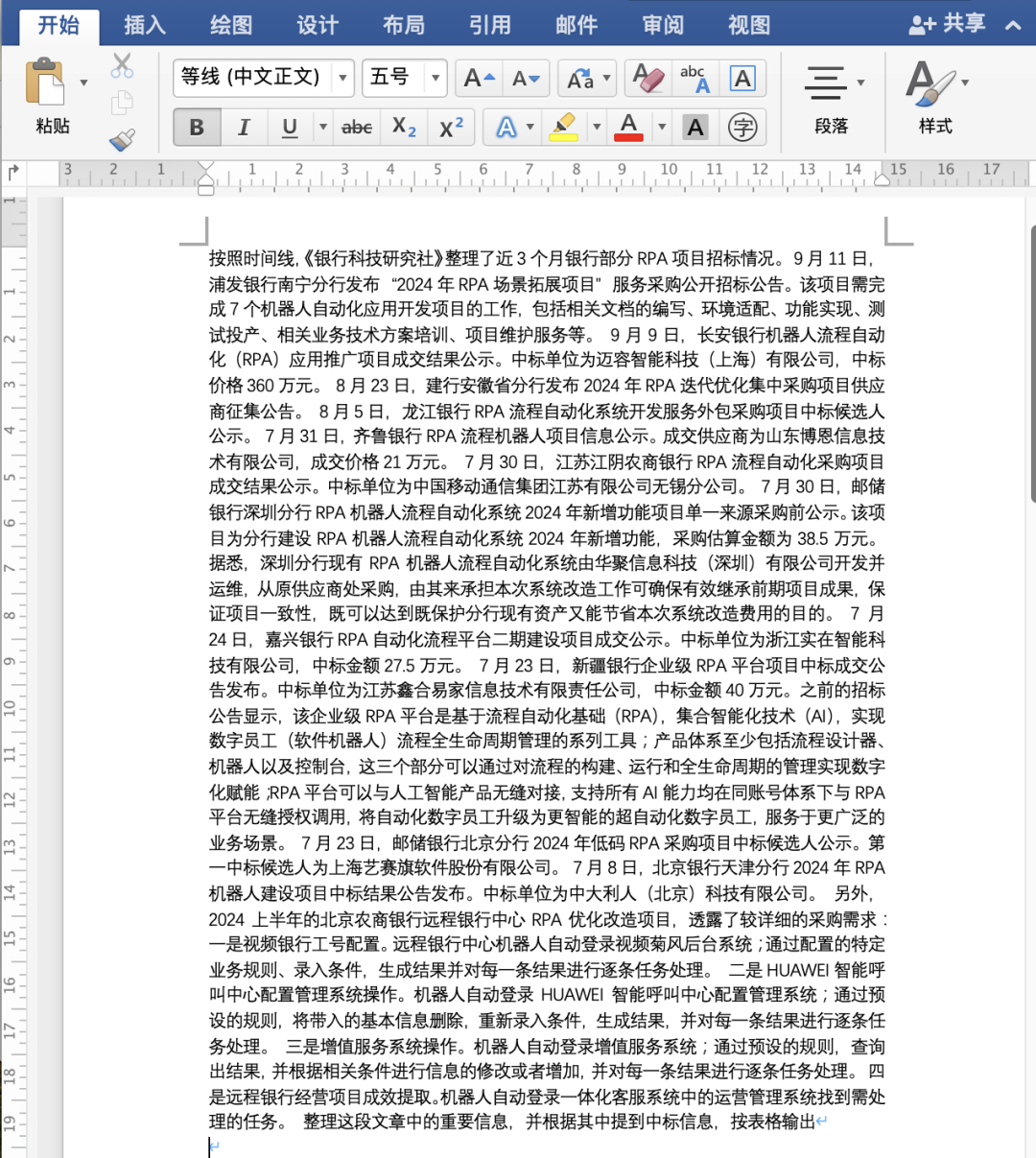
最终效果(内容有删减):
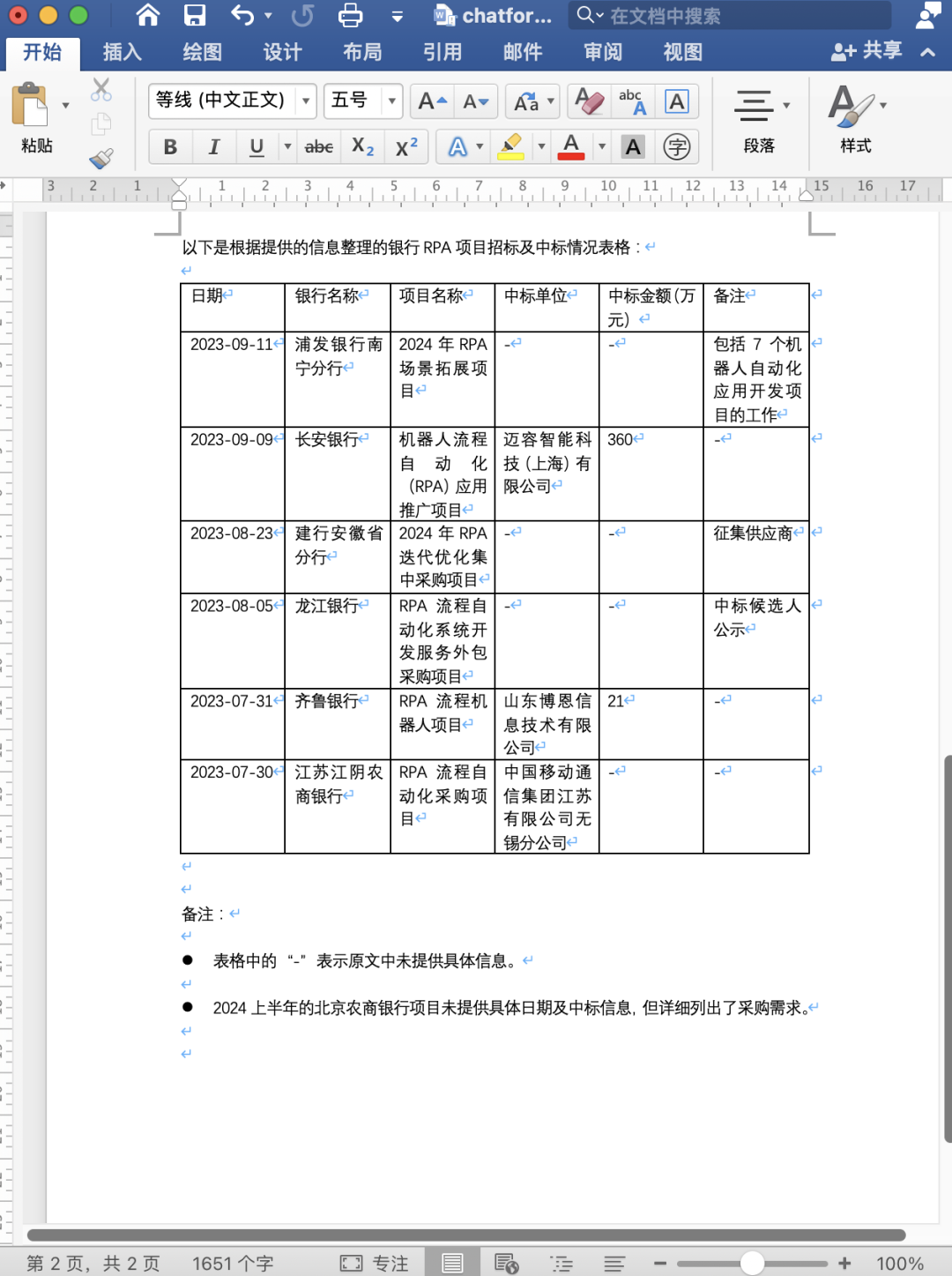
不仅实现了 ChatGPT for Word,而且支持了基本的 Markdown 格式,我都忍不住给自己点个赞。
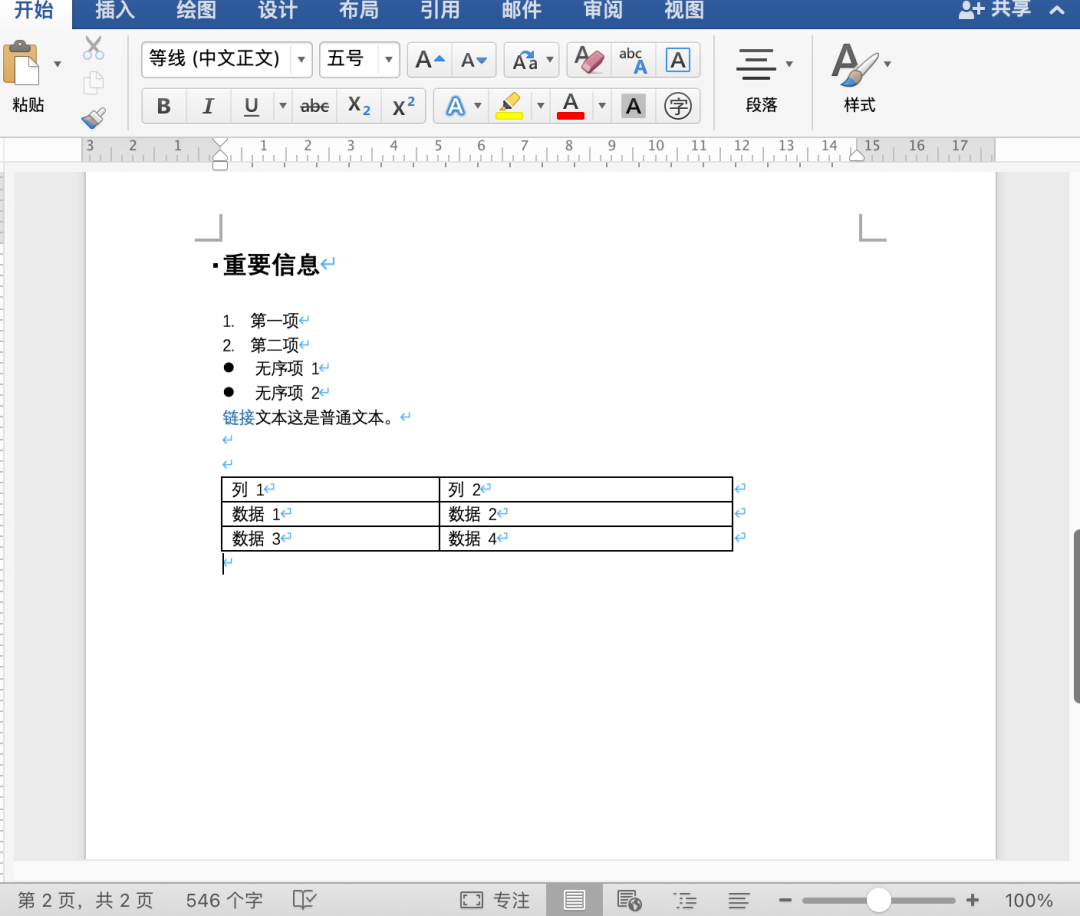
markdownText = "### 重要信息" & vbCrLf & _
                   "1. 第一项" & vbCrLf & _
                   "2. 第二项" & vbCrLf & _
                   "- 无序项 1" & vbCrLf & _
                   "- 无序项 2" & vbCrLf & _
                   "[链接文本](http://example.com)" & vbCrLf & _
                   "这是普通文本。" & vbCrLf & _
                   "| 列 1 | 列 2 |" & vbCrLf & _
                   "|-------|-------|" & vbCrLf & _
                   "| 数据 1 | 数据 2 |" & vbCrLf & _
                   "| 数据 3 | 数据 4 |"
输出效果如图:
是不是省了很多事情?
-
不再需要切换 APP
-
不再需要粘贴
-
不再需要调整样式
我终于感觉到做这个事情的意义了。
下面把我这个开发经历和大家分享一下:
开发环境:
-
OS:MacOS 14.4.1
-
Word:Office Word 2016
-
IDE:Cursor
-
jq (可以用 brew 安装)
-
curl
-
applescript
大致介绍一下我的开发水平, 20年+ 研发经验:
VBA:10年前写过 Visual Basic Applescript:没用过(感觉特别语义化,以后有时间了想多了解了解)
简单概括一下就是我有丰富的编程经验,但是 VBA 比较生疏(以前开发过用 VB 生成 Word 文档,转 PDF),Applescript 没用过。
Windows 版的 VBA 自带访问 HTTP 的库,其实比这个简单很多。不过我的电脑是 Mac,本着优先对自己负责的态度 :),就先开发 Mac 版,等有时间了再看看 Windows 版。
先贴一下VBA的核心代码, 因为 Mac 现在安全限制越来越多,起初用AppleScript直接启动 shell 脚本的方式,因为系统权限,一直不成功(成功了,故障多),后来查阅官方文档,发现2016以后有个AppleScriptTask的函数,后来就没有出现过问题。
Cursor 编程第一坑:它一直使用 AppleScript 这个方法,虽然我一直提示它有 bug
Sub AI()
    Dim myScriptResult As String
    Dim selectedText As Range
    Dim prompt As String

    ' Prompt the user to select text in the document
    If Selection.Type <> wdSelectionIP Then
        prompt = Trim(Selection.text)
        Set selectedText = Selection.Range
    Else
        MsgBox "Please select some text before running this macro."
        Exit Sub
    End If

    'Cleaning
    text = Replace(prompt, Chr(34), Chr(39))
    text = Replace(text, vbLf, "")
    text = Replace(text, vbCr, "")
    text = Replace(text, vbCrLf, "")

    ' Remove selection
    Selection.Collapse
    myScriptResult = AppleScriptTask("hello.scpt", "runAppleScriptTask", text)
    'Insert response text into Word document
    ConvertMarkdownToWord (myScriptResult)

    'selectedText.InsertAfter vbNewLine & myScriptResult
End Sub
零基础的可以直接下载我提供的文档,然后选择
启用宏
基本用法就是先选中文本,然后按fn + Option + F8调出宏操作, 选择 AI即可。
我们这里涉及两个文件,一个是这个 Word 文档,扩展名是docm,表示这个文档包含了宏。
另外一个文档是hello.scpt
我测试了一下,这个后缀必需是.scpt或 .applescript
下面是hello.scpt内容, 需要注意的是先要在智谱开放平台(https://open.bigmodel.cn/)注册,获取自己的 Token, 然后替换脚本中相应的 Token:
on runAppleScriptTask(prompt)
    -- Define the API URL
    set apiURL to "https://open.bigmodel.cn/api/paas/v4/chat/completions"

    -- Define the Authorization token
    set authToken to "你自己的Authorization token"


    -- Define the JSON payload with the escaped prompt parameter
    set jsonPayload to "{\"model\":\"glm-4-plus\",\"messages\":[{\"content\":\"" & prompt & "\",\"role\":\"user\"}],\"temperature\":0.7,\"top_p\":1}"
  -- display dialog jsonPayload


    -- Calculate the length of the JSON payload
    set contentLength to length of jsonPayload

    -- Define the path to jq (adjust if necessary)
    set jqPath to "/usr/local/bin/jq"

    -- Construct the curl command
    set curlCommand to "curl -s --connect-timeout 60 --max-time 180 --location " & ¬
        "-H 'Authorization: Bearer " & authToken & "' " & ¬
        "-H 'Accept: application/json;' " & ¬
        "-H 'Content-Type: application/json;' " & ¬
        "-X POST " & ¬
        "-d " & quoted form of jsonPayload & " " & ¬
        quoted form of apiURL

  -- display dialog curlCommand


  try
    -- Execute curl in the background
    do shell script curlCommand & " > /tmp/curl_output.txt &"

    repeat
    delay 1 -- Wait for 1 second
    try
        set curlStatus to do shell script "pgrep -c curl" -- Count running curl processes
        if curlStatus is "0" then exit repeat
    on error
        exit repeat -- Exit if there's an error (e.g., no curl process)
    end try
end repeat
    -- Now read the output
    set extractedContent to do shell script "cat /tmp/curl_output.txt | " & jqPath & " -r '.choices[0].message.content'"

    -- Return only the extracted content
    -- display dialog extractedContent
    return extractedContent
    on error errMsg
        -- Display the error message in a dialog box
        display dialog "Error: " & errMsg
    end try
end runAppleScriptTask

on urlEncode(input)
    set allowedChars to "abcdefghijklmnopqrstuvwxyzABCDEFGHIJKLMNOPQRSTUVWXYZ0123456789-_.~"
    set output to ""
    repeat with char in input
        if allowedChars contains char then
            set output to output & char
        else
            set asciiNum to ASCII number char
            set hexList to {"0", "1", "2", "3", "4", "5", "6", "7", "8", "9", "A", "B", "C", "D", "E", "F"}
            set output to output & "%" & (item ((asciiNum div 16) + 1) of hexList) & (item ((asciiNum mod 16) + 1) of hexList)
        end if
    end repeat
    return output
end urlEncode

on escapeForJSON(theString)
    set resultString to ""
    repeat with theCharacter in theString
        set asciiValue to ASCII number of theCharacter
        if asciiValue is 34 then -- double quote
            set resultString to resultString & "\\\""
        else if asciiValue is 92 then -- backslash
            set resultString to resultString & "\\\\"
        else if asciiValue is 47 then -- forward slash
            set resultString to resultString & "\\/"
        else if asciiValue is 8 then -- backspace
            set resultString to resultString & "\\b"
        else if asciiValue is 12 then -- form feed
            set resultString to resultString & "\\f"
        else if asciiValue is 10 then -- line feed
            set resultString to resultString & "\\n"
        else if asciiValue is 13 then -- carriage return
            set resultString to resultString & "\\r"
        else if asciiValue is 9 then -- tab
            set resultString to resultString & "\\t"
        else if asciiValue < 32 then -- other control characters
            set resultString to resultString & "\\u" & my padLeft(my toHex(asciiValue), 4, "0")
        else
            set resultString to resultString & theCharacter
        end if
    end repeat
    return resultString
end escapeForJSON

on toHex(theNumber)
    set hexChars to "0123456789ABCDEF"
    set hexString to ""
    repeat while theNumber > 0
        set hexString to (character ((theNumber mod 16) + 1) of hexChars) & hexString
        set theNumber to theNumber div 16
    end repeat
    if hexString is "" then set hexString to "0"
    return hexString
end toHex

on padLeft(theString, totalLength, padChar)
    if length of theString ≥ totalLength then return theString
    return text (totalLength - (length of theString)) through -1 of ((totalLength - (length of theString)) * padChar) & theString
end padLeft

--runAppleScriptTask("check script")
这个脚本绝大部分是 Cursor 自动生成的, 生成的时间10秒,调教的时间好多天。
这个脚本有个固定的位置,下载后需要把这个文件放到相应的位置才行
/Users/i/Library/Application Scripts/com.microsoft.Word
记得,要先安装curl 和 jq。
一个用来调用HTTP接口,一个负责解析返回的json。
如果一切 Lucky 的话,应该可以正常使用了。
Markdown 文档解析我也是花了老大一股劲,用了3-4个晚上才弄好。
目前支持标题、加粗、斜体字、列表、无序列表、表格。
表格花了很多时间,刚开始的时候生成的表格老是跑到最开头。
总结:
最后简单总结一下 Cursor 开发的坑:
-
Cursor 修 Bug,摁下葫芦起了漂。后来我优化提示词,把所有的需要的问题都列出来
-
Cursor 或者 ChatGPT 的水平有时候也有限。VBA 处理表格的时候无论怎么修改提示词,出来的表格都有问题,后来我还是用老办法,逐行调试,解决了一下。
-
新建的表格刚开始老是放在最前面。刚开始想着忍忍算了,后来觉得实在不能让。无奈 Cursor 虽然总是承认自己修改好了,但是一调试一点用都没有。我说你可以自己跑跑,看有没有问题,结果,他耍起赖来了:“不好意思,我没有环境”。一副死猪不怕开水烫的样子。后来我还是用最古老的办法,看看官方 VBA 开发的文档,参数的意思,修改了一下,终于好了。
-
Cursor 或者说 ChatGPT 可以在不熟悉的领域帮我们快速的完成原型,但是目前来说并不太靠谱。同样的提示词返回的代码质量千差万别。
-
我觉得算是老司机的一个导航吧,连助理还差可靠性和理解力。
福利
我把代码和文档打包放在百度网盘上,回复“Word”可以下载。
Windows 版本
暂时没有计划。
目前计划的是把 Excel、PPT 都出一版,方便自己工作。

欢迎加入DeepSeek 技术社区。在这里,你可以找到志同道合的朋友,共同探索AI技术的奥秘。
更多推荐



 6
6 0
0- 0


 已为社区贡献3条内容

所有评论(0)