使用GPT5.2提方案,Claude执行,实现codex返回会话Id
当然只是仅仅学习娱乐为主,仅供参考,不过我确实没明白为什么这么久都没有这个功能,我本地的官方codex的版本已经替换成修改过的版本.目前体验下来还是蛮舒服的。能像Jave在IDE中进行编译吗,Rust接触的不多,目前我都是靠命令行。字段,具体用途我没仔细研究,但是官方没有在结果中返回,我试过将会话Id放在这个字段里,在。感兴趣的可以看一下,也可以使用 npm下载使用,目前只支持Mac m系列芯片。
使用GPT5.2提方案,Claude执行,实现codex返回会话Id
效果如下
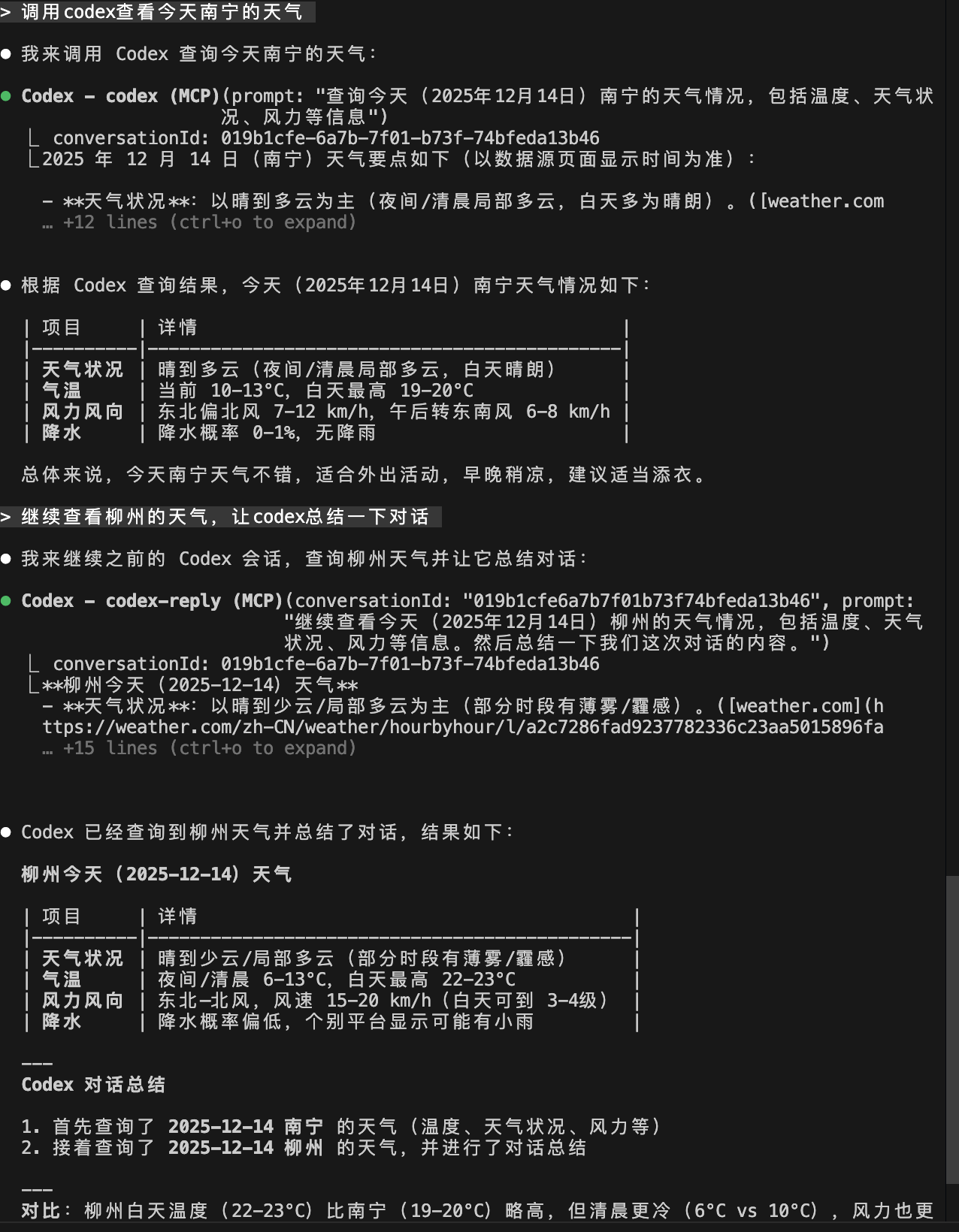
官方版本:0.72.0
因为我经常使用ClaudeCode调用codex mcp,但是codex-reply又无法丝滑使用,之前我一直让claude去文件夹里中找会话Id,我一直好奇到底是多复杂的功能,于是让GPT5.2帮我出方案,claude去执行,很出乎意料,就改了一个文件就实现了。
通过使用官方MCP Inspector测试结果,我们平时使用mcp进行对话,返回格式大致如下
{
  "content": [
    {
      "type": "text",
      "text": "Hi — what are you working on in `codex-rs` today? If you tell me the issue or the feature you want, I can jump in and make the change."
    }
  ]
}
然后我还发现源码有个structuredContent字段,具体用途我没仔细研究,但是官方没有在结果中返回,我试过将会话Id放在这个字段里,在MCP Inspector中显示如下:
{
  "content": [
    {
      "type": "text",
      "text": "Hi—what are you working on in `codex-rs` today? If you tell me the issue or goal (bug, feature, failing test, etc.), I can take it from there."
    }
  ],
  "structuredContent": {
    "conversation_id": "019b1c4a-d420-7192-a88e-95c6732d7130",
    "last_agent_message": "Hi—what are you working on in `codex-rs` today? If you tell me the issue or goal (bug, feature, failing test, etc.), I can take it from there."
  }
}
这里是因为我发现Claude code调用codex mcp优先显示structuredContent中的内容,就导致只会显示会话Id,所以我又加了一个last_agent_message。最后我回退对structuredContent的修改,只将会话放在content中,如下:
{
  "content": [
    {
      "type": "text",
      "text": "conversationId: 019b1d8d-047a-7751-a37e-9553959da7a3"
    },
    {
      "type": "text",
      "text": "Hi — what do you want to work on in `codex-rs` today? If you paste the error/log or describe the change you want, I can take it from there."
    }
  ]
}
最后被调用就是图片中的效果,这过程中最痛苦的就是修改代码等待编译过程,编译是真的慢,我有个疑问:Rust能像Jave在IDE中进行编译吗,Rust接触的不多,目前我都是靠命令行。有知道的朋友方便告知一下,十分感谢。
当然只是仅仅学习娱乐为主,仅供参考,不过我确实没明白为什么这么久都没有这个功能,我本地的官方codex的版本已经替换成修改过的版本.目前体验下来还是蛮舒服的
我也学会了使用官方的MCP Inspector来进行测试mcp,以后想要什么功能是不是能自己弄啦,哈哈哈,总之收获还是蛮多的。
相关代码我已经上传
github仓库https://github.com/robot8899/codex-custom.git
感兴趣的可以看一下,也可以使用 npm下载使用,目前只支持Mac m系列芯片npm install -g @robot8899/codex

欢迎加入DeepSeek 技术社区。在这里,你可以找到志同道合的朋友,共同探索AI技术的奥秘。
更多推荐


 4
4 0
0- 0


 已为社区贡献1条内容

所有评论(0)