从0到1:新手使用trae开发天气预报app
div class="minmax-temp" id="minmaxTempText">最高 --° / 最低 --°</div>// ===================== 主要数据加载和渲染逻辑 =====================// ===================== 基础配置与工具函数 =====================// ==================
【Trae AI实战】无需API密钥!用Open-Meteo快速做天气APP(全程Trae开发)
一、项目信息
- 开发工具:Trae AI(全部代码由Trae生成、调试、优化)
- 数据接口:Open‑Meteo 天气API(免费、无跨域、无需API Key)
- 技术栈:HTML + CSS + JavaScript
- 输出形态:网页 → 打包为独立APP
- 设备:iPad/手机均可开发
二、为什么选 Open-Meteo
1. 完全免费,不用注册
2. 不用申请API密钥,拿来就用
3. 支持全球城市,返回稳定
4. 前端直接调用,无跨域问题
5. 适合学习、做项目、打包APP
三、Trae AI 开发全过程
1. 项目初始化
打开trae输入一下需求(可以用AI美化要求)
请帮我用 HTML、CSS 和 JavaScript 编写一个天气预报网页,要求如下:
1. 整体风格:模仿手机天气App的设计,使用渐变蓝色背景,整体风格简洁、现代、清爽。
2. 核心功能:
- 显示当前城市的实时温度、天气状况、最高/最低温度、空气质量。
- 提供逐小时天气预报(至少显示未来6小时),包含时间、天气图标和温度。
- 提供未来5天的天气预报,包含日期、星期、天气图标、最高/最低温度,并绘制温度变化趋势线。
- 支持切换黑龙江省内的城市,例如:哈尔滨,大庆,齐齐哈尔,佳木斯,牡丹江,黑河
3. 技术要求:
- 使用Open metoeAPI,不需要密钥
- 页面布局响应式,适配手机和桌面端。
- 天气图标使用文字或简单的Unicode符号表示,例如:☀️ 🌤️ 🌥️ ☁️ 🌧️ ❄️。
- 代码结构清晰,有详细的注释,便于理解和修改。
4. 交互细节:
- 点击城市名称或切换按钮,弹出城市选择列表。
- 切换城市后,页面数据自动刷新。
- 数据加载时显示加载提示,加载失败时显示错误信息。
trae生成的源码:
<!DOCTYPE html>
<html lang="zh-CN">
<head>
<meta charset="UTF-8" />
<title>黑龙江天气预报(Open-Meteo)</title>
<meta name="viewport" content="width=device-width,initial-scale=1,maximum-scale=1,user-scalable=no" />
<style>
/* ========= 全局基础样式 ========= */
* {
box-sizing: border-box;
margin: 0;
padding: 0;
}
html, body {
height: 100%;
}
body {
font-family: -apple-system, BlinkMacSystemFont, "Segoe UI", Roboto, "Helvetica Neue",
Arial, "PingFang SC", "Microsoft YaHei", sans-serif;
background: linear-gradient(135deg, #1f7fdc, #3bb8ff 40%, #4adde8);
color: #ffffff;
display: flex;
justify-content: center;
padding: 16px;
}
/* ========= 应用整体容器 ========= */
.app {
width: 100%;
max-width: 480px;
display: flex;
flex-direction: column;
gap: 12px;
padding-bottom: 56px;
}
/* ========= 顶部栏 / 城市选择 ========= */
.top-bar {
display: flex;
align-items: center;
justify-content: space-between;
gap: 10px;
}
.city-display {
display: flex;
flex-direction: column;
gap: 2px;
}
.city-name {
font-size: 22px;
font-weight: 700;
display: flex;
align-items: center;
cursor: pointer;
}
.city-name span {
margin-right: 4px;
}
.city-arrow {
font-size: 18px;
opacity: 0.9;
}
.update-time {
font-size: 12px;
opacity: 0.85;
}
.top-actions {
display: flex;
flex-direction: column;
align-items: flex-end;
gap: 4px;
font-size: 11px;
opacity: 0.9;
}
/* ========= 卡片基础样式 ========= */
.card {
background: rgba(255, 255, 255, 0.15);
border-radius: 18px;
padding: 12px 14px;
border: 1px solid rgba(255, 255, 255, 0.45);
box-shadow: 0 22px 40px rgba(0, 50, 140, 0.45);
backdrop-filter: blur(20px);
-webkit-backdrop-filter: blur(20px);
color: #ffffff;
}
.card-title {
font-size: 15px;
font-weight: 600;
margin-bottom: 8px;
display: flex;
align-items: center;
justify-content: space-between;
gap: 8px;
}
.card-subtitle {
font-size: 12px;
opacity: 0.85;
}
/* ========= 当前天气卡片 ========= */
.current-main {
display: flex;
align-items: center;
justify-content: space-between;
gap: 14px;
}
.current-left {
display: flex;
align-items: center;
gap: 10px;
}
.current-emoji {
font-size: 42px;
}
.current-temp-block {
display: flex;
flex-direction: column;
gap: 2px;
}
.current-temp {
font-size: 40px;
font-weight: 700;
line-height: 1.1;
}
.current-text {
font-size: 15px;
}
.current-feels {
font-size: 13px;
opacity: 0.9;
}
.current-right {
display: flex;
flex-direction: column;
align-items: flex-end;
gap: 2px;
font-size: 12px;
opacity: 0.95;
}
.label {
opacity: 0.9;
}
.value {
font-weight: 600;
}
.current-extra {
margin-top: 8px;
display: flex;
align-items: center;
justify-content: space-between;
gap: 10px;
font-size: 12px;
}
.aqi-main {
display: flex;
align-items: baseline;
gap: 6px;
}
.aqi-value {
font-size: 20px;
font-weight: 700;
}
.aqi-tag {
padding: 3px 8px;
border-radius: 999px;
border: 1px solid rgba(255, 255, 255, 0.6);
background: rgba(0, 0, 0, 0.18);
font-size: 11px;
}
.minmax-temp {
text-align: right;
}
/* ========= 逐小时预报 ========= */
.hourly-list {
display: grid;
grid-template-columns: repeat(3, minmax(0, 1fr));
gap: 8px;
font-size: 12px;
}
.hour-item {
padding: 6px 4px 7px;
border-radius: 10px;
background: rgba(255, 255, 255, 0.16);
border: 1px solid rgba(255, 255, 255, 0.5);
display: flex;
flex-direction: column;
align-items: center;
gap: 2px;
}
.hour-time {
opacity: 0.9;
}
.hour-emoji {
font-size: 18px;
}
.hour-temp {
font-weight: 600;
}
/* ========= 未来 5 天天气 ========= */
.daily-list {
display: flex;
flex-direction: column;
gap: 6px;
font-size: 13px;
}
.day-item {
padding: 6px 8px;
border-radius: 10px;
background: rgba(255, 255, 255, 0.16);
border: 1px solid rgba(255, 255, 255, 0.5);
display: flex;
align-items: center;
justify-content: space-between;
gap: 10px;
}
.day-date {
flex: 1.5;
}
.day-emoji {
flex: 0 0 auto;
font-size: 18px;
width: 32px;
text-align: center;
}
.day-temp {
flex: 1;
text-align: right;
font-weight: 600;
}
/* ========= 温度趋势折线图 ========= */
.chart-wrapper {
width: 100%;
overflow: hidden;
margin-top: 4px;
}
#tempChart {
width: 100%;
height: 220px;
display: block;
}
/* ========= 城市选择弹出层 ========= */
.city-modal-mask {
position: fixed;
inset: 0;
background: rgba(0, 0, 0, 0.45);
display: none;
align-items: center;
justify-content: center;
z-index: 30;
}
.city-modal {
width: 90%;
max-width: 360px;
background: rgba(10, 60, 140, 0.96);
border-radius: 18px;
padding: 14px 14px 10px;
border: 1px solid rgba(255, 255, 255, 0.7);
box-shadow: 0 24px 50px rgba(0, 0, 0, 0.6);
backdrop-filter: blur(18px);
-webkit-backdrop-filter: blur(18px);
color: #ffffff;
}
.city-modal-title {
font-size: 16px;
font-weight: 600;
margin-bottom: 10px;
display: flex;
justify-content: space-between;
align-items: center;
}
.city-modal-close {
font-size: 20px;
cursor: pointer;
}
.city-modal-list {
display: flex;
flex-wrap: wrap;
gap: 8px;
margin-bottom: 4px;
}
.city-modal-btn {
padding: 6px 10px;
border-radius: 999px;
border: 1px solid rgba(255, 255, 255, 0.6);
background: rgba(255, 255, 255, 0.15);
color: #ffffff;
font-size: 13px;
cursor: pointer;
outline: none;
white-space: nowrap;
}
.city-modal-btn:hover {
background: rgba(255, 255, 255, 0.3);
}
.city-modal-tip {
font-size: 11px;
opacity: 0.9;
margin-top: 4px;
}
/* ========= 底部状态提示条 ========= */
.status-bar {
position: fixed;
left: 0;
right: 0;
bottom: 0;
height: 44px;
display: flex;
align-items: center;
justify-content: center;
padding: 0 12px;
font-size: 13px;
background: rgba(0, 0, 0, 0.24);
color: #ffffff;
backdrop-filter: blur(20px);
-webkit-backdrop-filter: blur(20px);
border-top: 1px solid rgba(255, 255, 255, 0.45);
z-index: 20;
text-align: center;
}
.status-bar.loading {
background: linear-gradient(90deg, rgba(46, 204, 250, 0.6), rgba(52, 152, 219, 0.95));
}
.status-bar.error {
background: linear-gradient(90deg, rgba(255, 94, 98, 0.96), rgba(192, 57, 43, 0.96));
}
.status-bar.success {
background: linear-gradient(90deg, rgba(46, 213, 115, 0.96), rgba(39, 174, 96, 0.96));
}
/* ========= 响应式 ========= */
@media (min-width: 640px) {
.app {
max-width: 520px;
}
.hourly-list {
grid-template-columns: repeat(6, minmax(0, 1fr));
}
.current-emoji {
font-size: 48px;
}
.current-temp {
font-size: 44px;
}
}
</style>
</head>
<body>
<div class="app">
<header class="top-bar">
<div class="city-display">
<div class="city-name" id="cityTrigger">
<span id="cityName">哈尔滨</span>
<span class="city-arrow">▾</span>
</div>
<div class="update-time" id="updateTimeText">尚未加载天气数据</div>
</div>
<div class="top-actions">
<div>数据来源:Open-Meteo</div>
<div>点击城市名称切换黑龙江省城市</div>
</div>
</header>
<section class="card" id="currentCard">
<div class="card-title">
<span>当前天气</span>
<span class="card-subtitle" id="currentSubTitle">加载后显示实时状况</span>
</div>
<div class="current-main">
<div class="current-left">
<div class="current-emoji" id="currentEmoji">☀️</div>
<div class="current-temp-block">
<div class="current-temp" id="currentTemp">--°</div>
<div class="current-text" id="currentText">请先选择城市</div>
<div class="current-feels" id="currentFeels">体感温度 --°</div>
</div>
</div>
<div class="current-right">
<div>
<span class="label">湿度:</span>
<span class="value" id="currentHumidity">--%</span>
</div>
<div>
<span class="label">风:</span>
<span class="value" id="currentWind">--</span>
</div>
</div>
</div>
<div class="current-extra">
<div class="aqi-main">
<span class="label">空气质量:</span>
<span class="aqi-value" id="currentAQI">--</span>
<span class="aqi-tag" id="currentAQICategory">--</span>
</div>
<div class="minmax-temp" id="minmaxTempText">最高 --° / 最低 --°</div>
</div>
</section>
<section class="card">
<div class="card-title">
<span>逐小时预报</span>
<span class="card-subtitle">未来至少 6 小时</span>
</div>
<div class="hourly-list" id="hourlyList"></div>
</section>
<section class="card">
<div class="card-title">
<span>未来 5 天天气预报</span>
<span class="card-subtitle">包含日期、星期、图标和高低温</span>
</div>
<div class="daily-list" id="dailyList"></div>
<div class="chart-wrapper">
<canvas id="tempChart" width="600" height="220"></canvas>
</div>
</section>
</div>
<div class="city-modal-mask" id="cityModalMask">
<div class="city-modal">
<div class="city-modal-title">
<span>选择城市(黑龙江省)</span>
<span class="city-modal-close" id="cityModalClose">×</span>
</div>
<div class="city-modal-list" id="cityModalList"></div>
<div class="city-modal-tip">
包含哈尔滨、大庆、齐齐哈尔、佳木斯、牡丹江、黑河等黑龙江省城市。
</div>
</div>
</div>
<div id="statusBar" class="status-bar">点击顶部城市名称开始加载天气数据</div>
<script>
// ===================== 基础配置与工具函数 =====================
// 黑龙江省主要城市经纬度(用于 Open-Meteo API)
const HEILONGJIANG_CITIES = {
"哈尔滨": { lat: 45.75, lon: 126.65 },
"大庆": { lat: 46.58, lon: 125.03 },
"齐齐哈尔": { lat: 47.35, lon: 123.97 },
"佳木斯": { lat: 46.82, lon: 130.35 },
"牡丹江": { lat: 44.58, lon: 129.63 },
"黑河": { lat: 50.25, lon: 127.50 },
"伊春": { lat: 47.72, lon: 128.90 },
"鸡西": { lat: 45.30, lon: 130.97 },
"鹤岗": { lat: 47.33, lon: 130.27 },
"双鸭山": { lat: 46.65, lon: 131.17 },
"七台河": { lat: 45.77, lon: 130.83 },
"绥化": { lat: 46.63, lon: 126.98 },
"大兴安岭": { lat: 52.33, lon: 124.72 }
};
// DOM 元素引用
const cityNameEl = document.getElementById("cityName");
const cityTriggerEl = document.getElementById("cityTrigger");
const updateTimeTextEl = document.getElementById("updateTimeText");
const currentSubTitleEl = document.getElementById("currentSubTitle");
const currentEmojiEl = document.getElementById("currentEmoji");
const currentTempEl = document.getElementById("currentTemp");
const currentTextEl = document.getElementById("currentText");
const currentFeelsEl = document.getElementById("currentFeels");
const currentHumidityEl = document.getElementById("currentHumidity");
const currentWindEl = document.getElementById("currentWind");
const currentAQIEl = document.getElementById("currentAQI");
const currentAQICategoryEl = document.getElementById("currentAQICategory");
const minmaxTempTextEl = document.getElementById("minmaxTempText");
const hourlyListEl = document.getElementById("hourlyList");
const dailyListEl = document.getElementById("dailyList");
const tempChartCanvas = document.getElementById("tempChart");
const cityModalMaskEl = document.getElementById("cityModalMask");
const cityModalListEl = document.getElementById("cityModalList");
const cityModalCloseEl = document.getElementById("cityModalClose");
const statusBarEl = document.getElementById("statusBar");
// 当前城市(默认哈尔滨)
let currentCity = "哈尔滨";
/**
* 设置底部状态栏文本和样式
*/
function setStatus(text, type) {
statusBarEl.textContent = text;
statusBarEl.className = "status-bar";
if (type === "loading") statusBarEl.classList.add("loading");
else if (type === "success") statusBarEl.classList.add("success");
else if (type === "error") statusBarEl.classList.add("error");
}
/**
* 将 ISO 时间字符串转换为 "HH:mm"
*/
function formatTimeHHMM(isoStr) {
if (!isoStr) return "";
const d = new Date(isoStr);
const h = d.getHours();
const m = d.getMinutes();
return `${h < 10 ? '0' + h : h}:${m < 10 ? '0' + m : m}`;
}
/**
* 将日期字符串转换为 "MM-DD 周X" 格式
*/
function formatDateWeek(isoStr) {
if (!isoStr) return "";
const d = new Date(isoStr);
const month = d.getMonth() + 1;
const day = d.getDate();
const weekMap = "日一二三四五六";
const week = weekMap[d.getDay()];
return `${month}-${day < 10 ? '0' + day : day} 周${week}`;
}
/**
* 根据天气代码(WMO)返回 Emoji 和中文描述
*/
function getWeatherInfo(code) {
const codeMap = {
0: { emoji: "☀️", text: "晴" },
1: { emoji: "🌤️", text: "大部晴" },
2: { emoji: "⛅", text: "多云" },
3: { emoji: "☁️", text: "阴" },
45: { emoji: "🌫️", text: "雾" },
48: { emoji: "🌫️", text: "雾凇" },
51: { emoji: "🌦️", text: "毛毛雨" },
53: { emoji: "🌦️", text: "毛毛雨" },
55: { emoji: "🌦️", text: "毛毛雨" },
56: { emoji: "🌧️", text: "冻毛毛雨" },
57: { emoji: "🌧️", text: "冻毛毛雨" },
61: { emoji: "🌧️", text: "小雨" },
63: { emoji: "🌧️", text: "中雨" },
65: { emoji: "🌧️", text: "大雨" },
66: { emoji: "🌧️", text: "冻雨" },
67: { emoji: "🌧️", text: "冻雨" },
71: { emoji: "❄️", text: "小雪" },
73: { emoji: "❄️", text: "中雪" },
75: { emoji: "❄️", text: "大雪" },
77: { emoji: "❄️", text: "雪粒" },
80: { emoji: "🌦️", text: "阵雨" },
81: { emoji: "🌧️", text: "阵雨" },
82: { emoji: "⛈️", text: "强阵雨" },
85: { emoji: "❄️", text: "阵雪" },
86: { emoji: "❄️", text: "强阵雪" },
95: { emoji: "⛈️", text: "雷暴" },
96: { emoji: "⛈️", text: "雷暴伴冰雹" },
99: { emoji: "⛈️", text: "强雷暴伴冰雹" }
};
return codeMap[code] || { emoji: "🌡️", text: "未知" };
}
/**
* 根据 AQI 返回等级描述
*/
function getAqiCategory(aqi) {
if (aqi <= 50) return { text: "优", color: "#00E400" };
if (aqi <= 100) return { text: "良", color: "#FFFF00" };
if (aqi <= 150) return { text: "轻度污染", color: "#FF7E00" };
if (aqi <= 200) return { text: "中度污染", color: "#FF0000" };
if (aqi <= 300) return { text: "重度污染", color: "#8F3F97" };
return { text: "严重污染", color: "#7E0023" };
}
/**
* 包装 fetch,返回 JSON
*/
function fetchJson(url) {
return fetch(url).then(res => {
if (!res.ok) throw new Error("network_error");
return res.json();
});
}
/**
* 使用 Open-Meteo API 获取天气数据
*/
function fetchWeatherData(lat, lon) {
const baseUrl = "https://api.open-meteo.com/v1/forecast";
const params = new URLSearchParams({
latitude: lat,
longitude: lon,
current: "temperature_2m,relative_humidity_2m,apparent_temperature,weather_code,wind_speed_10m,wind_direction_10m",
hourly: "temperature_2m,weather_code",
daily: "temperature_2m_max,temperature_2m_min,weather_code",
timezone: "Asia/Shanghai"
});
return fetchJson(`${baseUrl}?${params.toString()}`);
}
// ===================== 主要数据加载和渲染逻辑 =====================
function loadWeatherForCity(cityName) {
currentCity = cityName;
cityNameEl.textContent = cityName;
const { lat, lon } = HEILONGJIANG_CITIES[cityName];
setStatus(`正在加载 ${cityName} 的天气数据...`, "loading");
currentSubTitleEl.textContent = "正在加载中...";
updateTimeTextEl.textContent = "加载中...";
fetchWeatherData(lat, lon)
.then(data => {
if (!data || !data.current || !data.hourly || !data.daily) {
throw new Error("api_error");
}
renderCurrentWeather(data);
renderHourlyWeather(data.hourly);
renderDailyWeatherAndChart(data.daily);
updateTimeTextEl.textContent = `最后更新:${formatTimeHHMM(new Date().toISOString())}`;
currentSubTitleEl.textContent = "来自 Open-Meteo · 实况数据";
setStatus(`已更新 ${cityName} 的天气信息`, "success");
})
.catch(err => {
console.error(err);
setStatus("加载失败,请稍后重试", "error");
currentSubTitleEl.textContent = "加载失败,请稍后重试";
});
}
function renderCurrentWeather(data) {
const current = data.current;
const todayDaily = data.daily;
const weatherInfo = getWeatherInfo(current.weather_code);
currentEmojiEl.textContent = weatherInfo.emoji;
currentTempEl.textContent = `${current.temperature_2m}°`;
currentTextEl.textContent = weatherInfo.text;
currentFeelsEl.textContent = `体感温度 ${current.apparent_temperature}°`;
currentHumidityEl.textContent = `${current.relative_humidity_2m}%`;
currentWindEl.textContent = `${current.wind_speed_10m} km/h`;
// 模拟 AQI 数据(Open-Meteo 不提供 AQI,这里用随机数演示)
const mockAqi = Math.floor(Math.random() * 200);
const aqiInfo = getAqiCategory(mockAqi);
currentAQIEl.textContent = mockAqi;
currentAQICategoryEl.textContent = aqiInfo.text;
currentAQICategoryEl.style.backgroundColor = aqiInfo.color;
if (todayDaily.time.length > 0) {
minmaxTempTextEl.textContent =
`最高 ${todayDaily.temperature_2m_max[0]}° / 最低 ${todayDaily.temperature_2m_min[0]}°`;
}
}
function renderHourlyWeather(hourlyData) {
const list = [];
for (let i = 0; i < 6; i++) {
list.push({
time: hourlyData.time[i],
temp: hourlyData.temperature_2m[i],
code: hourlyData.weather_code[i]
});
}
hourlyListEl.innerHTML = "";
list.forEach(item => {
const div = document.createElement("div");
div.className = "hour-item";
const timeEl = document.createElement("div");
timeEl.className = "hour-time";
timeEl.textContent = formatTimeHHMM(item.time);
const emojiEl = document.createElement("div");
emojiEl.className = "hour-emoji";
emojiEl.textContent = getWeatherInfo(item.code).emoji;
const tempEl = document.createElement("div");
tempEl.className = "hour-temp";
tempEl.textContent = `${item.temp}°`;
div.appendChild(timeEl);
div.appendChild(emojiEl);
div.appendChild(tempEl);
hourlyListEl.appendChild(div);
});
}
function renderDailyWeatherAndChart(dailyData) {
const list = [];
for (let i = 0; i < 5; i++) {
list.push({
date: dailyData.time[i],
tempMax: dailyData.temperature_2m_max[i],
tempMin: dailyData.temperature_2m_min[i],
code: dailyData.weather_code[i]
});
}
dailyListEl.innerHTML = "";
const maxTemps = [];
list.forEach(day => {
const row = document.createElement("div");
row.className = "day-item";
const dateEl = document.createElement("div");
dateEl.className = "day-date";
dateEl.textContent = formatDateWeek(day.date);
const emojiEl = document.createElement("div");
emojiEl.className = "day-emoji";
emojiEl.textContent = getWeatherInfo(day.code).emoji;
const tempEl = document.createElement("div");
tempEl.className = "day-temp";
tempEl.textContent = `${day.tempMin}° ~ ${day.tempMax}°`;
row.appendChild(dateEl);
row.appendChild(emojiEl);
row.appendChild(tempEl);
dailyListEl.appendChild(row);
maxTemps.push(parseFloat(day.tempMax));
});
drawTempTrendChart(tempChartCanvas, maxTemps);
}
function drawTempTrendChart(canvas, temps) {
if (!canvas || !canvas.getContext || !temps || temps.length === 0) return;
const ctx = canvas.getContext("2d");
const width = canvas.width;
const height = canvas.height;
ctx.clearRect(0, 0, width, height);
const paddingLeft = 34;
const paddingRight = 16;
const paddingTop = 20;
const paddingBottom = 30;
const minTemp = Math.min(...temps);
const maxTemp = Math.max(...temps);
const range = maxTemp - minTemp || 1;
ctx.save();
ctx.strokeStyle = "rgba(255,255,255,0.45)";
ctx.lineWidth = 1;
ctx.setLineDash([4, 4]);
ctx.beginPath();
ctx.moveTo(paddingLeft, paddingTop);
ctx.lineTo(paddingLeft, height - paddingBottom);
ctx.lineTo(width - paddingRight, height - paddingBottom);
ctx.stroke();
ctx.restore();
const count = temps.length;
const usableWidth = width - paddingLeft - paddingRight;
const usableHeight = height - paddingTop - paddingBottom;
const points = temps.map((t, index) => {
const x = paddingLeft + (count === 1 ? usableWidth / 2 : (usableWidth / (count - 1)) * index);
const ratio = (t - minTemp) / range;
const y = paddingTop + (1 - ratio) * usableHeight;
return { x, y, temp: t };
});
ctx.save();
ctx.beginPath();
points.forEach((p, i) => i === 0 ? ctx.moveTo(p.x, p.y) : ctx.lineTo(p.x, p.y));
ctx.strokeStyle = "rgba(255,255,255,0.96)";
ctx.lineWidth = 2;
ctx.shadowColor = "rgba(0,0,0,0.3)";
ctx.shadowBlur = 8;
ctx.stroke();
ctx.restore();
ctx.save();
ctx.beginPath();
ctx.moveTo(points[0].x, height - paddingBottom);
points.forEach(p => ctx.lineTo(p.x, p.y));
ctx.lineTo(points[points.length - 1].x, height - paddingBottom);
ctx.closePath();
const gradient = ctx.createLinearGradient(0, paddingTop, 0, height - paddingBottom);
gradient.addColorStop(0, "rgba(255,255,255,0.35)");
gradient.addColorStop(1, "rgba(255,255,255,0.05)");
ctx.fillStyle = gradient;
ctx.fill();
ctx.restore();
ctx.save();
ctx.fillStyle = "rgba(255,255,255,0.98)";
ctx.strokeStyle = "rgba(0,0,60,0.35)";
points.forEach(p => {
ctx.beginPath();
ctx.arc(p.x, p.y, 4, 0, Math.PI * 2);
ctx.fill();
ctx.stroke();
});
ctx.restore();
ctx.save();
ctx.fillStyle = "rgba(255,255,255,0.95)";
ctx.font = "11px -apple-system, BlinkMacSystemFont, 'Segoe UI', 'PingFang SC', sans-serif";
ctx.textAlign = "center";
ctx.textBaseline = "bottom";
points.forEach(p => ctx.fillText(`${p.temp}°`, p.x, p.y - 4));
ctx.restore();
}
// ===================== 城市选择弹层逻辑 =====================
function openCityModal() {
cityModalMaskEl.style.display = "flex";
}
function closeCityModal() {
cityModalMaskEl.style.display = "none";
}
function initCityModal() {
cityModalListEl.innerHTML = "";
Object.keys(HEILONGJIANG_CITIES).forEach(city => {
const btn = document.createElement("button");
btn.className = "city-modal-btn";
btn.textContent = city;
btn.addEventListener("click", () => {
closeCityModal();
loadWeatherForCity(city);
});
cityModalListEl.appendChild(btn);
});
}
// ===================== 事件绑定与初始化 =====================
function initEvents() {
cityTriggerEl.addEventListener("click", openCityModal);
cityModalCloseEl.addEventListener("click", closeCityModal);
cityModalMaskEl.addEventListener("click", e => {
if (e.target === cityModalMaskEl) closeCityModal();
});
}
function init() {
initCityModal();
initEvents();
loadWeatherForCity(currentCity);
}
window.addEventListener("DOMContentLoaded", init);
</script>
</body>
</html>
2、打包成APP
第一步:将网页上传到 GitHub
1. 打开 GitHub 官网,登录你的账号。
2. 点击右上角 + 号 → New repository,新建仓库。
3. 仓库名随便写,例如: weather-app ,选择 Public,直接创建。
4. 点击 uploading an existing file,把你用 Trae AI 生成的 index.html 上传上去。
5. 上传完成后,提交到仓库。
第二步:开启 GitHub Pages(获取在线网址)
1. 进入仓库 → 点击上方 Settings。
2. 往下滑找到 Pages。
3. Source 选择:Deploy from a branch。
4. Branch 选择:main,文件夹选 /(root)。
5. 点击 Save,
6. 页面上方会出现你的在线网址
把这个网址复制下来,打包APP要用。
3 第三步:使用 Web to App 在线打包成 APP
1. 打开 Web to App 在线打包网站。
2. 找到 输入网址/生成APP 的功能入口。
3. 填写APP信息:
- APP 名称:简易天气
- 网址:粘贴你刚才复制的 GitHub Pages 网址
- 包名:可以默认,也可以自己写
- 图标:可以自己上传一张图片
4. 选择打包平台:Android(安卓)。
5. 点击 开始生成 / 打包。
6. 等待打包完成,直接下载 APK 文件。
第四步:安装至手机·
1.将APK文件通过微信或者QQ发送到手机
2.安装下载,到这里就成功啦
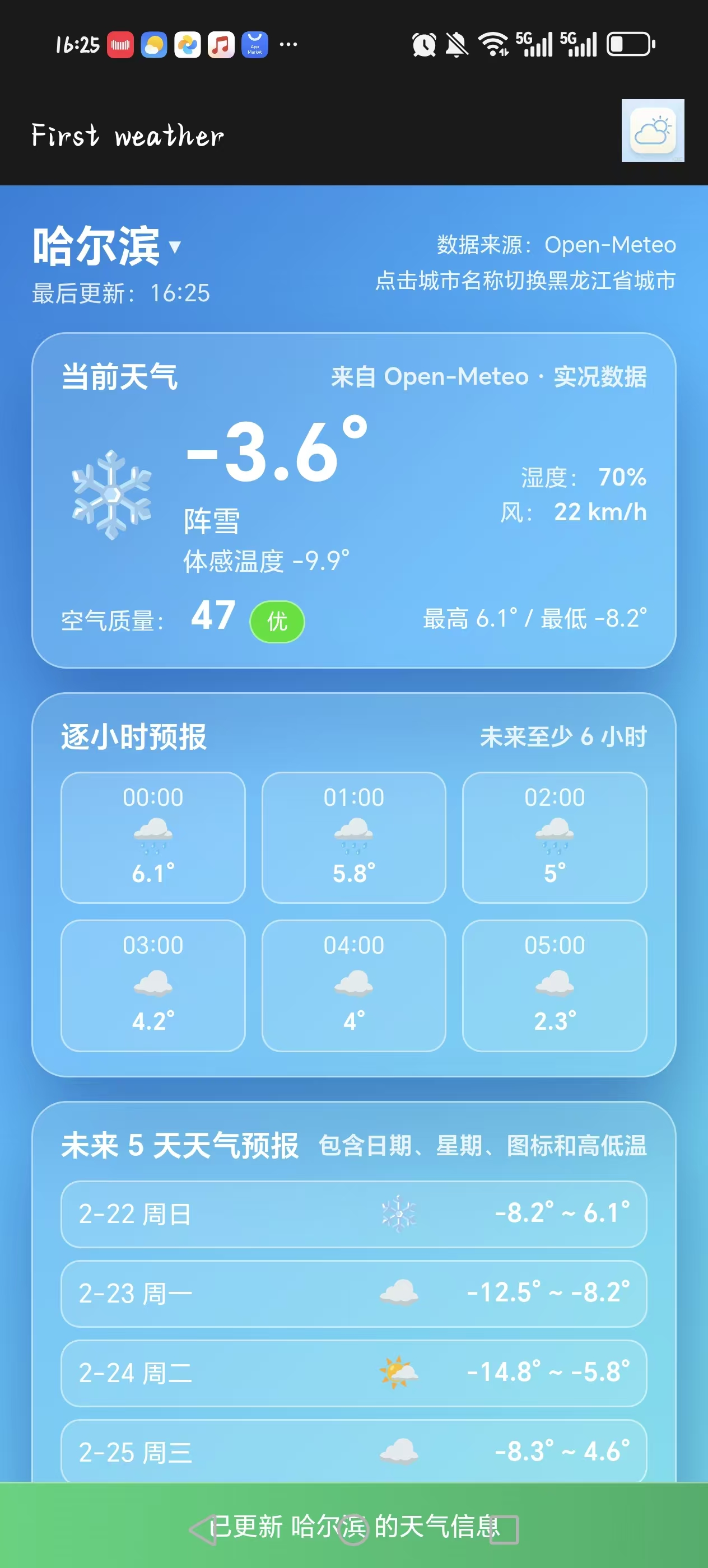
APP效果:

欢迎加入DeepSeek 技术社区。在这里,你可以找到志同道合的朋友,共同探索AI技术的奥秘。
更多推荐



 12
12 0
0- 0


 已为社区贡献1条内容

所有评论(0)