万字硬核教程【OpenRouter】:一个 API Key 解锁 400+ AI 大模型,免费白嫖 DeepSeek / Claude / GPT 全攻略(2026最新)
你在做一个 AI 应用,代码生成用 Claude 效果最好,长文档分析用 Gemini 1.5 Pro 成本最低,高频简单任务用 DeepSeek V3 几乎免费OpenRouter 就是为了解决这个痛点而生的。简单来说,OpenRouter 是一个 AI 模型聚合路由平台:✅ 一个 API Key,调用全球 400+ 主流 AI 模型✅ 统一接口格式(OpenAI 兼容),零改造成本迁移✅但每个
🚀万字硬核教程【OpenRouter】:一个 API Key 解锁 400+ AI 大模型,免费白嫖 DeepSeek / Claude / GPT 全攻略(2026最新)
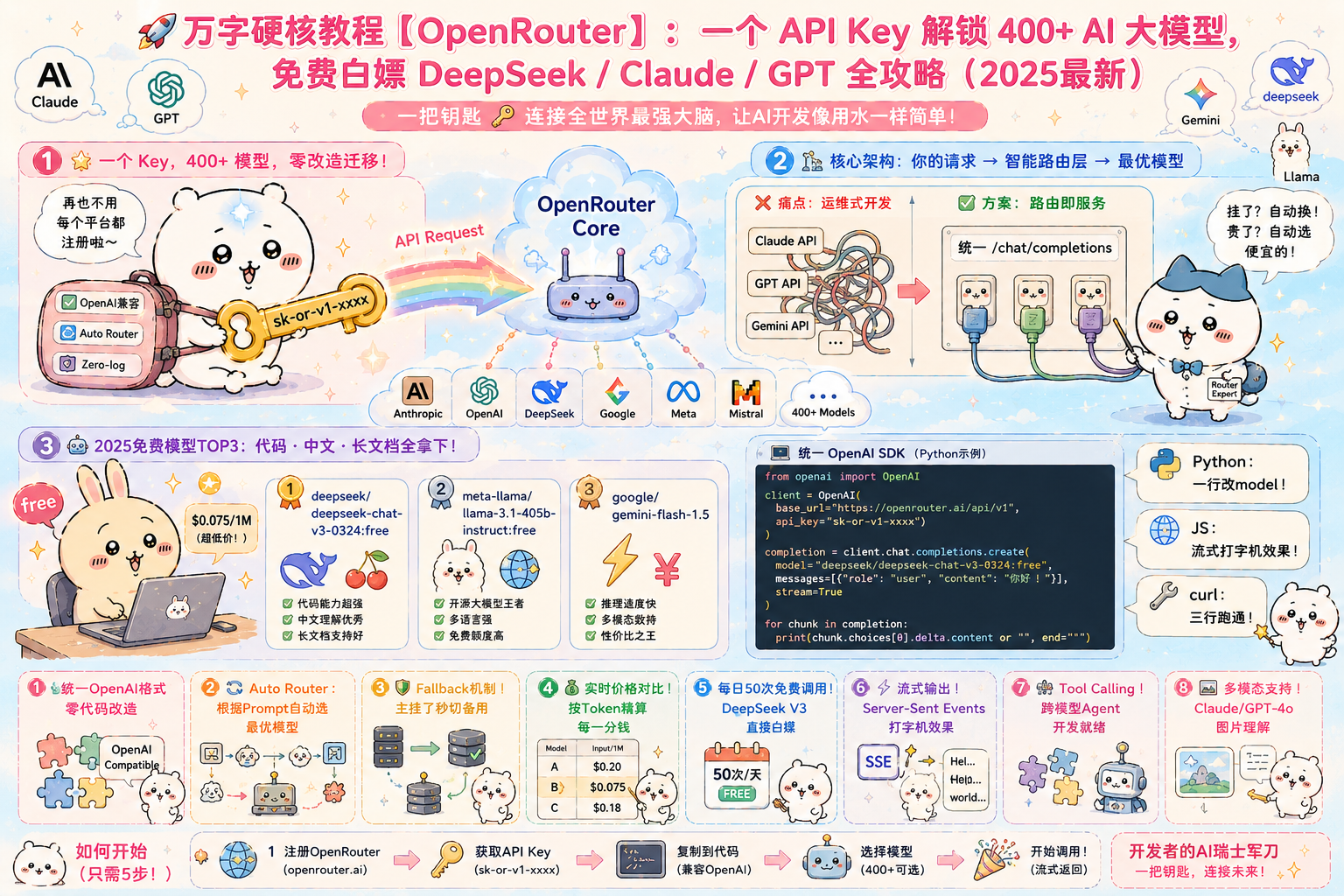
🔥 如果你还在为每个 AI 平台单独注册账号、管理不同 API、担心某个服务挂掉而焦虑——这篇文章将彻底解放你。
📑 目录导航
- 🌟 一、OpenRouter 是什么?为什么它让开发者疯狂?
- 🏗️ 二、核心架构揭秘:一个请求是怎么被路由的?
- ⚡ 三、5分钟快速上手:注册→Key→调用全流程
- 💻 四、代码实战:Python / JS / curl 三种方式调用
- 🤖 五、2025年最新免费模型大盘点(含性价比评分)
- 📊 六、热门模型性价比横评:选哪个最划算?
- 🔀 七、智能路由深度解析:Auto Router 是怎么工作的?
- 🛠️ 八、高级玩法:流式输出 / Tool Calling / 多模态
- 💡 九、避坑指南:10个使用 OpenRouter 常见问题
- 🚀 十、结语:AI 平权时代来临
🌟 一、OpenRouter 是什么?为什么它让开发者疯狂?
想象一个场景:
你在做一个 AI 应用,代码生成用 Claude 效果最好,长文档分析用 Gemini 1.5 Pro 成本最低,高频简单任务用 DeepSeek V3 几乎免费……
但每个平台都要单独注册、单独管理 Key、单独处理不同的 API 格式——这不是开发,这是在做运维!
OpenRouter 就是为了解决这个痛点而生的。
简单来说,OpenRouter 是一个 AI 模型聚合路由平台:
- ✅ 一个 API Key,调用全球 400+ 主流 AI 模型
- ✅ 统一接口格式(OpenAI 兼容),零改造成本迁移
- ✅ 自动智能路由,选择最优提供商
- ✅ 自动故障转移,某家挂了自动换备用
- ✅ 实时价格对比,帮你找最便宜的推理节点
- ✅ 部分模型完全免费,DeepSeek V3 / Llama 3 直接白嫖
📌 官网:https://openrouter.ai
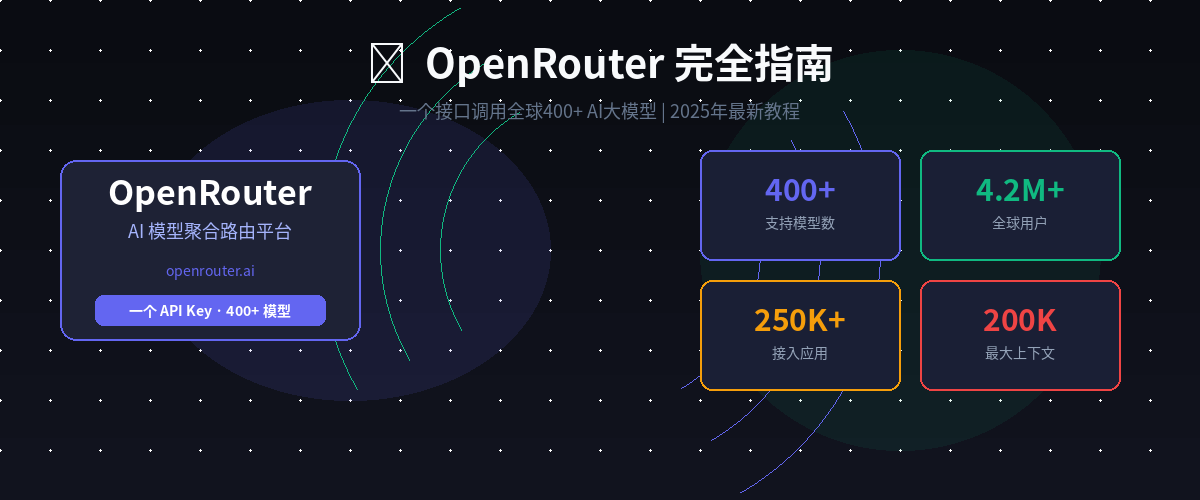
📌 目前数据:250K+ 应用接入,4.2M+ 全球用户,周活跃模型 200+
🏗️ 二、核心架构揭秘:一个请求是怎么被路由的?
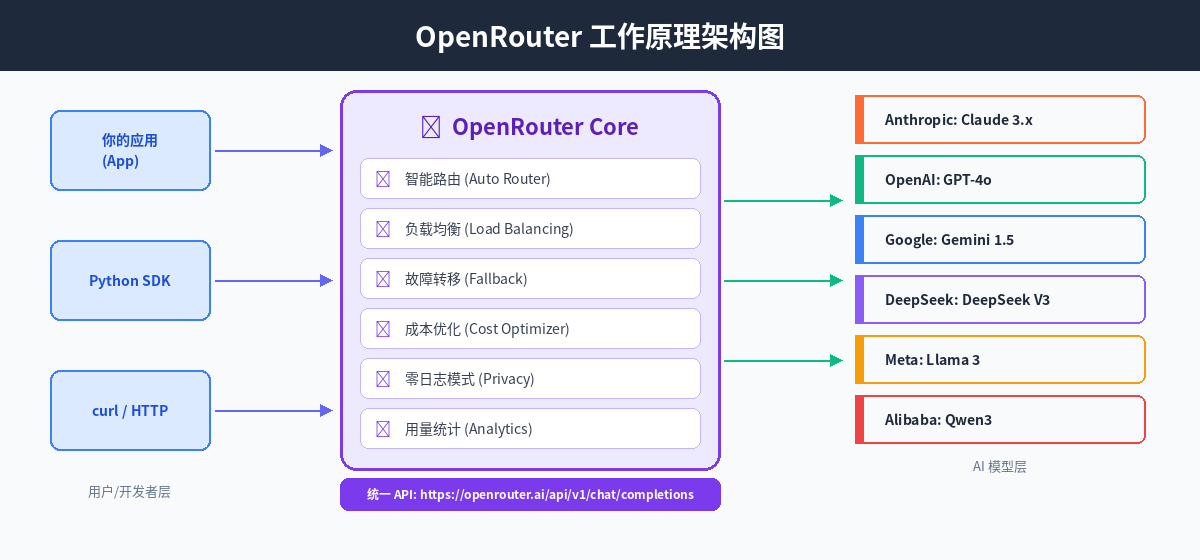
图2:OpenRouter 工作原理架构图——从你的应用到 AI 模型的全链路
整个调用链路如下:
你的应用 (任何语言)
    ↓  POST /api/v1/chat/completions
OpenRouter Core (智能路由层)
    ├── 解析模型选择
    ├── 查询实时可用性 & 延迟
    ├── 选择最优推理节点
    ├── 故障时自动 Fallback
    └── 返回统一格式响应
         ↓
   目标 AI 模型 (Claude / GPT / Gemini / DeepSeek...)
✨ 2.1 核心技术特性一览表
| 特性 | 说明 | 价值 |
|---|---|---|
| 统一 API 格式 | 完全兼容 OpenAI Chat Completion | 一行代码迁移,无需改造 |
| Auto Router | 根据 Prompt 自动选最优模型 | 省去选模型烦恼 |
| 多提供商路由 | 同一模型多家推理节点 | 延迟最低、成本最优 |
| Fallback 机制 | 主节点挂了自动换备用 | SLA 99.9% 高可用 |
| Prompt Caching | 缓存重复 Prompt | 最高省 90% Token 成本 |
| Zero-log 模式 | 不记录对话内容 | 企业级隐私合规 |
| 流式输出 | Server-Sent Events | 实时打字机效果 |
| Tool Calling | 统一工具调用协议 | 跨模型 Agent 开发 |
⚡ 三、5分钟快速上手:注册 → Key → 调用全流程
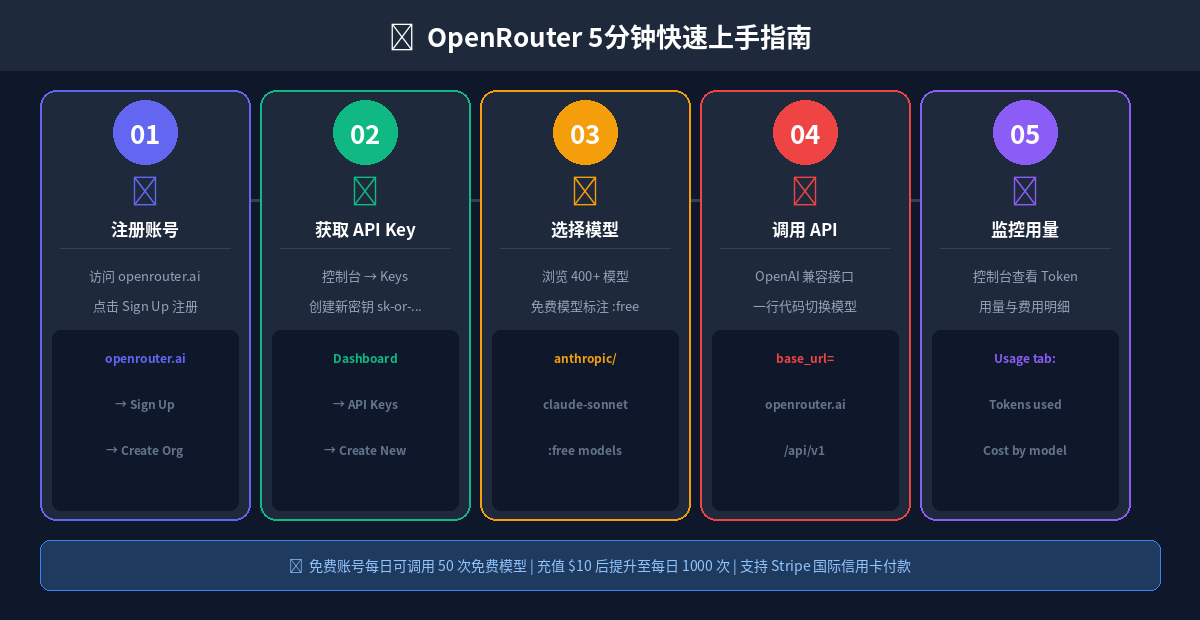
图3:OpenRouter 5分钟快速上手全流程
📝 3.1 注册账号
- 访问 https://openrouter.ai
- 点击右上角 Sign Up,支持 Google 账号一键登录
- 可选:创建 Organization(团队共享账号)
🔑 3.2 获取 API Key
控制台 → Keys → Create Key → 复制 sk-or-v1-xxxx...
⚠️ 注意:Key 只显示一次,请立即保存到安全的地方!
💰 3.3 充值(可选)
- 免费额度:每日 50 次免费模型调用(标注
:free的模型) - 充值后:余额 $10+ 可提升至每日 1000 次
- 支持:Stripe 国际信用卡(VISA/Mastercard)
🧪 3.4 第一个调用(curl 测试)
curl https://openrouter.ai/api/v1/chat/completions \
  -H "Content-Type: application/json" \
  -H "Authorization: Bearer sk-or-v1-你的Key" \
  -d '{
    "model": "deepseek/deepseek-chat-v3-0324:free",
    "messages": [
      {"role": "user", "content": "你好,介绍一下你自己"}
    ]
  }'
成功响应示例:
{
  "id": "gen-xxxxx",
  "model": "deepseek/deepseek-chat-v3-0324",
  "choices": [{
    "message": {
      "role": "assistant",
      "content": "你好!我是 DeepSeek,一个由深度求索开发的 AI 助手..."
    }
  }],
  "usage": {
    "prompt_tokens": 15,
    "completion_tokens": 48,
    "total_tokens": 63
  }
}
💻 四、代码实战:Python / JS / curl 三种方式调用
🐍 4.1 Python 方式(推荐:使用 openai SDK)
# pip install openai
from openai import OpenAI

client = OpenAI(
    base_url="https://openrouter.ai/api/v1",
    api_key="sk-or-v1-你的Key",
)

# =============================================
# 方式一:指定具体模型
# =============================================
response = client.chat.completions.create(
    model="anthropic/claude-sonnet-4-5",  # 换模型只改这一行!
    messages=[
        {"role": "system", "content": "你是一个专业的Python开发者"},
        {"role": "user",   "content": "写一个快速排序算法,附带注释"}
    ],
    max_tokens=1000,
    temperature=0.7,
    extra_headers={
        "HTTP-Referer": "https://your-app.com",  # 可选,用于统计
        "X-Title": "My AI App",                   # 可选,显示在排名
    }
)
print(response.choices[0].message.content)

# =============================================
# 方式二:批量对比免费模型输出
# =============================================
free_models = [
    "deepseek/deepseek-chat-v3-0324:free",
    "meta-llama/llama-3.1-405b-instruct:free",
    "qwen/qwen-2.5-72b-instruct:free",
]

for model in free_models:
    resp = client.chat.completions.create(
        model=model,
        messages=[{"role": "user", "content": "用一句话介绍你自己"}],
        max_tokens=100,
    )
    print(f"[{model.split('/')[1]}] {resp.choices[0].message.content}")

# =============================================
# 方式三:流式输出(打字机效果)
# =============================================
stream = client.chat.completions.create(
    model="openai/gpt-4o-mini",
    messages=[{"role": "user", "content": "写一首关于AI的七言律诗"}],
    stream=True,
)

print("\n流式输出:")
for chunk in stream:
    delta = chunk.choices[0].delta
    if delta.content:
        print(delta.content, end="", flush=True)
print()
🌐 4.2 JavaScript / Node.js 方式
// npm install openai
import OpenAI from 'openai';

const client = new OpenAI({
  baseURL: 'https://openrouter.ai/api/v1',
  apiKey: 'sk-or-v1-你的Key',
  defaultHeaders: {
    'HTTP-Referer': 'https://your-site.com',
    'X-Title': 'My App',
  },
});

// 普通调用
const completion = await client.chat.completions.create({
  model: 'deepseek/deepseek-chat-v3-0324:free',
  messages: [
    { role: 'user', content: '用JavaScript写一个防抖函数' }
  ],
});
console.log(completion.choices[0].message.content);

// 流式调用
const stream = await client.chat.completions.create({
  model: 'anthropic/claude-haiku-4-5',
  messages: [{ role: 'user', content: '解释一下 React Hooks' }],
  stream: true,
});
for await (const chunk of stream) {
  process.stdout.write(chunk.choices[0]?.delta?.content || '');
}
🔧 4.3 原生 requests 调用(零依赖)
import requests
import json

API_KEY = "sk-or-v1-你的Key"
API_URL = "https://openrouter.ai/api/v1/chat/completions"

def call_openrouter(model, messages, stream=False, **kwargs):
    """通用 OpenRouter 调用函数,支持流式输出"""
    headers = {
        "Authorization": f"Bearer {API_KEY}",
        "Content-Type":  "application/json",
        "HTTP-Referer":  "https://your-app.com",
    }
    payload = {"model": model, "messages": messages, "stream": stream, **kwargs}
    response = requests.post(API_URL, headers=headers, json=payload, stream=stream)

    if stream:
        for line in response.iter_lines():
            if line and line.startswith(b"data: "):
                data = line[6:]
                if data == b"[DONE]":
                    break
                chunk = json.loads(data)
                content = chunk["choices"][0]["delta"].get("content", "")
                print(content, end="", flush=True)
    else:
        return response.json()["choices"][0]["message"]["content"]

# 示例调用
result = call_openrouter(
    model="deepseek/deepseek-chat-v3-0324:free",
    messages=[{"role": "user", "content": "OpenRouter 有哪些核心优势?"}],
    temperature=0.8,
    max_tokens=500,
)
print(result)
🤖 五、2025年最新免费模型大盘点(含性价比评分)
💡 免费模型使用限制(2025年最新政策):
- 未充值账号:每日 50次 调用
- 余额 ≥ $10:每日 1000次 调用
- 每分钟请求上限:20次
🏆 5.1 免费模型推荐榜单
| 排名 | 模型 ID | 提供商 | 上下文 | 擅长场景 | 综合评分 |
|---|---|---|---|---|---|
| 🥇 | deepseek/deepseek-chat-v3-0324:free |
DeepSeek | 64K | 代码、中文、推理 | ⭐⭐⭐⭐⭐ |
| 🥈 | meta-llama/llama-3.1-405b-instruct:free |
Meta | 131K | 通用、多语言 | ⭐⭐⭐⭐⭐ |
| 🥉 | deepseek/deepseek-r1:free |
DeepSeek | 64K | 数学推理、逻辑 | ⭐⭐⭐⭐½ |
| 4 | qwen/qwen-2.5-72b-instruct:free |
Alibaba | 131K | 中文理解 | ⭐⭐⭐⭐ |
| 5 | microsoft/phi-3-medium-128k-instruct:free |
Microsoft | 128K | 长文档 | ⭐⭐⭐⭐ |
| 6 | google/gemma-2-27b-it:free |
8K | 轻量任务 | ⭐⭐⭐⭐ | |
| 7 | mistralai/mistral-7b-instruct:free |
Mistral | 32K | 欧洲语言 | ⭐⭐⭐ |
| 8 | openchat/openchat-7b:free |
OpenChat | 8K | 对话 | ⭐⭐⭐ |
🎯 5.2 场景选型速查
🔧 代码生成     → deepseek/deepseek-chat-v3-0324:free
🧮 数学推理     → deepseek/deepseek-r1:free
📝 中文写作     → qwen/qwen-2.5-72b-instruct:free
📄 长文档处理   → meta-llama/llama-3.1-405b-instruct:free
💬 通用对话     → deepseek/deepseek-chat-v3-0324:free
🌍 多语言翻译   → mistralai/mistral-7b-instruct:free
📊 六、热门模型性价比横评:选哪个最划算?
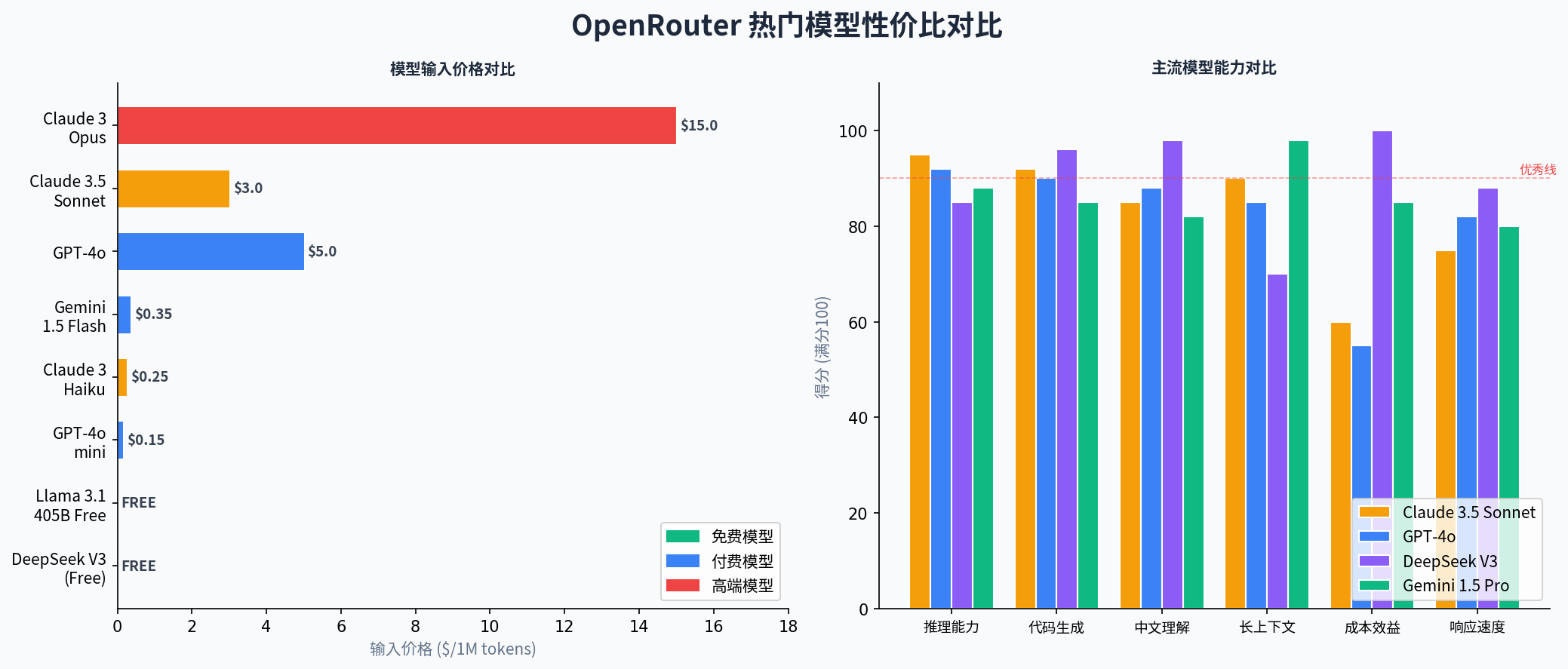
图4:OpenRouter 主流模型价格与多维能力横评(左:价格对比,右:能力雷达)
💵 6.1 付费模型价格对比(2025年5月)
| 模型 | 输入价格 | 输出价格 | 上下文 | 最适场景 |
|---|---|---|---|---|
anthropic/claude-sonnet-4-5 |
$3.0/1M | $15.0/1M | 200K | 推理、写作、代码全能 |
openai/gpt-4o |
$5.0/1M | $15.0/1M | 128K | 通用、多模态 |
openai/gpt-4o-mini |
$0.15/1M | $0.60/1M | 128K | 高频简单任务 |
anthropic/claude-haiku-4-5 |
$0.25/1M | $1.25/1M | 200K | 高速轻量任务 |
google/gemini-1.5-pro |
$1.25/1M | $5.0/1M | 1M | 超长上下文 |
google/gemini-flash-1.5 |
$0.075/1M | $0.30/1M | 1M | 超高性价比 ⭐ |
deepseek/deepseek-chat |
$0.14/1M | $0.28/1M | 64K | 代码+中文最优 |
💡 性价比之王:
google/gemini-flash-1.5— $0.075/1M token,1M 超长上下文,绝对价格屠夫。💡 质量天花板:
anthropic/claude-sonnet-4-5— 推理、写作、代码三项全能,高质量输出首选。
🧮 6.2 成本估算公式
总费用($) = N input × P input + N output × P output 1,000,000 \text{总费用(\$)} = \frac{N_{\text{input}} \times P_{\text{input}} + N_{\text{output}} \times P_{\text{output}}}{1{,}000{,}000} 总费用($)=1,000,000Ninput×Pinput+Noutput×Poutput
\text{总费用(\$)} = \frac{N_{\text{input}} \times P_{\text{input}} + N_{\text{output}} \times P_{\text{output}}}{1{,}000{,}000}
实例:用 Claude 3.5 Sonnet 处理一篇 5000 字文章(约 3000 tokens 输入 + 2000 tokens 输出):
费用 = 3000 × 3.0 + 2000 × 15.0 1,000,000 = 9000 + 30000 1,000,000 ≈ $ 0.039 \text{费用} = \frac{3000 \times 3.0 + 2000 \times 15.0}{1{,}000{,}000} = \frac{9000 + 30000}{1{,}000{,}000} \approx \$0.039 费用=1,000,0003000×3.0+2000×15.0=1,000,0009000+30000≈$0.039
\text{费用} = \frac{3000 \times 3.0 + 2000 \times 15.0}{1{,}000{,}000} \approx \$0.039
一篇文章只要不到 3 毛钱!
🔀 七、智能路由深度解析:Auto Router 是怎么工作的?
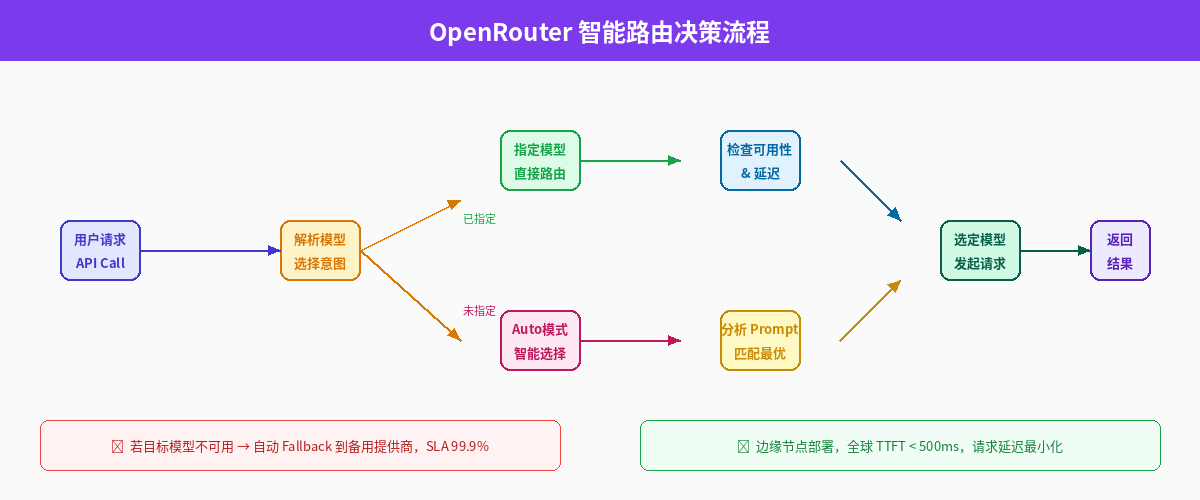
图5:OpenRouter 智能路由决策完整流程——从请求到模型选择的全链路
🤖 7.1 Auto Router 模式——让平台帮你决定
将模型设为 openrouter/auto,平台根据 Prompt 内容自动选择最合适的模型:
response = client.chat.completions.create(
    model="openrouter/auto",   # 魔法!让 OpenRouter 自动选
    messages=[{"role": "user", "content": "解一道微积分题:∫x²dx"}]
)
# OpenRouter 会自动选择最擅长数学推理的模型
⚙️ 7.2 Provider 级别精细控制
response = client.chat.completions.create(
    model="anthropic/claude-sonnet-4-5",
    messages=[{"role": "user", "content": "..."}],
    extra_body={
        "provider": {
            "order": ["Anthropic", "AWS Bedrock", "Azure"],  # 提供商优先级
            "allow_fallbacks": True,    # 允许自动回退
            "require_parameters": True  # 要求支持所有参数
        }
    }
)
🔄 7.3 多模型 Fallback 链——永不中断
# 主模型挂了自动切换备用,业务永不中断
response = client.chat.completions.create(
    model="anthropic/claude-sonnet-4-5",
    extra_body={
        "models": [              # 按优先级依次尝试
            "anthropic/claude-sonnet-4-5",
            "openai/gpt-4o",
            "google/gemini-1.5-pro",
            "deepseek/deepseek-chat:free",  # 最后兜底免费模型
        ]
    },
    messages=[{"role": "user", "content": "..."}]
)
💰 7.4 路由策略对比
| 路由策略 | 参数 | 优先目标 | 适用场景 |
|---|---|---|---|
| 指定提供商顺序 | provider.order |
服务商偏好 | 数据合规、区域限制 |
| 最低延迟 | route: "fastest" |
响应速度 | 实时对话、流式输出 |
| 最低成本 | route: "cheapest" |
Token 费用 | 批处理、非实时任务 |
| 故障转移 | route: "fallback" |
高可用 | 生产环境、关键业务 |
🛠️ 八、高级玩法:流式输出 / Tool Calling / 多模态
🔧 8.1 Tool Calling 函数调用
import json

tools = [{
    "type": "function",
    "function": {
        "name": "get_weather",
        "description": "获取指定城市的实时天气信息",
        "parameters": {
            "type": "object",
            "properties": {
                "city": {"type": "string", "description": "城市名称,如'北京'"},
                "unit": {"type": "string", "enum": ["celsius", "fahrenheit"]}
            },
            "required": ["city"]
        }
    }
}]

response = client.chat.completions.create(
    model="anthropic/claude-sonnet-4-5",
    messages=[{"role": "user", "content": "东京今天天气怎么样?"}],
    tools=tools,
    tool_choice="auto",
)

# 解析工具调用结果
if response.choices[0].message.tool_calls:
    tool_call = response.choices[0].message.tool_calls[0]
    args = json.loads(tool_call.function.arguments)
    print(f"调用函数: {tool_call.function.name}")
    print(f"参数:     {args}")
    # 输出 → 调用函数: get_weather | 参数: {'city': '东京', 'unit': 'celsius'}
🖼️ 8.2 多模态:图片理解
import base64

with open("screenshot.png", "rb") as f:
    image_b64 = base64.b64encode(f.read()).decode("utf-8")

response = client.chat.completions.create(
    model="anthropic/claude-sonnet-4-5",
    messages=[{
        "role": "user",
        "content": [
            {
                "type": "image_url",
                "image_url": {"url": f"data:image/png;base64,{image_b64}"}
            },
            {"type": "text", "text": "请详细描述这张图片,并指出代码中的 Bug"}
        ]
    }]
)
print(response.choices[0].message.content)
💾 8.3 Prompt Caching——省下 90% Token 成本
当系统提示很长(如大量文档),开启缓存可大幅降低成本:
LONG_SYSTEM_PROMPT = "你是一个专业的代码审查员..." + "规范文档内容..." * 200

response = client.chat.completions.create(
    model="anthropic/claude-sonnet-4-5",
    messages=[
        {
            "role": "system",
            "content": [{
                "type": "text",
                "text": LONG_SYSTEM_PROMPT,
                "cache_control": {"type": "ephemeral"}  # ← 开启缓存
            }]
        },
        {"role": "user", "content": "审查这段代码:def foo(): pass"}
    ]
)

# 查看缓存效果
usage = response.usage
print(f"缓存写入: {usage.prompt_tokens_details.cache_write_input_tokens} tokens")
print(f"缓存命中: {usage.prompt_tokens_details.cached_tokens} tokens")
print(f"节省费用: ~{usage.prompt_tokens_details.cached_tokens * 0.9:.0f} tokens 的成本")
💡 九、避坑指南:10 个使用 OpenRouter 常见问题
⚠️ 踩坑血泪史,帮你提前避雷!
| # | 问题现象 | 根本原因 | 解决方案 |
|---|---|---|---|
| 1 | 402 Payment Required |
免费额度耗尽 | 充值 $5+ 或等次日重置 |
| 2 | 响应特别慢、超时 | 免费模型高峰期排队 | 换付费模型或错峰调用 |
| 3 | Invalid model 报错 |
模型名格式错误 | 格式必须为 provider/model-name |
| 4 | 流式输出乱码 | 编码未设置 | 设置 response.encoding='utf-8' |
| 5 | Tool Calling 返回空 | 模型不支持工具调用 | 换 Claude 3.x / GPT-4 系列 |
| 6 | 图片理解不生效 | 模型不支持多模态 | 用 claude-sonnet 或 gpt-4o |
| 7 | 中文输出被截断 | max_tokens 设置过小 |
调大至 2000+ |
| 8 | 429 Too Many Requests |
超过每分钟 20 次限制 | 加重试 + 指数退避 |
| 9 | 输出不稳定、随机性强 | temperature 过高 |
调低至 0.3-0.7 |
| 10 | 月底账单超预期 | 忘记设置 max_tokens |
一定要设置 max_tokens 上限! |
🛡️ 生产级健壮调用模板
import time, random
from openai import OpenAI, RateLimitError, APIStatusError

client = OpenAI(
    base_url="https://openrouter.ai/api/v1",
    api_key="sk-or-v1-你的Key",
)

def robust_call(model, messages, max_retries=3, **kwargs):
    """带重试 + 指数退避的生产级调用函数"""
    for attempt in range(max_retries):
        try:
            resp = client.chat.completions.create(
                model=model,
                messages=messages,
                max_tokens=kwargs.pop("max_tokens", 2000),  # 默认设置上限
                **kwargs
            )
            return resp.choices[0].message.content

        except RateLimitError:
            wait = (2 ** attempt) + random.random()        # 指数退避 + 抖动
            print(f"⏳ 限速,{wait:.1f}s 后重试(第 {attempt+1} 次)...")
            time.sleep(wait)

        except APIStatusError as e:
            if e.status_code == 402:
                raise RuntimeError("❌ 余额不足,请前往 openrouter.ai 充值")
            print(f"⚠️  API 错误 {e.status_code}: {e.message}")
            if attempt < max_retries - 1:
                time.sleep(1)

    raise RuntimeError(f"🚫 重试 {max_retries} 次后仍失败")

# 调用示例
result = robust_call(
    model="deepseek/deepseek-chat-v3-0324:free",
    messages=[{"role": "user", "content": "你好,介绍 OpenRouter 的优势"}],
    temperature=0.7,
)
print(result)
🚀 十、结语:AI 平权时代来临
OpenRouter 的出现,本质上是 AI 基础设施的民主化。
过去,访问顶级 AI 模型需要在每家平台单独注册、充值、管理 API,开发者的精力被大量浪费在"接线"而非"创造"上。
现在,一个 API Key,400+ 模型随意调用,成本透明,自动路由——这才是开发者应该有的体验。
📋 给开发者的三条建议
| 阶段 | 建议 | 推荐模型 |
|---|---|---|
| 🧪 验证想法(POC) | 先用免费模型,零成本试错 | DeepSeek V3 Free |
| 🔨 打磨产品 | 用付费模型保证质量 | Claude Sonnet / GPT-4o |
| 🚀 规模化上线 | 监控用量,开启 Prompt Caching | Gemini Flash(极致性价比) |
💬 最后问你一个问题:你现在最想用 OpenRouter 调用哪个模型?欢迎评论区聊聊你的使用场景!
🙏 如果这篇文章帮到了你,请一键三连(点赞 👍 + 收藏 ⭐ + 关注),你的支持是我持续输出硬核教程的动力!
📚 参考资料
- OpenRouter 官方文档:https://openrouter.ai/docs
- OpenRouter 免费模型列表:https://openrouter.ai/collections/free-models
- Anthropic Claude API Docs:https://docs.anthropic.com
- Compound AI Systems — Berkeley AI Research Blog, 2024
- OpenRouter 免费 API 终极指南 — CSDN, 2026
本文为原创技术分享,持续更新。转载请注明出处。
最后更新:2025-05-10

欢迎加入DeepSeek 技术社区。在这里,你可以找到志同道合的朋友,共同探索AI技术的奥秘。
更多推荐
 8
8 0
0- 0


 已为社区贡献27条内容

所有评论(0)