微信公众号授权登录报错redirect_uri 参数错误和系统错误,错误码:1, undefined,使用ngrok 内网穿透
1:redirect_uri 参数错误。
微信授权常见的错误:
1:redirect_uri 参数错误
function handleWxLogin() {

//跳转的地址是首页/home

const redirectUri ='/home' ;

const effectiveAppId ="你的appid";

window.location.href = `https://open.weixin.qq.com/connect/oauth2/authorize?appid=${effectiveAppId}&redirect_uri=${redirectUri}&response_type=code&scope=snsapi_userinfo&state=login#wechat_redirect`; }
根据上面写的代码知道根本原因在于:
❌
redirect_uri必须是完整、公网可访问、且已在微信公众平台配置的 URL,不能是相对路径(如/home)!
这时候如果你以为改成const redirectUri ="window.location.origin"。就可以了也不完全对。如果是vue的项目。我们本地跑起来的一般都是使用代理的,localhost的这样的格式,也是不符合要求的
微信要求 redirect_uri 必须满足以下条件:
-
✅ 完整的绝对 URL(包含协议、域名、端口、路径)
❌ 错误:/home
✅ 正确:https://www.yourdomain.com/home -
✅ 必须与你在微信公众平台配置的「网页授权域名」完全匹配(不带路径,但协议和域名必须一致)
-
✅ 必须是公网可访问地址(微信服务器要能访问它来校验)(localhost和本地域名
192.168.2.56这样的格式都不行) -
✅ 不能包含端口号(除非是标准 80/443)
- 如果你用
http://localhost:5173,微信无法访问,会直接报错。
- 如果你用
解决方案:使用内网穿透工具(如 ngrok)
ngrok 是一个非常实用的 内网穿透工具,可以将你本地开发的服务(如 localhost:5173)暴露到公网,生成一个临时的 HTTPS 域名(如 https://abc123.ngrok-free.app),方便在手机、微信等外部环境访问。
下面以 最新版 ngrok(2024 年后) 为例,手把手教你使用:
✅ 一、注册并获取 Auth Token
- 访问官网:https://ngrok.com
- 点击右上角 Sign In / Sign Up 注册账号(支持 GitHub 登录)
- 登录后,进入 Auth 页面
- 复制你的 Authtoken(形如
2FzXxxxxx_xxxxxxxxxxxxxxxxxxxxxxx)
⚠️ 注意:旧版 ngrok 不需要 token 也能用 HTTP,但新版 必须登录 + 绑定 token 才能使用 HTTPS 和自定义域名
✅ 二、安装 ngrok
使用 npm(如果你有 Node.js)
npm install -g ngrok✅ 三、配置 Authtoken(只需一次)
https://dashboard.ngrok.com/get-started/your-authtoken打开这个链接可以看到你的Authtoken
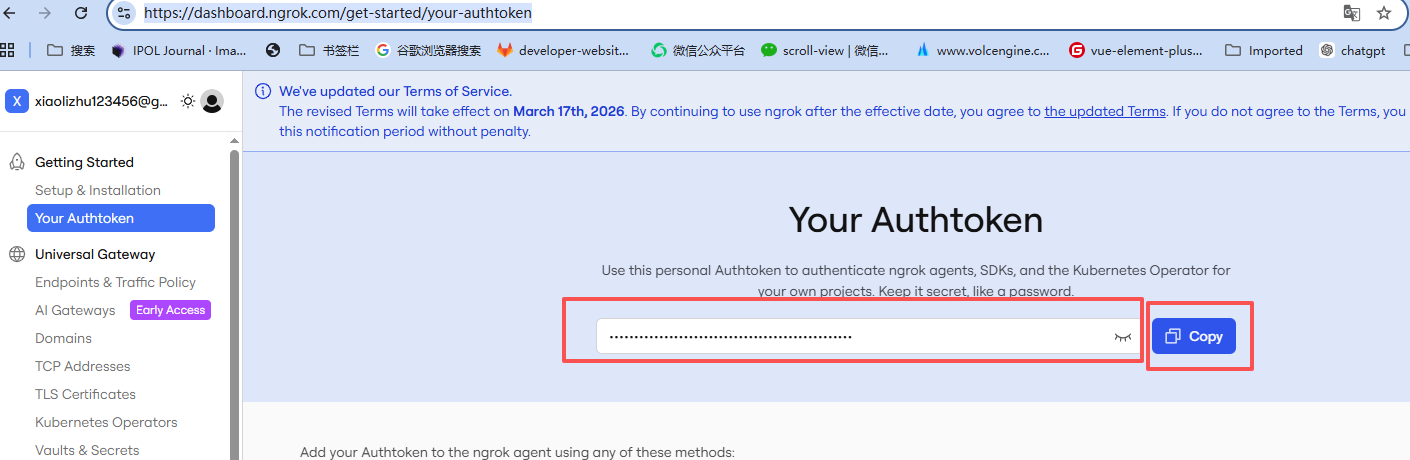
打开终端,运行:
ngrok config add-authtoken 你的_authtoken_字符串✅ 四、启动隧道(将本地服务暴露出去)
假设你的 Vite 项目运行在 http://localhost:5173
启动命令:
ngrok http 5173如果出现下面的界面就说明你成功了。只要把这个标红的网址,就是你的可以在微信开发者工具里面使用的网址啦
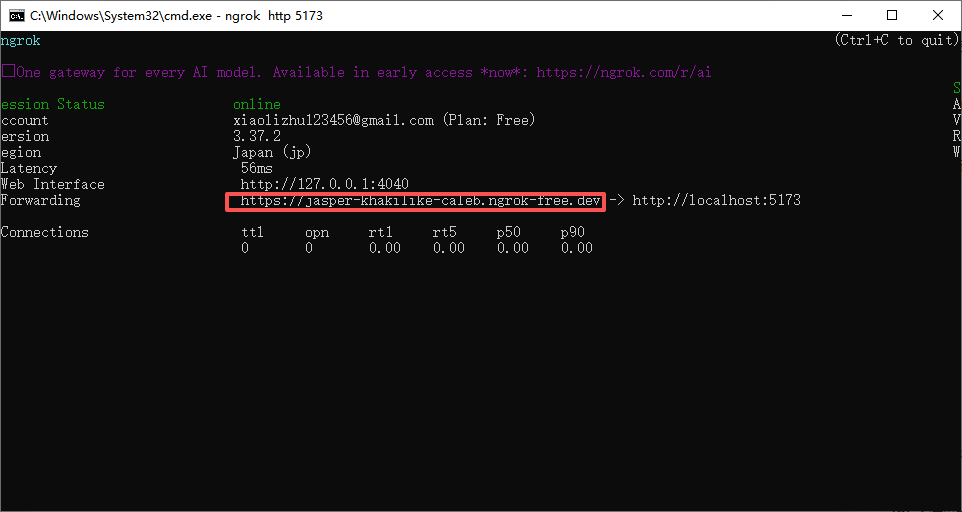
如果使用了这个网址还是出错redirect_uri参数错误
那是需要再微信公众平台配置一下这个域名
登录微信公众平台
- 打开:https://mp.weixin.qq.com/
- 进入 开发管理 → 接口权限
- 找到 “网页授权获取用户基本信息” → 点击 修改
- 在输入框中 填写:
jasper-khakilike-caleb.ngrok-free.dev
2:如果点击授权按钮提示下面报错:系统错误,错误码:1, undefined
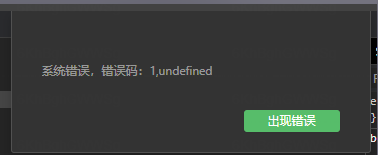
根本原因是 redirect_uri 参数没有正确编码,导致微信解析失败,最终触发了浏览器或框架的异常处理机制。
-
https://jasper-khakilike-caleb.ngrok-free.dev/home - 这个 URL 中包含特殊字符(如
:、/),但 没有进行encodeURIComponent编码。 - 微信服务器在解析参数时会失败,返回一个错误响应(通常是 400 或 500)。
- 你的前端框架(Vue)或某个中间层(如
axios、router)捕获到了这个错误,并抛出了undefined。
📌 最终表现为:“系统错误,错误码:1, undefined”
✅ 正确做法:对 redirect_uri 进行 URL 编码!
✅ 修改代码如下:
function handleWxLogin() {
  // 动态获取当前完整 origin
  let redirectUri = `${window.location.origin}/home`;

  // 从缓存中获取 appid
  const effectiveAppId = 你的appId;
  console.log('appid', effectiveAppId);

  // ⚠️ 必须对 redirect_uri 做 encodeURIComponent!
  const encodedRedirectUri = encodeURIComponent(redirectUri);

  window.location.href = `https://open.weixin.qq.com/connect/oauth2/authorize?appid=${effectiveAppId}&redirect_uri=${encodedRedirectUri}&response_type= code&scope=snsapi_userinfo&state=login#wechat_redirect`;
}
3:如果打开页面直接提示:
Blocked request. This host ("jasper-khakilike-caleb.ngrok-free.dev") is not allowed. To allow this host, add "jasper-khakilike-caleb.ngrok-free.dev" to `server.allowedHosts` in vite.config.js.
检查你的vite.config.js
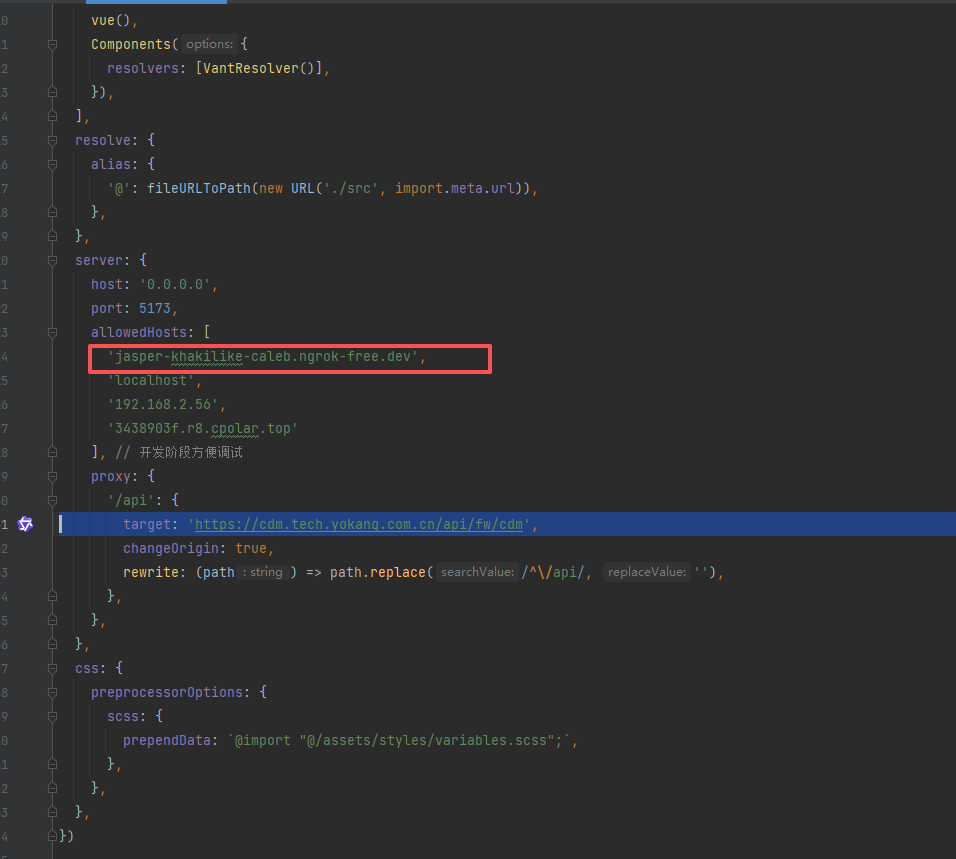
情况一:你是 Vite 2.x(不支持 'all')
你需要明确写出域名:
// vite.config.js
server: {
  host: '0.0.0.0',
  port: 5173,
  allowedHosts: ['jasper-khakilike-caleb.ngrok-free.dev'], // 必须写具体域名
  proxy: { /* ... */ }
}
情况二:你是 Vite 3+
server: {
  host: '0.0.0.0',
  port: 5173,
  allowedHosts: [
    'jasper-khakilike-caleb.ngrok-free.dev',
    'localhost',
    '192.168.2.56'
  ],
  proxy: { /* ... */ }
}
4:如果出现下面图片的情况该怎办呢?
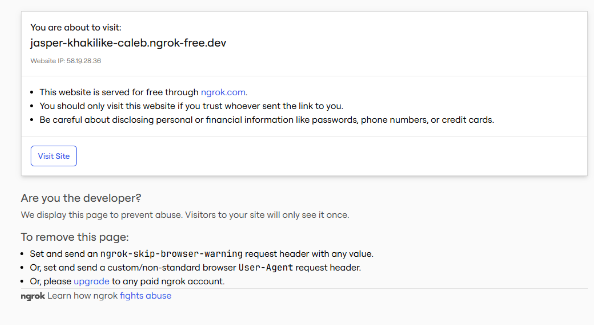
这是 ngrok 免费版的 默认安全警告页,目的是防止滥用和恶意行为。
它会拦截所有首次访问该隧道的用户,并显示一个提示框:
🔒 “You are about to visit: jasper-khakilike-caleb.ngrok-free.dev”
⚠️ 提示:这个网站通过 ngrok.com 免费提供,请确保你信任来源。
这并不是你的服务出错了,而是 ngrok 的正常防护机制。
✅ 如何解决?(三种方法)
✅ 方法一:点击「Visit Site」(最简单)
直接点击页面上的 "Visit Site" 按钮,就能进入你的实际网页。
📌 这个警告只会在第一次访问时出现一次,之后不会再弹出。
✅ 方法二:在代码中添加请求头(推荐用于自动跳转)
如果你希望用户不看到这个页面(比如微信扫码后直接跳转),可以在前端或后端设置一个自定义请求头来绕过。
方式 A:使用 fetch 或 axios 设置 header
Js
编辑
// 在 Vue 中发起请求时添加 header
fetch('/api/data', {
  headers: {
    'ngrok-skip-browser-warning': 'true'
  }
});
注意:这种方式适用于你主动发起的 API 请求,但不能阻止浏览器打开页面时的提示。

欢迎加入DeepSeek 技术社区。在这里,你可以找到志同道合的朋友,共同探索AI技术的奥秘。
更多推荐



 6
6 0
0- 0


 已为社区贡献2条内容

所有评论(0)