本地启动 lightRAG API 并调用千问大模型
引言 
随着人工智能和自然语言处理技术的快速发展,基于检索增强生成(Retrieval-Augmented Generation, RAG)的系统逐渐成为构建智能问答、知识图谱与语义理解应用的重要工具。LightRAG 是一个轻量级、高效且可扩展的 RAG 系统框架,支持快速构建本地化的知识检索与生成服务。
本文档旨在详细记录 LightRAG 项目的本地部署流程与关键配置项,包括服务启动方式、模型与嵌入配置、常见问题排查等内容。通过本指南,用户可以快速搭建起一个基于图结构的知识库系统,并实现对文本数据的高效索引、检索与生成。
在部署过程中,我们使用了 One-API 提供的统一接口来对接大语言模型(LLM)与嵌入模型(Embedding),并结合本地运行的 LightRAG 服务进行集成测试。虽然主要使用的模型为通义千问(Qwen),但由于其兼容 OpenAI 的 API 格式,因此仍采用 openai 类型进行绑定配置。
此外,我们在上传文档时遇到了“batch size is invalid, it should not be larger than 25”的报错。该错误通常出现在调用向量模型接口时,批量请求的数据条数超过服务端限制。为此,我们通过调整 EMBEDDING_BATCH_NUM=25 配置项解决了此问题。
通过本文档,读者将能够全面了解 LightRAG 的部署配置细节,并掌握如何解决实际使用中遇到的典型问题。
前期准备
申请千问大模型的AppKey
地址: https://www.aliyun.com/product/bailian
参考: https://blog.csdn.net/qq_62223405/article/details/147150815
开启 One-Api
下载地址: https://download.csdn.net/download/weixin_43664254/91070241
地址: https://github.com/songquanpeng/one-api
参考: https://www.bilibili.com/video/BV1SEv4eMEv9/?spm_id_from=333.1391.0.0&vd_source=71896ab743659b5af9bda243748dc817
相关其他文档
本地安装 light RAG + ollama 本地启动
LightRAG 源码级讲解
修改配置
# llm配置
# 我是用的 openai 通过 oneApi 模拟 openAi 的接口
LLM_BINDING=openai
# oneAPi 用那个模型
LLM_MODEL=qwen-turbo
# oneAPi 服务地址
LLM_BINDING_HOST=http://localhost:3000/v1
# oneAPi 生成的 token
LLM_BINDING_API_KEY=sk-LqqTskHysXyppRPnF9E34f0739E24fE9A790264393AeAdC7

# EMBEDDING 配置
EMBEDDING_BINDING=openai
EMBEDDING_MODEL=text-embedding-v1
EMBEDDING_DIM=1536
EMBEDDING_BINDING_API_KEY=sk-LqqTskHysXyppRPnF9E34f0739E24fE9A790264393AeAdC7
# If the embedding service is deployed within the same Docker stack, use host.docker.internal instead of localhost
EMBEDDING_BINDING_HOST=http://localhost:3000/v1
启动 lightRAG API
创建文件
项目中自带了一个模版, cp后重命名一下就行
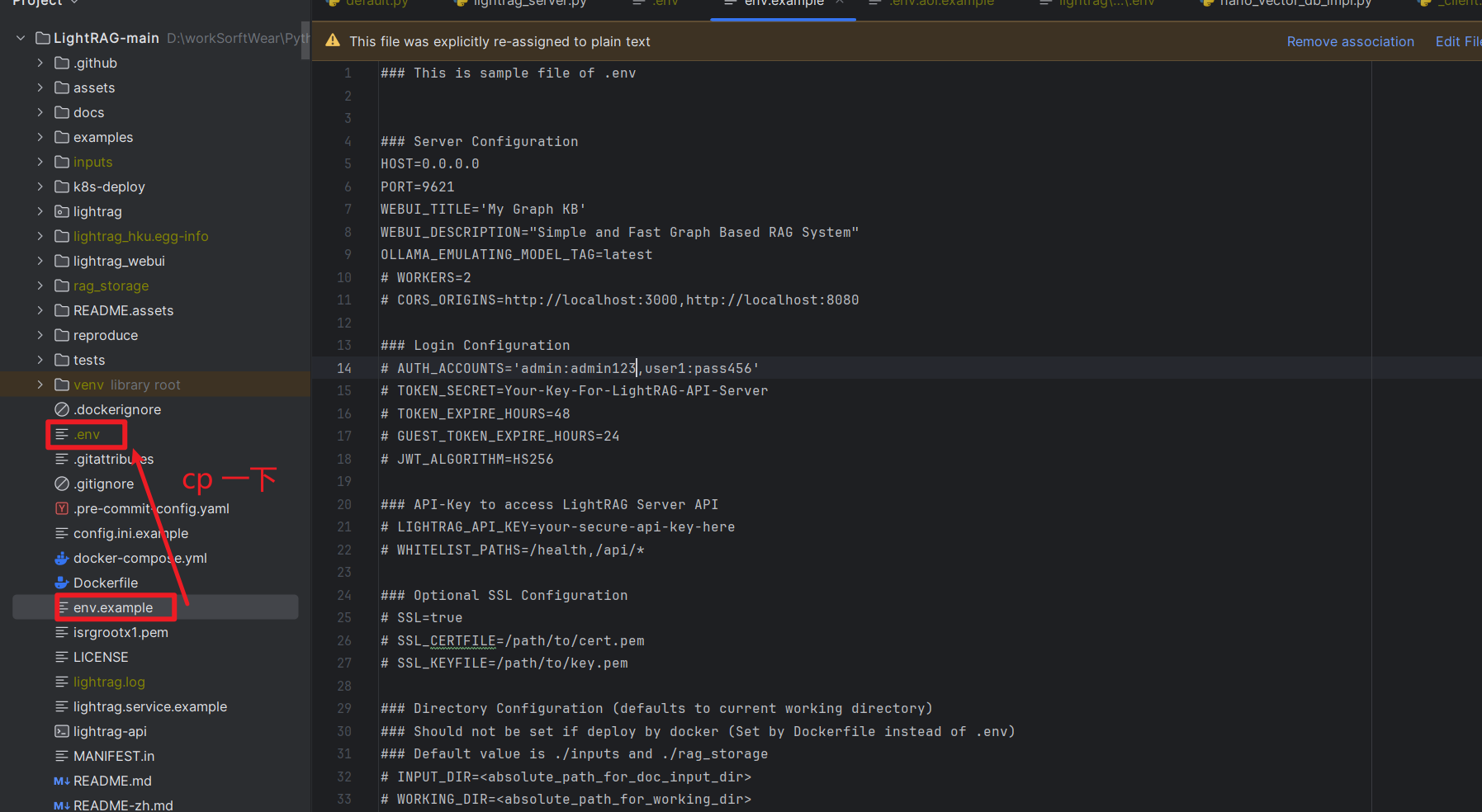
修改配置
服务器配置
这个基本使用的是默认配置, 测试使用
### Server Configuration
HOST=0.0.0.0
PORT=9621
WEBUI_TITLE='My Graph KB'
WEBUI_DESCRIPTION="Simple and Fast Graph Based RAG System"
OLLAMA_EMULATING_MODEL_TAG=latest
WORKERS=16
模型配置
一部分使用默认的, 一部分使用one-Api 生成的, 其他的先使用默认的
### LLM Configuration
ENABLE_LLM_CACHE=true
ENABLE_LLM_CACHE_FOR_EXTRACT=true
TIMEOUT=300000
TEMPERATURE=0
MAX_ASYNC=5
MAX_TOKENS=8192
# 虽然使用的是 千问模型, 但是这里还是要用 openai
LLM_BINDING=openai
# one-Api中的 模型名称
LLM_MODEL=qwen-turbo
# 服务地址
LLM_BINDING_HOST=http://localhost:3000/v1
# one-Api中的token
LLM_BINDING_API_KEY=sk-LqqTskHysXyppRPnF9E34f0739E24fE9A790264393AeAdC7


### Embedding Configuration
### Embedding Binding type: openai, ollama, lollms, azure_openai
EMBEDDING_BINDING=openai
EMBEDDING_MODEL=text-embedding-v1
EMBEDDING_DIM=1536
EMBEDDING_BINDING_API_KEY=sk-LqqTskHysXyppRPnF9E34f0739E24fE9A790264393AeAdC7
# If the embedding service is deployed within the same Docker stack, use host.docker.internal instead of localhost
EMBEDDING_BINDING_HOST=http://localhost:3000/v1

# light Tag调用向量模型时,遇到错误信息“batch size is invalid, it should not be larger than 25”
### Num of chunks send to Embedding in single request
EMBEDDING_BATCH_NUM=25
启动服务
命令行启动, 在服务上可以使用
The LightRAG Server supports two operational modes:
The simple and efficient Uvicorn mode:
lightrag-server
The multiprocess Gunicorn + Uvicorn mode (production mode, not supported on Windows environments):
lightrag-gunicorn --workers 4
本地启动
直接使用编辑器启动吧, 那里不明白还可以看看源码
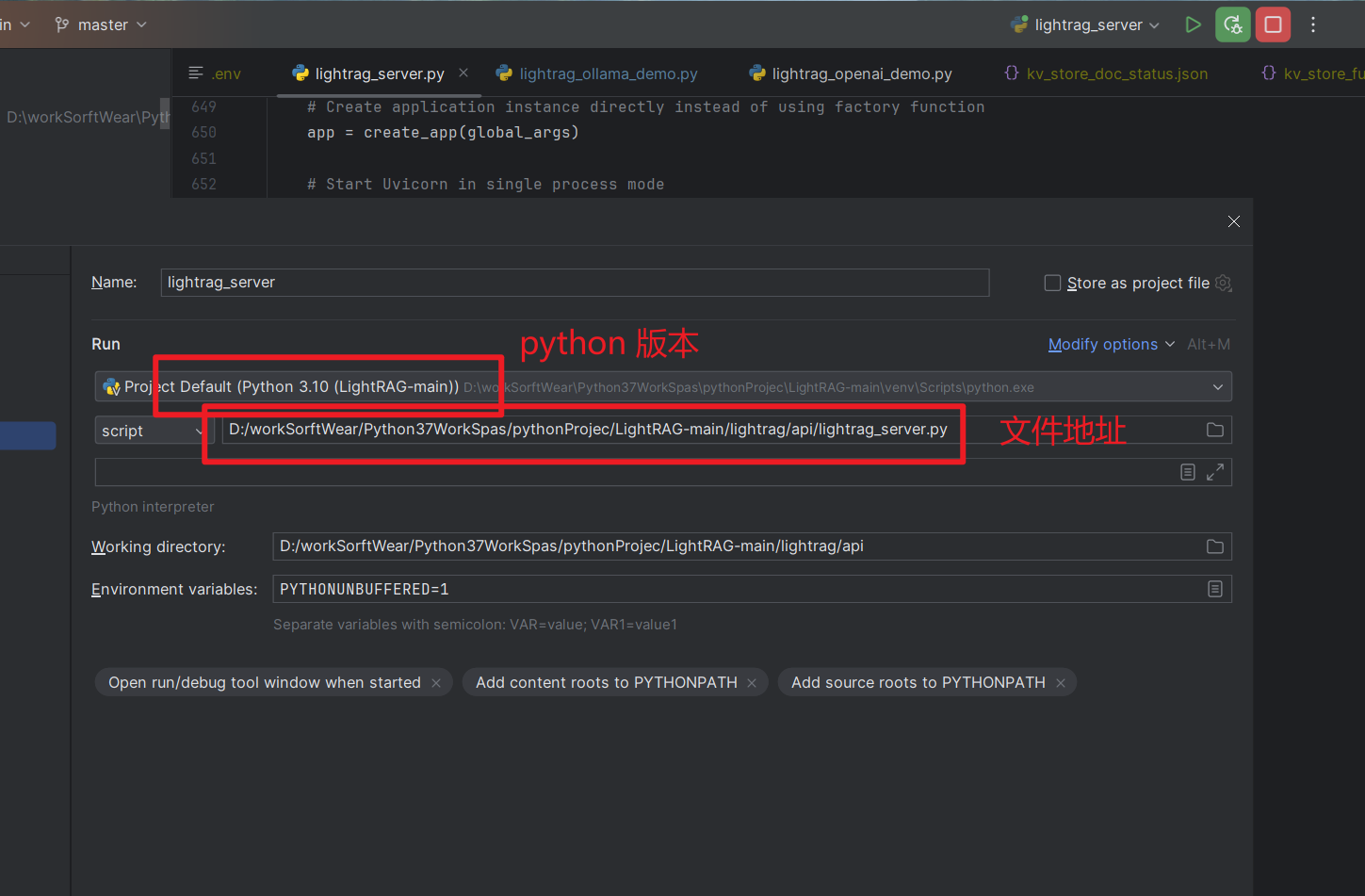
成功启动以后, 会有配置信息的打印,基本上就是自我简介了一下
2025-06-19 15:55:10 - pipmaster.package_manager - INFO - Targeting pip associated with Python: D:\workSorftWear\Python37WorkSpas\pythonProjec\LightRAG-main\venv\Scripts\python.exe | Command base: D:\workSorftWear\Python37WorkSpas\pythonProjec\LightRAG-main\venv\Scripts\python.exe -m pip
LightRAG log file: D:\workSorftWear\Python37WorkSpas\pythonProjec\LightRAG-main\lightrag\api\lightrag.log
    ╔══════════════════════════════════════════════════════════════╗
    ║                  🚀 LightRAG Server v1.3.8/0172              ║
    ║          Fast, Lightweight RAG Server Implementation         ║
    ╚══════════════════════════════════════════════════════════════╝

📡 Server Configuration:
    ├─ Host: 0.0.0.0
    ├─ Port: 9621
    ├─ Workers: 1
    ├─ CORS Origins: *
    ├─ SSL Enabled: False
    ├─ Ollama Emulating Model: lightrag:latest
    ├─ Log Level: INFO
    ├─ Verbose Debug: False
    ├─ History Turns: 3
    ├─ API Key: Not Set
    └─ JWT Auth: Disabled
📂 Directory Configuration:
    ├─ Working Directory: D:\workSorftWear\Python37WorkSpas\pythonProjec\LightRAG-main\lightrag\api\rag_storage
    └─ Input Directory: D:\workSorftWear\Python37WorkSpas\pythonProjec\LightRAG-main\lightrag\api\inputs
🤖 LLM Configuration:
    ├─ Binding: openai
    ├─ Host: http://localhost:3000/v1
    ├─ Model: qwen-turbo
    ├─ Temperature: 0.0
    ├─ Max Async for LLM: 5
    ├─ Max Tokens: 8192
    ├─ Timeout: 300000
    ├─ LLM Cache Enabled: True
    └─ LLM Cache for Extraction Enabled: True
📊 Embedding Configuration:
    ├─ Binding: openai
    ├─ Host: http://localhost:3000/v1
    ├─ Model: text-embedding-v1
    └─ Dimensions: 1536
⚙️ RAG Configuration:
    ├─ Summary Language: Chinese
    ├─ Max Parallel Insert: 5
    ├─ Max Embed Tokens: 8192
    ├─ Chunk Size: 1200
    ├─ Chunk Overlap Size: 100
    ├─ Cosine Threshold: 0.2
    ├─ Top-K: 60
    ├─ Max Token Summary: 500
    └─ Force LLM Summary on Merge: 6
💾 Storage Configuration:
    ├─ KV Storage: JsonKVStorage
    ├─ Vector Storage: NanoVectorDBStorage
    ├─ Graph Storage: NetworkXStorage
    └─ Document Status Storage: JsonDocStatusStorage
✨ Server starting up...
🌐 Server Access Information:
    ├─ WebUI (local): http://localhost:9621
    ├─ Remote Access: http://<your-ip-address>:9621
    ├─ API Documentation (local): http://localhost:9621/docs
    └─ Alternative Documentation (local): http://localhost:9621/redoc
📝 Note:
    Since the server is running on 0.0.0.0:
    - Use 'localhost' or '127.0.0.1' for local access
    - Use your machine's IP address for remote access
    - To find your IP address:
      • Windows: Run 'ipconfig' in terminal
      • Linux/Mac: Run 'ifconfig' or 'ip addr' in terminal

WARNING:root:In uvicorn mode, workers parameter was set to 16. Forcing workers=1
INFO: Process 79352 Shared-Data created for Single Process
INFO: Loaded graph from D:\workSorftWear\Python37WorkSpas\pythonProjec\LightRAG-main\lightrag\api\rag_storage\graph_chunk_entity_relation.graphml with 15 nodes, 16 edges
Starting Uvicorn server in single-process mode on 0.0.0.0:9621
INFO: Started server process [79352]
INFO: Waiting for application startup.
INFO: Process 79352 initialized updated flags for namespace: [full_docs]
INFO: Process 79352 ready to initialize storage namespace: [full_docs]
INFO: Process 79352 KV load full_docs with 1 records
INFO: Process 79352 initialized updated flags for namespace: [text_chunks]
INFO: Process 79352 ready to initialize storage namespace: [text_chunks]
INFO: Process 79352 KV load text_chunks with 1 records
INFO: Process 79352 initialized updated flags for namespace: [entities]
INFO: Process 79352 initialized updated flags for namespace: [relationships]
INFO: Process 79352 initialized updated flags for namespace: [chunks]
INFO: Process 79352 initialized updated flags for namespace: [chunk_entity_relation]
INFO: Process 79352 initialized updated flags for namespace: [llm_response_cache]
INFO: Process 79352 ready to initialize storage namespace: [llm_response_cache]
INFO: Process 79352 KV load llm_response_cache with 8 records
INFO: Process 79352 initialized updated flags for namespace: [doc_status]
INFO: Process 79352 ready to initialize storage namespace: [doc_status]
INFO: Process 79352 doc status load doc_status with 1 records
INFO: Process 79352 Pipeline namespace initialized
INFO: Application startup complete.
INFO: Uvicorn running on http://0.0.0.0:9621 (Press CTRL+C to quit)
咱们重点关注一下 这句话, 是你访问 webUI 地址
🌐 Server Access Information:
    ├─ WebUI (local): http://localhost:9621
    ├─ Remote Access: http://<your-ip-address>:9621
    ├─ API Documentation (local): http://localhost:9621/docs
    └─ Alternative Documentation (local): http://localhost:9621/redoc
输入 http://localhost:9621 就可以进入这个地址了
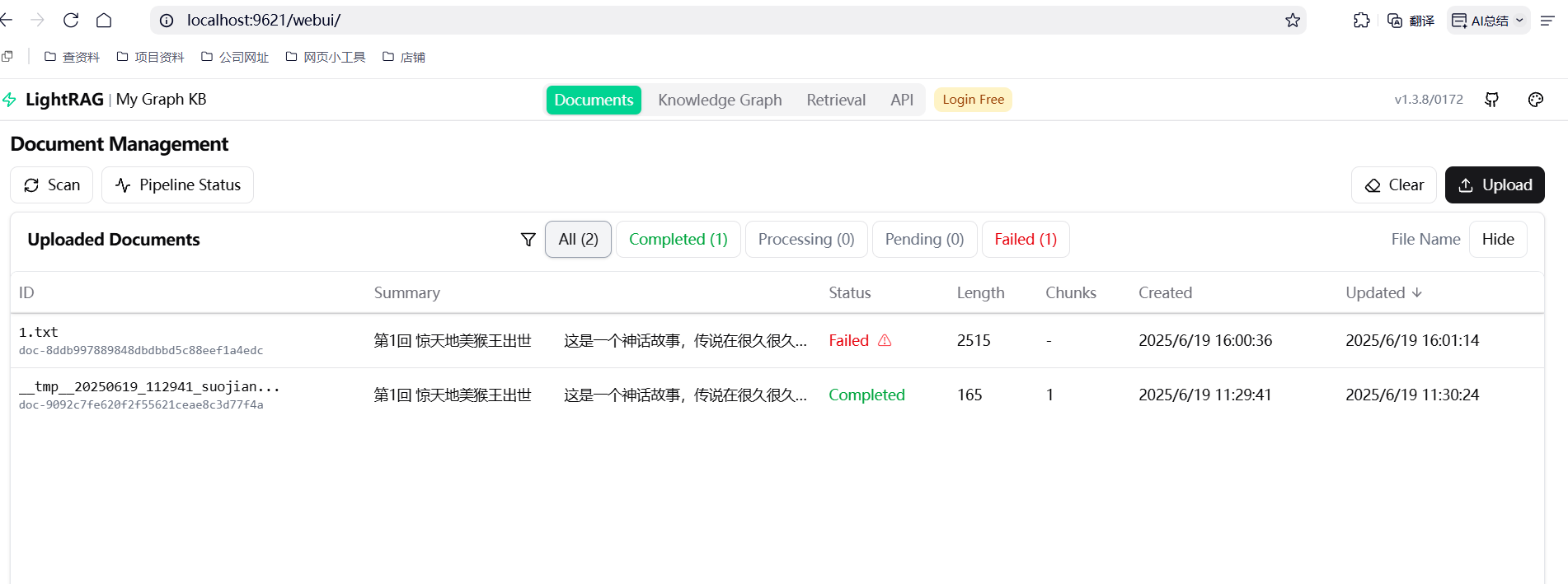
上传文件
在页面上点上传, 就可上传文档进行分析了, 不过需要文本格式, 并且是utf-8格式的
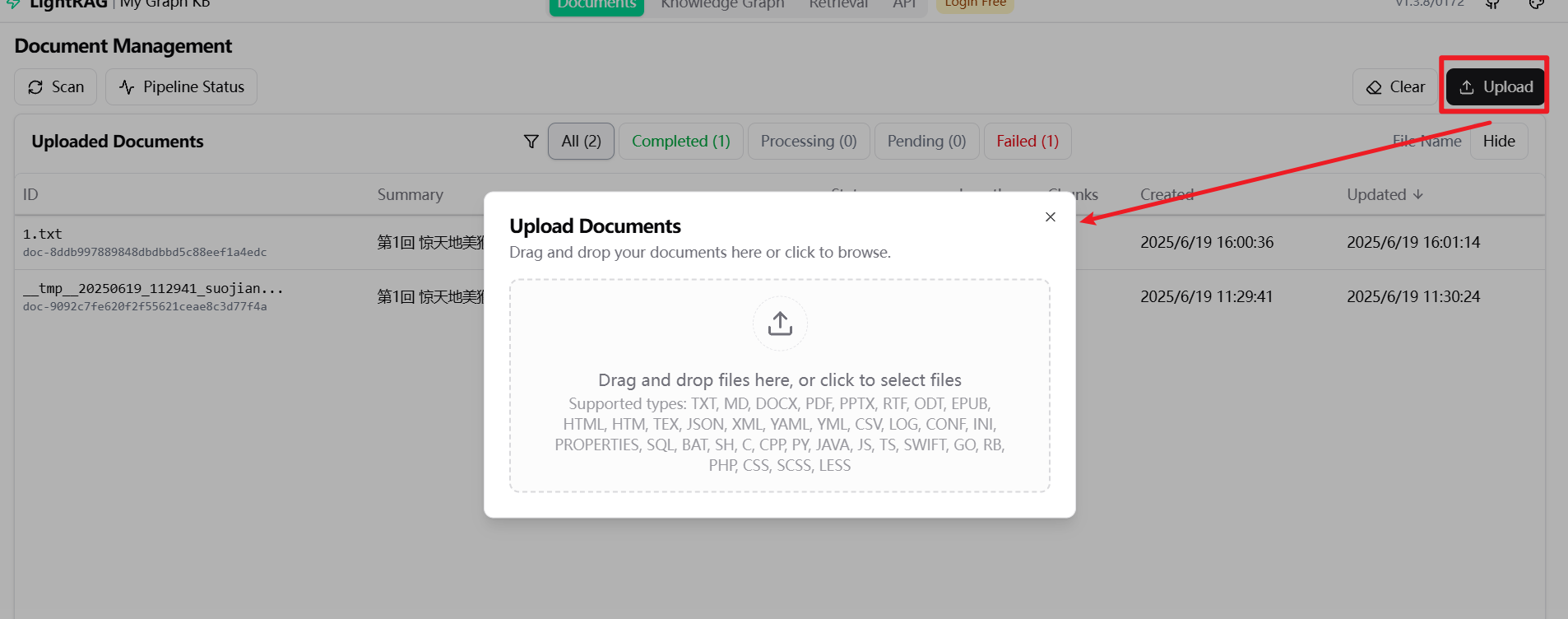
我在上传的时候出现个 batch size is invalid, it should not be larger than 25 报错
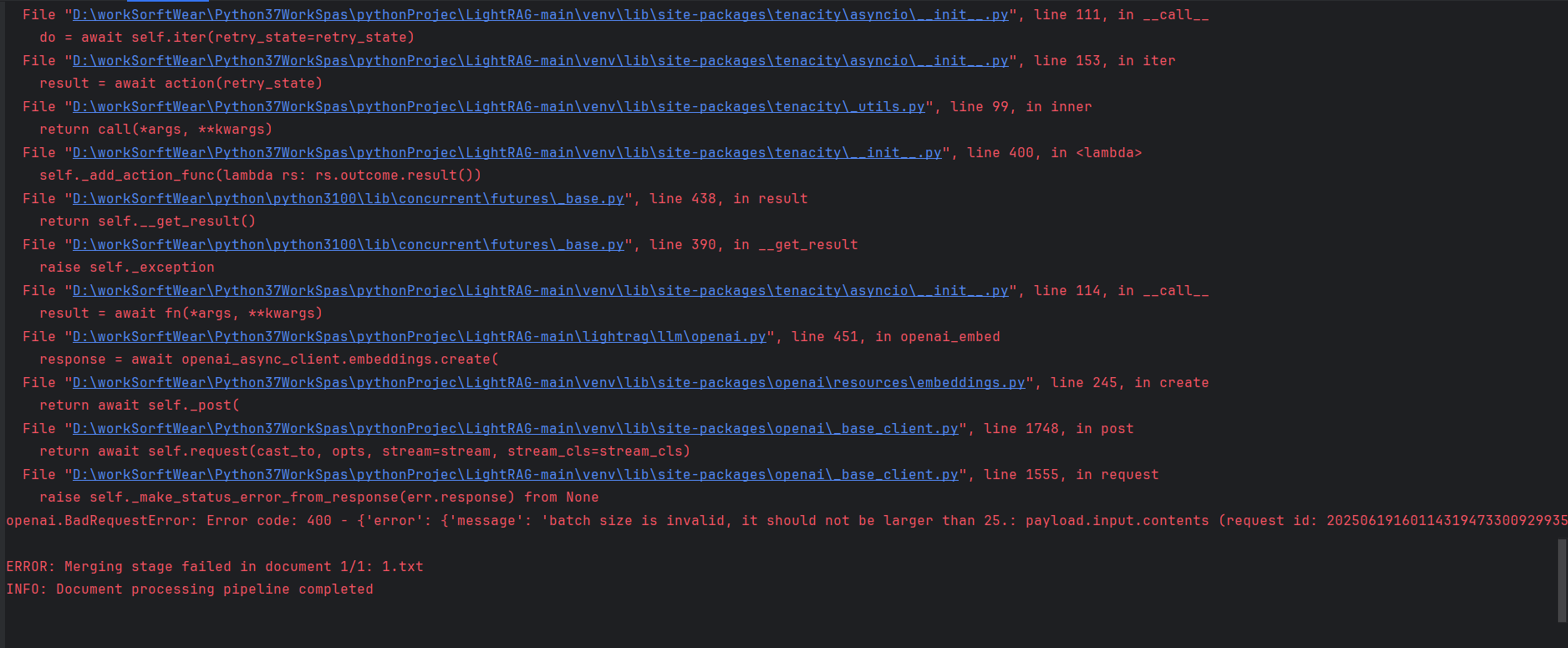
ERROR: limit_async: Error in decorated function: Error code: 400 - {'error': {'message': 'batch size is invalid, it should not be larger than 25.: payload.input.contents (request id: 2025061916011431947330092993507)', 'type': 'upstream_error', 'param': '400', 'code': 'bad_response_status_code'}}
ERROR: Traceback (most recent call last):
  File "D:\workSorftWear\Python37WorkSpas\pythonProjec\LightRAG-main\lightrag\lightrag.py", line 1056, in process_document
    await merge_nodes_and_edges(
  File "D:\workSorftWear\Python37WorkSpas\pythonProjec\LightRAG-main\lightrag\operate.py", line 624, in merge_nodes_and_edges
    await entity_vdb.upsert(data_for_vdb)
  File "D:\workSorftWear\Python37WorkSpas\pythonProjec\LightRAG-main\lightrag\kg\nano_vector_db_impl.py", line 109, in upsert
    embeddings_list = await asyncio.gather(*embedding_tasks)
  File "D:\workSorftWear\Python37WorkSpas\pythonProjec\LightRAG-main\lightrag\utils.py", line 586, in wait_func
    return await future
  File "D:\workSorftWear\Python37WorkSpas\pythonProjec\LightRAG-main\lightrag\utils.py", line 370, in worker
    result = await func(*args, **kwargs)
  File "D:\workSorftWear\Python37WorkSpas\pythonProjec\LightRAG-main\lightrag\utils.py", line 241, in __call__
    return await self.func(*args, **kwargs)
  File "D:\workSorftWear\Python37WorkSpas\pythonProjec\LightRAG-main\lightrag\utils.py", line 241, in __call__
    return await self.func(*args, **kwargs)
  File "D:\workSorftWear\Python37WorkSpas\pythonProjec\LightRAG-main\venv\lib\site-packages\tenacity\asyncio\__init__.py", line 189, in async_wrapped
    return await copy(fn, *args, **kwargs)
  File "D:\workSorftWear\Python37WorkSpas\pythonProjec\LightRAG-main\venv\lib\site-packages\tenacity\asyncio\__init__.py", line 111, in __call__
    do = await self.iter(retry_state=retry_state)
  File "D:\workSorftWear\Python37WorkSpas\pythonProjec\LightRAG-main\venv\lib\site-packages\tenacity\asyncio\__init__.py", line 153, in iter
    result = await action(retry_state)
  File "D:\workSorftWear\Python37WorkSpas\pythonProjec\LightRAG-main\venv\lib\site-packages\tenacity\_utils.py", line 99, in inner
    return call(*args, **kwargs)
  File "D:\workSorftWear\Python37WorkSpas\pythonProjec\LightRAG-main\venv\lib\site-packages\tenacity\__init__.py", line 400, in <lambda>
    self._add_action_func(lambda rs: rs.outcome.result())
  File "D:\workSorftWear\python\python3100\lib\concurrent\futures\_base.py", line 438, in result
    return self.__get_result()
  File "D:\workSorftWear\python\python3100\lib\concurrent\futures\_base.py", line 390, in __get_result
    raise self._exception
  File "D:\workSorftWear\Python37WorkSpas\pythonProjec\LightRAG-main\venv\lib\site-packages\tenacity\asyncio\__init__.py", line 114, in __call__
    result = await fn(*args, **kwargs)
  File "D:\workSorftWear\Python37WorkSpas\pythonProjec\LightRAG-main\lightrag\llm\openai.py", line 451, in openai_embed
    response = await openai_async_client.embeddings.create(
  File "D:\workSorftWear\Python37WorkSpas\pythonProjec\LightRAG-main\venv\lib\site-packages\openai\resources\embeddings.py", line 245, in create
    return await self._post(
  File "D:\workSorftWear\Python37WorkSpas\pythonProjec\LightRAG-main\venv\lib\site-packages\openai\_base_client.py", line 1748, in post
    return await self.request(cast_to, opts, stream=stream, stream_cls=stream_cls)
  File "D:\workSorftWear\Python37WorkSpas\pythonProjec\LightRAG-main\venv\lib\site-packages\openai\_base_client.py", line 1555, in request
    raise self._make_status_error_from_response(err.response) from None
openai.BadRequestError: Error code: 400 - {'error': {'message': 'batch size is invalid, it should not be larger than 25.: payload.input.contents (request id: 2025061916011431947330092993507)', 'type': 'upstream_error', 'param': '400', 'code': 'bad_response_status_code'}}
ERROR: Merging stage failed in document 1/1: 1.txt
INFO: Document processing pipeline completed
是因为light Tag调用向量模型时,遇到错误信息“batch size is invalid, it should not be larger than 25”,这意味着该工具或框架对单次处理的数据量(即batch size)有一个明确的上限,不能超过25。
调整 .env 文件中的 EMBEDDING_BATCH_NUM=25 就好了
### Num of chunks send to Embedding in single request
EMBEDDING_BATCH_NUM=25
文字聊天
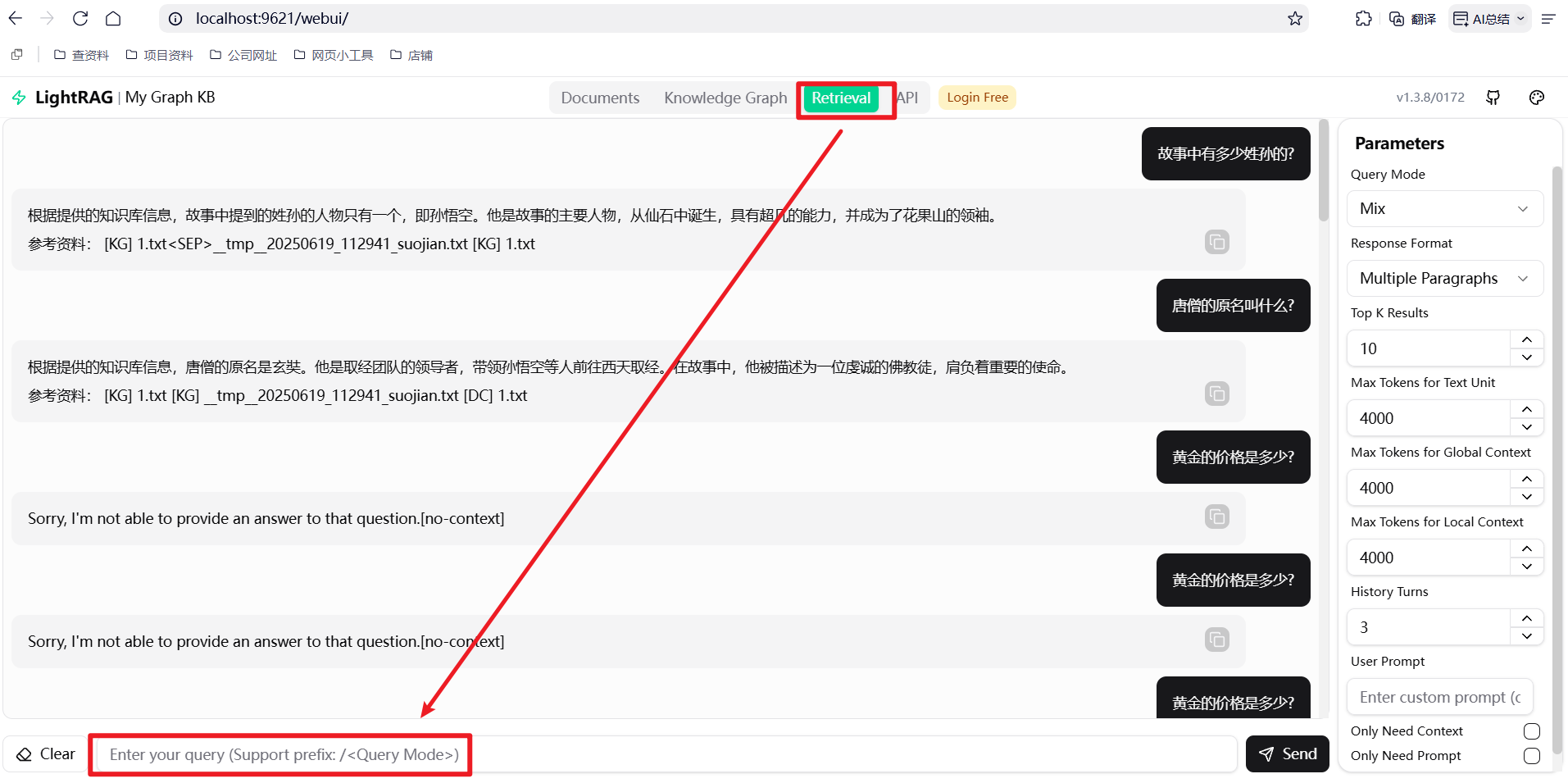
实战测试
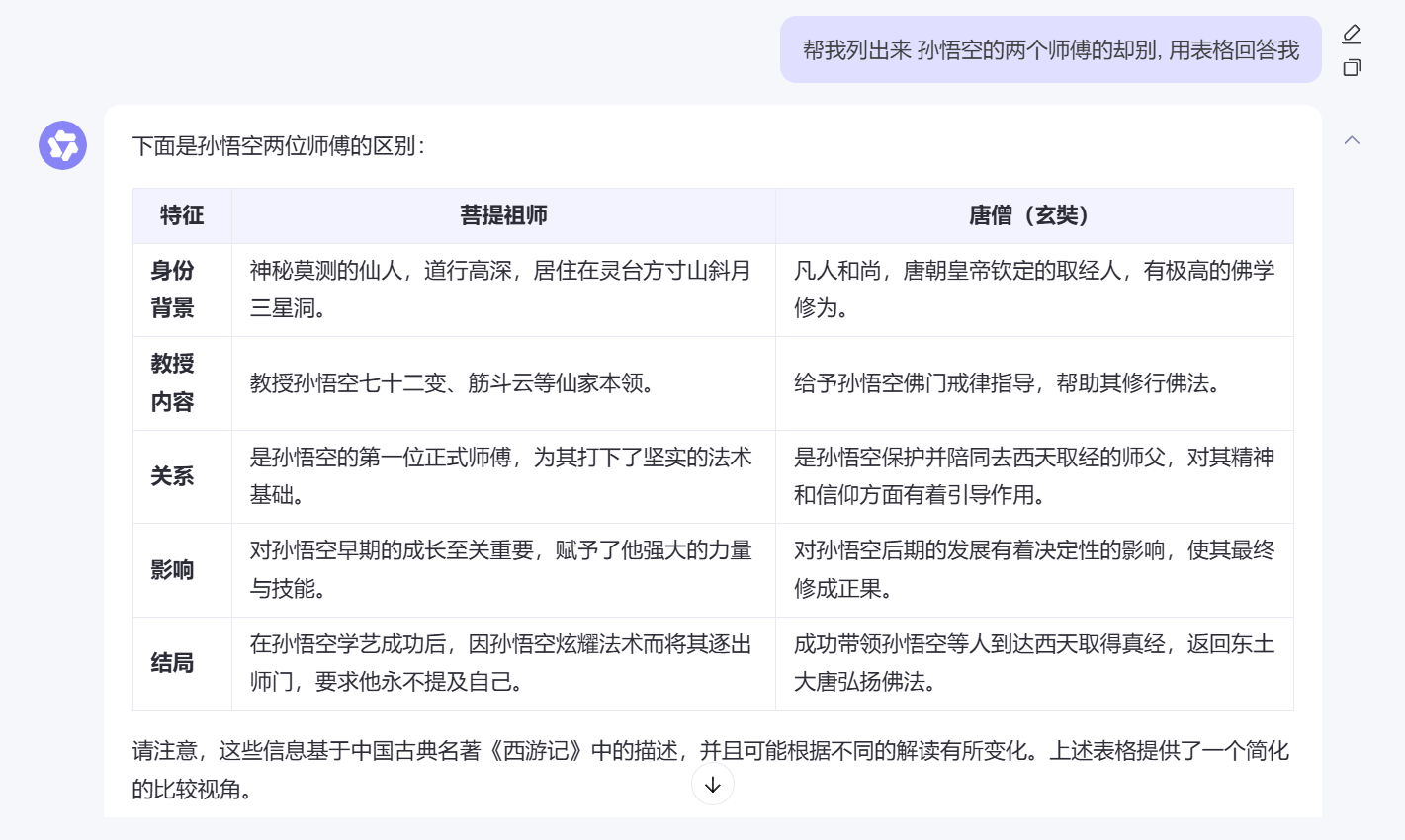
我这里上传西游记前9章的内容, 并对他进行提问
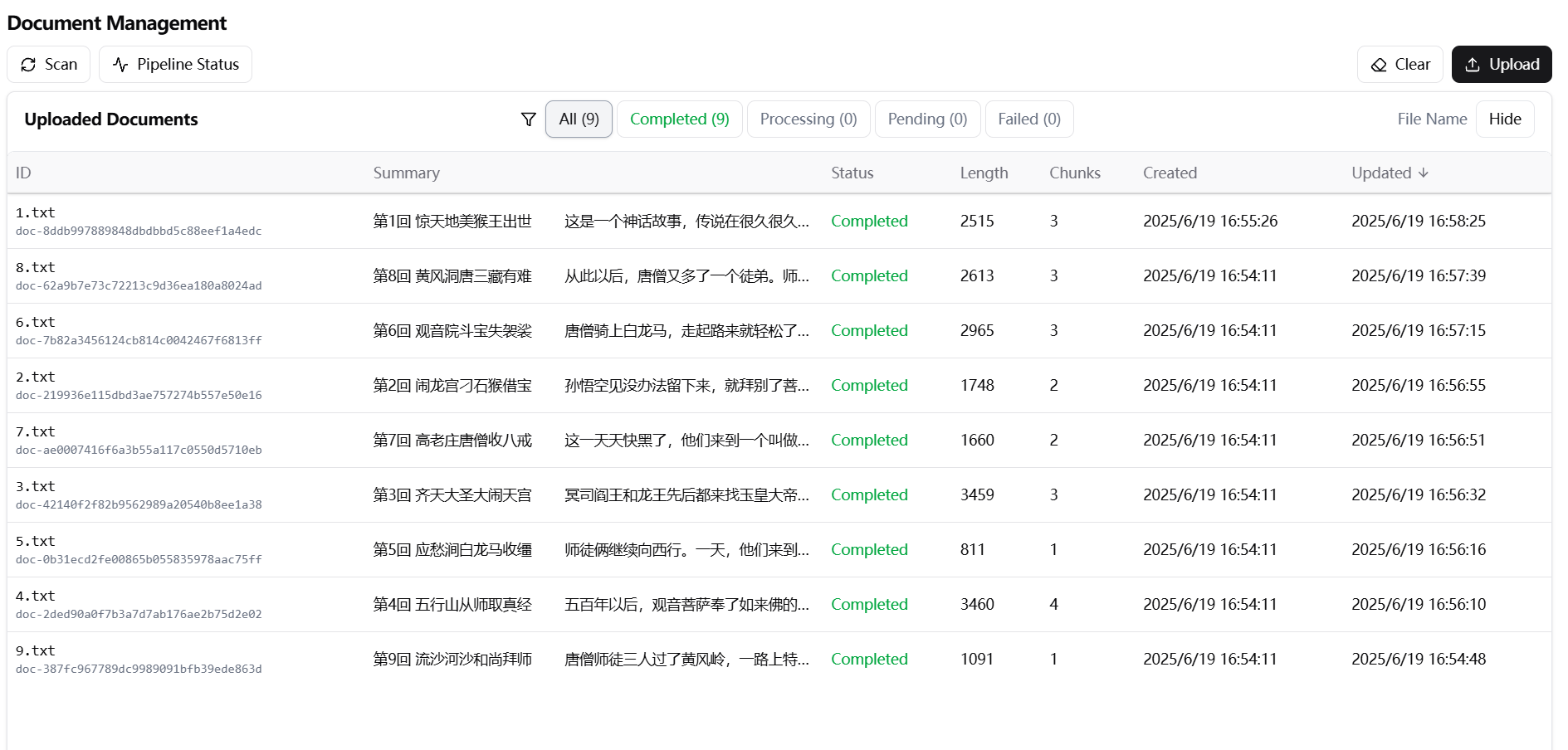
提问结果的回答结果还是不错的
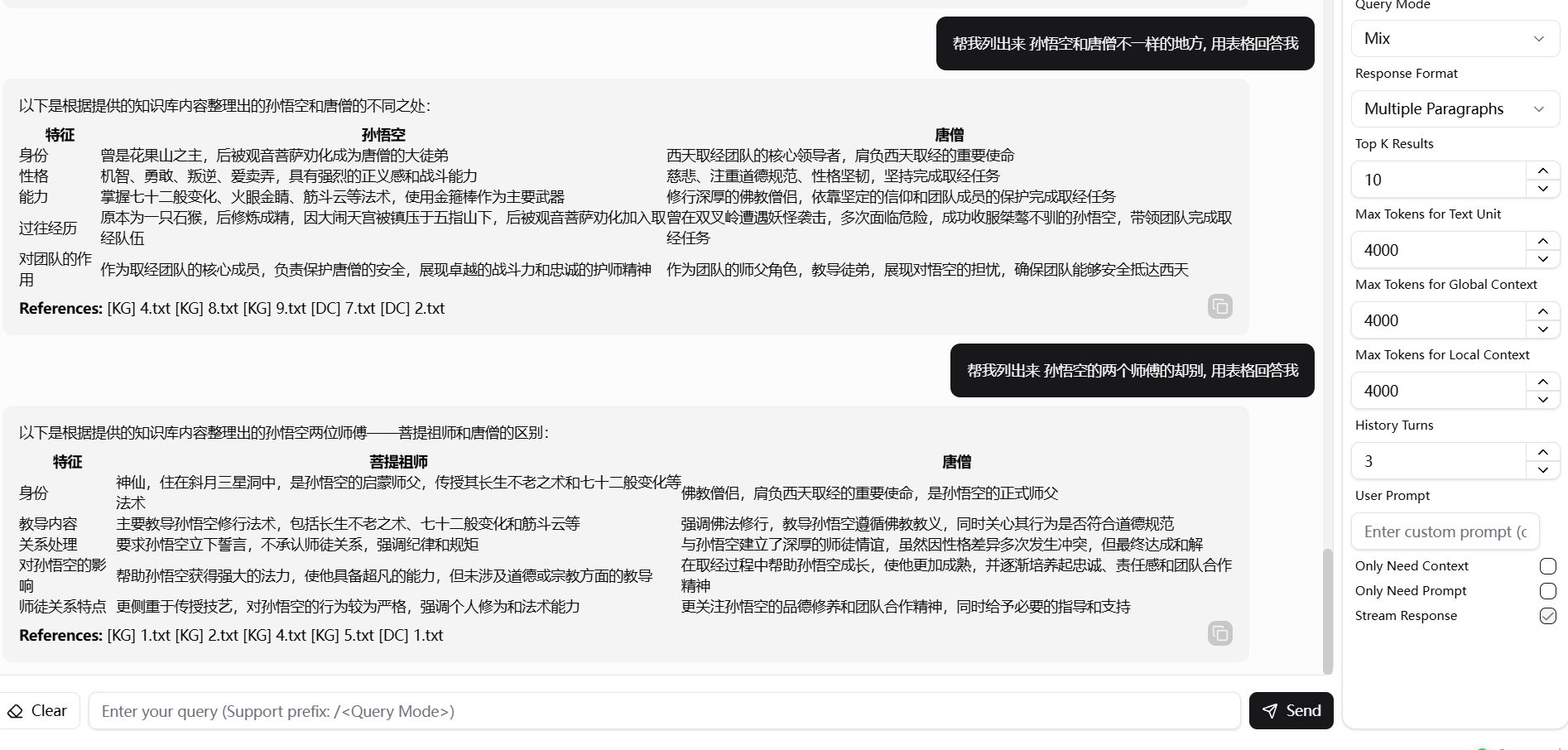
对比千问模型直接问, 感觉也算是不错的了
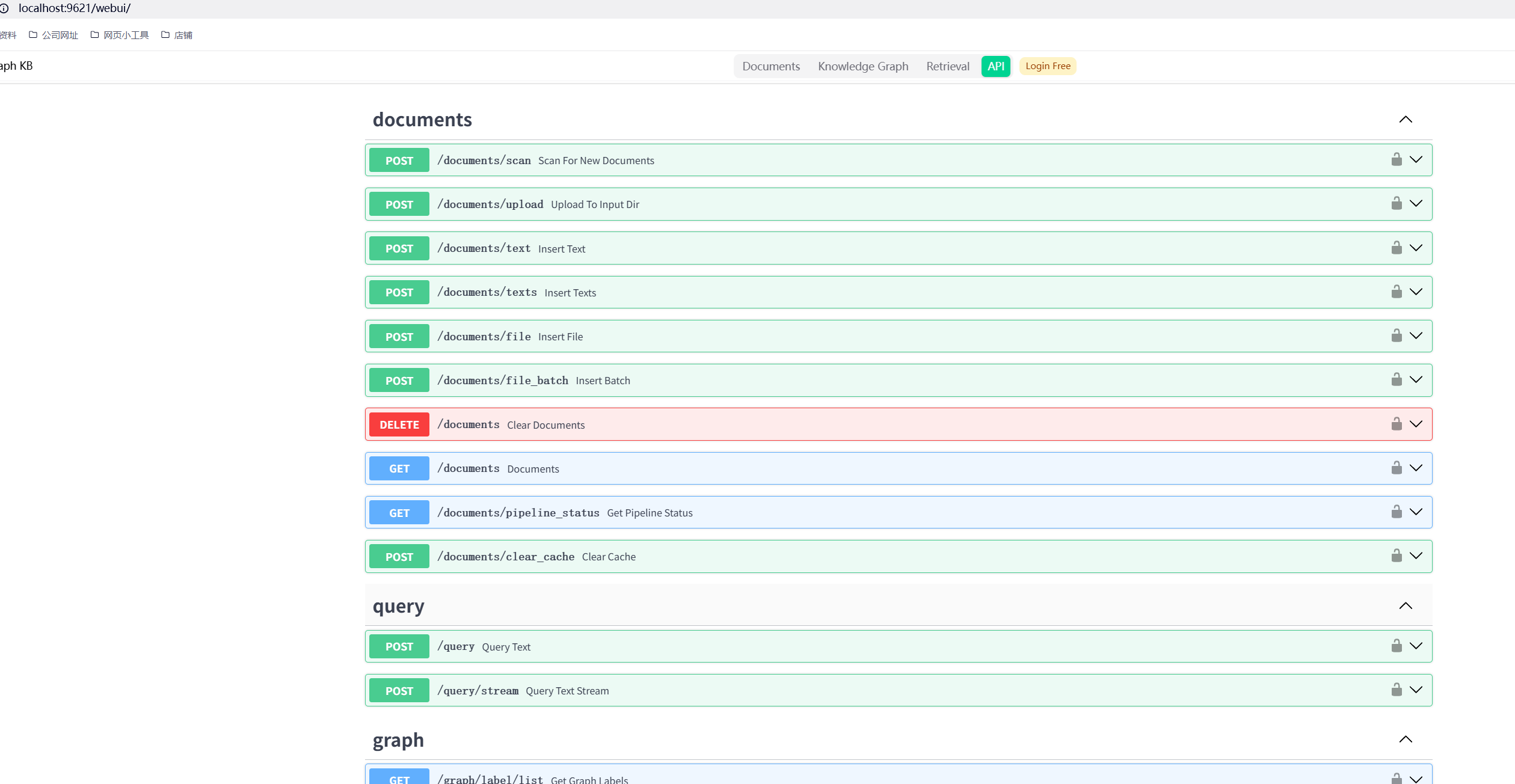
LigthRAG 的 APi
这个APi主要也就三大部分, 上传文档, 查询,服务信息, 这里不难, 有兴趣的可以你自己看一下


欢迎加入DeepSeek 技术社区。在这里,你可以找到志同道合的朋友,共同探索AI技术的奥秘。
更多推荐
 14
14 0
0- 0


 已为社区贡献1条内容

所有评论(0)