如何在本地部署大模型并实现接口访问( Llama3、Qwen、DeepSeek等)_deepseek本地部署后有接口吗
本文介绍了本地部署大模型(如Llama3、Qwen、DeepSeek等)并实现API访问的完整流程。主要内容包括:从HuggingFace或魔搭网站下载模型,使用git lfs和screen确保大文件完整下载;通过FastAPI封装模型推理接口,支持多GPU运行;使用conda创建Python 3.10环境并安装依赖,以nohup后台启动服务;最后提供代码示例展示如何通过Postman或程序调用A
如何在本地部署大模型并实现接口访问( Llama3、Qwen、DeepSeek等)
- 如何在本地部署大模型并实现接口访问( Llama3、Qwen、DeepSeek等)
-
- 模型地址
- 模型下载
- 模型部署
-
- 指定显卡运行
- app.py
- 运行环境
-
- requirements
- 调用接口
-
- 代码调用
- 结语
如何在本地部署大模型并实现接口访问( Llama3、Qwen、DeepSeek等)
本文详细介绍了如何在本地服务器上部署大模型(如DeepSeek、Llama3、Qwen等),并通过接口实现外部调用。首先,从HuggingFace或魔搭网站下载模型,使用git lfs和screen确保大文件完整下载;接着,使用FastAPI封装模型推理过程,支持多GPU运行并通过CUDA_VISIBLE_DEVICES指定显卡,提供完整的app.py代码实现模型加载和接口响应;然后,通过conda创建Python 3.10环境并安装依赖,使用nohup后台运行服务;最后,展示如何通过Postman或代码调用接口,发送请求并获取模型生成的文本。本文提供了从模型下载、部署到接口调用的完整流程,适合在本地服务器上运行大模型并实现高效的推理服务。
模型地址
在HuggingFace中搜索对应模型,并选择git clone
比如
git clone https://huggingface.co/deepseek-ai/DeepSeek-V2-Chat

huggingface网站可能会访问超时,因此可以选择国内的魔搭网站,同样登录网站后,搜索对应模型并下载

git clone https://www.modelscope.cn/deepseek-ai/DeepSeek-V2-Lite-Chat.git
模型下载
由于模型比较大,所以需要用git lfs install
如果是下载70B或者更大的模型,可能git clone还是会遗漏一些文件,所以推荐使用Screen在后台下载
创建conda环境后,使用conda install -c conda-forge screen安装screen
为 screen 会话指定一个名称,可以使用 -S 参数:
screen -S mysession
暂时离开当前 screen 会话(但保持会话在后台运行)
Ctrl + A,然后按 D
重新连接到之前创建的 screen 会话,可以使用以下命令:
screen -r mysession
screen相当于启动了一个新的终端,与其他的终端互不影响,其中的工作都在后台运行
在screen中运行 git clone命令即可
如果出现文件遗漏,可以使用sh脚本指定文件下载,比如指定三个文件进行下载的download_files.sh:
#!/bin/bash

# 目标 URL 和文件名的前缀
BASE_URL="https://www.modelscope.cn/models/LLM-Research/Llama-3.3-70B-Instruct/resolve/master"
FILES=(
    "model-00028-of-00030.safetensors"
    "model-00029-of-00030.safetensors"
    "model-00030-of-00030.safetensors"
)

# 循环下载文件
for FILE in "${FILES[@]}"; do
    echo "开始下载 $FILE ..."
    curl -O "$BASE_URL/$FILE"  # 使用 curl 下载文件
    if [ $? -eq 0 ]; then
        echo "$FILE 下载成功"
    else
        echo "$FILE 下载失败"
    fi
done

echo "所有文件下载完毕!"
在终端中运行脚本:
./download_files.sh
- ./ 表示当前目录,确保系统知道从当前目录查找脚本。
👉[CSDN大礼包🎁:全网最全《LLM大模型入门+进阶学习资源包》免费分享(安全链接,放心点击)]()👈

模型部署
模型下载后,本地就有了完整的模型仓库

接下来就要进行模型的部署,采用fastapi进行模型部署,使用下列代码作为app.py
指定显卡运行
如果你有多张显卡,并且想指定使用第4和第5张GPU运行,可以在环境变量中设置仅4,5 GPU可见,此时第4变为0 第5变为1
if "DeepSeek" in MODEL_PATH_OR_NAME:
    os.environ['CUDA_VISIBLE_DEVICES'] = '4'
else:
    os.environ['CUDA_VISIBLE_DEVICES'] = '4,5'
然后加载模型时设置device_map="auto"
model = AutoModelForCausalLM.from_pretrained(MODEL_PATH_OR_NAME, torch_dtype=torch.float16, device_map="auto")
app.py
import os
from fastapi import FastAPI, HTTPException
from pydantic import BaseModel
from transformers import AutoTokenizer, AutoModelForCausalLM, GenerationConfig
import torch
import torch.nn as nn
# Initialize FastAPI app
app = FastAPI()

MODEL_PATH_OR_NAME = "/yourpath/DeepSeek-V2-Lite-Chat"

# Set CUDA devices for visibility
if "DeepSeek" in MODEL_PATH_OR_NAME:
    os.environ['CUDA_VISIBLE_DEVICES'] = '4'
else:
    os.environ['CUDA_VISIBLE_DEVICES'] = '4,5'
device = torch.device('cuda:0')  # Using GPU 2

# Declare global variables for model and tokenizer
model = None
tokenizer = None

# Use startup and shutdown events for model loading and unloading
@app.on_event("startup")
async def startup():
    global model, tokenizer
    print("Loading model and tokenizer...")
    if "DeepSeek" in MODEL_PATH_OR_NAME:
        tokenizer = AutoTokenizer.from_pretrained(MODEL_PATH_OR_NAME, trust_remote_code=True)
        model = AutoModelForCausalLM.from_pretrained(MODEL_PATH_OR_NAME, trust_remote_code=True, torch_dtype=torch.bfloat16, device_map="auto").cuda()
        model.generation_config = GenerationConfig.from_pretrained(MODEL_PATH_OR_NAME)
        model.generation_config.pad_token_id = model.generation_config.eos_token_id
    else:
        tokenizer = AutoTokenizer.from_pretrained(MODEL_PATH_OR_NAME, use_fast=False)
        tokenizer.pad_token_id = tokenizer.eos_token_id  # 假设eos_token_id就是合适的填充词元标识
        model = AutoModelForCausalLM.from_pretrained(MODEL_PATH_OR_NAME, torch_dtype=torch.float16, device_map="auto")

    print("Model loaded successfully!")

@app.on_event("shutdown")
async def shutdown():
    global model, tokenizer
    print("Shutting down the model...")
    del model
    del tokenizer

# Define request model using Pydantic
class ChatCompletionRequest(BaseModel):
    model: str
    messages: list
    temperature: float = 0
    max_tokens: int = 256
    top_p: float = 1
    stop: list = None  # Ensure stop is a list or None

# Define response model
class ChatCompletionResponse(BaseModel):
    choices: list

# Define the /generate route
@app.post("/generate", response_model=ChatCompletionResponse)
async def generate_response(request: ChatCompletionRequest):
                # Get user prompt (last message)
    prompt = request.messages[-1]["content"]
    print('INPUT :'+prompt+'\n')
    if "DeepSeek" in MODEL_PATH_OR_NAME:
        try:
            messages = [
                {"role": "user", "content": prompt}
            ]
            input_tensor = tokenizer.apply_chat_template(messages, add_generation_prompt=True, return_tensors="pt")
            outputs = model.generate(input_tensor.to(device), max_new_tokens=100)

            result = tokenizer.decode(outputs[0][input_tensor.shape[1]:], skip_special_tokens=True)
            print('OUTPUT :'+result)
            return ChatCompletionResponse(
                choices=[{
                    "message": {"role": "assistant", "content": result},
                    "finish_reason": "stop"
                }]
            )

        except Exception as e:
            raise HTTPException(status_code=500, detail=str(e))
    else:
        try:
            # Tokenize the input text (with padding and truncation to ensure consistency)
            input_ids = tokenizer.encode(prompt, return_tensors="pt").to(device)

            # Optionally, get eos_token_id for stopping criteria
            eos_token_id = tokenizer.eos_token_id if tokenizer.eos_token_id else None
            attention_mask = torch.ones(input_ids.shape,dtype=torch.long,device=device)
            # Generate the response using the model
            output = model.generate(
                input_ids,
                num_beams=1,  # Use greedy decoding
                num_return_sequences=1,
                early_stopping=True,
                do_sample=False,
                max_length=(getattr(request, 'max_tokens', 50) + len(input_ids[0])),  # 默认 max_tokens=50
                top_p=getattr(request, 'top_p', 0.9),  # 默认 top_p=0.9
                temperature=getattr(request, 'temperature', 0.9),  # 默认 temperature=1.0
                repetition_penalty=getattr(request, 'repetition_penalty', 1.2),  # 默认 repetition_penalty=1.2
                eos_token_id=eos_token_id,  # Use eos_token_id for stopping
                attention_mask=attention_mask,
                pad_token_id=eos_token_id
            )

            # Decode the generated text (skip special tokens)
            generated_text = tokenizer.decode(output[0], skip_special_tokens=True)

            # Strip the prompt (remove the input part from the output)
            output_tokens = output[0][len(input_ids[0]):]  # Remove input tokens from output tokens
            generated_text = tokenizer.decode(output_tokens, skip_special_tokens=True)
            print('OUTPUT:'+generated_text)
            # Return the generated text in the expected format
            return ChatCompletionResponse(
                choices=[{
                    "message": {"role": "assistant", "content": generated_text.strip()},
                    "finish_reason": "stop"
                }]
            )

        except Exception as e:
            raise HTTPException(status_code=500, detail=str(e))

# Health check route
@app.get("/")
async def health_check():
    return {"status": "ok", "message": "Text Generation API is running!"}

if __name__ == "__main__":
    import uvicorn
    uvicorn.run("app:app", host="0.0.0.0", port=8890, reload=True)  # reload=True 用于开发时的热重载
运行环境
运行app.py前需要安装环境依赖
首先
conda 创建环境:
conda create -n llmapi python=3.10 -y
conda activate llmapi
安装以下依赖,保存为requirements,txt
requirements
accelerate==1.1.1
annotated-types==0.7.0
anyio==4.6.2.post1
certifi==2024.8.30
charset-normalizer==3.4.0
click==8.1.7
exceptiongroup==1.2.2
fastapi==0.115.5
filelock==3.16.1
fsspec==2024.10.0
gputil==1.4.0
h11==0.14.0
huggingface-hub==0.26.3
idna==3.10
jinja2==3.1.4
markupsafe==3.0.2
mpmath==1.3.0
# networkx==3.2.1
numpy==2.0.2
nvidia-cublas-cu12==12.4.5.8
nvidia-cuda-cupti-cu12==12.4.127
nvidia-cuda-nvrtc-cu12==12.4.127
nvidia-cuda-runtime-cu12==12.4.127
nvidia-cudnn-cu12==9.1.0.70
nvidia-cufft-cu12==11.2.1.3
nvidia-curand-cu12==10.3.5.147
nvidia-cusolver-cu12==11.6.1.9
nvidia-cusparse-cu12==12.3.1.170
nvidia-nccl-cu12==2.21.5
nvidia-nvjitlink-cu12==12.4.127
nvidia-nvtx-cu12==12.4.127
packaging==24.2
pillow==11.0.0
protobuf==5.29.0
psutil==6.1.0
pydantic==2.10.2
pydantic-core==2.27.1
pyyaml==6.0.2
regex==2024.11.6
requests==2.32.3
safetensors==0.4.5
sentencepiece==0.2.0
sniffio==1.3.1
starlette==0.41.3
sympy==1.13.1
tokenizers==0.20.3
torch==2.5.1
torchaudio==2.5.1
torchvision==0.20.1
tqdm==4.67.1
transformers==4.46.3
triton==3.1.0
typing-extensions==4.12.2
urllib3==2.2.3
uvicorn==0.32.1
运行下列命令安装:
pip install -r requirements,txt
然后运行下列命令启动app.py ,这个命令会在后台启动app.py,并且输出日志在app.log 文件内
nohup python app.py > app.log 2>&1 &
调用接口
查看日志模型是否成功启动:

然后使用Post请求对应接口
{
            "model": "deep seek",
            "messages": [{"role": "user", "content": "AI是什么意思?"}],
            "temperature": 0.9,
            "max_tokens": 100,
            "repetition_penalty": 1.2,
            "top_p": 0.9,
            "stop": ["\n"]
        }
使用PostMan测试结果:

代码调用
 import requests
 import json

 # Define the FastAPI URL
 url = "http://YourIPAddress:YourPort/generate"
 prompt = '你是什么模型?'
 # Define the request payload (data)
 data = {
     "model": "ModelName",  # Example model name (change according to your setup)
     "messages": [{'role': 'user', 'content': prompt}],
     "temperature": 0.7,
     "max_tokens": 100,
     "top_p": 1.0,
     "frequency_penalty": 0.0,
     "presence_penalty": 0.0,
     "stop": []  # Ensure 'stop' is an empty list
 }
 response = ''
 # Send a POST request to the FastAPI endpoint
 response_data = requests.post(url, json=data)

 # Check the response
 if response_data.status_code == 200:
     # print("Response received successfully:")
     # print(json.dumps(response.json(), indent=4))
     result = response_data.json()
     # 从响应中获取生成的文本
     response = str(result['choices'][0]['message']['content']).strip()
 else:
     print(f"Request failed with status code {response_data.status_code}")
     print(response_data.text)
 return response
结语
至此,大模型的本地部署和接口调用就介绍完了
读者福利:如果大家对大模型感兴趣,这套大模型学习资料一定对你有用
对于0基础小白入门:
如果你是零基础小白,想快速入门大模型是可以考虑的。
一方面是学习时间相对较短,学习内容更全面更集中。
二方面是可以根据这些资料规划好学习计划和方向。
包括:大模型学习线路汇总、学习阶段,大模型实战案例,大模型学习视频,人工智能、机器学习、大模型书籍PDF。带你从零基础系统性的学好大模型!
😝有需要的小伙伴,可以保存图片到wx扫描二v码免费领取【保证100%免费】🆓
👉AI大模型学习路线汇总👈
大模型学习路线图,整体分为7个大的阶段:(全套教程文末领取哈)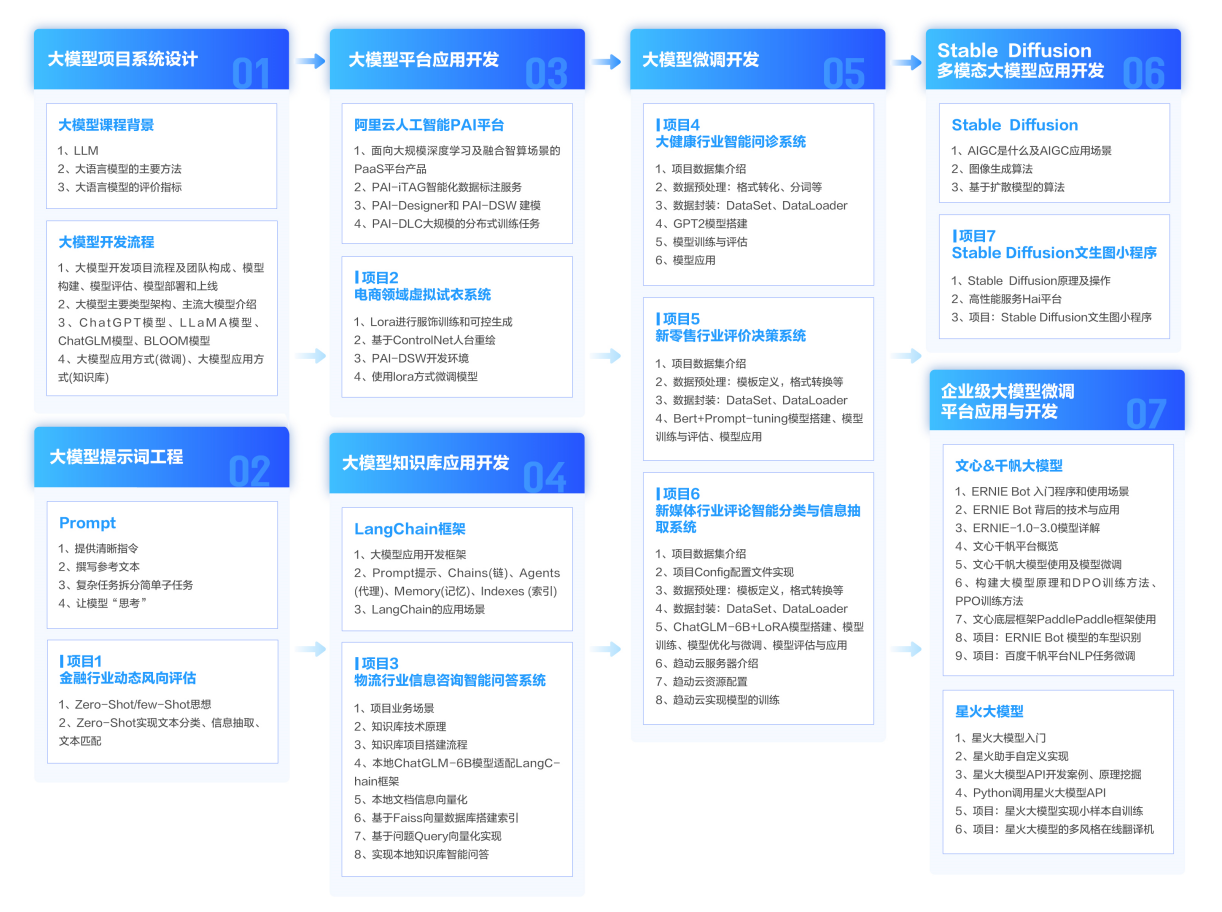
第一阶段: 从大模型系统设计入手,讲解大模型的主要方法;
第二阶段: 在通过大模型提示词工程从Prompts角度入手更好发挥模型的作用;
第三阶段: 大模型平台应用开发借助阿里云PAI平台构建电商领域虚拟试衣系统;
第四阶段: 大模型知识库应用开发以LangChain框架为例,构建物流行业咨询智能问答系统;
第五阶段: 大模型微调开发借助以大健康、新零售、新媒体领域构建适合当前领域大模型;
第六阶段: 以SD多模态大模型为主,搭建了文生图小程序案例;
第七阶段: 以大模型平台应用与开发为主,通过星火大模型,文心大模型等成熟大模型构建大模型行业应用。
👉大模型实战案例👈
光学理论是没用的,要学会跟着一起做,要动手实操,才能将自己的所学运用到实际当中去,这时候可以搞点实战案例来学习。

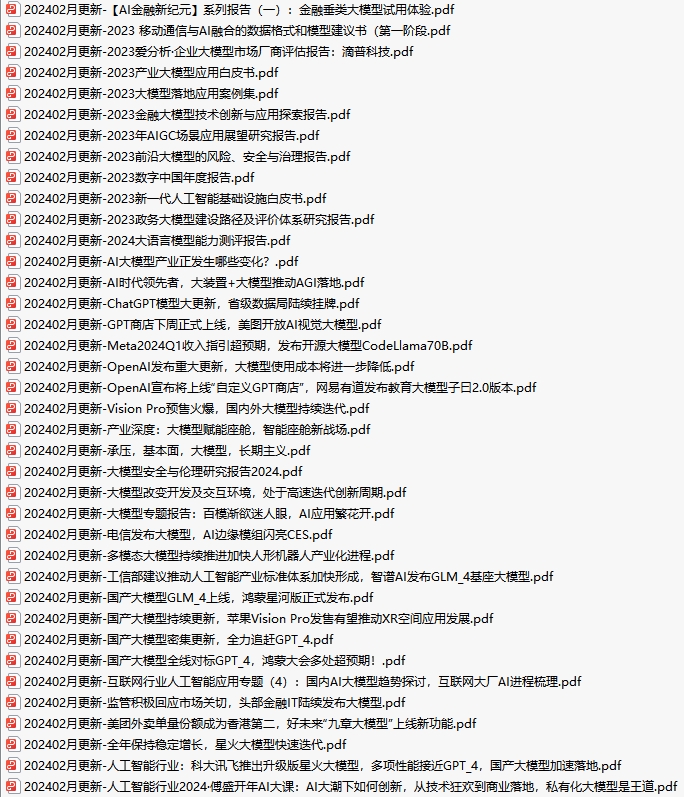
👉大模型视频和PDF合集👈
观看零基础学习书籍和视频,看书籍和视频学习是最快捷也是最有效果的方式,跟着视频中老师的思路,从基础到深入,还是很容易入门的。
👉学会后的收获:👈
• 基于大模型全栈工程实现(前端、后端、产品经理、设计、数据分析等),通过这门课可获得不同能力;
• 能够利用大模型解决相关实际项目需求: 大数据时代,越来越多的企业和机构需要处理海量数据,利用大模型技术可以更好地处理这些数据,提高数据分析和决策的准确性。因此,掌握大模型应用开发技能,可以让程序员更好地应对实际项目需求;
• 基于大模型和企业数据AI应用开发,实现大模型理论、掌握GPU算力、硬件、LangChain开发框架和项目实战技能, 学会Fine-tuning垂直训练大模型(数据准备、数据蒸馏、大模型部署)一站式掌握;
• 能够完成时下热门大模型垂直领域模型训练能力,提高程序员的编码能力: 大模型应用开发需要掌握机器学习算法、深度学习框架等技术,这些技术的掌握可以提高程序员的编码能力和分析能力,让程序员更加熟练地编写高质量的代码。
👉获取方式:
😝有需要的小伙伴,可以保存图片到wx扫描二v码免费领取【保证100%免费】🆓

欢迎加入DeepSeek 技术社区。在这里,你可以找到志同道合的朋友,共同探索AI技术的奥秘。
更多推荐


 28
28 0
0- 0


 已为社区贡献24条内容

所有评论(0)