C++AI多模型聊天系统(二)大模型 DeepSeek 接口接入与代码实现
本文介绍了如何将Deepseek大模型接入C++AI多模型聊天系统的具体实现过程。首先通过分析Deepseek官方API文档,明确了接口地址、鉴权方式、请求/响应结构等关键信息。然后基于项目架构,设计了DeepSeekProvider类继承LLMProvider基类,实现了初始化、消息发送等核心功能。具体包括:1)从配置中获取API Key和端点地址完成初始化;2)实现SendMessage方法处
C++AI多模型聊天系统(二)AI大模型Deepseek接入与实现
前言
- 前面我们搭好了项目的骨架——统一的消息结构体、抽象的模型接口、轻量的日志系统。但这套骨架能不能用,得接一个真实的大模型进来验证一下。
DeepSeek是目前性价比极高、中文能力突出的一款国产大模型,而且API完全兼容OpenAI格式,这意味着接入它不需要引入额外的SDK,直接用我们已有的httplib发HTTP请求就行。
- 这一篇我们从零开始,把DeepSeek从API文档落地成项目里真正能跑的代码
一、Deepseek官网API接口
- 接入任何模型的第一步不是写代码,而是搞清楚对方的结构和api是什么
https://platform.deepseek.com/usage
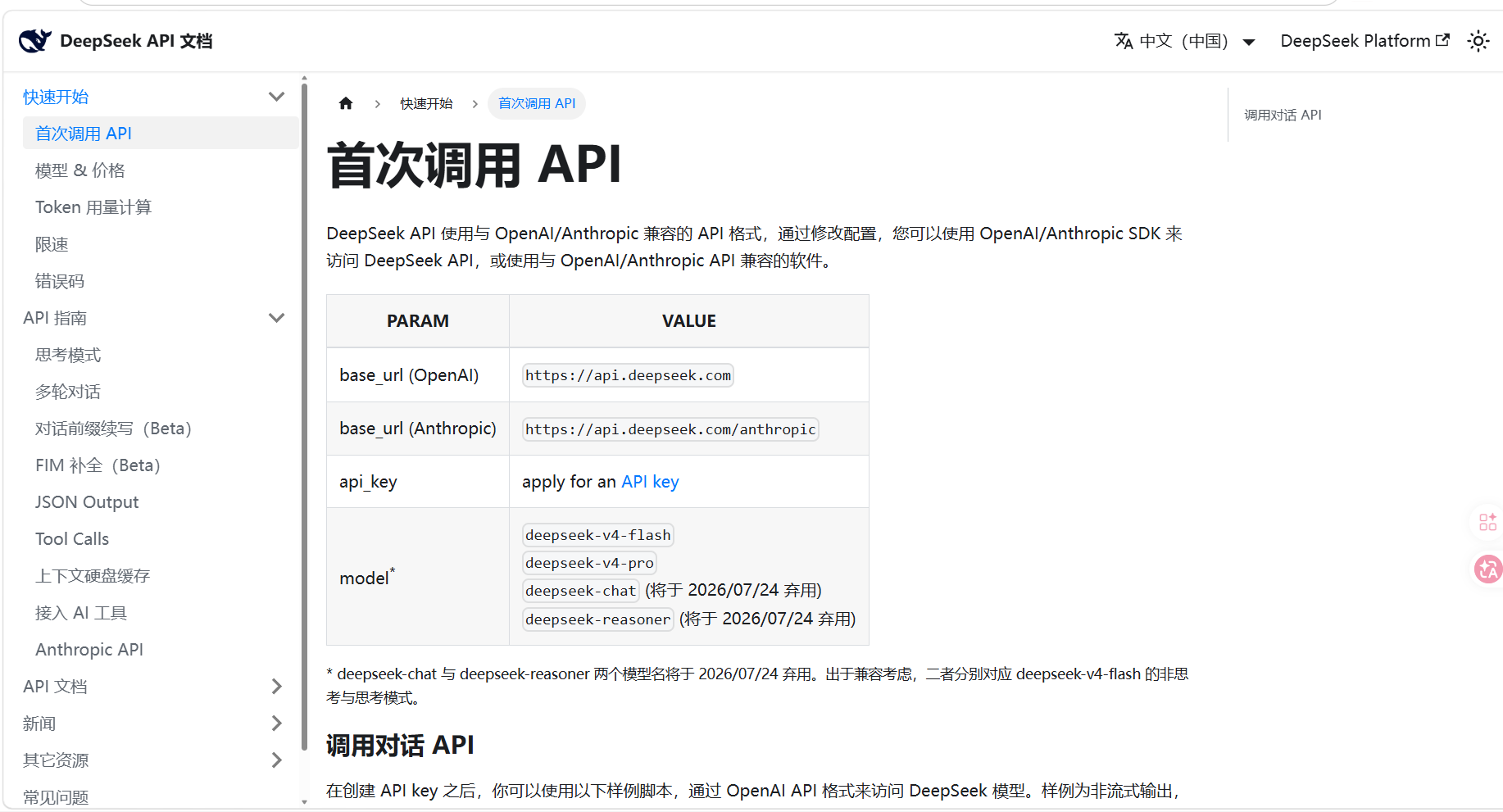
核心信息就几条:
1. 接口地址
POST https://api.deepseek.com/v1/chat/completions
2. 鉴权方式
在HTTP请求头里带上:
Authorization: Bearer {你的API Key}
3. 请求体结构(JSON)
{
  "model": "deepseek-chat",
  "messages": [
    {"role": "user", "content": "你好"}
  ],
  "temperature": 0.7,
  "max_tokens": 2048,
  "stream": false
}
4. 响应体结构(全量模式)
{
  "choices": [
    {
      "message": {
        "content": "你好!有什么可以帮你的?"
      }
    }
  ]
}
5. 流式模式
请求里加 "stream": true,返回的是SSE(Server-Sent Events)格式,每段数据以 data: 开头,结束标记是 data: [DONE]。
找到并创建apikey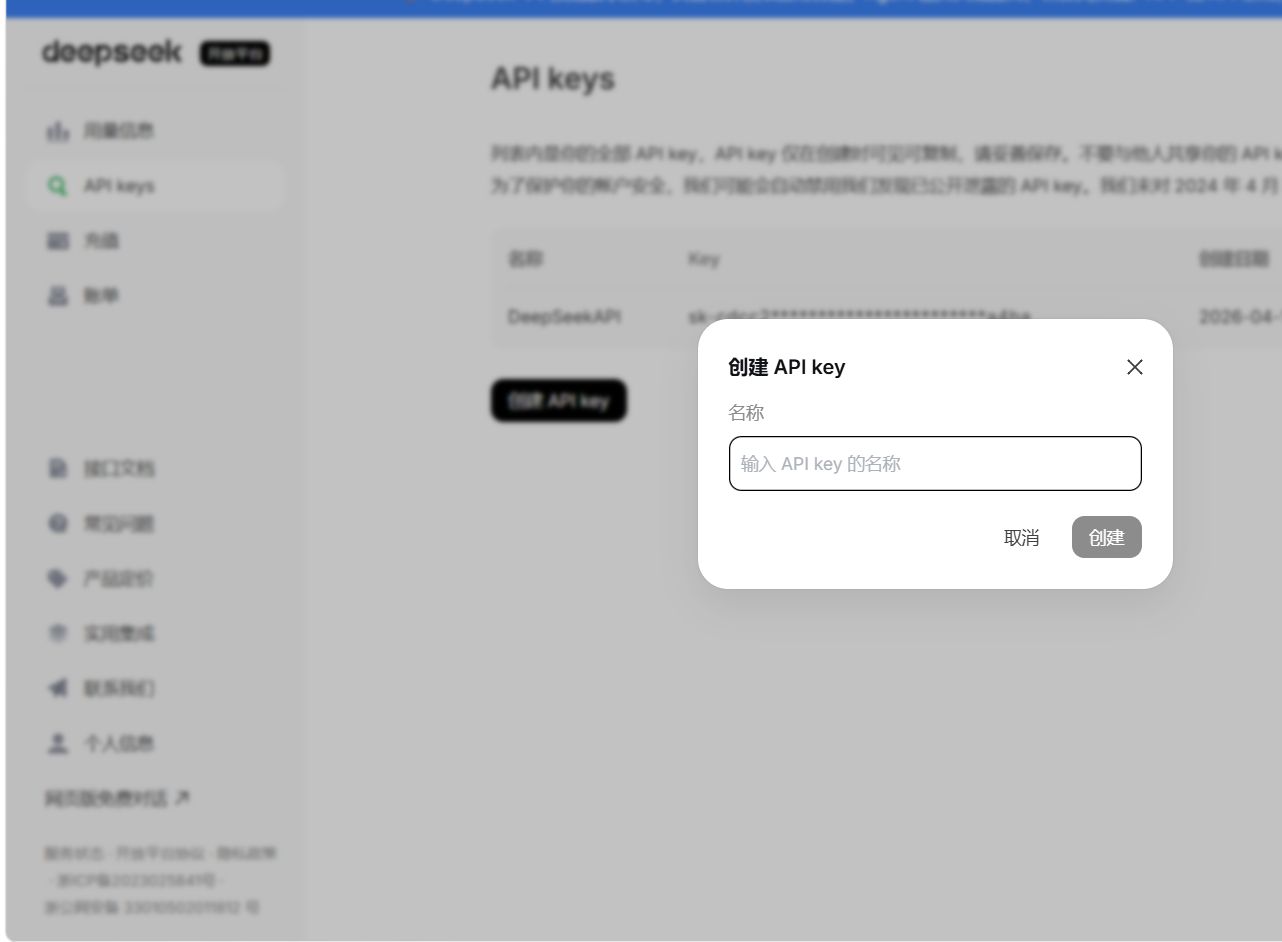
二、Deepseek具体接入代码实现
- 有了上面的信息,回到我们的项目架构,这段逻辑应该放在哪里?
按照第一篇的设计,每个模型都是一个独立的Provider子类,继承自 LLMProvider。所以DeepSeek的对接逻辑应该集中在 DeepSeekProvider 这一个类里,对外暴露的只有基类定义的几个接口:
InitModel()          → 拿着API Key把自己初始化好
IsAvailable()        → 告诉上层我能不能用
SendMessage()        → 发消息,等完整回复
SendMessageStream()  → 发消息,回一段通知一段
上层调用者(比如
LLMManager)不需要知道DeepSeek的API长什么样,它只知道"我有个Provider,我调它的SendMessage就行"。这就是接口抽象的价值
2.1 头文件
#pragma once
#include "../core/LLMProvider.h"
#include "../core/common.h"

namespace ai_chat_sdk {
class DeepSeekProvider : public LLMProvider {
public:

    void InitModel(const std::map<std::string, std::string>& modelConfig) override;
    bool IsAvailable() const override;
    std::string GetModelName() const override;
    std::string GetModelDesc() const override;
    virtual std::string GetModelId() const override;

    std::string SendMessage(
        const std::vector<Message>& messages,
        const std::map<std::string, std::string>& requestParam) override;

    std::string SendMessageStream(
        const std::vector<Message>& messages,
        const std::map<std::string, std::string>& requestParam,
        const std::function<void(const std::string&, bool)>& callback) override;
};
}
2.2 源文件
2.2.1 初始化实现
void DeepSeekProvider::InitModel(const std::map<std::string, std::string>& modelConfig)
{
    // 1. 从配置map里找 api_key
    auto apiKeyIter = modelConfig.find("api_key");
    if (apiKeyIter == modelConfig.end())
    {
        LOG_ERR("DeepSeek 初始化失败: 未找到 api_key");
        m_isAvailable = false;
        return;
    }
    m_apiKey = apiKeyIter->second;

    // 2. 找 endpoint,没有就用默认的
    auto endpointIter = modelConfig.find("endpoint");
    if (endpointIter == modelConfig.end())
    {
        m_endpoint = "https://api.deepseek.com";
        LOG_INFO("使用 DeepSeek 默认接口地址:{}", m_endpoint);
    }
    else
    {
        m_endpoint = endpointIter->second;
    }

    // 3. 标记可用
    m_isAvailable = true;
    LOG_INFO("DeepSeek 初始化成功!接口地址:{}", m_endpoint);
}
设计要点:
- 配置走
map<string,string>传进来,Provider自己不关心配置从哪来(可能是代码硬编码,也可能是从配置文件读的,这是调用方的选择) - Endpoint给了默认值,但如果调用方传了就用调用方的——方便以后切换代理地址或私有化部署
- 初始化失败就直接把
m_isAvailable设为false,后续所有操作都会因为这个标记被拦截,不会产生无效的网络请求
2.2.2 全量请求
这是最常用的模式——用户发一句话,等着,拿到完整回复。
std::string DeepSeekProvider::SendMessage(
    const std::vector<Message>& messages,
    const std::map<std::string, std::string>& requestParam)
{
    // 1. 可用性检查
    if (!IsAvailable()) {
        LOG_ERR("DeepSeek 发送消息失败:模型未初始化/不可用");
        return "";
    }

    // 2. 从requestParam中提取temperature和max_tokens,没传就用默认值
    double temperature = 0.7;
    int maxTokens = 2048;
    if (requestParam.count("temperature"))
        temperature = std::stod(requestParam.at("temperature"));
    if (requestParam.count("maxTokens"))
        maxTokens = std::stoi(requestParam.at("maxTokens"));

    // 3. 把我们的Message结构体转成DeepSeek要的JSON格式
    Json::Value messagesArray;
    for (const auto& msg : messages) {
        Json::Value msgObj;
        msgObj["role"] = msg.role;
        std::string textContent;
        for (const auto& item : msg.contents) {
            if (item.type == "input_text") {
                textContent += item.text;
            }
        }
        msgObj["content"] = textContent;
        messagesArray.append(msgObj);
    }

    // 4. 组装完整请求体
    Json::Value reqBody;
    reqBody["model"] = GetModelName();
    reqBody["messages"] = messagesArray;
    reqBody["temperature"] = temperature;
    reqBody["max_tokens"] = maxTokens;

    // 5. 序列化并发送
    Json::StreamWriterBuilder writer;
    writer["indentation"] = "";
    std::string reqStr = Json::writeString(writer, reqBody);

    httplib::Client client(m_endpoint.c_str());
    client.set_connection_timeout(30, 0);
    client.set_read_timeout(30, 0);

    httplib::Headers headers = {
        {"Authorization", "Bearer " + m_apiKey},
        {"Content-Type", "application/json"}
    };

    auto resp = client.Post("/v1/chat/completions", headers, reqStr, "application/json");

    // 6. 错误处理:网络不通
    if (!resp) {
        LOG_ERR("DeepSeek 请求失败:无法连接服务器");
        return "请求失败:无法连接服务器";
    }

    // 7. 错误处理:HTTP状态码异常
    if (resp->status != 200) {
        LOG_ERR("DeepSeek 请求失败, HTTP状态码:{}", resp->status);
        return "请求失败,请检查密钥/模型/网络";
    }

    // 8. 从响应JSON中提取回复内容
    Json::Value respBody;
    std::istringstream respStream(resp->body);
    Json::CharReaderBuilder reader;
    std::string parseErr;

    if (Json::parseFromStream(reader, respStream, &respBody, &parseErr)) {
        if (respBody.isMember("choices") && !respBody["choices"].empty()) {
            std::string reply = respBody["choices"][0]["message"]["content"].asString();
            return reply;
        }
        LOG_ERR("AI 返回格式错误:缺少 choices");
        return "AI 返回格式错误";
    }
    LOG_ERR("JSON 解析失败:{}", parseErr);
    return "解析AI响应失败";
}
流程总结:
可用性检查 → 准备参数 → 拼JSON → HTTP POST → 判状态码 → 解析JSON → 提取content → 返回
2.2.3 流式请求
流式请求的核心难点不在于"怎么发请求",而在于怎么边收数据边解析边通知上层。
std::string DeepSeekProvider::SendMessageStream(
    const std::vector<Message>& messages,
    const std::map<std::string, std::string>& requestParam,
    const std::function<void(const std::string&, bool)>& callback)
{
    // ...前面参数准备和JSON拼装逻辑与全量请求一致...

    // 关键区别:stream 设为 true
    reqBody["stream"] = true;

    // SSE格式要求加这个请求头
    httplib::Headers headers = {
        {"Authorization", "Bearer " + m_apiKey},
        {"Content-Type", "application/json"},
        {"Accept", "text/event-stream"}
    };

    // 几个流式处理专用的变量
    std::string buffer;        // 缓冲区:拼接收到的碎片数据
    std::string fullResponse;  // 完整回复:用于最终持久化
    bool streamFinish = false; // 是否收到了 [DONE] 标记

    httplib::Request req;
    req.method = "POST";
    req.path = "/v1/chat/completions";
    req.headers = headers;
    req.body = reqStr;

    // response_handler:服务器一开始响应就回调
    req.response_handler = [&](const httplib::Response& res) {
        if (res.status != 200) {
            gotError = true;
            return false; // 返回false会直接中断后续接收
        }
        return true;
    };

    // content_receiver:每收到一段数据就回调
    req.content_receiver = [&](const char* data, size_t length, ...) {
        buffer.append(data, length);

        // 在buffer里找完整的SSE事件(以 \n\n 分隔)
        size_t pos = 0;
        while ((pos = buffer.find("\n\n")) != std::string::npos) {
            std::string chunk = buffer.substr(0, pos);
            buffer.erase(0, pos + 2);

            if (chunk.empty() || chunk[0] == ':') continue;

            if (chunk.compare(0, 6, "data: ") == 0) {
                std::string json_str = chunk.substr(6);
                if (json_str == "[DONE]") {
                    callback("", true);  // 通知上层:结束了
                    streamFinish = true;
                    return true;
                }
                // 解析JSON,提取 delta.content
                // 每拿到一小段文本,立即通过callback传给上层
                callback(content, false);
            }
        }
        return true;
    };

    client.send(req);
}
为什么这么设计?
content_receiver是httplib提供的流式数据回调接口,数据一来就能拿到,不需要等整个响应结束- 用
buffer拼接是因为网络数据是按字节流到达的,一次回调可能只拿到半行,需要在缓冲区里找完整的SSE事件 callback(chunk, false)的设计:第一个参数是本次拿到的文本片段,第二个参数false表示"还没完",上层收到后可以立刻渲染打字机效果;收完[DONE]后调callback("", true)通知上层流结束了
2.2.4 完整代码实现
#define CPPHTTPLIB_OPENSSL_SUPPORT//开启 httplib 的 HTTPS 支持
#include "../include/model/DeepSeekProvider.h"
#include "../include/util/myLog.h"
#include "../3rdparty/httplib/httplib.h"
#include "../include/core/common.h"
#include <cstddef>
#include <functional>
#include <jsoncpp/json/config.h>
#include <jsoncpp/json/json.h>
#include <jsoncpp/json/reader.h>
#include <jsoncpp/json/value.h>
#include <jsoncpp/json/writer.h>
#include <map>
#include <sstream>
#include <string>
#include <vector>

namespace ai_chat_sdk {
    //初始化
    void DeepSeekProvider::InitModel(const std::map<std::string, std::string>& modelConfig)
    {
        // 在配置map中查找api_key
        auto apiKeyIter = modelConfig.find("api_key");
        if (apiKeyIter == modelConfig.end())
        {
            LOG_ERR("DeepSeek 初始化失败: 未找到 api_key");
            m_isAvailable = false;
            return;
        }
        m_apiKey = apiKeyIter->second;

        //读取 Endpoint
        auto endpointIter = modelConfig.find("endpoint");
        if(endpointIter == modelConfig.end())
        {
            m_endpoint = "https://api.deepseek.com";
            LOG_INFO("使用 DeepSeek 默认接口地址:{}", m_endpoint);
        }
        else
        {
            m_endpoint = endpointIter->second;
        }

        //初始化完成
        m_isAvailable = true;
        LOG_INFO("DeepSeek 初始化成功!接口地址:{}", m_endpoint);
    }

    //模型运行状态
    bool DeepSeekProvider::IsAvailable() const
    {
       return m_isAvailable;
    }
    std::string DeepSeekProvider::GetModelId() const {
        return "deepseek"; // 内部唯一ID
    }

    //查询
    std::string DeepSeekProvider::GetModelName() const
    {
        return "deepseek-v4-flash";
    }

    //获取描述
    std::string DeepSeekProvider::GetModelDesc() const
    {
        return "DeepSeek 商业对话模型,中文优化,支持长文本、创作、问答";
    }

    //全量请求
    std::string DeepSeekProvider::SendMessage(const std::vector<Message>& messages,const std::map<std::string, std::string>&requestParam)
    {

        if (!IsAvailable())
        {
            LOG_ERR("DeepSeek 发送消息失败:模型未初始化/不可用");
            return "";
        }

        //请求临时参数
        double temperature = 0.7;
        int maxTokens = 2048;
        if(requestParam.count("temperature"))
        {
            temperature = std::stod(requestParam.at("temperature"));
        }
        if(requestParam.count("maxTokens"))
        {
            maxTokens = std::stoi(requestParam.at("maxTokens"));
        }

        //构造对话历史
        Json::Value messagesArray;
        for(const auto&msg : messages)
        {
            Json::Value msgObj;
            msgObj["role"] = msg.role;
            std::string textContent;
            for(const auto& item : msg.contents)
            {
                if(item.type == "input_text")
                {
                    textContent += item.text;
                }
            }
            msgObj["content"] = textContent;
            messagesArray.append(msgObj);
        }

        //完整请求JSON
        Json::Value reqBody;
        reqBody["model"] = GetModelName();
        reqBody["messages"] = messagesArray;
        reqBody["temperature"] = temperature;
        reqBody["max_tokens"] = maxTokens;

        //序列化
        Json::StreamWriterBuilder writer;
        writer["indentation"] = "";
        std::string reqStr = Json::writeString(writer, reqBody);
        LOG_INFO("DeepSeek 请求参数:{}", reqStr);

        //发送http——post
        httplib::Client client(m_endpoint.c_str());
        client.set_connection_timeout(30, 0);
        client.set_read_timeout(30, 0);

        //请求头
        httplib::Headers headers = {
            {"Authorization", "Bearer " + m_apiKey},
            {"Content-Type", "application/json"}
        };

        //发送请求
        auto resp = client.Post("/v1/chat/completions", headers, reqStr, "application/json");

        //效验响应结果
        if (!resp)
        {
            LOG_ERR("DeepSeek 请求失败:无法连接服务器");
            return "请求失败:无法连接服务器";
        }

        LOG_INFO("HTTP状态码: {}", resp->status);
        LOG_INFO("AI返回内容: {}", resp->body);

        if (resp->status != 200)
        {
            LOG_ERR("DeepSeek 请求失败,HTTP状态码:{}", resp->status);
            return "请求失败,请检查密钥/模型/网络";
        }

        //反序列化
        Json::Value respBody;
        std::istringstream respStream(resp->body);
        Json::CharReaderBuilder reader;
        std::string parseErr;

        if (Json::parseFromStream(reader, respStream, &respBody, &parseErr))
        {
            // 是否有choices
            if (respBody.isMember("choices") && respBody["choices"].isArray() && !respBody["choices"].empty())
            {
                // 拿到第一条回答
                const Json::Value& choice = respBody["choices"][0];

                //是否有 message 和 content
                if (choice.isMember("message") && choice["message"].isMember("content"))
                {
                    // 取出最终回答
                    std::string reply = choice["message"]["content"].asString();
                    LOG_INFO("AI 回答:{}", reply);
                    return reply;
                }
                else
                {
                    LOG_ERR("AI 返回格式错误:缺少 message 或 content");
                    return "AI 返回格式错误";
                }
            }
            else
            {
                LOG_ERR("AI 返回空回答");
                return "AI 返回空回答";
            }
        }
        else
        {
            // 解析失败
            LOG_ERR("JSON 解析失败:{}", parseErr);
            return "解析AI响应失败";
        }
    }

    //流式请求
    std::string DeepSeekProvider::SendMessageStream(const std::vector<Message>& messages,const std::map<std::string, std::string>&requestParam,const std::function<void(const std::string&,bool)>& callback)
    {
        if(!IsAvailable())
        {
            LOG_ERR("Deepseek流式请求失败");
            callback("",true);
            return "";
        }
        double temperature=0.7;
        int maxTokens=2048;
        if(requestParam.count("temperature"))
        {
            temperature = std::stod(requestParam.at("temperature"));
        }
        if(requestParam.count("maxTokens"))
        {
            maxTokens = std::stoi(requestParam.at("maxTokens"));
        }
        Json::Value messagesArray;
        for(const auto&msg : messages)
        {
            Json::Value msgObj;
            msgObj["role"] = msg.role;
            std::string textContent;
            for(const auto& item : msg.contents)
            {
                if(item.type == "input_text")
                {
                    textContent += item.text;
                }
            }
            msgObj["content"] = textContent;
            messagesArray.append(msgObj);
        }
        //开启流式响应
        Json::Value reqBody;
        reqBody["model"]=GetModelName();
        reqBody["messages"]=messagesArray;
        reqBody["temperature"]= temperature;
        reqBody["max_tokens"] = maxTokens;
        reqBody["stream"] = true;

        //序列化
        Json::StreamWriterBuilder writer;
        writer["indentation"] = "";
        std::string reqStr = Json::writeString(writer, reqBody);
        LOG_INFO("DeepSeek 请求参数:{}", reqStr);
        //发送post
        httplib::Client client(m_endpoint.c_str());
        client.set_connection_timeout(30, 0);
        client.set_read_timeout(300, 0);
        httplib::Headers headers = {
            {"Authorization", "Bearer " + m_apiKey},
            {"Content-Type", "application/json"},
            {"Accept","text/event-stream"}
        };
        //流式处理变量
        std::string buffer;
        bool gotError = false;
        std::string errorMsg;//错误详细
        int statusCode = 0;//状态码
        bool streamFinish = false;
        std::string fullResponse;//拼接


        //创建请求对象
        httplib::Request req;
        req.method = "POST";
        req.path = "/v1/chat/completions";
        req.headers = headers;
        req.body = reqStr;

        // 设置响应处理器,提前终止资源
        req.response_handler = [&](const httplib::Response& res)
        {
            //存服务器的状态码
            statusCode = res.status;
            if(res.status !=200)
            {
                gotError = true;
                errorMsg = "HTTP status code: " + std::to_string(res.status);
                return false;
            }
            return true;
        };

        //设置数据接收处理器
        req.content_receiver = [&](const char* data,size_t length,size_t /*offset*/, size_t totalLength)
        {
            // 出错停止接收
            if(gotError)
            {
                return false;
            }
            //追加数据
            buffer.append(data,length);
            if (totalLength > 0)
            {
                LOG_INFO("接收进度:{} 字节 / 总 {} 字节", buffer.size(), totalLength);
             }
            //处理所有的流式响应的数据块
            size_t pos = 0;
            while((pos = buffer.find("\n\n"))!= std::string::npos)
            {
                std::string chunk = buffer.substr(0,pos);
                buffer.erase(0,pos+2);
                //过滤空行/注释
                if(chunk.empty()||chunk[0] == ':')
                {
                    continue;
                }
                //处理data开头的有效内容
                if(chunk.compare(0,6,"data: " )==0)
                {
                    std::string json_str = chunk.substr(6);
                    if(json_str == "[DONE]")
                    {
                        callback("",true);
                        streamFinish = true;
                        return true;
                    }
                    // 反序列化
                    Json::Value modelDataJson;
                    Json::CharReaderBuilder reader;
                    std::string parseErr;
                    std::istringstream respStream(json_str);
                    if(Json::parseFromStream(reader, respStream, & modelDataJson,&parseErr))
                    {
                        if (modelDataJson.isMember("choices") && modelDataJson["choices"].isArray() &&!modelDataJson["choices"].empty() &&modelDataJson["choices"][0].isMember("delta") &&modelDataJson["choices"][0]["delta"].isMember("content"))
                        {
                            std::string content = modelDataJson["choices"][0]["delta"]["content"].asString();
                            fullResponse += content;
                            callback(content, false);
                        }
                    }
                    else{
                        LOG_ERR("JSON解析失败;{}", parseErr);
                    }
                }
            }
            return true;
        };
        //发送请求
        auto result = client.send(req);
        if(!result)
        {
            LOG_ERR("网络错误 {}",httplib::to_string(result.error()));
            callback("", true);
            return "";
        }
        LOG_INFO("流式请求完成,HTTP状态码;{}", statusCode);
        if(!streamFinish)
        {
            LOG_WARN("数据流已结束,但未收到 [DONE] 结束标记");
            callback("", true);
        }

        return fullResponse;
    }

}
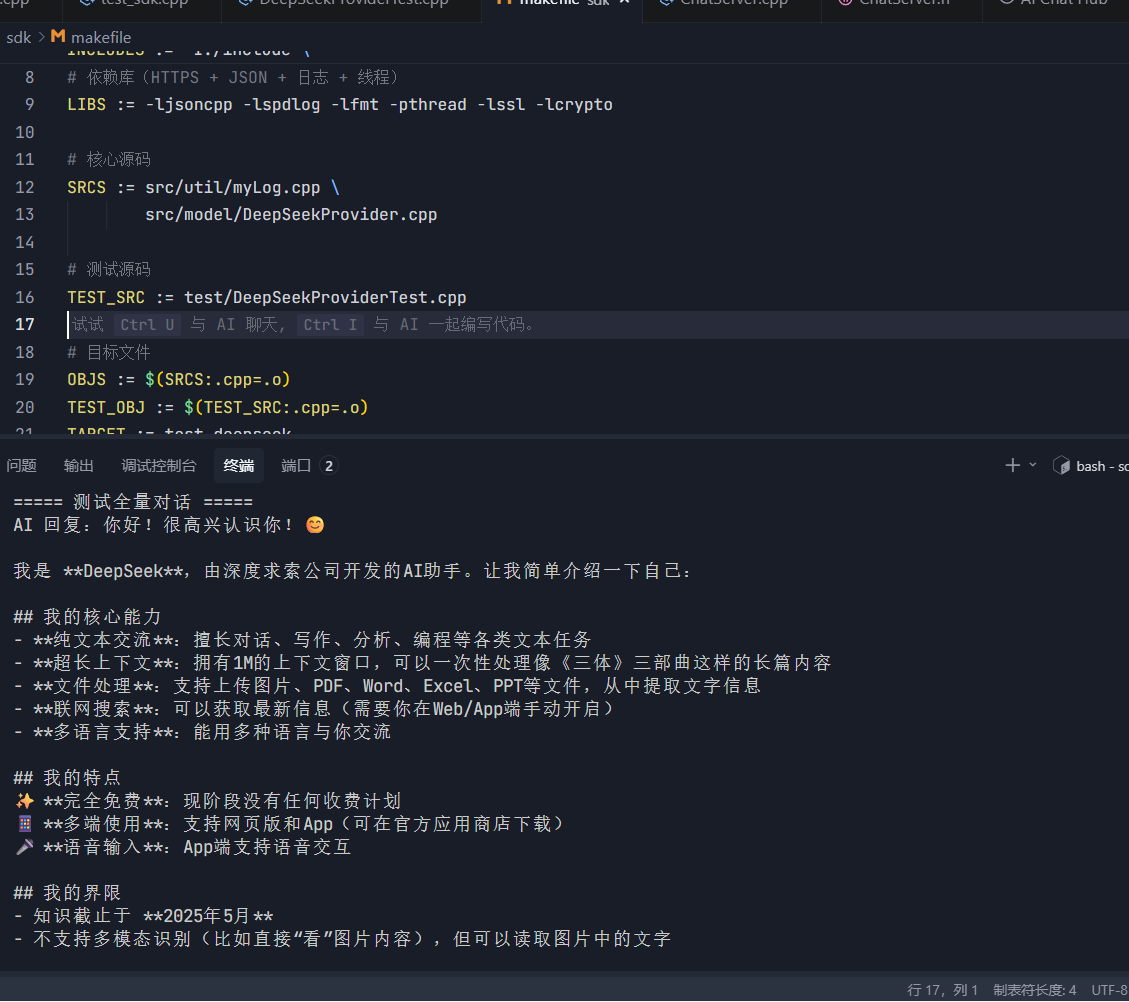
三、测试Deepseek是否接入成功
1.test_deepseek.cpp代码实现
#include "../include/model/DeepSeekProvider.h"
#include "../include/util/myLog.h"
#include "../include/core/common.h"
#include <iostream>
#include <string>
#include <map>

using namespace ai_chat_sdk;
using namespace std;

int main() {
    myLog::logger::InitLogger("test_deepseek", "test.log", spdlog::level::info);
    LOG_INFO("========== DeepSeek 独立测试开始 ==========");
    DeepSeekProvider deepseek;

    // 构造配置我们刚刚配置的api
    map<string, string> config;
    config["api_key"] = "sk-xxxxxxxxxxxxxxxxxxxxxxxx";
    config["endpoint"] = "https://api.deepseek.com";

    // 4. 初始化模型
    deepseek.InitModel(config);
    if (!deepseek.IsAvailable()) {
        LOG_ERR("DeepSeek 初始化失败!");
        return -1;
    }
    LOG_INFO("DeepSeek 初始化成功!");

    cout << "\n===== 测试全量对话 =====" << endl;
    // 构造用户消息
    vector<Message> messages;
    messages.emplace_back("user", "你好,介绍一下你自己");

    // 发送请求
    map<string, string> params;
    string reply = deepseek.SendMessage(messages, params);
    cout << "AI 回复:" << reply << endl;

    // 测试2:流式对话(打字机效果)
    cout << "\n===== 测试流式对话 =====" << endl;
    vector<Message> messages2;
    messages2.emplace_back("user", "写一个C++ Hello World 代码");

    // 流式回调函数
    deepseek.SendMessageStream(messages2, params, [](const string& chunk, bool is_done) {
        if (!is_done) {
            cout << chunk << flush; // 实时打印
        }
        if (is_done) {
            cout << endl;
        }
    });

    LOG_INFO("========== DeepSeek 测试结束 ==========");
    return 0;
}
2. 编写简易Makefile
CXX := g++
CXXFLAGS := -std=c++17 -Wall -g
# 头文件路径
INCLUDES := -I./include \
            -I./3rdparty \
            -I/usr/include/jsoncpp

# 依赖库(HTTPS + JSON + 日志 + 线程)
LIBS := -ljsoncpp -lspdlog -lfmt -pthread -lssl -lcrypto

# 核心源码
SRCS := src/util/myLog.cpp \
        src/model/DeepSeekProvider.cpp

# 测试源码
TEST_SRC := test/test_deepseek.cpp

# 目标文件
OBJS := $(SRCS:.cpp=.o)
TEST_OBJ := $(TEST_SRC:.cpp=.o)
TARGET := test_deepseek

.PHONY: all clean run

all: $(TARGET)

# 链接可执行文件
$(TARGET): $(OBJS) $(TEST_OBJ)
	$(CXX) $(CXXFLAGS) $^ -o $@ $(LIBS)
	@echo "编译成功!: ./test_deepseek"

# 编译cpp文件
%.o: %.cpp
	$(CXX) $(CXXFLAGS) $(INCLUDES) -c $< -o $@

# 运行测试
run: $(TARGET)
	./$(TARGET)

# 清理
clean:
	rm -f $(OBJS) $(TEST_OBJ) $(TARGET) *.log
我的个人主页,欢迎来阅读我的其他文章
https://blog.csdn.net/2402_83322742?spm=1011.2415.3001.5343
我的C++AI多模型聊天系统项目专栏
欢迎来阅读指出不足
https://blog.csdn.net/2402_83322742/category_13159665.html?spm=1001.2014.3001.5482

欢迎加入DeepSeek 技术社区。在这里,你可以找到志同道合的朋友,共同探索AI技术的奥秘。
更多推荐
 7
7 0
0- 0


 已为社区贡献1条内容

所有评论(0)