SpringBoot + VUE3 +deepseek实现的简单的AI对话页面(无广告,不会员)
1.单纯的多轮对话2.可以指定角色的对话在这里指定完整代码3.带上下文关联,指定角色回复这里主要思路是:用redis存对话的历史,然后每次会话会获取生成一个随机的不重复的key,用这个key存这次会话的历史,在当前会话,每次进行对话时,都会传入key 作为获取历史的参数,以达到上下文关联的目的普通对话我还多写了一个接口方法,其实也不需要的主要的实现类pom.xml。
·
主要使用SpringBoot + VUE3 +deepseek实现的简单的AI对话页面
页面有点简单
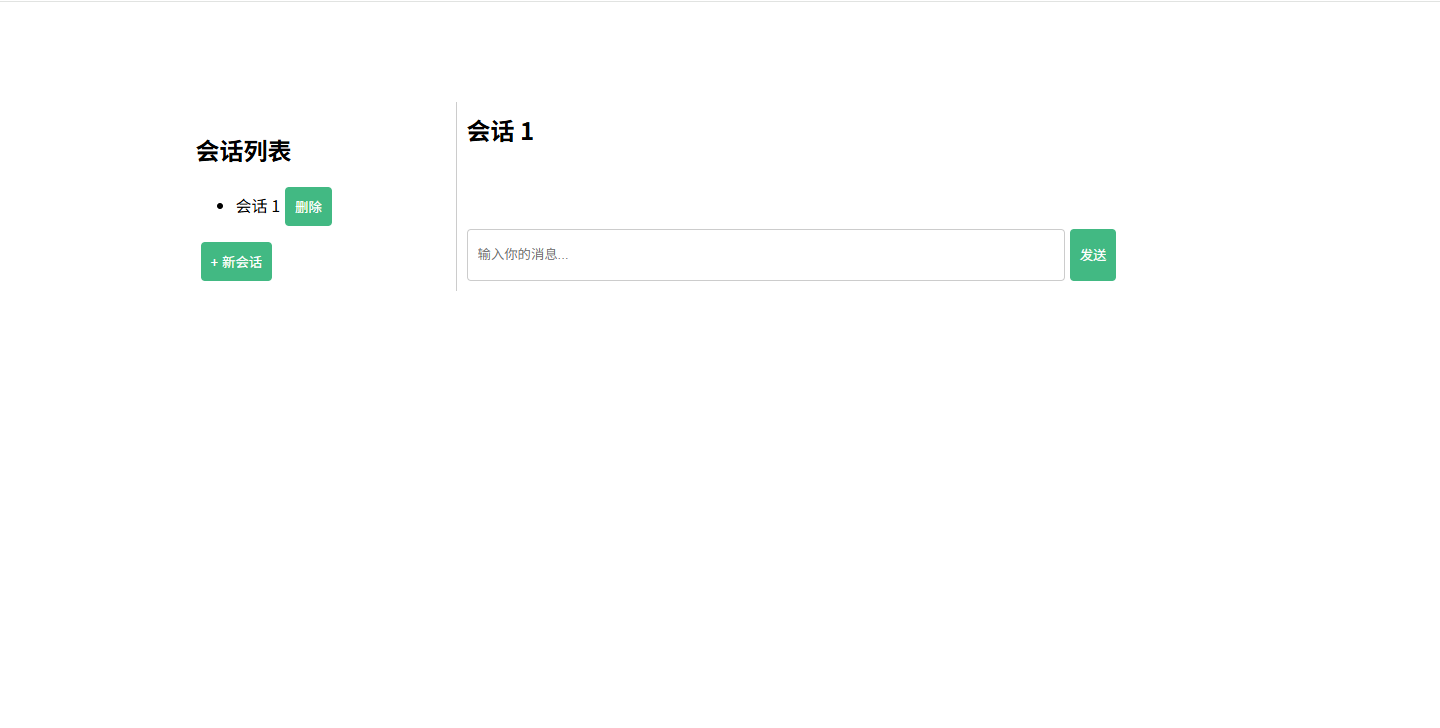
主要写了三种方式
使用前在API_KEY替换成自己的key,模型可以使用V3或者R1
1.单纯的多轮对话
import okhttp3.*;

import java.io.IOException;
import java.util.Objects;
import java.util.concurrent.TimeUnit;

public class DeepSeekOkHttpClient implements DeepSeekClient {
    private static final String API_URL = "https://api.deepseek.com/v1/chat/completions";
    private static final String API_KEY = "sk-xxx"; // 请务必妥善保管API_KEY
    private static final MediaType JSON = MediaType.get("application/json; charset=utf-8");
    private final OkHttpClient client;
    // 设置超时常量
    private static final int CONNECT_TIMEOUT = 10; // 连接超时(秒)
    private static final int READ_TIMEOUT = 130;    // 读取超时(秒)
    private static final int WRITE_TIMEOUT = 30;   // 写入超时(秒)

    public DeepSeekOkHttpClient() {
        this.client = new OkHttpClient.Builder()
                .connectTimeout(CONNECT_TIMEOUT, TimeUnit.SECONDS) // 设置连接超时
                .readTimeout(READ_TIMEOUT, TimeUnit.SECONDS)       // 设置读取超时
                .writeTimeout(WRITE_TIMEOUT, TimeUnit.SECONDS)     // 设置写入超时
                .build();
    }

    @Override
    public String getChatCompletion(String userMessage) {
        String requestBody = String.format("{\"model\":\"deepseek-chat\",\"messages\":[{\"role\":\"user\",\"content\":\"%s\"}]}", userMessage);
        RequestBody body = RequestBody.create(requestBody, JSON);
        Request request = new Request.Builder()
                .url(API_URL)
                .addHeader("Authorization", "Bearer " + API_KEY)
                .post(body)
                .build();

        try (Response response = client.newCall(request).execute()) {
            if (!response.isSuccessful()) throw new IOException("Unexpected code " + response);
            return Objects.requireNonNull(response.body()).string();
        } catch (IOException e) {
            e.printStackTrace();
            return null;
        }
    }
}
2.可以指定角色的对话
在这里指定
 messages.put(new JSONObject()
                .put("role", "system")
                .put("content", "用精简语言回答问题,但是要回答准确全面!"));
完整代码
import okhttp3.*;
import org.json.JSONArray;
import org.json.JSONObject;
import java.io.IOException;
import java.util.concurrent.TimeUnit;

public class DeepSeekChatWithRole {
    private static final String API_URL = "https://api.deepseek.com/v1/chat/completions";
    private static final String API_KEY = "sk-xxx"; // 请妥善保管API_KEY
    private static final MediaType JSON = MediaType.get("application/json; charset=utf-8");

    // 设置超时常量
    private static final int CONNECT_TIMEOUT = 10; // 连接超时(秒)
    private static final int READ_TIMEOUT = 130;    // 读取超时(秒)
    private static final int WRITE_TIMEOUT = 30;   // 写入超时(秒)

    private final OkHttpClient client;

    public DeepSeekChatWithRole() {
        this.client = new OkHttpClient.Builder()
                .connectTimeout(CONNECT_TIMEOUT, TimeUnit.SECONDS) // 设置连接超时
                .readTimeout(READ_TIMEOUT, TimeUnit.SECONDS)       // 设置读取超时
                .writeTimeout(WRITE_TIMEOUT, TimeUnit.SECONDS)     // 设置写入超时
                .build();
    }

    public String getChatCompletion(String userMessage) throws IOException {
        JSONArray messages = new JSONArray();

        messages.put(new JSONObject()
                .put("role", "system")
                .put("content", "用精简语言回答问题,但是要回答准确全面!"));

        messages.put(new JSONObject()
                .put("role", "user")
                .put("content", userMessage));

        JSONObject requestBody = new JSONObject()
                .put("model", "deepseek-reasoner")
                .put("messages", messages)
                .put("temperature", 0.7);  // 控制回答的随机性(0-1)

        RequestBody body = RequestBody.create(requestBody.toString(), JSON);
        Request request = new Request.Builder()
                .url(API_URL)
                .addHeader("Authorization", "Bearer " + API_KEY)
                .post(body)
                .build();

        try (Response response = client.newCall(request).execute()) {
            if (!response.isSuccessful()) {
                throw new IOException("API 请求失败: " + response.code() + " - " + response.message());
            }
            return response.body().string();
        }
    }

    public static void main(String[] args) {
        DeepSeekChatWithRole chatClient = new DeepSeekChatWithRole();
        try {
            String response = chatClient.getChatCompletion("Java 的 HashMap 和 LinkedHashMap 有什么区别?");
            System.out.println("AI 回答: " + response);
        } catch (IOException e) {
            e.printStackTrace();
        }
    }
}
3.带上下文关联,指定角色回复
这里主要思路是:用redis存对话的历史,然后每次会话会获取生成一个随机的不重复的key,用这个key存这次会话的历史,在当前会话,每次进行对话时,都会传入key 作为获取历史的参数,以达到上下文关联的目的
import okhttp3.*;
import org.json.JSONArray;
import org.json.JSONObject;
import redis.clients.jedis.Jedis;

import java.io.IOException;
import java.security.SecureRandom;
import java.util.ArrayList;
import java.util.List;
import java.util.concurrent.TimeUnit;

public class ChatRedisContext {
    private static final String API_URL = "https://api.deepseek.com/v1/chat/completions";
    private static final String API_KEY = "sk-xxx";
    private static final MediaType JSON = MediaType.get("application/json; charset=utf-8");

    // 超时设置
    private static final int CONNECT_TIMEOUT = 10;
    private static final int READ_TIMEOUT = 130;
    private static final int WRITE_TIMEOUT = 30;

    private final OkHttpClient client;
    private final String redisHost = "127.0.0.1"; // Redis 服务器地址
    private final int redisPort = 6379; // Redis 服务器端口


    private static final String ALPHABET = "ABCDEFGHIJKLMNOPQRSTUVWXYZabcdefghijklmnopqrstuvwxyz";
    private static final SecureRandom random = new SecureRandom();


    public ChatRedisContext() {
        this.client = new OkHttpClient.Builder()
                .connectTimeout(CONNECT_TIMEOUT, TimeUnit.SECONDS)
                .readTimeout(READ_TIMEOUT, TimeUnit.SECONDS)
                .writeTimeout(WRITE_TIMEOUT, TimeUnit.SECONDS)
                .build();
    }

    private static class Message {
        String role;
        String content;

        public Message(String role, String content) {
            this.role = role;
            this.content = content;
        }

        public JSONObject toJson() {
            return new JSONObject()
                    .put("role", this.role)
                    .put("content", this.content);
        }
    }

    private void saveConversationHistory(String conversationKey, List<Message> history) {
        JSONArray messagesJson = new JSONArray();
        for (Message msg : history) {
            messagesJson.put(msg.toJson());
        }

        try (Jedis jedis = new Jedis(redisHost, redisPort)) {
            // 设置键值并设置过期时间为 12 小时(43200 秒)
            jedis.setex(conversationKey, 43200, messagesJson.toString());
        }
    }

    private List<Message> getConversationHistory(String conversationKey) {
        try (Jedis jedis = new Jedis(redisHost, redisPort)) {
            String historyJson = jedis.get(conversationKey);
            List<Message> history = new ArrayList<>();
            if (historyJson != null) {
                JSONArray messagesJson = new JSONArray(historyJson);
                for (int i = 0; i < messagesJson.length(); i++) {
                    JSONObject msgJson = messagesJson.getJSONObject(i);
                    history.add(new Message(msgJson.getString("role"), msgJson.getString("content")));
                }
            }
            return history;
        }
    }

    public String chat(String conversationKey, String userMessage) throws IOException {
        List<Message> conversationHistory = getConversationHistory(conversationKey);
        if (conversationHistory.isEmpty()) {
            conversationHistory.add(new Message("system", "用精简语言回答问题,但是要回答准确全面!"));
        }

        conversationHistory.add(new Message("user", userMessage));
        JSONArray messages = new JSONArray();
        for (Message msg : conversationHistory) {
            messages.put(msg.toJson());
        }

        JSONObject requestBody = new JSONObject()
                .put("model", "deepseek-chat")
                .put("messages", messages)
                .put("temperature", 0.7);

        RequestBody body = RequestBody.create(requestBody.toString(), JSON);
        Request request = new Request.Builder()
                .url(API_URL)
                .addHeader("Authorization", "Bearer " + API_KEY)
                .post(body)
                .build();

        try (Response response = client.newCall(request).execute()) {
            if (!response.isSuccessful()) {
                throw new IOException("API 请求失败: " + response.code() + " - " + response.message());
            }

            String responseBody = response.body().string();
            JSONObject jsonResponse = new JSONObject(responseBody);
            String aiResponse = jsonResponse.getJSONArray("choices")
                    .getJSONObject(0)
                    .getJSONObject("message")
                    .getString("content");

            conversationHistory.add(new Message("assistant", aiResponse));
            saveConversationHistory(conversationKey, conversationHistory);
            return aiResponse;
        }
    }

    public static String generateUniqueKey() {

        long timestamp = System.currentTimeMillis();
        StringBuilder randomString = new StringBuilder();
        for (int i = 0; i < 8; i++) { // 生成8个随机字母
            int index = random.nextInt(ALPHABET.length());
            randomString.append(ALPHABET.charAt(index));
        }
        return timestamp + "_" + randomString.toString();
    }


    public void clearConversation(String conversationKey) {
        try (Jedis jedis = new Jedis(redisHost, redisPort)) {
            if (null != conversationKey && jedis.exists(conversationKey)){
                jedis.del(conversationKey);
            }
        }
    }


}
普通对话我还多写了一个接口方法,其实也不需要的
/**
 * <描述>
 *
 * @author lj
 * @date 2025/5/26  9:34
 */
public interface DeepSeekClient {
    String getChatCompletion(String userMessage);


}
主要的实现类
import com.alibaba.fastjson.JSON;
import com.alibaba.fastjson.JSONObject;
import com.zkzm.dpDemo.client.*;
import org.springframework.http.ResponseEntity;
import org.springframework.web.bind.annotation.GetMapping;
import org.springframework.web.bind.annotation.RequestParam;
import org.springframework.web.bind.annotation.RestController;

import java.io.IOException;
import java.util.HashMap;
import java.util.Map;

/**
 * <描述>
 *
 * @author lj
 * @date 2025/5/26  9:35
 */
@RestController
public class DpController {
    public static void main(String[] args) {
        DeepSeekClient deepSeekClient = new DeepSeekOkHttpClient();
        String userMessage = "你好,你是谁?";
        String response = deepSeekClient.getChatCompletion(userMessage);

        System.out.println("Response: " + response);
    }


    /**
     * 普通多轮对话
     * */
    @GetMapping("getText")
    public ResponseEntity<Map<String, Object>> getText(String message) {
        DeepSeekClient deepSeekClient = new DeepSeekOkHttpClient();
        Map<String, Object> responseMap = new HashMap<>();

        try {
            String result = deepSeekClient.getChatCompletion(message);

            JSONObject nestedJson = JSON.parseObject(result);

            responseMap.put("message", nestedJson);
            responseMap.put("status", "success");
            return ResponseEntity.ok(responseMap);
        } catch (Exception e) {
            responseMap.put("message", "Error: " + e.getMessage());
            responseMap.put("status", "error");
            return ResponseEntity.status(500).body(responseMap);
        }
    }


    /**
     * 带角色对话
     * */
    @GetMapping("getTextWithRole")
    public String getTextWithRole(String message) throws IOException {

        DeepSeekChatWithRole client = new DeepSeekChatWithRole();
        String response = client.getChatCompletion(message);
        return response;
    }


    @GetMapping("getTextWithContext")
    public String getTextWithContext(String message) throws IOException {

        DeepSeekChatWithContext client = new DeepSeekChatWithContext();
        String response = client.chat(message);
        return response;
    }

    /**
     * 基于redis的上下文
     * */
    @GetMapping("getChatRedisContext")
    public String getChatRedisContext(String message,String conversationKey) throws IOException {

        ChatRedisContext chatClient = new ChatRedisContext();
        String response = chatClient.chat(conversationKey, message);
        return response;
    }


    /**
     * 生成redis的key
     * */
    @GetMapping("getKey")
    public String getKey() throws IOException {
        return ChatRedisContext.generateUniqueKey();
    }

    /**
     * 清空redis的key
     * */
    @GetMapping("clearConversation")
    public void clearConversation(String conversationKey) throws IOException {
        ChatRedisContext chatClient = new ChatRedisContext();
        chatClient.clearConversation(conversationKey);
    }
}
pom.xml
  <dependency>
            <groupId>com.squareup.okhttp3</groupId>
            <artifactId>okhttp</artifactId>
            <version>4.9.2</version>
        </dependency>

        <dependency>
            <groupId>com.alibaba</groupId>
            <artifactId>fastjson</artifactId>
            <version>1.2.83</version>
        </dependency>

        <!-- https://mvnrepository.com/artifact/org.json/json -->
        <dependency>
            <groupId>org.json</groupId>
            <artifactId>json</artifactId>
            <version>20240303</version>
        </dependency>

        <dependency>
            <groupId>redis.clients</groupId>
            <artifactId>jedis</artifactId>
            <version>4.3.1</version> <!-- 确保使用的是最新版本 -->
        </dependency>
接下来是前端代码,主要使用的是第三种方式(基于redis实现上下文)
1.每次页面加载,会默认创建一个会话,即调用获取key的接口
2.每次新增一个会话都会调用获取key的接口,确保每个会话的key是唯一的,达到上下文的目的
3.删除会话,会调用后台删除key的接口,同步删除了redis中的key
完整代码
.vue
<template>
  <div id="app">
    <div class="sidebar">
      <h2>会话列表</h2>
      <ul>
        <li v-for="(session, index) in sessions" :key="index">
          <span @click="loadSession(index)">{{ session.title }}</span>
          <button @click="deleteSession(index)">删除</button>
        </li>
      </ul>
      <button @click="startNewSession" :disabled="sessions.length >= 10">+ 新会话</button>
    </div>
    <div class="chat-container">
      <div class="chat-title">{{ currentSession.title }}</div>
      <div class="messages" ref="messagesContainer">
        <div v-for="(msg, index) in currentSession.messages" :key="index" class="message" :class="msg.role">
          <span class="role">{{ msg.role }}:</span>
          <span class="content">{{ msg.content }}</span>
        </div>
        <div v-if="currentSession.loading" class="message assistant">
          <span class="role">小助手:</span>
          <span class="content">加载中...</span>
        </div>
        <div v-if="currentSession.timeout && !currentSession.loading" class="message assistant">
          <span class="role">小助手:</span>
          <span class="content">请求超时,请稍后再试。</span>
        </div>
      </div>
      <div class="input-container">
        <input v-model="userMessage" @keyup.enter="sendMessage" type="text" placeholder="输入你的消息..." />
        <button @click="sendMessage"
          :disabled="!currentSession.conversationKey || currentSession.loading || currentSession.timeout">发送</button>
      </div>
    </div>
  </div>
</template>

<script>
import { chat, getKey, clearConversation } from '@/api/main';
import { ref, nextTick, onMounted } from 'vue';

export default {
  setup() {
    const userMessage = ref('');
    const sessions = ref([]); // 存储会话列表
    const currentSession = ref({ title: '请开始新的会话', messages: [], loading: false, timeout: false, conversationKey: '' }); // 当前会话

    const sendMessage = async () => {
      if (!userMessage.value.trim()) return;

      const params = {
        conversationKey: currentSession.value.conversationKey,
        message: userMessage.value,
      };

      currentSession.value.messages.push({ role: 'user', content: userMessage.value });
      userMessage.value = '';

      currentSession.value.loading = true;
      currentSession.value.timeout = false;

      const timeoutPromise = new Promise((_, reject) => {
        setTimeout(() => {
          currentSession.value.timeout = true;
          currentSession.value.loading = false;
          reject(new Error('请求超时'));
        }, 120000);
      });

      try {
        const response = await Promise.race([chat(params), timeoutPromise]);
        currentSession.value.messages.push({ role: 'assistant', content: response.data });
      } catch (error) {
        console.error("发送消息失败:", error.message);
        if (error.message !== '请求超时') {
          currentSession.value.messages.push({ role: 'assistant', content: '请求失败,请重试。' });
        }
      } finally {
        currentSession.value.loading = false;
        nextTick(() => {
          const messagesContainer = document.querySelector('.messages');
          messagesContainer.scrollTop = messagesContainer.scrollHeight;
        });
      }
    };

    const startNewSession = async () => {
      if (sessions.value.length >= 10) {
        alert('最多只能创建10个会话!');
        return;
      }

      try {
        const key = await getKey();
        if (!key || !key.data) {
          console.error("获取的会话密钥无效");
          alert('无法创建会话,获取的密钥无效,请稍后再试。');
          return;
        }

        const newSession = {
          title: `会话 ${sessions.value.length + 1}`,
          messages: [],
          loading: false,
          timeout: false,
          conversationKey: key.data,
        };
        sessions.value.push(newSession);
        loadSession(sessions.value.length - 1);
      } catch (error) {
        console.error("获取会话密钥失败:", error.message);
      }
    };

    const loadSession = (index) => {
      currentSession.value = sessions.value[index];
    };

    const deleteSession = async (index) => {
      try {
        const params = {
          conversationKey: sessions.value[index].conversationKey
        }

        await clearConversation(params);
        sessions.value.splice(index, 1);
        if (sessions.value.length > 0) {
          loadSession(0);
        } else {
          currentSession.value = { title: '请开始新的会话', messages: [], loading: false, timeout: false, conversationKey: '' };
        }
      } catch (error) {
        console.error("删除会话失败:", error.message);
      }
    };

    onMounted(() => {
      startNewSession();
    });

    return {
      userMessage,
      sendMessage,
      sessions,
      currentSession,
      startNewSession,
      loadSession,
      deleteSession,
    };
  },
};
</script>

<style>
#app {
  margin-top: 50px;
  display: flex;
  justify-content: center; /* 水平居中 */
  height: 80%;
  width: 70%; /* 设置宽度 */
}

.sidebar {
  width: 250px;
  border-right: 1px solid #ccc;
  padding: 10px;
}

.chat-container {
  flex: 1;
  display: flex;
  flex-direction: column;
  padding: 10px;
}

.chat-title {
  font-size: 24px;
  font-weight: bold;
  margin-bottom: 20px;
}

.messages {
  flex: 1;
  overflow-y: auto; /* 允许垂直滚动 */
  margin-bottom: 10px;
  max-height: 500px; /* 设置最大高度 */
}

.message {
  margin: 5px 0;
}

.message.user {
  text-align: right;
  color: green;
}

.message.assistant {
  margin: 10px;
  text-align: left;
  color: #333;
}

.input-container {
  display: flex;
}

input {
  flex: 1;
  padding: 10px;
  border: 1px solid #ccc;
  border-radius: 4px;
  height: 30px;
}

button {
  padding: 10px;
  margin-left: 5px;
  border: none;
  background-color: #42b983;
  color: white;
  border-radius: 4px;
  cursor: pointer;
}

button:disabled {
  background-color: #ccc;
  cursor: not-allowed;
}

button:hover:not(:disabled) {
  background-color: #369e77;
}
</style>
.ts
import { get, post } from "@/config/request";

interface ContextParams {
  conversationKey: string;
  message: string;
}

export function chat(params: ContextParams) {
  return get("api/getChatRedisContext", params);
}

export function getKey() {
  return get("api/getKey");
}

export function clearConversation(params: ContextParams) {
  return get("api/clearConversation", params);
}
config
/* eslint-disable @typescript-eslint/no-explicit-any */
import axios, {
  type AxiosInstance,
  type AxiosRequestConfig,
  type AxiosResponse,
} from "axios";

const commonurl = import.meta.env.VITE_APP_BASE_API;
const envType = import.meta.env.VITE_ENV_SET;
// const router = useRouter()
interface resType {
  code: number;
  msg: string;
  data: any;
}

const getBaseUrl = (): string => {
  if (envType === "dev") {
    return commonurl;
  }
  return `https://api.example.com`;
};

const instance = axios.create({
  baseURL: "",
  timeout: 120000,
});

// 添加请求拦截器
instance.interceptors.request.use(
  (config: AxiosRequestConfig): any => {
    // const { userDetil } = storeToRefs(userInfoStore());
    // const Authorization = userDetil.value.Authorization;
    // if (!Authorization && config.url?.indexOf("sys/login") === -1) {
    //   const herf = window.location.href;
    //   const baseUrl = window.location.href.split("#")[0];
    //   const url = `${baseUrl}#/login`;
    //   window.location.replace(url);
    //   showError("用户未登录请重新登录!");
    //   return {};
    // }
    config.headers = {
      "Content-Type": "application/json",
      // Authorization: String(Authorization),
      ...config.headers,
    };
    return config;
  },

  (error: unknown): Promise<any> => {
    // 对请求错误做些什么
    return Promise.reject(error);
  }
);

instance.interceptors.response.use(
  (response: AxiosResponse<resType>): any => {
    const data = response.data;
    if (data.code === 501) {
      showError("账号密码错误!" + `系统提示:${data.msg}`);
      return Promise.reject();
    }
    if (data.code === 500) {
      showError(`系统提示:${data.msg}`);
      return Promise.reject();
    }
    return response;
  },
  (error: any) => {
    if (
      error.response &&
      (error.response.status === 501 ||
        error.response.status === 404 ||
        error.response.status === 401)
    ) {
      const herf = window.location.href;
      const baseUrl = window.location.href.split("#")[0];
      const url = `${baseUrl}#/login`;
      window.location.replace(url);
      showError(error.message);
      return Promise.reject();
    }
    return Promise.reject(error);
  }
);
export const get = <T>(url: string, params?: any): any => {
  return instance.get<T>(url, { params });
};
export const post = <T>(url: string, data?: any): any => {
  return instance.post<T>(url, data);
};
这里的封装配置可能不同,可以自行使用,主要就是调用上面的几个接口
功能比较简陋,还在持续完善中,希望大佬多多指教(手动抱拳)
最近又给加了 一个深度思考
手动给了两个标识符
           String reasoningStartIdentifier = "<reasoning-start>"; // 开始标识符
           String reasoningEndIdentifier = "<reasoning-end>"; // 结束标识符
具体实现方法如下:
   public void reasoner(String conversationKey, String userMessage, SseEmitter emitter, boolean isFirstChat) throws IOException {
       // 获取对话历史
       List<Message> conversationHistory = getConversationHistory(conversationKey);

       // 如果历史记录为空,添加初始系统消息
       if (conversationHistory.isEmpty()) {
           conversationHistory.add(new Message("system", "你现在是个编程高手"));
       }

       // 如果是首次对话,存储用户的名称
       if (isFirstChat) {
           SysAiChat aiChat = aiChatMapper.getByConversationKey(conversationKey);
           aiChat.setChatName(userMessage);
           aiChatMapper.updateCatName(aiChat);
       }

       // 将用户消息添加到对话历史
       conversationHistory.add(new Message("user", userMessage));
       JSONArray messages = new JSONArray();
       for (Message msg : conversationHistory) {
           messages.put(msg.toJson());
       }

       // 创建请求体
       JSONObject requestBody = new JSONObject()
               .put("model", "deepseek-reasoner") // 使用深度思考模型
               .put("messages", messages)
               .put("temperature", 0.7)
               .put("stream", true);

       RequestBody body = RequestBody.create(requestBody.toString(), JSON);
       Request request = new Request.Builder()
               .url(API_URL)
               .addHeader("Authorization", "Bearer " + API_KEY)
               .post(body)
               .build();

       try (Response response = client.newCall(request).execute()) {
           if (!response.isSuccessful()) {
               throw new IOException("API 请求失败: " + response.code() + " - " + response.message());
           }

           BufferedSource source = response.body().source();
           StringBuilder reasoningContent = new StringBuilder(); // 存储思考过程
           StringBuilder finalContent = new StringBuilder();     // 存储最终答案

           // 开始标识符
           String reasoningStartIdentifier = "<reasoning-start>"; // 开始标识符
           String reasoningEndIdentifier = "<reasoning-end>"; // 结束标识符
           boolean isStarting = true;
           boolean isEnding = true;

           while (!source.exhausted()) {
               String chunk = source.readUtf8Line();
               if (chunk != null && chunk.startsWith("data: ")) {
                   String json = chunk.substring(6).trim();
                   if (json.equals("[DONE]")) {
                       break;
                   }

                   try {
                       JSONObject jsonResponse = new JSONObject(json);
                       JSONObject choice = jsonResponse.getJSONArray("choices").getJSONObject(0);
                       JSONObject delta = choice.getJSONObject("delta");

                       // 检查并处理思考内容
                       if (delta.has("reasoning_content") && !delta.isNull("reasoning_content")) {
                           String reasoning = delta.getString("reasoning_content");
                           if (!reasoning.isEmpty()) {
                               if (isStarting){
                                   emitter.send(reasoningStartIdentifier); // 发送开始标识符
                                   reasoningContent.append(reasoningStartIdentifier);
                                   isStarting = false;
                               }


                               // 发送思考内容到前端
                               String formattedReasoning = reasoning.replace("\n", "\\x0A");
                               emitter.send(formattedReasoning);
                               reasoningContent.append(reasoning); // 保存思考内容
                               System.out.print(reasoning); // 控制台打印
                           }
                       }

                       // 检查并处理最终答案内容
                       if (delta.has("content") && !delta.isNull("content")) {
                           String content = delta.getString("content");
                           if (!content.isEmpty()) {
                               if (isEnding){
                                   emitter.send(reasoningEndIdentifier); // 发送结束标识符
                                   finalContent.append(reasoningEndIdentifier);
                                   isEnding = false;
                               }
                               // 发送最终答案到前端
                               String formattedContent = content.replace("\n", "\\x0A");
                               emitter.send(formattedContent);
                               finalContent.append(content); // 保存最终答案
                               System.out.print(content); // 控制台打印
                           }
                       }

                   } catch (JSONException e) {
                       System.err.println("JSON解析错误: " + e.getMessage());
                   }
               }
           }

           // 在reasoning_content部分结束后发送结束标识符


           // 发送结束标志
           emitter.send("[DONE]");

           // 合并深度思考内容和最终答案
           String combinedResponse = reasoningContent.toString().trim() + "\n" + finalContent.toString().trim();

           // 保存对话记录 - 保存用户消息和合并后的内容
           saveConversationWithTimestamp(conversationKey, "user", userMessage);
           saveConversationWithTimestamp(conversationKey, "assistant", combinedResponse);

           // 更新聊天名称
           if (isFirstChat) {
               SysAiChat aiChat = aiChatMapper.getByConversationKey(conversationKey);
               aiChat.setChatName(userMessage.substring(0, Math.min(userMessage.length(), 50)));
               aiChatMapper.updateCatName(aiChat);
           }

           // 将回复添加到对话历史
           conversationHistory.add(new Message("assistant", combinedResponse));
           saveConversationHistory(conversationKey, conversationHistory);

       } catch (IOException e) {
           emitter.completeWithError(e);
       } finally {
           emitter.complete();
       }
   }

欢迎加入DeepSeek 技术社区。在这里,你可以找到志同道合的朋友,共同探索AI技术的奥秘。
更多推荐


 5
5 0
0- 0


 已为社区贡献1条内容

所有评论(0)