大模型应用开发 | RAG在实际落地场景中的优化(一)RAG关键流程源码解读
本文主要围绕DB-GPT应用开发框架如何在实际落地场景做RAG优化。
本文主要围绕DB-GPT应用开发框架如何在实际落地场景做RAG优化。
背景
在过去两年中,检索增强生成(RAG,Retrieval-Augmented Generation)技术逐渐成为提升智能体的核心组成部分。通过结合检索与生成的双重能力,RAG能够引入外部知识,从而为大模型在复杂场景中的应用提供更多可能性。但是在实际落地场景中,往往会存在检索准确率低,噪音干扰多,召回完整性,专业性不够,导致LLM幻觉严重的问题。本次分享会聚焦RAG在实际落地场景中的知识加工和检索细节,如何去优化RAG Pineline链路,最终提升召回准确率。
快速搭建一个RAG智能问答应用很简单,但是需要在实际业务场景落地还需要做大量的工作。
本文将主要介绍围绕DB-GPT应用开发框架(https://github.com/eosphoros-ai/DB-GPT),如何在实际落地场景做RAG优化。
一、RAG关键流程源码解读
主要讲述在DB-GPT中,知识加工和RAG流程关键源码实现。
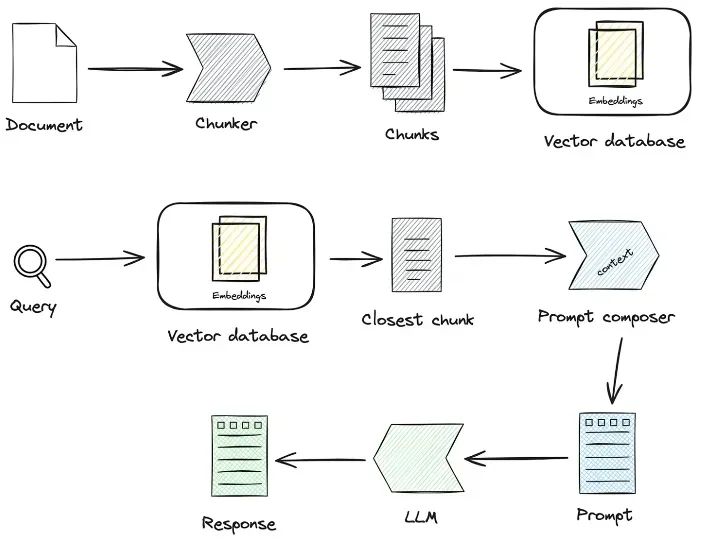
1.1 知识加工
知识加载 -> 知识切片 -> 信息抽取 -> 知识加工(embedding/graph/keywords) -> 知识存储
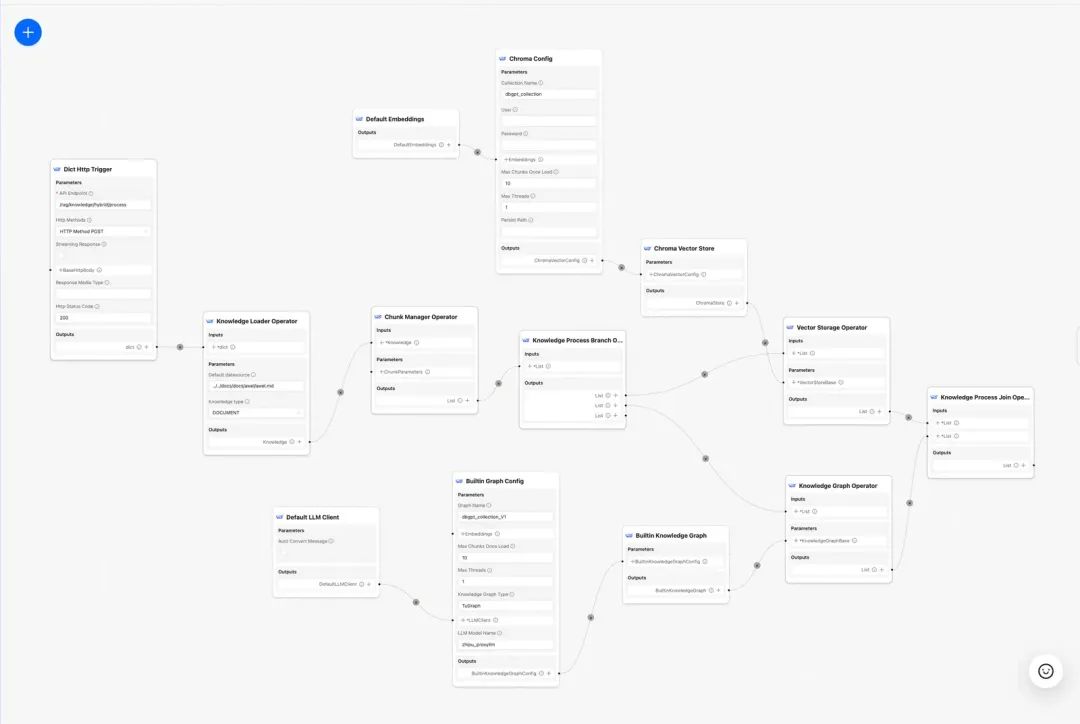
- 知识加载:通过知识工厂类将不同格式的非结构化文档进行实例化。
# 知识工厂进行实例化
KnowledgeFactory -> create() -> load() -> Document
- knowledge
 - markdown
 - pdf
 - docx
 - txt
 - html
 - pptx
 - url
 - ...
如何扩展:通过继承Knowledge接口,实现load(),support_chunk_strategy(),default_chunk_strategy()等方法
class Knowledge(ABC):
    def load(self) -> List[Document]:
        """Load knowledge from data loader."""
    @classmethod
    def document_type(cls) -> Any:
        """Get document type."""
    def support_chunk_strategy(cls) -> List[ChunkStrategy]:
        """Return supported chunk strategy."""
        return [
            ChunkStrategy.CHUNK_BY_SIZE,
            ChunkStrategy.CHUNK_BY_PAGE,
            ChunkStrategy.CHUNK_BY_PARAGRAPH,
            ChunkStrategy.CHUNK_BY_MARKDOWN_HEADER,
            ChunkStrategy.CHUNK_BY_SEPARATOR,
        ]
    @classmethod
    def default_chunk_strategy(cls) -> ChunkStrategy:
        """Return default chunk strategy.

        Returns:
            ChunkStrategy: default chunk strategy
        """
        return ChunkStrategy.CHUNK_BY_SIZE
- 知识切片
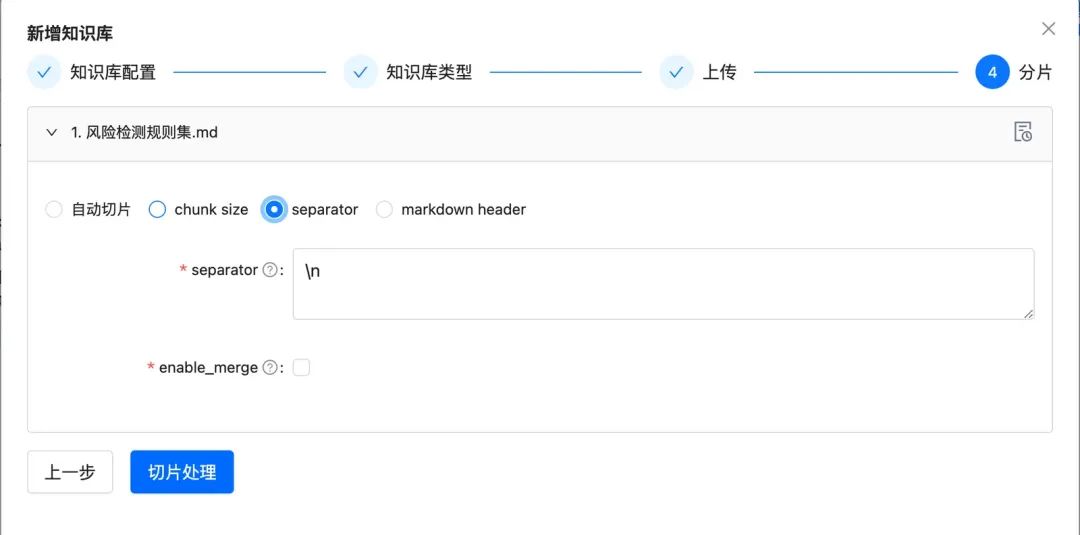
- ChunkManager: 通过加载后的知识数据,根据用户指定的分片策略和分片参数路由到对应的分片处理器进行分配。
class ChunkManager:
    """Manager for chunks."""

    def __init__(
        self,
        knowledge: Knowledge,
        chunk_parameter: Optional[ChunkParameters] = None,
        extractor: Optional[Extractor] = None,
    ):
        """Create a new ChunkManager with the given knowledge.

        Args:
            knowledge: (Knowledge) Knowledge datasource.
            chunk_parameter: (Optional[ChunkParameter]) Chunk parameter.
            extractor: (Optional[Extractor]) Extractor to use for summarization.
        """
        self._knowledge = knowledge

        self._extractor = extractor
        self._chunk_parameters = chunk_parameter or ChunkParameters()
        self._chunk_strategy = (
            chunk_parameter.chunk_strategy
            if chunk_parameter and chunk_parameter.chunk_strategy
            else self._knowledge.default_chunk_strategy().name
        )
        self._text_splitter = self._chunk_parameters.text_splitter
        self._splitter_type = self._chunk_parameters.splitter_type
如何扩展:如果你想在界面上自定义一个新的分片策略
-
新增切片策略ChunkStrategy
-
新增Splitter实现逻辑
class ChunkStrategy(Enum):
    """Chunk Strategy Enum."""

    CHUNK_BY_SIZE: _STRATEGY_ENUM_TYPE = (
        RecursiveCharacterTextSplitter,
        [
            {
                "param_name": "chunk_size",
                "param_type": "int",
                "default_value": 512,
                "description": "The size of the data chunks used in processing.",
            },
            {
                "param_name": "chunk_overlap",
                "param_type": "int",
                "default_value": 50,
                "description": "The amount of overlap between adjacent data chunks.",
            },
        ],
        "chunk size",
        "split document by chunk size",
    )
    CHUNK_BY_PAGE: _STRATEGY_ENUM_TYPE = (
        PageTextSplitter,
        [],
        "page",
        "split document by page",
    )
    CHUNK_BY_PARAGRAPH: _STRATEGY_ENUM_TYPE = (
        ParagraphTextSplitter,
        [
            {
                "param_name": "separator",
                "param_type": "string",
                "default_value": "\\n",
                "description": "paragraph separator",
            }
        ],
        "paragraph",
        "split document by paragraph",
    )
    CHUNK_BY_SEPARATOR: _STRATEGY_ENUM_TYPE = (
        SeparatorTextSplitter,
        [
            {
                "param_name": "separator",
                "param_type": "string",
                "default_value": "\\n",
                "description": "chunk separator",
            },
            {
                "param_name": "enable_merge",
                "param_type": "boolean",
                "default_value": False,
                "description": "Whether to merge according to the chunk_size after "
                "splitting by the separator.",
            },
        ],
        "separator",
        "split document by separator",
    )
    CHUNK_BY_MARKDOWN_HEADER: _STRATEGY_ENUM_TYPE = (
        MarkdownHeaderTextSplitter,
        [],
        "markdown header",
        "split document by markdown header",
    )
-
知识抽取,目前支持向量抽取,知识图谱抽取,关键词抽取。
-
向量抽取 -> embedding, 实现Embeddings接口
@abstractmethod
    def embed_documents(self, texts: List[str]) -> List[List[float]]:
        """Embed search docs."""

    @abstractmethod
    def embed_query(self, text: str) -> List[float]:
        """Embed query text."""

    async def aembed_documents(self, texts: List[str]) -> List[List[float]]:
        """Asynchronous Embed search docs."""
        return await asyncio.get_running_loop().run_in_executor(
            None, self.embed_documents, texts
        )

    async def aembed_query(self, text: str) -> List[float]:
        """Asynchronous Embed query text."""
        return await asyncio.get_running_loop().run_in_executor(
            None, self.embed_query, text
        )
# EMBEDDING_MODEL=proxy_openai
# proxy_openai_proxy_server_url=https://api.openai.com/v1
# proxy_openai_proxy_api_key={your-openai-sk}
# proxy_openai_proxy_backend=text-embedding-ada-002


## qwen embedding model, See dbgpt/model/parameter.py
# EMBEDDING_MODEL=proxy_tongyi
# proxy_tongyi_proxy_backend=text-embedding-v1
# proxy_tongyi_proxy_api_key={your-api-key}

## qianfan embedding model, See dbgpt/model/parameter.py
#EMBEDDING_MODEL=proxy_qianfan
#proxy_qianfan_proxy_backend=bge-large-zh
#proxy_qianfan_proxy_api_key={your-api-key}
#proxy_qianfan_proxy_api_secret={your-secret-key}
- 知识图谱抽取 -> knowledge graph, 通过利用大模型提取(实体,关系,实体)三元组结构。
class TripletExtractor(LLMExtractor):
    """TripletExtractor class."""

    def __init__(self, llm_client: LLMClient, model_name: str):
        """Initialize the TripletExtractor."""
        super().__init__(llm_client, model_name, TRIPLET_EXTRACT_PT)

TRIPLET_EXTRACT_PT = (
    "Some text is provided below. Given the text, "
    "extract up to knowledge triplets as more as possible "
    "in the form of (subject, predicate, object).\n"
    "Avoid stopwords. The subject, predicate, object can not be none.\n"
    "---------------------\n"
    "Example:\n"
    "Text: Alice is Bob's mother.\n"
    "Triplets:\n(Alice, is mother of, Bob)\n"
    "Text: Alice has 2 apples.\n"
    "Triplets:\n(Alice, has 2, apple)\n"
    "Text: Alice was given 1 apple by Bob.\n"
    "Triplets:(Bob, gives 1 apple, Bob)\n"
    "Text: Alice was pushed by Bob.\n"
    "Triplets:(Bob, pushes, Alice)\n"
    "Text: Bob's mother Alice has 2 apples.\n"
    "Triplets:\n(Alice, is mother of, Bob)\n(Alice, has 2, apple)\n"
    "Text: A Big monkey climbed up the tall fruit tree and picked 3 peaches.\n"
    "Triplets:\n(monkey, climbed up, fruit tree)\n(monkey, picked 3, peach)\n"
    "Text: Alice has 2 apples, she gives 1 to Bob.\n"
    "Triplets:\n"
    "(Alice, has 2, apple)\n(Alice, gives 1 apple, Bob)\n"
    "Text: Philz is a coffee shop founded in Berkeley in 1982.\n"
    "Triplets:\n"
    "(Philz, is, coffee shop)\n(Philz, founded in, Berkeley)\n"
    "(Philz, founded in, 1982)\n"
    "---------------------\n"
    "Text: {text}\n"
    "Triplets:\n"
)
- 倒排索引抽取 -> keywords分词
- 可以用es默认的分词库,也可以使用es的插件模式自定义分词
- 知识存储
整个知识持久化统一实现了IndexStoreBase接口,目前提供了向量数据库、图数据库、全文索引三类实现。
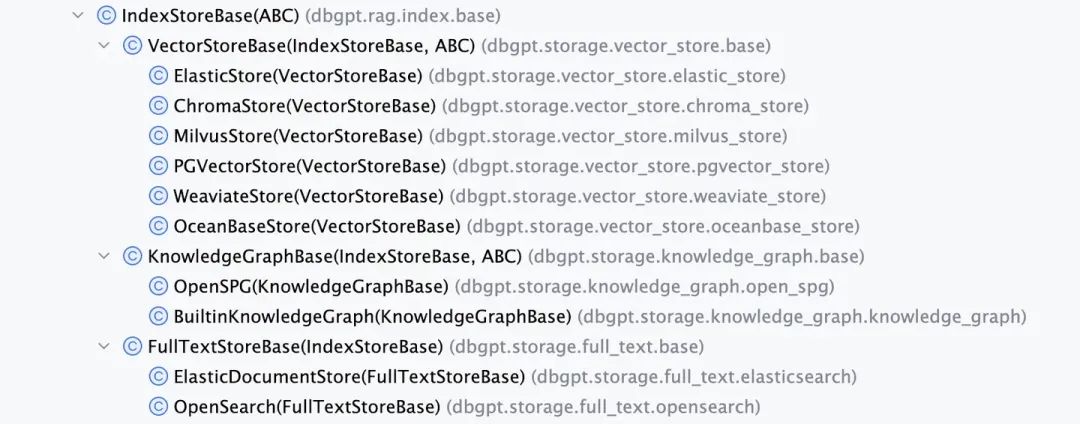
- VectorStore,向量数据库主要逻辑都在load_document(),包括索引schema创建,向量数据分批写入等等。
- VectorStoreBase
    - ChromaStore
    - MilvusStore
    - OceanbaseStore
    - ElasticsearchStore
    - PGVectorStore

class VectorStoreBase(IndexStoreBase, ABC):
    """Vector store base class."""

    @abstractmethod
    def load_document(self, chunks: List[Chunk]) -> List[str]:
        """Load document in index database."""
    @abstractmethod
    async def aload_document(self, chunks: List[Chunk]) -> List[str]:
        """Load document in index database."""

    @abstractmethod
    def similar_search_with_scores(
        self,
        text,
        topk,
        score_threshold: float,
        filters: Optional[MetadataFilters] = None,
    ) -> List[Chunk]:
        """Similar search with scores in index database."""
    def similar_search(
        self, text: str, topk: int, filters: Optional[MetadataFilters] = None
    ) -> List[Chunk]:
        return self.similar_search_with_scores(text, topk, 1.0, filters)
-
GraphStore ,具体的图存储提供了三元组写入的实现,一般会调用具体的图数据库的查询语言来完成。例如TuGraphStore会根据三元组生成具体的Cypher语句并执行。
-
图存储接口GraphStoreBase提供统一的图存储抽象,目前内置了MemoryGraphStore和TuGraphStore的实现,我们也提供Neo4j接口给开发者进行接入。
- GraphStoreBase
    - TuGraphStore
    - Neo4jStore

def insert_triplet(self, subj: str, rel: str, obj: str) -> None:
    """Add triplet."""
    ...TL;DR...
    subj_query = f"MERGE (n1:{self._node_label} {{id:'{subj}'}})"
    obj_query = f"MERGE (n1:{self._node_label} {{id:'{obj}'}})"
    rel_query = (
        f"MERGE (n1:{self._node_label} {{id:'{subj}'}})"
        f"-[r:{self._edge_label} {{id:'{rel}'}}]->"
        f"(n2:{self._node_label} {{id:'{obj}'}})"
    )
    self.conn.run(query=subj_query)
    self.conn.run(query=obj_query)
    self.conn.run(query=rel_query)
- FullTextStore: 通过构建es索引,通过es内置分词算法进行分词,然后由es构建keyword->doc_id的倒排索引。
{
            "analysis": {"analyzer": {"default": {"type": "standard"}}},
            "similarity": {
                "custom_bm25": {
                    "type": "BM25",
                    "k1": self._k1,
                    "b": self._b,
                }
            },
        }
        self._es_mappings = {
            "properties": {
                "content": {
                    "type": "text",
                    "similarity": "custom_bm25",
                },
                "metadata": {
                    "type": "keyword",
                },
            }
        }
目前提供的全文索引接口支持Elasticsearch,同时也定义了OpenSearch的接口
- FullTextStoreBase
    - ElasticDocumentStore
    - OpenSearchStore
1.2 知识检索
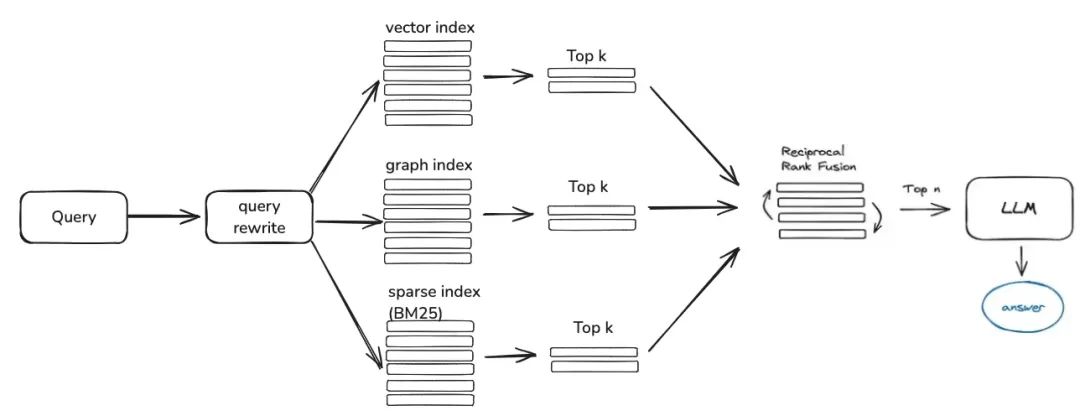
question -> rewrite -> similarity_search -> rerank -> context_candidates
接下来是知识检索,目前社区的检索逻辑主要分为这几步,如果你设置了查询改写参数,目前会通过大模型给你进行一轮问题改写,然后会根据你的知识加工方式路由到对应的检索器,如果你是通过向量进行加工的,那就会通过EmbeddingRetriever进行检索,如果你构建方式是通过知识图谱构建的,就会按照知识图谱方式进行检索,如果你设置了rerank模型,会给粗筛后的候选值进行精筛,让候选值和用户问题更有关联。
- EmbeddingRetriever
class EmbeddingRetriever(BaseRetriever):
    """Embedding retriever."""

    def __init__(
        self,
        index_store: IndexStoreBase,
        top_k: int = 4,
        query_rewrite: Optional[QueryRewrite] = None,
        rerank: Optional[Ranker] = None,
        retrieve_strategy: Optional[RetrieverStrategy] = RetrieverStrategy.EMBEDDING,
    ):


    async def _aretrieve_with_score(
        self,
        query: str,
        score_threshold: float,
        filters: Optional[MetadataFilters] = None,
    ) -> List[Chunk]:
        """Retrieve knowledge chunks with score.

        Args:
            query (str): query text
            score_threshold (float): score threshold
            filters: metadata filters.
        Return:
            List[Chunk]: list of chunks with score
        """
        queries = [query]
        new_queries = await self._query_rewrite.rewrite(
                    origin_query=query, context=context, nums=1
                )
                queries.extend(new_queries)
        candidates_with_score = [
                self._similarity_search_with_score(
                    query, score_threshold, filters, root_tracer.get_current_span_id()
                )
                for query in queries
            ]
            ...

        new_candidates_with_score = await self._rerank.arank(
                new_candidates_with_score, query
            )
            return new_candidates_with_score
-
index_store: 具体的向量数据库
-
top_k: 返回的具体候选chunk个数
-
query_rewrite:查询改写函数
-
rerank:重排序函数
-
query:原始查询
-
score_threshold:得分,我们默认会把相似度得分小于阈值的上下文信息给过滤掉
-
filters:Optional[MetadataFilters], 元数据信息过滤器,主要是可以用来前置通过属性信息筛掉一些不匹配的候选信息。
class FilterCondition(str, Enum):
    """Vector Store Meta data filter conditions."""
    AND = "and"
    OR = "or"
class MetadataFilter(BaseModel):
    """Meta data filter."""

    key: str = Field(
        ...,
        description="The key of metadata to filter.",
    )
    operator: FilterOperator = Field(
        default=FilterOperator.EQ,
        description="The operator of metadata filter.",
    )
    value: Union[str, int, float, List[str], List[int], List[float]] = Field(
        ...,
        description="The value of metadata to filter.",
    )
- Graph RAG
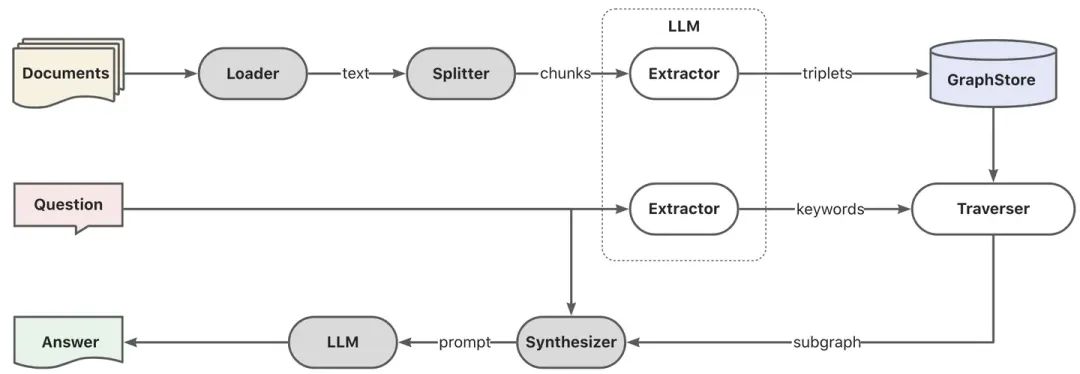
首先通过模型进行关键词抽取,这里可以通过传统的nlp技术进行分词,也可以通过大模型进行分词,然后进行关键词按照同义词做扩充,找到关键词的候选列表,最好根据关键词候选列表调用explore方法召回局部子图。
KEYWORD_EXTRACT_PT = (
    "A question is provided below. Given the question, extract up to "
    "keywords from the text. Focus on extracting the keywords that we can use "
    "to best lookup answers to the question.\n"
    "Generate as more as possible synonyms or alias of the keywords "
    "considering possible cases of capitalization, pluralization, "
    "common expressions, etc.\n"
    "Avoid stopwords.\n"
    "Provide the keywords and synonyms in comma-separated format."
    "Formatted keywords and synonyms text should be separated by a semicolon.\n"
    "---------------------\n"
    "Example:\n"
    "Text: Alice is Bob's mother.\n"
    "Keywords:\nAlice,mother,Bob;mummy\n"
    "Text: Philz is a coffee shop founded in Berkeley in 1982.\n"
    "Keywords:\nPhilz,coffee shop,Berkeley,1982;coffee bar,coffee house\n"
    "---------------------\n"
    "Text: {text}\n"
    "Keywords:\n"
)

def explore(
    self,
    subs: List[str],
    direct: Direction = Direction.BOTH,
    depth: Optional[int] = None,
    fan: Optional[int] = None,
    limit: Optional[int] = None,
) -> Graph:
    """Explore on graph."""
- DBSchemaRetriever 这部分是ChatData场景的schema-linking检索
主要是通过schema-linking方式通过二阶段相似度检索,首先先找到最相关的表,然后再最相关的字段信息。
优点:这种二阶段检索也是为了解决社区反馈的大宽表体验的问题。
def _similarity_search(
        self, query, filters: Optional[MetadataFilters] = None
    ) -> List[Chunk]:
        """Similar search."""
        table_chunks = self._table_vector_store_connector.similar_search_with_scores(
            query, self._top_k, 0, filters
        )

        not_sep_chunks = [
            chunk for chunk in table_chunks if not chunk.metadata.get("separated")
        ]
        separated_chunks = [
            chunk for chunk in table_chunks if chunk.metadata.get("separated")
        ]
        if not separated_chunks:
            return not_sep_chunks

        # Create tasks list
        tasks = [
            lambda c=chunk: self._retrieve_field(c, query) for chunk in separated_chunks
        ]
        # Run tasks concurrently
        separated_result = run_tasks(tasks, concurrency_limit=3)

        # Combine and return results
        return not_sep_chunks + separated_result
- table_vector_store_connector: 负责检索最相关的表。
- field_vector_store_connector: 负责检索最相关的字段。
如何系统学习掌握AI大模型?
AI大模型作为人工智能领域的重要技术突破,正成为推动各行各业创新和转型的关键力量。抓住AI大模型的风口,掌握AI大模型的知识和技能将变得越来越重要。
学习AI大模型是一个系统的过程,需要从基础开始,逐步深入到更高级的技术。
这里给大家精心整理了一份
全面的AI大模型学习资源,包括:AI大模型全套学习路线图(从入门到实战)、精品AI大模型学习书籍手册、视频教程、实战学习、面试题等,资料免费分享!
1. 成长路线图&学习规划
要学习一门新的技术,作为新手一定要先学习成长路线图,方向不对,努力白费。
这里,我们为新手和想要进一步提升的专业人士准备了一份详细的学习成长路线图和规划。可以说是最科学最系统的学习成长路线。

2. 大模型经典PDF书籍
书籍和学习文档资料是学习大模型过程中必不可少的,我们精选了一系列深入探讨大模型技术的书籍和学习文档,它们由领域内的顶尖专家撰写,内容全面、深入、详尽,为你学习大模型提供坚实的理论基础。(书籍含电子版PDF)

3. 大模型视频教程
对于很多自学或者没有基础的同学来说,书籍这些纯文字类的学习教材会觉得比较晦涩难以理解,因此,我们提供了丰富的大模型视频教程,以动态、形象的方式展示技术概念,帮助你更快、更轻松地掌握核心知识。

4. 2024行业报告
行业分析主要包括对不同行业的现状、趋势、问题、机会等进行系统地调研和评估,以了解哪些行业更适合引入大模型的技术和应用,以及在哪些方面可以发挥大模型的优势。

5. 大模型项目实战
学以致用 ,当你的理论知识积累到一定程度,就需要通过项目实战,在实际操作中检验和巩固你所学到的知识,同时为你找工作和职业发展打下坚实的基础。

6. 大模型面试题
面试不仅是技术的较量,更需要充分的准备。
在你已经掌握了大模型技术之后,就需要开始准备面试,我们将提供精心整理的大模型面试题库,涵盖当前面试中可能遇到的各种技术问题,让你在面试中游刃有余。

全套的AI大模型学习资源已经整理打包,有需要的小伙伴可以
微信扫描下方CSDN官方认证二维码,免费领取【保证100%免费】


欢迎加入DeepSeek 技术社区。在这里,你可以找到志同道合的朋友,共同探索AI技术的奥秘。
更多推荐


 15
15 0
0- 0


 已为社区贡献63条内容

所有评论(0)