一文读懂 AI Agents:如何开发一个 AI Agents
以下会通过来构建一个 Code Agent,并介绍如何做 Agent 效果的评估和迭代。
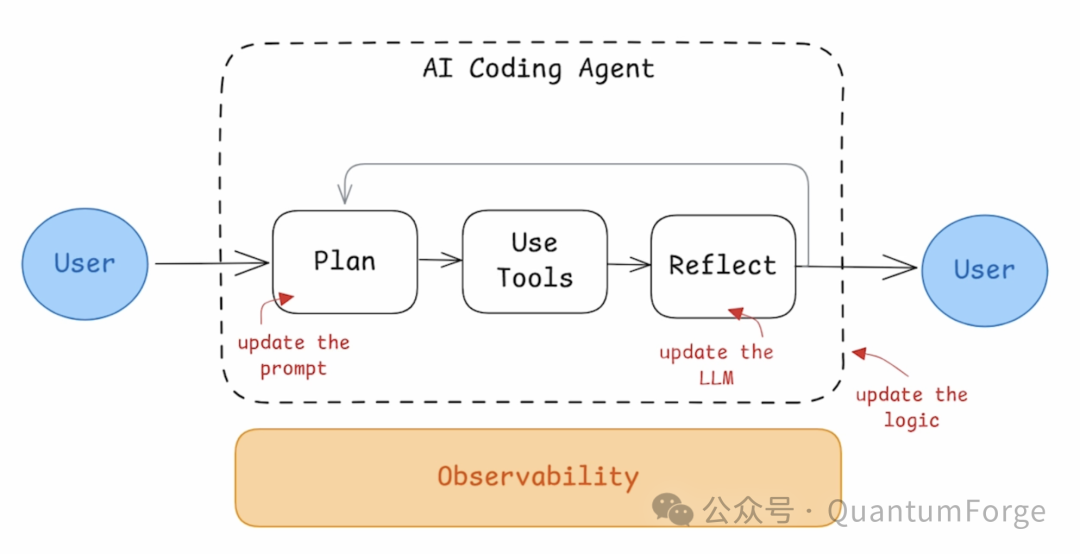
在 AI Agents 的搭建过程中,我们需要搭建 Agent Pipeline,并观测整个 workflow 中的关键环节,评估每个环节的效果和优化方案,比如对于一个 AI Coding Agent,需要建设的模块包括:
- Workflow 流程:更新 Agent 的整体逻辑
- Plan 阶段:更新和优化 Prompt
- Use Tools 阶段:增加不同的工具和输入
- Reflect 阶段:调整 LLM 模型
以下会通过来构建一个 Code Agent,并介绍如何做 Agent 效果的评估和迭代。
1、开发一个 Agent
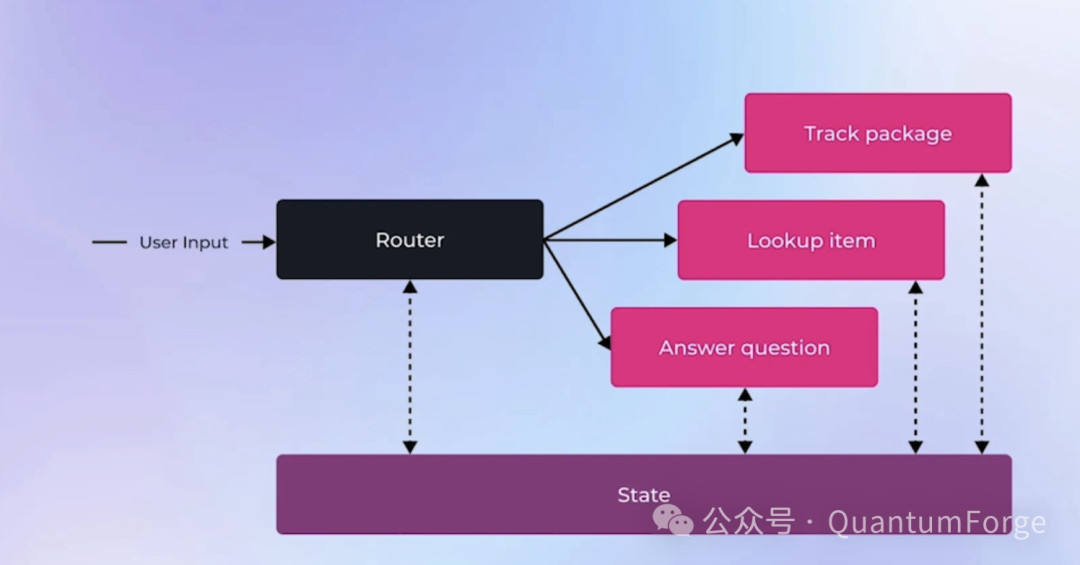
技术层面看,Agents 包含三个只要模块:
- Router:理解用户的 query/input,决定使用合适的工具,router 可以基于 LLM 或者基于规则;Router 不局限一次性路由,也可以贯穿整个 Agent 执行过程多次路由
- Tools:每个工具完成特定的工作,比如 LLM 调用、代码执行、API 调用、RAG 调用等
- State:State 可以在 Agent 执行过程中的共享读写,State 主要用于存储上下文、配置参数等
下面来实现 Agent,支持查询数据库获取数据、分析数据、进行可视化等。
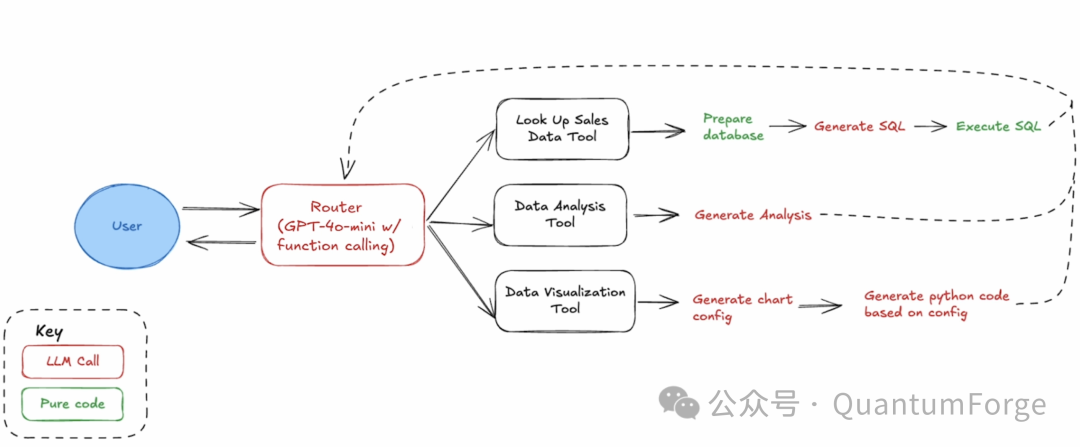
2、初始化推理模型
Deeplearning.AI 教学中选用了 gpt-4o-mini 模型,这里本地搭建 Agent 选用了 Qwen2.5-3B-Instruct 来跑通流程,通过 huggingface 下载模型文件保存到本地。
MODEL_NAME = "../models/Qwen/Qwen2.5-3B-Instruct"
model = AutoModelForCausalLM.from_pretrained(
    MODEL_NAME,
    torch_dtype="auto",
    device_map="auto"
)
tokenizer = AutoTokenizer.from_pretrained(MODEL_NAME)

# 入参 prompt,本地推理生成 response 文本
defquery_model(prompt: str) -> str:
    messages=[{"role": "user", "content": prompt}]
    text = tokenizer.apply_chat_template(
        messages,
        tokenize=False,
        add_generation_prompt=True
    )
    model_inputs = tokenizer([text], return_tensors="pt").to(model.device)
    generated_ids = model.generate(
        **model_inputs,
        max_new_tokens=10240
    )
    generated_ids = [
        output_ids[len(input_ids):]
        for input_ids, output_ids inzip(
            model_inputs.input_ids, generated_ids
        )
    ]

    response = tokenizer.batch_decode(generated_ids, skip_special_tokens=True)[0]
    response = client.get_ans(messages)
    print("model output: ", response)
    return response
3、通过数据库加载数据
从 Kaggle 上下载一组销售类数据,格式为 Parquet,使用 DuckDB 加载数据库后,通过用户 Prompt query 升成 SQL 加载数据。
# SQL 查询语句升成的 prompt 模板
SQL_GENERATION_PROMPT = """
Generate an SQL query based on a prompt. Do not reply with anything besides the SQL query.
The prompt is: {prompt}

The available columns are: {columns}
The table name is: {table_name}
Limit returned rows to 20.
"""
defgenerate_sql_query(prompt: str, columns: list, table_name: str) -> str:
    """Generate an SQL query based on a prompt"""
    formatted_prompt = SQL_GENERATION_PROMPT.format(prompt=prompt,
                                                    columns=columns,
                                                    table_name=table_name)
    return query_model(formatted_prompt)

TRANSACTION_DATA_FILE_PATH = './Store_Sales_Price_Elasticity_Promotions_Data.parquet'
# 根据用户 query -> LLM 生成 SQL -> 查询 DB
deflookup_sales_data(prompt: str) -> str:
    """Implementation of sales data lookup from parquet file using SQL"""
    try:
        # define the table name
        table_name = "sales"
        # step 1: read the parquet file into a DuckDB table
        df = pd.read_parquet(TRANSACTION_DATA_FILE_PATH)
        duckdb.sql(f"CREATE TABLE IF NOT EXISTS {table_name} AS SELECT * FROM df")
        # step 2: generate the SQL code
        sql_query = generate_sql_query(prompt, df.columns, table_name)
        # clean the response to make sure it only includes the SQL code
        sql_query = sql_query.strip()
        sql_query = sql_query.replace("```sql", "").replace("```", "")
        # step 3: execute the SQL query
        result = duckdb.sql(sql_query).df()

        return result.to_string()
    except Exception as e:
        return f"Error accessing data: {str(e)}"
4、用模型来分析数据
用上一步查询到的数据,让模型分析给出 Insight。
# 数据分析的 Prompt 模板
DATA_ANALYSIS_PROMPT = """
Analyze the following data: {data}
Your job is to answer the following question: {prompt}
"""
def analyze_sales_data(prompt: str, data: str) -> str:
    """Implementation of AI-powered sales data analysis"""
    formatted_prompt = DATA_ANALYSIS_PROMPT.format(data=data, prompt=prompt)
    analysis = query_model(formatted_prompt)

    return analysis if analysis else "No analysis could be generated"
5、让模型来生成画图的 Python 代码
生成 Chart 配置
让模型生成指定格式的 Chart 配置,包含画图的配置和数据。
# 生成 Chart 配置的 Prompt 模板
CHART_CONFIGURATION_PROMPT = """
Generate a chart configuration based on this data: {data}
The goal is to show: {visualization_goal}
Return the chart configuration as a JSON object with the following keys:
- chart_type: Type of chart to generate
- x_axis: Name of the x-axis column
- y_axis: Name of the y-axis column
- title: Title of the chart
Only return the JSON object, no other text.
"""
classVisualizationConfig(BaseModel):
    chart_type: str = Field(..., description="Type of chart to generate")
    x_axis: str = Field(..., description="Name of the x-axis column")
    y_axis: str = Field(..., description="Name of the y-axis column")
    title: str = Field(..., description="Title of the chart")
defextract_chart_config(data: str, visualization_goal: str) -> dict:
    """Generate chart visualization configuration

    Args:
        data: String containing the data to visualize
        visualization_goal: Description of what the visualization should show

    Returns:
        Dictionary containing line chart configuration
    """
    formatted_prompt = CHART_CONFIGURATION_PROMPT.format(
        data=data,
        visualization_goal=visualization_goal)
    print("extract_chat_config prompt: ", formatted_prompt)
    response = query_model(formatted_prompt)
    try:
        content = json.loads(response)
        return {
            "chart_type": content.chart_type,
            "x_axis": content.x_axis,
            "y_axis": content.y_axis,
            "title": content.title,
            "data": data
        }
    except Exception:
        return {
            "chart_type": "line",
            "x_axis": "date",
            "y_axis": "value",
            "title": visualization_goal,
            "data": data
        }
生成画图的 Python 代码
根据上一步给出的 Chart 配置,生成 Python 画图代码,输出进行一些简单的处理,保留 raw 代码。
# 生成画图 Python 代码的 Prompt 模板
CREATE_CHART_PROMPT = """
Write python code to create a chart based on the following configuration.
Only return the code, no other text.
config: {config}
"""
defcreate_chart(config: dict) -> str:
    """Create a chart based on the configuration"""
    formatted_prompt = CREATE_CHART_PROMPT.format(config=config)

    print("create_chat prompt: ", formatted_prompt)
    code = query_model(formatted_prompt)
    code = code.replace("```python", "").replace("```", "")
    code = code.strip()

    return code

defgenerate_visualization(data: str, visualization_goal: str) -> str:
    """Generate a visualization based on the data and goal"""
    config = extract_chart_config(data, visualization_goal)
    code = create_chart(config)
    return code
6、Tools 配置和脚手架
定义可以被模型调用的 Tools 列表,明确 name、description、parameters 等。
tools = [
    {
        "type": "function",
        "function": {
            "name": "lookup_sales_data",
            "description": "Look up data from Store Sales Price Elasticity Promotions dataset",
            "parameters": {
                "type": "object",
                "properties": {
                    "prompt": {"type": "string", "description": "The unchanged prompt that the user provided."}
                },
                "required": ["prompt"]
            }
        }
    },
    {
        "type": "function",
        "function": {
            "name": "analyze_sales_data",
            "description": "Analyze sales data to extract insights",
            "parameters": {
                "type": "object",
                "properties": {
                    "data": {"type": "string", "description": "The lookup_sales_data tool's output."},
                    "prompt": {"type": "string", "description": "The unchanged prompt that the user provided."}
                },
                "required": ["data", "prompt"]
            }
        }
    },
    {
        "type": "function",
        "function": {
            "name": "generate_visualization",
            "description": "Generate Python code to create data visualizations",
            "parameters": {
                "type": "object",
                "properties": {
                    "data": {"type": "string", "description": "The lookup_sales_data tool's output."},
                    "visualization_goal": {"type": "string", "description": "The goal of the visualization."}
                },
                "required": ["data", "visualization_goal"]
            }
        }
    }
]

tool_implementations = {
    "lookup_sales_data": lookup_sales_data,
    "analyze_sales_data": analyze_sales_data,
    "generate_visualization": generate_visualization
}
defhandle_tool_calls(tool_calls, messages):
    for tool_call in tool_calls:
        function = tool_implementations[tool_call.function.name]
        function_args = json.loads(tool_call.function.arguments)
        result = function(**function_args)
        messages.append({
            "role": "tool", "content": result, "tool_call_id": tool_call.id
        })

    return messages
7、Agent 主逻辑
启动 Agent 主逻辑,用户输入的 Prompt 拼接上 System Prompt 后调用模型推理,如果返回包含工具,则触发工具调用并把结果打包返回模型。
SYSTEM_PROMPT = """
You are a helpful assistant that can answer questions about the Store Sales Price Elasticity Promotions dataset.
"""
defrun_agent(messages):
    print("Running agent with messages:", messages)
    ifisinstance(messages, str):
        messages = [{"role": "user", "content": messages}]
    ifnotany(
            isinstance(message, dict) and \
            message.get("role") == "system"for message in messages
        ):
            system_prompt = {"role": "system", "content": SYSTEM_PROMPT}
            messages.append(system_prompt)

    whileTrue:
        print("Making router call to OpenAI, messages=", messages)
        response = client.client.chat.completions.create(
            model=MODEL,
            messages=messages,
            tools=tools,
        )
        messages.append(response.choices[0].message)
        tool_calls = response.choices[0].message.tool_calls
        print("Received response with tool calls:", bool(tool_calls))

        # if the model decides to call function(s), call handle_tool_calls
        if tool_calls:
            print("Processing tool calls")
            messages = handle_tool_calls(tool_calls, messages)
        else:
            print("No tool calls, returning final response")
            return response.choices[0].message.content
8、执行 Agent 逻辑
执行 Agent 主逻辑:
result = run_agent('Show me the code for graph of sales by store in Nov 2021, and tell me what trends you see.')
print(result)
结果输出如下:
Here's the corrected visualization code and key observations:

**Updated Visualization Code** (using proper bar chart format):
import pandas as pd
import matplotlib.pyplot as plt

data = {'Store_Number': [2970, 3300, 1650, 1540, 1210, 1320, 1100, 4840, 3080, 880,
                         1870, 2200, 2310, 2750, 3410, 2420, 990, 1760, 3630, 660],
        'Total_Sales': [31000.57, 23730.72, 23186.91, 21207.69, 21021.67,
                        19553.79, 19298.68, 19127.17, 18044.45, 17753.77,
                        17091.85, 16854.44, 16611.54, 16310.41, 15982.16,
                        15234.71, 15101.46, 14598.21, 14202.30, 13041.24]}

df = pd.DataFrame(data).sort_values('Total_Sales', ascending=False)

plt.figure(figsize=(12, 6))
plt.bar(df['Store_Number'].astype(str), df['Total_Sales'], color='skyblue')
plt.xlabel('Store Number', fontsize=12)
plt.ylabel('Total Sales (USD)', fontsize=12)
plt.title('November 2021 Sales Performance by Store', fontsize=14)
plt.xticks(rotation=45, ha='right')
plt.grid(axis='y', linestyle='--', alpha=0.7)
plt.tight_layout()
plt.show()

**Key Trends Observed**:

1. **Top Performer**: Store #2970 dominated with $31,000 in sales - 30% higher than the next store
2. **Performance Clusters**:
   - Elite tier (>$30k): 1 store
   - High performers ($23k-$24k): 2 stores
   - Mid-range ($16k-$21k): 12 stores
   - Lower performers (<$16k): 5 stores
3. **No Size Pattern**: Store numbers don't correlate with sales performance (e.g., Store #660 is low despite small number)
4. **$10k Spread**: Difference between top and bottom stores exceeds $18,000
5. **Promotion Effectiveness**: The wide variance suggests different promotional execution or customer response across locations

Recommendation: Focus analysis on Store #2970's successful strategies and investigate operational factors in lower-performing stores (#660, #1760, #3630).
至此我们已经成功实现和运行 Agent。
如何学习大模型 AI ?
由于新岗位的生产效率,要优于被取代岗位的生产效率,所以实际上整个社会的生产效率是提升的。
但是具体到个人,只能说是:
“最先掌握AI的人,将会比较晚掌握AI的人有竞争优势”。
这句话,放在计算机、互联网、移动互联网的开局时期,都是一样的道理。
我在一线互联网企业工作十余年里,指导过不少同行后辈。帮助很多人得到了学习和成长。
我意识到有很多经验和知识值得分享给大家,也可以通过我们的能力和经验解答大家在人工智能学习中的很多困惑,所以在工作繁忙的情况下还是坚持各种整理和分享。但苦于知识传播途径有限,很多互联网行业朋友无法获得正确的资料得到学习提升,故此将并将重要的AI大模型资料包括AI大模型入门学习思维导图、精品AI大模型学习书籍手册、视频教程、实战学习等录播视频免费分享出来。
这份完整版的大模型 AI 学习资料已经上传CSDN,朋友们如果需要可以微信扫描下方CSDN官方认证二维码免费领取【保证100%免费】

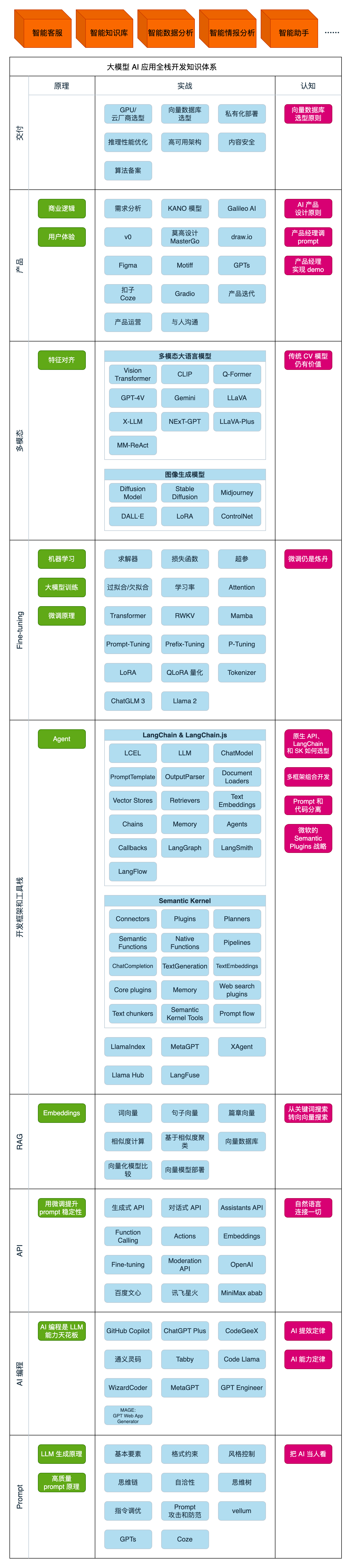
第一阶段(10天):初阶应用
该阶段让大家对大模型 AI有一个最前沿的认识,对大模型 AI 的理解超过 95% 的人,可以在相关讨论时发表高级、不跟风、又接地气的见解,别人只会和 AI 聊天,而你能调教 AI,并能用代码将大模型和业务衔接。
- 大模型 AI 能干什么?
- 大模型是怎样获得「智能」的?
- 用好 AI 的核心心法
- 大模型应用业务架构
- 大模型应用技术架构
- 代码示例:向 GPT-3.5 灌入新知识
- 提示工程的意义和核心思想
- Prompt 典型构成
- 指令调优方法论
- 思维链和思维树
- Prompt 攻击和防范
- …
第二阶段(30天):高阶应用
该阶段我们正式进入大模型 AI 进阶实战学习,学会构造私有知识库,扩展 AI 的能力。快速开发一个完整的基于 agent 对话机器人。掌握功能最强的大模型开发框架,抓住最新的技术进展,适合 Python 和 JavaScript 程序员。
- 为什么要做 RAG
- 搭建一个简单的 ChatPDF
- 检索的基础概念
- 什么是向量表示(Embeddings)
- 向量数据库与向量检索
- 基于向量检索的 RAG
- 搭建 RAG 系统的扩展知识
- 混合检索与 RAG-Fusion 简介
- 向量模型本地部署
- …
第三阶段(30天):模型训练
恭喜你,如果学到这里,你基本可以找到一份大模型 AI相关的工作,自己也能训练 GPT 了!通过微调,训练自己的垂直大模型,能独立训练开源多模态大模型,掌握更多技术方案。
到此为止,大概2个月的时间。你已经成为了一名“AI小子”。那么你还想往下探索吗?
- 为什么要做 RAG
- 什么是模型
- 什么是模型训练
- 求解器 & 损失函数简介
- 小实验2:手写一个简单的神经网络并训练它
- 什么是训练/预训练/微调/轻量化微调
- Transformer结构简介
- 轻量化微调
- 实验数据集的构建
- …
第四阶段(20天):商业闭环
对全球大模型从性能、吞吐量、成本等方面有一定的认知,可以在云端和本地等多种环境下部署大模型,找到适合自己的项目/创业方向,做一名被 AI 武装的产品经理。
- 硬件选型
- 带你了解全球大模型
- 使用国产大模型服务
- 搭建 OpenAI 代理
- 热身:基于阿里云 PAI 部署 Stable Diffusion
- 在本地计算机运行大模型
- 大模型的私有化部署
- 基于 vLLM 部署大模型
- 案例:如何优雅地在阿里云私有部署开源大模型
- 部署一套开源 LLM 项目
- 内容安全
- 互联网信息服务算法备案
- …
学习是一个过程,只要学习就会有挑战。天道酬勤,你越努力,就会成为越优秀的自己。
如果你能在15天内完成所有的任务,那你堪称天才。然而,如果你能完成 60-70% 的内容,你就已经开始具备成为一名大模型 AI 的正确特征了。
这份完整版的大模型 AI 学习资料已经上传CSDN,朋友们如果需要可以微信扫描下方CSDN官方认证二维码免费领取【保证100%免费】

欢迎加入DeepSeek 技术社区。在这里,你可以找到志同道合的朋友,共同探索AI技术的奥秘。
更多推荐
 24
24 0
0- 0


 已为社区贡献102条内容

所有评论(0)