大模型学习——qwen-agent智能体安装问题
但是在安装过程中可能会遇到一些问题:1.由于,导致pip无法处理超长路径的某些文件,常见于组件。然后尝试解决:按下Win + R,输入gpedit.msc打开依次进入:计算机配置→管理模板→系统→文件系统找到并双击设置为“”,点击“确定”重启电脑后重新安装:但是在输入按照上面的方案解决之后又弹出问题,且关闭不了这个弹窗,不得已重启电脑:接着找这个问题的解决方案:这个问题是指系统缺失了某些“本地组策
在使用Qwen本地大模型构建智能体时需要导入qwen_agent包,官方给的简单安装方法为:
pip install -U "qwen-agent[gui,rag,code_interpreter,mcp]"但是在安装过程中可能会遇到一些问题:
1.由于 Windows 没有开启长路径支持,导致 pip 无法处理超长路径的某些文件,常见于 modelscope_studio 组件。
Attempting uninstall: gradio Found existing installation: gradio 5.17.1 Uninstalling gradio-5.17.1: Successfully uninstalled gradio-5.17.1 WARNING: The scripts gradio.exe and upload_theme.exe are installed in 'C:\Users\16348\AppData\Local\Packages\PythonSoftwareFoundation.Python.3.12_qbz5n2kfra8p0\LocalCache\local-packages\Python312\Scripts' which is not on PATH. Consider adding this directory to PATH or, if you prefer to suppress this warning, use --no-warn-script-location. WARNING: The script jupyter-execute.exe is installed in 'C:\Users\16348\AppData\Local\Packages\PythonSoftwareFoundation.Python.3.12_qbz5n2kfra8p0\LocalCache\local-packages\Python312\Scripts' which is not on PATH. Consider adding this directory to PATH or, if you prefer to suppress this warning, use --no-warn-script-location. ERROR: Could not install packages due to an OSError: [Errno 2] No such file or directory: 'C:\\Users\\16348\\AppData\\Local\\Packages\\PythonSoftwareFoundation.Python.3.12_qbz5n2kfra8p0\\LocalCache\\local-packages\\Python312\\site-packages\\modelscope_studio\\components\\antd\\table\\row_selection\\selection\\templates\\component\\table.row-selection.selection-nLtL7rEC.js' HINT: This error might have occurred since this system does not have Windows Long Path support enabled. You can find information on how to enable this at https://pip.pypa.io/warnings/enable-long-paths [notice] A new release of pip is available: 25.0.1 -> 25.1.1 [notice] To update, run: C:\Users\16348\AppData\Local\Microsoft\WindowsApps\PythonSoftwareFoundation.Python.3.12_qbz5n2kfra8p0\python.exe -m pip install --upgrade pip PS D:\Study\LLM\MCP_test>
然后尝试解决:
-
按下
Win + R,输入gpedit.msc打开本地组策略编辑器 -
依次进入:
计算机配置→管理模板→系统→文件系统 -
找到并双击 “启用 Win32 长路径”
-
设置为“已启用”,点击“确定”
-
重启电脑后重新安装:
但是在输入gpedit.msc显示没有,于是又去搜解决方案
win10家庭版找不到gpedit.msc的解决办法(亲测有效)_gpedit.msc找不到文件-CSDN博客
按照上面的方案解决之后又弹出问题,且关闭不了这个弹窗,不得已重启电脑:
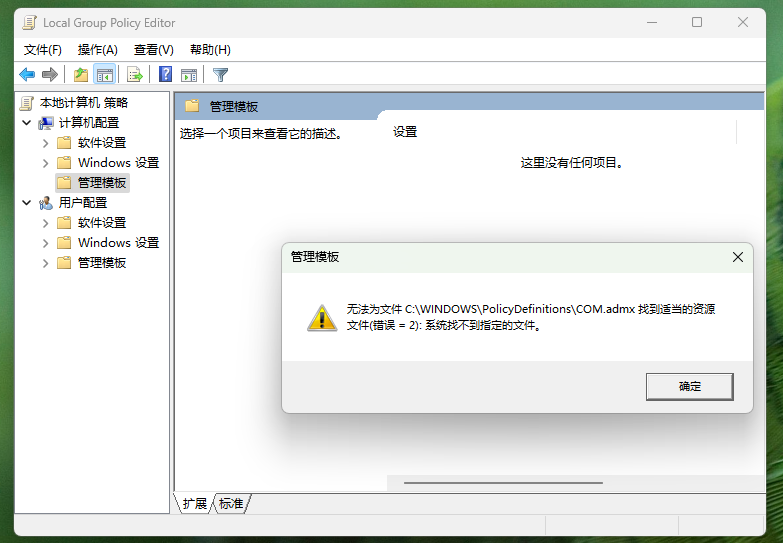
接着找这个问题的解决方案:
这个问题是指系统缺失了某些“本地组策略模板文件(*.admx)”,通常出现在部分 家庭版(Home)Windows 中。
解决方案:
1. 打开注册表编辑器
按下 Win + R,输入:regedit 回车
2. 路径定位到:
HKEY_LOCAL_MACHINE\SYSTEM\CurrentControlSet\Control\FileSystem3. 找到名为:LongPathsEnabled 的键
-
如果没有该键 → 右键空白处 → 新建
DWORD (32 位)值,命名为:LongPathsEnabled -
双击打开 → 将“数值数据”改为
1 -
点击“确定”,关闭注册表,重启电脑即可
之后继续输入gpedit.msc,虽然还是会显示上面问题,但是去安装qwen-agent包却是神奇的可以了,然后就可以愉快的进行智能体构建了。
上面是我在安装过程中遇到的一些问题汇总,仅供参考。

欢迎加入DeepSeek 技术社区。在这里,你可以找到志同道合的朋友,共同探索AI技术的奥秘。
更多推荐


 18
18 0
0- 0


 已为社区贡献1条内容

所有评论(0)