LLamaIndex极简快速入门
简单来说,LLamaIndex 是一个用于 LLM 应用程序的数据框架,用于注入,结构化,并访问私有或特定领域数据。Data Connectors:以一种统一的标准解析各种类型的数据Data Indexes:负责处理文本转向量、存入向量数据库、构建索引Data Agents:在一些较为复杂的逻辑场景中,负责使用 Agents 来调用大模型Engines:加载大模型 Query(单轮) Chat(多
·
目录
今天来介绍一下 LLamaIndex
1.什么是 LLamaIndex
简单来说,LLamaIndex 是一个用于 LLM 应用程序的数据框架,用于注入,结构化,并访问私有或特定领域数据。
2.LLamaIndex的框架各部分组件介绍
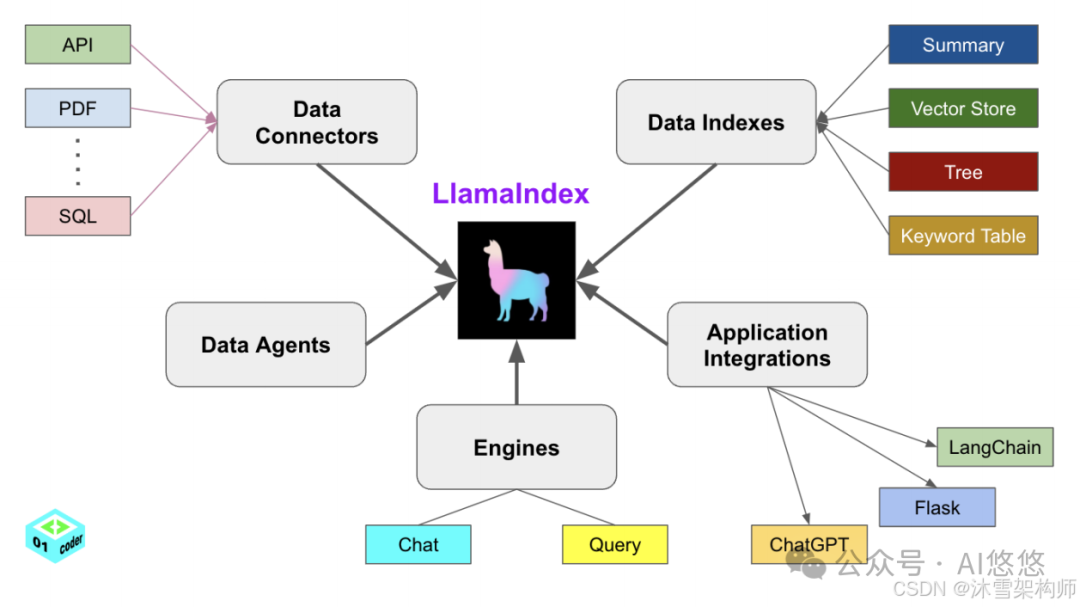
框架共由五个组件组成:
-
- Data Connectors:以一种统一的标准解析各种类型的数据
- Data Indexes:负责处理文本转向量、存入向量数据库、构建索引
- Data Agents:在一些较为复杂的逻辑场景中,负责使用 Agents 来调用大模型
- Engines:加载大模型 Query(单轮) Chat(多轮)
- Application Intergations:调用外部 api 接口作为 LLamaIndex 的辅助插件
-
3.安装
-
conda create -n llamaindex python==3.12 -y
source activate llamaindex
pip install llama-index
pip install llama-index-llms-huggingface
4.LLamaIndex的简单使用
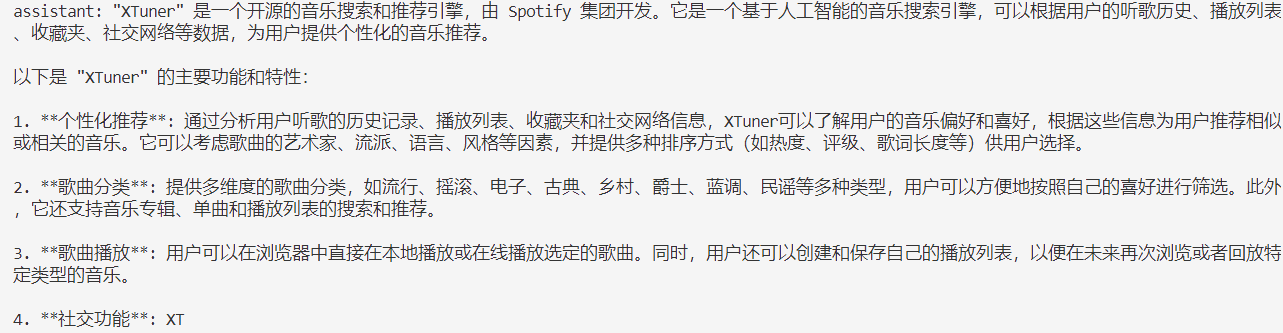
- 使用 Qwen1.5-1.8B-Chat 作为实验模型,在做文档检索之前,我们先对模型进行提问:“什么是Xtuner?”。由于这个模型并未经过相关数据的训练,所以它必然是不知道的。模型的回答如下:
- 我们提供了一个Xtuner相关的文档,并使用下方的代码,建立了一个简单的查询索引
-
# LLamaIndex测试
from llama_index.embeddings.huggingface import HuggingFaceEmbedding
from llama_index.core import Settings, SimpleDirectoryReader, VectorStoreIndex
from llama_index.llms.huggingface import HuggingFaceLLM

# 初始化一个 HuggingFaceEmbedding 对象,用于将文本转换为向量表示
embed_model = HuggingFaceEmbedding(
    # 指定了一个预训练的 sentence-transformer 模型的路径
    model_name = "/root/autodl-tmp/models/paraphrase-multilingual-MiniLM-L12-v2"
)

# 将创建的嵌入模型赋值给全局设置的 embed_model 属性,这样在后续的索引构建过程中,就会使用这个模型
Settings.embed_model = embed_model

# 使用 HuggingFaceLLM 加载本地大模型
llm = HuggingFaceLLM(
    model_name="/root/autodl-tmp/models/Qwen1.5-1.8B-Chat",
    tokenizer_name="/root/autodl-tmp/models/Qwen1.5-1.8B-Chat",
    model_kwargs={"trust_remote_code": True},
    tokenizer_kwargs={"trust_remote_code": True}
)

# 设置全局的 llm 属性,这样在索引查询时会使用这个模型
Settings.llm = llm

# 从指定的文件目录读取文档,将数据加载到内存
documents = SimpleDirectoryReader("/autodl-tmp/project/llamaindex/data").load_data()
# print(documents)
# 创建一个 VectorStoreIndex,并使用之前在家的文档来构建向量索引
# 此索引将文档转换为向量,并存储这些向量(内存)以便于快速检索
index = VectorStoreIndex.from_documents(documents)
# 创建一个查询引擎,这个引擎可以接收查询并返回相关文档的相应
query_engine = index.as_query_engine()
rsp = query_engine.query("Xtuner是什么?")
print(rsp)
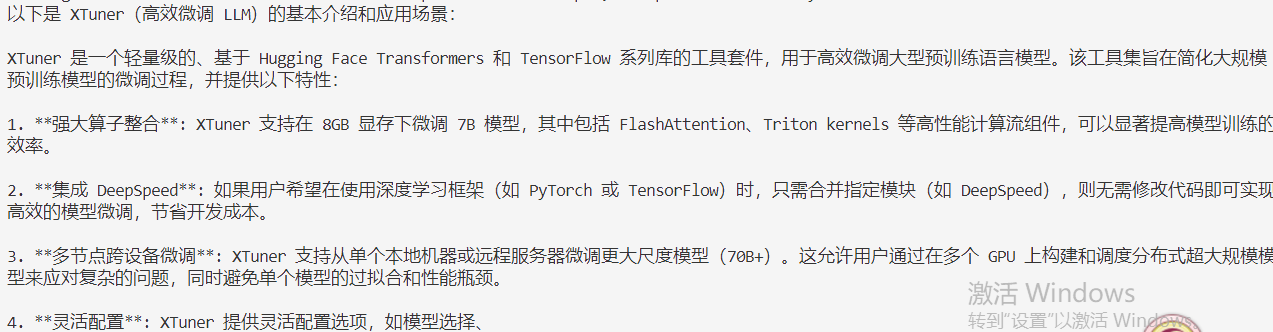
之后,我们在代码中同样问它:“Xtuner是什么?”。它的回答如下:
-
-
一个使用 LLamaIndex 构建的简单文档检索便成功了。
-
-
- 我们提供了一个Xtuner相关的文档,并使用下方的代码,建立了一个简单的查询索引

欢迎加入DeepSeek 技术社区。在这里,你可以找到志同道合的朋友,共同探索AI技术的奥秘。
更多推荐


 8
8 0
0- 0


 已为社区贡献1条内容

所有评论(0)