【语音结合大模型LLM控制IoT设备全流程解析】虾哥小智AI机器人
ESP32端任务完成硬件初始化与音频处理生成并上报设备能力描述实现语音采集及Opus编码基于WebSocket协议进行通信执行IoT控制指令后端服务器任务通过ASR技术将语音转为文字与AI大模型(如LLM)交互解析语义生成并下发IoT控制指令通过TTS技术合成语音反馈关键映射逻辑ESP32启动时向服务器上报设备能力(如支持的传感器、执行器等)服务器将设备能力作为上下文(Context)传递给AI大
前端代码(开发板子):github虾哥开源项目
后端代码:github小智ESP32后端服务
当前讲解版本代码:云盘(也可按当前时间2025.06.04到github下载对应版本)
感谢大佬开源,膜拜大佬~
🎯 核心工作原理
这个系统的核心是通过AI大模型作为"智能翻译器",将用户的自然语音转换为精确的设备控制指令。整个过程分为以下几个关键步骤:
📡 第一步:设备能力描述上报与后端处理
当ESP32启动时,会将所有能控制IoT设备的能力描述发送给服务器:
📁 文件位置::xiaozhi-esp32-main/main/protocols/protocol.cc
void Protocol::SendIotDescriptors(const std::string& descriptors) {
    cJSON* root = cJSON_Parse(descriptors.c_str());
    if (root == nullptr) {
        ESP_LOGE(TAG, "Failed to parse IoT descriptors: %s", descriptors.c_str());
        return;
    }

    if (!cJSON_IsArray(root)) {
        ESP_LOGE(TAG, "IoT descriptors should be an array");
        cJSON_Delete(root);
        return;
    }

    int arraySize = cJSON_GetArraySize(root);
    for (int i = 0; i < arraySize; ++i) {
        cJSON* descriptor = cJSON_GetArrayItem(root, i);
        if (descriptor == nullptr) {
            ESP_LOGE(TAG, "Failed to get IoT descriptor at index %d", i);
            continue;
        }

        cJSON* messageRoot = cJSON_CreateObject();
        cJSON_AddStringToObject(messageRoot, "session_id", session_id_.c_str());
        cJSON_AddStringToObject(messageRoot, "type", "iot");
        cJSON_AddBoolToObject(messageRoot, "update", true);

        cJSON* descriptorArray = cJSON_CreateArray();
        cJSON_AddItemToArray(descriptorArray, cJSON_Duplicate(descriptor, 1));
        cJSON_AddItemToObject(messageRoot, "descriptors", descriptorArray);

        char* message = cJSON_PrintUnformatted(messageRoot);
        if (message == nullptr) {
            ESP_LOGE(TAG, "Failed to print JSON message for IoT descriptor at index %d", i);
            cJSON_Delete(messageRoot);
            continue;
        }

        SendText(std::string(message));
        cJSON_free(message);
        cJSON_Delete(messageRoot);
    }

    cJSON_Delete(root);
}
发送给AI的设备描述示例:
{
  "session_id": "xxx",
  "type": "iot",
  "update": true,
  "descriptors": [{
    "name": "SmartFan",
    "description": "一个智能风扇,支持调速和多种模式",
    "properties": {
      "power": {"description": "风扇是否开启", "type": "boolean"},
      "speed": {"description": "当前风扇速度(0-100)", "type": "number"},
      "mode": {"description": "当前工作模式", "type": "string"}
    },
    "methods": {
      "turn_on": {"description": "开启风扇", "parameters": {}},
      "set_speed": {
        "description": "设置风扇速度",
        "parameters": {
          "speed": {"description": "风扇速度,0-100之间的整数", "type": "number"}
        }
      }
    }
  }]
}
后端接收IoT设备能力描述代码
📁 文件位置:
xiaozhi-esp32-server-main/main/xiaozhi-server/core/handle/textHandle.py
# 处理IoT消息
elif msg_json["type"] == "iot":
    conn.logger.bind(tag=TAG).info(f"收到iot消息:{message}")
    if "descriptors" in msg_json:
        # 异步处理设备能力描述
        asyncio.create_task(handleIotDescriptors(conn, msg_json["descriptors"]))
    if "states" in msg_json:
        # 异步处理设备状态更新
        asyncio.create_task(handleIotStatus(conn, msg_json["states"]))
后端处理设备能力描述代码
async def handleIotDescriptors(conn, descriptors):
    """处理物联网描述"""
    functions_changed = False

    for descriptor in descriptors:
        # 如果descriptor没有properties和methods,则直接跳过
        if "properties" not in descriptor and "methods" not in descriptor:
            continue

        # 创建IOT设备描述符
        iot_descriptor = IotDescriptor(
            descriptor["name"],
            descriptor["description"],
            descriptor["properties"],
            descriptor["methods"],
        )
        conn.iot_descriptors[descriptor["name"]] = iot_descriptor

        if conn.load_function_plugin:
            # 注册或获取设备类型
            device_type_registry = conn.func_handler.device_type_registry
            type_id = register_device_type(descriptor, device_type_registry)
            device_functions = device_type_registry.get_device_functions(type_id)

            # 在连接级注册设备函数
            if hasattr(conn, "func_handler"):
                for func_name, func_item in device_functions.items():
                    conn.func_handler.function_registry.register_function(
                        func_name, func_item
                    )
                    conn.logger.bind(tag=TAG).info(
                        f"注册IOT函数到function handler: {func_name}"
                    )
                    functions_changed = True

    # 如果注册了新函数,更新function描述列表
    if functions_changed and hasattr(conn, "func_handler"):
        conn.func_handler.upload_functions_desc()
        func_names = conn.func_handler.current_support_functions()
        conn.logger.bind(tag=TAG).info(
            f"更新function描述列表完成,当前支持的函数: {func_names}"
        )
🎤 第二步:用户语音输入与识别
用户说话:“小智,把风扇调到80%” → 语音识别(ASR) → 文本:“把风扇调到80%”
📁 文件位置: xiaozhi-esp32-main/main/application.cc
// 音频处理器初始化和音频采集
audio_processor_->Initialize(codec);
audio_processor_->OnOutput([this](std::vector<int16_t>&& data) {
    // 在后台任务中处理音频编码
    background_task_->Schedule([this, data = std::move(data)]() mutable {
        // 使用Opus编码器编码PCM音频数据
        opus_encoder_->Encode(std::move(data), [this](std::vector<uint8_t>&& opus) {
            AudioStreamPacket packet;
            packet.payload = std::move(opus);

            #ifdef CONFIG_USE_SERVER_AEC
            {
                std::lock_guard<std::mutex> lock(timestamp_mutex_);
                if (!timestamp_queue_.empty()) {
                    packet.timestamp = timestamp_queue_.front();
                    timestamp_queue_.pop_front();
                } else {
                    packet.timestamp = 0;
                }
            }
            #endif

            // 将编码后的音频包加入发送队列
            std::lock_guard<std::mutex> lock(mutex_);
            if (audio_send_queue_.size() >= MAX_AUDIO_PACKETS_IN_QUEUE) {
                ESP_LOGW(TAG, "Too many audio packets in queue, drop the oldest packet");
                audio_send_queue_.pop_front();
            }
            audio_send_queue_.emplace_back(std::move(packet));
            xEventGroupSetBits(event_group_, SEND_AUDIO_EVENT); // 触发发送事件
        });
    });
});
⚡第三步:语音WebSocket发送代码与后端处理
📁 文件位置: xiaozhi-esp32-main/main/protocols/websocket_protocol.cc
bool WebsocketProtocol::SendAudio(const AudioStreamPacket& packet) {
    if (websocket_ == nullptr) {
        return false;
    }

    if (version_ == 3) {
        // 协议版本3的二进制格式
        std::string serialized;
        serialized.resize(sizeof(BinaryProtocol3) + packet.payload.size());
        auto bp3 = (BinaryProtocol3*)serialized.data();
        bp3->type = 0;
        bp3->reserved = 0;
        bp3->payload_size = htons(packet.payload.size());
        memcpy(bp3->payload, packet.payload.data(), packet.payload.size());

        // 通过WebSocket发送二进制数据
        return websocket_->Send(serialized.data(), serialized.size(), true);
    } else {
        // 简单版本直接发送Opus数据
        return websocket_->Send(packet.payload.data(), packet.payload.size(), true);
    }
}
后端语音转文字(ASR)处理代码
📁 文件位置:
xiaozhi-esp32-server-main/main/xiaozhi-server/core/handle/receiveAudioHandle.py
async def handleAudioMessage(conn, audio):
    if conn.vad is None:
        return
    if conn.asr is None or not hasattr(conn.asr, "conn") or conn.asr.conn is None:
        return

    # 当前片段是否有人说话
    have_voice = conn.vad.is_vad(conn, audio)
    if have_voice:
        if conn.client_is_speaking:
            await handleAbortMessage(conn)

    # 设备长时间空闲检测,用于say goodbye
    await no_voice_close_connect(conn, have_voice)
    # 接收音频进行ASR处理
    await conn.asr.receive_audio(audio, have_voice)

async def startToChat(conn, text):
    # 首先进行意图分析
    intent_handled = await handle_user_intent(conn, text)

    if intent_handled:
        # 如果意图已被处理,不再进行聊天
        return

    # 意图未被处理,继续常规聊天流程
    await send_stt_message(conn, text)  # 发送STT结果给ESP32
    conn.executor.submit(conn.chat, text)  # 提交给LLM处理
🧠 第四步:后端发送给LLM(大语言模型)与指令发送
📁 文件位置:
xiaozhi-esp32-server-main/main/xiaozhi-server/core/connection.py
def chat(self, query, tool_call=False):
    self.logger.bind(tag=TAG).info(f"大模型收到用户消息: {query}")
    self.llm_finish_task = False

    if not tool_call:
        self.dialogue.put(Message(role="user", content=query))

    # 定义可用的IoT控制函数
    functions = None
    if self.intent_type == "function_call" and hasattr(self, "func_handler"):
        # 获取所有已注册的IoT控制函数
        functions = self.func_handler.get_functions()

    # 添加MCP工具支持
    if hasattr(self, "mcp_client"):
        mcp_tools = self.mcp_client.get_available_tools()
        if mcp_tools is not None and len(mcp_tools) > 0:
            if functions is None:
                functions = []
            functions.extend(mcp_tools)

    try:
        # 使用记忆功能
        memory_str = None
        if self.memory is not None:
            future = asyncio.run_coroutine_threadsafe(
                self.memory.query_memory(query), self.loop
            )
            memory_str = future.result()

        uuid_str = str(uuid.uuid4()).replace("-", "")
        self.sentence_id = uuid_str

        if functions is not None:
            # 使用支持functions的streaming接口,发送给LLM的格式:
            # {
            #   "messages": [对话历史],
            #   "functions": [
            #     {
            #       "type": "function",
            #       "function": {
            #         "name": "lamp_turn_on",
            #         "description": "智能灯 - 打开灯",
            #         "parameters": {
            #           "type": "object",
            #           "properties": {
            #             "response_success": {"type": "string", "description": "操作成功时的友好回复"},
            #             "response_failure": {"type": "string", "description": "操作失败时的友好回复"}
            #           },
            #           "required": ["response_success", "response_failure"]
            #         }
            #       }
            #     }
            #   ]
            # }
            llm_responses = self.llm.response_with_functions(
                self.session_id,
                self.dialogue.get_llm_dialogue_with_memory(memory_str),
                functions=functions,
            )
        else:
            # 普通对话模式
            llm_responses = self.llm.response(
                self.session_id,
                self.dialogue.get_llm_dialogue_with_memory(memory_str),
            )
    except Exception as e:
        self.logger.bind(tag=TAG).error(f"LLM 处理出错 {query}: {e}")
        return None

    # 处理LLM的流式响应...
后端WebSocket发送IoT指令给前端板子代码
📁 文件位置:
xiaozhi-esp32-server-main/main/xiaozhi-server/core/handle/iotHandle.py
async def send_iot_conn(conn, name, method_name, parameters):
    """发送物联网指令"""
    for key, value in conn.iot_descriptors.items():
        if key == name:
            # 找到了设备
            for method in value.methods:
                # 找到了方法
                if method["name"] == method_name:
                    # 构建命令对象
                    command = {
                        "name": name,
                        "method": method_name,
                    }

                    # 只有当参数不为空时才添加parameters字段
                    if parameters:
                        command["parameters"] = parameters

                    # 发送JSON格式的IoT控制指令
                    send_message = json.dumps({"type": "iot", "commands": [command]})
                    await conn.websocket.send(send_message)
                    conn.logger.bind(tag=TAG).info(f"发送物联网指令: {send_message}")
                    return
    conn.logger.bind(tag=TAG).error(f"未找到方法{method_name}")

# IoT控制函数的具体实现
def create_iot_function(device_name, method_name, method_info):
    """根据IOT设备描述生成通用的控制函数"""

    async def iot_control_function(
        conn, response_success=None, response_failure=None, **params
    ):
        try:
            # 设置默认响应消息
            if not response_success:
                response_success = "操作成功"
            if not response_failure:
                response_failure = "操作失败"

            # 发送控制命令到ESP32
            await send_iot_conn(conn, device_name, method_name, params)
            # 等待一小段时间让状态更新
            await asyncio.sleep(0.1)

            # 生成结果信息
            result = f"{device_name}的{method_name}操作执行成功"

            # 处理响应中可能的占位符
            response = response_success
            # 替换{value}占位符
            for param_name, param_value in params.items():
                if "{" + param_name + "}" in response:
                    response = response.replace(
                        "{" + param_name + "}", str(param_value)
                    )
                if "{value}" in response:
                    response = response.replace("{value}", str(param_value))
                    break

            return ActionResponse(Action.RESPONSE, result, response)
        except Exception as e:
            conn.logger.bind(tag=TAG).error(
                f"执行{device_name}的{method_name}操作失败: {e}"
            )
            response = response_failure
            return ActionResponse(Action.ERROR, str(e), response)

    return wrap_async_function(iot_control_function)
🔧 第五步:ESP32执行指令
ESP32接收到指令后,通过Thing类的Invoke方法执行:
📁 文件位置: xiaozhi-esp32-main/main/iot/thing.cc
void Thing::Invoke(const cJSON* command) {
    auto method_name = cJSON_GetObjectItem(command, "method");
    auto input_params = cJSON_GetObjectItem(command, "parameters");

    try {
        auto& method = methods_[method_name->valuestring];
        for (auto& param : method.parameters()) {
            auto input_param = cJSON_GetObjectItem(input_params, param.name().c_str());
            if (param.required() && input_param == nullptr) {
                throw std::runtime_error("Parameter " + param.name() + " is required");
            }
            if (param.type() == kValueTypeNumber) {
                if (cJSON_IsNumber(input_param)) {
                    param.set_number(input_param->valueint);
                }
            } else if (param.type() == kValueTypeString) {
                if (cJSON_IsString(input_param) || cJSON_IsObject(input_param) || cJSON_IsArray(input_param)) {
                    std::string value_str = input_param->valuestring;
                    param.set_string(value_str);
                }
            } else if (param.type() == kValueTypeBoolean) {
                if (cJSON_IsBool(input_param)) {
                    param.set_boolean(input_param->valueint == 1);
                }
            }
        }

        Application::GetInstance().Schedule([&method]() {
            method.Invoke();
        });
    } catch (const std::runtime_error& e) {
        ESP_LOGE(TAG, "Method not found: %s", method_name->valuestring);
        return;
    }
}
🔄 第六步:状态同步反馈
执行完成后,ESP32会同步设备状态变化:
📁 文件位置: xiaozhi-esp32-main/main/application.cc
void Application::UpdateIotStates() {
#if CONFIG_IOT_PROTOCOL_XIAOZHI
    auto& thing_manager = iot::ThingManager::GetInstance();
    std::string states;
    if (thing_manager.GetStatesJson(states, true)) {
        protocol_->SendIotStates(states);
    }
#endif
}
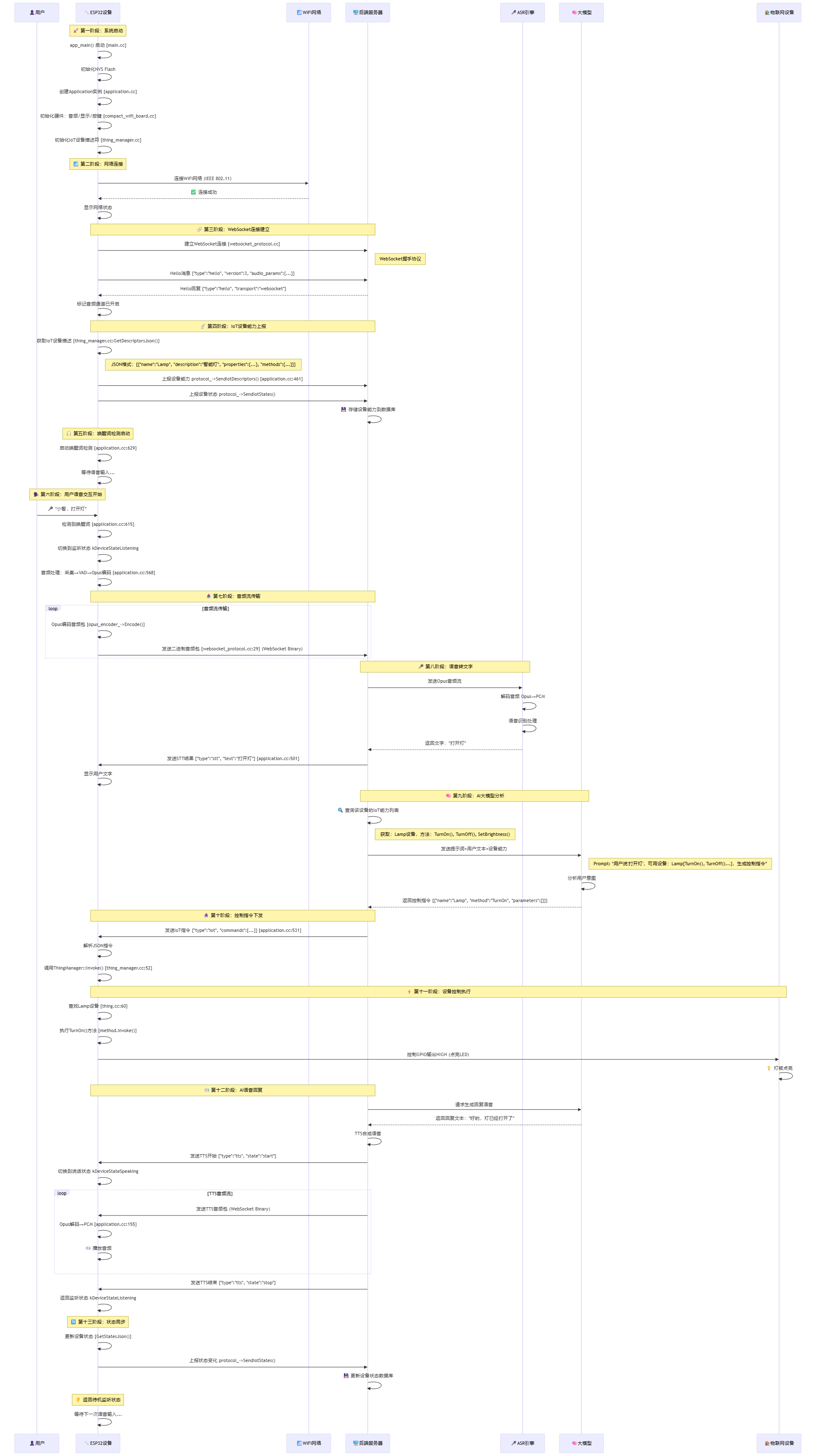
📊 完整时序图
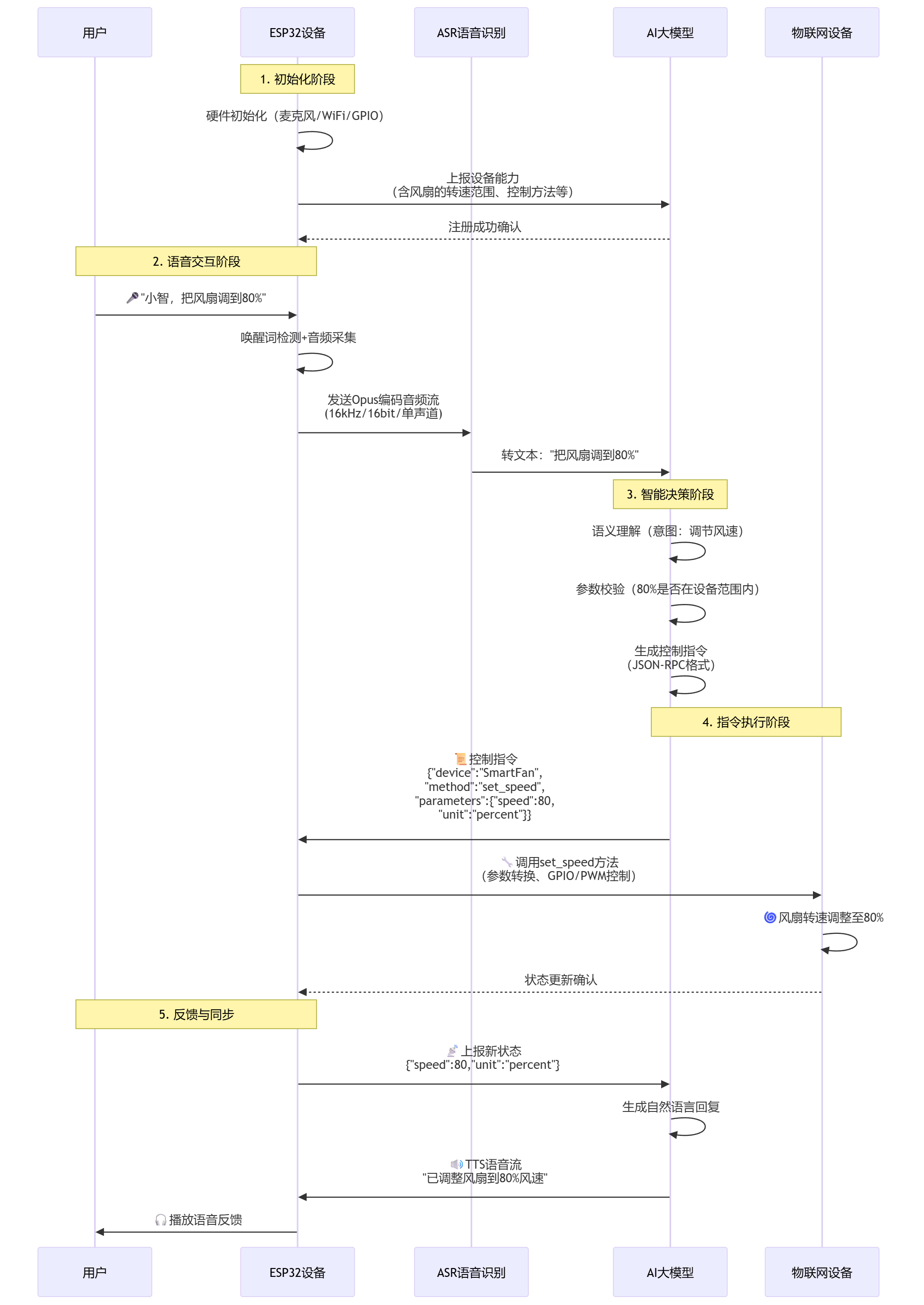
📊 更详细的时序图
ESP32语音对讲机器人全流程总结
一、核心工作机制
-
ESP32端任务
- 完成硬件初始化与音频处理
- 生成并上报设备能力描述
- 实现语音采集及Opus编码
- 基于WebSocket协议进行通信
- 执行IoT控制指令
-
后端服务器任务
- 通过ASR技术将语音转为文字
- 与AI大模型(如LLM)交互解析语义
- 生成并下发IoT控制指令
- 通过TTS技术合成语音反馈
-
关键映射逻辑
- ESP32启动时向服务器上报设备能力(如支持的传感器、执行器等)
- 服务器将设备能力作为上下文(Context)传递给AI大模型
- 大模型结合用户语音指令与设备能力,生成精准控制指令
- 采用WebSocket JSON协议(非传统MQTT)传输指令
二、技术协议栈
- 物理层:基于WiFi 802.11无线通信
- 传输层:WebSocket协议(遵循RFC 6455标准)
- 音频编码:Opus格式(采样率16kHz,20ms帧长)
- 控制协议:JSON-RPC风格的IoT指令格式
三、自定义功能扩展方法
若需添加新的IoT控制指令,步骤如下:
- 创建设备类:在代码目录
main/iot/things/下定义新设备类 - 注册设备:在
compact_wifi_board.cc文件的InitializeIot()函数中注册新设备 - 更新编译配置:在
CMakeLists.txt中添加新设备类的源文件路径
系统优势:通过JSON描述符实现设备能力的自动发现与AI智能映射,无需手动配置复杂逻辑,开发者仅需关注具体设备控制代码,大幅提升开发效率,是当前先进的语音驱动IoT架构方案。
核心架构:
- ESP32端:承担硬件控制、音频处理以及设备能力上报的工作。
- 后端服务器:负责自动语音识别(ASR)、大语言模型(LLM)分析,同时生成并下发物联网(IoT)指令。
- 智能映射:借助函数调用(Function Calling)机制,实现自然语言到精确控制指令的转换。
整个系统通过WebSocket进行实时通信,既支持音频流传输,也支持JSON控制指令,是一套先进的语音控制物联网解决方案!
🛠️ 自定义IoT控制设备修改指南
1. 创建自定义设备类
创建设备类
📁 文件位置: xiaozhi-esp32-main/main/iot/things/smart_air_conditioner.cc
#include "iot/thing.h"
#include "board.h"
#include <driver/gpio.h>
#include <driver/ledc.h>
#include <esp_log.h>

#define TAG "SmartAirConditioner"

namespace iot {

class SmartAirConditioner : public Thing {
private:
    // 硬件引脚定义
    gpio_num_t power_gpio_ = GPIO_NUM_19;          // 电源控制引脚
    gpio_num_t mode_gpio_1_ = GPIO_NUM_20;         // 模式选择引脚1
    gpio_num_t mode_gpio_2_ = GPIO_NUM_21;         // 模式选择引脚2
    ledc_channel_t fan_speed_channel_ = LEDC_CHANNEL_0;  // PWM风速控制

    // 设备状态
    bool power_ = false;                           // 电源状态
    int temperature_ = 26;                         // 目标温度 (16-30°C)
    int fan_speed_ = 1;                           // 风速等级 (1-5)
    std::string mode_ = "cool";                   // 运行模式:cool, heat, fan, dry
    bool eco_mode_ = false;                       // 省电模式

    void InitializeHardware() {
        // 初始化电源控制GPIO
        gpio_config_t power_config = {
            .pin_bit_mask = (1ULL << power_gpio_),
            .mode = GPIO_MODE_OUTPUT,
            .pull_up_en = GPIO_PULLUP_DISABLE,
            .pull_down_en = GPIO_PULLDOWN_DISABLE,
            .intr_type = GPIO_INTR_DISABLE,
        };
        ESP_ERROR_CHECK(gpio_config(&power_config));

        // 初始化模式选择GPIO
        gpio_config_t mode_config = {
            .pin_bit_mask = (1ULL << mode_gpio_1_) | (1ULL << mode_gpio_2_),
            .mode = GPIO_MODE_OUTPUT,
            .pull_up_en = GPIO_PULLUP_DISABLE,
            .pull_down_en = GPIO_PULLDOWN_DISABLE,
            .intr_type = GPIO_INTR_DISABLE,
        };
        ESP_ERROR_CHECK(gpio_config(&mode_config));

        // 初始化PWM风速控制
        ledc_timer_config_t timer_config = {
            .speed_mode = LEDC_LOW_SPEED_MODE,
            .duty_resolution = LEDC_TIMER_8_BIT,
            .timer_num = LEDC_TIMER_0,
            .freq_hz = 1000,
            .clk_cfg = LEDC_AUTO_CLK
        };
        ESP_ERROR_CHECK(ledc_timer_config(&timer_config));

        ledc_channel_config_t channel_config = {
            .gpio_num = GPIO_NUM_22,
            .speed_mode = LEDC_LOW_SPEED_MODE,
            .channel = fan_speed_channel_,
            .intr_type = LEDC_INTR_DISABLE,
            .timer_sel = LEDC_TIMER_0,
            .duty = 0,
            .hpoint = 0
        };
        ESP_ERROR_CHECK(ledc_channel_config(&channel_config));

        // 设置初始状态
        UpdateHardwareState();
    }

    void UpdateHardwareState() {
        // 控制电源
        gpio_set_level(power_gpio_, power_ ? 1 : 0);

        if (!power_) {
            // 如果关机,停止所有输出
            gpio_set_level(mode_gpio_1_, 0);
            gpio_set_level(mode_gpio_2_, 0);
            ledc_set_duty(LEDC_LOW_SPEED_MODE, fan_speed_channel_, 0);
            ledc_update_duty(LEDC_LOW_SPEED_MODE, fan_speed_channel_);
            return;
        }

        // 设置模式(通过两个GPIO的组合表示4种模式)
        if (mode_ == "cool") {
            gpio_set_level(mode_gpio_1_, 0);
            gpio_set_level(mode_gpio_2_, 0);
        } else if (mode_ == "heat") {
            gpio_set_level(mode_gpio_1_, 1);
            gpio_set_level(mode_gpio_2_, 0);
        } else if (mode_ == "fan") {
            gpio_set_level(mode_gpio_1_, 0);
            gpio_set_level(mode_gpio_2_, 1);
        } else if (mode_ == "dry") {
            gpio_set_level(mode_gpio_1_, 1);
            gpio_set_level(mode_gpio_2_, 1);
        }

        // 设置风速(PWM占空比:20%, 40%, 60%, 80%, 100%)
        int duty = (fan_speed_ * 255) / 5;
        ledc_set_duty(LEDC_LOW_SPEED_MODE, fan_speed_channel_, duty);
        ledc_update_duty(LEDC_LOW_SPEED_MODE, fan_speed_channel_);

        ESP_LOGI(TAG, "空调状态更新 - 电源:%s 模式:%s 温度:%d°C 风速:%d",
                 power_ ? "开" : "关", mode_.c_str(), temperature_, fan_speed_);
    }

public:
    SmartAirConditioner() : Thing("SmartAirConditioner", "智能空调,支持制冷制热除湿送风等功能") {
        InitializeHardware();

        // ========== 定义设备属性(可查询状态) ==========

        properties_.AddBooleanProperty("power", "空调电源状态", [this]() -> bool {
            return power_;
        });

        properties_.AddNumberProperty("temperature", "目标温度", [this]() -> double {
            return static_cast<double>(temperature_);
        });

        properties_.AddNumberProperty("fan_speed", "风速等级(1-5)", [this]() -> double {
            return static_cast<double>(fan_speed_);
        });

        properties_.AddStringProperty("mode", "运行模式", [this]() -> std::string {
            return mode_;
        });

        properties_.AddBooleanProperty("eco_mode", "省电模式", [this]() -> bool {
            return eco_mode_;
        });

        // ========== 定义设备方法(可执行指令) ==========

        // 开机
        methods_.AddMethod("turn_on", "打开空调", ParameterList(),
            [this](const ParameterList& parameters) {
                power_ = true;
                UpdateHardwareState();
            });

        // 关机
        methods_.AddMethod("turn_off", "关闭空调", ParameterList(),
            [this](const ParameterList& parameters) {
                power_ = false;
                UpdateHardwareState();
            });

        // 设置温度
        ParameterList temp_params;
        temp_params.AddNumberParameter("temperature", "目标温度(16-30)", true);
        methods_.AddMethod("set_temperature", "设置目标温度", temp_params,
            [this](const ParameterList& parameters) {
                int temp = static_cast<int>(parameters.GetNumberParameter("temperature"));
                if (temp >= 16 && temp <= 30) {
                    temperature_ = temp;
                    UpdateHardwareState();
                } else {
                    ESP_LOGW(TAG, "温度设置超出范围:%d,应在16-30之间", temp);
                }
            });

        // 设置风速
        ParameterList speed_params;
        speed_params.AddNumberParameter("speed", "风速等级(1-5)", true);
        methods_.AddMethod("set_fan_speed", "设置风速", speed_params,
            [this](const ParameterList& parameters) {
                int speed = static_cast<int>(parameters.GetNumberParameter("speed"));
                if (speed >= 1 && speed <= 5) {
                    fan_speed_ = speed;
                    UpdateHardwareState();
                } else {
                    ESP_LOGW(TAG, "风速设置超出范围:%d,应在1-5之间", speed);
                }
            });

        // 设置模式
        ParameterList mode_params;
        mode_params.AddStringParameter("mode", "运行模式(cool/heat/fan/dry)", true);
        methods_.AddMethod("set_mode", "设置运行模式", mode_params,
            [this](const ParameterList& parameters) {
                std::string new_mode = parameters.GetStringParameter("mode");
                if (new_mode == "cool" || new_mode == "heat" ||
                    new_mode == "fan" || new_mode == "dry") {
                    mode_ = new_mode;
                    UpdateHardwareState();
                } else {
                    ESP_LOGW(TAG, "不支持的运行模式:%s", new_mode.c_str());
                }
            });

        // 切换省电模式
        methods_.AddMethod("toggle_eco_mode", "切换省电模式", ParameterList(),
            [this](const ParameterList& parameters) {
                eco_mode_ = !eco_mode_;
                if (eco_mode_) {
                    // 省电模式:降低风速,调整温度
                    if (fan_speed_ > 2) fan_speed_ = 2;
                    if (mode_ == "cool" && temperature_ < 26) temperature_ = 26;
                    if (mode_ == "heat" && temperature_ > 22) temperature_ = 22;
                }
                UpdateHardwareState();
            });

        // 快速制冷
        methods_.AddMethod("quick_cool", "快速制冷模式", ParameterList(),
            [this](const ParameterList& parameters) {
                power_ = true;
                mode_ = "cool";
                temperature_ = 18;
                fan_speed_ = 5;
                eco_mode_ = false;
                UpdateHardwareState();
            });

        // 快速制热
        methods_.AddMethod("quick_heat", "快速制热模式", ParameterList(),
            [this](const ParameterList& parameters) {
                power_ = true;
                mode_ = "heat";
                temperature_ = 28;
                fan_speed_ = 5;
                eco_mode_ = false;
                UpdateHardwareState();
            });
    }

    ~SmartAirConditioner() {
        // 析构时关闭设备
        power_ = false;
        UpdateHardwareState();
    }
};

} // namespace iot

DECLARE_THING(SmartAirConditioner);
2. 注册设备到硬件板
📁 文件位置: main/boards/bread-compact-wifi/compact_wifi_board.cc
🔧 修改位置: InitializeIot() 方法
// 在InitializeIot()方法中添加自定义设备
void InitializeIot() {
#if CONFIG_IOT_PROTOCOL_XIAOZHI
    auto& thing_manager = iot::ThingManager::GetInstance();

    // 现有设备
    thing_manager.AddThing(iot::CreateThing("Speaker"));
    thing_manager.AddThing(iot::CreateThing("Lamp"));

    // 添加自定义设备
    thing_manager.AddThing(iot::CreateThing("SmartAirConditioner"));

#elif CONFIG_IOT_PROTOCOL_MCP
    static LampController lamp(LAMP_GPIO);
#endif
}
3. 更新编译配置
📁 文件位置: main/CMakeLists.txt
🔧 修改内容: 添加新设备源文件
# 在SRCS列表中添加新的设备文件
set(SRCS
    # ... 现有文件 ...
    "iot/things/lamp.cc"
    "iot/things/speaker.cc"
    "iot/things/smart_air_conditioner.cc"  # 添加这一行
    # ... 其他文件 ...
)
4. 完整的语音控制示例
添加了智能空调后,用户可以通过以下语音指令控制:
用户语音指令 → AI模型生成的控制指令

"小智,打开空调"
→ {"name": "SmartAirConditioner", "method": "turn_on", "parameters": {}}

"小智,把空调温度调到22度"
→ {"name": "SmartAirConditioner", "method": "set_temperature", "parameters": {"temperature": 22}}

"小智,空调开启制热模式"
→ {"name": "SmartAirConditioner", "method": "set_mode", "parameters": {"mode": "heat"}}

"小智,空调风速调到最大"
→ {"name": "SmartAirConditioner", "method": "set_fan_speed", "parameters": {"speed": 5}}

"小智,开启空调省电模式"
→ {"name": "SmartAirConditioner", "method": "toggle_eco_mode", "parameters": {}}

"小智,空调快速制冷"
→ {"name": "SmartAirConditioner", "method": "quick_cool", "parameters": {}}
📋 完整修改清单总结
要添加自定义IoT设备,您需要修改以下文件:
| 序号 | 文件路径 | 修改内容 | 功能 |
|---|---|---|---|
| 1 | main/iot/things/your_device.cc |
创建设备类,定义属性和方法 | 设备逻辑实现 |
| 2 | main/boards/bread-compact-wifi/compact_wifi_board.cc |
在InitializeIot()中注册设备 |
设备注册 |
| 3 | main/CMakeLists.txt |
添加源文件到编译列表 | 编译配置 |
通过这种方式,您可以轻松添加任何自定义IoT设备,系统会自动处理:
- ✅ 设备能力自动上报到服务器
- ✅ AI大模型自动学习设备功能
- ✅ 语音指令自动解析和映射
- ✅ 设备状态自动同步
附录

欢迎加入DeepSeek 技术社区。在这里,你可以找到志同道合的朋友,共同探索AI技术的奥秘。
更多推荐


 32
32 0
0- 0


 已为社区贡献1条内容

所有评论(0)