山东大学软件学院项目实训-基于大模型的模拟面试系统-个人博客(六)
在当前的AI系统中,AI已经可以通过调用开发的MCP工具对系统相关数据进行修改和查询。然而,系统无法检测和记录这些行为,导致用户在使用过程中缺乏反馈感。为了提升用户体验,我们开发了一个“MCP动作记录系统”,用于记录AI在执行MCP相关操作时的行为,并通过前端和后端协作,为用户提供实时的操作反馈。通过MCP动作记录系统的开发,我们成功实现了对AI操作行为的记录和反馈。系统通过Redis存储临时动作
背景介绍
在当前的AI系统中,AI已经可以通过调用开发的MCP工具对系统相关数据进行修改和查询。然而,系统无法检测和记录这些行为,导致用户在使用过程中缺乏反馈感。为了提升用户体验,我们开发了一个“MCP动作记录系统”,用于记录AI在执行MCP相关操作时的行为,并通过前端和后端协作,为用户提供实时的操作反馈。
系统架构
MCP动作记录系统的架构设计如下:
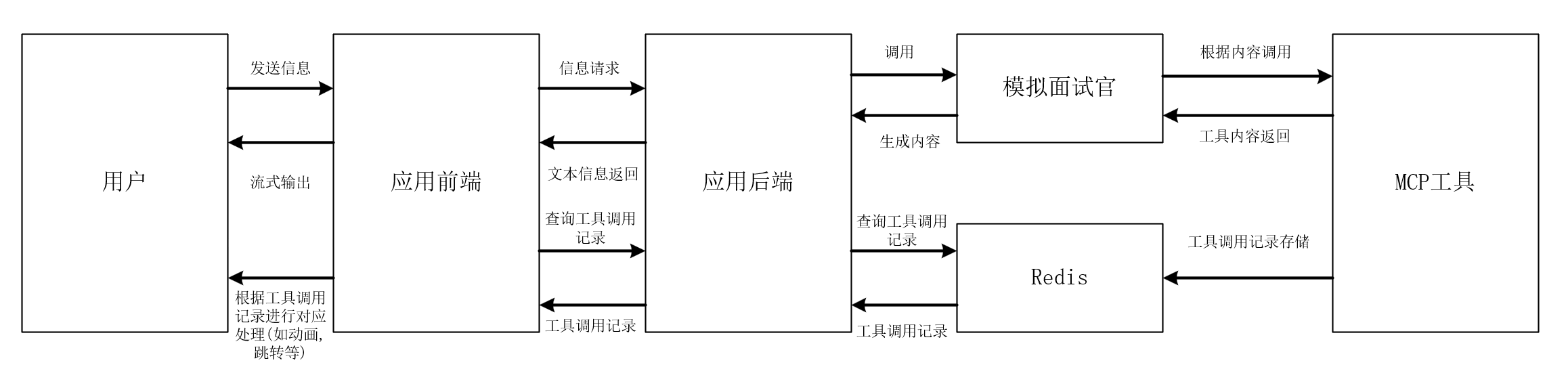
架构说明:
- 前端:负责与用户交互,展示AI聊天内容,并通过轮询机制获取MCP动作记录,触发对应的UI更新或页面跳转。
- 后端:处理MCP操作请求,将动作数据存储到Redis,并提供API接口供前端查询。
- Redis:作为临时数据存储,用于保存MCP动作记录,设置过期时间以避免数据堆积。
- AI服务:通过调用外部API(如DashScope)获取题目信息,并触发MCP动作记录的存储。
核心实现
1. 后端代码实现
1.1 MCP动作数据存储
在后端,我们通过调用外部API(如DashScope)获取题目信息后,将MCP动作数据存储到Redis中。以下是关键代码片段:
mcp相关代码:
server.tool(
    "query_problem",
    "获取合适的题目信息",
    {
        prompt: z.string().describe("描述你想查找的题目,如难度,标签,描述等"),
        chatId: z.string().describe("聊天会话ID,为整形数字的字符串格式")
    },
    async ({ prompt = "", chatId = "" }) => {
        // 省略DashScope API调用部分代码...

        if (response.status === 200 && response.data.output && response.data.output.text) {
            const text = response.data.output.text;
            const idMatch = text.match(/ID:\s*(\S+)/);
            const codeMatch = text.match(/题目编号:\s*(\S+)/);

            if (idMatch && idMatch[1] && codeMatch && codeMatch[1]) {
                const problemId = idMatch[1];
                const problemCode = codeMatch[1];

                try {
                    const redis = getRedis();
                    const actionKey = `action${chatId}_push`;
                    const actionData = {
                        action: "push",
                        chatId: chatId,
                        problemId: problemId,
                        code: problemCode
                    };

                    await redis.select(1); // 选择db1
                    await redis.set(actionKey, JSON.stringify(actionData));
                    await redis.expire(actionKey, 3 * 60); // 设置3分钟过期时间
                    console.log(`Action data saved to Redis: key=${actionKey}`);
                } catch (redisError) {
                    console.error(`Error saving to Redis: ${redisError.message}`);
                }
            }

            return {
                content: [{ type: "text", text: text }]
            };
        }
        // 省略错误处理代码...
    }
);
说明:在成功获取题目信息后,我们将动作数据(如action: "push")以JSON格式存储到Redis中,并设置3分钟的过期时间以避免数据长期占用存储空间。
1.2 MCP动作查询接口
后端提供了一个API接口,用于前端查询指定聊天ID下的MCP动作记录,并在查询后删除对应的Redis记录,以避免重复处理。代码如下:
@GetMapping("/getActions")
public GlobalResult<List<String>> getActions(@RequestParam("chatId") String chatId) {
    if (chatId == null || chatId.isEmpty()) {
        throw new ServiceException("chatId不能为空");
    }
    int chatIdInt = Integer.parseInt(chatId);

    Set<String> keys = redisService.keys("action" + chatIdInt + "*");
    List<String> actions = new ArrayList<>();
    if (keys != null) {
        for (String key : keys) {
            String value = redisService.get(key);
            if (value != null) {
                actions.add(value);
                // 删除已经获取的action key
                redisService.delete(key);
            }
        }
    }

    return GlobalResultGenerator.genSuccessResult(actions);
}
说明:通过redisService.keys()方法获取匹配的动作记录键值,并在返回数据后删除对应键,确保每个动作只被处理一次。
2. 前端代码实现
2.1 AI聊天结束后的动作处理
在前端,当AI聊天结束后,会触发轮询完成事件,并调用方法查询MCP动作记录。以下是相关代码:
if (shouldStop) {
    this.stopPolling();
    this.isAiThinking = false;
    const aiMsg = this.messageListForShow.find(m => m.messageId === messageId);
    if (aiMsg) {
        // 将AI消息加入currentBranch
        this.currentBranch.messageLocals.push({
            messageId: aiMsg.messageId,
            role: 'assistant',
            branchId: this.currentBranch.branchId,
            content: {
                text: aiMsg.content.text,
                files: []
            },
            timestamp: new Date()
        });
        this.modifiedBranch.push(this.currentBranch);
        await this.saveBranchList(this.modifiedBranch);
        this.modifiedBranch = [];
        this.$emit('polling-completed');
        await this.fetchData(this.chatRecordId);
        this.scrollToBottom();
    }
}
说明:在AI消息处理完成后,触发polling-completed事件,并调用fetchData方法重新获取数据。
2.2 查询和处理MCP动作记录
前端通过调用后端API获取MCP动作记录,并根据动作类型执行不同的操作(如页面跳转或评估更新)。代码如下:
async handlePollingCompleted() {
    try {
        if (!this.activeChatRecord) return;

        const res = await axios.get('/api/chat/getActions', {
            params: { chatId: this.activeChatRecord }
        });

        if (res.data && res.data.length > 0) {
            console.log('获取到的actions:', res.data);

            const valuationChanges = [];
            const pageChanges = [];
            for (const actionData of res.data) {
                try {
                    const actionObj = JSON.parse(actionData);

                    if (actionObj.action === 'update_valuation' &&
                        actionObj.valuationName &&
                        actionObj.delta !== undefined) {
                        valuationChanges.push({
                            valuationName: actionObj.valuationName,
                            delta: parseFloat(actionObj.delta)
                        });
                    }

                    if (actionObj.action === 'push' &&
                        actionObj.chatId &&
                        actionObj.problemId) {
                        if (this.$refs.chatArea) {
                            this.$refs.chatArea.handleActionPush(actionObj.problemId);
                        } else {
                            console.warn('chatArea组件未找到,无法调用handleActionPush方法');
                        }
                    }
                } catch (parseError) {
                    console.error('解析action数据失败:', parseError);
                }
            }

            if (valuationChanges.length > 0) {
                await this.handleValuationUpdate(valuationChanges);
            }
        }
    } catch (error) {
        console.error('获取actions失败:', error);
        this.$message.error('获取面试动作失败');
    }
}
说明:前端通过axios请求后端API获取动作记录,并根据动作类型执行不同的逻辑。例如,push动作会触发页面跳转,update_valuation动作会更新评估数据。
总结
通过MCP动作记录系统的开发,我们成功实现了对AI操作行为的记录和反馈。系统通过Redis存储临时动作数据,前端定时轮询获取动作记录并执行相应操作,从而提升了用户的交互体验。未来,我们可以进一步优化Redis的存储策略,增加动作类型的支持,以满足更多业务需求。

欢迎加入DeepSeek 技术社区。在这里,你可以找到志同道合的朋友,共同探索AI技术的奥秘。
更多推荐


 15
15 0
0- 0


 已为社区贡献4条内容

所有评论(0)