PHP调用Ollama本地部署的deepseek-r1:1.5b模型生成文本的完整实现方案
PHP调用Ollama本地部署的deepseek-r1:1.5b模型生成文本的完整实现方案
·
以下是使用PHP调用Ollama本地部署的deepseek-r1:1.5b模型生成文本的完整实现方案:
一、基础环境准备
-
安装Ollama服务
双击
OllamaSetup.exe就可完成安装,是不是发现不能设置安装地址,全在C盘那得有多卡,放心有小妙招:使用命令模式OllamaSetup.exe /DIR="D:\Ollama" -
安装deepseek大模型
命令如下:ollama run deepseek-r1:1.5b # 自动下载模型并启动服务:ml-citation{ref="1,5" data="citationList"} -
验证服务状态
检查端口11434是否正常监听(默认仅允许本地访问),浏览器访问 http://localhost:11434 ,出现如下图,恭喜你模型安装成功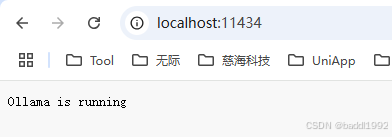
二、PHP调用示例(带历史记录)
    /**
     * 测试deepseek API接口
     *
     * @param string $sessionId  会话ID
     * @param string $message    询问标题
     * @return array
     */
    public function testdeepseek($message = '', $sessionId = ''){
        $userSessionId = rand_str(15); // 用户ID
        $sessionId = $sessionId ? $userSessionId.'_'.$sessionId : $userSessionId.'_'.rand_str();

        $sessionDir = RUNTIME_PATH.'sessions/';
        if(!is_dir($sessionDir)){
            mkdirs($sessionDir, 0777);
        }
        $sessionFile = $sessionDir . $sessionId . '.json';

        // 加载历史对话
        $history = [];
        if (file_exists($sessionFile)) {
            $history = json_decode(file_get_contents($sessionFile), true);
        }

        // API 端点
        $url = "http://127.0.0.1:11434/api/generate";

        // context:使用的对话的编码,可以在下一个请求中发送以保持对话记忆
        // 请求数据
        $data = [
            "model" => "deepseek-r1:1.5b",  // 模型名称
            'prompt' => $message,
            'context' => $history,
            "stream" => false  // 是否流式输出
        ];

        $header = [];
        $header[] = "Content-Type: application/json";
        $header[] = "Authorization: Bearer $userSessionId";

        $res = curlRequest($url, $data, 'POST', $header);
        if(isset($res['error'])){
            print_r($res);
            exit;
        }

        $answer = $res['response'] ?: '';
        file_put_contents($sessionFile, json_encode($res['context']));

        $search = ['\n', '\r', '\t', '<think>','</think>'];
        $replace = ['<br/>', '<br/>', ' ', '<div style="color:#8C8C8C;margin:20px;">','</div><div>'];
        $answer = str_replace($search, $replace, $answer);
        $answer .= '</div>';

        echo $answer;
    }

/**
 * 调用Curl
 *
 * @param [type] $url
 * @param [type] $method   请求方式
 * @param array/string $data      参数
 * @param [type] $headers  请求头
 * @return array
 */
function curlRequest($url, $data = [], $method='POST', $headers=[]){
    $curl = curl_init();
    curl_setopt($curl, CURLOPT_CUSTOMREQUEST, $method);
    curl_setopt($curl, CURLOPT_URL, $url);
    curl_setopt($curl, CURLOPT_FAILONERROR, false);
    curl_setopt($curl, CURLOPT_RETURNTRANSFER, true);
    curl_setopt($curl, CURLOPT_USERAGENT, 'Mozilla/5.0 (compatible; MSIE 5.01; Windows NT 5.0)');
    curl_setopt($curl, CURLOPT_TIMEOUT, 30);
    curl_setopt($curl, CURLOPT_CONNECTTIMEOUT, 30);

    if(!$headers){
        $headers[] = 'Content-Type: application/json; charset=UTF-8';
    }
    curl_setopt($curl, CURLOPT_HTTPHEADER, $headers);

    if($data){
        curl_setopt($curl, CURLOPT_POST, 1);
        curl_setopt($curl, CURLOPT_POSTFIELDS, is_array($data) ? json_encode($data): $data);
    }

    if (stripos($url, "https") !== false)
    {
        curl_setopt($curl, CURLOPT_SSL_VERIFYPEER, false);
        curl_setopt($curl, CURLOPT_SSL_VERIFYHOST, false);
    }
    $ctx = curl_exec($curl);
    if (curl_errno($curl)) {
        return curl_error($curl);
    }
    $re = [];
    if ($ctx) {
        $re = json_decode($ctx, true);
    }
    curl_close($curl);
    return $re;
}
三、更多接口地址
API 参考文档 -- Ollama 中文文档|Ollama官方文档
更多问题解决办法,请转向 https://www.firerise.com.cn/
有网站建设、小程序需求,联系 (baddl1992@126.com)
世界级【PMP证书】成员全程陪护

欢迎加入DeepSeek 技术社区。在这里,你可以找到志同道合的朋友,共同探索AI技术的奥秘。
更多推荐
 19
19 0
0- 0


 已为社区贡献2条内容

所有评论(0)