DeepSeek+SpringAI实现流式对话
大模型的响应速度通常是很慢的,为了避免用户用户能够耐心等待输出的结果,我们通常会使用流式输出一点点将结果输出给用户。那么问题来了,想要实现流式结果输出,后端和前端要如何配合?后端要使用什么技术实现流式输出呢?
·
大模型的响应速度通常是很慢的,为了避免用户用户能够耐心等待输出的结果,我们通常会使用流式输出一点点将结果输出给用户。
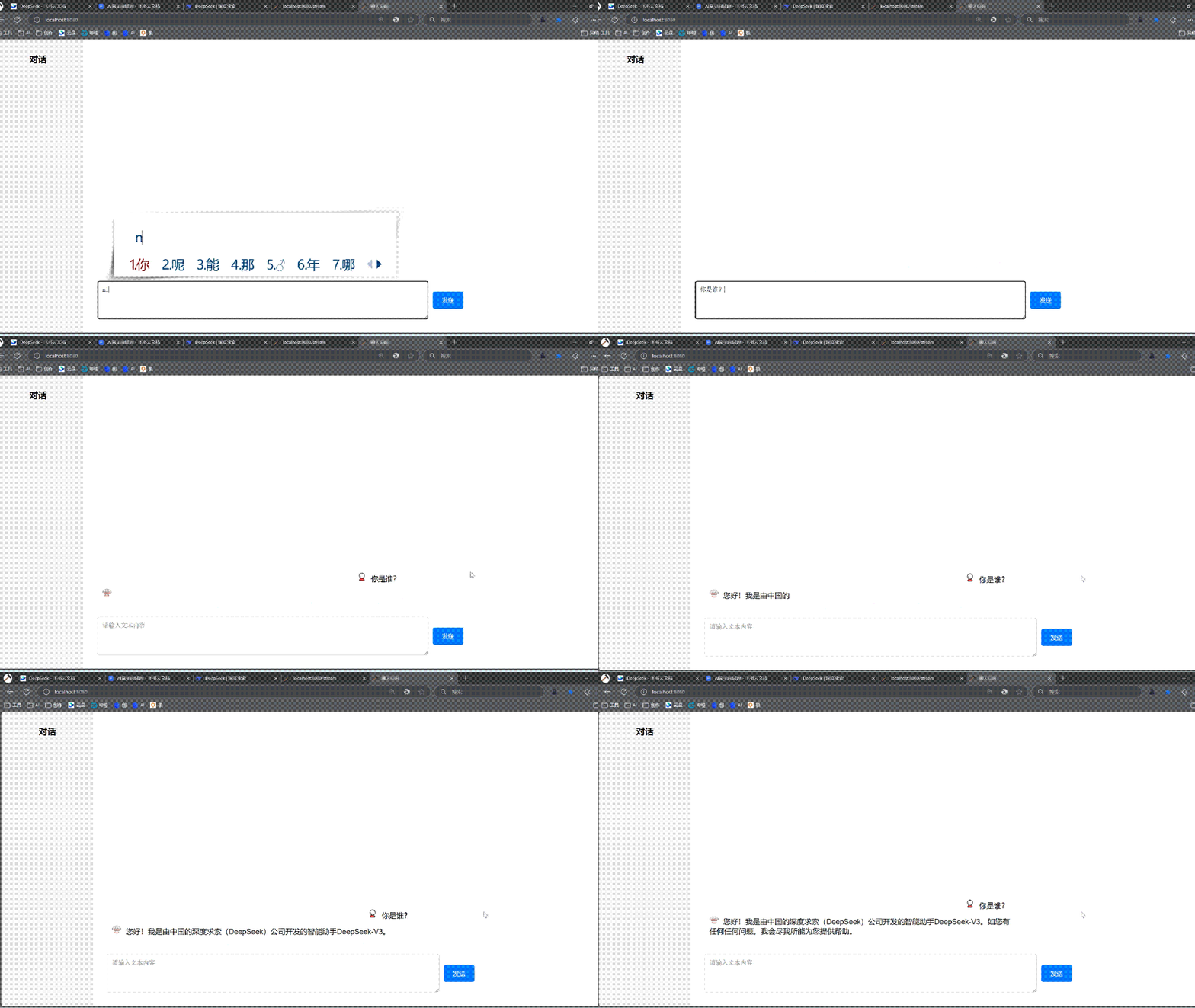
那么问题来了,想要实现流式结果输出,后端和前端要如何配合?后端要使用什么技术实现流式输出呢?接下来本文给出具体的实现代码,先看最终实现效果:
解决方案
在 Spring Boot 中实现流式输出可以使用 Sse(Server-Sent Events,服务器发送事件)技术来实现,它是一种服务器推送技术,适合单向实时数据流,我们使用 Spring MVC(基于 Servlet)中的 SseEmitter 对象来实现流式输出。
具体实现如下。
1.后端代码
Spring Boot 程序使用 SseEmitter 对象提供的 send 方法发送数据,具体实现代码如下:
import org.springframework.http.MediaType;
import org.springframework.web.bind.annotation.GetMapping;
import org.springframework.web.bind.annotation.RestController;
import org.springframework.web.servlet.mvc.method.annotation.SseEmitter;

@RestController
public class StreamController {

    @GetMapping(value = "/stream", produces = MediaType.TEXT_EVENT_STREAM_VALUE)
    public SseEmitter streamData() {
        // 创建 SSE 发射器,设置超时时间(例如 1 分钟)
        SseEmitter emitter = new SseEmitter(60_000L);
        // 创建新线程,防止主程序阻塞
        new Thread(() -> {
            try {
                for (int i = 1; i <= 5; i++) {
                    Thread.sleep(1000); // 模拟延迟
                    // 发送数据
                    emitter.send("time=" + System.currentTimeMillis());
                }
                // 发送完毕
                emitter.complete();
            } catch (Exception e) {
                emitter.completeWithError(e);
            }
        }).start();
        return emitter;
    }
}
2.前端代码
前端接受数据流也比较简单,不需要在使用传统 Ajax 技术了,只需要创建一个 EventSource 对象,监听后端 SSE 接口,然后将接收到的数据流展示出来即可,如下代码所示:
<!DOCTYPE html>
<html>
  <head>
    <title>流式输出示例</title>
  </head>
  <body>
    <h2>流式数据接收演示</h2>
    <button onclick="startStream()">开始接收数据</button>
    <div id="output" style="margin-top: 20px; border: 1px solid #ccc; padding: 10px;"></div>

    <script>
      function startStream() {
        const output = document.getElementById('output');
        output.innerHTML = ''; // 清空之前的内容

        const eventSource = new EventSource('/stream');

        eventSource.onmessage = function(e) {
          const newElement = document.createElement('div');
          newElement.textContent = "print -> " + e.data;
          output.appendChild(newElement);
        };

        eventSource.onerror = function(e) {
          console.error('EventSource 错误:', e);
          eventSource.close();
          const newElement = document.createElement('div');
          newElement.textContent = "连接关闭";
          output.appendChild(newElement);
        };
      }
    </script>
  </body>
</html>
3.运行项目
运行项目测试结果:
- 启动 Spring Boot 项目。
- 在浏览器中访问地址 http://localhost:8080/index.html,即可看到流式输出的内容逐渐显示在页面上。
4.最终版:流式输出
后端代码如下:
import org.springframework.ai.chat.messages.UserMessage;
import org.springframework.ai.chat.prompt.Prompt;
import org.springframework.ai.openai.OpenAiChatModel;
import org.springframework.beans.factory.annotation.Autowired;
import org.springframework.web.bind.annotation.GetMapping;
import org.springframework.web.bind.annotation.RequestParam;
import org.springframework.web.bind.annotation.RestController;
import org.springframework.web.servlet.mvc.method.annotation.SseEmitter;

import java.util.Map;

@RestController
public class ChatController {
    private final OpenAiChatModel chatModel;

    @Autowired
    public ChatController(OpenAiChatModel chatModel) {
        this.chatModel = chatModel;
    }

    @GetMapping("/ai/generate")
    public Map generate(@RequestParam(value = "message", defaultValue = "你是谁?") String message) {
        return Map.of("generation", this.chatModel.call(message));
    }

    @GetMapping("/ai/generateStream")
    public SseEmitter streamChat(@RequestParam String message) {
        // 创建 SSE 发射器,设置超时时间(例如 1 分钟)
        SseEmitter emitter = new SseEmitter(60_000L);
        // 创建 Prompt 对象
        Prompt prompt = new Prompt(new UserMessage(message));
        // 订阅流式响应
        chatModel.stream(prompt).subscribe(response -> {
            try {
                String content = response.getResult().getOutput().getContent();
                System.out.print(content);
                // 发送 SSE 事件
                emitter.send(SseEmitter.event()
                             .data(content)
                             .id(String.valueOf(System.currentTimeMillis()))
                             .build());
            } catch (Exception e) {
                emitter.completeWithError(e);
            }
        },
                                           error -> { // 异常处理
                                               emitter.completeWithError(error);
                                           },
                                           () -> { // 完成处理
                                               emitter.complete();
                                           }
                                          );
        // 处理客户端断开连接
        emitter.onCompletion(() -> {
            // 可在此处释放资源
            System.out.println("SSE connection completed");
        });
        emitter.onTimeout(() -> {
            emitter.complete();
            System.out.println("SSE connection timed out");
        });
        return emitter;
    }
}
前端核心 JS 代码如下:
$('#send-button').click(function () {
  const message = $('#chat-input').val();
  const eventSource = new EventSource(`/ai/generateStream?message=` + message);
  // 构建动态结果
  var chatMessages = $('#chat-messages');
  var newMessage = $('<div class="message user"></div>');
  newMessage.append('<img class="avatar" src="/imgs/user.png" alt="用户头像">');
  newMessage.append(`<span class="nickname">${message}</span>`);
  chatMessages.prepend(newMessage);
  var botMessage = $('<div class="message bot"></div>');
  botMessage.append('<img class="avatar" src="/imgs/robot.png" alt="助手头像">');
  // 流式输出
  eventSource.onmessage = function (event) {
    botMessage.append(`${event.data}`);
  };
  chatMessages.prepend(botMessage);
  $('#chat-input').val('');
  eventSource.onerror = function (err) {
    console.error("EventSource failed:", err);
    eventSource.close();
  };
});
以上代码中的“$”代表的是 jQuery。

欢迎加入DeepSeek 技术社区。在这里,你可以找到志同道合的朋友,共同探索AI技术的奥秘。
更多推荐


 8
8 0
0- 0


 已为社区贡献2条内容

所有评论(0)