Django框架下读取查询docx
在deepseek的提示中还有libreoffice,可以安装无头版,libreoffice --headless,但是最后因为权限问题,无法实现,如果要能实现,需要要改系统的安全权限,查询权限可以用下面两个命令sestatus。
1、python-docs
1.1、安装这个插件
pip install python-docx1.2、urls.py
path('readdocx/', docx.view_word),1.3、docx.py
import os
from django.conf import settings
from docx import Document
from django.shortcuts import render

def view_word(request):
    # 获取静态文件的路径(相对于 STATIC_ROOT 或 STATICFILES_DIRS)
    relative_path = 'word/1.docx'

    # 构建完整的文件路径
    full_path = os.path.join(settings.BASE_DIR, 'static', relative_path)

    # 检查文件是否存在
    if not os.path.exists(full_path):
        raise FileNotFoundError(f"文件未找到: {full_path}")

    # 加载文档
    doc = Document(full_path)

    # 处理文档内容(示例:提取所有段落文本)
    content = []
    for para in doc.paragraphs:
        content.append(para.text)

    # 将内容传递到模板或其他处理逻辑
    # return render(request, 'your_template.html', {'document_content': content})
    # 将内容传递给模板
    return render(request, 'view_word.html', {'content': content})
1.4、view_word.html
<!-- view_word.html -->
<!DOCTYPE html>
<html lang="en">
<head>
    <meta charset="UTF-8">
    <title>View Word Document</title>
</head>
<body>
    <h1>Word 文档内容</h1>
    <div>
        {% for para in content %}
            <p>{{ para }}</p>
        {% endfor %}
    </div>
</body>
</html>
2、mammoth.js
mammoth.js 是一个 JavaScript 库,可以将 Word 文档转换为 HTML。你可以在 Django 中上传 Word 文档,然后在前端使用 mammoth.js 进行转换和显示。这个不涉及django的模块。
2.1、urls.py
path('readdocx1/', docx.view_word1),2.2、docx.py
from django.shortcuts import render
def view_word1(request):
    return render(request, 'view_word1.html')
2.3、view_word1.html
<!DOCTYPE html>
<html lang="en">
<head>
    <meta charset="UTF-8">
    <title>View Word Document</title>
    <script src="https://unpkg.com/mammoth/mammoth.browser.min.js"></script>
</head>
<body>
    <h1>上传 Word 文档</h1>
    <input type="file" id="word-file">
    <div id="word-content"></div>

    <script>
        document.getElementById('word-file').addEventListener('change', function(event) {
            var file = event.target.files[0];
            if (file) {
                mammoth.extractRawText({arrayBuffer: file})
                    .then(function(result) {
                        document.getElementById('word-content').innerHTML = result.value;
                    })
                    .catch(function(error) {
                        console.error(error);
                    });
            }
        });
    </script>
</body>
</html>
效果如下:
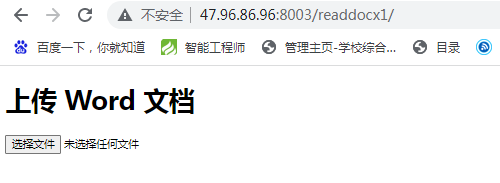
上面两个方法能读取的是word的文本内容,格式和图片会部分丢失。
3、如何查询模块
有时候安装了模块,不知道模块要引用什么名,模块里面用什么方法。例如安装
pip install aspose-words
然后引用是
from asposewords.api import Document但是程序却提示找不到asposewords,这就需要查询真实的名和模块是否正确,首先找模块安装的地址
/www/server/pyporject_evn/demo2_venv/lib/python3.9/site-packages
demo2这个就是网站文件夹名的。
进入后有aspose和aspose_words-25.2.0.dist-info这两个文件夹
找METADATA里面 Name
Metadata-Version: 2.1
Name: aspose-words
Version: 25.2.0
Summary: Aspose.Words for Python is a Document Processing library that allows developers to work with documents in many popular formats without needing Office Automation.
Home-page: https://products.aspose.com/words/python-net/
Author: Aspose
License: UNKNOWN
然后通过进入虚拟环境下的命令查询里面有的方法。查询的名字中-换成.,然后做命令行的输入
先输入python,进入python的命令行,然后输入命令
>>> import aspose.words
>>> print(dir(aspose.words))
这个时候就能打印出来有哪些方法
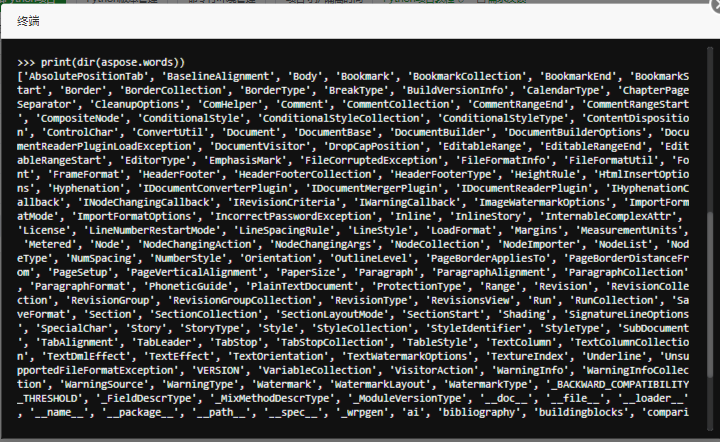
这个时候再看api就没有的。
所以导入应该改成
from aspose.words import Document然后运行就没有问题了。
4、Aspose.Words
4.1、urls.py
path('readdocx2/', docx.view_word2),4.2、docx.py
from django.http import HttpResponse
from aspose.words import Document
from django.conf import settings
import os

def view_word2(request):
    relative_path = 'word/1.docx'

    # 定义 Word 文件路径和输出 PDF 路径
    word_file_path = os.path.join(settings.BASE_DIR, 'static', relative_path)
    output_pdf_path = os.path.join(settings.BASE_DIR, 'static', 'word/1.pdf')

    # 使用 Aspose.Words 将文档转换为 PDF
    doc = Document(word_file_path)
    doc.save(output_pdf_path)

    # 读取生成的 PDF 文件并返回
    with open(output_pdf_path, 'rb') as pdf_file:
        response = HttpResponse(pdf_file.read(), content_type='application/pdf')
        response['Content-Disposition'] = 'attachment; filename="output.pdf"'
    return response
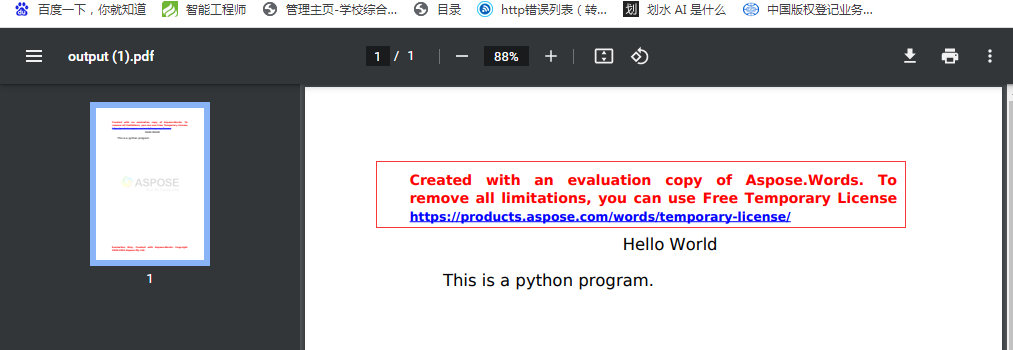
这个不需要显示,程序是直接下载,运行就出来下载pdf文件了,另外在同路径下会存下来一个同名的pdf文件。但是不完美的就是中文字体不支持,中文出来是方框,但是英文是支持的。同时还出来一个授权的提示,需要免费使用需要申请授权。
libreoffice --headless --convert-to pdf /path/to/input.docx --outdir /path/to/output/directory/5、总结
在deepseek的提示中还有libreoffice,可以安装无头版,libreoffice --headless,但是最后因为权限问题,无法实现,如果要能实现,需要要改系统的安全权限,查询权限可以用下面两个命令
sestatus
sudo setenforce 0
欢迎加入DeepSeek 技术社区。在这里,你可以找到志同道合的朋友,共同探索AI技术的奥秘。
更多推荐


 3
3 0
0- 0


 已为社区贡献1条内容

所有评论(0)