Word接入DeepSeekV3
1)File(文件)->Option(选项)->Trust Center(信任中心)->Trust Center Setting (信任中心设置)2)左侧一栏选择,右侧选择如图所示,勾选完设置选择ok。
打开Word进行设置
1、设置信任管理
1)File(文件)->Option(选项)->Trust Center(信任中心)->Trust Center Setting (信任中心设置)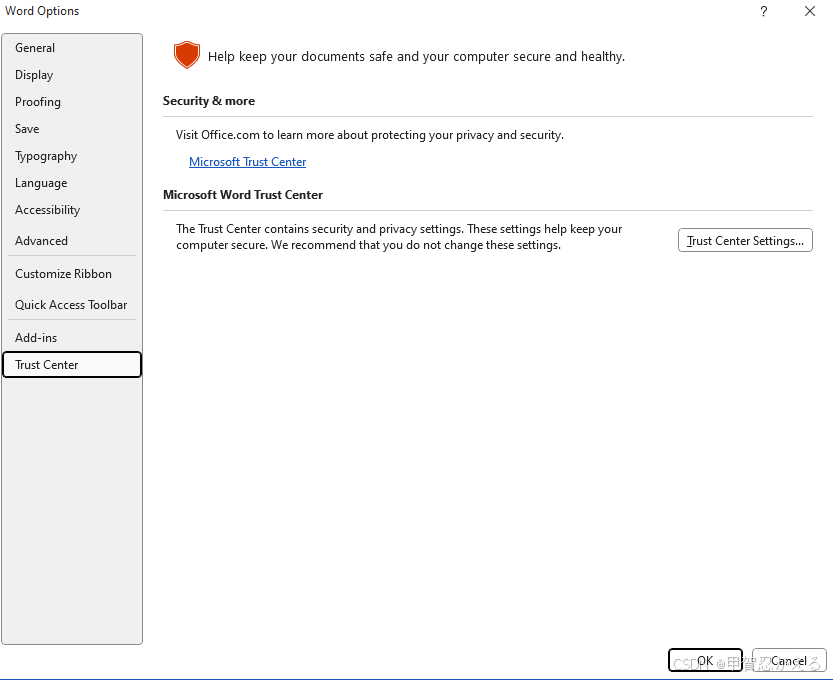](https://i-blog.csdnimg.cn/direct/3120ce135a58486e82e49af8d888702c.png)
2)左侧一栏选择Macro Setting(宏设置),右侧选择如图所示,勾选完设置选择ok: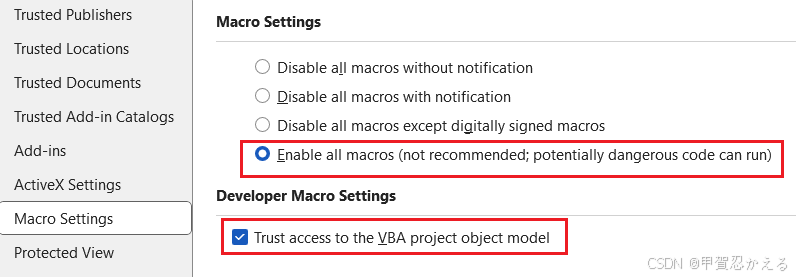
2、DeepSeek官网获取API
1)访问 deepseek官网 获取API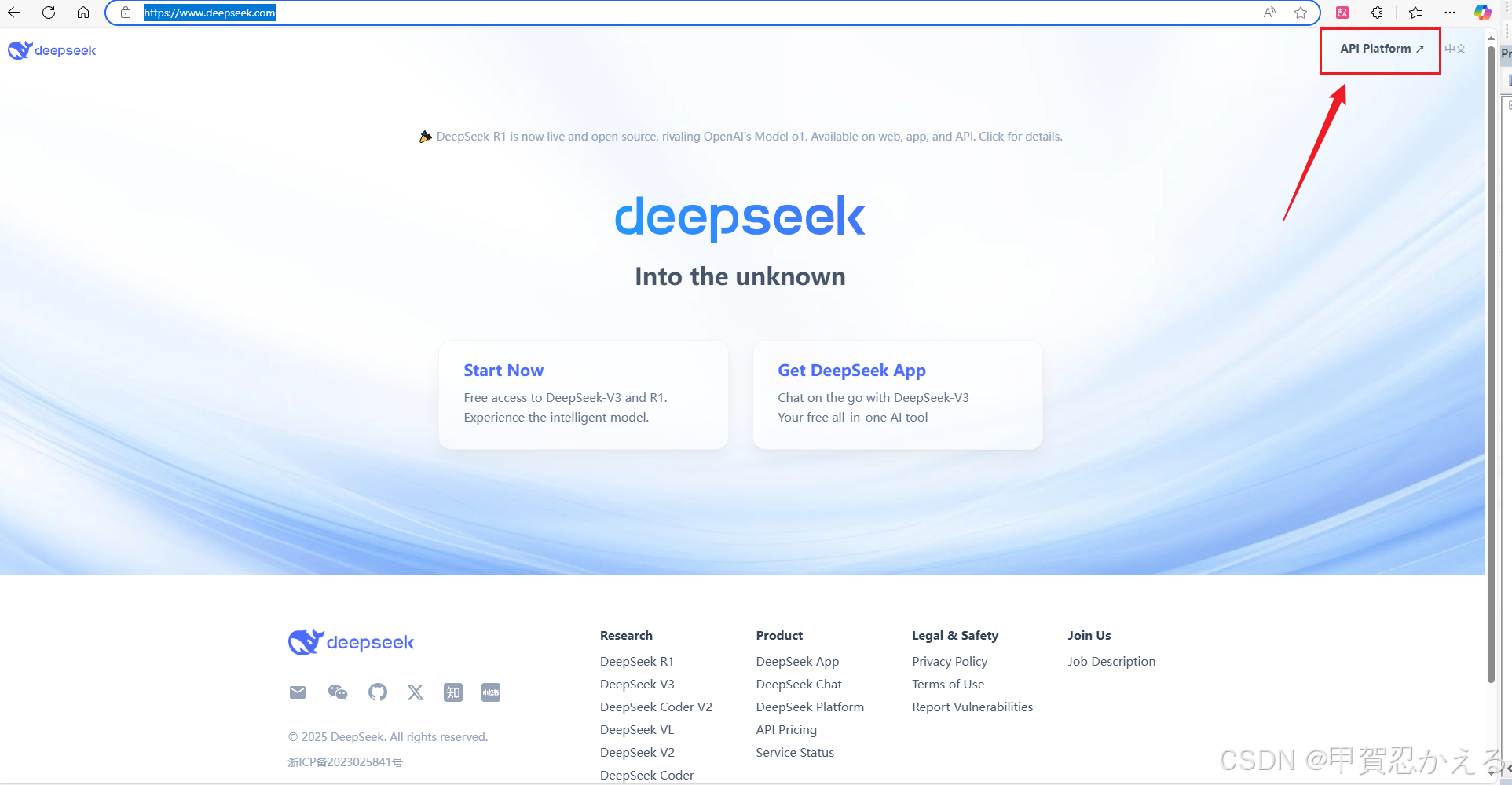
2)创建API
3)将创建的API复制好,后面会用到。
3、设置VBA(宏)代码
1)点击任务栏Developer(开发者工具)【如果没有Developer选项请参考下面4中的1)】->点击Visual Basic
2)插入模块:Insert(插入)->Module(模块)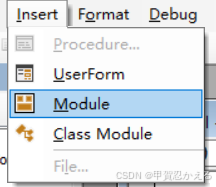
3)在模块中粘贴以下代码
Option Explicit

' API Configuration Constants
Private Const API_URL As String = "https://api.deepseek.com/chat/completions"
Private Const API_MODEL As String = "deepseek-chat"
Private Const TIMEOUT_SECONDS As Integer = 30

#If VBA7 Then
    Private Declare PtrSafe Function GetTickCount Lib "kernel32" () As Long
#Else
    Private Declare Function GetTickCount Lib "kernel32" () As Long
#End If

Public Sub DeepSeekV3()
    Dim selectedText As String
    Dim response As String
    Dim originalRange As Range

    ' Save the original selection range
    Set originalRange = Selection.Range

    ' Get and validate the selected text
    selectedText = CleanInputText(Selection.text)
    If selectedText = "" Then
        MsgBox "Please select some text first", vbExclamation
        Exit Sub
    End If

    ' Show wait cursor
    System.Cursor = wdCursorWait
    response = ChatToDeepSeek(selectedText)
    System.Cursor = wdCursorNormal

    ' Process the response
    If Left(response, 5) = "Error" Then
        MsgBox response, vbCritical
        Exit Sub
    End If

    ' Insert the response content
    InsertResponseContent originalRange, response
End Sub

Private Function ChatToDeepSeek(ByVal chatText As String) As String
    Dim apiKey As String
    Dim httpRequest As Object
    Dim requestBody As String
    Dim startTime As Long
    Dim responseText As String
    Dim errorMessage As String

    On Error GoTo ErrorHandler

    ' Securely get the API key
    apiKey = "你的API密钥"
    If apiKey = "" Then
        ChatToDeepSeek = "Error: API key not configured"
        Exit Function
    End If

    ' Build the JSON request
    requestBody = BuildRequestJSON(chatText)
    If Left(requestBody, 5) = "Error" Then
        ChatToDeepSeek = requestBody
        Exit Function
    End If

    ' Create the HTTP object
    Set httpRequest = CreateObject("MSXML2.ServerXMLHTTP.6.0")
    startTime = GetTickCount()

    With httpRequest
        .Open "POST", API_URL, False
        .setRequestHeader "Content-Type", "application/json"
        .setRequestHeader "Authorization", "Bearer " & apiKey
        .setRequestHeader "Accept", "application/json"

        ' Set timeouts (in milliseconds)
        .setTimeouts TIMEOUT_SECONDS * 1000, TIMEOUT_SECONDS * 1000, TIMEOUT_SECONDS * 1000, TIMEOUT_SECONDS * 1000

        On Error Resume Next
        .send requestBody
        If Err.Number <> 0 Then
            errorMessage = "Connection error: " & Err.Description
            GoTo ErrorHandler
        End If
        On Error GoTo ErrorHandler

        ' Timeout check
        If GetTickCount() - startTime > TIMEOUT_SECONDS * 1000 Then
            errorMessage = "Request timed out (" & TIMEOUT_SECONDS & " seconds)"
            GoTo ErrorHandler
        End If

        Select Case .Status
            Case 200
                responseText = .responseText
            Case 400
                errorMessage = "Invalid request parameters"
            Case 401
                errorMessage = "Invalid API key"
            Case 402
                errorMessage = "Insufficient account balance"
            Case 429
                errorMessage = "Too many requests"
            Case 500
                errorMessage = "Internal server error"
            Case 503
                errorMessage = "Service unavailable"
            Case Else
                errorMessage = "Unknown error (" & .Status & ")"
        End Select
    End With

    If responseText <> "" Then
        ChatToDeepSeek = ParseAPIResponse(responseText)
    Else
        ChatToDeepSeek = "Error: " & errorMessage & " - Status code: " & httpRequest.Status & " - Response: " & httpRequest.responseText
    End If

    Exit Function

ErrorHandler:
    ChatToDeepSeek = "Error: " & IIf(errorMessage <> "", errorMessage, Err.Description)
    Debug.Print "Error " & Err.Number & ": " & Err.Description
End Function

' Helper functions --------------------------------------------------
Private Function GetSecureAPIKey() As String
    On Error Resume Next
    ' Method 1: Get from document properties
    GetSecureAPIKey = ThisDocument.CustomDocumentProperties("DeepSeek_API_Key")

    ' Method 2: Get from input box (if method 1 fails)
    If GetSecureAPIKey = "" Then
        GetSecureAPIKey = InputBox("Please enter your DeepSeek API key:", "API Key Configuration")
    End If
    On Error GoTo 0
End Function

Private Function BuildRequestJSON(ByVal text As String) As String
    On Error GoTo ErrorHandler
    ' Manually build the JSON string
    BuildRequestJSON = "{"
    BuildRequestJSON = BuildRequestJSON & """model"": """ & API_MODEL & ""","
    BuildRequestJSON = BuildRequestJSON & """messages"": [{"
    BuildRequestJSON = BuildRequestJSON & """role"": ""user"","
    BuildRequestJSON = BuildRequestJSON & """content"": """ & EscapeJSONString(text) & """"
    BuildRequestJSON = BuildRequestJSON & "}],"
    BuildRequestJSON = BuildRequestJSON & """temperature"": 0.7,"
    BuildRequestJSON = BuildRequestJSON & """stream"": false"
    BuildRequestJSON = BuildRequestJSON & "}"
    Exit Function

ErrorHandler:
    BuildRequestJSON = "Error: JSON build failed - " & Err.Description
End Function

Private Function ParseAPIResponse(ByVal jsonString As String) As String
    On Error GoTo ErrorHandler
    Dim contentStart As Long
    Dim contentEnd As Long

    ' Find the response content
    contentStart = InStr(jsonString, """content"":""")
    If contentStart = 0 Then
        ParseAPIResponse = "Error: Response content not found"
        Exit Function
    End If

    contentStart = contentStart + Len("""content"":""")
    contentEnd = InStr(contentStart, jsonString, """")
    If contentEnd = 0 Then
        ParseAPIResponse = "Error: Invalid response format"
        Exit Function
    End If

    ' Extract the content
    ParseAPIResponse = Mid(jsonString, contentStart, contentEnd - contentStart)
    ParseAPIResponse = UnescapeJSONString(ParseAPIResponse)
    Exit Function

ErrorHandler:
    ParseAPIResponse = "Error: Response parsing failed"
End Function

Private Function EscapeJSONString(ByVal text As String) As String
    ' Escape JSON special characters
    EscapeJSONString = Replace(text, "\", "\\")
    EscapeJSONString = Replace(EscapeJSONString, """", "\""")
    EscapeJSONString = Replace(EscapeJSONString, vbCrLf, "\n")
    EscapeJSONString = Replace(EscapeJSONString, vbCr, "\n")
    EscapeJSONString = Replace(EscapeJSONString, vbLf, "\n")
End Function

Private Function UnescapeJSONString(ByVal text As String) As String
    ' Unescape JSON special characters
    UnescapeJSONString = Replace(text, "\""", """")
    UnescapeJSONString = Replace(UnescapeJSONString, "\\", "\")
    UnescapeJSONString = Replace(UnescapeJSONString, "\n", vbCrLf)
End Function

Private Function CleanInputText(ByVal text As String) As String
    ' Clean the input text
    CleanInputText = Trim(text)
    CleanInputText = Replace(CleanInputText, Chr(34), "'")  ' Replace double quotes
    CleanInputText = Replace(CleanInputText, "\", "\\")     ' Escape backslashes
    CleanInputText = Replace(CleanInputText, vbCrLf, "\n")  ' Handle line breaks
End Function

Private Sub InsertResponseContent(ByRef targetRange As Range, ByVal content As String)
    ' Insert formatted response
    With targetRange
        .InsertAfter vbCrLf & "[DeepSeek Response]" & vbCrLf
        .InsertAfter content
        .Font.Color = RGB(0, 102, 204)  ' Blue font
        .Select
    End With
End Sub
4)将2中获取到的API粘贴到代码中apiKey变量中,保存代码并退出。
4、设置Developer(开发者工具)
1)File(文件)->Option(选项)->Customize Ribbon(用户自定义)
勾选右侧的Developer(开发者工具)选项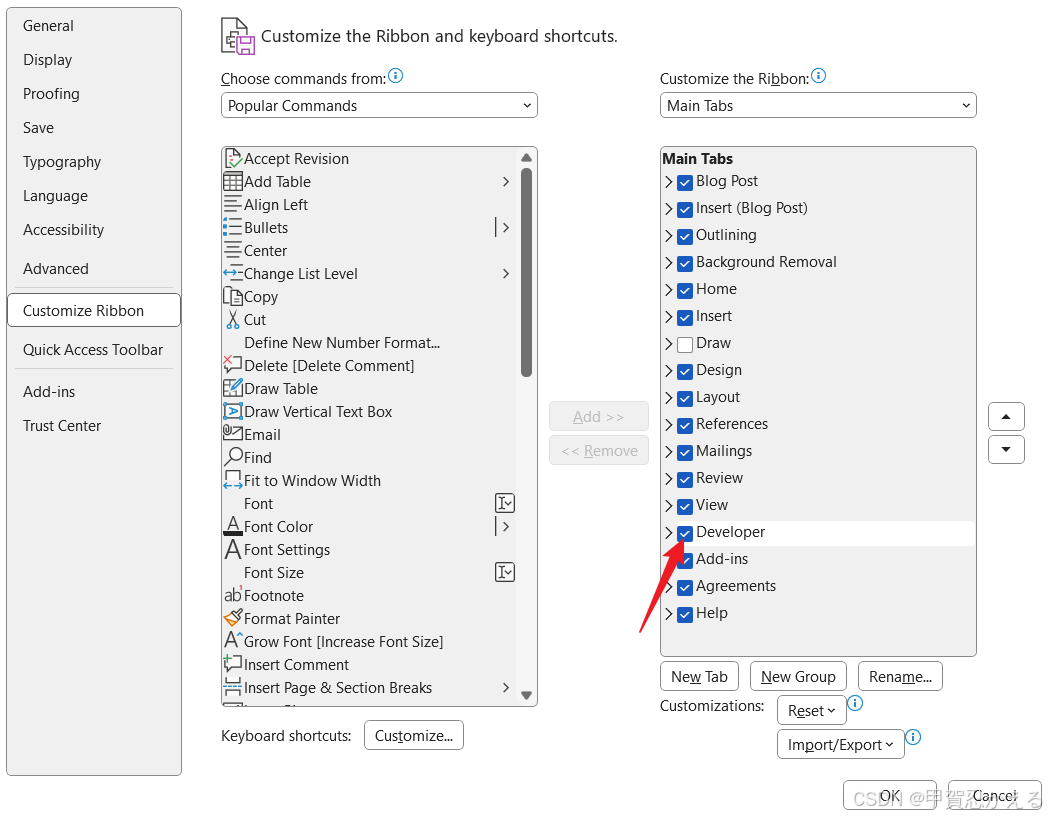 2)右键
2)右键Developer(开发者工具)选择Add New Group(添加新的组)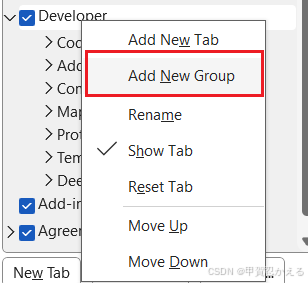
3)选中刚刚新建的组,点击Rename(重命名)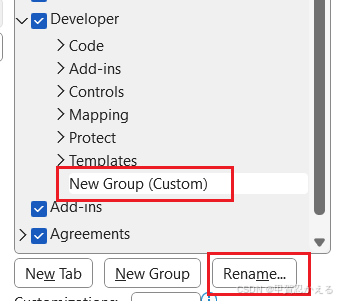
4)命名如下图所示(完成点击OK):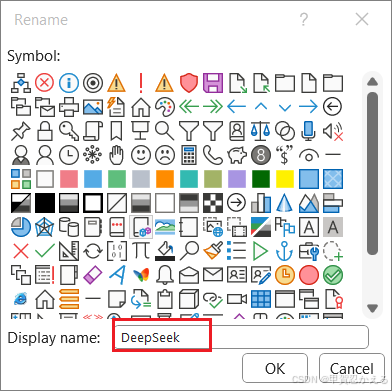
5)选中刚刚重命名的组,把右侧的下拉栏中的选项切换为Macro(宏)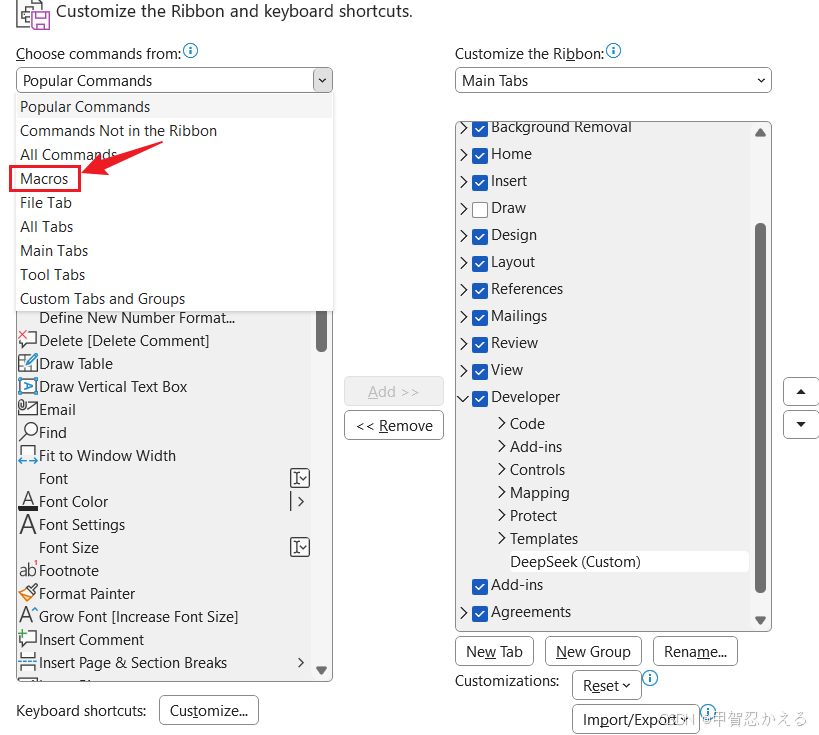
6)选中图片中所示的宏添加到右侧的组中(完成点击OK)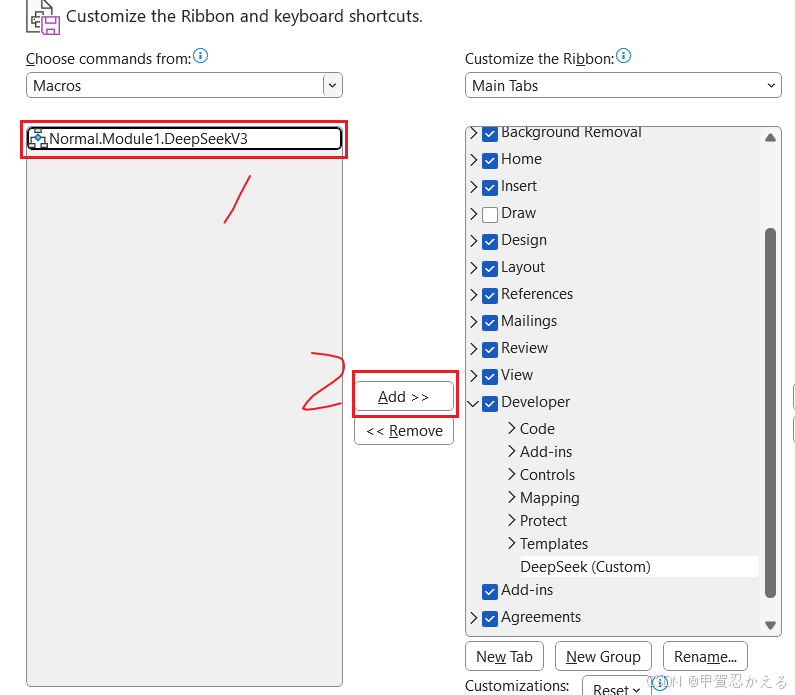
7)重命名添加进组的宏,选择自定义图标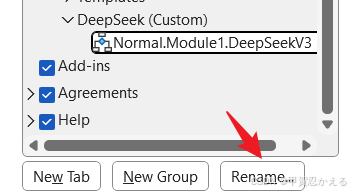
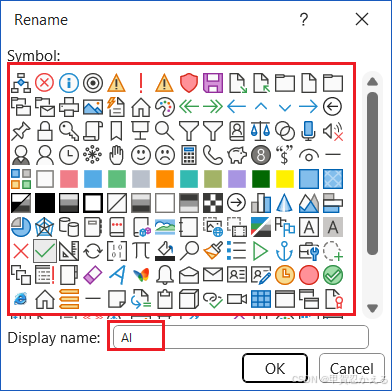
8)完成后,上方任务栏Developer(开发者工具)有显示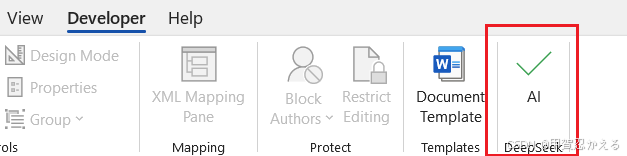
5、使用方法
在Word中输入提问内容,全选提问内容,点击AI即可。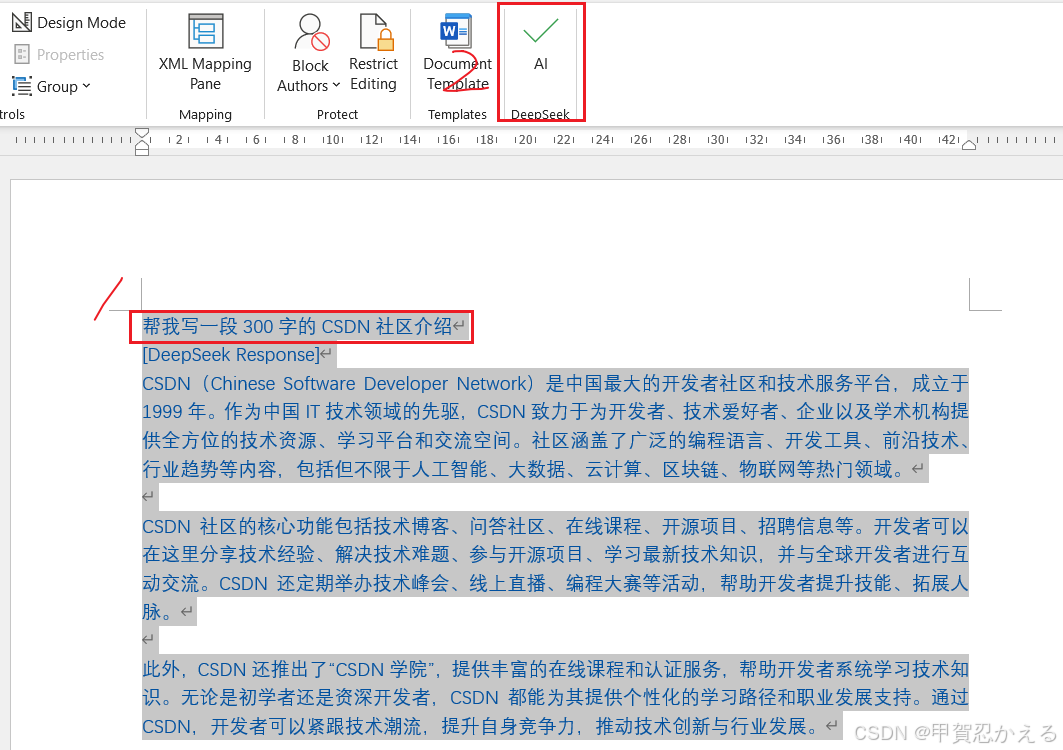

欢迎加入DeepSeek 技术社区。在这里,你可以找到志同道合的朋友,共同探索AI技术的奥秘。
更多推荐



 4
4 0
0- 0


 已为社区贡献1条内容

所有评论(0)