基于deepseek在TTGO T-Display ESP32测试开发一款类似太空大战小游戏
基于大模型开发处理Excel应用程序到微信小程序提交发布,再次证明掌握基础的编程能力,借助AI模型是可以进行测试开发的。这之后我再次转向嵌入式开发,基于TTGO T-Display ESP32 WIFI 蓝牙 1.14英寸LCD开发板设计一款类似于《太空大战》的游戏,并成功在开发板上运行和操控,同时添加游戏剧情背景,BOOS,胜利的环境等等。提示:本次使用的大模型是deepseek-r1,以下是本
提示:欢迎志同道合朋友一起交流学习,一起探索人工智能应用,一起迈进超级个体时代!
文章目录
一、前言
基于大模型开发处理Excel应用程序到微信小程序提交发布,再次证明掌握基础的编程能力,借助AI模型是可以进行测试开发的。这之后我再次转向嵌入式开发,基于TTGO T-Display ESP32 WIFI 蓝牙 1.14英寸LCD开发板设计一款类似于《太空大战》的游戏,并成功在开发板上运行和操控,同时添加游戏剧情背景,BOOS,胜利的环境等等。
提示:本次使用的大模型是deepseek-r1,以下是本篇文章正文内容,下面案例可供参考
二、开发环境的安装和配置
本次使用的是deepseek模型,是因为作为国内的模型,具有比较详细的开发板匹配信息。同时实现和修改代码比较快,准确性比较高,就是服务器相应比较慢。可以参考本地部署deepseek模型,测试一下不同模型在嵌入式应用情况,关于本地部署相关问题,可以参考之前博客:基于Ollama于D盘安装deepseek-r1到11343漏洞问题
1、Arduino和PlatformIO
Arduino和PlatformIO都是用于开发和上传代码到微控制器(如 Arduino、ESP32、STM32 等)的集成开发环境(IDE)。如果你是刚开始学习嵌入式开发,Arduino IDE可能会更加友好;而如果你需要更强的功能、跨平台支持以及项目管理功能,PlatformIO IDE则是更好的选择。关于两者的安装使用,可以参考:Arduino开发入门,ArduinoIDE与platformIO的安装使用
2、添加附加开发板地址
我这里使用的开发平台是arduino,因为操作便捷,可以自定义加载开发板信息和库,比较适合新手进行选择和安装。由于我使用的开发板是乐鑫esp32芯片,所以在安装开发板时,需要先安装乐鑫官方下的开发板包,可以更好运行测试。因为在vscode上使用platformIO编译时,无法点亮开发板,估计是开发板信息和库不对应导致。添加开发板地址,可以打开Arduino IDE菜单 > 文件 >首选项,在 附加开发板管理器网址 输入框中,填入以下网址:https://arduino.me/packages/esp32.json
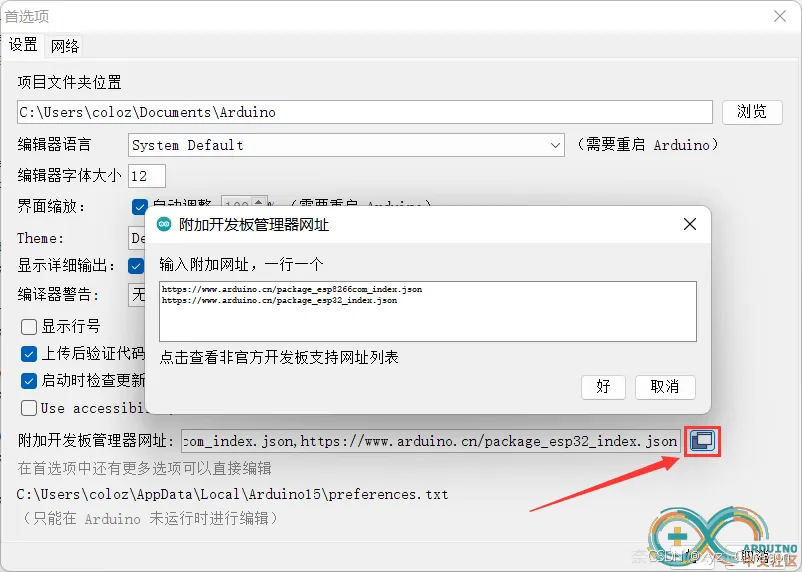
具体相关信息可以查看arduion中文社区: Arduino IDE安装esp32 SDK(Windows)2023.9.10更新
3、TFT_eSPI的下载安装
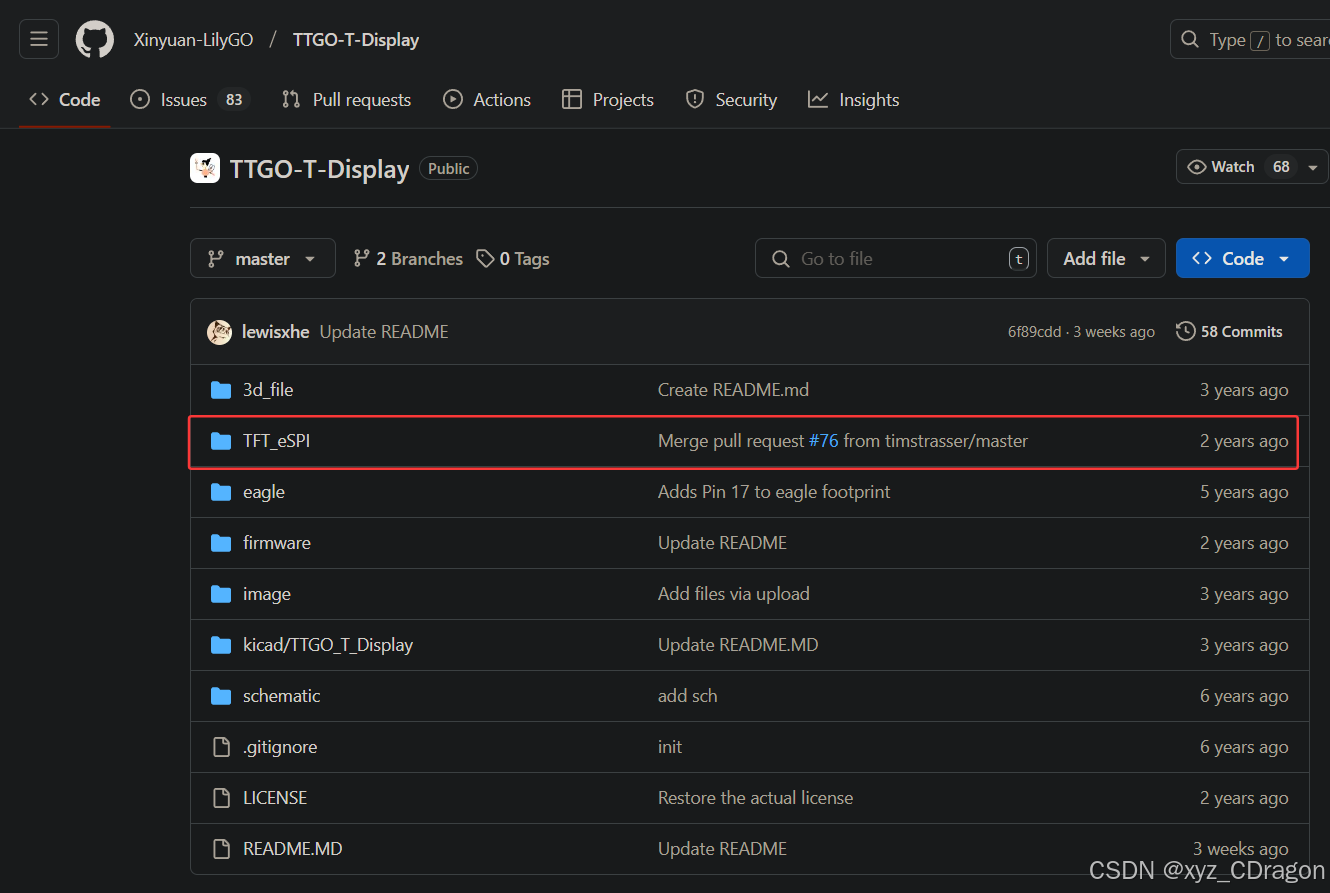
TFT_eSPI库是一个用于驱动LCD屏幕的Arduino库,支持通过SPI通信方式进行屏幕控制。该库提供了丰富的API,方便用户进行屏幕初始化、绘制图形、显示文字和图片等操作。由于arduion自带的TFT_eSPI库版本不适配开发板,所以屏幕无法点亮。不过这里还有待商榷,不确定是最新版的不支持,还是没有设置好,但是使用github资料里下载的TFT_eSPI库可以正常运行。
三、TTGO T-Display ESP32
1、开发板介绍
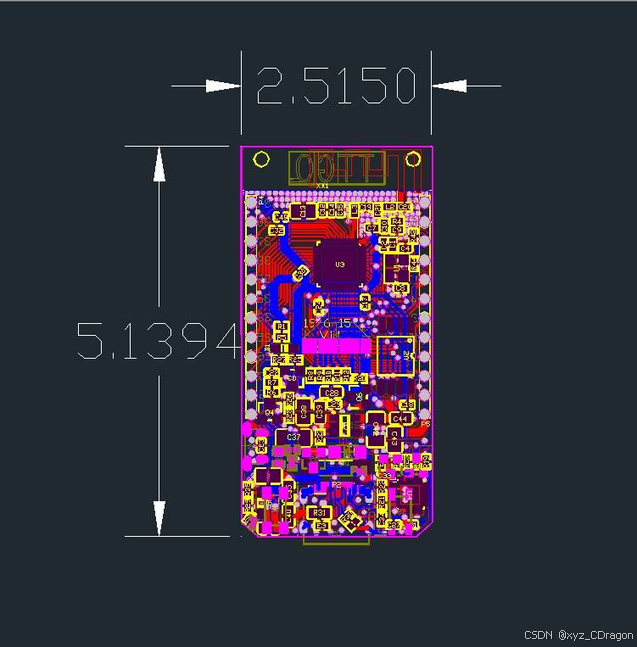
TTGO T-Display ESP32 是一款功能强大、易于使用的开发板,集成了 WiFi、蓝牙和 LCD 显示屏,非常适合物联网、可穿戴设备和原型开发等应用。具体的开发资料和相关信息,可以在github上寻找,这里是资料代码链接: https://github.com/Xinyuan-LilyGO/TTGO-T-Display
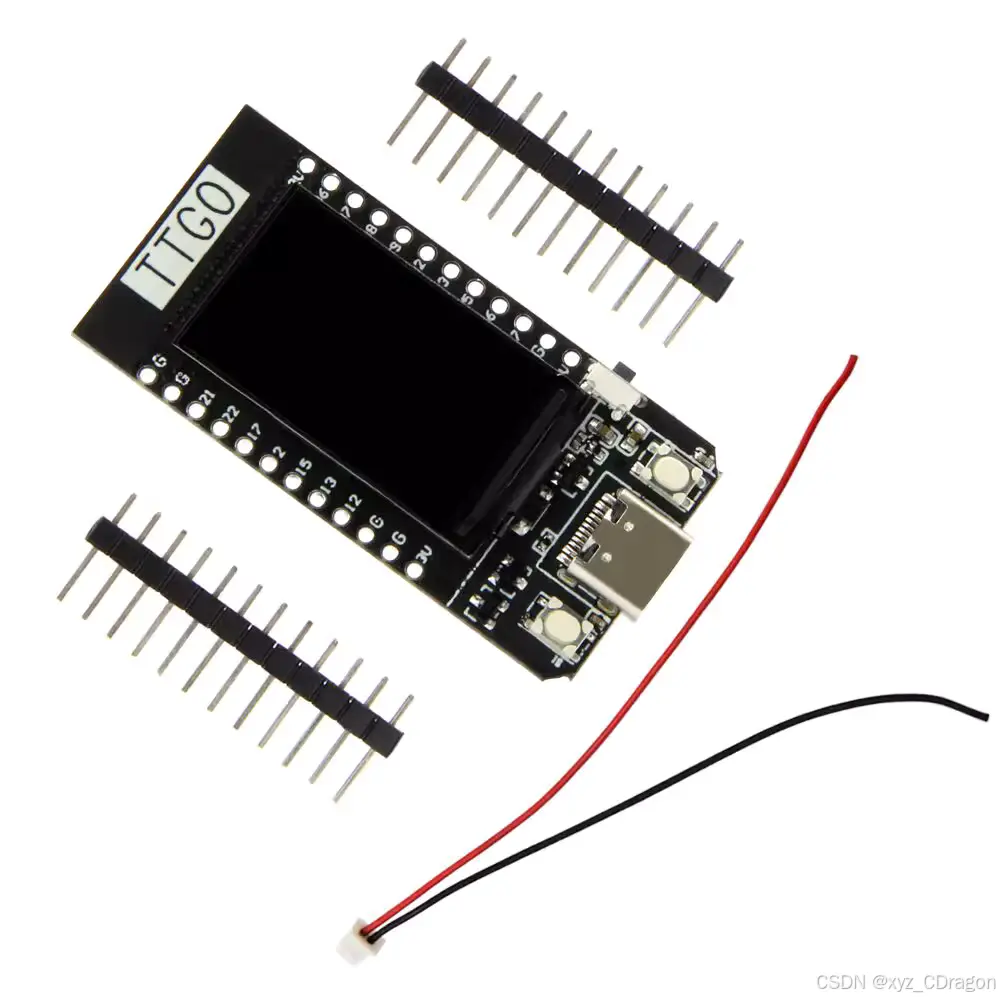
2、开发板详细规格
以下规格可以参考,根据自己需求进行测试开发。
| 规格 | 描述 |
|---|---|
| 硬件规格 | |
| 芯片组 | ESPRESSIF-ESP32 240MHz Xtensa® 单/双核 32 位 LX6 微处理器 |
| 闪存 | QSPI 闪存 4MB |
| SRAM | 520 kB SRAM |
| 按钮 | 复位 |
| USB 转 TTL | CP2104 |
| 模块接口 | UART, SPI, SDIO, I2C, LED PWM, TV PWM, I2S, IRGPIO, ADC, 电容触摸传感器, DACLNA 前置放大器 |
| 显示屏 | IPS ST7789V 1.14 英寸 |
| 工作电压 | 2.7V-4.2V |
| 工作电流 | 约 67mA |
| 睡眠电流 | 约 350uA |
| 工作温度范围 | -40°C ~ +85°C |
| 尺寸和重量 | 51.52x25.04x8.54mm (7.81g) |
| 蓝牙规格 | |
| 协议 | 符合蓝牙 v4.2 BR/EDR 和 BLE 标准 |
| 射频 | 具有 -97dBm 灵敏度的 NZIF 接收器,Class-1、Class-2 和 Class-3 发射器,AFH |
| 音频频率 | CVSD 和 SBC 音频频率 |
| 软件规格 | |
| Wi-Fi 模块 | Station /SoftAP/SoftAPAP+Station/P2P |
| 安全机制 | WPA/WPA2/WPA2-Enterprise/WPS |
| 加密类型 | AES/RSA/ECC/SHA |
| 固件升级 | UART 下载/OTA(通过网络/主机下载和写入固件) |
| 软件开发 | 支持云服务器开发/用户固件开发的 SDK |
| 网络协议 | IPv4、IPv6、SSL、TCP/UDP/HTTP/FTP/MQTT |
| 用户配置 | AT + 指令集,云服务器,安卓/iOS 应用 |
| 操作系统 | FreeRTOS |
| 电源规格 | |
| 电源供应 | USB 5V/1A |
| 充电电流 | 500mA |
| 电池 | 3.7V 锂电池 |
| JST连接器 | 2Pin 1.25mm |
| USB | Type-C |
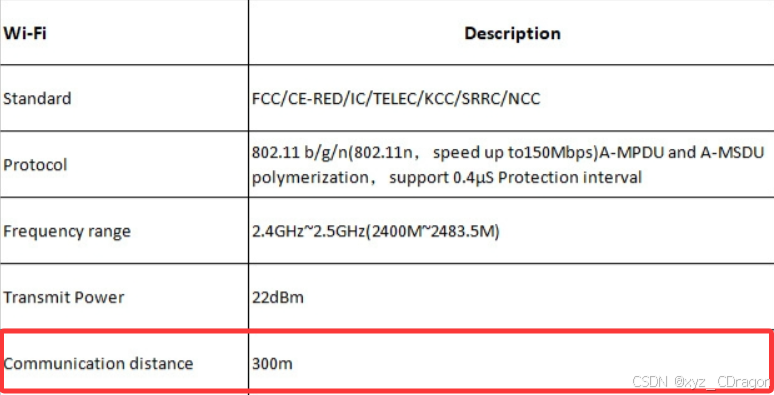
| Wi-Fi规格 | |
| 标准 | FCC/CE-RED/IC/TELEC/KCC/SRRC/NCC |
| 协议 | 802.11 b/g/n(802.11n,速度高达 150Mbps)A-MPDU 和 A-MSDU 聚合,支持 0.4μS 保护间隔 |
| 频率范围 | 2.4GHz~2.5GHz (2400M~2483.5M) |
| 发射功率 | 22dBm |
| 通信距离 | 300m |
这里我严重怀疑官方给的参数有点问题,WiFi通信距离能到300m吗?不应该是30m,具体还是需要进行测试才知道。(/(°∞°))
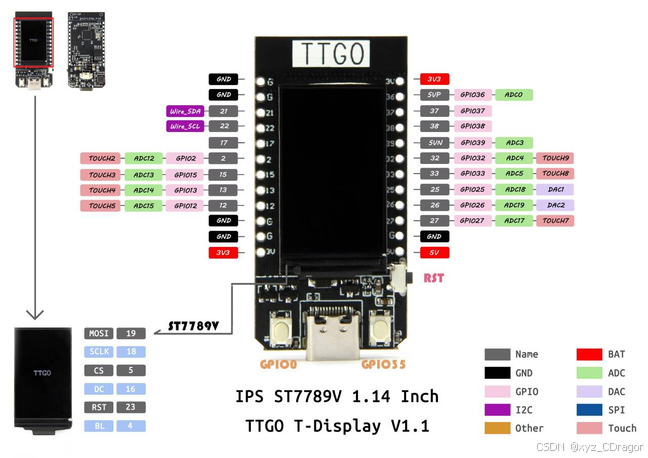
3、开发板引脚
该开发板的功能还是比较全面,适合添加不同的模块进行测试开发。
四、基于deepseek实现游戏代码编译
在使用arduion进行代码编译时,需要选择好开发板和对应的库,
1、代码的测试与修改
初次使用deepseek进行嵌入式开发,虽然在之前的程序开发上已经有过成功经验,但是嵌入相比更难因为AI无法判断开发板的具体信息和配置,也不懂编译后的测试情况如何,它只能根据错误提示进行修改,即使代码修改完成编译烧录后,也不一定会成功运行开发板。而具备一定的电路知识非常重要,这样可以确保对应的接口可以按照预期代码实现,否则即使代码无误,也无法点亮。不过deepseek在编程这方面还是可以的,只是你投喂的问题和提示词尽可能明确目的,否则同一个BUG容易反复出现。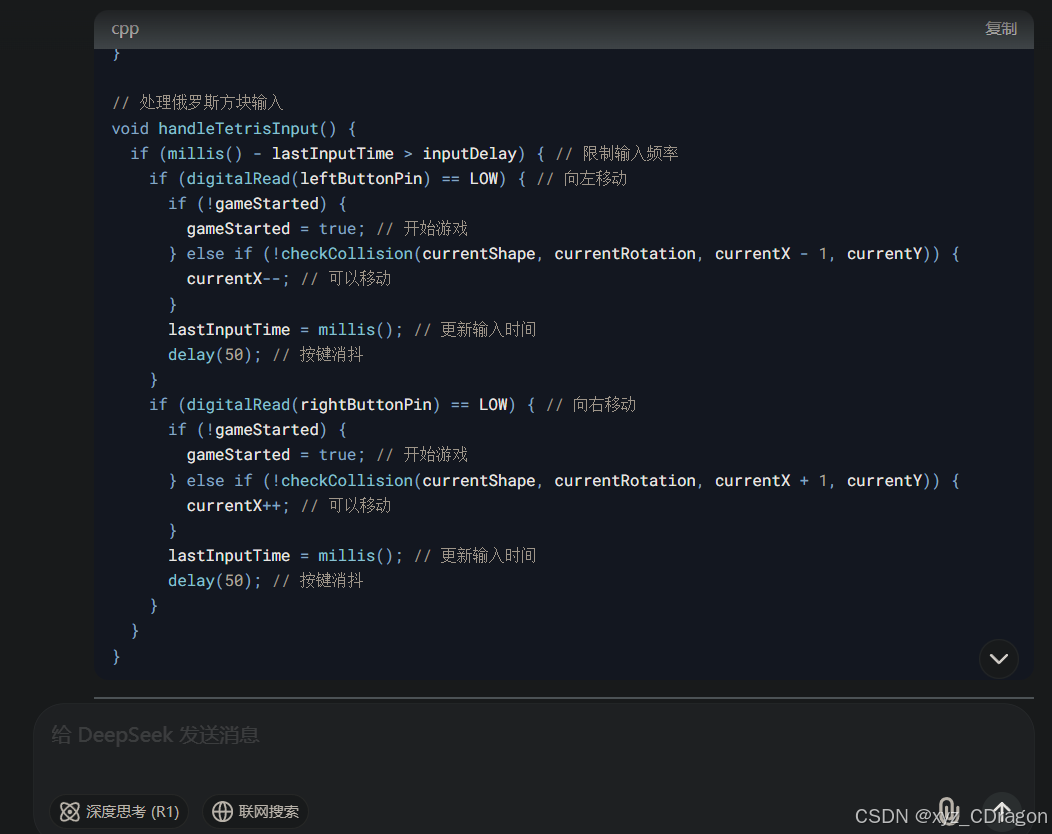
2、基于arduino ide的完整代码
在使用deepseek写代码的时候,为了保证可以正常运行,可以使用已经成功运行的案例代码先投喂给大模型,之后再次基础上进行修改编译,对于新手来说比较友好。同时,也可以根据编译后的代码,解析学习,了解不同代码片段的功能和关系,特别是开发板的接口设置,这样可以很快在实战里学习嵌入式。
完整的游戏代码如下:
#include <TFT_eSPI.h>
#include "esp_sleep.h"
#include <math.h>

TFT_eSPI tft = TFT_eSPI();

const int leftButtonPin = 0;   // GPIO0,用于左移
const int rightButtonPin = 35; // GPIO35,用于右移

// 游戏状态
bool gameOver = false;
int score = 0;
int lives = 3;
bool gameWon = false;

// 飞机和敌人的相关参数
int spaceshipX = 120;
int bulletX, bulletY;
bool bulletActive;
int enemyX, enemyY;
int bossX, bossY;
int bossLives = 10;
bool bossActive = false;
int bossDirection = 1;
int bossBulletX, bossBulletY;
bool bossBulletActive = false;
int giftX, giftY;
bool giftActive = false;

// 游戏刷新速率
unsigned long lastUpdateTime = 0;
int frameDelay = 50;
unsigned long lastBossDefeatedTime = 0;

// 按钮长按检测
unsigned long buttonPressStartTime = 0;
bool isLongPress = false;

// 计时器
unsigned long startTime;

// 函数的前向声明
void showGameOverScreen();

void setup() {
  randomSeed(analogRead(0));

  Serial.begin(115200);

  tft.init();
  tft.setRotation(1);
  tft.fillScreen(TFT_BLACK);

  pinMode(leftButtonPin, INPUT_PULLUP);
  pinMode(rightButtonPin, INPUT_PULLUP);

  showGameName();         // 显示游戏名称
  showRollingIntro();     // 显示向上滚动的游戏介绍
  showDimensionAnimation();  // 显示维度动画

  startNewGame();
}

void loop() {
  if (digitalRead(rightButtonPin) == LOW) {
    if (!isLongPress) {
      buttonPressStartTime = millis();
      isLongPress = true;
    }
    if (isLongPress && millis() - buttonPressStartTime > 3000) {
      Serial.println("Shutting down...");
      esp_sleep_enable_ext0_wakeup(GPIO_NUM_35, 0);
      esp_deep_sleep_start();
    }
  } else {
    isLongPress = false;
  }

  if (!gameWon) {
    handleInput(); // 玩家输入处理

    if ((millis() - lastUpdateTime) > frameDelay) {
      lastUpdateTime = millis();
      updateGame();
      drawGame();
    }
  }

  if (score >= 500) {
    gameWon = true;
    showVictoryMessage();  // 显示胜利提示
    showVictoryScreen();   // 显示胜利画面
    delay(2000);
    while (1); // 等待重启
  }

  if (gameOver) {
    showGameOverScreen();
    delay(2000);
    showDimensionAnimation();
    startNewGame();
  }
}

void startNewGame() {
  gameOver = false;
  score = 0;
  lives = 3;
  gameWon = false;

  spaceshipX = 120;
  bulletActive = false;

  spawnEnemy();
  bossActive = false;
  bossLives = 10;

  tft.fillScreen(TFT_BLACK);
  startTime = millis();
  frameDelay = 50;
  giftActive = false;
}

void handleInput() {
  if (digitalRead(leftButtonPin) == LOW && spaceshipX > 0) {
    spaceshipX -= 5;
    delay(30);
  }
  if (digitalRead(rightButtonPin) == LOW && spaceshipX < tft.width() - 20) {
    spaceshipX += 5;
    delay(30);
  }
}

void updateGame() {
  if (!bulletActive) {
    bulletActive = true;
    bulletX = spaceshipX;
    bulletY = tft.height() - 15;
  }

  if (bulletActive) {
    bulletY -= 10;
    if (bulletY < 0) {
      bulletActive = false;
    }
    if (abs(bulletX - enemyX) < 10 && abs(bulletY - enemyY) < 10) {
      score += 10;
      bulletActive = false;
      spawnEnemy();
    } else if (bossActive && abs(bulletX - bossX) < 20 && abs(bulletY - bossY) < 20) {
      bossLives--;
      bulletActive = false;
      if (bossLives <= 0) {
        score += 100;
        bossActive = false;
        lastBossDefeatedTime = millis();
        spawnGift();
        spawnEnemy();
      }
    }
  }

  if (giftActive) {
    giftY += 3;
    if (giftY > tft.height()) {
      giftActive = false;
    }

    if (abs(spaceshipX - giftX) < 10 && abs(tft.height() - 10 - giftY) < 10) {
      giftActive = false;
      frameDelay = max(frameDelay - 5, 10);
    }
  }

  if (!bossActive && (millis() - lastBossDefeatedTime) > 30000) {
    bossActive = true;
    bossLives = 10;
    bossX = tft.width() / 2;
    bossY = 0;
  }

  if (!bossActive) {
    enemyY += 5;
    if (enemyY > tft.height()) {
      spawnEnemy();
    }
    if ((abs(spaceshipX - enemyX) < 10) && (abs(tft.height() - 10 - enemyY) < 10)) {
      lives--;
      if (lives <= 0) {
        gameOver = true;
      }
      spawnEnemy();
    }
  } else {
    bossX += bossDirection * 5;
    if (bossX <= 0 || bossX >= tft.width() - 40) {
      bossDirection = -bossDirection;
    }
    if (!bossBulletActive) {
      bossBulletActive = true;
      bossBulletX = bossX + 20;
      bossBulletY = bossY + 20;
    }
    if (bossBulletActive) {
      bossBulletY += 5;
      if (bossBulletY > tft.height()) {
        bossBulletActive = false;
      } else if ((abs(bossBulletX - spaceshipX) < 15) && (abs(bossBulletY - (tft.height() - 10)) < 10)) {
        lives--;
        bossBulletActive = false;
        if (lives <= 0) {
          gameOver = true;
        }
      }
    }
    if ((abs(spaceshipX - bossX) < 20) && (abs(tft.height() - 10 - bossY) < 20)) {
      lives--;
      if (lives <= 0) {
        gameOver = true;
      }
    }
  }
}

void spawnEnemy() {
  enemyX = random(tft.width() - 10);
  enemyY = 0;
}

void spawnGift() {
  giftX = random(tft.width() - 10);
  giftY = 0;
  giftActive = true;
}

void drawGame() {
  // 清除屏幕背景
  tft.fillScreen(TFT_BLACK);

  // 设置三角形的顶点来表示飞机
  int x1 = spaceshipX;
  int y1 = tft.height() - 15;
  int x2 = spaceshipX - 10;
  int y2 = tft.height() - 5;
  int x3 = spaceshipX + 10;
  int y3 = tft.height() - 5;

  // 绘制飞机三角形
  tft.fillTriangle(x1, y1, x2, y2, x3, y3, TFT_BLUE);

  if (!bossActive) {
    tft.fillRect(enemyX, enemyY, 10, 10, TFT_RED);
  } else {
    tft.fillRect(bossX, bossY, 40, 20, TFT_RED);
    if (bossBulletActive) {
      tft.fillCircle(bossBulletX, bossBulletY, 3, TFT_YELLOW);
    }
  }

  if (bulletActive) {
    tft.drawCircle(bulletX, bulletY, 3, TFT_GREEN);
  }

  if (giftActive) {
    tft.fillCircle(giftX, giftY, 5, TFT_MAGENTA);
  }

  // 显示分数和生命统计
  tft.setTextSize(1);
  tft.setTextColor(TFT_WHITE, TFT_BLACK);
  tft.setCursor(0, 0);
  tft.print("Score: ");
  tft.print(score);
  tft.setCursor(0, 10);
  tft.print("Lives: ");
  tft.print(lives);
}

void showGameName() {
  tft.fillScreen(TFT_BLACK);
  tft.setTextSize(3);
  tft.setTextColor(TFT_CYAN, TFT_BLACK);
  tft.setCursor(tft.width() / 2 - 85, tft.height() / 2 - 20);
  tft.println("Dimensional Journey");
  delay(3000); // 显示游戏名称3秒
}

void showRollingIntro() {
  tft.fillScreen(TFT_BLACK);
  tft.setTextSize(1);
  tft.setTextColor(TFT_WHITE, TFT_BLACK);

  const char* lines[] = {
    "Pilot an advanced spaceship",
    "through diverse dimensions",
    "to find the exit and rescue",
    "your beloved in each realm.",
    "Due to instability, each jump",
    "creates a rift, duplicating",
    "and fracturing space. You must",
    "return to the past before",
    "space shatters to save",
    "your love and return to Earth."
  };

  int lineCount = sizeof(lines) / sizeof(lines[0]);
  int totalHeight = lineCount * 10;
  long start = millis();
  int speed = 10; // Speed of the moving text

  int yOffset = tft.height(); // Start from the bottom

  while (yOffset + totalHeight > 0) {
    tft.fillScreen(TFT_BLACK);
    for (int i = 0; i < lineCount; i++) {
      tft.setCursor(10, yOffset + i * 10);
      tft.println(lines[i]);
    }
    yOffset -= speed / 10;  // Adjust speed of scrolling
    delay(100);
  }
}

void showDimensionAnimation() {
  unsigned long start = millis();

  while (millis() - start < 8000) {
    float progress = (millis() - start) / 8000.0;
    tft.fillScreen(TFT_BLACK);

    if (progress < 1.0 / 6) {
      tft.fillCircle(tft.width() / 2, tft.height() / 2, 5, TFT_WHITE);
      tft.setCursor(tft.width() / 2 - 40, tft.height() / 2 + 20);
      tft.println("0D Space: Point");
    } else if (progress < 2.0 / 6) {
      tft.drawLine(tft.width() / 4, tft.height() / 2, 3 * tft.width() / 4, tft.height() / 2, TFT_WHITE);
      tft.setCursor(tft.width() / 2 - 40, tft.height() / 2 + 20);
      tft.println("1D Space: Line");
    } else if (progress < 3.0 / 6) {
      tft.drawRect(tft.width() / 4, tft.height() / 4, tft.width() / 2, tft.height() / 2, TFT_WHITE);
      tft.setCursor(tft.width() / 2 - 50, tft.height() / 2 + 60);
      tft.println("2D Space: Plane");
    } else if (progress < 4.0 / 6) {
      drawCube(tft.width() / 2, tft.height() / 2, 40, TFT_WHITE);
      tft.setCursor(tft.width() / 2 - 40, tft.height() / 2 + 50);
      tft.println("3D Space: Cube");
    } else if (progress < 5.0 / 6) {
      drawHyperCubeLine(tft.width() / 6, tft.height() / 2, 20, TFT_WHITE);
      tft.setCursor(tft.width() / 2 - 60, tft.height() / 2 + 50);
      tft.println("4D Space: Tesseract Line");
    } else {
      drawInterlacedCubes(tft.width() / 2, tft.height() / 2, 20, TFT_WHITE);
      tft.setCursor(tft.width() / 2 - 70, tft.height() / 2 + 50);
      tft.println("5D Space: Interlaced Cubes");
    }

    delay(100);
  }
}

void drawCube(int centerX, int centerY, int size, uint16_t color) {
  int half = size / 2;
  tft.drawLine(centerX - half, centerY - half, centerX + half, centerY - half, color);
  tft.drawLine(centerX + half, centerY - half, centerX + half, centerY + half, color);
  tft.drawLine(centerX + half, centerY + half, centerX - half, centerY + half, color);
  tft.drawLine(centerX - half, centerY + half, centerX - half, centerY - half, color);

  tft.drawLine(centerX - half - 10, centerY - half - 10, centerX + half - 10, centerY - half - 10, color);
  tft.drawLine(centerX + half - 10, centerY - half - 10, centerX + half - 10, centerY + half - 10, color);
  tft.drawLine(centerX + half - 10, centerY + half - 10, centerX - half - 10, centerY + half - 10, color);
  tft.drawLine(centerX - half - 10, centerY + half - 10, centerX - half - 10, centerY - half - 10, color);

  tft.drawLine(centerX - half, centerY - half, centerX - half - 10, centerY - half - 10, color);
  tft.drawLine(centerX + half, centerY - half, centerX + half - 10, centerY - half - 10, color);
  tft.drawLine(centerX + half, centerY + half, centerX + half - 10, centerY + half - 10, color);
  tft.drawLine(centerX - half, centerY + half, centerX - half - 10, centerY + half - 10, color);
}

void drawHyperCubeLine(int startX, int centerY, int size, uint16_t color) {
  int spacing = size + 10;
  for (int i = 0; i < 4; ++i) {
    drawTesseract(startX + i * spacing, centerY, size, color);
  }
}

void drawTesseract(int centerX, int centerY, int size, uint16_t color) {
  int half = size / 2;
  int offset = size / 4;
  tft.drawLine(centerX - half, centerY - half, centerX + half, centerY - half, color);
  tft.drawLine(centerX + half, centerY - half, centerX + half, centerY + half, color);
  tft.drawLine(centerX + half, centerY + half, centerX - half, centerY + half, color);
  tft.drawLine(centerX - half, centerY + half, centerX - half, centerY - half, color);

  tft.drawLine(centerX - half - offset, centerY - half - offset, centerX + half - offset, centerY - half - offset, color);
  tft.drawLine(centerX + half - offset, centerY - half - offset, centerX + half - offset, centerY + half - offset, color);
  tft.drawLine(centerX + half - offset, centerY + half - offset, centerX - half - offset, centerY + half - offset, color);
  tft.drawLine(centerX - half - offset, centerY + half - offset, centerX - half - offset, centerY - half - offset, color);

  tft.drawLine(centerX - half, centerY - half, centerX - half - offset, centerY - half - offset, color);
  tft.drawLine(centerX + half, centerY - half, centerX + half - offset, centerY - half - offset, color);
  tft.drawLine(centerX + half, centerY + half, centerX + half - offset, centerY + half - offset, color);
  tft.drawLine(centerX - half, centerY + half, centerX - half - offset, centerY + half - offset, color);
}

void drawInterlacedCubes(int centerX, int centerY, int size, uint16_t color) {
  int half = size / 2;
  int offset = size / 3;
  for (int dx = -offset; dx <= offset; dx += offset) {
    for (int dy = -offset; dy <= offset; dy += offset) {
      drawCube(centerX + dx, centerY + dy, size / 2, color);
    }
  }
}

void showVictoryMessage() {
  tft.fillScreen(TFT_BLACK);
  tft.setTextSize(2);
  tft.setTextColor(TFT_GREEN, TFT_BLACK);
  tft.setCursor(50, 50);
  tft.println("Congratulations!");
  tft.setCursor(50, 80);
  tft.println("You Won!");
  delay(2000); // 显示胜利信息2秒
}

void showVictoryScreen() {
  unsigned long start = millis();
  int duration = 5000; // Total duration for the animation

  // First 5 seconds: rotating cube
  while (millis() - start < duration) {
    drawRotatingCube((millis() - start) * 360 / duration);
    delay(10);
  }

  // After the cube, show interstellar to earth transition
  showInterstellarTravelToEarth();
}

void drawRotatingCube(float angle) {
  tft.fillScreen(TFT_BLACK);
  int centerX = tft.width() / 2;
  int centerY = tft.height() / 2;
  int size = 40;
  angle = angle * M_PI / 180;

  int x1 = cos(angle) * size;
  int y1 = sin(angle) * size;

  int x2 = cos(angle + M_PI / 2) * size;
  int y2 = sin(angle + M_PI / 2) * size;

  int x3 = cos(angle + M_PI) * size;
  int y3 = sin(angle + M_PI) * size;

  int x4 = cos(angle + 3 * M_PI / 2) * size;
  int y4 = sin(angle + 3 * M_PI / 2) * size;

  tft.drawLine(centerX + x1, centerY + y1, centerX + x2, centerY + y2, TFT_WHITE);
  tft.drawLine(centerX + x2, centerY + y2, centerX + x3, centerY + y3, TFT_WHITE);
  tft.drawLine(centerX + x3, centerY + y3, centerX + x4, centerY + y4, TFT_WHITE);
  tft.drawLine(centerX + x4, centerY + y4, centerX + x1, centerY + y1, TFT_WHITE);
}

void showInterstellarTravelToEarth() {
  unsigned long start = millis();
  int duration = 5000; // Duration for the transition

  while (millis() - start < duration) {
    int progress = millis() - start;
    // Create an interstellar effect (this could be many fast dots)
    tft.fillScreen(TFT_BLACK);
    for (int i = 0; i < 20; i++) {
      int x = random(tft.width());
      int y = random(tft.height());
      tft.drawPixel(x, y, TFT_WHITE);
    }

    // As time progresses, transition into showing the earth
    if (progress > duration * 0.5) {
      float alpha = (float)(progress - duration * 0.5) / (duration * 0.5);
      drawEarth(alpha);
    }
    delay(50);
  }
}

void drawEarth(float scale) {
  int centerX = tft.width() / 2;
  int centerY = tft.height() / 2;
  int radius = 20 * scale; // Scale the earth

  tft.drawCircle(centerX, centerY, radius, TFT_BLUE);

  int x = cos(0) * radius;
  int y = sin(0) * radius;

  tft.fillCircle(centerX + x, centerY + y, 3, TFT_GREEN);
}

void showGameOverScreen() {
  tft.fillScreen(TFT_BLACK);
  tft.setTextSize(2);
  tft.setTextColor(TFT_RED, TFT_BLACK);
  tft.setCursor(50, 50);
  tft.println("Game Over!");
  tft.setCursor(50, 80);
  tft.print("Score: ");
  tft.print(score);
}
实属不易,记得支持一下!(„ಡωಡ„)栓Q
五、游戏的烧录与测试
1、运行和操控的游戏界面效果
废话不多说,直接演示效果!
游戏开机后会展示名字:Dimensional Journey(穿越维度),3秒后会有游戏背景弹幕出现,然后会展示从一维空间到五维空间的过渡动画,最后进入游戏;在不失败(有3条生命值)情况下,击败敌人获得500分后(击退小敌人得10分,大BOOS为100分),既可以胜利通关,随后会展示胜利的过渡动画;如果失败则会重新开始。
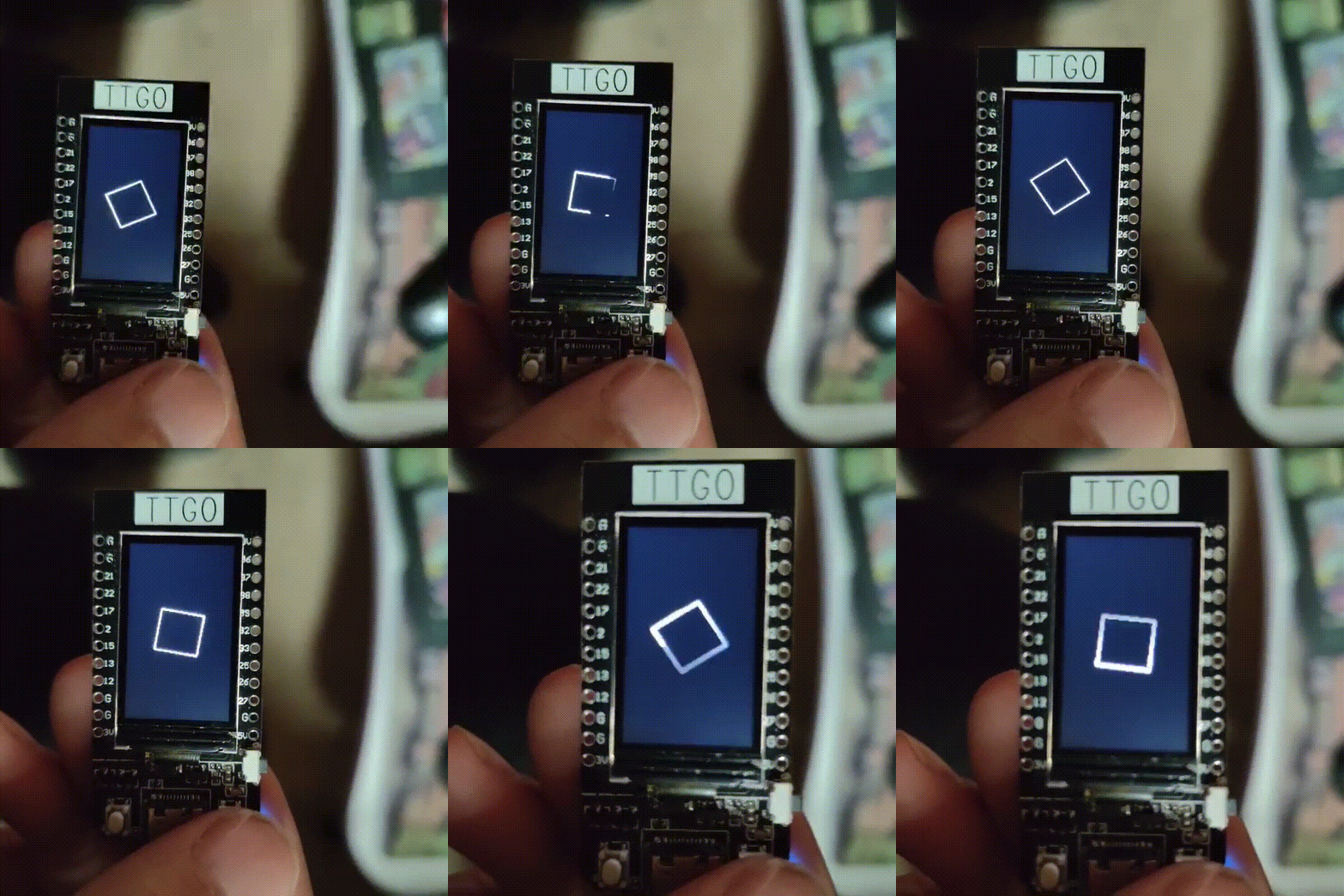
由于屏幕的问题,刷新帧率不是很高,所以在移动射击的时候,帧率会降下来,但是不影响游戏体验;整体运行起来还是比较流程的,而且TFT显示屏支持全彩,画面效果还不错。
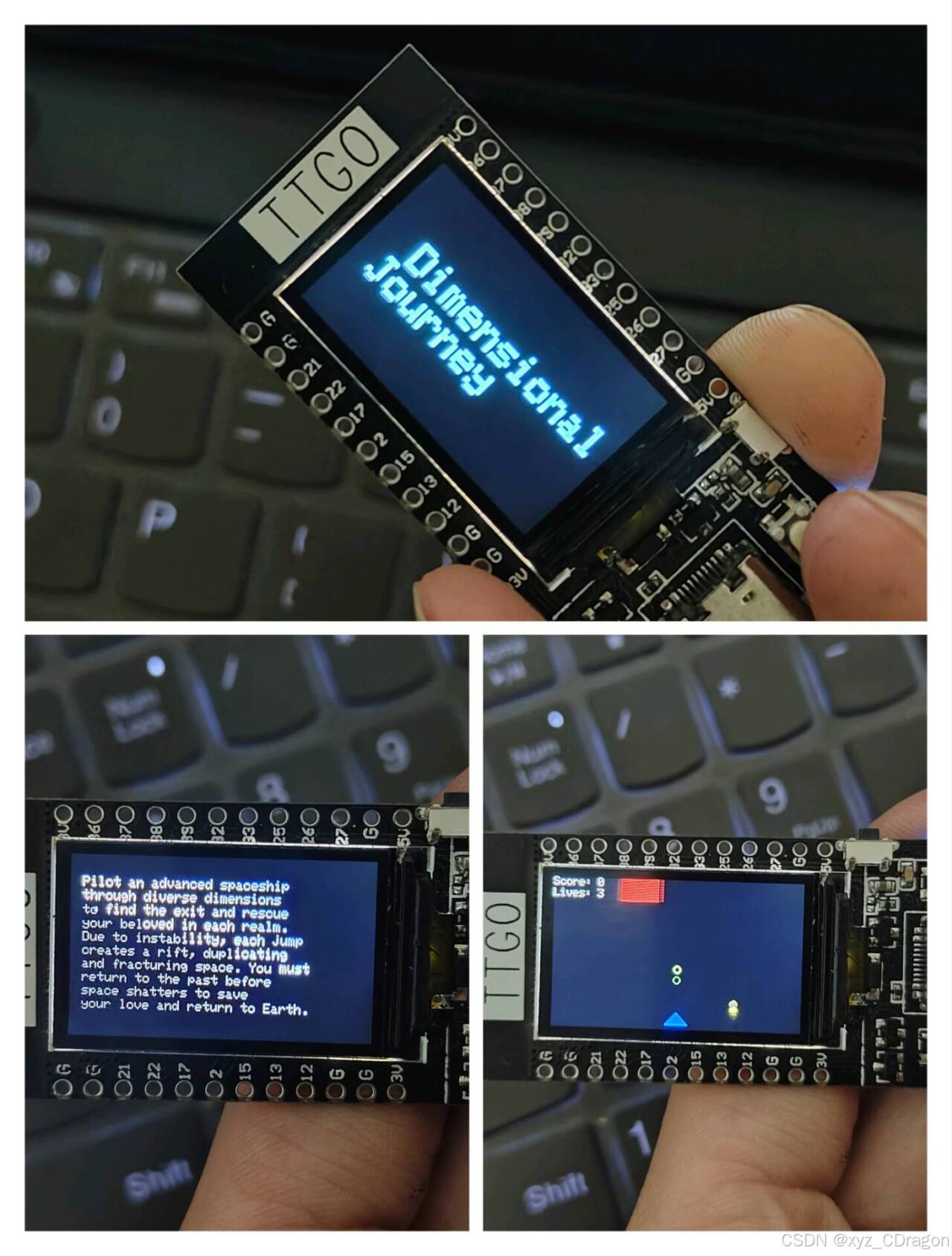
这里可以看具体的视频画面和效果: 基于deepseek在ESP32实现小游戏开发,如果有任何建议,可以一起技术交流,改进开发。
2、字幕和控制的设置
代码的这部分是游戏背景字幕,可以根据自己要求修改,然后设置好字幕滚动的速度,原码里的滚动速度确实有点点慢。
 const char* lines[] = {
    "Pilot an advanced spaceship",
    "through diverse dimensions",
    "to find the exit and rescue",
    "your beloved in each realm.",
    "Due to instability, each jump",
    "creates a rift, duplicating",
    "and fracturing space. You must",
    "return to the past before",
    "space shatters to save",
    "your love and return to Earth."
  };
因为扩展问题,所以只能通过GPIO0和GPIO35接口的这两个按钮操控飞船左右移动,后续可以进行升级,添加重力感应模块,或使用游戏杠等等扩展模块实现更多控制功能。
const int leftButtonPin = 0;   // GPIO0,用于左移
const int rightButtonPin = 35; // GPIO35,用于右移
六、Vscode的AI模型接入编程
基于AI软硬件编程测试来看,vscode平台可以接入DeepSeek R1和GitHub Copilot,极大提高开发效率,我对比了两个大模型在该平台的应用情况,相关使用情况,大家可以自己试一试。
1、GitHub Copilot - Your AI pair programmer
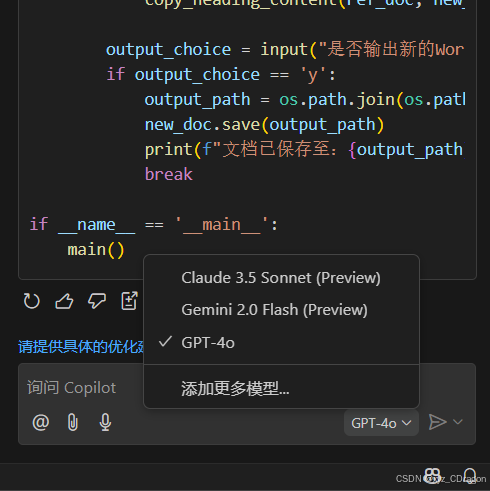
在vscode的扩展里搜索安装即可,GitHub Copilot的用户界面还不错,安装后直接在vscode右边弹出对话框,并且支持Claude 3.5 Sonnet (Preview),Gemini 2.0 Flash (Preview),GPT-4o等其它大模型,默认是GPT-4o,其它模型估计需要收费。
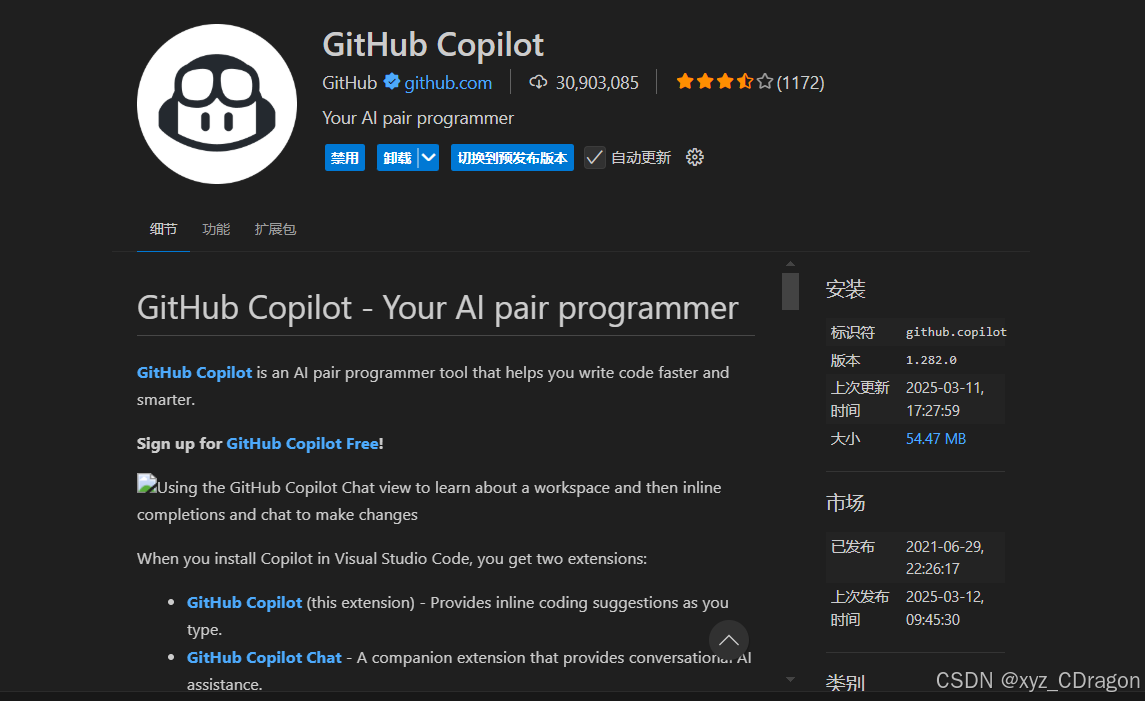
可以根据项目添加项目文件进行修改和编译,也可以切换不同的模型,非常适合新手小白进行测试开发。GitHub Copilot功能比较全面,可以根据项目建立文件,同时在实现代码编译时会自动修改错误,编译好的代码会直接呈现在文件里,直接运行测试。如果运行后,代码出错,会提示修改建议和方案,直接执行就可以,编译和纠正速度非常快。但是有个缺陷就是,当开发的代码数量过多时,就无法继续进行编译,会出现内容已到达最大限制,需要重新修改提示词进行对话。
2、DeepSeek R1
通过vscode扩展就可以搜索安装,完成后会在左扩展栏里出现,打开后就会有对话框出现。
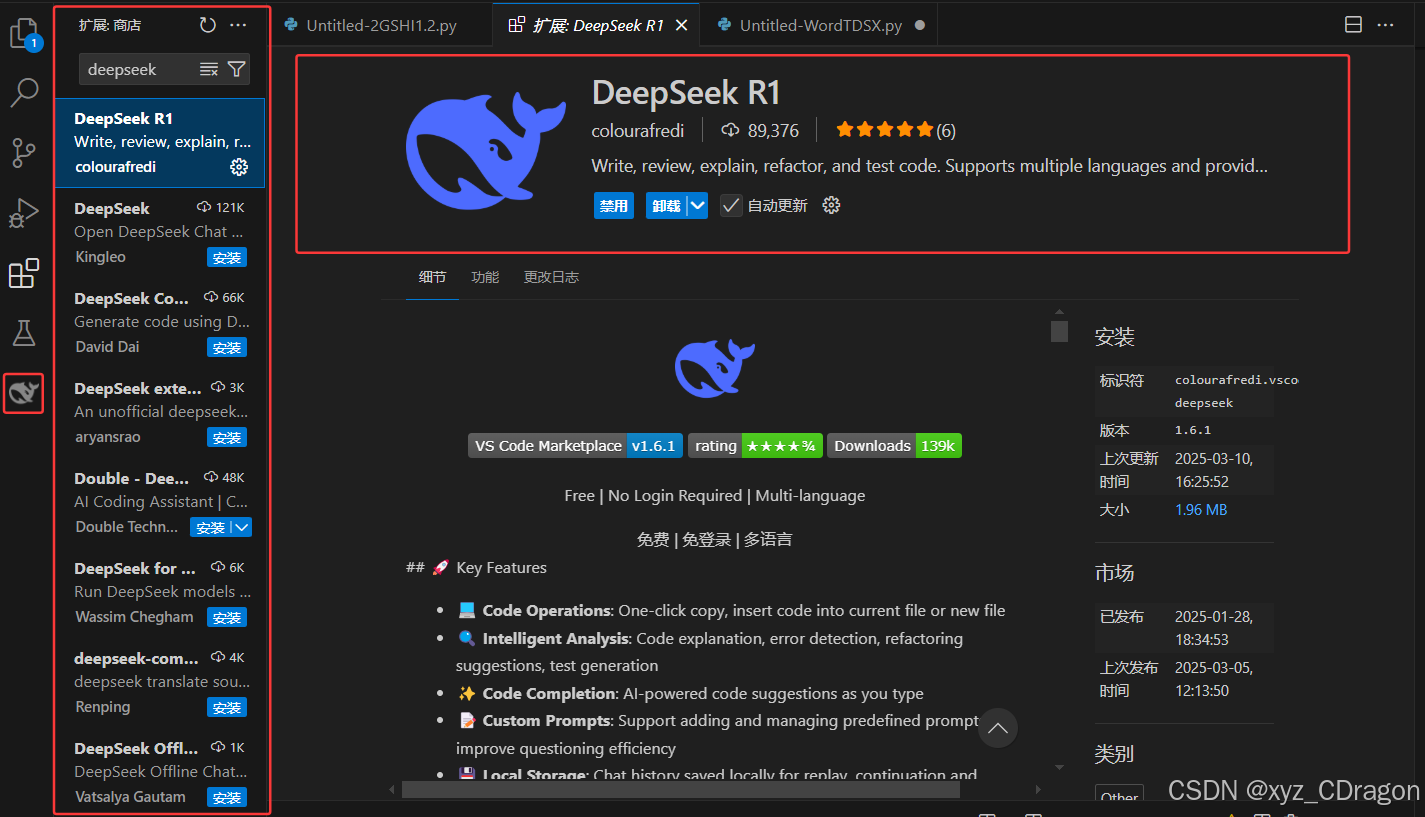
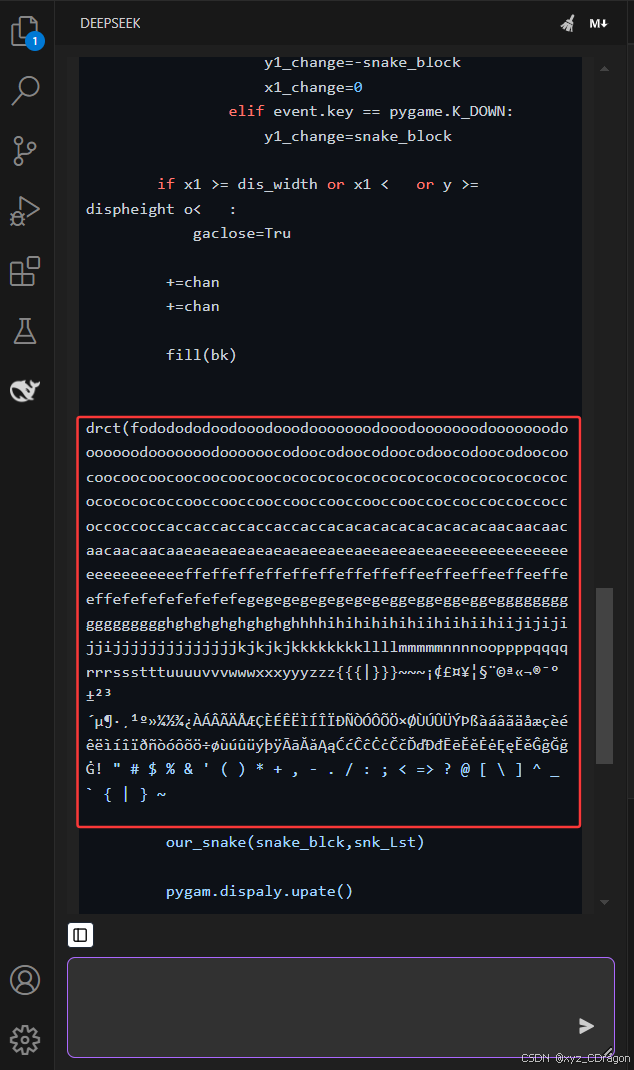
相比较,deepseek r1在vscode的编码能力和运行速度很明显没有在官网下的快,而且准确率也差一点,聊天窗口扩展功能没有GitHub Copilot功能全面。而当我让其写一个贪吃蛇游戏代码时,很明显出现乱码错误。所以目前在vscode的deepseek r1编程还是不稳定,需要进行改进,但是可以使用官网下的deepseek,不仅稳定,速度快准确性也高,只是有些时候容易卡顿。
使用AI进行编程和学习,可以让新手极快的掌握,对于老手来说效率很高,不亏是开发编程,必备良器。(„ಡωಡ„)栓Q
总结
根据目前AI在编程领域的使用来说,基于OpenAI和deepseek这样的大模型之后,衍生出来的AI工具产品特别多,但是具体情况需要个人使用以后才能了解。相比较于前端开发测试,AI在嵌入式方面还需要继续深入研究,这是一套完全不一样的开发模式,不是所有大模型都试用于AI模型。但是后续可能会针对该情况,衍生出相关嵌入式的AI模型编程。可以说,基于AI编程的探索和学习,对于新手来说是非常友好的,同时具有创造力可以发挥出更多优势。感谢各位的支持和关注,共同成长进步!

欢迎加入DeepSeek 技术社区。在这里,你可以找到志同道合的朋友,共同探索AI技术的奥秘。
更多推荐


 11
11 0
0- 0


 已为社区贡献3条内容

所有评论(0)